project-84858970
 Abhishek Singh Rawat
hi


Comments (0)
Sign in to leave a comment
Project Tasks
83Setup Database Schema
Design and implement the database schema for users, workspaces, integrations, templates, and onboarding processes.
Implement CTASection for Landing
As a frontend developer, implement the CTASection for the Landing page. This section uses the 'motion' library to animate its elements, including a badge, title, subtitle, and two call-to-action buttons. The animation involves fading in and sliding up the content when it comes into view. Ensure that the links to 'Signup' and 'Docs' are conditionally shown based on persona access, with 'Docs' accessible by Admin/Manager, Developer, and IT/Support Staff. Page access: shared by all personas (Admin/Manager, Developer, IT/Support Staff).
Implement Navbar for Landing
As a frontend developer, implement the Navbar for the Landing page. This section includes navigation links and a toggleable menu for mobile views. Ensure that links to restricted pages are conditionally shown based on persona access. The navbar should be responsive and accessible. Page access: shared by all personas (Admin/Manager, Developer, IT/Support Staff).
Implement DashboardSidebar for Onboarding Dashboard
As a frontend developer, implement the DashboardSidebar section which provides navigation links based on the user's role. It includes a toggle button to collapse/expand the sidebar. Ensure that links to restricted pages like Billing and Templates are conditionally shown based on the user's role. This section is accessible by Admin/Manager, Developer, and IT/Support Staff personas. Page access: Admin/Manager, Developer only.
Implement RoleBasedWelcome for Onboarding Dashboard
As a frontend developer, implement the RoleBasedWelcome section which displays a personalized welcome message and metric based on the user's role. It includes a call-to-action button. This section is accessible by Admin/Manager and Developer personas. Page access: Admin/Manager, Developer only.
Implement QuickActionsBanner for Onboarding Dashboard
As a frontend developer, implement the QuickActionsBanner section which displays quick action cards based on the user's role. Each card includes an icon, label, and optional badge. This section is accessible by Admin/Manager and Developer personas. Page access: Admin/Manager, Developer only.
Implement OnboardingChecklistManager for Onboarding Dashboard
As a frontend developer, implement the OnboardingChecklistManager section which displays a sortable table of team members' onboarding progress. It includes actions like view, edit, and resend. This section is accessible by Admin/Manager personas. Page access: Admin/Manager, Developer only.
Implement OnboardingChecklistDeveloper for Onboarding Dashboard
As a frontend developer, implement the OnboardingChecklistDeveloper section which displays a list of onboarding steps with checkboxes and expandable details. It includes a progress ring showing completion percentage. This section is accessible by Developer personas. Page access: Admin/Manager, Developer only.
Implement ProgressTracker for Onboarding Dashboard
As a frontend developer, implement the ProgressTracker section which displays progress statistics for managers or developers. It includes visual elements like progress bars and circles. This section is accessible by Admin/Manager, Developer, and IT/Support Staff personas. Page access: Admin/Manager, Developer only.
Implement IntegrationStatus for Onboarding Dashboard
As a frontend developer, implement the IntegrationStatus section which displays the status of various integrations with color-coded indicators. It includes action buttons for each integration. This section is accessible by Admin/Manager and IT/Support Staff personas. Page access: Admin/Manager, Developer only.
Implement TeamActivityFeedManager for Onboarding Dashboard
As a frontend developer, implement the TeamActivityFeedManager section which displays a list of team activities with filtering options. It includes links to detailed views of each activity. This section is accessible by Admin/Manager personas. Page access: Admin/Manager, Developer only.
Implement WorkspaceFilter for Progress Tracker
As a frontend developer, implement the WorkspaceFilter section for the Progress Tracker page. This section allows users to filter developers by workspace using radio buttons. It uses useState to manage the selected workspace and mobileOpen state for responsive design. The section includes motion animations for mobile toggle interactions and AnimatePresence for conditional rendering. This page is accessible by Admin/Manager, Developer, and IT/Support Staff. Page access: shared by all personas (Admin/Manager, Developer, IT/Support Staff).
Implement CohortStatusDateFilters for Progress Tracker
As a frontend developer, implement the CohortStatusDateFilters section for the Progress Tracker page. This section provides filters for cohorts, statuses, and date ranges using useState for managing selected filters and date inputs. It includes useRef for handling click outside events and useCallback for toggle actions. The section features error handling for date validation and a reset function to clear all filters. This page is accessible by Admin/Manager, Developer, and IT/Support Staff. Page access: shared by all personas (Admin/Manager, Developer, IT/Support Staff).
Implement ProgressMetrics for Progress Tracker
As a frontend developer, implement the ProgressMetrics section for the Progress Tracker page. This section displays key metrics using animated metric cards with motion effects. It uses a custom useCountUp hook to animate metric values and useReducedMotion for accessibility. Each card includes icons and percentage bars, with hover animations for enhanced interactivity. This page is accessible by Admin/Manager, Developer, and IT/Support Staff. Page access: shared by all personas (Admin/Manager, Developer, IT/Support Staff).
Implement OnboardingTimeline for Progress Tracker
As a frontend developer, implement the OnboardingTimeline section for the Progress Tracker page. This section visualizes the onboarding journey with stages, using motion animations for transitions. It includes an AvatarStack component to display developer avatars and uses a computeFillPercent function to calculate progress. The section is designed to be responsive and visually engaging. This page is accessible by Admin/Manager, Developer, and IT/Support Staff. Page access: shared by all personas (Admin/Manager, Developer, IT/Support Staff).
Implement DeveloperProgressTable for Progress Tracker
As a frontend developer, implement the DeveloperProgressTable section for the Progress Tracker page. This section displays a detailed table of developers' progress, using useState and useMemo for state management and performance optimization. It includes interactive sorting and filtering capabilities, with motion animations for row transitions. This page is accessible by Admin/Manager, Developer, and IT/Support Staff. Page access: shared by all personas (Admin/Manager, Developer, IT/Support Staff).
Implement StatusBreakdownChart for Progress Tracker
As a frontend developer, implement the StatusBreakdownChart section for the Progress Tracker page. This section uses the react-chartjs-2 library to render a doughnut chart, displaying the breakdown of developer statuses. It includes interactive toggling of chart segments using useState and useCallback, with motion animations for chart rendering. This page is accessible by Admin/Manager, Developer, and IT/Support Staff. Page access: shared by all personas (Admin/Manager, Developer, IT/Support Staff).
Implement Auth Service
Develop authentication service with JWT for user login and signup, ensuring secure access control.
Develop Workspace API
Create API endpoints for workspace creation and management, accessible by Admin/Manager and IT/Support Staff.
Build Integration API
Develop API for GitHub and Slack integrations, ensuring secure authorization and data sync.
Create Template API
Implement API for creating and managing onboarding templates, accessible by Admin/Manager.
Develop Onboarding API
Create API endpoints for starting and tracking onboarding processes, accessible by Admin/Manager and Developer.
Implement AI Docs Service
Develop AI-powered service for document search and Q&A, integrating with internal documentation.
Implement FeaturesSection for Landing
As a frontend developer, implement the FeaturesSection for the Landing page. This section displays a grid of feature cards, each with an icon, title, and description. The cards animate into view using the 'motion' library, with staggered delays for each card. Ensure the animations are smooth and responsive. Page access: shared by all personas (Admin/Manager, Developer, IT/Support Staff).
Implement Footer for Landing
As a frontend developer, implement the Footer for the Landing page. This section includes links organized under Product, Resources, and Company categories. Ensure that links to restricted pages like 'Billing' and 'Templates' are conditionally shown based on persona access. The footer should also include branding elements and a copyright notice. Page access: shared by all personas (Admin/Manager, Developer, IT/Support Staff).
Implement HeroSection for Landing
As a frontend developer, implement the HeroSection for the Landing page. This section features interactive elements with animations using 'motion' and 'useSpring' for smooth transitions. It includes a badge, title, subtitle, and interactive stages that change on hover. Ensure the animations are responsive and accessible. Page access: shared by all personas (Admin/Manager, Developer, IT/Support Staff).
Implement HowItWorksSection for Landing
As a frontend developer, implement the HowItWorksSection for the Landing page. This section outlines the onboarding process in four steps, each with a number, title, and description. The steps animate into view using the 'motion' library. Ensure the animations are smooth and the layout is responsive. Page access: shared by all personas (Admin/Manager, Developer, IT/Support Staff).
Implement StatsSection for Landing
As a frontend developer, implement the StatsSection for the Landing page. This section displays key statistics in a grid format, with each stat card animating into view using the 'motion' library. Ensure the animations are smooth and the layout is responsive. Page access: shared by all personas (Admin/Manager, Developer, IT/Support Staff).
Implement Navbar for Signup
As a frontend developer, implement the Navbar section for the Signup page. This component includes a responsive navigation menu with links to various pages such as Home, Workspace, Integrations, and more. It uses a state hook to toggle the menu's open state and conditionally renders a 'Sign Up Free' call-to-action link. Ensure that links to restricted pages like Billing and Templates are conditionally shown based on the user's persona. Page access: shared by all personas (Admin/Manager, Developer, IT/Support Staff).
Develop Billing API
Create API endpoints for managing billing plans and processing payments, accessible by Admin/Manager.
Define Data Retention Policies
Establish data retention and deletion policies for user data, onboarding templates, and integration logs to ensure compliance with privacy standards.
Implement RBAC
Set up role-based access control for different user personas, ensuring secure access to restricted pages.
Setup API Client
Develop a shared API client for frontend to interact with backend services, ensuring consistent data flow.
Integration Tests for APIs
Develop integration tests for all API endpoints to ensure reliability and correctness of data flow.
Implement SignupHero for Signup
As a frontend developer, implement the SignupHero section for the Signup page. This section features a prominent title and subtitle encouraging users to start their free trial. It includes a link to scroll directly to the signup form. Ensure the design is visually appealing and aligns with the overall theme of the page. Page access: shared by all personas (Admin/Manager, Developer, IT/Support Staff).
Implement SignupFormInputs for Signup
As a frontend developer, implement the SignupFormInputs section for the Signup page. This form includes fields for name, email, password, confirm password, and workspace name, along with a checkbox for terms agreement. It uses state hooks for form data and error handling, and includes validation logic for each field. The form submission simulates an account creation process with a loading state. Page access: shared by all personas (Admin/Manager, Developer, IT/Support Staff).
Implement SignupFormSocial for Signup
As a frontend developer, implement the SignupFormSocial section for the Signup page. This component provides buttons for social login via Google and GitHub. It includes handlers that redirect users to the respective authentication endpoints. Ensure the design is consistent with the rest of the signup form. Page access: shared by all personas (Admin/Manager, Developer, IT/Support Staff).
Implement SignupBenefitsCard1 for Signup
As a frontend developer, implement the SignupBenefitsCard1 section for the Signup page. This card highlights the 'Instant Team Setup' benefit with an icon, title, and description. Ensure the card is styled to match the overall design and is responsive. Page access: shared by all personas (Admin/Manager, Developer, IT/Support Staff).
Implement SignupBenefitsCard2 for Signup
As a frontend developer, implement the SignupBenefitsCard2 section for the Signup page. This card highlights the 'AI-Powered Docs' benefit with an icon, title, and description. Ensure the card is styled to match the overall design and is responsive. Page access: shared by all personas (Admin/Manager, Developer, IT/Support Staff).
Implement SignupBenefitsCard3 for Signup
As a frontend developer, implement the SignupBenefitsCard3 section for the Signup page. This card highlights the 'Seamless Integrations' benefit with an icon, title, and description. Ensure the card is styled to match the overall design and is responsive. Page access: shared by all personas (Admin/Manager, Developer, IT/Support Staff).
Implement SignupFAQGroup1 for Signup
As a frontend developer, implement the SignupFAQGroup1 section for the Signup page. This component displays a list of frequently asked questions with toggleable answers. It uses a state hook to manage which question is open. Ensure the design is user-friendly and accessible. Page access: shared by all personas (Admin/Manager, Developer, IT/Support Staff).
Implement SignupFAQGroup2 for Signup
As a frontend developer, implement the SignupFAQGroup2 section for the Signup page. This component displays additional frequently asked questions with toggleable answers. It uses a state hook to manage which question is open. Ensure the design is user-friendly and accessible. Page access: shared by all personas (Admin/Manager, Developer, IT/Support Staff).
Implement Footer for Signup
As a frontend developer, implement the Footer section for the Signup page. This component includes links to various sections like Product, Resources, and Company. Ensure that links to restricted pages are conditionally shown based on the user's persona. The footer should be consistent with the design used across other pages. Page access: shared by all personas (Admin/Manager, Developer, IT/Support Staff).
Implement WorkspaceSidebar for Workspace
As a frontend developer, implement the WorkspaceSidebar section which includes navigation links such as Overview, Integrations, Templates, Onboarding Dashboard, Progress Tracker, Docs, and Billing. Each link has an associated icon and the active link is highlighted. Ensure that links to restricted pages like Billing and Templates are conditionally shown based on the user's persona. Page access: Admin/Manager, IT/Support Staff only.
Implement DashboardHeader for Onboarding Dashboard
As a frontend developer, implement the DashboardHeader section which displays the workspace name, role badge, and a metric. It includes a help button for assistance. This section is accessible by Admin/Manager and Developer personas. Ensure the role badge dynamically changes based on the user's role. This section depends on the Navbar from the Signup page. Page access: Admin/Manager, Developer only.
Implement DocsHeader for Docs
As a frontend developer, implement the DocsHeader section which includes a title 'Documentation & AI Assistant', a tagline, and an accent bar. This section is accessible by Admin/Manager, Developer, and IT/Support Staff. Ensure the header is styled according to the provided CSS and integrates seamlessly with the rest of the page. This section depends on the Signup page's Navbar implementation. Page access: shared by all personas (Admin/Manager, Developer, IT/Support Staff).
Integrate Billing Backend and Frontend
As a Tech Lead, verify the end-to-end integration between the Billing frontend implementation and the Billing backend API. Ensure data flows correctly, API responses are handled properly in the UI, and all interactions work as expected.
Implement WorkspaceHeader for Workspace
As a frontend developer, implement the WorkspaceHeader section which displays the workspace title 'DevStudio Pro', a description, and metadata including the number of members and creation date. It also includes action buttons for adding a member and accessing settings. Page access: Admin/Manager, IT/Support Staff only.
Implement OnboardingProgress for Workspace
As a frontend developer, implement the OnboardingProgress section which displays a list of onboarding tasks with details such as name, assignee, status, and progress. Each task has a progress bar and status badge indicating whether it's completed or in progress. Include a button to start a new onboarding process. Page access: Admin/Manager, IT/Support Staff only.
Implement IntegrationStatus for Workspace
As a frontend developer, implement the IntegrationStatus section which displays the status of integrations such as GitHub and Slack. Each integration card shows the name, icon, connection status, last sync time, and a button to connect or disconnect. Ensure the status indicator reflects the current connection state. Page access: Admin/Manager, IT/Support Staff only.
Implement TeamMembers for Workspace
As a frontend developer, implement the TeamMembers section which displays a table of team members with details such as name, role, status, join date, and actions. Include buttons for editing and removing members. Ensure the table is responsive and includes a mobile card view. Page access: Admin/Manager, IT/Support Staff only.
Implement QuickActions for Workspace
As a frontend developer, implement the QuickActions section which provides quick access to actions like viewing docs, upgrading billing, and contacting support. Each action card includes an icon, title, description, and a call-to-action button. Highlight primary actions with a distinct style. Page access: Admin/Manager, IT/Support Staff only.
Implement DocsSidebar for Docs
As a frontend developer, implement the DocsSidebar section which includes expandable categories and subcategories for navigation. This section uses state hooks to manage expanded categories and active sections, and includes a mobile drawer toggle. Ensure the sidebar is styled according to the provided CSS and is accessible by Admin/Manager, Developer, and IT/Support Staff. Page access: shared by all personas (Admin/Manager, Developer, IT/Support Staff).
Implement SearchInput for Docs
As a frontend developer, implement the SearchInput component which includes a search field with keyboard shortcuts, a clear button, and an AI badge. The component uses refs and event listeners to handle focus and keydown events. Ensure the input is styled according to the provided CSS and is accessible by Admin/Manager, Developer, and IT/Support Staff. Page access: shared by all personas (Admin/Manager, Developer, IT/Support Staff).
Implement IntegrationsHeader for Integrations
As a frontend developer, implement the IntegrationsHeader section which includes a search input for filtering integrations, category pills for filtering by category, and a title and description. The search input should update the search state on change and provide a clear button when text is present. Category pills should update the active category state when clicked. This section is accessible by Admin/Manager and IT/Support Staff. Page access: Admin/Manager, IT/Support Staff only.
Implement PageHeader for Progress Tracker
As a frontend developer, implement the PageHeader section for the Progress Tracker page. This section includes interactive tabs for filtering developers by status (All, In Progress, Completed, At Risk) using useState for activeTab management. It also features an export button with state transitions (idle, exporting, done) managed by useState and useRef for timeout handling. The section uses motion animations for title and subtitle transitions, and AnimatePresence for subtitle changes. Ensure the export button is disabled during non-idle states. This page is accessible by Admin/Manager, Developer, and IT/Support Staff. Page access: shared by all personas (Admin/Manager, Developer, IT/Support Staff).
Implement BillingHero for Billing
As a frontend developer, implement the BillingHero section which includes a breadcrumb navigation linking to the Workspace and Billing pages, a headline 'Upgrade Your Plan', and a subheadline describing the benefits of upgrading. This section is accessible only by Admin/Manager personas. Ensure the breadcrumb navigation conditionally shows links based on persona access. Page access: Admin/Manager only.
Develop E2E Tests for Signup
Create end-to-end tests for the Signup flow to ensure users can successfully register and create a workspace. Include tests for edge cases like invalid inputs and network failures.
Implement Authorization Middleware
Develop middleware to enforce role-based access control for API endpoints, ensuring only authorized users can access restricted resources.
Implement SearchSuggestions for Docs
As a frontend developer, implement the SearchSuggestions component which displays quick shortcuts, recent searches, and filtered suggestions based on the query. The component uses props to manage query and selection actions. Ensure the suggestions are styled according to the provided CSS and are accessible by Admin/Manager, Developer, and IT/Support Staff. Page access: shared by all personas (Admin/Manager, Developer, IT/Support Staff).
Implement ContentArea for Docs
As a frontend developer, implement the ContentArea section which includes a breadcrumb, article content with headings, code blocks, and callouts. The section also features a table of contents sidebar. Ensure the content area is styled according to the provided CSS and is accessible by Admin/Manager, Developer, and IT/Support Staff. Page access: shared by all personas (Admin/Manager, Developer, IT/Support Staff).
Implement IntegrationsGrid for Integrations
As a frontend developer, implement the IntegrationsGrid section which displays a grid of integration cards. Each card shows the integration's icon, name, description, status badge, and action button. The action button varies based on the integration's status (Connect, Manage, Reconnect). Clicking a card should trigger an onCardClick event. This section is accessible by Admin/Manager and IT/Support Staff. Page access: Admin/Manager, IT/Support Staff only.
Implement PricingTiers for Billing
As a frontend developer, implement the PricingTiers section which displays different subscription plans with a toggle for monthly and annual pricing. It includes interactive elements such as a switch to toggle pricing and buttons for plan actions. This section is accessible only by Admin/Manager personas. Page access: Admin/Manager only.
Implement BillingFeatures for Billing
As a frontend developer, implement the BillingFeatures section which provides a detailed comparison of features across different plans using a table layout. This section is accessible only by Admin/Manager personas. Page access: Admin/Manager only.
Implement CurrentPlan for Billing
As a frontend developer, implement the CurrentPlan section which displays the user's current subscription details, including plan name, billing cycle, renewal date, and usage statistics. This section is accessible only by Admin/Manager personas. Page access: Admin/Manager only.
Implement PaymentMethodsList for Billing
As a frontend developer, implement the PaymentMethodsList section which displays a list of saved payment methods with options to add, edit, or remove methods. This section is accessible only by Admin/Manager personas. Page access: Admin/Manager only.
Implement BillingHistory for Billing
As a frontend developer, implement the BillingHistory section which displays a paginated list of invoices with filters for status and date range. This section is accessible only by Admin/Manager personas. Page access: Admin/Manager only.
Implement TemplatesHeader for Templates
As a frontend developer, implement the TemplatesHeader section which includes a title, subtitle, and a 'Create New Template' button. The button triggers the onCreate function when clicked. This section is accessible by Admin/Manager only and should conditionally render based on user persona. Ensure integration with the existing styles from TemplatesHeader.css. Page access: Admin/Manager only.
Implement IntegrationDetailPanel for Integrations
As a frontend developer, implement the IntegrationDetailPanel section which displays detailed information about a selected integration. It includes a header with the integration's name, status, and a close button. The panel should trap focus when open and restore focus when closed. This section is accessible by Admin/Manager and IT/Support Staff. Page access: Admin/Manager, IT/Support Staff only.
Implement PaymentMethodsForm for Billing
As a frontend developer, implement the PaymentMethodsForm section which allows users to add new payment methods with form validation for card details. This section is accessible only by Admin/Manager personas. Page access: Admin/Manager only.
Implement TemplatesFilters for Templates
As a frontend developer, implement the TemplatesFilters section which includes status filter buttons, a search input, a sort dropdown, and a clear button. The section manages state changes for filtering, searching, and sorting templates. Ensure integration with the existing styles from TemplatesFilters.css. This section is accessible by Admin/Manager only. Page access: Admin/Manager only.
Implement TemplatesGrid for Templates
As a frontend developer, implement the TemplatesGrid section which displays a list of TemplateCard components. Each card includes actions like edit, duplicate, delete, and view onboardings, managed by TemplatesGridActions. This section is accessible by Admin/Manager only and should integrate with TemplatesGrid.css. Page access: Admin/Manager only.
Implement TemplatesEmpty for Templates
As a frontend developer, implement the TemplatesEmpty section which displays a message and a button to create a new template when no templates are available. The button triggers the onCreate function. This section is accessible by Admin/Manager only and should integrate with TemplatesEmpty.css. Page access: Admin/Manager only.
Implement TemplatesCreateModalContent for Templates
As a frontend developer, implement the TemplatesCreateModalContent section which includes fields for template name, description, and default assignee. The section manages input changes and displays character count for the description. This section is accessible by Admin/Manager only and should integrate with TemplatesCreateModalContent.css. Page access: Admin/Manager only.
Implement IntegrationDetailSetupSteps for Integrations
As a frontend developer, implement the IntegrationDetailSetupSteps section which provides a list of setup steps for an integration. Each step can be expanded to show details and code snippets, which can be copied to the clipboard. This section is accessible by Admin/Manager and IT/Support Staff. Page access: Admin/Manager, IT/Support Staff only.
Implement TemplatesGridActions for Templates
As a frontend developer, implement the TemplatesGridActions component which provides a dropdown menu for actions like edit, duplicate, delete, and view onboardings. The component uses a ref to handle outside clicks for closing the menu. This section is accessible by Admin/Manager only and should integrate with TemplatesGridActions.css. Page access: Admin/Manager only.
Implement TemplatesCreateModalTags for Templates
As a frontend developer, implement the TemplatesCreateModalTags section which allows adding and removing tags. It includes an input for new tags and suggestions from preset tags. The section manages state for input value and tag list. This section is accessible by Admin/Manager only and should integrate with TemplatesCreateModalTags.css. Page access: Admin/Manager only.
Implement TemplatesCreateModalSteps for Templates
As a frontend developer, implement the TemplatesCreateModalSteps section which allows adding, removing, and reordering steps. Each step includes a title and optional description. The section manages state for the list of steps. This section is accessible by Admin/Manager only and should integrate with TemplatesCreateModalSteps.css. Page access: Admin/Manager only.
Implement TemplatesCreateModalFooter for Templates
As a frontend developer, implement the TemplatesCreateModalFooter section which includes 'Cancel' and 'Create Template' buttons. The 'Create Template' button shows a spinner when submitting. This section is accessible by Admin/Manager only and should integrate with TemplatesCreateModalFooter.css. Page access: Admin/Manager only.
Implement IntegrationDetailOAuth for Integrations
As a frontend developer, implement the IntegrationDetailOAuth section which manages OAuth connections for an integration. It displays required permissions and provides buttons to connect, disconnect, or retry connections. The connection state is managed internally. This section is accessible by Admin/Manager and IT/Support Staff. Page access: Admin/Manager, IT/Support Staff only.
Implement IntegrationStatusTable for Integrations
As a frontend developer, implement the IntegrationStatusTable section which displays a table of integration statuses. Each row includes the integration's name, connection date, last sync time, and sync status badge. This section is accessible by Admin/Manager and IT/Support Staff. Page access: Admin/Manager, IT/Support Staff only.
Implement IntegrationStatusActions for Integrations
As a frontend developer, implement the IntegrationStatusActions section which provides quick actions for each integration, including manage, re-sync, disconnect, and view logs. The re-sync button shows a loading state while syncing. This section is accessible by Admin/Manager and IT/Support Staff. Page access: Admin/Manager, IT/Support Staff only.
Implement Troubleshooting for Integrations
As a frontend developer, implement the Troubleshooting section which provides a list of common issues and solutions for integrations. Each issue can be expanded to show details and includes a copy button for error codes. This section is accessible by Admin/Manager and IT/Support Staff. Page access: Admin/Manager, IT/Support Staff only.
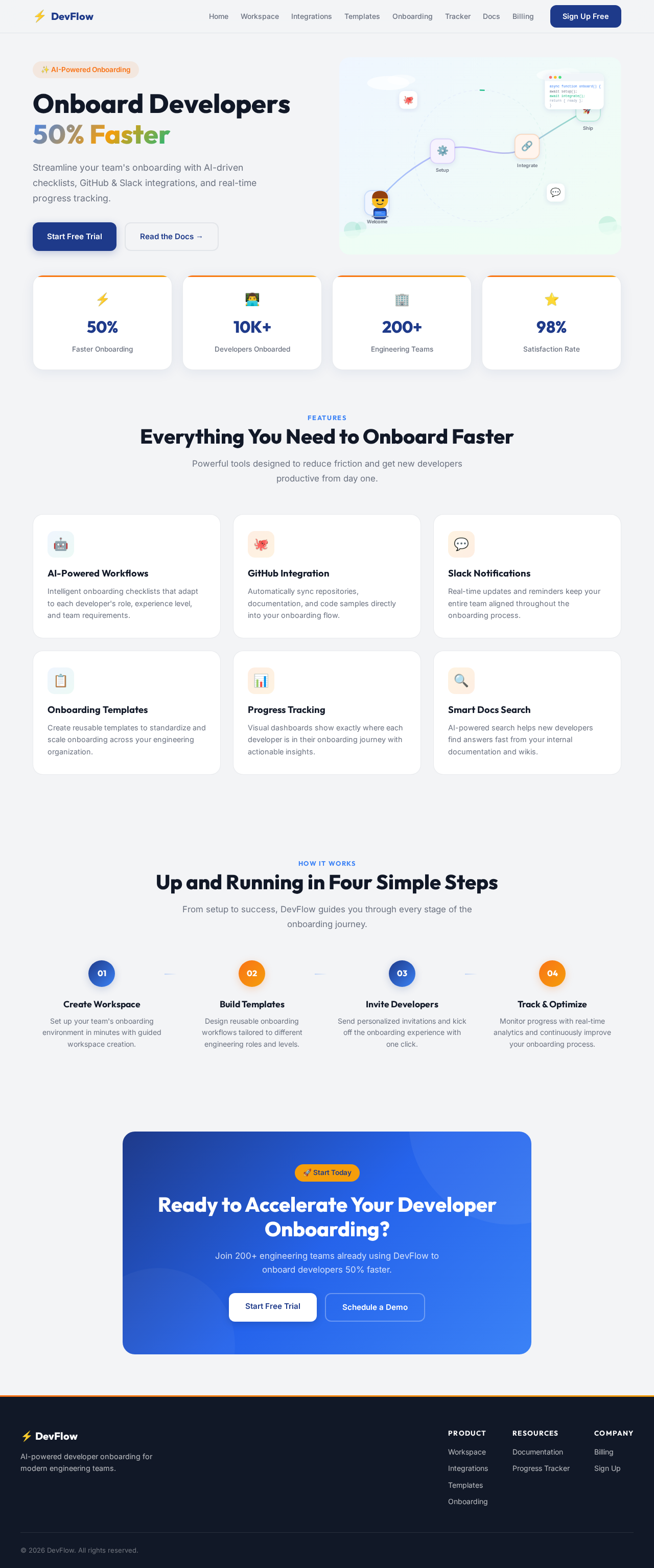
Onboard Developers 50% Faster
Streamline your team's onboarding with AI-driven checklists, GitHub & Slack integrations, and real-time progress tracking.
Everything You Need to Onboard Faster
Powerful tools designed to reduce friction and get new developers productive from day one.
AI-Powered Workflows
Intelligent onboarding checklists that adapt to each developer's role, experience level, and team requirements.
GitHub Integration
Automatically sync repositories, documentation, and code samples directly into your onboarding flow.
Slack Notifications
Real-time updates and reminders keep your entire team aligned throughout the onboarding process.
Onboarding Templates
Create reusable templates to standardize and scale onboarding across your engineering organization.
Progress Tracking
Visual dashboards show exactly where each developer is in their onboarding journey with actionable insights.
Smart Docs Search
AI-powered search helps new developers find answers fast from your internal documentation and wikis.
Up and Running in Four Simple Steps
From setup to success, DevFlow guides you through every stage of the onboarding journey.
Create Workspace
Set up your team's onboarding environment in minutes with guided workspace creation.
Build Templates
Design reusable onboarding workflows tailored to different engineering roles and levels.
Invite Developers
Send personalized invitations and kick off the onboarding experience with one click.
Track & Optimize
Monitor progress with real-time analytics and continuously improve your onboarding process.
Ready to Accelerate Your Developer Onboarding?
Join 200+ engineering teams already using DevFlow to onboard developers 50% faster.
Onboard Developers 50% Faster
Streamline your team's onboarding with AI-driven checklists, GitHub & Slack integrations, and real-time progress tracking.
Everything You Need to Onboard Faster
Powerful tools designed to reduce friction and get new developers productive from day one.
AI-Powered Workflows
Intelligent onboarding checklists that adapt to each developer's role, experience level, and team requirements.
GitHub Integration
Automatically sync repositories, documentation, and code samples directly into your onboarding flow.
Slack Notifications
Real-time updates and reminders keep your entire team aligned throughout the onboarding process.
Onboarding Templates
Create reusable templates to standardize and scale onboarding across your engineering organization.
Progress Tracking
Visual dashboards show exactly where each developer is in their onboarding journey with actionable insights.
Smart Docs Search
AI-powered search helps new developers find answers fast from your internal documentation and wikis.
Up and Running in Four Simple Steps
From setup to success, DevFlow guides you through every stage of the onboarding journey.
Create Workspace
Set up your team's onboarding environment in minutes with guided workspace creation.
Build Templates
Design reusable onboarding workflows tailored to different engineering roles and levels.
Invite Developers
Send personalized invitations and kick off the onboarding experience with one click.
Track & Optimize
Monitor progress with real-time analytics and continuously improve your onboarding process.
Ready to Accelerate Your Developer Onboarding?
Join 200+ engineering teams already using DevFlow to onboard developers 50% faster.
No comments yet. Be the first!