project-723264b3
 Love Life
Mujhe ek accout receivable/payable and bookkeeping ke liye training simulator banana hai jisme us based accounting ke concept wale features ho and ek virtual working simulator ho jo daily ko task assign kare and user ko preogress report bhi dikhti rahe isme 100 customer/vendor and 500+ invoice is type ka dummy data bhi rahega


Comments (0)
Sign in to leave a comment
System Requirements
System Requirements Document for project-723264b3
Introduction
The purpose of this document is to outline the system requirements for project-723264b3, which involves the development of a US-based accounting training simulator. This simulator will provide users with virtual task assignments, progress reports, and include dummy data for 100 customer/vendor entries and 500+ invoices.
System Overview
Project-723264b3 aims to create an interactive training platform for accounting professionals. The system will simulate real-world accounting scenarios, focusing on accounts receivable/payable and bookkeeping. It will provide users with a virtual working environment where they can receive daily task assignments and track their progress through detailed reports.
Functional Requirements as Story Points
- As a User, I should be able to access a virtual training simulator for accounts receivable/payable and bookkeeping.
- As a User, I should be able to receive daily task assignments related to accounting practices.
- As a User, I should be able to view progress reports to track my learning and task completion.
- As a User, I should be able to interact with dummy data, including 100 customer/vendor entries.
- As a User, I should be able to manage and process 500+ invoice entries as part of the training exercises.
User Personas
- Trainee Accountant: A user who is learning accounting practices and needs hands-on experience with accounts receivable/payable and bookkeeping.
- Instructor: A user who oversees the training process, assigns tasks, and reviews progress reports.
Core User Flows
- Trainee logs into the simulator -> Receives daily task assignments -> Completes tasks using dummy data -> Views progress report.
- Instructor logs into the simulator -> Assigns tasks to trainees -> Monitors trainee progress through reports.
Visuals Colors and Theme
- primary: #0047AB (Deep Blue)
- primary_light: #5A9BD8 (Light Blue)
- secondary: #FF6F61 (Coral)
- accent: #FFD700 (Gold)
- highlight: #FFA500 (Orange)
- bg: #F5F5F5 (Light Gray)
- surface: rgba(255, 255, 255, 0.9) (White with slight transparency)
- text: #333333 (Dark Gray)
- text_muted: #777777 (Medium Gray)
- border: rgba(0, 71, 171, 0.2) (Light Blue)
Signature Design Concept
Interactive Accounting Dashboard
The homepage will feature an interactive accounting dashboard that visually represents the user's progress and tasks. The dashboard will use a dynamic, animated interface where users can drag and drop tasks into a virtual "inbox" for completion. Each task will animate into a completed state once finished, providing immediate visual feedback. The dashboard will also feature a progress bar that fills as tasks are completed, offering a gamified experience.
Landing Hero Motion Brief
The landing page will feature a continuous animation loop using motion/react, depicting a virtual office environment. The animation will show documents and invoices flowing into an "inbox" on a desk, symbolizing task assignments. As tasks are completed, the documents will transform into completed reports, visually representing the user's progress. This loop will last 10 seconds and reset seamlessly, ensuring a smooth user experience.
Interaction Model & Motion Direction
- Interaction Model: Animated
- The landing page will feature moderate scroll-triggered reveals and hover transitions. Interactive elements will have spring physics to enhance user engagement. The animated dashboard will provide a polished, feature-rich experience for users.
Non-Functional Requirements
- The system must support concurrent users without performance degradation.
- The simulator should be accessible on both desktop and mobile devices.
- Data privacy and security must be ensured for all user interactions.
Tech Stack
- Frontend: React for Web
- Backend: Python, FastAPI
- Database: MySQL or MariaDB, using Alembic for migrations
- Local Orchestration: Docker, docker-compose
- Server-side Orchestration: Kubernetes
Assumptions and Constraints
- The system will use dummy data for training purposes, which will not be linked to any real-world entities.
- The simulator will focus on US-based accounting practices and standards.
- Users will require internet access to utilize the simulator.
Glossary
- Accounts Receivable: Money owed to a company by its debtors.
- Accounts Payable: Money a company owes to its creditors.
- Bookkeeping: The recording of financial transactions.
- Dummy Data: Simulated data used for testing and training purposes.
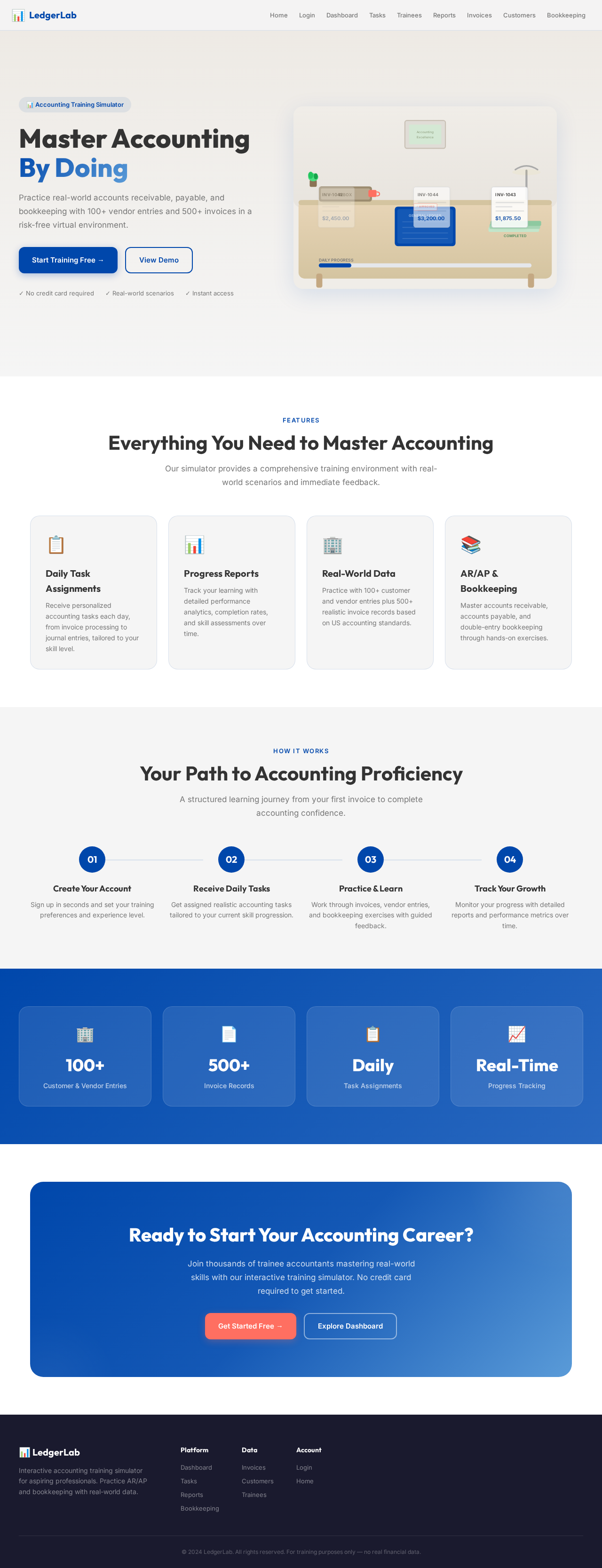
Master Accounting By Doing
Practice real-world accounts receivable, payable, and bookkeeping with 100+ vendor entries and 500+ invoices in a risk-free virtual environment.
Everything You Need to Master Accounting
Our simulator provides a comprehensive training environment with real-world scenarios and immediate feedback.
Daily Task Assignments
Receive personalized accounting tasks each day, from invoice processing to journal entries, tailored to your skill level.
Progress Reports
Track your learning with detailed performance analytics, completion rates, and skill assessments over time.
Real-World Data
Practice with 100+ customer and vendor entries plus 500+ realistic invoice records based on US accounting standards.
AR/AP & Bookkeeping
Master accounts receivable, accounts payable, and double-entry bookkeeping through hands-on exercises.
Your Path to Accounting Proficiency
A structured learning journey from your first invoice to complete accounting confidence.
Create Your Account
Sign up in seconds and set your training preferences and experience level.
Receive Daily Tasks
Get assigned realistic accounting tasks tailored to your current skill progression.
Practice & Learn
Work through invoices, vendor entries, and bookkeeping exercises with guided feedback.
Track Your Growth
Monitor your progress with detailed reports and performance metrics over time.
Ready to Start Your Accounting Career?
Join thousands of trainee accountants mastering real-world skills with our interactive training simulator. No credit card required to get started.
Master Accounting By Doing
Practice real-world accounts receivable, payable, and bookkeeping with 100+ vendor entries and 500+ invoices in a risk-free virtual environment.
Everything You Need to Master Accounting
Our simulator provides a comprehensive training environment with real-world scenarios and immediate feedback.
Daily Task Assignments
Receive personalized accounting tasks each day, from invoice processing to journal entries, tailored to your skill level.
Progress Reports
Track your learning with detailed performance analytics, completion rates, and skill assessments over time.
Real-World Data
Practice with 100+ customer and vendor entries plus 500+ realistic invoice records based on US accounting standards.
AR/AP & Bookkeeping
Master accounts receivable, accounts payable, and double-entry bookkeeping through hands-on exercises.
Your Path to Accounting Proficiency
A structured learning journey from your first invoice to complete accounting confidence.
Create Your Account
Sign up in seconds and set your training preferences and experience level.
Receive Daily Tasks
Get assigned realistic accounting tasks tailored to your current skill progression.
Practice & Learn
Work through invoices, vendor entries, and bookkeeping exercises with guided feedback.
Track Your Growth
Monitor your progress with detailed reports and performance metrics over time.
Ready to Start Your Accounting Career?
Join thousands of trainee accountants mastering real-world skills with our interactive training simulator. No credit card required to get started.
No comments yet. Be the first!