
project-6fb3d8bb

bySujal Gayakwad

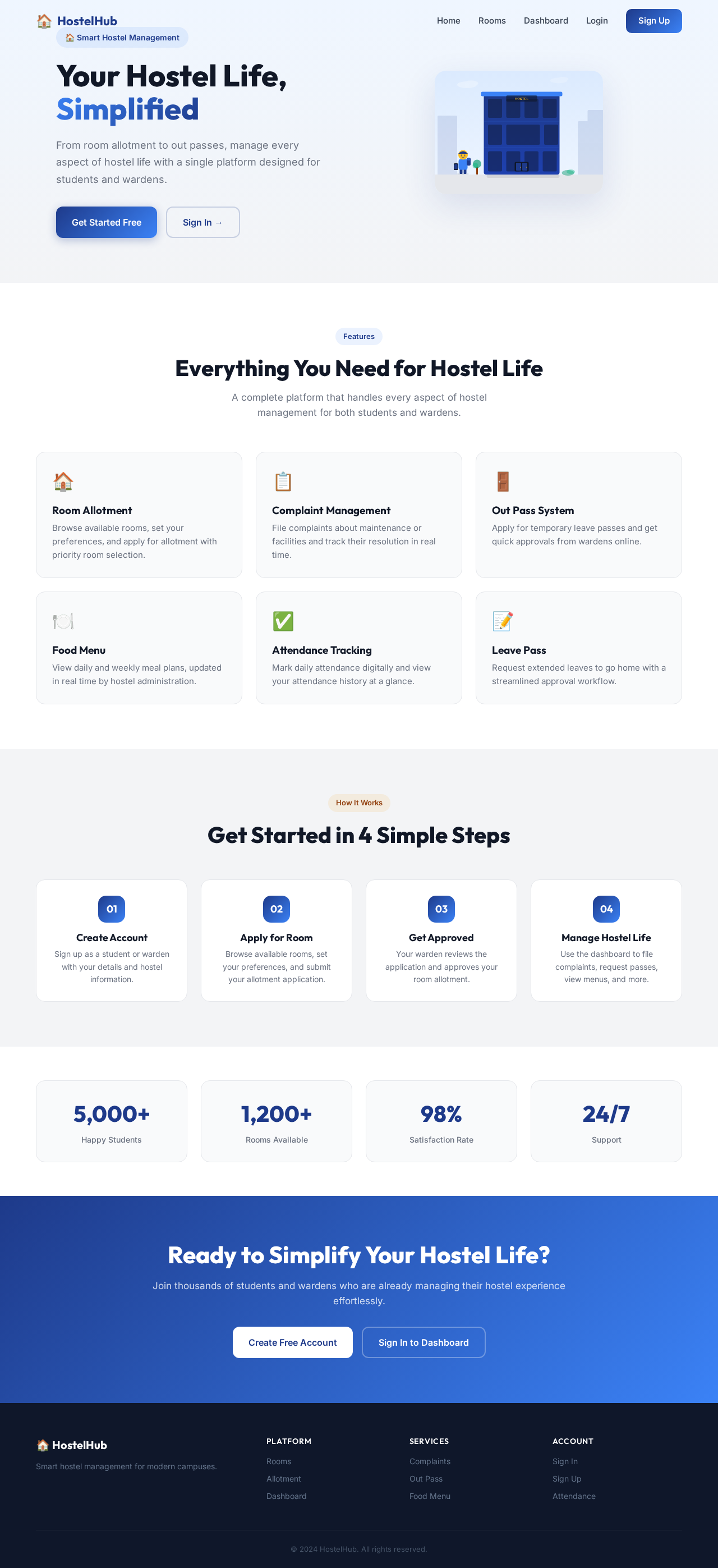
Create hostel management system where students login singup warden login and singup add features like room allotment application complaint in warden section room altment and many features like out pass approval room views food menu attendence sheet leave pass for students to go home and many features as you know add backend also if student should see which room is vactade and which is available and student should put the priority rooms so that e rooms in priority list

LandingLoginRooms
Landing

Comments (0)

No comments yet. Be the first!

System Requirements

System Requirement Document
Page 1 of 5

project-6fb3d8bb System Requirements Document

Introduction

The purpose of this document is to outline the system requirements for "project-6fb3d8bb," a comprehensive hostel management system. This system is designed to facilitate the management of hostel operations, including student and warden interactions, room management, and other essential features.

System Overview

The hostel management system will provide a platform for students and wardens to manage hostel-related activities efficiently. The system will include functionalities for login/signup, room allotment, complaint management, out pass approvals, room availability checks, priority room selection, food menu management, attendance tracking, and leave pass requests. The backend will support these operations to ensure seamless data management and user interaction.

Page 2 of 5

Functional Requirements as Story Points

  • As a Student, I should be able to sign up and log in to the system.
  • As a Warden, I should be able to sign up and log in to the system.
  • As a Student, I should be able to apply for room allotment.
  • As a Warden, I should be able to manage room allotments.
  • As a Student, I should be able to file complaints through the system.
  • As a Warden, I should be able to view and address student complaints.
  • As a Student, I should be able to apply for an out pass.
  • As a Warden, I should be able to approve or reject out pass requests.
  • As a Student, I should be able to view available rooms and their status.
  • As a Student, I should be able to select priority rooms for allotment.
  • As a Student, I should be able to view the food menu.
  • As a Warden, I should be able to update the food menu.
  • As a Student, I should be able to view and mark attendance.
  • As a Warden, I should be able to manage the attendance sheet.
  • As a Student, I should be able to request a leave pass to go home.
  • As a Warden, I should be able to approve or reject leave pass requests.

User Personas

  • Student: A user who resides in the hostel and uses the system to manage their hostel-related activities.
  • Warden: A user responsible for managing the hostel operations, including room allotments, complaints, and approvals.
Page 3 of 5

Core User Flows

  • Student Room Allotment: Student logs in -> Applies for room allotment -> Selects priority rooms -> Warden reviews and approves -> Student receives confirmation.
  • Complaint Management: Student logs in -> Files a complaint -> Warden reviews complaint -> Warden addresses the issue -> Student receives feedback.
  • Out Pass Approval: Student logs in -> Applies for an out pass -> Warden reviews request -> Warden approves/rejects -> Student receives notification.
  • Room Availability Check: Student logs in -> Views available rooms -> Selects preferred rooms for priority list.
  • Food Menu Management: Warden updates menu -> Students view updated menu.
  • Attendance Tracking: Student logs in -> Marks attendance -> Warden reviews and updates attendance records.
  • Leave Pass Request: Student logs in -> Requests leave pass -> Warden reviews and approves/rejects -> Student receives notification.

Visuals Colors and Theme

  • primary: #1E3A8A (Deep Blue)
  • primary_light: #3B82F6 (Light Blue)
  • secondary: #F59E0B (Amber)
  • accent: #EF4444 (Red)
  • highlight: #FBBF24 (Gold)
  • bg: #F3F4F6 (Light Gray)
  • surface: rgba(255, 255, 255, 0.8)
  • text: #111827 (Dark Gray)
  • text_muted: #6B7280 (Muted Gray)
  • border: rgba(209, 213, 219, 0.2)
Page 4 of 5

Signature Design Concept

The homepage will feature an interactive "Hostel Life Journey" animation. As users scroll, they will see a dynamic illustration of a student's journey through the hostel system. The animation will depict key stages such as room selection, complaint filing, and out pass approval. Each stage will be interactive, allowing users to click and explore more details. The animation will use motion/react for smooth transitions and interactions, creating an engaging and memorable experience.

Landing Hero Motion Brief

The landing hero will showcase a continuous loop of a student's journey: logging in, selecting a room, and receiving approval. The animation will be a 2D composition using inline SVG and CSS, with layers representing different stages of the journey. The loop will last 10 seconds, with interactive elements that reveal more information upon hover. The reduced-motion state will maintain clarity and accessibility.

Interaction Model & Motion Direction

  • Intended Interaction Model: Animated
  • The landing page will feature moderate scroll-triggered reveals and hover transitions, enhancing user engagement without overwhelming them. Each section will have a distinctive mechanic, such as kinetic typography or scroll-linked reveals, to maintain interest and clarity.

Non-Functional Requirements

  • The system must be responsive and accessible on various devices.
  • Data security and privacy must be ensured for all user interactions.
  • The backend should support high availability and scalability.
Page 5 of 5

Tech Stack

  • Frontend: React for Web
  • Backend: Python, FastAPI
  • Database: MySQL or MariaDB
  • AI Tools: Not applicable
  • Local Orchestration: Docker, docker-compose
  • Server-side Orchestration: Kubernetes

Assumptions and Constraints

  • The system will primarily serve users in India, considering local time zones and currency.
  • Internet connectivity is assumed for all user interactions.
  • The system will comply with local data protection regulations.

Glossary

  • Room Allotment: The process of assigning rooms to students.
  • Out Pass: Permission for students to leave the hostel premises temporarily.
  • Warden: The person responsible for managing hostel operations.
  • Leave Pass: Permission for students to leave the hostel for an extended period.
Landing design preview
Landing: View Info
Login: Sign In
Landing: Register
Signup: Create Account
Dashboard: View Overview
Rooms: View Availability
Rooms: Select Priority
Allotment: Apply Room
Complaints: File Complaint
OutPass: Apply Pass
FoodMenu: View Menu
Attendance: Mark Attendance
LeavePass: Request Leave
Landing design preview
Landing: View Info
Login: Sign In
Landing: Register
Signup: Create Account
Dashboard: View Overview
Rooms: View Availability
Rooms: Select Priority
Allotment: Apply Room
Complaints: File Complaint
OutPass: Apply Pass
FoodMenu: View Menu
Attendance: Mark Attendance
LeavePass: Request Leave