project-6f1e44ac
 jihanki team
Create a full-screen dark hero landing page for a security company called "SENTINEL AI" using React, Vite, TypeScript, Tailwind CSS, shadcn/ui, and an embedded Spline 3D scene as the background. The tech stack uses @splinetool/react-spline and @splinetool/runtime for the 3D embed. Here is every detail: FONT: Google Fonts "Sora" with weights 300, 400, 500, 600, 700. Load it in index.html: <link rel="preconnect" href="https://fonts.googleapis.com"> <link rel="preconnect" href="https://fonts.gstatic.com" crossorigin> <link href="https://fonts.googleapis.com/css2?family=Sora:wght@300;400;500;600;700&display=swap" rel="stylesheet"> Set font-sora as the body font via Tailwind config: fontFamily: { sora: ["Sora", "sans-serif"] } and apply font-sora antialiased on body. COLOR THEME (all HSL CSS custom properties, dark only, no light mode): --background: 0 0% 10% (dark charcoal) --foreground: 0 0% 96% (near-white) --primary: 119 99% 46% (vivid green) --primary-foreground: 0 0% 4% (near-black) --secondary: 0 0% 18% --secondary-foreground: 0 0% 96% --muted: 0 0% 16% --muted-foreground: 0 0% 60% --accent: 119 99% 46% (same vivid green as primary) --accent-foreground: 0 0% 4% --destructive: 0 84% 60% --border: 0 0% 20% --input: 0 0% 20% --ring: 119 99% 46% --radius: 0.5rem --nav-button: 0 0% 18% --hero-bg: 0 0% 8% (the darkest background, nearly black) Map these in Tailwind config using hsl(var(--variable)) pattern. Add custom color tokens: nav-button and hero-bg. CUSTOM ANIMATIONS (Tailwind config keyframes + animation): fade-up keyframe: 0%: opacity: 0, transform: translateY(20px), filter: blur(4px) 100%: opacity: 1, transform: translateY(0), filter: blur(0) Animation: fade-up 0.7s cubic-bezier(0.16, 1, 0.3, 1) forwards fade-in keyframe: 0%: opacity: 0 100%: opacity: 1 Animation: fade-in 0.5s ease-out forwards NAVBAR (fixed, transparent, floating over the Spline scene): fixed top-0 left-0 right-0 z-50, horizontal flex, justify-between, padding px-8 lg:px-16 py-5 Left: Logo text "SENTINEL" -- text-foreground text-xl font-semibold tracking-tight Center: Nav links array: ["Services", "About Us", "Projects", "Team", "Contacts"] -- each is text-sm text-muted-foreground hover:text-foreground transition-colors uppercase tracking-widest. Links use href={#section-name}. Hidden on mobile (hidden md:flex), with gap-8. Right: "Get Quote" button using shadcn Button with a custom navCta variant: text-foreground bg-nav-button hover:bg-nav-button/80 active:scale-[0.97] transition-all. Size lg, with classes hidden md:inline-flex rounded-lg uppercase text-xs tracking-widest px-6. HERO SECTION (full-screen, content at bottom-left): Structure: Outer <section>: relative min-h-screen flex items-end bg-hero-bg overflow-hidden Spline 3D Background (absolute, full-size): Lazy-loaded via React.lazy(() => import("@splinetool/react-spline")) wrapped in <Suspense> with a fallback <div className="absolute inset-0 bg-hero-bg" />. The Spline component uses scene="https://prod.spline.design/Slk6b8kz3LRlKiyk/scene.splinecode" and className="w-full h-full". Placed inside <div className="absolute inset-0">. Dark overlay: <div className="absolute inset-0 bg-black/30 z-[1] pointer-events-none" /> Content container: relative z-10 pointer-events-none w-full max-w-[90%] sm:max-w-md lg:max-w-2xl px-6 md:px-10 pb-10 md:pb-10 pt-32 Content elements (all with staggered animate-fade-up, starting opacity-0): Heading (delay 0.2s): <h1> with text "SENTINEL" in white + " AI" in primary green. Classes: text-[clamp(3rem,8vw,6rem)] font-bold leading-[1.05] tracking-[-0.05em] text-foreground mb-2 md:mb-4 uppercase. The "AI" part is wrapped in <span className="text-primary">. Subheading (delay 0.4s): <p> -- "We implement security correctly." -- text-foreground/80 text-[clamp(1.125rem,2.5vw,1.875rem)] font-light mb-3 md:mb-6 Description (delay 0.55s): <p> -- "Enterprise security systems built in days. AI-powered surveillance deployed with zero-trust architecture. Smart access control set up for your entire facility. All of it done right, not just fast." -- text-muted-foreground text-[clamp(0.875rem,1.5vw,1.25rem)] font-light mb-4 md:mb-8 Two CTA buttons (delay 0.7s): Wrapped in flex flex-wrap gap-3 font-bold. Both are plain <button> elements (not shadcn Button) with pointer-events-auto (to re-enable clicks since parent is pointer-events-none): "Book a Call": bg-primary text-primary-foreground px-6 py-3 md:px-8 md:py-4 text-sm rounded-sm cursor-pointer hover:brightness-110 transition-all active:scale-[0.97] "Our Work": bg-white text-background px-6 py-3 md:px-8 md:py-4 text-sm rounded-sm cursor-pointer hover:brightness-90 transition-all active:scale-[0.97] Trust line (delay 0.85s): <p> -- "Trusted security partner. Columbus, OH. 12 systems deployed." -- text-muted-foreground/60 text-xs font-light mt-4 md:mt-6 All animated elements use style={{ animationDelay: "Xs" }} for the stagger, combined with the opacity-0 animate-fade-up classes. PAGE WRAPPER (Index.tsx): Simple wrapper: <div className="bg-hero-bg min-h-screen"> containing <Navbar /> and <HeroSection />. KEY DEPENDENCIES: @splinetool/react-spline and @splinetool/runtime for the 3D Spline embed tailwindcss-animate plugin shadcn/ui Button component with custom variants (navCta, hero, heroOutline) class-variance-authority for button variants IMPORTANT NOTES: The Spline scene URL is https://prod.spline.design/Slk6b8kz3LRlKiyk/scene.splinecode -- this is the exact 3D scene used The entire content area has pointer-events-none so clicks pass through to the Spline scene, but buttons re-enable with pointer-events-auto Responsive fluid typography uses clamp() for the heading, subheading, and description The content is anchored to the bottom-left of the viewport (flex items-end on the section + padding-bottom on the content) No hamburger menu on mobile -- the nav links and CTA simply hide (hidden md:flex / hidden md:inline-flex)


Comments (0)
Sign in to leave a comment
System Requirements
project-6f1e44ac System Requirements Document
1. Introduction
This document outlines the system requirements for the project named "project-6f1e44ac". The project involves creating a full-screen dark hero landing page for a security company called "SENTINEL AI". The implementation will utilize modern web technologies and design principles to deliver a visually compelling and interactive user experience.
2. System Overview
The "project-6f1e44ac" aims to develop a landing page for SENTINEL AI, a security company. The landing page will feature a dark theme with a full-screen hero section, incorporating a 3D Spline scene as the background. The page will be built using React, Vite, TypeScript, Tailwind CSS, and shadcn/ui, with specific emphasis on interactive and responsive design elements.
3. Functional Requirements
- As a Visitor, I should see a full-screen dark hero landing page with a 3D Spline scene background.
- As a Visitor, I should be able to view the company logo "SENTINEL" prominently on the navbar.
- As a Visitor, I should see navigation links for "Services", "About Us", "Projects", "Team", and "Contacts".
- As a Visitor, I should be able to click a "Get Quote" button on the navbar.
- As a Visitor, I should see a hero section with the heading "SENTINEL AI" and a subheading "We implement security correctly."
- As a Visitor, I should be able to read a description of SENTINEL AI's services in the hero section.
- As a Visitor, I should see two call-to-action buttons: "Book a Call" and "Our Work".
- As a Visitor, I should see a trust line indicating SENTINEL AI's credibility and location.
- As a Visitor, I should experience smooth animations as I interact with the page elements.
4. User Personas
- Visitor: An individual visiting the SENTINEL AI landing page to learn more about the company's services and potentially engage with them.
5. Core User Flows
- Visitor lands on the page -> Views the 3D Spline background -> Reads the hero section content -> Interacts with navigation links -> Clicks on "Get Quote" or other CTA buttons.
6. Visuals Colors and Theme
- primary: #1DB954 (vivid green)
- primary_light: #66E07F (light green)
- secondary: #2E2E2E (dark gray)
- accent: #FF5733 (vibrant orange)
- highlight: #FFC300 (warm yellow)
- bg: #1A1A1A (dark charcoal)
- surface: rgba(30, 30, 30, 0.8)
- text: #F5F5F5 (near-white)
- text_muted: #B0B0B0 (soft gray)
- border: rgba(255, 255, 255, 0.2)
7. Signature Design Concept
The homepage will feature an interactive 3D Spline scene as the background, creating a dynamic and immersive experience. The scene will be a futuristic cityscape representing SENTINEL AI's cutting-edge technology. Users can interact with the scene by hovering over buildings to reveal information about different services. The page will use @splinetool/react-spline for the 3D integration, ensuring smooth transitions and animations. The hero section will have staggered animations for text and buttons, enhancing the visual appeal and engagement.
8. Interaction Model & Motion Direction
The landing page will use a "parallax" interaction model, with layered depth effects via scroll. The 3D Spline scene will move subtly as users scroll, creating a sense of depth and immersion. Content will reveal with smooth animations triggered by scroll and hover interactions, providing a polished and engaging experience.
9. Non-Functional Requirements
- The landing page must load within 3 seconds on a standard broadband connection.
- The design should be responsive and accessible on all modern browsers and devices.
- The 3D Spline scene should not hinder page performance or user interaction.
10. Tech Stack
- Frontend: React, Vite, TypeScript, Tailwind CSS, shadcn/ui
- 3D Integration: @splinetool/react-spline, @splinetool/runtime
11. Assumptions and Constraints
- The page will primarily target desktop and tablet users, with a simplified experience for mobile users.
- The 3D Spline scene will be hosted externally and must be accessible at all times.
- The design will adhere to the specified color theme and typography guidelines.
12. Glossary
- Spline: A tool for creating 3D scenes and animations.
- CTA: Call to Action, a prompt for users to engage with the site.
- Parallax: A design technique where background images move slower than foreground images, creating a 3D effect.
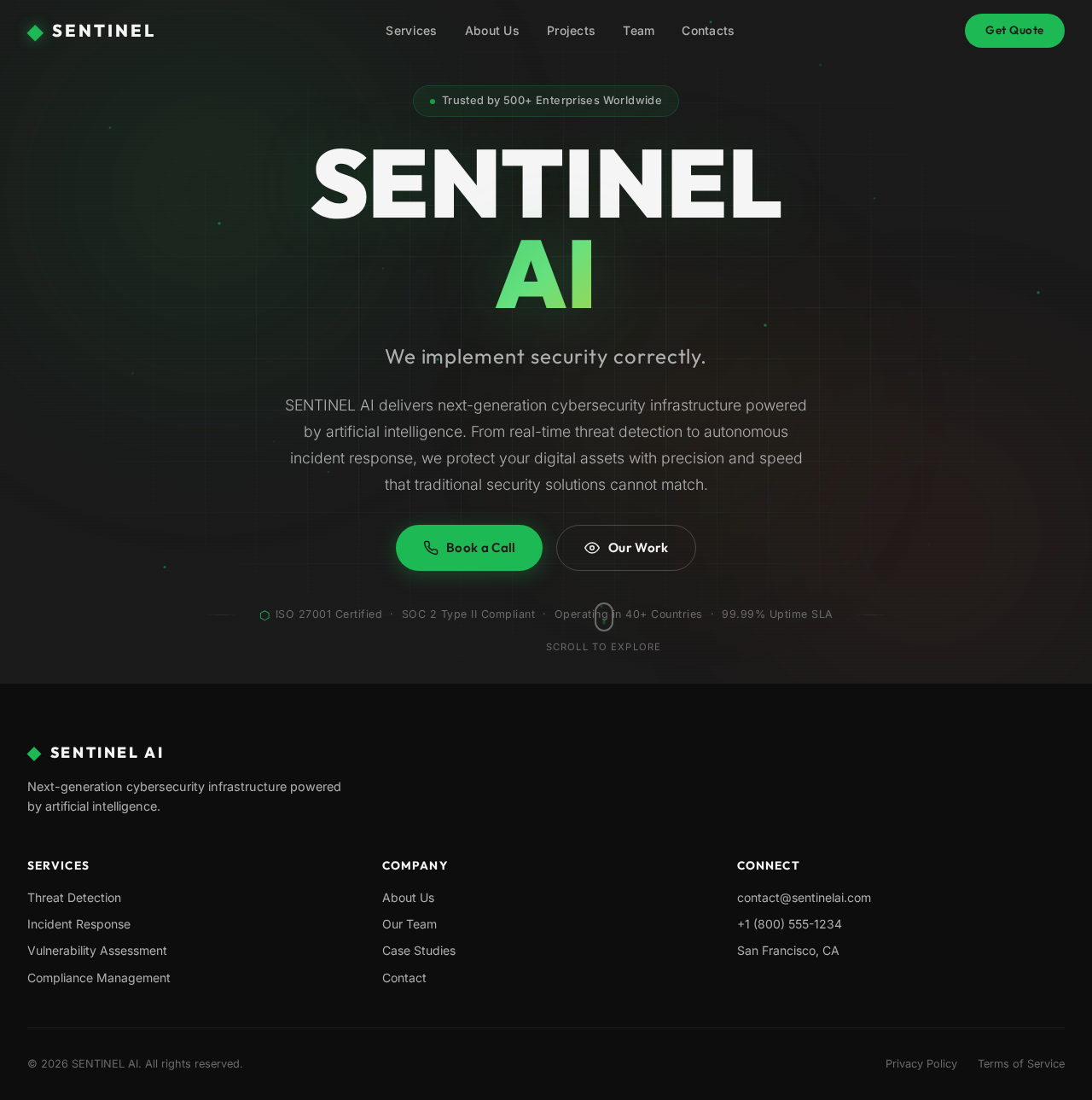
SENTINELAI
We implement security correctly.
SENTINEL AI delivers next-generation cybersecurity infrastructure powered by artificial intelligence. From real-time threat detection to autonomous incident response, we protect your digital assets with precision and speed that traditional security solutions cannot match.
ISO 27001 Certified · SOC 2 Type II Compliant · Operating in 40+ Countries · 99.99% Uptime SLA
No comments yet. Be the first!