project-6b068f04
 Diya Trivedi
start a project to build a simple single page design of the calculator

Comments (0)
Sign in to leave a comment
System Requirements
Project-6b068f04 System Requirements Document
Introduction
This document outlines the system requirements for Project-6b068f04, which aims to develop a basic single-page calculator design. The project is intended to provide users with a simple and intuitive interface for performing basic arithmetic operations.
System Overview
Project-6b068f04 is a web-based application designed to function as a simple calculator. The primary goal is to offer a user-friendly interface that allows users to perform basic arithmetic operations such as addition, subtraction, multiplication, and division. The application will be accessible via web browsers and will be optimized for performance and ease of use.
Functional Requirements as Story Points
- As a User, I should be able to perform addition operations using the calculator.
- As a User, I should be able to perform subtraction operations using the calculator.
- As a User, I should be able to perform multiplication operations using the calculator.
- As a User, I should be able to perform division operations using the calculator.
- As a User, I should be able to clear the current input to start a new calculation.
- As a User, I should be able to view the result of my calculations immediately after entering the operation.
User Personas
- User: The primary user persona is an individual seeking a straightforward tool to perform basic arithmetic calculations quickly and efficiently. This user values simplicity and ease of use.
Core User Flows
- User opens the calculator application -> enters numbers and selects an operation -> views the result -> clears input for a new calculation.
Visuals Colors and Theme
- primary: #3498db (a calming blue for the main interface)
- primary_light: #85c1e9 (a lighter blue for hover states)
- secondary: #e74c3c (a contrasting red for error messages or alerts)
- accent: #f1c40f (a vibrant yellow for call-to-action buttons)
- highlight: #f39c12 (a warm orange for active states)
- bg: #ecf0f1 (a light grey for the background)
- surface: rgba(255, 255, 255, 0.9) (a soft white for panels)
- text: #2c3e50 (a dark blue for primary text)
- text_muted: #95a5a6 (a muted grey for secondary text)
- border: rgba(44, 62, 80, 0.2) (a subtle dark blue for borders)
Signature Design Concept
The calculator's landing page will feature an interactive digital flipboard aesthetic. Each number and operation button will appear as a flipping tile, reminiscent of old-school split-flap displays. When a user clicks a button, the tile will flip to reveal the selected number or operation, providing a tactile and engaging experience. This design will be implemented using motion/react for smooth animations and transitions.
Landing Hero Motion Brief
The landing page will feature a continuous loop animation where numbers and operations float into view, assemble into a calculation, and then dissolve back into the background. This animation will be created using motion/react, ensuring a seamless and captivating user experience. The animation will highlight the transformation of inputs into a calculated result, emphasizing the calculator's functionality.
Interaction Model & Motion Direction
- Intended interaction model: Animated
- The calculator will feature moderate animations for button presses and result displays. Hover transitions and spring physics will be applied to interactive elements to enhance user engagement.
Non-Functional Requirements
- The application must load within 2 seconds on a standard broadband connection.
- The calculator should be responsive and function correctly on both desktop and mobile devices.
- The application must handle up to 100 concurrent users without performance degradation.
Tech Stack
- Frontend: React for Web
- Backend: None required (client-side only)
- Database: None required
Assumptions and Constraints
- The calculator will not support advanced mathematical functions such as trigonometry or logarithms.
- The application will be developed as a single-page application (SPA) with no server-side processing.
Glossary
- SPA: Single Page Application
- UI: User Interface
- UX: User Experience
This document serves as a comprehensive guide for the development of Project-6b068f04, ensuring all stakeholders have a clear understanding of the project's scope and requirements.
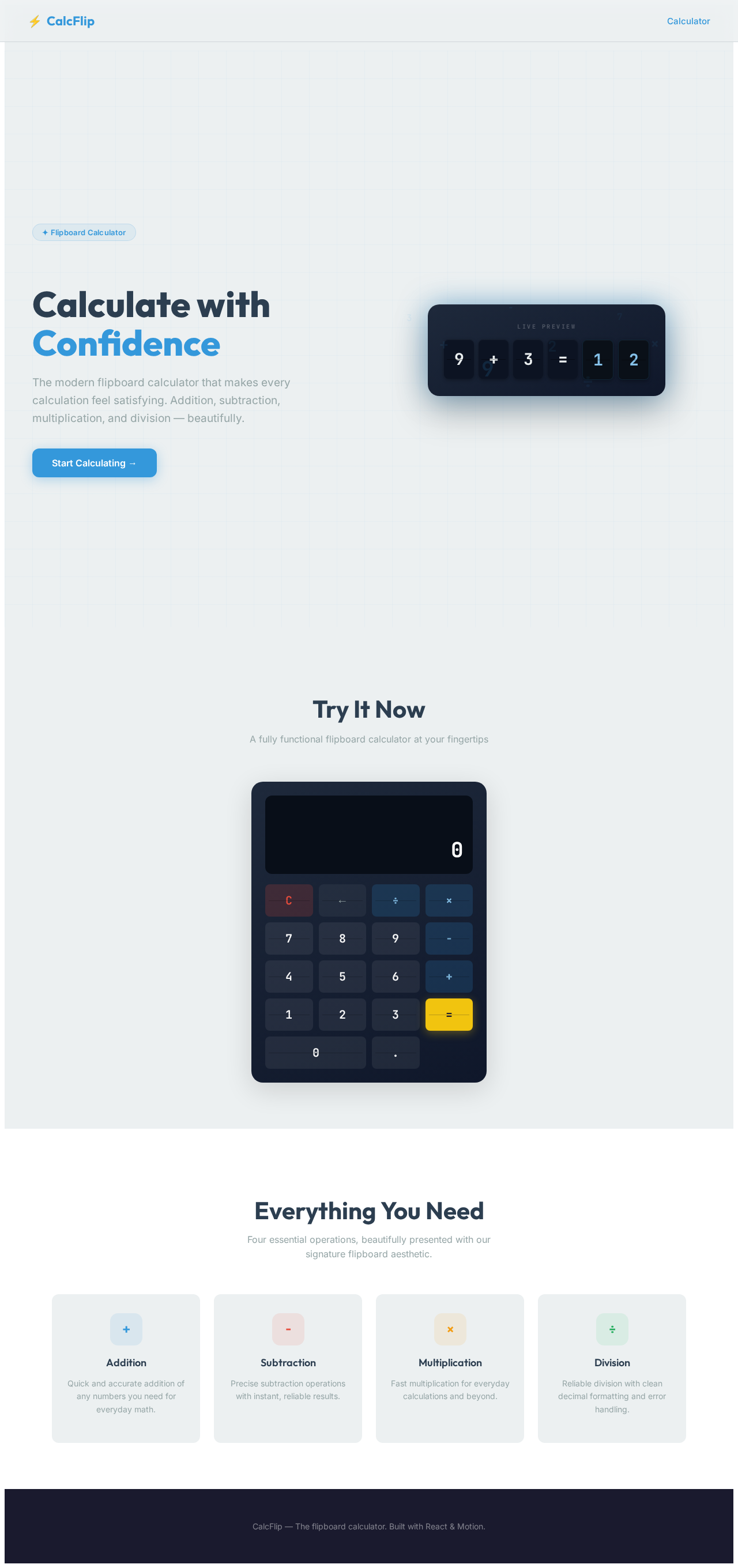
Calculate with
Confidence
The modern flipboard calculator that makes every calculation feel satisfying. Addition, subtraction, multiplication, and division — beautifully.
Start Calculating →Try It Now
A fully functional flipboard calculator at your fingertips
Everything You Need
Four essential operations, beautifully presented with our signature flipboard aesthetic.
Addition
Quick and accurate addition of any numbers you need for everyday math.
Subtraction
Precise subtraction operations with instant, reliable results.
Multiplication
Fast multiplication for everyday calculations and beyond.
Division
Reliable division with clean decimal formatting and error handling.
Calculate with
Confidence
The modern flipboard calculator that makes every calculation feel satisfying. Addition, subtraction, multiplication, and division — beautifully.
Start Calculating →Try It Now
A fully functional flipboard calculator at your fingertips
Everything You Need
Four essential operations, beautifully presented with our signature flipboard aesthetic.
Addition
Quick and accurate addition of any numbers you need for everyday math.
Subtraction
Precise subtraction operations with instant, reliable results.
Multiplication
Fast multiplication for everyday calculations and beyond.
Division
Reliable division with clean decimal formatting and error handling.
No comments yet. Be the first!