project-679b7bdd
 Arun tej
Appointment Follow-Up & Feedback Automator for Clinics What it does: Automates post-appointment SMS/email: thank-you, satisfaction survey, review ask, and next-booking link. Why it works: Appointment reminders and feedback tools exist, but many are generic and not optimized for clinic workflows (multiple doctors, insurance, etc.). GTM strategy ICP: Solo doctors, small clinics, dental/physio centers. Primary motion: Vertical specialization + partnerships. Integrate with 1–2 popular clinic management apps and become their “recommended feedback tool.” Run local webinars for clinic owners: “How to get more Google reviews without extra work.” Channels: Local SEO: “clinic feedback automation [city]”. Direct outreach: email/DM clinic owners with a 2-minute demo. Offer: Per-location pricing, e.g., $29–$79/month. Hook: “Every patient gets a perfect follow-up, automatically.”


Comments (0)
Sign in to leave a comment
System Requirements
System Requirements Document for project-679b7bdd
Introduction
The project-679b7bdd is designed to automate post-appointment communications and feedback collection for clinics. This system aims to enhance clinic workflows by providing tailored follow-up messages and feedback requests, integrating seamlessly with existing clinic management applications.
System Overview
The Appointment Follow-Up & Feedback Automator is a specialized tool for clinics, including solo doctors, small clinics, and dental/physio centers. It automates the process of sending thank-you messages, satisfaction surveys, review requests, and next-booking links via SMS or email after patient appointments. The system is designed to integrate with popular clinic management apps, providing a streamlined and efficient feedback mechanism that aligns with clinic-specific workflows.
Functional Requirements as Story Points
- As a Clinic Owner, I should be able to integrate the automator with my existing clinic management app to streamline follow-up communications.
- As a Clinic Owner, I should be able to customize the content of thank-you messages, satisfaction surveys, and review requests to match my clinic's branding.
- As a Patient, I should receive a thank-you message after my appointment to feel appreciated and encouraged to provide feedback.
- As a Patient, I should receive a satisfaction survey to share my experience and help improve clinic services.
- As a Clinic Owner, I should be able to view and analyze feedback data to make informed decisions about service improvements.
- As a Clinic Owner, I should be able to set up automated reminders for patients to book their next appointment.
- As a Clinic Owner, I should be able to participate in local webinars to learn how to maximize the benefits of the automator.
User Personas
- Clinic Owner: Manages the clinic operations, seeks to improve patient engagement and service quality.
- Patient: Receives follow-up communications and provides feedback on their clinic experience.
Core User Flows
- Clinic Owner integrates the automator with the clinic management app -> Customizes message templates -> Automator sends follow-up communications post-appointment -> Patient receives and interacts with messages -> Feedback is collected and analyzed -> Clinic Owner reviews feedback and adjusts services accordingly.
Visuals Colors and Theme
- primary: #1E90FF (Dodger Blue)
- primary_light: #63B8FF (Light Sky Blue)
- secondary: #FF6347 (Tomato)
- accent: #32CD32 (Lime Green)
- highlight: #FFD700 (Gold)
- bg: #F5F5F5 (White Smoke)
- surface: rgba(255, 255, 255, 0.8)
- text: #333333 (Dark Gray)
- text_muted: #777777 (Gray)
- border: rgba(204, 204, 204, 0.5)
Signature Design Concept
The homepage will feature an interactive clinic environment illustration. As users scroll, they will see a dynamic workflow of a patient journey: from booking an appointment to receiving follow-up communications. This will be animated using motion/react to create a seamless narrative. Each stage of the journey will be clickable, providing more details about how the automator enhances each step. The design will incorporate subtle animations and transitions to keep the user engaged.
Landing Hero Motion Brief
The hero section will depict a patient entering a clinic, receiving care, and then interacting with follow-up messages on their phone. The animation will loop every 10 seconds, showing the transformation from an in-clinic visit to digital engagement. The use of motion/react will ensure smooth transitions and interactions, with layers representing the clinic, patient, and digital interfaces.
Interaction Model & Motion Direction
- Intended Interaction Model: Animated
- The landing page will feature moderate scroll-triggered reveals and hover transitions, enhancing the storytelling aspect of the clinic-patient interaction journey.
Non-Functional Requirements
- The system must ensure data privacy and comply with local regulations regarding patient information.
- The system should be scalable to handle multiple clinics and patient interactions simultaneously.
Tech Stack
- Frontend: React for Web
- Backend: Python, FastAPI
- Database: MySQL or MariaDB, using Alembic for migrations
- AI Models: GPT 5.4 for user-friendly responses
- AI Tools: Litellm for LLM Routing
- Local Orchestration: Docker, docker-compose
Assumptions and Constraints
- The system assumes clinics have existing management apps that support integration.
- The system is constrained by the need to comply with healthcare data privacy laws.
Glossary
- Clinic Management App: Software used by clinics to manage appointments, patient records, and other administrative tasks.
- Automator: The system that automates follow-up communications and feedback collection.
- ICP: Ideal Customer Profile, referring to the target audience for the system.
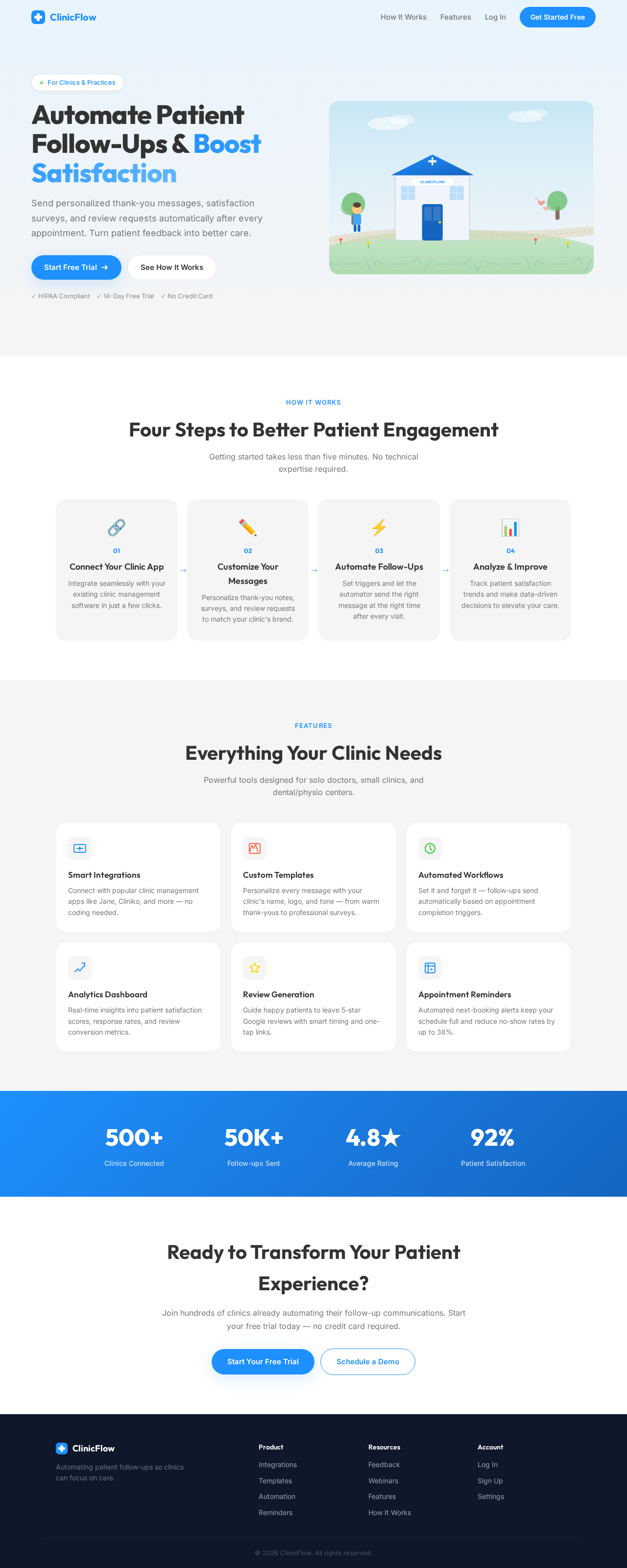
Automate Patient Follow-Ups & Boost Satisfaction
Send personalized thank-you messages, satisfaction surveys, and review requests automatically after every appointment. Turn patient feedback into better care.
Four Steps to Better Patient Engagement
Getting started takes less than five minutes. No technical expertise required.
Connect Your Clinic App
Integrate seamlessly with your existing clinic management software in just a few clicks.
Customize Your Messages
Personalize thank-you notes, surveys, and review requests to match your clinic's brand.
Automate Follow-Ups
Set triggers and let the automator send the right message at the right time after every visit.
Analyze & Improve
Track patient satisfaction trends and make data-driven decisions to elevate your care.
Everything Your Clinic Needs
Powerful tools designed for solo doctors, small clinics, and dental/physio centers.
Smart Integrations
Connect with popular clinic management apps like Jane, Cliniko, and more — no coding needed.
Custom Templates
Personalize every message with your clinic's name, logo, and tone — from warm thank-yous to professional surveys.
Automated Workflows
Set it and forget it — follow-ups send automatically based on appointment completion triggers.
Analytics Dashboard
Real-time insights into patient satisfaction scores, response rates, and review conversion metrics.
Review Generation
Guide happy patients to leave 5-star Google reviews with smart timing and one-tap links.
Appointment Reminders
Automated next-booking alerts keep your schedule full and reduce no-show rates by up to 38%.
Ready to Transform Your Patient Experience?
Join hundreds of clinics already automating their follow-up communications. Start your free trial today — no credit card required.
Automate Patient Follow-Ups & Boost Satisfaction
Send personalized thank-you messages, satisfaction surveys, and review requests automatically after every appointment. Turn patient feedback into better care.
Four Steps to Better Patient Engagement
Getting started takes less than five minutes. No technical expertise required.
Connect Your Clinic App
Integrate seamlessly with your existing clinic management software in just a few clicks.
Customize Your Messages
Personalize thank-you notes, surveys, and review requests to match your clinic's brand.
Automate Follow-Ups
Set triggers and let the automator send the right message at the right time after every visit.
Analyze & Improve
Track patient satisfaction trends and make data-driven decisions to elevate your care.
Everything Your Clinic Needs
Powerful tools designed for solo doctors, small clinics, and dental/physio centers.
Smart Integrations
Connect with popular clinic management apps like Jane, Cliniko, and more — no coding needed.
Custom Templates
Personalize every message with your clinic's name, logo, and tone — from warm thank-yous to professional surveys.
Automated Workflows
Set it and forget it — follow-ups send automatically based on appointment completion triggers.
Analytics Dashboard
Real-time insights into patient satisfaction scores, response rates, and review conversion metrics.
Review Generation
Guide happy patients to leave 5-star Google reviews with smart timing and one-tap links.
Appointment Reminders
Automated next-booking alerts keep your schedule full and reduce no-show rates by up to 38%.
Ready to Transform Your Patient Experience?
Join hundreds of clinics already automating their follow-up communications. Start your free trial today — no credit card required.
No comments yet. Be the first!