
project-57763393

byAbhilash Raj

Local SEO listing manager for multi‑location small businesses — one dashboard to sync hours, menus, photos, and respond to reviews across directories. Validation: local listing tools are steady‑paying micro‑SaaS niches.

Landing
Landing

Comments (0)

No comments yet. Be the first!

System Requirements

System Requirement Document
Page 1 of 5

System Requirements Document for project-57763393

1. Introduction

This System Requirements Document (SRD) outlines the requirements for project-57763393, a micro-SaaS platform designed to manage local SEO listings for multi-location small businesses and provide video captioning and repurposing workflows for short-form content creators. The platform aims to offer a unified dashboard for syncing business information across directories and a suite of tools for content creators to enhance and distribute their videos across various platforms.

2. System Overview

The project-57763393 platform will serve two primary user groups: local businesses and short-form content creators. For local businesses, the platform will provide tools to manage and sync business information such as hours, menus, and photos across multiple directories. For content creators, the platform will offer features for video captioning, format conversion, and post-scheduling to platforms like YouTube, Shorts, and Reels.

2a. Source Content Inventory

No authoritative content sources were provided for this section.

Page 2 of 5

3. Functional Requirements as Story Points

  • As a Local Business Owner, I should be able to sync my business hours, menus, and photos across multiple directories.
  • As a Local Business Owner, I should be able to respond to reviews from a single dashboard.
  • As a Content Creator, I should be able to automatically generate captions for my videos.
  • As a Content Creator, I should be able to convert video formats to suit different platforms.
  • As a Content Creator, I should be able to schedule posts to YouTube, Shorts, and Reels.
  • As a Content Creator, I should be able to manage my content distribution from a single dashboard.
  • As a Platform Administrator, I should be able to manage user subscriptions and payments.

4. User Personas

  • Local Business Owner: Manages multiple business locations and needs to keep information consistent across directories.
  • Content Creator: Produces short-form videos and seeks tools to enhance and distribute content efficiently.
  • Platform Administrator: Oversees platform operations, user management, and subscription services.

5. Core User Flows

  • Local Business Owner updates business info -> syncs across directories -> monitors and responds to reviews.
  • Content Creator uploads video -> auto-generates captions -> converts format -> schedules post to YouTube, Shorts, Reels.
  • Platform Administrator manages user accounts -> processes subscription payments -> monitors platform usage.
Page 3 of 5

6. Visuals Colors and Theme

  • primary: #1A73E8 (deep blue)
  • primary_light: #4D90FE (light blue)
  • secondary: #FF7043 (coral)
  • accent: #FFCA28 (amber)
  • highlight: #FFB300 (gold)
  • bg: #F5F5F5 (light grey)
  • surface: rgba(255, 255, 255, 0.8) (white)
  • text: #212121 (dark grey)
  • text_muted: #757575 (medium grey)
  • border: rgba(0, 0, 0, 0.1) (light black)

7. Signature Design Concept

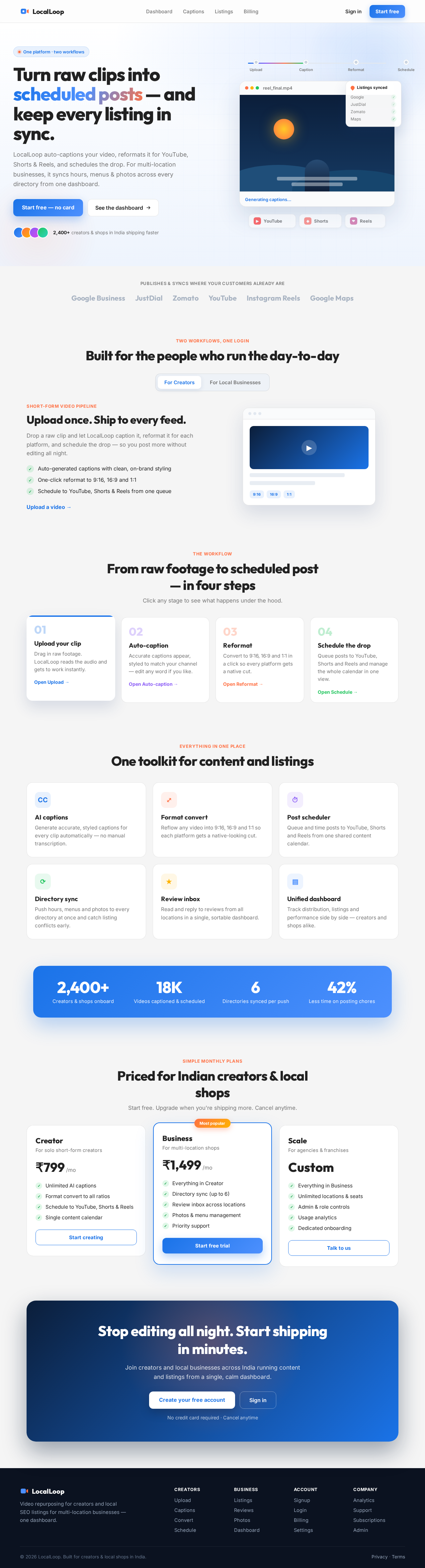
Interactive Video Workflow

The homepage will feature an interactive video workflow animation that visually represents the content creation process. Users will see a video clip being uploaded, captions automatically appearing, formats changing, and the final video being scheduled for posting. This animation will loop continuously, showing the transformation from raw footage to a polished, scheduled post. Users can interact with the animation by clicking on different stages to learn more about each feature.

Page 4 of 5

LANDING HERO MOTION BRIEF

The landing hero will use motion/react to create a dynamic 2D animation. The animation will depict a video file entering the system, being processed with captions and format changes, and finally being scheduled for posting. The animation will loop every 10 seconds, with a clear transformation from input to output. The animation will be responsive, adjusting to different screen sizes while maintaining clarity and engagement.

8. Interaction Model & Motion Direction

The landing page will use an "animated" interaction model with moderate scroll-triggered reveals and hover transitions. The animation will enhance the storytelling of the platform's capabilities, providing a polished and engaging user experience.

9. Non-Functional Requirements

  • The system should support high availability and scalability to handle multiple users simultaneously.
  • The platform should ensure data security and user privacy.
  • The user interface should be intuitive and responsive across devices.
Page 5 of 5

10. Tech Stack

  • Frontend: React for Web
  • Backend: Python, FastAPI
  • Database: MySQL or MariaDB
  • AI Models: GPT 5.4 for user-friendly responses
  • AI Tools: Litellm for LLM Routing
  • Local Orchestration: Docker, docker-compose
  • Server-side Orchestration: Kubernetes

11. Assumptions and Constraints

  • The platform will primarily target users in India, considering local business needs and content creator trends.
  • The system will operate under a monthly subscription model for content creators.
  • The platform must comply with local data protection regulations.

12. Glossary

  • SEO: Search Engine Optimization
  • SaaS: Software as a Service
  • MRR: Monthly Recurring Revenue
  • LLM: Large Language Model

This document outlines the comprehensive requirements for project-57763393, ensuring a robust and user-friendly platform for both local businesses and content creators.

Landing design preview
Landing: View Info
Signup: Create Account
Login: Sign In
Dashboard: View Content
Upload: Upload Video
Captions: Generate Captions
Convert: Change Format
Schedule: Schedule Post
Dashboard: Manage Distribution
Billing: Manage Subscription
Settings: Update Profile
Landing design preview
Landing: View Info
Signup: Create Account
Login: Sign In
Dashboard: View Content
Upload: Upload Video
Captions: Generate Captions
Convert: Change Format
Schedule: Schedule Post
Dashboard: Manage Distribution
Billing: Manage Subscription
Settings: Update Profile