project-5212e44e
 Diya Trivedi
build a simple single page design of the todo

Comments (0)
Sign in to leave a comment
System Requirements
project-5212e44e
Introduction
The purpose of this document is to outline the system requirements for project-5212e44e, focusing on the development of a simple single-page design for a to-do application. This document will serve as a guide for the design and development phases, ensuring that all necessary features and functionalities are included.
System Overview
The project-5212e44e aims to create a user-friendly, efficient, and visually appealing single-page to-do application. The application will allow users to manage their tasks effectively with minimalistic design and intuitive interactions.
Functional Requirements as Story Points
- As a User, I should be able to add new tasks to my to-do list.
- As a User, I should be able to view all my tasks on a single page.
- As a User, I should be able to mark tasks as completed.
- As a User, I should be able to delete tasks from my to-do list.
- As a User, I should be able to edit existing tasks.
- As a User, I should be able to filter tasks by their completion status.
User Personas
- User: The primary user of the application who will manage their personal tasks and to-do lists.
Core User Flows
- User adds a new task -> Task appears on the list -> User marks task as completed -> User deletes or edits the task as needed.
Visuals Colors and Theme
- primary: #4A90E2 (a calming blue for the main interface)
- primary_light: #A6C8FF (a lighter blue for hover states)
- secondary: #FF6F61 (a contrasting coral for emphasis and links)
- accent: #FFD700 (a vibrant gold for call-to-action buttons)
- highlight: #FFA500 (an orange for active states and notifications)
- bg: #FFFFFF (a clean white for the background)
- surface: rgba(255, 255, 255, 0.9) (a slightly opaque white for cards/panels)
- text: #333333 (a dark grey for primary text)
- text_muted: #888888 (a softer grey for secondary text)
- border: rgba(0, 0, 0, 0.1) (a subtle grey for borders)
Signature Design Concept
The homepage of the to-do application will feature an interactive task board that mimics a physical corkboard. Users can drag and drop tasks as if they were sticky notes. Each task note will have a subtle animation when added or removed, providing a tactile feel. The board will have a dynamic background that changes color based on the time of day, offering a fresh look every time the user visits. This concept will be implemented using motion/react for smooth animations and transitions.
Landing Hero Motion Brief
The landing hero will showcase a dynamic illustration of tasks being organized on a corkboard. As users add tasks, they will see animated sticky notes smoothly transition onto the board. The animation will loop every 10 seconds, showing tasks being added, completed, and removed, illustrating the application's core functionality. The first frame will display a clean, organized board with a call-to-action to start adding tasks.
Interaction Model & Motion Direction
The intended interaction model for the landing page is "animated." The page will feature moderate scroll-triggered reveals and hover transitions, enhancing the user experience with spring physics on interactive elements. This approach will ensure a polished and engaging interface for the to-do application.
Non-Functional Requirements
- The application should load quickly and perform efficiently on all modern web browsers.
- The design should be responsive and accessible on both desktop and mobile devices.
- The application should maintain data integrity and security for user tasks.
Tech Stack
- Frontend: React for Web
- Backend: Not specified (assumed to be minimal or serverless for a single-page application)
- Database: Not specified (assumed to be local storage for simplicity)
- AI Models: Not applicable
- Local orchestration: Not applicable
- Server-side orchestration: Not applicable
Assumptions and Constraints
- The application will be developed as a single-page application.
- The design will focus on simplicity and ease of use.
- The application will not require user authentication or complex backend services.
Glossary
- Task: An item on the to-do list that the user can add, edit, complete, or delete.
- Single-page application: A web application that interacts with the user by dynamically rewriting the current page rather than loading entire new pages from the server.
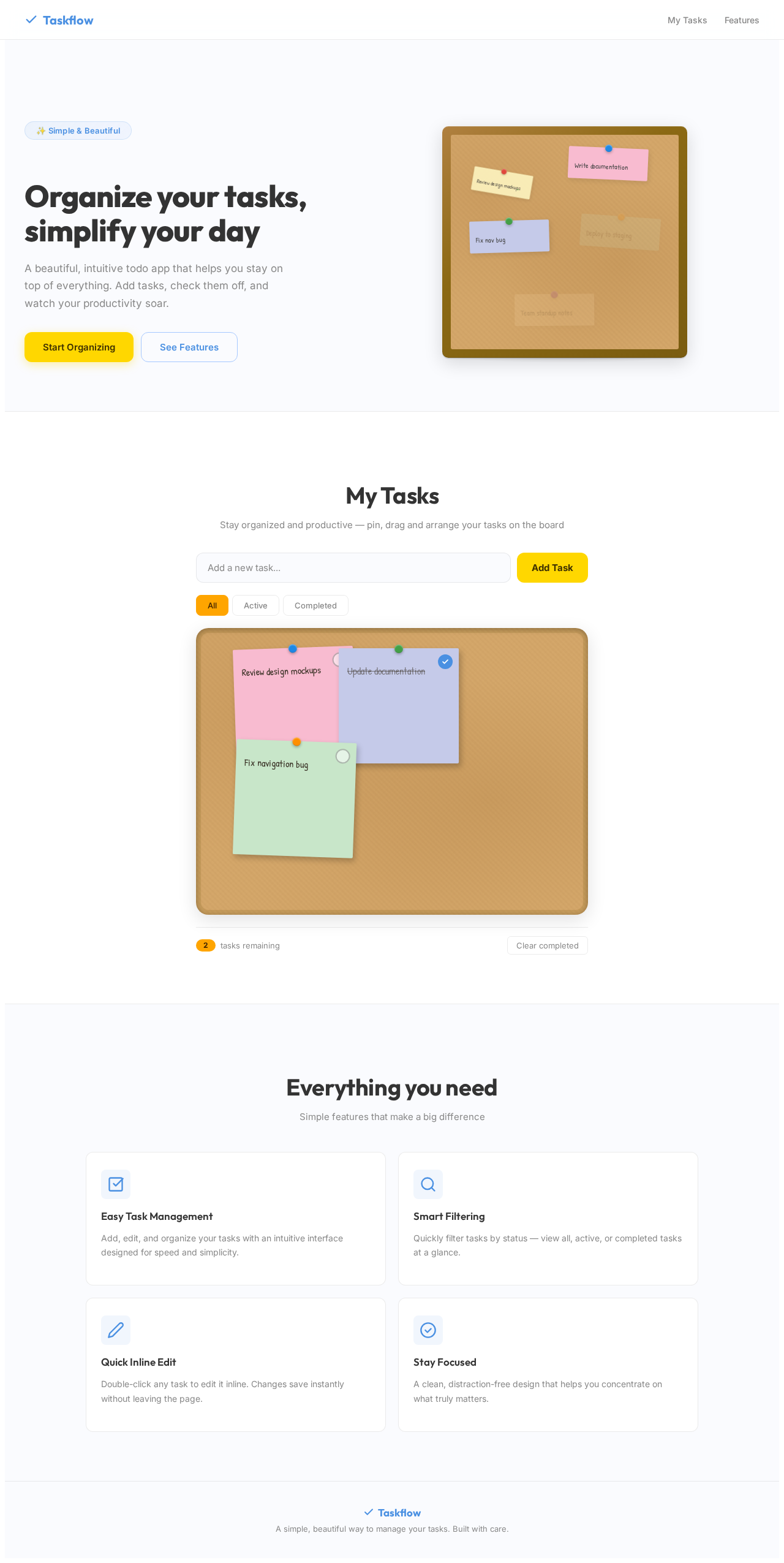
Organize your tasks, simplify your day
A beautiful, intuitive todo app that helps you stay on top of everything. Add tasks, check them off, and watch your productivity soar.
My Tasks
Stay organized and productive — pin, drag and arrange your tasks on the board
Everything you need
Simple features that make a big difference
Easy Task Management
Add, edit, and organize your tasks with an intuitive interface designed for speed and simplicity.
Smart Filtering
Quickly filter tasks by status — view all, active, or completed tasks at a glance.
Quick Inline Edit
Double-click any task to edit it inline. Changes save instantly without leaving the page.
Stay Focused
A clean, distraction-free design that helps you concentrate on what truly matters.
No user flows yet.
The User Flow Agent will generate per-persona navigation diagrams after SRD updates.
Organize your tasks, simplify your day
A beautiful, intuitive todo app that helps you stay on top of everything. Add tasks, check them off, and watch your productivity soar.
My Tasks
Stay organized and productive — pin, drag and arrange your tasks on the board
Everything you need
Simple features that make a big difference
Easy Task Management
Add, edit, and organize your tasks with an intuitive interface designed for speed and simplicity.
Smart Filtering
Quickly filter tasks by status — view all, active, or completed tasks at a glance.
Quick Inline Edit
Double-click any task to edit it inline. Changes save instantly without leaving the page.
Stay Focused
A clean, distraction-free design that helps you concentrate on what truly matters.
No user flows yet.
The User Flow Agent will generate per-persona navigation diagrams after SRD updates.
No comments yet. Be the first!