project-48f44302
 Khivraj Singh (khinv sa)
Agar aap AI Website Builder (Lovable, Bolt.new, Firebase Studio, Replit AI, Cursor AI, Windsurf, v0, etc.) se website banwana chahte hain, to neeche diya gaya prompt use kar sakte hain. # RSSB LDC Complete Practice Portal – AI Development Prompt Build a complete production-ready web application called **RSSB LDC Complete Practice Portal** for Rajasthan Staff Selection Board (RSSB) LDC exam preparation. The website must be modern, responsive, fast, secure, and built using professional software engineering practices. --- ## Tech Stack ### Frontend * React 19 * Vite * Tailwind CSS * React Router DOM * Redux Toolkit * Axios * Framer Motion * React Icons * Chart.js or Recharts ### Backend * Node.js * Express.js * MongoDB (Mongoose) * JWT Authentication * bcrypt * Multer * Cloudinary --- # Theme Primary Color: #2563EB Secondary Color: #1E40AF Success: #22C55E Danger: #EF4444 Background: #F8FAFC Style: * Professional * Government Exam Portal * Glassmorphism Cards * Rounded UI * Soft Shadows * Responsive * Dark Mode Support * Mobile First --- # Landing Page Create an attractive homepage including: * Sticky Navbar * Hero Section * Call To Action * Features Section * Courses Section * Statistics * Student Reviews * FAQ * Contact Form * Footer Animations should use Framer Motion. --- # Authentication Student Registration Student Login Forgot Password Reset Password JWT Authentication Password Encryption using bcrypt Protected Routes Role Based Authentication Admin Login --- # Student Dashboard Dashboard should include: Welcome Card Today's Practice Overall Progress English Typing Hindi Typing MS Word Practice MS Excel Practice Mock Tests Recent Activity Performance Graph Certificates Leaderboard Notifications Profile Management Settings Dark Mode --- # English Typing Module Develop a professional typing engine. Features: * Live Typing * Random Paragraphs * Custom Paragraph Upload * Timer * Accuracy * WPM * CPM * Mistake Counter * Backspace Rules * Restart Test * Pause * Resume * Live Progress Bar * Keyboard Highlight * Finger Animation * Sound Effects * Result Page Difficulty Levels Easy Medium Hard Expert --- # Hindi Typing Module Support: Kruti Dev 010 Features: Hindi Keyboard Finger Guide Hindi Accuracy Hindi WPM Error Detection Timer Paragraph Upload Hindi Mock Test --- # MS Word Practice Simulator Develop a realistic Microsoft Word practice environment. Include: Toolbar Bold Italic Underline Font Font Size Alignment Bullets Numbering Tables Header Footer Page Setup Margins Insert Image Formatting Tasks Auto Evaluation Scoring System --- # MS Excel Practice Simulator Develop spreadsheet practice. Support: Rows Columns Cell Editing Formatting Merge Sort Filter SUM AVERAGE COUNT MAX MIN IF VLOOKUP Charts Conditional Formatting Auto Evaluation --- # Mock Test Module Flow: English Typing ↓ Hindi Typing ↓ MS Word ↓ MS Excel ↓ Result ↓ Certificate Include: Countdown Timer Navigation Auto Submit Negative Marking Option Performance Analysis Rank --- # Analytics Daily Practice Weekly Progress Monthly Graph Yearly Report Average WPM Average Accuracy Typing Heatmap Charts Leaderboards Achievements --- # Admin Panel Admin Dashboard should manage: Students Admins English Paragraphs Hindi Paragraphs Word Tasks Excel Tasks Mock Tests Certificates Reports Analytics Announcements File Uploads Cloudinary Media --- # Database Collections Users Admins EnglishParagraphs HindiParagraphs WordTasks ExcelTasks MockTests Results Certificates Notifications Leaderboard ActivityLogs Settings --- # APIs Authentication APIs Student APIs Admin APIs Typing APIs Analytics APIs Paragraph APIs Mock APIs Certificate APIs Leaderboard APIs Profile APIs Notification APIs --- # Security JWT bcrypt Helmet Rate Limiting CORS Validation Input Sanitization Protected APIs Role Permissions --- # Performance Lazy Loading Code Splitting Image Optimization Caching Pagination Search Filtering Debouncing --- # UI Requirements Professional Dashboard Beautiful Cards Charts Tables Modals Loading Skeletons Toast Notifications Animations Responsive Design Accessibility Dark Mode --- # Deployment Frontend should be ready for Vercel. Backend should be ready for Render or Railway. MongoDB Atlas support. Environment Variables configured. --- # Project Structure client/ assets/ components/ pages/ layouts/ hooks/ context/ redux/ services/ utils/ App.jsx main.jsx server/ config/ controllers/ middleware/ models/ routes/ services/ uploads/ utils/ server.js .env --- Generate the project as a clean, scalable, production-ready codebase with reusable components, modular architecture, proper folder structure, comments where necessary, validation, error handling, and best coding practices. Every feature should be fully functional rather than placeholder UI. Ye prompt kisi bhi advanced AI coding tool ko ek **commercial-quality RSSB LDC Complete Practice Portal** generate karne ke liye strong specification deta hai. Agar aap **Bolt.new**, **Lovable**, **Firebase Studio**, ya **Cursor AI** use karenge, to is prompt se kaafi achha initial project generate hoga.


Comments (0)
Sign in to leave a comment
System Requirements
project-48f44302
Introduction
The project-48f44302 is aimed at developing a comprehensive web application called the RSSB LDC Complete Practice Portal. This portal is designed to assist candidates in preparing for the Rajasthan Staff Selection Board (RSSB) LDC exam. The application will be modern, responsive, fast, and secure, adhering to professional software engineering practices.
System Overview
The RSSB LDC Complete Practice Portal will provide a robust platform for exam preparation, featuring modules for English and Hindi typing, MS Word and Excel practice, mock tests, and detailed analytics. The system will include both student and admin interfaces, ensuring a seamless experience for all users.
Source Content Inventory
- Frontend Technologies: React 19, Vite, Tailwind CSS, React Router DOM, Redux Toolkit, Axios, Framer Motion, React Icons, Chart.js or Recharts
- Backend Technologies: Node.js, Express.js, MongoDB (Mongoose), JWT Authentication, bcrypt, Multer, Cloudinary
- Theme Colors: Primary (#2563EB), Secondary (#1E40AF), Success (#22C55E), Danger (#EF4444), Background (#F8FAFC)
- Design Style: Professional, Government Exam Portal, Glassmorphism Cards, Rounded UI, Soft Shadows, Responsive, Dark Mode Support, Mobile First
Functional Requirements as Story Points
- As a Student, I should be able to register and log in to the portal.
- As a Student, I should be able to reset my password if forgotten.
- As a Student, I should be able to access a dashboard with my practice progress.
- As a Student, I should be able to practice English typing with live feedback.
- As a Student, I should be able to practice Hindi typing with Kruti Dev 010 support.
- As a Student, I should be able to simulate MS Word and Excel environments for practice.
- As a Student, I should be able to take mock tests and receive certificates.
- As a Student, I should be able to view analytics of my practice sessions.
- As an Admin, I should be able to manage students, content, and analytics.
- As an Admin, I should be able to upload and manage media content via Cloudinary.
- As a System, I should pre-resolve API requests as determined by the API supervisor.
User Personas
- Student: A user preparing for the RSSB LDC exam, requiring access to practice modules and analytics.
- Admin: A user managing the portal's content, users, and analytics.
Core User Flows
- Student registers -> logs in -> accesses dashboard -> selects practice module -> completes practice -> views analytics
- Admin logs in -> manages content -> reviews analytics -> updates settings
Visuals Colors and Theme
- primary: #2563EB
- primary_light: #3B82F6
- secondary: #1E40AF
- accent: #EF4444
- highlight: #22C55E
- bg: #F8FAFC
- surface: rgba(248, 250, 252, 0.8)
- text: #111827
- text_muted: #6B7280
- border: rgba(31, 41, 55, 0.2)
Signature Design Concept
The homepage will feature an interactive 3D floating island representing different sections of the portal. Users can navigate between sections by clicking on buildings that represent different practice modules. The scene will be built using @react-three/fiber and @react-three/drei, providing a unique and engaging user experience. Animations will be smooth and responsive, with sections lighting up as users hover over them.
Interaction Model & Motion Direction
The landing page will utilize a "parallax" interaction model, creating a layered depth effect as users scroll. This will be complemented by animated transitions and hover effects using Framer Motion, enhancing the visual storytelling of the portal.
Non-Functional Requirements
- The system must be secure, with JWT authentication and bcrypt for password encryption.
- The application should be responsive and support dark mode.
- Performance optimizations such as lazy loading, code splitting, and caching should be implemented.
Tech Stack
- Frontend: React 19, Vite, Tailwind CSS, React Router DOM, Redux Toolkit, Axios, Framer Motion, React Icons, Chart.js or Recharts
- Backend: Node.js, Express.js, MongoDB (Mongoose)
- Deployment: Vercel for frontend, Render or Railway for backend, MongoDB Atlas
Assumptions and Constraints
- The application will be used primarily by students preparing for the RSSB LDC exam.
- The system must handle a large number of concurrent users efficiently.
- The design must adhere to accessibility standards.
Glossary
- WPM: Words Per Minute
- CPM: Characters Per Minute
- JWT: JSON Web Token
- API: Application Programming Interface
This document outlines the comprehensive requirements for the development of the RSSB LDC Complete Practice Portal, ensuring a robust and user-friendly application.
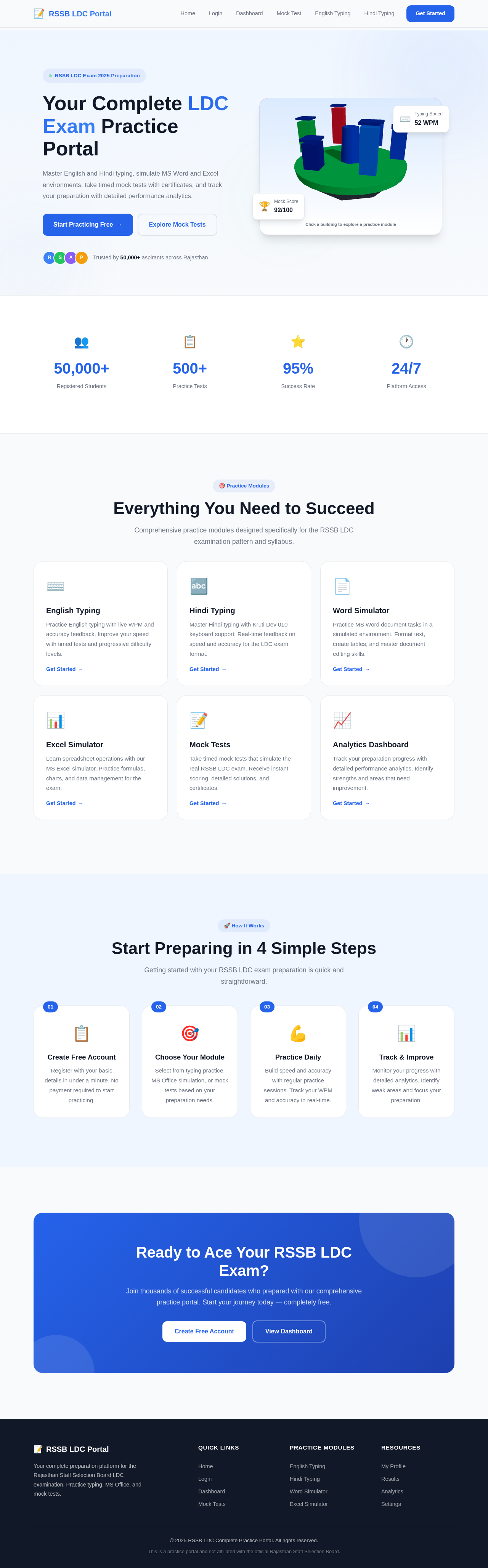
Your Complete LDC Exam Practice Portal
Master English and Hindi typing, simulate MS Word and Excel environments, take timed mock tests with certificates, and track your preparation with detailed performance analytics.
Trusted by 50,000+ aspirants across Rajasthan
Everything You Need to Succeed
Comprehensive practice modules designed specifically for the RSSB LDC examination pattern and syllabus.
English Typing
Practice English typing with live WPM and accuracy feedback. Improve your speed with timed tests and progressive difficulty levels.
Get Started →🔤Hindi Typing
Master Hindi typing with Kruti Dev 010 keyboard support. Real-time feedback on speed and accuracy for the LDC exam format.
Get Started →📄Word Simulator
Practice MS Word document tasks in a simulated environment. Format text, create tables, and master document editing skills.
Get Started →📊Excel Simulator
Learn spreadsheet operations with our MS Excel simulator. Practice formulas, charts, and data management for the exam.
Get Started →📝Mock Tests
Take timed mock tests that simulate the real RSSB LDC exam. Receive instant scoring, detailed solutions, and certificates.
Get Started →📈Analytics Dashboard
Track your preparation progress with detailed performance analytics. Identify strengths and areas that need improvement.
Get Started →Start Preparing in 4 Simple Steps
Getting started with your RSSB LDC exam preparation is quick and straightforward.
Create Free Account
Register with your basic details in under a minute. No payment required to start practicing.
Choose Your Module
Select from typing practice, MS Office simulation, or mock tests based on your preparation needs.
Practice Daily
Build speed and accuracy with regular practice sessions. Track your WPM and accuracy in real-time.
Track & Improve
Monitor your progress with detailed analytics. Identify weak areas and focus your preparation.
Ready to Ace Your RSSB LDC Exam?
Join thousands of successful candidates who prepared with our comprehensive practice portal. Start your journey today — completely free.
Your Complete LDC Exam Practice Portal
Master English and Hindi typing, simulate MS Word and Excel environments, take timed mock tests with certificates, and track your preparation with detailed performance analytics.
Trusted by 50,000+ aspirants across Rajasthan
Everything You Need to Succeed
Comprehensive practice modules designed specifically for the RSSB LDC examination pattern and syllabus.
English Typing
Practice English typing with live WPM and accuracy feedback. Improve your speed with timed tests and progressive difficulty levels.
Get Started →🔤Hindi Typing
Master Hindi typing with Kruti Dev 010 keyboard support. Real-time feedback on speed and accuracy for the LDC exam format.
Get Started →📄Word Simulator
Practice MS Word document tasks in a simulated environment. Format text, create tables, and master document editing skills.
Get Started →📊Excel Simulator
Learn spreadsheet operations with our MS Excel simulator. Practice formulas, charts, and data management for the exam.
Get Started →📝Mock Tests
Take timed mock tests that simulate the real RSSB LDC exam. Receive instant scoring, detailed solutions, and certificates.
Get Started →📈Analytics Dashboard
Track your preparation progress with detailed performance analytics. Identify strengths and areas that need improvement.
Get Started →Start Preparing in 4 Simple Steps
Getting started with your RSSB LDC exam preparation is quick and straightforward.
Create Free Account
Register with your basic details in under a minute. No payment required to start practicing.
Choose Your Module
Select from typing practice, MS Office simulation, or mock tests based on your preparation needs.
Practice Daily
Build speed and accuracy with regular practice sessions. Track your WPM and accuracy in real-time.
Track & Improve
Monitor your progress with detailed analytics. Identify weak areas and focus your preparation.
Ready to Ace Your RSSB LDC Exam?
Join thousands of successful candidates who prepared with our comprehensive practice portal. Start your journey today — completely free.
No comments yet. Be the first!