
project-426e0a74

byKolakaluri Abinash

Build a Professional AI Coding Assistant Create a premium AI application called CodeForge AI whose only purpose is software development and code generation. The application must function as a professional AI software engineer capable of understanding natural language instructions and reference images to generate complete, production-ready code. Primary Goal The AI should help developers build software from ideas, prompts, sketches, wireframes, screenshots, and UI reference images. It must generate clean, modular, scalable, well-documented code for beginners and professional developers. User Input The AI must accept: - Natural language prompts - Multiple reference images - Screenshots - Hand-drawn sketches - Existing source code - ZIP projects - PDF specifications - API documentation - UI mockups The AI should combine all inputs before generating code. Image Understanding When users upload one or more images, the AI must analyze: - Layout - Components - Colors - Typography - Icons - Buttons - Cards - Navigation - Spacing - Shadows - Animations - Overall design style The AI should recreate the design in code rather than copying pixels. Core AI Features Generate complete applications Generate individual screens Generate reusable components Generate animations Generate APIs Generate databases Generate authentication Generate dashboards Generate responsive layouts Generate backend services Generate documentation Generate unit tests Generate project structures Generate deployment configurations Generate comments Generate clean architecture Generate design systems Programming Languages Flutter Dart Kotlin Java Python JavaScript TypeScript HTML CSS SQL Node.js React React Native Next.js Vue.js Angular Express.js Laravel Spring Boot Go Rust Swift PHP Ruby C C++ C# Unity C# Unreal Engine C++ TensorFlow PyTorch AI Development Modes Generate Fix Explain Optimize Refactor Convert Review Debug Document Test Continue Existing Project Workspace Professional IDE-style interface including: - AI chat - Integrated code editor - File explorer - Project explorer - Multiple tabs - Syntax highlighting - Auto formatting - Line numbers - Search & Replace - AI inline suggestions - Error highlighting - Terminal panel - Console panel - Preview panel Project Templates Android App Flutter App Website Landing Page Portfolio Dashboard Admin Panel REST API AI Application Chatbot Game Desktop Application Automation Script CLI Tool Export Copy code Download single files Download complete project as ZIP Share project Save project Version history Performance Fast Responsive Modern Minimal Professional Scalable Modular Maintainable Readable AI Behavior The AI should ask clarifying questions whenever requirements are incomplete instead of making assumptions. It should explain important implementation decisions and suggest improvements when appropriate. If an error exists in generated code, it should identify the likely cause and propose a corrected version. The generated code should follow current best practices for the selected language and framework. The application should feel like a professional AI software engineering assistant dedicated entirely to programming, capable of turning ideas, prompts, sketches, and reference images into complete software projects.

LandingAuthPreviewDashboard
Landing

Comments (0)

No comments yet. Be the first!

System Requirements

System Requirement Document

project-426e0a74

Introduction

The purpose of this document is to outline the system requirements for "project-426e0a74," a premium AI application named CodeForge AI. This application is designed to function as a professional AI software engineer, capable of understanding natural language instructions and reference images to generate complete, production-ready code.

System Overview

CodeForge AI is intended to assist developers in building software from various inputs such as ideas, prompts, sketches, wireframes, screenshots, and UI reference images. The AI will generate clean, modular, scalable, and well-documented code suitable for both beginners and professional developers. The application will support multiple programming languages and provide a professional IDE-style interface.

Page 1 of 7

Functional Requirements

  • As a Developer, I should be able to input natural language prompts to generate code.
  • As a Developer, I should be able to upload multiple reference images for AI analysis.
  • As a Developer, I should be able to provide screenshots and hand-drawn sketches for code generation.
  • As a Developer, I should be able to input existing source code, ZIP projects, and PDF specifications.
  • As a Developer, I should be able to provide API documentation and UI mockups for code generation.
  • As a Developer, I should be able to generate complete applications from inputs.
  • As a Developer, I should be able to generate individual screens and reusable components.
  • As a Developer, I should be able to generate animations, APIs, and databases.
  • As a Developer, I should be able to generate authentication systems and dashboards.
  • As a Developer, I should be able to generate responsive layouts and backend services.
  • As a Developer, I should be able to generate documentation, unit tests, and project structures.
  • As a Developer, I should be able to generate deployment configurations and comments.
  • As a Developer, I should be able to generate clean architecture and design systems.
  • As a Developer, I should be able to use AI development modes such as Generate, Fix, Explain, Optimize, Refactor, Convert, Review, Debug, Document, Test, and Continue Existing Project.
Page 2 of 7
  • As a Developer, I should be able to use a professional IDE-style interface with features like AI chat, integrated code editor, file explorer, project explorer, multiple tabs, syntax highlighting, auto formatting, line numbers, search & replace, AI inline suggestions, error highlighting, terminal panel, console panel, and preview panel.
  • As a Developer, I should be able to use project templates for Android App, Flutter App, Website, Landing Page, Portfolio, Dashboard, Admin Panel, REST API, AI Application, Chatbot, Game, Desktop Application, Automation Script, and CLI Tool.
  • As a Developer, I should be able to export code by copying, downloading single files, downloading complete projects as ZIP, sharing projects, saving projects, and accessing version history.
  • As a Developer, I should be able to receive clarifying questions from the AI when requirements are incomplete.
  • As a Developer, I should be able to receive explanations of important implementation decisions and suggestions for improvements.
  • As a Developer, I should be able to receive error identification and corrected versions from the AI.

User Personas

  • Developer: A user who utilizes CodeForge AI to generate, optimize, and manage software projects using natural language prompts and various input formats.
Page 3 of 7

Core User Flows

  • Developer inputs natural language prompt -> AI generates code -> Developer reviews and refines code.
  • Developer uploads reference images -> AI analyzes design elements -> AI generates corresponding code.
  • Developer selects project template -> AI generates project structure -> Developer customizes and finalizes project.

Visuals Colors and Theme

  • primary: #1E3A8A (Deep Blue)
  • primary_light: #3B82F6 (Light Blue)
  • secondary: #F97316 (Vibrant Orange)
  • accent: #10B981 (Emerald Green)
  • highlight: #F59E0B (Amber)
  • bg: #F3F4F6 (Light Gray)
  • surface: rgba(255, 255, 255, 0.8) (White)
  • text: #111827 (Dark Gray)
  • text_muted: #6B7280 (Muted Gray)
  • border: rgba(209, 213, 219, 0.2) (Light Gray)
Page 4 of 7

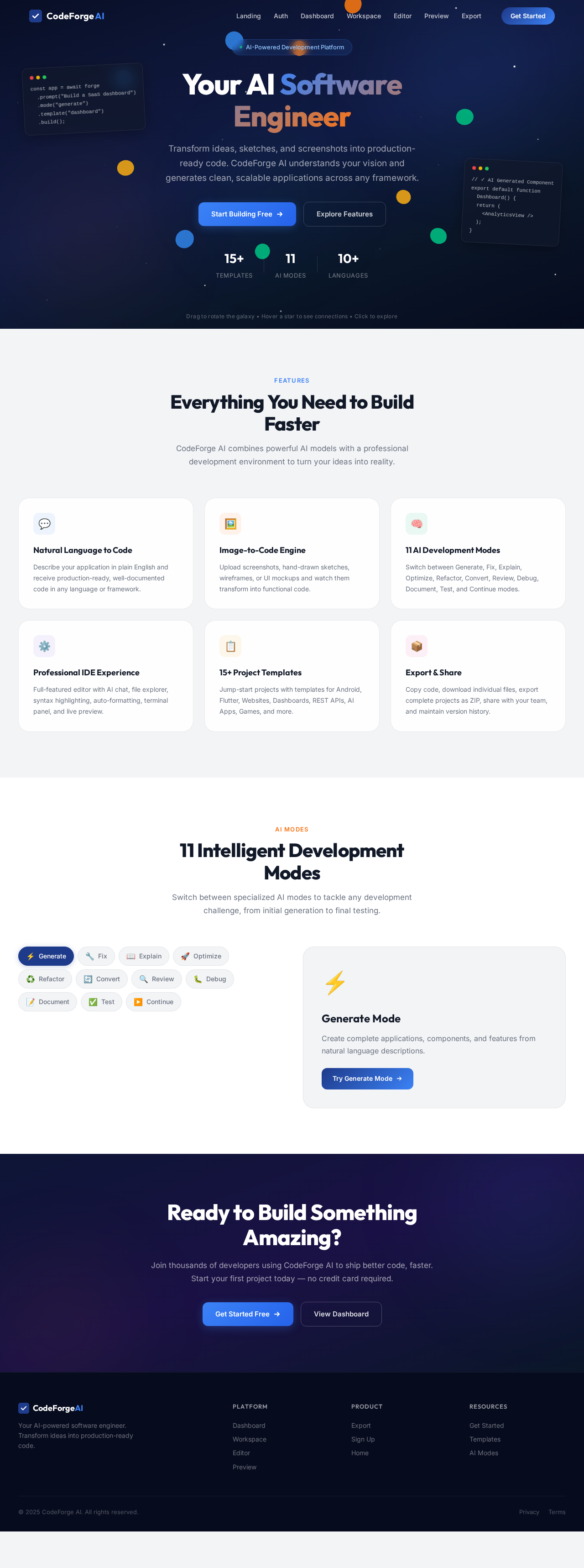
Signature Design Concept

The homepage of CodeForge AI will feature an interactive "Code Galaxy" where each star represents a different programming language or framework. Users can click on a star to explore related features, drag to rotate the galaxy, and hover to see connections between technologies. This concept will be implemented using @react-three/fiber for 3D rendering and gsap for smooth animations and transitions. The galaxy will dynamically update as users input different project requirements, creating an engaging and exploratory experience.

Interaction Model & Motion Direction

The landing page will use a "parallax" interaction model, providing a layered depth effect as users scroll. Decorative elements like stars and nebulae will move at different speeds, while real content scrolls naturally. This model is ideal for creating a visually rich first impression that aligns with the exploratory theme of the "Code Galaxy."

Non-Functional Requirements

  • The application must be fast, responsive, and modern.
  • It should maintain a professional, scalable, modular, maintainable, and readable codebase.
  • The AI should follow current best practices for the selected language and framework.
Page 5 of 7

Tech Stack

  • Frontend: React for Web
  • Backend: Python, FastAPI
  • Database: MySQL or MariaDB
  • AI Models: GPT 5.4, Claude Sonnet 5, Gemini 3.1 pro, Google Nano banana
  • AI Tools: Litellm, Langchain
  • Local Orchestration: Docker, docker-compose
  • Server-side Orchestration: Kubernetes

Assumptions and Constraints

  • The AI will require internet access to process inputs and generate code.
  • The application must comply with data privacy regulations applicable in India.
  • The AI's performance may vary based on the complexity of the input and the current best practices for the selected language.
Page 6 of 7

Glossary

  • AI: Artificial Intelligence
  • IDE: Integrated Development Environment
  • API: Application Programming Interface
  • UI: User Interface
  • CLI: Command Line Interface
  • REST API: Representational State Transfer Application Programming Interface
  • 3D: Three-Dimensional
  • gsap: GreenSock Animation Platform

This document outlines the comprehensive system requirements for project-426e0a74, ensuring that CodeForge AI meets the needs of developers seeking a professional AI coding assistant.

Page 7 of 7
Landing design preview
Landing: Explore Code Galaxy
Auth: Sign Up
Dashboard: Select Template
Workspace: Enter Prompt
Workspace: Upload Images
Workspace: Select AI Mode
Workspace: Generate Code
Workspace: AI Chat Clarify
Editor: Review Code
Editor: Debug Fix Errors
Preview: Test Application
Export: Download ZIP
Export: Save Version
Dashboard: View Projects
Landing design preview
Landing: Explore Code Galaxy
Auth: Sign Up
Dashboard: Select Template
Workspace: Enter Prompt
Workspace: Upload Images
Workspace: Select AI Mode
Workspace: Generate Code
Workspace: AI Chat Clarify
Editor: Review Code
Editor: Debug Fix Errors
Preview: Test Application
Export: Download ZIP
Export: Save Version
Dashboard: View Projects