
project-39897f53

byMoazzam syd

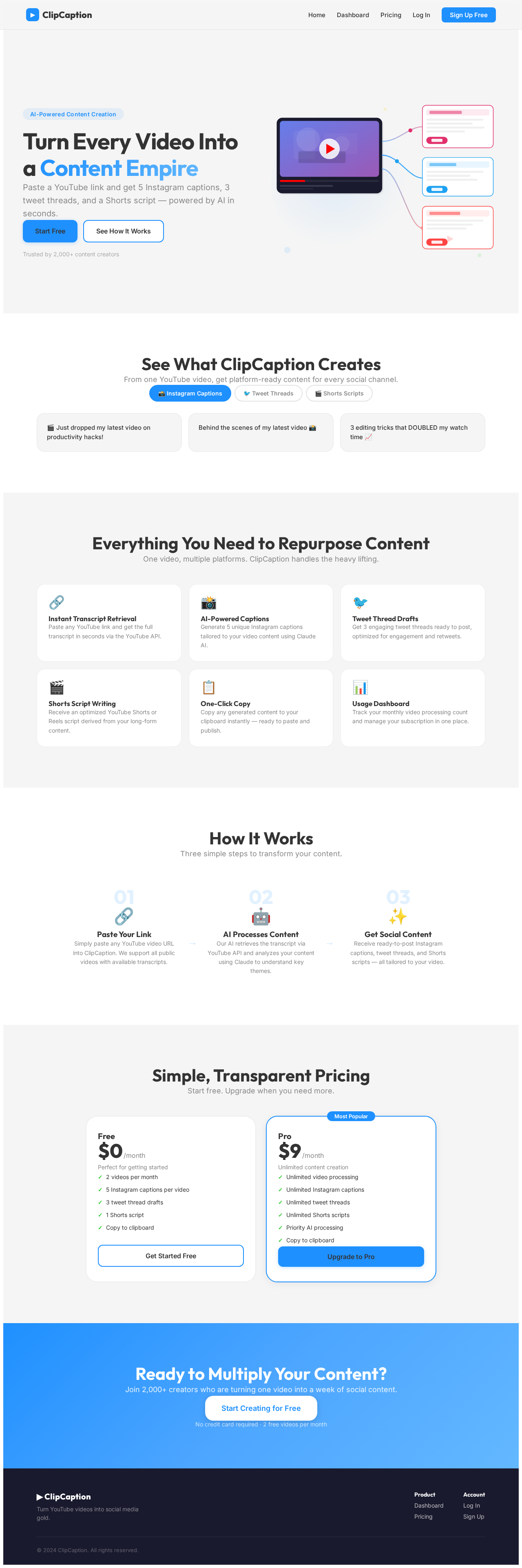
Build a web app called ClipCaption. Users paste a YouTube video link. The app pulls the video's transcript (via YouTube's caption/transcript API). It sends the transcript to the Claude API and generates: 5 Instagram captions, 3 tweet-thread drafts, and 1 YouTube Shorts/Reels script, written for solo YouTubers and influencers (not agencies). Output is shown on screen with a copy button for each item. Include user accounts (email sign-up), and a free tier limited to 2 videos/month, with a paid tier ($9/month, unlimited) via Stripe subscription. Keep the UI simple — one input box, one button, results below. Use React frontend, FastAPI or Node backend, Postgres for user/subscription data.

LandingSignupLogin
Landing

Comments (0)

No comments yet. Be the first!

System Requirements

System Requirement Document

project-39897f53 System Requirements Document

Introduction

The purpose of this document is to outline the system requirements for the project named "project-39897f53," which involves developing a web application called ClipCaption. This application is designed to generate social media content from YouTube video transcripts for solo YouTubers and influencers.

System Overview

ClipCaption is a web application that allows users to input a YouTube video link, retrieve the video's transcript using YouTube's API, and generate social media content such as Instagram captions, tweet-thread drafts, and YouTube Shorts/Reels scripts. The application is targeted at solo YouTubers and influencers, providing them with easy-to-use tools for content creation.

Source Content Inventory

  • YouTube API: Used to retrieve video transcripts.
  • Claude API: Utilized for generating Instagram captions, tweet-thread drafts, and YouTube Shorts/Reels scripts.
Page 1 of 6

Functional Requirements as Story Points

  • As a User, I should be able to paste a YouTube video link into the app.
  • As a User, I should be able to retrieve the video's transcript via YouTube's caption/transcript API.
  • As a User, I should be able to generate 5 Instagram captions from the transcript.
  • As a User, I should be able to generate 3 tweet-thread drafts from the transcript.
  • As a User, I should be able to generate 1 YouTube Shorts/Reels script from the transcript.
  • As a User, I should be able to view the generated content on the screen with a copy button for each item.
  • As a User, I should be able to sign up for an account using my email.
  • As a User, I should have access to a free tier limited to processing 2 videos per month.
  • As a User, I should have the option to upgrade to a paid tier for $9/month for unlimited video processing via Stripe subscription.

User Personas

  • Solo YouTuber: A content creator who produces videos independently and seeks to enhance their social media presence.
  • Influencer: An individual who uses social media platforms to engage with followers and requires efficient content generation tools.
Page 2 of 6

Core User Flows

  1. User signs up:

    • User enters email and password -> User receives confirmation email -> User confirms email -> Account is created.
  2. Video processing:

    • User logs in -> Pastes YouTube video link -> Clicks 'Generate' -> App retrieves transcript -> App generates content -> User views and copies content.
  3. Subscription management:

    • User logs in -> Navigates to subscription page -> Selects paid tier -> Enters payment details via Stripe -> Subscription is activated.

Visuals Colors and Theme

  • primary: #1E90FF (Dodger Blue)
  • primary_light: #63B8FF (Light Sky Blue)
  • secondary: #FF6347 (Tomato)
  • accent: #32CD32 (Lime Green)
  • highlight: #FFD700 (Gold)
  • bg: #F5F5F5 (White Smoke)
  • surface: rgba(255, 255, 255, 0.9)
  • text: #333333 (Dark Gray)
  • text_muted: #888888 (Gray)
  • border: rgba(200, 200, 200, 0.5)
Page 3 of 6

Signature Design Concept

The ClipCaption homepage will feature an interactive "Content Carousel" where users can see a rotating display of sample Instagram captions, tweet threads, and YouTube Shorts scripts. As users hover over each item, it expands with a smooth animation, revealing more details and a "Copy" button. This carousel will use motion/react for animations, creating a dynamic and engaging user experience.

Landing Hero Motion Brief

The landing page will showcase a continuous loop animation where a YouTube video icon transforms into various social media icons (Instagram, Twitter, YouTube Shorts). This transformation will illustrate the app's core functionality of converting video content into social media posts. The animation will be created using motion/react, ensuring smooth transitions and a polished look. The animation will pause when the user interacts with the input box or buttons, maintaining focus on user actions.

Interaction Model & Motion Direction

  • Intended Interaction Model: Animated
  • The landing page will feature moderate scroll-triggered reveals and hover transitions, enhancing user engagement without overwhelming the interface.
Page 4 of 6

Non-Functional Requirements

  • The application must be responsive and accessible across various devices and screen sizes.
  • Ensure data security and privacy, particularly for user accounts and payment information.
  • The system should handle up to 10,000 users concurrently without performance degradation.

Tech Stack

  • Frontend: React
  • Backend: FastAPI or Node.js
  • Database: PostgreSQL for user and subscription data
  • Payment Processing: Stripe for subscription management

Assumptions and Constraints

  • The application will primarily serve users in Australia, considering local timezone and currency (AUD) for transactions.
  • The free tier is limited to 2 videos per month to encourage subscription to the paid tier.
Page 5 of 6

Glossary

  • API: Application Programming Interface
  • Claude API: An API used for generating social media content
  • Stripe: A payment processing platform
  • YouTube API: An API used to retrieve video transcripts from YouTube

This document outlines the requirements and design considerations for the ClipCaption web application, ensuring a clear understanding of the project's scope and objectives.

Page 6 of 6
Landing design preview
Landing: View Info
Signup: Create Account
Login: Sign In
Dashboard: Paste Link
Dashboard: Generate Content
Dashboard: View Captions
Dashboard: Copy Content
Dashboard: Check Usage
Subscription: View Plans
Subscription: Upgrade Plan
Subscription: Enter Payment
Dashboard: Paste Link
Landing design preview
Landing: View Info
Signup: Create Account
Login: Sign In
Dashboard: Paste Link
Dashboard: Generate Content
Dashboard: View Captions
Dashboard: Copy Content
Dashboard: Check Usage
Subscription: View Plans
Subscription: Upgrade Plan
Subscription: Enter Payment
Dashboard: Paste Link