
project-2e063554

byumar shaik

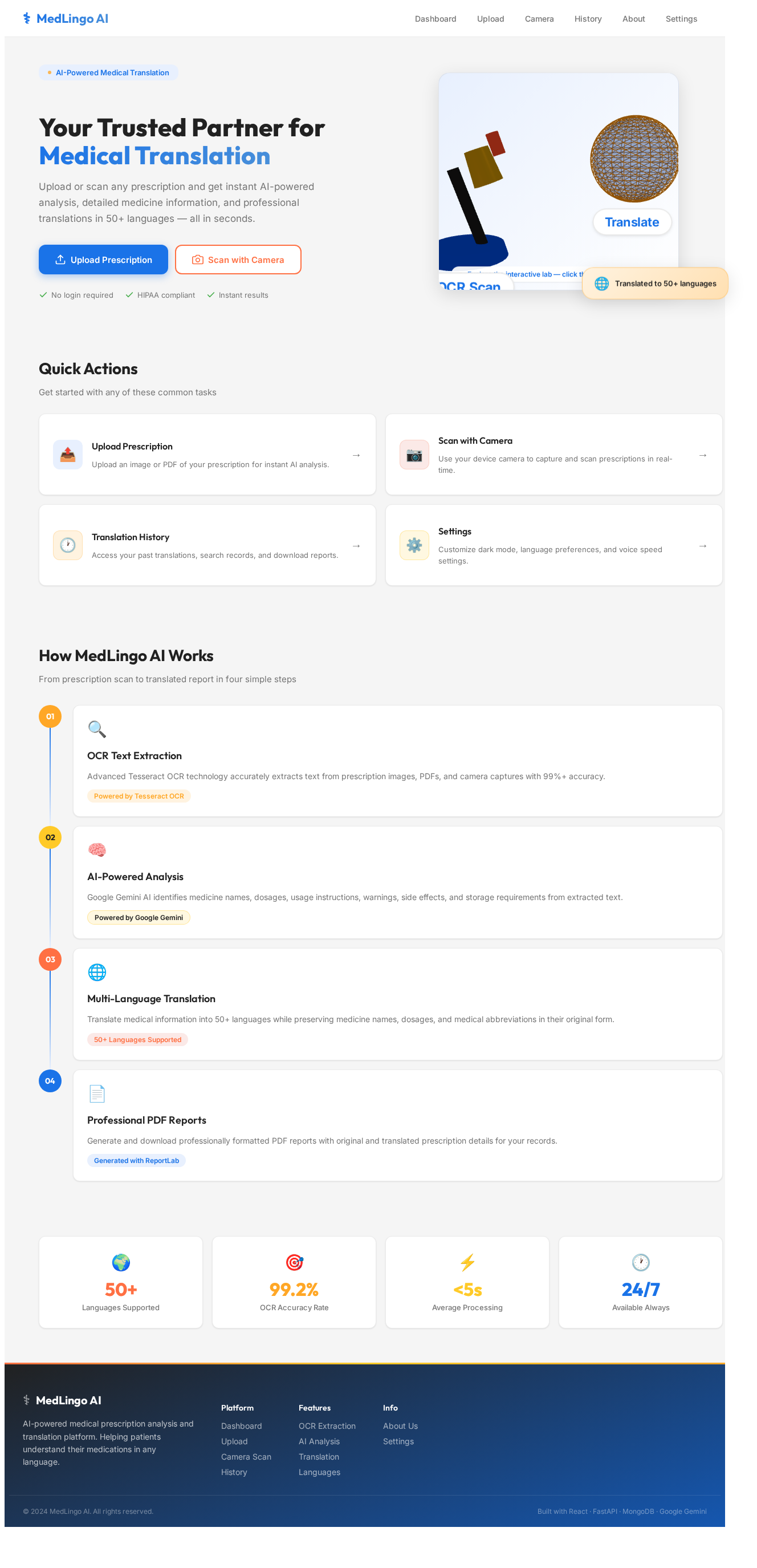
You are a Senior Full Stack Developer, AI Engineer, UI/UX Designer, OCR Expert and Product Architect. Build a COMPLETE LIVE WORKING web application called "MedLingo AI". This is a professional AI Medical Translator platform. Do NOT build a simple college project. Build a premium healthcare SaaS website. ========================================= PROJECT GOAL ========================================= Patients upload or scan a medical prescription. The system extracts the prescription text using OCR. Google Gemini AI analyzes the prescription. The application identifies all medicines and displays: • Medicine Name • Usage • Daily Dose • Short Description • Warnings After analysis, the user can translate the complete medical information into any selected language. Medicine names, dosage, mg, ml and medical abbreviations MUST NEVER be translated. ========================================= TECH STACK ========================================= Frontend - React JS - Vite - Tailwind CSS - shadcn/ui - Framer Motion - Lucide React - Axios Backend - FastAPI (Python) Database - MongoDB Atlas AI - Google Gemini API OCR - Tesseract OCR PDF - ReportLab ========================================= APPLICATION FLOW ========================================= Do NOT create Login. Do NOT create Signup. When the application starts, open the Dashboard directly. ========================================= DASHBOARD ========================================= Create a modern premium dashboard. Top Navigation Logo: MedLingo AI Menu Dashboard History About Settings Dark Mode Toggle Hero Section Title AI Medical Translator Subtitle Translate medical prescriptions using Artificial Intelligence. Create two large action cards. Card 1 Scan Prescription Card 2 Upload Prescription ========================================= SCAN PRESCRIPTION ========================================= When the user clicks Scan Prescription Open the device camera. Allow taking a photo. After capturing Automatically process the image. ========================================= UPLOAD PRESCRIPTION ========================================= Allow Image Upload PDF Upload Drag and Drop Upload Preview uploaded file. ========================================= OCR ========================================= Use Tesseract OCR. Extract text from Printed Prescription Handwritten Prescription Images PDF Display OCR loading animation. ========================================= AI ANALYSIS ========================================= Use Google Gemini API. Analyze the extracted prescription. Identify every medicine. For each medicine display Medicine Name Usage Daily Dose Short Description Warnings Side Effects Storage Doctor Instructions ========================================= TRANSLATE ========================================= Each medicine card must contain a large button Translate When the button is clicked Open a Language Selection Dialog. Supported Languages English Telugu Hindi Tamil Kannada Malayalam Marathi Gujarati Punjabi Bengali French German Spanish Arabic Japanese Chinese Korean Russian And any language supported by Gemini. After selecting the language Translate ONLY Usage Dose Instructions Warnings Short Description Doctor Instructions Do NOT translate Medicine Names mg ml Dosage Disease Names Medical Abbreviations ========================================= TRANSLATION PAGE ========================================= Show Original Information Translated Information Medicine Cards Copy Button Download PDF Button Listen Audio Button Clear Button ========================================= VOICE ========================================= Read translated text aloud. ========================================= PDF ========================================= Generate professional PDF. Include Hospital Style Layout Original Prescription Translated Prescription Medicine Details Warnings Doctor Instructions QR Code Date & Time ========================================= HISTORY ========================================= Save every translation in MongoDB. Allow Search Delete Open Previous Reports Download PDF Again ========================================= ABOUT ========================================= Explain Application Technology How AI Works Benefits ========================================= SETTINGS ========================================= Dark Mode Language Voice Speed ========================================= UI DESIGN ========================================= Build a premium UI inspired by Google Gemini Apple Microsoft Copilot Linear Use Glassmorphism Blue Gradient Rounded Cards Smooth Animations Modern Typography Professional Healthcare Theme Responsive Design Desktop Laptop Tablet Mobile ========================================= PROJECT STRUCTURE ========================================= frontend backend components pages hooks services utils assets database models routes api ========================================= IMPORTANT Generate a REAL WORKING APPLICATION. Do not create placeholder components. Connect FastAPI with React. Connect MongoDB. Integrate Gemini API. Integrate OCR. Integrate PDF Generation. Generate reusable React components. Use clean architecture. The project must successfully run using npm install npm run dev The final application should look like a professional healthcare SaaS product suitable for a final-year engineering project.

DashboardLanguageAnalysisUpload
Dashboard

Comments (0)

No comments yet. Be the first!

System Requirements

System Requirement Document

System Requirements Document for project-2e063554

Introduction

The project, titled "project-2e063554," is a professional AI Medical Translator platform named "MedLingo AI." This platform is designed to provide a premium healthcare SaaS experience, allowing patients to upload or scan medical prescriptions, which are then analyzed and translated using advanced AI technologies.

System Overview

MedLingo AI is a web application that leverages OCR and AI to extract, analyze, and translate medical prescription information. The system is designed to provide users with detailed insights into their prescriptions, including medicine names, usage, dosage, and warnings, while offering translation capabilities into multiple languages. The application is built using a modern tech stack, ensuring a seamless and professional user experience.

Page 1 of 5

Functional Requirements

  • As a Patient, I should be able to upload or scan a medical prescription.
  • As a System, I should extract text from prescriptions using Tesseract OCR.
  • As a System, I should analyze the extracted text using Google Gemini AI.
  • As a System, I should identify and display medicine details such as name, usage, daily dose, short description, warnings, side effects, storage, and doctor instructions.
  • As a Patient, I should be able to translate the medical information into any selected language, excluding medicine names, dosage, mg, ml, and medical abbreviations.
  • As a Patient, I should be able to view original and translated information on the Translation Page.
  • As a Patient, I should be able to listen to the translated text aloud.
  • As a Patient, I should be able to generate and download a professional PDF of the prescription.
  • As a Patient, I should be able to view and manage my translation history, including searching, deleting, and downloading previous reports.
  • As a User, I should be able to access information about the application, technology, AI workings, and benefits.
  • As a User, I should be able to customize settings such as dark mode, language, and voice speed.

User Personas

  • Patient: Individuals who need to understand and translate their medical prescriptions.
  • System: The backend processes that handle OCR, AI analysis, and translation.
Page 2 of 5

Core User Flows

  • Patient uploads or scans a prescription -> System extracts text using OCR -> AI analyzes prescription -> Displays medicine details -> Patient selects language for translation -> System translates selected information -> Patient views original and translated information -> Patient downloads PDF or listens to audio.
  • Patient accesses history -> Searches or deletes past translations -> Downloads previous reports.

Visuals Colors and Theme

  • primary: #1A73E8 (a deep blue inspired by healthcare and technology)
  • primary_light: #E8F0FE (a lighter blue for hover states)
  • secondary: #FF7043 (a coral hue for emphasis and links)
  • accent: #FFCA28 (a vibrant amber for CTAs and active states)
  • highlight: #FFA726 (a warm orange for notifications and active indicators)
  • bg: #F5F5F5 (a light grey for the page background)
  • surface: rgba(255, 255, 255, 0.9) (a white card/panel background)
  • text: #212121 (a dark grey for primary text)
  • text_muted: #757575 (a softer grey for secondary text)
  • border: rgba(0, 0, 0, 0.1) (a subtle grey for borders)
Page 3 of 5

Signature Design Concept

The homepage of MedLingo AI will feature an interactive 3D medical lab environment using @react-three/fiber and @react-three/drei. Users will navigate through a virtual lab where each section represents a different feature of the application. For instance, clicking on a microscope opens the OCR feature, while a globe represents the translation capabilities. The environment will be dynamic, with elements reacting to user interactions, such as hovering or clicking, creating an engaging and memorable experience.

Interaction Model & Motion Direction

The landing page will utilize a "parallax" interaction model, creating a layered depth effect as users scroll. Decorative elements will move at different speeds, enhancing the storytelling aspect of the platform. Internal pages will maintain a "static" model for clarity and ease of use, focusing on functionality over decoration.

Non-Functional Requirements

  • The application must be responsive and accessible across all devices, including desktops, laptops, tablets, and mobile phones.
  • The system should ensure data privacy and security, especially concerning patient information.
  • The application should provide a seamless and fast user experience, with minimal loading times.
Page 4 of 5

Tech Stack

  • Frontend: React JS, Vite, Tailwind CSS, shadcn/ui, Framer Motion, Lucide React, Axios
  • Backend: FastAPI (Python)
  • Database: MongoDB Atlas
  • AI: Google Gemini API
  • OCR: Tesseract OCR
  • PDF: ReportLab

Assumptions and Constraints

  • The application will not include login or signup features, starting directly at the dashboard.
  • The system will rely on the Google Gemini API for AI analysis and translation capabilities.
  • The application must integrate seamlessly with FastAPI and MongoDB.

Glossary

  • OCR: Optical Character Recognition, a technology used to extract text from images.
  • AI: Artificial Intelligence, used here for analyzing and translating medical prescriptions.
  • SaaS: Software as a Service, a software distribution model in which applications are hosted by a service provider and made available to customers over the internet.
Page 5 of 5
Dashboard design preview
Dashboard: View Hero
Dashboard: Scan Prescription
Camera: Capture Photo
OCR: View Extraction
Dashboard: Upload Prescription
Analysis: View Medicine Details
Analysis: Click Translate
Language: Select Language
Translation: View Translated Info
Translation: Listen Audio
Translation: Download PDF
History: Search Reports
History: Delete Report
About: View Info
Settings: Customize Preferences
Dashboard design preview
Dashboard: View Hero
Dashboard: Scan Prescription
Camera: Capture Photo
OCR: View Extraction
Dashboard: Upload Prescription
Analysis: View Medicine Details
Analysis: Click Translate
Language: Select Language
Translation: View Translated Info
Translation: Listen Audio
Translation: Download PDF
History: Search Reports
History: Delete Report
About: View Info
Settings: Customize Preferences