project-2435184f
 Anand Patil
B2B Contextual Knowledge Base Rewriter The Problem: Development teams ship updates constantly and write messy, highly technical changelogs or git commits. Product managers and customer support teams then waste hours translating that jargon into clean, customer-facing FAQs or documentation. The Micro-SaaS: An integration that hooks into a company's deployment pipeline or release tags. It pulls raw release notes and uses a tailored LLM pipeline to auto-generate beautifully formatted user guides, public changelogs, and support center copy matching the company's brand voice. Target Audience: Engineering managers, small B2B SaaS teams. Monetization: $39–$79/month team tier.


Comments (0)
Sign in to leave a comment
Project Tasks
106Define Database Schema
As a Data Engineer, I want to define the database schema for users, release notes, and documentation to ensure data is stored efficiently and securely.
Setup CI/CD Pipeline
As a DevOps Engineer, I want to set up a CI/CD pipeline to automate testing and deployment of the application.
Implement CTASection for Landing
As a frontend developer, implement the CTASection for the Landing page. This section includes a call-to-action with a title, subtitle, and a button linking to the Login page. Ensure the layout matches the design and the button is styled as per the CSS provided. This section is accessible to all personas. Page access: shared by all personas (B2B SaaS Team, Customer Support Team Member, Engineering Manager, Product Manager).
Implement FeaturesSection for Landing
As a frontend developer, implement the FeaturesSection for the Landing page. This section displays a grid of features, each with an icon, title, and description. Ensure the grid layout and styling match the provided CSS. This section is accessible to all personas. Page access: shared by all personas (B2B SaaS Team, Customer Support Team Member, Engineering Manager, Product Manager).
Implement Footer for Landing
As a frontend developer, implement the Footer for the Landing page. This section includes multiple columns with links to various pages. Ensure the layout and styling match the provided CSS. Note that links to restricted pages must be conditionally shown based on persona access. Page access: shared by all personas (B2B SaaS Team, Customer Support Team Member, Engineering Manager, Product Manager).
Implement HeroSection for Landing
As a frontend developer, implement the HeroSection for the Landing page. This section includes animated elements using motion/react, with interactive mouse movement effects. Ensure animations are smooth and responsive, and the layout matches the design. This section is accessible to all personas. Page access: shared by all personas (B2B SaaS Team, Customer Support Team Member, Engineering Manager, Product Manager).
Implement HowItWorksSection for Landing
As a frontend developer, implement the HowItWorksSection for the Landing page. This section displays a step-by-step process with icons and descriptions. Ensure the grid layout and styling match the provided CSS. This section is accessible to all personas. Page access: shared by all personas (B2B SaaS Team, Customer Support Team Member, Engineering Manager, Product Manager).
Implement Navbar for Landing
As a frontend developer, implement the Navbar for the Landing page. This section includes a responsive navigation bar with links and a toggleable menu. Ensure the scroll effect and menu toggle functionality work as expected. This section is accessible to all personas. Page access: shared by all personas (B2B SaaS Team, Customer Support Team Member, Engineering Manager, Product Manager).
Implement PricingSection for Landing
As a frontend developer, implement the PricingSection for the Landing page. This section displays pricing tiers with features and call-to-action buttons. Ensure the layout and styling match the provided CSS. This section is accessible to all personas. Page access: shared by all personas (B2B SaaS Team, Customer Support Team Member, Engineering Manager, Product Manager).
Implement PipelineSidebar for LLMPipeline
As a frontend developer, implement the PipelineSidebar section which includes navigation items for different sections of the pipeline. This component uses state to manage mobile view toggling and active section highlighting. Ensure that the sidebar is responsive and accessible only to the B2B SaaS Team. Page access: B2B SaaS Team only.
Implement PipelineOverview for LLMPipeline
As a frontend developer, implement the PipelineOverview section which displays metrics and a data flow diagram of the pipeline stages. This section includes interactive elements like buttons for managing stages and displays real-time metrics. It is accessible only by the B2B SaaS Team. Page access: B2B SaaS Team only.
Implement TransformationStagesConfig for LLMPipeline
As a frontend developer, implement the TransformationStagesConfig section which allows configuration of each transformation stage. This section includes interactive elements like toggles, sliders, and dropdowns for setting parameters. It is accessible only by the B2B SaaS Team. Page access: B2B SaaS Team only.
Implement StageAdvancedOptions for LLMPipeline
As a frontend developer, implement the StageAdvancedOptions section which provides advanced configuration options for each stage. This section includes state management for system prompts, retry logic, and example input/output pairs. It is accessible only by the B2B SaaS Team. Page access: B2B SaaS Team only.
Implement BrandVoiceBasic for LLMPipeline
As a frontend developer, implement the BrandVoiceBasic section which allows configuration of brand voice settings. This section includes interactive elements for selecting tone descriptors and editing writing guidelines. It is accessible only by the B2B SaaS Team. Page access: B2B SaaS Team only.
Implement BrandVoiceGlossary for LLMPipeline
As a frontend developer, implement the BrandVoiceGlossary section which allows management of a glossary of terms. This section includes functionality for adding, editing, and removing terms. It is accessible only by the B2B SaaS Team. Page access: B2B SaaS Team only.
Implement BrandVoiceAnalyzer for LLMPipeline
As a frontend developer, implement the BrandVoiceAnalyzer section which analyzes text against configured brand voice settings. This section includes functionality for text input, analysis, and displaying feedback. It is accessible only by the B2B SaaS Team. Page access: B2B SaaS Team only.
Implement TemplateSelector for LLMPipeline
As a frontend developer, implement the TemplateSelector section which allows selection and management of documentation templates. This section includes interactive elements for selecting templates and previewing or editing them. It is accessible only by the B2B SaaS Team. Page access: B2B SaaS Team only.
Implement UserGuidesSearch for UserGuides
As a frontend developer, implement the UserGuidesSearch section which includes a search input with a clear button. The search input should update its value based on user input and clear the input when the clear button is clicked. This section is accessible only by the Customer Support Team Member persona. Page access: Customer Support Team Member only.
Implement UserGuidesFilters for UserGuides
As a frontend developer, implement the UserGuidesFilters section which includes dropdowns for filtering and sorting guides. The dropdowns should be interactive, allowing users to select filter and sort options. This section is accessible only by the Customer Support Team Member persona. Page access: Customer Support Team Member only.
Implement UserGuidesGrid for UserGuides
As a frontend developer, implement the UserGuidesGrid section which displays a list of guide cards. Each card includes a title, description, type icon, and a bookmark button. The bookmark button should toggle its state when clicked. This section is accessible only by the Customer Support Team Member persona. Page access: Customer Support Team Member only.
Implement UserGuidesPagination for UserGuides
As a frontend developer, implement the UserGuidesPagination section which includes pagination controls for navigating through pages of guides. The pagination should support both desktop and mobile views, with a 'Load More' button for mobile. This section is accessible only by the Customer Support Team Member persona. Page access: Customer Support Team Member only.
Implement ChangelogFilters for Changelog
As a frontend developer, implement the ChangelogFilters section for the Changelog page. This section includes filter options for different types of changelog entries such as 'All', 'Features', 'Bug Fixes', 'Improvements', and 'Security'. It uses a state hook to manage the active filter and provides buttons for each filter option, as well as a clear button to reset filters. Additionally, implement a mobile-friendly select dropdown for filters. This section is accessible by Customer Support Team Members and Product Managers. Page access: Customer Support Team Member, Product Manager only.
Implement ChangelogTimeline for Changelog
As a frontend developer, implement the ChangelogTimeline section for the Changelog page. This section displays a timeline of changelog entries, each with a version, date, and list of items including features, improvements, fixes, and security updates. Each item includes a title, description, and detailed information. Use state hooks to manage the display of detailed information for each entry. This section is accessible by Customer Support Team Members and Product Managers. Page access: Customer Support Team Member, Product Manager only.
Implement SupportCopySearch for SupportCopy
As a frontend developer, implement the SupportCopySearch section which includes a search input with a clear button. The input should update the search value via the onChange function, and the clear button should reset the search field. This section is accessible only by the Customer Support Team Member persona. Page access: Customer Support Team Member only.
Implement SupportCopyFilterSort for SupportCopy
As a frontend developer, implement the SupportCopyFilterSort section which includes dropdowns for filtering and sorting articles. The dropdowns should toggle visibility and update the active filter or sort option via the onFilterChange and onSortChange functions. This section is accessible only by the Customer Support Team Member persona. Page access: Customer Support Team Member only.
Implement SupportCopyGrid for SupportCopy
As a frontend developer, implement the SupportCopyGrid section which displays a grid of articles. Each article card should include a title, excerpt, category badge, publication date, and read time. The renderCopyButton function should be used to include a copy button for each article. This section is accessible only by the Customer Support Team Member persona. Page access: Customer Support Team Member only.
Implement SupportCopyCopyButton for SupportCopy
As a frontend developer, implement the SupportCopyCopyButton component which allows users to copy article content to the clipboard. The button should display a 'Copied!' tooltip when the content is successfully copied. This section is accessible only by the Customer Support Team Member persona. Page access: Customer Support Team Member only.
Implement SupportCopyPagination for SupportCopy
As a frontend developer, implement the SupportCopyPagination component which provides pagination controls for navigating through pages of articles. The component should handle page changes and display the current page out of total pages. This section is accessible only by the Customer Support Team Member persona. Page access: Customer Support Team Member only.
Implement SearchBarSection for ReleaseNotes
As a frontend developer, implement the SearchBarSection which includes a search input for filtering release notes by title, version, or content. It features a clear button and displays the count of search results. This section is accessible only by the Engineering Manager persona. Page access: Engineering Manager only.
Implement FilterControlsSection for ReleaseNotes
As a frontend developer, implement the FilterControlsSection which allows filtering of release notes by date range, source, status, and sort order. It includes mobile toggle functionality and displays the count of active filters. This section is accessible only by the Engineering Manager persona. Page access: Engineering Manager only.
Implement ExtractionStatus for ReleaseNotes
As a frontend developer, implement the ExtractionStatus section which displays the current status of the extraction pipeline, including progress, queue count, success and failure rates, and last extraction time. This section is accessible only by the Engineering Manager persona. Page access: Engineering Manager only.
Implement RawReleaseNotesListSection for ReleaseNotes
As a frontend developer, implement the RawReleaseNotesListSection which displays a paginated list of release notes with actions to view, copy, and send notes. It includes pagination controls and source icons. This section is accessible only by the Engineering Manager persona. Page access: Engineering Manager only.
Implement ReleaseNotesDetailModalSection for ReleaseNotes
As a frontend developer, implement the ReleaseNotesDetailModalSection which displays detailed information about a release note in a modal. It includes syntax highlighting for versions and commit hashes, and actions to copy full text or send to documentation. This section is accessible only by the Engineering Manager persona. Page access: Engineering Manager only.
Implement LogViewerSection for ReleaseNotes
As a frontend developer, implement the LogViewerSection which displays extraction logs with options to expand/collapse error details and toggle auto-scroll. It uses a ref for auto-scrolling and manages expanded errors with state. This section is accessible only by the Engineering Manager persona. Page access: Engineering Manager only.
Implement LogFilterSection for ReleaseNotes
As a frontend developer, implement the LogFilterSection which provides controls to filter logs by level, stage, and search terms. It includes actions to clear filters and download logs. This section is accessible only by the Engineering Manager persona. Page access: Engineering Manager only.
Deploy develop branch to stage
Deploy the current develop branch to the stage environment for this product. Do not implement code changes.
Deploy develop branch to stage
Deploy the current develop branch to the stage environment for this product. Do not implement code changes.
Create Database Migrations
As a Data Engineer, I want to create database migrations using Alembic to manage schema changes over time.
Implement API Authentication
As a Backend Developer, I want to implement JWT-based authentication to secure API endpoints for different personas.
Implement Navbar for Login
As a frontend developer, implement the Navbar section for the Login page. This component includes a responsive navigation bar with links to Documentation, Changelog, and Release Notes. It features a scroll effect that changes the navbar style when the page is scrolled, and a burger menu for mobile view. The component also includes buttons for 'Log In' and 'Start Free'. Ensure that links to restricted pages are conditionally shown based on the user's persona. This component may already exist from the Landing page. Page access: shared by all personas (B2B SaaS Team, Customer Support Team Member, Engineering Manager, Product Manager).
Develop Release Notes API
As a Backend Developer, I want to develop an API to handle release notes extraction and storage, accessible only by Engineering Managers.
Implement Role-Based Access Control
As a Backend Developer, I want to implement RBAC to ensure that only authorized personas can access specific API endpoints.
Implement LoginForm for Login
As a frontend developer, implement the LoginForm section for the Login page. This form includes fields for email and password, with validation for both. It features a 'Remember Me' checkbox and a 'Forgot Password?' link. The form uses state hooks to manage input values and validation errors. Ensure the form is accessible to B2B SaaS Team, Customer Support Team Member, Engineering Manager, and Product Manager personas. Page access: shared by all personas (B2B SaaS Team, Customer Support Team Member, Engineering Manager, Product Manager).
Implement LoginSocial for Login
As a frontend developer, implement the LoginSocial section for the Login page. This component provides buttons for social login options, including Google and GitHub. It uses a mock OAuth flow for demonstration purposes. Ensure the component is styled according to the design and accessible to the relevant personas. Page access: shared by all personas (B2B SaaS Team, Customer Support Team Member, Engineering Manager, Product Manager).
Implement LoginSignup for Login
As a frontend developer, implement the LoginSignup section for the Login page. This component provides a link for users to sign up if they don't have an account. Ensure the link is styled correctly and accessible to all relevant personas. Page access: shared by all personas (B2B SaaS Team, Customer Support Team Member, Engineering Manager, Product Manager).
Implement Footer for Login
As a frontend developer, implement the Footer section for the Login page. This component includes multiple columns with links to various sections such as Product, Support, and Account. Ensure the footer is styled consistently with the rest of the application and is accessible to all relevant personas. This component may already exist from the Landing page. Page access: shared by all personas (B2B SaaS Team, Customer Support Team Member, Engineering Manager, Product Manager).
Implement DashboardSidebar for Dashboard
As a frontend developer, implement the DashboardSidebar section which includes a collapsible sidebar with menu items such as 'Dashboard', 'Pipeline', 'LLM Pipeline', and more. The sidebar should allow toggling between collapsed and expanded states using a button, and display the selected project name. Ensure that links to restricted pages like 'Billing' and 'Brand Voice' are conditionally shown based on the user's persona. Page access: shared by all personas (B2B SaaS Team, Customer Support Team Member, Engineering Manager, Product Manager).
Implement Documentation Generation API
As a Backend Developer, I want to implement an API that processes release notes through the LLM pipeline to generate documentation.
Setup Frontend Routing
As a Frontend Developer, I want to set up routing for the application to ensure users can navigate to different pages based on their roles.
Implement DashboardHeader for Dashboard
As a frontend developer, implement the DashboardHeader section which includes breadcrumbs navigation and action buttons for 'Generate Docs' and 'New Project'. Ensure the header is styled according to the design and integrates seamlessly with the rest of the dashboard layout. Page access: shared by all personas (B2B SaaS Team, Customer Support Team Member, Engineering Manager, Product Manager).
Implement OverviewStats for Dashboard
As a frontend developer, implement the OverviewStats section which displays key statistics such as 'Total Projects', 'Docs Generated This Month', 'AI Generations', and 'Team Members'. Each stat card should display an icon, label, value, and change indicator with appropriate styling and color coding. Page access: shared by all personas (B2B SaaS Team, Customer Support Team Member, Engineering Manager, Product Manager).
Implement QuickActions for Dashboard
As a frontend developer, implement the QuickActions section which provides buttons for actions like 'Create New Project', 'Generate Documentation', and 'Review Draft Docs'. Each button should be styled with an icon and color, and should be interactive. Page access: shared by all personas (B2B SaaS Team, Customer Support Team Member, Engineering Manager, Product Manager).
Implement RecentActivity for Dashboard
As a frontend developer, implement the RecentActivity section which displays a list of recent activities with filters for 'All', 'Success', and 'Pending'. Each activity should show an icon, actor, action, timestamp, and status badge. Implement state management for filtering activities. Page access: shared by all personas (B2B SaaS Team, Customer Support Team Member, Engineering Manager, Product Manager).
Implement ProjectList for Dashboard
As a frontend developer, implement the ProjectList section which displays a sortable and filterable table of projects. The table should allow sorting by 'Project Name', 'Status', 'Last Updated', and 'Docs This Month'. Implement state management for sorting and filtering. Page access: shared by all personas (B2B SaaS Team, Customer Support Team Member, Engineering Manager, Product Manager).
Implement PipelineHeader for LLMPipeline
As a frontend developer, implement the PipelineHeader section which includes a breadcrumb navigation and a page title with description. This section is accessible only by the B2B SaaS Team and should integrate with the existing DashboardSidebar component from the Dashboard page. Ensure the breadcrumb accurately reflects the navigation path within the LLMPipeline page. Page access: B2B SaaS Team only.
Implement SettingsTopBar for Settings
As a frontend developer, implement the SettingsTopBar section which includes a back button with an SVG icon to navigate back in history, a title 'Settings', and a link to 'Help & Documentation'. This section is accessible by B2B SaaS Team and Engineering Manager. Ensure the back button is functional and the help link opens in a new tab. Page access: B2B SaaS Team, Engineering Manager only.
Implement BillingHeader for Billing
As a frontend developer, implement the BillingHeader section which includes a breadcrumb navigation and a title with a description. This section is accessible by B2B SaaS Team and Engineering Manager. Ensure that the breadcrumb navigation correctly reflects the user's path within the application. Page access: B2B SaaS Team, Engineering Manager only.
Implement UserGuidesHeader for UserGuides
As a frontend developer, implement the UserGuidesHeader section which includes a title, subtitle, and a tab navigation system. The tabs ('All', 'Getting Started', 'Advanced Features', 'Troubleshooting') should be interactive, changing the active tab state when clicked. This section is accessible only by the Customer Support Team Member persona. Ensure that the component integrates with the existing Dashboard page as per the dependency. Page access: Customer Support Team Member only.
Implement ChangelogHeader for Changelog
As a frontend developer, implement the ChangelogHeader section for the Changelog page. This section includes a breadcrumb navigation with links to the Dashboard and the current Changelog page, a title and description about updates to RelayDocs, and a search input for filtering changelog entries. Ensure the search input is accessible with appropriate aria-labels. This section is accessible by Customer Support Team Members and Product Managers. Note that links to restricted pages must be conditionally shown. Page access: Customer Support Team Member, Product Manager only.
Implement SupportCopyHeader for SupportCopy
As a frontend developer, implement the SupportCopyHeader section which includes a title, subtitle, and category tabs for filtering support articles. The tabs should highlight the active category and trigger the onCategoryChange function when clicked. This section is accessible only by the Customer Support Team Member persona. Ensure the component integrates with the existing Navbar from the Dashboard page. Page access: Customer Support Team Member only.
Implement PipelineHeader for Pipeline
As a frontend developer, implement the PipelineHeader section which includes a breadcrumb navigation and a page title for the Pipeline page. This section is accessible only by the Engineering Manager persona and should display the current page context. Ensure that the breadcrumb accurately reflects the navigation path. This section depends on the Dashboard page components. Page access: Engineering Manager only.
Implement DocHeader for Documentation
As a frontend developer, implement the DocHeader section for the Documentation page. This section includes a breadcrumb navigation linking back to the Dashboard, a title 'Generated Documentation', and action buttons for refreshing, exporting, and accessing settings. It also displays status badges showing the number of drafts and published documents. This section is accessible by B2B SaaS Team and Product Manager personas. Page access: B2B SaaS Team, Product Manager only.
Integrate ReleaseNotes API
As a Tech Lead, verify the end-to-end integration between the ReleaseNotes frontend implementation and the ReleaseNotes API. Ensure data flows correctly, API responses are handled properly in the UI, and all interactions work as expected.
QA Authentication Flow
As a QA Engineer, I want to test the authentication flow to ensure users can log in and access their respective dashboards.
Implement SettingsNav for Settings
As a frontend developer, implement the SettingsNav section which includes a navigation menu with categories such as 'Account', 'Team Members', 'Security', etc. The section uses state hooks to manage mobile menu visibility and active category highlighting. It also employs an IntersectionObserver to update the active category based on scroll position. This section is accessible by B2B SaaS Team and Engineering Manager. Page access: B2B SaaS Team, Engineering Manager only.
Implement AccountSettingsSection for Settings
As a frontend developer, implement the AccountSettingsSection which includes a form for updating account details such as account name, email, and display name. It features avatar upload functionality and uses state hooks to manage form data and save status. This section is accessible by B2B SaaS Team and Engineering Manager. Page access: B2B SaaS Team, Engineering Manager only.
Implement TeamMembersListSection for Settings
As a frontend developer, implement the TeamMembersListSection which displays a list of team members with options to filter by role, sort by name or join date, and change member roles. It uses state hooks to manage members and filters. This section is accessible by B2B SaaS Team and Engineering Manager. Page access: B2B SaaS Team, Engineering Manager only.
Implement TeamMemberAddSection for Settings
As a frontend developer, implement the TeamMemberAddSection which allows adding new team members by email and role, with an optional bulk invite feature. It uses state hooks to manage form inputs and displays success or error messages. This section is accessible by B2B SaaS Team and Engineering Manager. Page access: B2B SaaS Team, Engineering Manager only.
Implement TwoFactorAuthSection for Settings
As a frontend developer, implement the TwoFactorAuthSection which allows users to enable or disable two-factor authentication. It includes a toggle switch for 2FA status and displays recovery codes when 2FA is enabled. This section is accessible by B2B SaaS Team and Engineering Manager. Page access: B2B SaaS Team, Engineering Manager only.
Implement PasswordChangeSection for Settings
As a frontend developer, implement the PasswordChangeSection which allows users to change their password. It includes fields for current, new, and confirm password, with password strength evaluation and visibility toggles. This section is accessible by B2B SaaS Team and Engineering Manager. Page access: B2B SaaS Team, Engineering Manager only.
Implement SessionManagementSection for Settings
As a frontend developer, implement the SessionManagementSection which displays active sessions and allows users to log out of specific sessions or all other sessions. It uses state hooks to manage session data. This section is accessible by B2B SaaS Team and Engineering Manager. Page access: B2B SaaS Team, Engineering Manager only.
Implement LoginActivitySection for Settings
As a frontend developer, implement the LoginActivitySection which displays login activity with options to filter by time range and export activity data. It uses state hooks to manage filter and export status. This section is accessible by B2B SaaS Team and Engineering Manager. Page access: B2B SaaS Team, Engineering Manager only.
Implement CurrentPlan for Billing
As a frontend developer, implement the CurrentPlan section which displays the user's current subscription plan details, including plan name, cost, and billing cycle. It includes interactive buttons for upgrading, downgrading, and canceling the subscription. This section is accessible by B2B SaaS Team and Engineering Manager. Page access: B2B SaaS Team, Engineering Manager only.
Implement BillingHistory for Billing
As a frontend developer, implement the BillingHistory section which displays a list of past invoices with sorting and filtering capabilities. It includes a table with invoice details and buttons for exporting data. This section is accessible by B2B SaaS Team and Engineering Manager. Page access: B2B SaaS Team, Engineering Manager only.
Implement PaymentMethod for Billing
As a frontend developer, implement the PaymentMethod section which displays the user's saved payment methods and allows adding, editing, and removing cards. It includes a security message about data encryption. This section is accessible by B2B SaaS Team and Engineering Manager. Page access: B2B SaaS Team, Engineering Manager only.
Implement BillingFAQ for Billing
As a frontend developer, implement the BillingFAQ section which provides answers to common billing questions. It includes an accordion-style interface for expanding and collapsing answers. This section is accessible by B2B SaaS Team and Engineering Manager. Page access: B2B SaaS Team, Engineering Manager only.
Implement DeploymentPlatforms for Pipeline
As a frontend developer, implement the DeploymentPlatforms section which displays a grid of deployment platforms with their connection status. This section allows the Engineering Manager to select a platform for configuration. Each platform card should show a status badge indicating 'Connected', 'Not Connected', or 'Error'. The section should handle platform selection via the onSelect callback. Page access: Engineering Manager only.
Implement ExtractionRules for Pipeline
As a frontend developer, implement the ExtractionRules section which allows the Engineering Manager to define regex, tag, and file path patterns for extracting release notes. This section includes a form with text inputs and a save button that triggers a demo alert. Ensure the form handles state updates for each pattern input. Page access: Engineering Manager only.
Implement PipelineStatus for Pipeline
As a frontend developer, implement the PipelineStatus section which displays the current state of the pipeline, last extraction time, extractions count, and API health status. This section is accessible only by the Engineering Manager persona and should visually represent the pipeline's health using a color-coded indicator. Page access: Engineering Manager only.
Implement FilterAndSearch for Documentation
As a frontend developer, implement the FilterAndSearch section for the Documentation page. This section includes a search input for filtering documents by title or content and a toggleable filter panel with options for status, release version, date range, and sorting. It uses state to manage filter visibility and updates. This section is accessible by B2B SaaS Team and Product Manager personas. Page access: B2B SaaS Team, Product Manager only.
Implement DocumentationList for Documentation
As a frontend developer, implement the DocumentationList section for the Documentation page. This section displays a list of documents with columns for title, version, status, date, and actions. It includes interactive buttons for viewing, editing, comparing, and deleting documents. The list is styled with status colors and supports selection highlighting. This section is accessible by B2B SaaS Team and Product Manager personas. Page access: B2B SaaS Team, Product Manager only.
Implement BrandVoiceHeader for BrandVoice
As a frontend developer, implement the BrandVoiceHeader section which includes a breadcrumb navigation linking to the Dashboard, a title, a description, and an info badge. This section is accessible by the B2B SaaS Team and Product Manager. Ensure the breadcrumb correctly reflects the navigation path and the info badge provides contextual information about the settings' application. This section depends on the LLMPipeline page tasks. Page access: B2B SaaS Team, Product Manager only.
Implement ReleaseNotesHeader for ReleaseNotes
As a frontend developer, implement the ReleaseNotesHeader section which includes breadcrumb navigation, a page title, and action buttons for refreshing extraction, manual upload, and downloading. It also displays a summary of extracted notes, last extraction time, and connection status. This section is accessible only by the Engineering Manager persona. Ensure that the component integrates with the existing PipelineHeader from the Pipeline page. Page access: Engineering Manager only.
Integrate Pipeline API
As a Tech Lead, verify the end-to-end integration between the Pipeline frontend implementation and the Pipeline API. Ensure data flows correctly, API responses are handled properly in the UI, and all interactions work as expected.
Implement PlatformDetails for Pipeline
As a frontend developer, implement the PlatformDetails section which provides configuration options for a selected deployment platform. This section includes an API key input with visibility toggle and buttons for installing or configuring the integration. It should display the platform's connection status and last sync time. This section is accessible only by the Engineering Manager persona. Page access: Engineering Manager only.
Implement ExtractionTesting for Pipeline
As a frontend developer, implement the ExtractionTesting section which allows the Engineering Manager to test extraction rules. This section includes a frequency selector, a test button, and displays test results with a sample output. The test button simulates an extraction test with a loading state and displays a success message upon completion. Page access: Engineering Manager only.
Implement StatusActions for Pipeline
As a frontend developer, implement the StatusActions section which provides quick actions for the Engineering Manager to pause/resume the pipeline, force an extraction, and view logs. This section includes modal dialogs for confirmation of force extraction and uses state to toggle pipeline status. Page access: Engineering Manager only.
Implement DocumentDetail for Documentation
As a frontend developer, implement the DocumentDetail section for the Documentation page. This section displays detailed information about a selected document, including title, version, generation date, last modified date, author, and AI confidence score. It also includes a table of contents and generation notes. This section is accessible by B2B SaaS Team and Product Manager personas. Page access: B2B SaaS Team, Product Manager only.
Implement VoicePresets for BrandVoice
As a frontend developer, implement the VoicePresets section which allows users to select from predefined voice presets. This section uses state to manage the active preset and updates the UI accordingly. It is accessible by the B2B SaaS Team and Product Manager. Ensure the preset cards visually indicate the selected state and apply the correct accent color. Page access: B2B SaaS Team, Product Manager only.
Implement ToneCustomizer for BrandVoice
As a frontend developer, implement the ToneCustomizer section which includes sliders for adjusting tone dimensions and an input for custom keywords. This section uses state to manage slider values and keywords, updating the preview text dynamically. It is accessible by the B2B SaaS Team and Product Manager. Ensure the sliders visually represent the selected values and update the preview text accordingly. Page access: B2B SaaS Team, Product Manager only.
Implement VoiceSamples for BrandVoice
As a frontend developer, implement the VoiceSamples section which displays before and after examples of release notes. This section is accessible by the B2B SaaS Team and Product Manager. Ensure the formatted output reflects the current style settings and the transition between raw and formatted content is clear. Page access: B2B SaaS Team, Product Manager only.
Implement OutputPreview for BrandVoice
As a frontend developer, implement the OutputPreview section which provides a customer-facing preview of the changelog. This section is accessible by the B2B SaaS Team and Product Manager. Ensure the preview accurately reflects the selected voice settings and includes metadata such as version and release date. Page access: B2B SaaS Team, Product Manager only.
Implement SaveAndApply for BrandVoice
As a frontend developer, implement the SaveAndApply section which includes buttons for saving, previewing, and discarding changes, as well as a toggle for automatic application to future releases. This section uses state to manage save status and auto-apply settings. It is accessible by the B2B SaaS Team and Product Manager. Ensure the save confirmation message displays correctly and the toggle updates the auto-apply state. Page access: B2B SaaS Team, Product Manager only.
Implement TemplatesHeader for Templates
As a frontend developer, implement the TemplatesHeader section which includes a search bar with dynamic search input handling, buttons for importing and creating new templates, and displays the total count of templates. This section is accessible only by the B2B SaaS Team and should conditionally render based on persona access. Ensure the search input updates the state and the buttons trigger the respective actions. This section depends on the BrandVoice page components. Page access: B2B SaaS Team only.
Integrate BrandVoice API
As a Tech Lead, verify the end-to-end integration between the BrandVoice frontend implementation and the BrandVoice API. Ensure data flows correctly, API responses are handled properly in the UI, and all interactions work as expected.
Implement LogViewer for Pipeline
As a frontend developer, implement the LogViewer section which displays a sortable table of integration logs. This section allows the Engineering Manager to view logs sorted by timestamp, event type, description, and status. Implement sorting functionality and ensure logs are displayed with appropriate status classes. Page access: Engineering Manager only.
Implement VersionComparison for Documentation
As a frontend developer, implement the VersionComparison section for the Documentation page. This section allows users to compare the current document version with the previous one. It includes a toggle to expand/collapse the comparison view and displays differences in a side-by-side panel layout. This section is accessible by B2B SaaS Team and Product Manager personas. Page access: B2B SaaS Team, Product Manager only.
Implement TemplatesGrid for Templates
As a frontend developer, implement the TemplatesGrid section which displays a grid of templates filtered by category and search query. It includes interactive elements for sorting and filtering templates, and handles actions like preview, edit, duplicate, delete, and share. This section is accessible only by the B2B SaaS Team and should ensure that the grid updates dynamically based on user interactions. Page access: B2B SaaS Team only.
Implement TemplatesCTA for Templates
As a frontend developer, implement the TemplatesCTA section which encourages users to configure their Brand Voice. It includes a call-to-action button linking to the Brand Voice configuration page. This section is accessible only by the B2B SaaS Team and should ensure the link is conditionally shown based on persona access. Page access: B2B SaaS Team only.
Integrate Documentation API
As a Tech Lead, verify the end-to-end integration between the Documentation frontend implementation and the Documentation API. Ensure data flows correctly, API responses are handled properly in the UI, and all interactions work as expected.
Implement LogControls for Pipeline
As a frontend developer, implement the LogControls section which provides filtering and export options for the Engineering Manager to manage logs. This section includes date filters, event type selection, and buttons to export logs to CSV or clear all logs with confirmation modals. Page access: Engineering Manager only.
Implement WorkflowStatus for Documentation
As a frontend developer, implement the WorkflowStatus section for the Documentation page. This section visualizes the document's workflow stages using a timeline with steps for Draft, Review, Approved, Published, and Archived. It highlights the current stage and displays version history. This section is accessible by B2B SaaS Team and Product Manager personas. Page access: B2B SaaS Team, Product Manager only.
Implement TemplatesPreview for Templates
As a frontend developer, implement the TemplatesPreview section which provides a detailed view of a selected template. It includes metadata display, tags, and a template prompt block. The section should handle keyboard events for closing the preview and support actions like edit and duplicate. This section is accessible only by the B2B SaaS Team. Page access: B2B SaaS Team only.
Implement EditActions for Documentation
As a frontend developer, implement the EditActions section for the Documentation page. This section provides buttons for editing and regenerating document content. It triggers respective callbacks for these actions. This section is accessible by B2B SaaS Team and Product Manager personas. Page access: B2B SaaS Team, Product Manager only.
Integrate Templates API
As a Tech Lead, verify the end-to-end integration between the Templates frontend implementation and the Templates API. Ensure data flows correctly, API responses are handled properly in the UI, and all interactions work as expected.
Implement ApprovalPanel for Documentation
As a frontend developer, implement the ApprovalPanel section for the Documentation page. This section allows users to approve and publish documents, add review notes, and archive versions. It includes conditional rendering based on the document's workflow state. This section is accessible by B2B SaaS Team and Product Manager personas. Page access: B2B SaaS Team, Product Manager only.
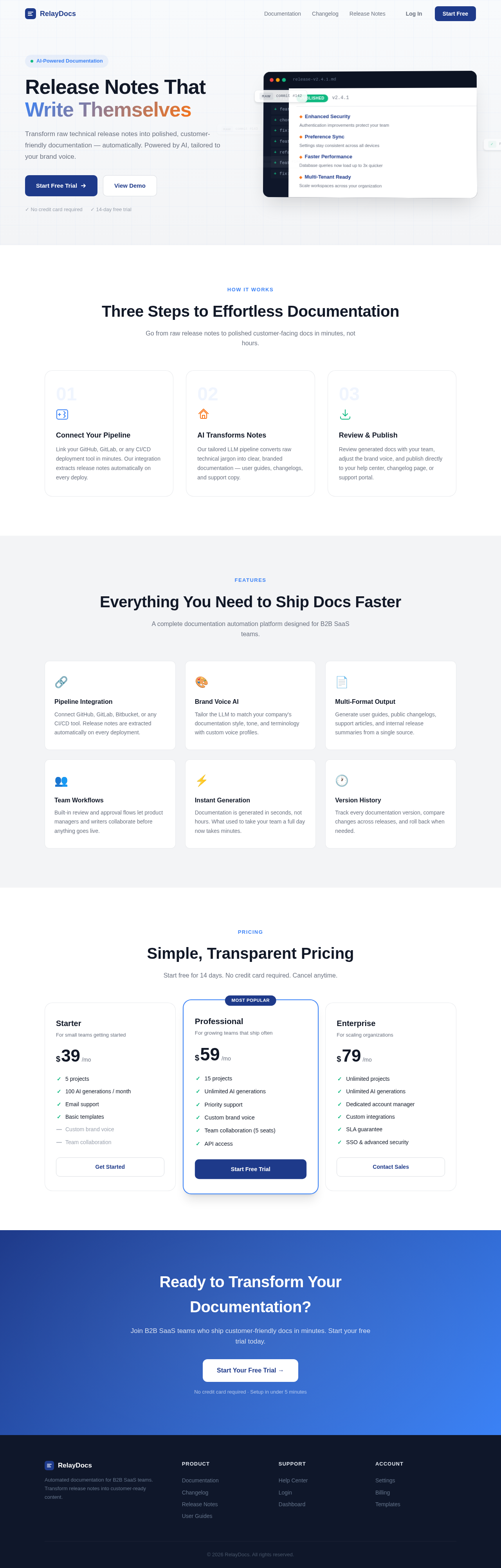
Release Notes That Write Themselves
Transform raw technical release notes into polished, customer-friendly documentation — automatically. Powered by AI, tailored to your brand voice.
Three Steps to Effortless Documentation
Go from raw release notes to polished customer-facing docs in minutes, not hours.
Connect Your Pipeline
Link your GitHub, GitLab, or any CI/CD deployment tool in minutes. Our integration extracts release notes automatically on every deploy.
AI Transforms Notes
Our tailored LLM pipeline converts raw technical jargon into clear, branded documentation — user guides, changelogs, and support copy.
Review & Publish
Review generated docs with your team, adjust the brand voice, and publish directly to your help center, changelog page, or support portal.
Everything You Need to Ship Docs Faster
A complete documentation automation platform designed for B2B SaaS teams.
Pipeline Integration
Connect GitHub, GitLab, Bitbucket, or any CI/CD tool. Release notes are extracted automatically on every deployment.
Brand Voice AI
Tailor the LLM to match your company's documentation style, tone, and terminology with custom voice profiles.
Multi-Format Output
Generate user guides, public changelogs, support articles, and internal release summaries from a single source.
Team Workflows
Built-in review and approval flows let product managers and writers collaborate before anything goes live.
Instant Generation
Documentation is generated in seconds, not hours. What used to take your team a full day now takes minutes.
Version History
Track every documentation version, compare changes across releases, and roll back when needed.
Simple, Transparent Pricing
Start free for 14 days. No credit card required. Cancel anytime.
Starter
For small teams getting started
- ✓5 projects
- ✓100 AI generations / month
- ✓Email support
- ✓Basic templates
- —Custom brand voice
- —Team collaboration
Professional
For growing teams that ship often
- ✓15 projects
- ✓Unlimited AI generations
- ✓Priority support
- ✓Custom brand voice
- ✓Team collaboration (5 seats)
- ✓API access
Enterprise
For scaling organizations
- ✓Unlimited projects
- ✓Unlimited AI generations
- ✓Dedicated account manager
- ✓Custom integrations
- ✓SLA guarantee
- ✓SSO & advanced security
Ready to Transform Your Documentation?
Join B2B SaaS teams who ship customer-friendly docs in minutes. Start your free trial today.
No credit card required · Setup in under 5 minutes
Release Notes That Write Themselves
Transform raw technical release notes into polished, customer-friendly documentation — automatically. Powered by AI, tailored to your brand voice.
Three Steps to Effortless Documentation
Go from raw release notes to polished customer-facing docs in minutes, not hours.
Connect Your Pipeline
Link your GitHub, GitLab, or any CI/CD deployment tool in minutes. Our integration extracts release notes automatically on every deploy.
AI Transforms Notes
Our tailored LLM pipeline converts raw technical jargon into clear, branded documentation — user guides, changelogs, and support copy.
Review & Publish
Review generated docs with your team, adjust the brand voice, and publish directly to your help center, changelog page, or support portal.
Everything You Need to Ship Docs Faster
A complete documentation automation platform designed for B2B SaaS teams.
Pipeline Integration
Connect GitHub, GitLab, Bitbucket, or any CI/CD tool. Release notes are extracted automatically on every deployment.
Brand Voice AI
Tailor the LLM to match your company's documentation style, tone, and terminology with custom voice profiles.
Multi-Format Output
Generate user guides, public changelogs, support articles, and internal release summaries from a single source.
Team Workflows
Built-in review and approval flows let product managers and writers collaborate before anything goes live.
Instant Generation
Documentation is generated in seconds, not hours. What used to take your team a full day now takes minutes.
Version History
Track every documentation version, compare changes across releases, and roll back when needed.
Simple, Transparent Pricing
Start free for 14 days. No credit card required. Cancel anytime.
Starter
For small teams getting started
- ✓5 projects
- ✓100 AI generations / month
- ✓Email support
- ✓Basic templates
- —Custom brand voice
- —Team collaboration
Professional
For growing teams that ship often
- ✓15 projects
- ✓Unlimited AI generations
- ✓Priority support
- ✓Custom brand voice
- ✓Team collaboration (5 seats)
- ✓API access
Enterprise
For scaling organizations
- ✓Unlimited projects
- ✓Unlimited AI generations
- ✓Dedicated account manager
- ✓Custom integrations
- ✓SLA guarantee
- ✓SSO & advanced security
Ready to Transform Your Documentation?
Join B2B SaaS teams who ship customer-friendly docs in minutes. Start your free trial today.
No credit card required · Setup in under 5 minutes
No comments yet. Be the first!