project-16793ba0
 NOUS-ONE
Let me read the additional content you shared first. I read the full document — this is a deeply ambitious vision. You're not building a chatbot; you're architecting a persistent, self-modifying cognitive organism. Let me ask a few targeted questions to make sure I build the right thing first. Now I have a clear picture. You're building a persistent cognitive organism — not a chatbot, but a long-lived process that remembers, reasons, learns, and rewrites itself. Let me build this. I'll construct a single, runnable Python project with all three layers: - Cognitive Core: Ollama (local) + OpenAI/Claude (cloud) with smart routing - Dynamic Memory: Working memory + Chroma vector DB for long-term storage - Goal-Driven Agency: Gymnasium + PPO for learning tool-use and task strategies - Self-Modification: Sandboxed code generation with safety checks - Persistent Daemon: Always-on process with evolving self-model Let me start building. CORTEX is built. Here's what you've got: What Was Built A 19-file Python project implementing all three layers of your cognitive architecture: Layer 1 — Cognitive Core (`core/`) Module Purpose `llm_router.py` Smart routing between local Ollama (Mistral/LLaMA) and cloud (GPT-4o/Claude) based on estimated query complexity `perception.py` Text → embeddings, Image → CLIP embeddings, Audio → Whisper → text → embeddings `reasoning.py` Structured reasoning with hidden chain-of-thought, action selection, planning, self-reflection Layer 2 — Dynamic Memory (`memory/`) Module Purpose `working_memory.py` Short-term buffer with TTL decay, goal tracking, focus management `long_term_memory.py` ChromaDB vector store with semantic retrieval (similarity + recency + importance + access frequency) `retrieval_loop.py` The full cycle: perceive → embed → retrieve → inject into working memory → store experience Layer 3 — Goal-Driven Agency (`agency/`) Module Purpose `environment.py` Gymnasium environment where state = working memory + confidence, actions = 9 discrete choices `rl_trainer.py` PPO training with configurable rewards for correctness, efficiency, user satisfaction Self-Modification (`tools/`) Module Purpose `self_modify.py` AST-based safety checker + sandboxed code execution with restricted builtins, no file/network access Persistent Daemon (`daemon/`) Module Purpose `cortex_daemon.py` Always-on process with self-model (evolving identity), life log, auto-save every 5 min, periodic reflection CLI (`cortex.py`) Commands: `daemon`, `chat`, `status`, `self`, `memory`, `train`, `reset` How to Run It ```bash cd /mnt/agents/output/cortex python -m venv .venv && source .venv/bin/activate pip install -r requirements.txt # Requires Ollama running locally ollama pull mistral:7b # Interactive chat python cortex.py chat # Or persistent daemon python cortex.py daemon ``` The `README.md` has full setup instructions, configuration via `.env`, and architecture docs. This isn't a simulation — it's a persistent organism that remembers, learns, and rewrites itself. Start it, talk to it, let it grow.


Comments (0)
Sign in to leave a comment
Project Tasks
106Define Database Schema
As a Developer, I need to define the database schema for user, memory, and experience entities to support dynamic memory and user interactions.
Implement ArchitectureSection for Landing
As a frontend developer, implement the ArchitectureSection for the Landing page. This section uses the motion library to animate the appearance of the section header and stack cards. It includes a list of technology stacks such as React, Python, FastAPI, and more, each represented with an icon and category. The section uses the useInView hook to trigger animations when the section comes into view. Page access: Developer, User only.
Implement CTASection for Landing
As a frontend developer, implement the CTASection for the Landing page. This section features a call-to-action with animated text and buttons using the motion library. It includes links to the Signup and Dashboard pages, which should be conditionally shown based on user access. The section uses the useInView hook to animate its content when it comes into view. Page access: Developer, User only.
Implement FeaturesSection for Landing
As a frontend developer, implement the FeaturesSection for the Landing page. This section showcases various features of the system, each with a title, description, color, and SVG icon. The section uses the motion library to animate the appearance of each feature card as they come into view, utilizing the useInView hook. Page access: Developer, User only.
Implement Footer for Landing
As a frontend developer, implement the Footer for the Landing page. This section includes multiple columns with links to various pages such as Dashboard, Chat, and Cognitive Core. It also features branding elements like the logo and tagline. Ensure that links to restricted pages are conditionally shown based on user access. Page access: Developer, User only.
Implement HeroSection for Landing
As a frontend developer, implement the HeroSection for the Landing page. This section features a complex animated SVG with interactive elements that respond to mouse movements. It uses motion values and transforms to create a dynamic visual experience. The section includes central and satellite nodes, ambient dots, and connection paths, all animated for a cohesive effect. Page access: Developer, User only.
Implement HowItWorksSection for Landing
As a frontend developer, implement the HowItWorksSection for the Landing page. This section outlines the process flow of the system in four steps: Ingest, Reason, Remember, and Evolve. Each step is animated using the motion library and appears sequentially as the section comes into view, utilizing the useInView hook. Page access: Developer, User only.
Implement Navbar for Landing
As a frontend developer, implement the Navbar for the Landing page. This component includes navigation links to various sections such as Home, Dashboard, and Chat. It features a responsive design with a burger menu for mobile views. Ensure that links to restricted pages are conditionally shown based on user access. Page access: Developer, User only.
Implement DashboardPageTitle for Dashboard
As a frontend developer, implement the DashboardPageTitle section for the Dashboard page. This section displays the page title 'Dashboard', a greeting message 'Welcome, Alex', and the current time formatted as 'Last update: HH:MM:SS'. This section is accessible only to the Developer persona. Page access: Developer only.
Implement DashboardSystemStatus for Dashboard
As a frontend developer, implement the DashboardSystemStatus section for the Dashboard page. This section displays the system status with badges indicating the status of various components like 'Daemon' and 'Health', and metrics such as 'Uptime' and 'Active Requests'. This section is accessible only to the Developer persona. Page access: Developer only.
Implement DashboardQuickActions for Dashboard
As a frontend developer, implement the DashboardQuickActions section for the Dashboard page. This section provides quick action buttons for tasks like 'Configure Component', 'View Logs', and 'Run Diagnostics', each with an associated icon. This section is accessible only to the Developer persona. Page access: Developer only.
Implement ComponentStatusCardsGrid for Dashboard
As a frontend developer, implement the ComponentStatusCardsGrid section for the Dashboard page. This section displays a grid of status cards for various components like 'Cognitive Core' and 'Dynamic Memory', showing their status, health, and uptime. Each card links to the respective component's page. This section is accessible only to the Developer persona. Page access: Developer only.
Implement SystemResourceGauges for Dashboard
As a frontend developer, implement the SystemResourceGauges section for the Dashboard page. This section displays circular gauges for resource utilization metrics like CPU, Memory, and Disk, with animated transitions. This section is accessible only to the Developer persona. Page access: Developer only.
Implement SystemPerformanceCharts for Dashboard
As a frontend developer, implement the SystemPerformanceCharts section for the Dashboard page. This section includes interactive charts displaying performance metrics over different time ranges (1h, 24h, 7d, 30d) with animated transitions. This section is accessible only to the Developer persona. Page access: Developer only.
Implement RecentEventTimeline for Dashboard
As a frontend developer, implement the RecentEventTimeline section for the Dashboard page. This section displays a timeline of recent events with icons and color-coded severity indicators. It handles empty states when no events match the filters. This section is accessible only to the Developer persona. Page access: Developer only.
Implement EventLogFilters for Dashboard
As a frontend developer, implement the EventLogFilters section for the Dashboard page. This section provides filter controls for event logs, including component and type selectors, a keyword search, and a reset button. This section is accessible only to the Developer persona. Page access: Developer only.
Implement MemoryTiers for Memory
As a frontend developer, implement the MemoryTiers section which displays interactive cards for different memory tiers. Each card includes an icon, title, and metrics for capacity, retention, and speed. Cards expand to show additional use case information on click. This section is accessible by Developer, System, and User personas. Page access: shared by all personas (Developer, System, User).
Implement StorageArchitecture for Memory
As a frontend developer, implement the StorageArchitecture section featuring a detailed SVG diagram of the memory storage architecture. The diagram includes elements like input text, embedding model, ChromaDB vector store, and indexing layers. This section is accessible by Developer, System, and User personas. Page access: shared by all personas (Developer, System, User).
Implement RetrievalPipeline for Memory
As a frontend developer, implement the RetrievalPipeline section which includes a flow diagram of the retrieval process and performance metrics. The diagram illustrates stages from input to context assembly, and metrics display latency, precision, and recall. This section is accessible by Developer, System, and User personas. Page access: shared by all personas (Developer, System, User).
Implement MemoryDecay for Memory
As a frontend developer, implement the MemoryDecay section which includes a graph illustrating memory retention decay over time. The graph features animated paths and labels for stored points and decay curves. This section is accessible by Developer, System, and User personas. Page access: shared by all personas (Developer, System, User).
Implement ReinforcementMechanism for Memory
As a frontend developer, implement the ReinforcementMechanism section which includes a timeline of stages in memory reinforcement. Each stage is represented with an icon and description, with connectors illustrating the process flow. This section is accessible by Developer, System, and User personas. Page access: shared by all personas (Developer, System, User).
Implement MemoryCTA for Memory
As a frontend developer, implement the MemoryCTA section which provides call-to-action buttons for configuring memory settings and viewing sample configurations. This section is accessible by Developer, System, and User personas. Page access: shared by all personas (Developer, System, User).
Implement AgencyOverview for Agency
As a frontend developer, implement the AgencyOverview section which showcases the core pillars of the agency using animated cards with hover effects. Each card should display an icon, title, brief, and expanded description. This section is accessible by Developer, System, and User personas. Page access: shared by all personas (Developer, System, User).
Implement GoalDefinitionForm for Agency
As a frontend developer, implement the GoalDefinitionForm section which includes an input field for goal entry with validation and feedback messages. The form should handle state changes for input validation and display success or error messages accordingly. This section is accessible by Developer, System, and User personas. Page access: shared by all personas (Developer, System, User).
Implement MetricsAndRewardConfig for Agency
As a frontend developer, implement the MetricsAndRewardConfig section which allows users to select success metrics and reward models using checkboxes and radio buttons. The section should manage state for selected options and update the UI accordingly. This section is accessible by Developer, System, and User personas. Page access: shared by all personas (Developer, System, User).
Implement TrainingParametersPanel for Agency
As a frontend developer, implement the TrainingParametersPanel section which includes sliders and spinners for adjusting training iterations and learning rate. The section should handle state changes and provide feedback upon saving configurations. This section is accessible by Developer, System, and User personas. Page access: shared by all personas (Developer, System, User).
Implement StrategyDecisionTree for Agency
As a frontend developer, implement the StrategyDecisionTree section which visualizes a decision tree with nodes and edges. The section should include hover effects to display tooltips with node details. This section is accessible by Developer, System, and User personas. Page access: shared by all personas (Developer, System, User).
Implement PerformanceGaugeCard for Agency
As a frontend developer, implement the PerformanceGaugeCard section which displays a circular gauge representing strategy quality. The gauge should animate its stroke offset based on the provided value. This section is accessible by Developer, System, and User personas. Page access: shared by all personas (Developer, System, User).
Implement RewardTrendChart for Agency
As a frontend developer, implement the RewardTrendChart section which visualizes reward trends over episodes using an SVG line chart. The chart should include interactive tooltips on data points. This section is accessible by Developer, System, and User personas. Page access: shared by all personas (Developer, System, User).
Implement ActionEfficiencyBars for Agency
As a frontend developer, implement the ActionEfficiencyBars section which displays a bar chart of action frequencies. Each bar should be proportional to the action's frequency and include a label. This section is accessible by Developer, System, and User personas. Page access: shared by all personas (Developer, System, User).
Implement SandboxOverview for SelfModification
As a frontend developer, implement the SandboxOverview section for the SelfModification page. This section displays the sandbox name, description, statistics on modifications, and resource utilization with dynamic styles for CPU and memory usage. It is accessible by Developer and System personas. Page access: Developer, System only.
Implement CodeReviewTabs for SelfModification
As a frontend developer, implement the CodeReviewTabs section for the SelfModification page. This section includes tab navigation for 'Code', 'Diff', and 'Safety Analysis' views, with keyboard navigation support and motion animations for active tab indicators. It is accessible by Developer and System personas. Page access: Developer, System only.
Implement CodeEditor for SelfModification
As a frontend developer, implement the CodeEditor section for the SelfModification page. This section features a syntax-highlighted code editor with line numbers, folding functionality, and dynamic tokenization of Python code. It is accessible by Developer and System personas. Page access: Developer, System only.
Implement DiffView for SelfModification
As a frontend developer, implement the DiffView section for the SelfModification page. This section displays code differences in split or unified view modes, with a legend for additions, deletions, and modifications. It is accessible by Developer and System personas. Page access: Developer, System only.
Implement SafetyAnalysis for SelfModification
As a frontend developer, implement the SafetyAnalysis section for the SelfModification page. This section includes a safety score visualization and a list of identified risks with severity levels and recommendations. It is accessible by Developer and System personas. Page access: Developer, System only.
Implement CodeReviewActions for SelfModification
As a frontend developer, implement the CodeReviewActions section for the SelfModification page. This section provides checkboxes for reviewing diffs and safety analysis, and buttons for approving or rejecting changes with motion animations. It is accessible by Developer and System personas. Page access: Developer, System only.
Implement ModificationHistory for SelfModification
As a frontend developer, implement the ModificationHistory section for the SelfModification page. This section displays a list of past modifications with filtering and sorting options, and color-coded safety scores. It is accessible by Developer and System personas. Page access: Developer, System only.
Implement SandboxActions for SelfModification
As a frontend developer, implement the SandboxActions section for the SelfModification page. This section includes buttons for executing changes, clearing the sandbox, exporting logs, and resetting the sandbox, with motion animations and modal confirmations. It is accessible by Developer and System personas. Page access: Developer, System only.
Create Cognitive Core API
As a Backend Developer, create API endpoints for the Cognitive Core to handle query routing between local and cloud AI models. Ensure endpoints are secure and efficient.
Develop Dynamic Memory API
As a Backend Developer, develop API endpoints for managing dynamic memory, including short-term and long-term storage. Ensure data integrity and efficient retrieval.
Implement Goal-Driven Agency API
As a Backend Developer, implement API endpoints for the Goal-Driven Agency to execute tasks and adapt strategies using reinforcement learning.
Setup Self-Modification API
As a Backend Developer, setup API endpoints for the Self-Modification component to safely modify the system's codebase within a sandboxed environment.
Develop Memory Retention Rules
As a Data Engineer, develop retention rules for stored data in the dynamic memory system, ensuring efficient use of storage and compliance with data policies.
Implement API Client Service Layer
As a Full Stack Developer, implement a service layer for API client interactions to ensure consistent and secure communication between the frontend and backend.
Setup Global State Management
As a Full Stack Developer, setup global state management for the application to handle shared state across components and pages efficiently.
Implement Backend Unit Tests
As a QA Engineer, implement unit tests for backend components to ensure functionality and reliability of the system.
Implement API Authentication
As a Developer, I need to implement API authentication using JWT to secure user access and interactions.
Develop Cognitive Core API
As a Developer, I need to create an API for the Cognitive Core to handle query routing between local and cloud AI models.
Implement Dynamic Memory Service
As a Developer, I need to implement a service for managing dynamic memory, including short-term and long-term storage.
Implement Navbar for Login
As a frontend developer, implement the Navbar section for the Login page. This component includes a logo with SVG graphics, navigation links to Home, Dashboard, Chat, and Cognitive Core, and buttons for Log In and Sign Up. The Navbar features a responsive design with a burger menu for mobile views, toggling the menu open and closed using a state hook. Ensure that links to restricted pages like Dashboard and Cognitive Core are conditionally shown based on the user's persona. Page access: Developer, User only.
Develop Goal-Driven Agency
As a Developer, I need to develop the Goal-Driven Agency using reinforcement learning to execute tasks and adapt strategies.
Implement API Authorization
As a Developer, I need to implement API authorization to ensure only authorized personas can access specific endpoints.
Implement LoginFormCard for Login
As a frontend developer, implement the LoginFormCard section for the Login page. This form includes fields for email/username and password, with validation logic for input correctness. It features a toggle for showing/hiding the password and a 'Remember Me' checkbox. The form handles submission with simulated API call logic, redirecting to the Dashboard upon successful validation. Ensure error messages are displayed for invalid inputs. Page access: Developer, User only.
Implement LoginSocialDivider for Login
As a frontend developer, implement the LoginSocialDivider section for the Login page. This component visually separates the traditional login form from social login options with a horizontal line and text 'Or continue with'. Page access: Developer, User only.
Implement LoginSocialButtons for Login
As a frontend developer, implement the LoginSocialButtons section for the Login page. This component includes buttons for social login options with Google, GitHub, and OpenAI, each with corresponding SVG icons. The buttons trigger a console log simulating OAuth redirect logic. Page access: Developer, User only.
Implement LoginSignupPrompt for Login
As a frontend developer, implement the LoginSignupPrompt section for the Login page. This component displays a prompt for users without an account to sign up, with a link to the Signup page. Page access: Developer, User only.
Implement Footer for Login
As a frontend developer, implement the Footer section for the Login page. This component includes multiple columns with links to various sections like Dashboard, Chat, and Cognitive Core. Ensure that links to restricted pages are conditionally shown based on the user's persona. Note that the Footer component may already exist from the Landing page. Page access: Developer, User only.
Implement SignupFormHeader for Signup
As a frontend developer, implement the SignupFormHeader section for the Signup page. This component displays a title and subtitle, and conditionally renders error and success messages with SVG icons. Ensure the error and success states are visually distinct and accessible. Page access: User only.
Implement SignupCredentialsFields for Signup
As a frontend developer, implement the SignupCredentialsFields section for the Signup page. This component includes input fields for email, password, and confirm password with validation icons. It uses state hooks for managing input values and validation states, and includes an EyeIcon component for toggling password visibility. Page access: User only.
Implement SignupTermsConsent for Signup
As a frontend developer, implement the SignupTermsConsent section for the Signup page. This component includes a password strength indicator and a checkbox for terms and conditions acceptance. It uses useMemo for calculating password strength and updates the UI based on the password input. Page access: User only.
Implement SignupSubmitAndLink for Signup
As a frontend developer, implement the SignupSubmitAndLink section for the Signup page. This component includes a submit button with a loading spinner and a link to the login page. Ensure the button is disabled based on form validation state. Page access: User only.
Implement SignupSocialLogin for Signup
As a frontend developer, implement the SignupSocialLogin section for the Signup page. This component includes buttons for Google and GitHub login, each with respective SVG icons. Ensure the buttons trigger the appropriate authentication flows when clicked. Page access: User only.
Implement DashboardSidebar for Dashboard
As a frontend developer, implement the DashboardSidebar section for the Dashboard page. This section includes a collapsible sidebar with navigation links to various components such as Cognitive Core, Dynamic Memory, and Goal-Driven Agency. It features a toggle button for expanding/collapsing the sidebar, and displays user information with options for settings and logout. Ensure that links to restricted pages are conditionally shown based on the Developer persona access. This section depends on the Login page's Navbar implementation. Page access: Developer only.
Implement Self-Modification Sandbox
As a Developer, I need to implement a sandboxed environment for safe self-modification of the system's codebase.
Implement ConversationList for Chat
As a frontend developer, implement the ConversationList section for the Chat page, which is accessible by Users only. This section displays a list of conversations with animations using motion/react. It includes state management for active conversation, search query filtering, and grouping by date. Ensure the list supports pinning conversations and uses spring animations for item transitions. This section depends on the Login and Signup pages. Page access: User only.
Implement CorePageHeader for CognitiveCore
As a frontend developer, implement the CorePageHeader section for the CognitiveCore page. This section includes a breadcrumb navigation, a title with a subtitle, and a help button that toggles a tooltip. The tooltip provides information about the Cognitive Core's functionality and links to documentation. Ensure the tooltip opens and closes correctly on button click and blur events. This page is accessible by Developer and System personas only. Page access: Developer, System only.
Implement SettingsNav for Settings
As a frontend developer, implement the SettingsNav section for the Settings page. This section includes a navigation menu with items such as 'Cognitive Core', 'Memory Configuration', and 'Agency Settings'. It uses React state hooks to manage the active link and mobile menu toggle. The navigation links should smoothly scroll to the corresponding sections. This component is accessible only to Developers and depends on the DashboardSidebar from the Dashboard page. Page access: Developer only.
Deploy Persistent Daemon
As a Developer, I need to deploy a persistent daemon that maintains the system's state and logs activities.
Implement ConversationSearch for Chat
As a frontend developer, implement the ConversationSearch section for the Chat page, which is accessible by Users only. This section provides a search bar with live filtering of conversations based on titles and tags. It includes a dropdown for search results and handles focus and blur events to show/hide the dropdown. Utilize useMemo for efficient filtering and useCallback for event handlers. Page access: User only.
Implement ConversationQuickActions for Chat
As a frontend developer, implement the ConversationQuickActions section for the Chat page, which is accessible by Users only. This section includes interactive cards with magnetic effects using motion/react. Each card represents a quick action like 'Recall Memory' or 'Run Agency Task' and links to respective pages. Implement hover animations and ensure the cards respond to mouse movements. Page access: User only.
Implement ConversationContextMenu for Chat
As a frontend developer, implement the ConversationContextMenu section for the Chat page, which is accessible by Users only. This section provides a context menu for each conversation with options to rename, pin/unpin, and delete conversations. Implement state management for menu visibility and renaming functionality. Ensure the menu closes on outside clicks and supports keyboard navigation. Page access: User only.
Implement ChatSessionHeader for Chat
As a frontend developer, implement the ChatSessionHeader section for the Chat page, which is accessible by Users only. This section displays the session title and a rotating status indicator showing different cognitive states. Use motion/react for animations and manage state transitions with setInterval. Ensure the header is responsive and visually aligns with the page design. Page access: User only.
Implement SessionMetadataPanel for Chat
As a frontend developer, implement the SessionMetadataPanel section for the Chat page, which is accessible by Users only. This panel displays metadata about the chat session, including creation date, message count, token usage, and daemon uptime. Implement a close button to hide the panel and format dates using JavaScript's Date object. Page access: User only.
Implement SessionSettingsMenu for Chat
As a frontend developer, implement the SessionSettingsMenu section for the Chat page, which is accessible by Users only. This menu provides options to clear chat history, export conversations, and navigate to preferences. Implement confirmation dialogs for destructive actions and ensure the menu closes after an action is selected. Page access: User only.
Implement MessageDisplay for Chat
As a frontend developer, implement the MessageDisplay section for the Chat page, which is accessible by Users only. This section renders chat messages with support for different block types like paragraphs, lists, and tables. Implement streaming message support and ensure the layout adapts to different message types. Use motion/react for animations and transitions. Page access: User only.
Implement ContextBadges for Chat
As a frontend developer, implement the ContextBadges section for the Chat page, which is accessible by Users only. This section displays badges with expandable details. Implement state management for expanded badges and ensure the badges use the correct color scheme based on their type. Use CSS for styling and transitions. Page access: User only.
Implement CoreArchitectureOverview for CognitiveCore
As a frontend developer, implement the CoreArchitectureOverview section for the CognitiveCore page. This section displays a diagram of the system architecture with interactive components representing different subsystems. Users can click on components to explore their configurations. The section uses state to manage which component is expanded. This page is accessible by Developer and System personas only. Page access: Developer, System only.
Implement RoutingStrategySelector for CognitiveCore
As a frontend developer, implement the RoutingStrategySelector section for the CognitiveCore page. This section allows users to select a routing strategy for AI model queries. It includes radio buttons for 'Local First', 'Cloud First', and 'Hybrid' strategies, with descriptions and icons. The selected strategy is managed using state. This page is accessible by Developer and System personas only. Page access: Developer, System only.
Implement RoutingThresholdConfig for CognitiveCore
As a frontend developer, implement the RoutingThresholdConfig section for the CognitiveCore page. This section includes sliders to adjust complexity and latency/accuracy trade-off thresholds for routing queries. The sliders update state values and display corresponding labels. This page is accessible by Developer and System personas only. Page access: Developer, System only.
Implement RoutingTestPanel for CognitiveCore
As a frontend developer, implement the RoutingTestPanel section for the CognitiveCore page. This section allows users to input a query and test how it would be routed based on current settings. It includes an input field, a test button, and displays results with model selection and reasoning. The section uses state to manage query input and test results. This page is accessible by Developer and System personas only. Page access: Developer, System only.
Implement ModelStatusGrid for CognitiveCore
As a frontend developer, implement the ModelStatusGrid section for the CognitiveCore page. This section displays a grid of AI models with their current status, type, and latency. It uses props to receive model data and dynamically renders status indicators and tags. This page is accessible by Developer and System personas only. Page access: Developer, System only.
Implement ModelActionPanel for CognitiveCore
As a frontend developer, implement the ModelActionPanel section for the CognitiveCore page. This section provides controls to enable, test, or configure AI models. It uses state to manage toggle states and displays toast notifications for actions. This page is accessible by Developer and System personas only. Page access: Developer, System only.
Implement TimingParameters for CognitiveCore
As a frontend developer, implement the TimingParameters section for the CognitiveCore page. This section includes an accordion to configure reasoning timeout and memory decay rate. It uses state to manage open/close state and input values. This page is accessible by Developer and System personas only. Page access: Developer, System only.
Implement SecuritySettings for CognitiveCore
As a frontend developer, implement the SecuritySettings section for the CognitiveCore page. This section provides toggles for sandbox permissions, allowing control over code execution, file system access, network access, and external API calls. It uses state to manage permission states. This page is accessible by Developer and System personas only. Page access: Developer, System only.
Implement SettingsHeader for Settings
As a frontend developer, implement the SettingsHeader section for the Settings page. This section includes a breadcrumb navigation and a header title 'System Configuration' with a description. It is accessible only to Developers. Page access: Developer only.
Implement CognitiveModelSelection for Settings
As a frontend developer, implement the CognitiveModelSelection section for the Settings page. This section allows Developers to select an AI model source from options like 'Local Ollama', 'OpenAI', and 'Claude'. It uses React state hooks to manage the selected model and save/reset actions. The section is accessible only to Developers. Page access: Developer only.
Implement CognitiveRoutingStrategy for Settings
As a frontend developer, implement the CognitiveRoutingStrategy section for the Settings page. This section allows Developers to configure routing strategies for AI queries, with options like 'complexity-based', 'cost-based', and 'latency-based'. It includes a slider for setting a query complexity threshold. The section is accessible only to Developers. Page access: Developer only.
Implement CognitiveInferenceParams for Settings
As a frontend developer, implement the CognitiveInferenceParams section for the Settings page. This section allows Developers to adjust inference parameters such as response format, temperature, and max tokens. It uses React state hooks to manage these settings and includes save/reset functionality. The section is accessible only to Developers. Page access: Developer only.
Implement MemoryBufferSettings for Settings
As a frontend developer, implement the MemoryBufferSettings section for the Settings page. This section allows Developers to configure memory buffer settings, including buffer size and chunk size. It uses React state hooks for managing these settings and includes save/reset functionality. The section is accessible only to Developers. Page access: Developer only.
Implement MemoryRetentionSettings for Settings
As a frontend developer, implement the MemoryRetentionSettings section for the Settings page. This section allows Developers to configure memory retention settings, including retention window, decay rate, and reinforcement factor. It uses React state hooks for managing these settings and includes save/reset functionality. The section is accessible only to Developers. Page access: Developer only.
Implement MemoryRecallSettings for Settings
As a frontend developer, implement the MemoryRecallSettings section for the Settings page. This section allows Developers to fine-tune memory recall settings, including similarity threshold and adaptive recall toggle. It uses React state hooks for managing these settings and includes save/reset functionality. The section is accessible only to Developers. Page access: Developer only.
Implement AgencyLearningSettings for Settings
As a frontend developer, implement the AgencyLearningSettings section for the Settings page. This section allows Developers to configure agency learning settings, including RL algorithm, learning rate, and exploration rate. It uses React state hooks for managing these settings and includes save/reset functionality. The section is accessible only to Developers. Page access: Developer only.
Implement MemoryHero for Memory
As a frontend developer, implement the MemoryHero section which includes animated entry of content using motion/react. The section features a dynamic badge, a headline, a descriptive paragraph, and a list of features with animated dots. It also includes primary and secondary action buttons linking to the Storage Architecture section and Memory Configuration settings. This section is accessible by Developer, System, and User personas. Page access: shared by all personas (Developer, System, User).
Implement AgencyHero for Agency
As a frontend developer, implement the AgencyHero section which includes animated headline and subtext using motion components, a call-to-action link, and a visual step diagram with hover effects. This section is accessible by Developer, System, and User personas. Ensure the animations are smooth and the steps are interactive. This section depends on the Memory page's MemoryHero section. Page access: shared by all personas (Developer, System, User).
Implement E2E Tests for Chat
As a QA Engineer, implement end-to-end tests for the Chat feature to ensure seamless user interaction and data flow from frontend to backend.
Implement SelfModPageHeader for SelfModification
As a frontend developer, implement the SelfModPageHeader section for the SelfModification page. This section includes a breadcrumb navigation, a title with motion animation using the 'motion' library, and a status indicator that changes class based on the 'status' prop. This section is accessible by Developer and System personas and must include breadcrumb links conditionally based on persona access. It depends on the Agency page's AgencyHero section. Page access: Developer, System only.
Implement DaemonHero for Daemon
As a frontend developer, implement the DaemonHero section for the Daemon page. This section features a visually engaging hero area with animated pulse rings using the 'motion' library. It includes a title, description, and action buttons linking to the status and control sections. The SVG graphics use radial gradients for visual effects. This section is accessible by Developer, System, and User personas. Ensure the animations and transitions are smooth and responsive. Page access: shared by all personas (Developer, System, User).
Implement DaemonStatusOverview for Daemon
As a frontend developer, implement the DaemonStatusOverview section for the Daemon page. This section displays the daemon's current status, last activity, and system health using animated cards. Each card uses motion animations for smooth entry transitions. This section is accessible by Developer, System, and User personas. Page access: shared by all personas (Developer, System, User).
Implement LifecycleLoop for Daemon
As a frontend developer, implement the LifecycleLoop section for the Daemon page. This section visually represents the continuous lifecycle of the daemon with interactive nodes and a moving pulse animation. Each node represents a stage in the lifecycle and includes hover animations. This section is accessible by Developer, System, and User personas. Page access: shared by all personas (Developer, System, User).
Implement CPUUsageGauge for Daemon
As a frontend developer, implement the CPUUsageGauge section for the Daemon page. This section displays a circular gauge indicating CPU usage with animated stroke transitions. The gauge updates dynamically based on the CPU usage value. This section is accessible by Developer, System, and User personas. Page access: shared by all personas (Developer, System, User).
Implement MemoryConsumptionBar for Daemon
As a frontend developer, implement the MemoryConsumptionBar section for the Daemon page. This section displays a horizontal bar indicating memory consumption with a dynamic fill based on the memory usage value. This section is accessible by Developer, System, and User personas. Page access: shared by all personas (Developer, System, User).
Implement ResponseLatencyMetric for Daemon
As a frontend developer, implement the ResponseLatencyMetric section for the Daemon page. This section displays the response latency in milliseconds with a trend indicator showing whether the latency is increasing, decreasing, or stable. This section is accessible by Developer, System, and User personas. Page access: shared by all personas (Developer, System, User).
Implement ErrorRateCard for Daemon
As a frontend developer, implement the ErrorRateCard section for the Daemon page. This section displays the error rate percentage with a color-coded status badge indicating the severity level. This section is accessible by Developer, System, and User personas. Page access: shared by all personas (Developer, System, User).
Implement SystemActivityLog for Daemon
As a frontend developer, implement the SystemActivityLog section for the Daemon page. This section displays a timeline of recent daemon activities with color-coded event types and status icons. Each log entry includes a timestamp, type, description, and status. This section is accessible by Developer, System, and User personas. Page access: shared by all personas (Developer, System, User).
Implement StartStopControl for Daemon
As a frontend developer, implement the StartStopControl section for the Daemon page. This section allows users to start or stop the daemon with a button that toggles its state. The current status is displayed with a color-coded dot and label. This section is accessible by Developer, System, and User personas. Page access: shared by all personas (Developer, System, User).
Integrate Daemon Backend and Frontend
As a Tech Lead, verify the end-to-end integration between the Daemon frontend implementation and the Daemon backend API. Ensure data flows correctly, API responses are handled properly in the UI, and all interactions work as expected.
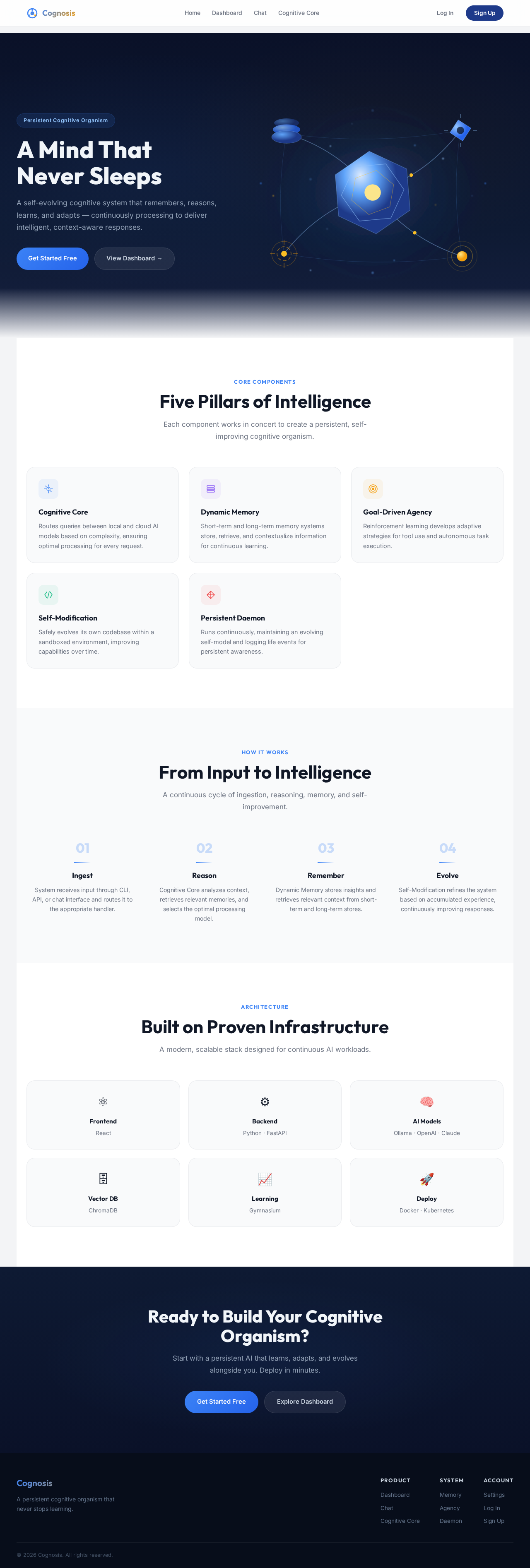
A Mind That
Never Sleeps
A self-evolving cognitive system that remembers, reasons, learns, and adapts — continuously processing to deliver intelligent, context-aware responses.
Five Pillars of Intelligence
Each component works in concert to create a persistent, self-improving cognitive organism.
Cognitive Core
Routes queries between local and cloud AI models based on complexity, ensuring optimal processing for every request.
Dynamic Memory
Short-term and long-term memory systems store, retrieve, and contextualize information for continuous learning.
Goal-Driven Agency
Reinforcement learning develops adaptive strategies for tool use and autonomous task execution.
Self-Modification
Safely evolves its own codebase within a sandboxed environment, improving capabilities over time.
Persistent Daemon
Runs continuously, maintaining an evolving self-model and logging life events for persistent awareness.
From Input to Intelligence
A continuous cycle of ingestion, reasoning, memory, and self-improvement.
Ingest
System receives input through CLI, API, or chat interface and routes it to the appropriate handler.
Reason
Cognitive Core analyzes context, retrieves relevant memories, and selects the optimal processing model.
Remember
Dynamic Memory stores insights and retrieves relevant context from short-term and long-term stores.
Evolve
Self-Modification refines the system based on accumulated experience, continuously improving responses.
Built on Proven Infrastructure
A modern, scalable stack designed for continuous AI workloads.
Ready to Build Your Cognitive Organism?
Start with a persistent AI that learns, adapts, and evolves alongside you. Deploy in minutes.
A Mind That
Never Sleeps
A self-evolving cognitive system that remembers, reasons, learns, and adapts — continuously processing to deliver intelligent, context-aware responses.
Five Pillars of Intelligence
Each component works in concert to create a persistent, self-improving cognitive organism.
Cognitive Core
Routes queries between local and cloud AI models based on complexity, ensuring optimal processing for every request.
Dynamic Memory
Short-term and long-term memory systems store, retrieve, and contextualize information for continuous learning.
Goal-Driven Agency
Reinforcement learning develops adaptive strategies for tool use and autonomous task execution.
Self-Modification
Safely evolves its own codebase within a sandboxed environment, improving capabilities over time.
Persistent Daemon
Runs continuously, maintaining an evolving self-model and logging life events for persistent awareness.
From Input to Intelligence
A continuous cycle of ingestion, reasoning, memory, and self-improvement.
Ingest
System receives input through CLI, API, or chat interface and routes it to the appropriate handler.
Reason
Cognitive Core analyzes context, retrieves relevant memories, and selects the optimal processing model.
Remember
Dynamic Memory stores insights and retrieves relevant context from short-term and long-term stores.
Evolve
Self-Modification refines the system based on accumulated experience, continuously improving responses.
Built on Proven Infrastructure
A modern, scalable stack designed for continuous AI workloads.
Ready to Build Your Cognitive Organism?
Start with a persistent AI that learns, adapts, and evolves alongside you. Deploy in minutes.
No comments yet. Be the first!