project-0c542651
 Ravi Gupta
Create a SaaS platform like Elfsight where users can search, customize, and embed no-code website widgets such as Google Reviews, Facebook Feed, Instagram Feed, YouTube Feed, WhatsApp Chat, forms, popups, FAQs, and testimonials. Provide a visual editor, live preview, embed code generation, analytics, user dashboard, and subscription management.


Comments (0)
Sign in to leave a comment
System Requirements
Project-0c542651 System Requirements Document
Introduction
Project-0c542651 is a SaaS platform designed to enable users to search, customize, and embed no-code website widgets. The platform will provide a visual editor, live preview, embed code generation, analytics, user dashboard, and subscription management, similar to Elfsight. This document outlines the system requirements for the development and deployment of the platform.
System Overview
The platform will allow users to create and manage various website widgets such as Google Reviews, Facebook Feed, Instagram Feed, YouTube Feed, WhatsApp Chat, forms, popups, FAQs, and testimonials. Users will have access to a visual editor for customization, a live preview feature, and tools for generating embed codes. The platform will also include analytics for widget performance, a user dashboard for managing widgets, and subscription management for different service tiers.
Functional Requirements as Story Points
- As a User, I should be able to search for available widgets to embed on my website.
- As a User, I should be able to customize widgets using a visual editor.
- As a User, I should be able to see a live preview of the widget as I customize it.
- As a User, I should be able to generate embed codes for my customized widgets.
- As a User, I should be able to view analytics on widget performance.
- As a User, I should be able to manage my widgets through a user dashboard.
- As a User, I should be able to manage my subscription and payment details.
User Personas
- Admin: Manages the platform, oversees user accounts, and handles subscription plans.
- User: Searches, customizes, and embeds widgets on their website. Accesses analytics and manages subscriptions.
Core User Flows
- User searches for a widget -> Customizes widget in visual editor -> Previews widget live -> Generates embed code -> Embeds widget on website -> Monitors widget analytics -> Manages subscription through dashboard.
Visuals Colors and Theme
- primary: #1E90FF (Dodger Blue)
- primary_light: #63B8FF (Light Sky Blue)
- secondary: #FF6347 (Tomato)
- accent: #32CD32 (Lime Green)
- highlight: #FFD700 (Gold)
- bg: #F5F5F5 (White Smoke)
- surface: rgba(255, 255, 255, 0.8)
- text: #333333 (Dark Gray)
- text_muted: #777777 (Gray)
- border: rgba(0, 0, 0, 0.1)
Signature Design Concept
Interactive Widget Gallery
The homepage will feature an interactive gallery of widgets. Users can click on any widget to see it expand and animate into a full-screen preview, showcasing its customization options. The gallery will use motion/react for smooth transitions and animations. Each widget will have a "flip" animation to reveal customization options on the back. This interactive experience will make the platform engaging and intuitive.
Landing Hero Motion Brief
The landing page will feature a dynamic animation where widgets gather around a central workspace. As users interact, the workspace transforms, showing the customization process and resulting in a live preview of the widget. This loop will last 10 seconds, using motion/react for seamless transitions. The animation will be responsive and maintain clarity in reduced-motion settings.
Interaction Model & Motion Direction
- Interaction Model: Animated
- The landing page will feature moderate scroll-triggered reveals and hover transitions. Interactive elements will have spring physics for a polished user experience.
Non-Functional Requirements
- The platform must be scalable to support a growing number of users and widgets.
- Ensure high availability and minimal downtime.
- Provide secure access control and data protection.
Tech Stack
- Frontend: Next Js 16v for Web
- Backend: Node Js
- Database: Mongodb
- AI Tools: Not applicable
- Orchestration: Docker, Kubernetes
Assumptions and Constraints
- The platform will initially target the Indian market, considering local currency and timezone settings.
- Users are expected to have basic knowledge of embedding widgets on websites.
Glossary
- Widget: A small application with limited functionality that can be installed and executed within a web page.
- Visual Editor: A tool that allows users to customize widgets without coding.
- Embed Code: A snippet of code that allows a widget to be embedded on a website.
- Analytics: Data and insights on widget performance and user interaction.
- Subscription Management: The process of handling user subscriptions and payments.
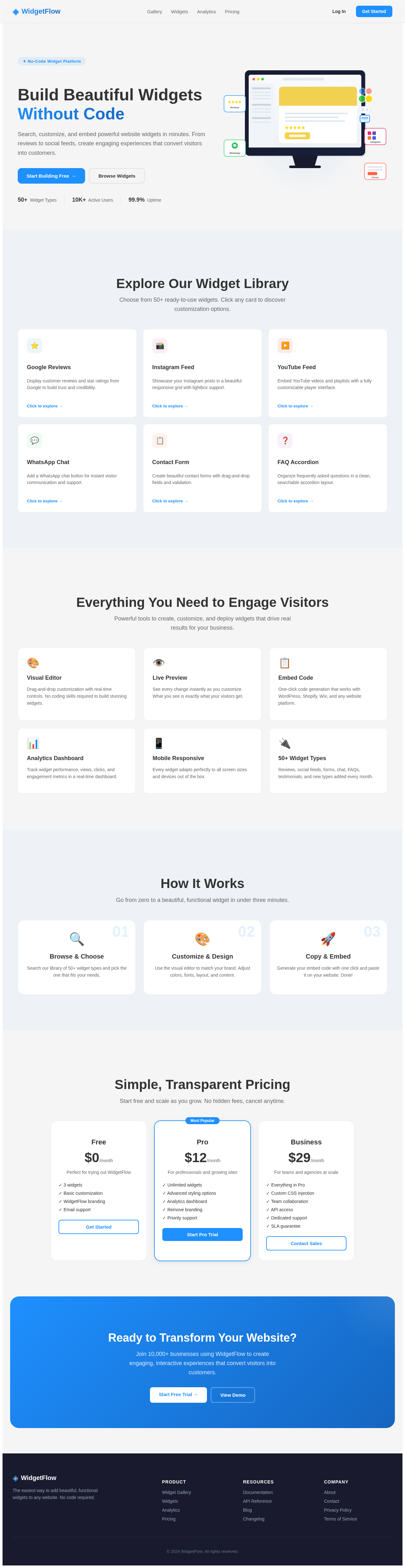
Build Beautiful Widgets Without Code
Search, customize, and embed powerful website widgets in minutes. From reviews to social feeds, create engaging experiences that convert visitors into customers.
Explore Our Widget Library
Choose from 50+ ready-to-use widgets. Click any card to discover customization options.
Google Reviews
Display customer reviews and star ratings from Google to build trust and credibility.
Click to explore →Instagram Feed
Showcase your Instagram posts in a beautiful responsive grid with lightbox support.
Click to explore →YouTube Feed
Embed YouTube videos and playlists with a fully customizable player interface.
Click to explore →WhatsApp Chat
Add a WhatsApp chat button for instant visitor communication and support.
Click to explore →Contact Form
Create beautiful contact forms with drag-and-drop fields and validation.
Click to explore →FAQ Accordion
Organize frequently asked questions in a clean, searchable accordion layout.
Click to explore →Everything You Need to Engage Visitors
Powerful tools to create, customize, and deploy widgets that drive real results for your business.
Visual Editor
Drag-and-drop customization with real-time controls. No coding skills required to build stunning widgets.
Live Preview
See every change instantly as you customize. What you see is exactly what your visitors get.
Embed Code
One-click code generation that works with WordPress, Shopify, Wix, and any website platform.
Analytics Dashboard
Track widget performance, views, clicks, and engagement metrics in a real-time dashboard.
Mobile Responsive
Every widget adapts perfectly to all screen sizes and devices out of the box.
50+ Widget Types
Reviews, social feeds, forms, chat, FAQs, testimonials, and new types added every month.
How It Works
Go from zero to a beautiful, functional widget in under three minutes.
Browse & Choose
Search our library of 50+ widget types and pick the one that fits your needs.
Customize & Design
Use the visual editor to match your brand. Adjust colors, fonts, layout, and content.
Copy & Embed
Generate your embed code with one click and paste it on your website. Done!
Simple, Transparent Pricing
Start free and scale as you grow. No hidden fees, cancel anytime.
Free
Perfect for trying out WidgetFlow
- ✓ 3 widgets
- ✓ Basic customization
- ✓ WidgetFlow branding
- ✓ Email support
Pro
For professionals and growing sites
- ✓ Unlimited widgets
- ✓ Advanced styling options
- ✓ Analytics dashboard
- ✓ Remove branding
- ✓ Priority support
Business
For teams and agencies at scale
- ✓ Everything in Pro
- ✓ Custom CSS injection
- ✓ Team collaboration
- ✓ API access
- ✓ Dedicated support
- ✓ SLA guarantee
Ready to Transform Your Website?
Join 10,000+ businesses using WidgetFlow to create engaging, interactive experiences that convert visitors into customers.
Build Beautiful Widgets Without Code
Search, customize, and embed powerful website widgets in minutes. From reviews to social feeds, create engaging experiences that convert visitors into customers.
Explore Our Widget Library
Choose from 50+ ready-to-use widgets. Click any card to discover customization options.
Google Reviews
Display customer reviews and star ratings from Google to build trust and credibility.
Click to explore →Instagram Feed
Showcase your Instagram posts in a beautiful responsive grid with lightbox support.
Click to explore →YouTube Feed
Embed YouTube videos and playlists with a fully customizable player interface.
Click to explore →WhatsApp Chat
Add a WhatsApp chat button for instant visitor communication and support.
Click to explore →Contact Form
Create beautiful contact forms with drag-and-drop fields and validation.
Click to explore →FAQ Accordion
Organize frequently asked questions in a clean, searchable accordion layout.
Click to explore →Everything You Need to Engage Visitors
Powerful tools to create, customize, and deploy widgets that drive real results for your business.
Visual Editor
Drag-and-drop customization with real-time controls. No coding skills required to build stunning widgets.
Live Preview
See every change instantly as you customize. What you see is exactly what your visitors get.
Embed Code
One-click code generation that works with WordPress, Shopify, Wix, and any website platform.
Analytics Dashboard
Track widget performance, views, clicks, and engagement metrics in a real-time dashboard.
Mobile Responsive
Every widget adapts perfectly to all screen sizes and devices out of the box.
50+ Widget Types
Reviews, social feeds, forms, chat, FAQs, testimonials, and new types added every month.
How It Works
Go from zero to a beautiful, functional widget in under three minutes.
Browse & Choose
Search our library of 50+ widget types and pick the one that fits your needs.
Customize & Design
Use the visual editor to match your brand. Adjust colors, fonts, layout, and content.
Copy & Embed
Generate your embed code with one click and paste it on your website. Done!
Simple, Transparent Pricing
Start free and scale as you grow. No hidden fees, cancel anytime.
Free
Perfect for trying out WidgetFlow
- ✓ 3 widgets
- ✓ Basic customization
- ✓ WidgetFlow branding
- ✓ Email support
Pro
For professionals and growing sites
- ✓ Unlimited widgets
- ✓ Advanced styling options
- ✓ Analytics dashboard
- ✓ Remove branding
- ✓ Priority support
Business
For teams and agencies at scale
- ✓ Everything in Pro
- ✓ Custom CSS injection
- ✓ Team collaboration
- ✓ API access
- ✓ Dedicated support
- ✓ SLA guarantee
Ready to Transform Your Website?
Join 10,000+ businesses using WidgetFlow to create engaging, interactive experiences that convert visitors into customers.
No comments yet. Be the first!