project-0c105f26
 Darshan Rachchh
create notes app

Comments (0)
Sign in to leave a comment
System Requirements
project-0c105f26
Introduction
The purpose of this System Requirements Document (SRD) is to outline the specifications for the development of "project-0c105f26," which includes the creation of a notes application. This document will serve as a guide for the development team to ensure that all functional and non-functional requirements are met.
System Overview
The project-0c105f26 aims to develop a user-friendly notes application that allows users to create, edit, and manage their notes efficiently. The application will be designed to cater to a wide range of users, providing a seamless experience across different devices.
Functional Requirements as Story Points
- As a User, I should be able to create a new note.
- As a User, I should be able to edit an existing note.
- As a User, I should be able to delete a note.
- As a User, I should be able to view a list of all my notes.
- As a User, I should be able to search for notes by keywords.
- As a User, I should be able to categorize notes for better organization.
- As a User, I should be able to sync my notes across multiple devices.
- As a User, I should be able to share notes with other users.
- As a User, I should be able to set reminders for specific notes.
User Personas
- Regular User: A person who uses the application to jot down personal notes, reminders, and ideas.
- Professional User: A user who utilizes the application for work-related notes, task management, and collaboration with colleagues.
Core User Flows
- User creates a new note -> User adds content -> User saves the note -> Note is added to the list.
- User selects a note -> User edits content -> User saves changes -> Note is updated.
- User selects a note -> User deletes the note -> Note is removed from the list.
- User searches for a keyword -> Application displays matching notes -> User selects a note to view/edit.
Visuals Colors and Theme
- primary: #2A9D8F (Teal)
- primary_light: #A8DADC (Light Teal)
- secondary: #E76F51 (Coral)
- accent: #F4A261 (Orange)
- highlight: #E9C46A (Gold)
- bg: #F1FAEE (Off-white)
- surface: rgba(233, 233, 233, 0.8)
- text: #264653 (Dark Blue)
- text_muted: #6D6875 (Muted Gray)
- border: rgba(38, 70, 83, 0.2)
Signature Design Concept
The homepage of the notes application will feature an interactive "Notes Canvas" where users can drag and drop notes like sticky notes on a virtual board. Each note can be resized and moved around, allowing users to organize their thoughts visually. The canvas will have a subtle grid background to help align notes. When a note is clicked, it will "flip" to reveal the editing interface on the back, using a smooth 3D animation powered by @react-three/fiber. This interactive experience will make note-taking dynamic and engaging.
Landing Hero Motion Brief
The landing page will feature a continuous animation loop where digital sticky notes float onto the screen, each representing a different use case (e.g., personal, work, reminders). As they settle, the notes will briefly display their content before fading into the background, highlighting the app's versatility. This will be achieved using motion/react for smooth transitions and interactions. The animation will pause when the user hovers over a note, allowing them to click and explore further.
Interaction Model & Motion Direction
The intended interaction model for the landing page is "animated." This will include moderate scroll-triggered reveals and hover transitions, enhancing the user experience without overwhelming them. The animation will focus on showcasing the app's features and ease of use.
Non-Functional Requirements
- The application should load within 3 seconds on a standard internet connection.
- The application must be responsive and accessible on both desktop and mobile devices.
- Data synchronization should occur in real-time to ensure consistency across devices.
- The application should support multiple languages, starting with English and Hindi.
Tech Stack
- Frontend: React for Web
- Backend: Python with FastAPI
- Database: MySQL or MariaDB, using Alembic for migrations
- AI Models: None specified
- Local Orchestration: Docker, docker-compose
- Server-side Orchestration: Kubernetes
Assumptions and Constraints
- The application will initially support English and Hindi languages.
- Users will require an internet connection for data synchronization.
- The application will be developed to support the latest versions of major web browsers.
Glossary
- Note: A piece of information recorded by the user.
- Canvas: The virtual board where notes are displayed and organized.
- Sync: The process of ensuring data consistency across multiple devices.
- Responsive Design: An approach to web design that makes web pages render well on a variety of devices and window or screen sizes.
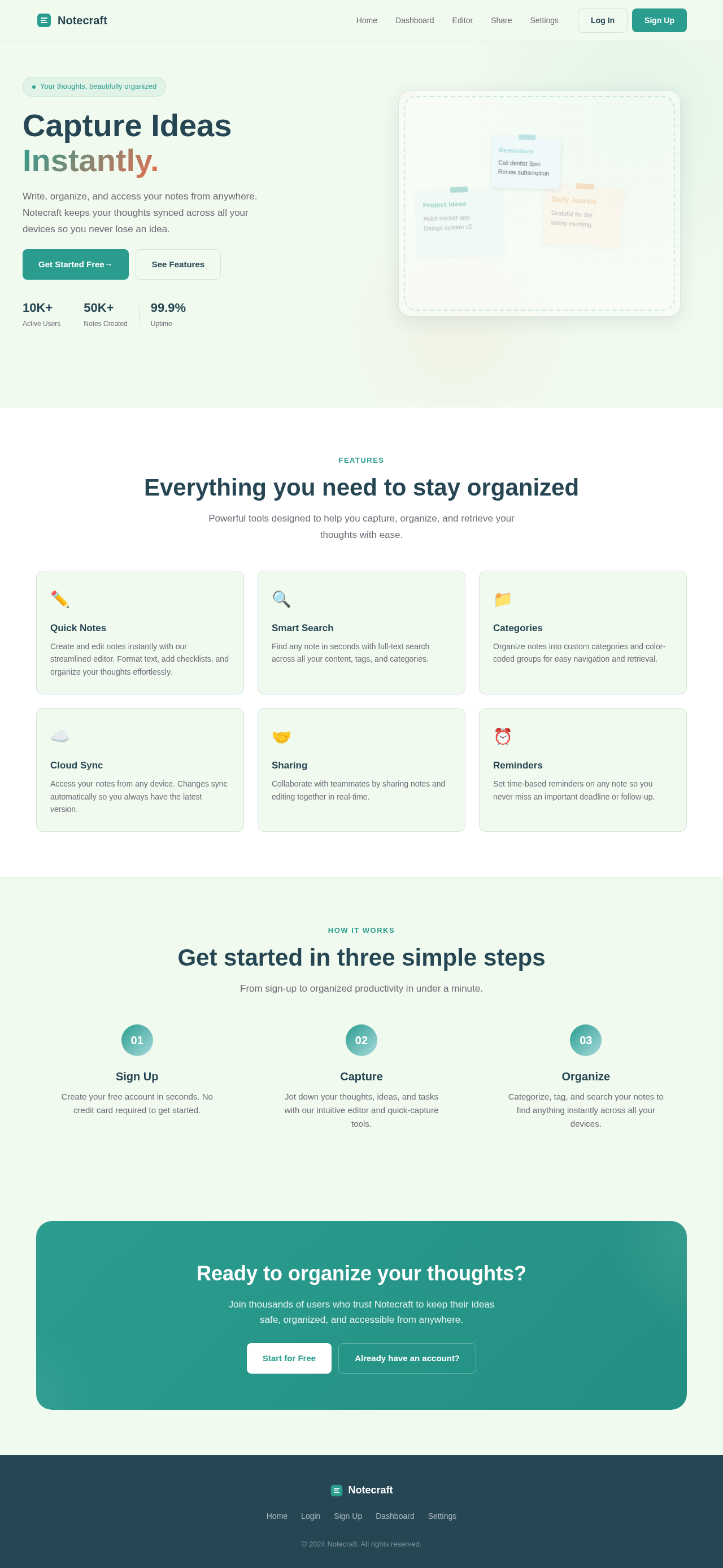
Capture Ideas
Instantly.
Write, organize, and access your notes from anywhere. Notecraft keeps your thoughts synced across all your devices so you never lose an idea.
Everything you need to stay organized
Powerful tools designed to help you capture, organize, and retrieve your thoughts with ease.
Quick Notes
Create and edit notes instantly with our streamlined editor. Format text, add checklists, and organize your thoughts effortlessly.
Smart Search
Find any note in seconds with full-text search across all your content, tags, and categories.
Categories
Organize notes into custom categories and color-coded groups for easy navigation and retrieval.
Cloud Sync
Access your notes from any device. Changes sync automatically so you always have the latest version.
Sharing
Collaborate with teammates by sharing notes and editing together in real-time.
Reminders
Set time-based reminders on any note so you never miss an important deadline or follow-up.
Get started in three simple steps
From sign-up to organized productivity in under a minute.
Sign Up
Create your free account in seconds. No credit card required to get started.
Capture
Jot down your thoughts, ideas, and tasks with our intuitive editor and quick-capture tools.
Organize
Categorize, tag, and search your notes to find anything instantly across all your devices.
Ready to organize your thoughts?
Join thousands of users who trust Notecraft to keep their ideas safe, organized, and accessible from anywhere.
Capture Ideas
Instantly.
Write, organize, and access your notes from anywhere. Notecraft keeps your thoughts synced across all your devices so you never lose an idea.
Everything you need to stay organized
Powerful tools designed to help you capture, organize, and retrieve your thoughts with ease.
Quick Notes
Create and edit notes instantly with our streamlined editor. Format text, add checklists, and organize your thoughts effortlessly.
Smart Search
Find any note in seconds with full-text search across all your content, tags, and categories.
Categories
Organize notes into custom categories and color-coded groups for easy navigation and retrieval.
Cloud Sync
Access your notes from any device. Changes sync automatically so you always have the latest version.
Sharing
Collaborate with teammates by sharing notes and editing together in real-time.
Reminders
Set time-based reminders on any note so you never miss an important deadline or follow-up.
Get started in three simple steps
From sign-up to organized productivity in under a minute.
Sign Up
Create your free account in seconds. No credit card required to get started.
Capture
Jot down your thoughts, ideas, and tasks with our intuitive editor and quick-capture tools.
Organize
Categorize, tag, and search your notes to find anything instantly across all your devices.
Ready to organize your thoughts?
Join thousands of users who trust Notecraft to keep their ideas safe, organized, and accessible from anywhere.
No comments yet. Be the first!