
project-010f5886

byZachary Fleming

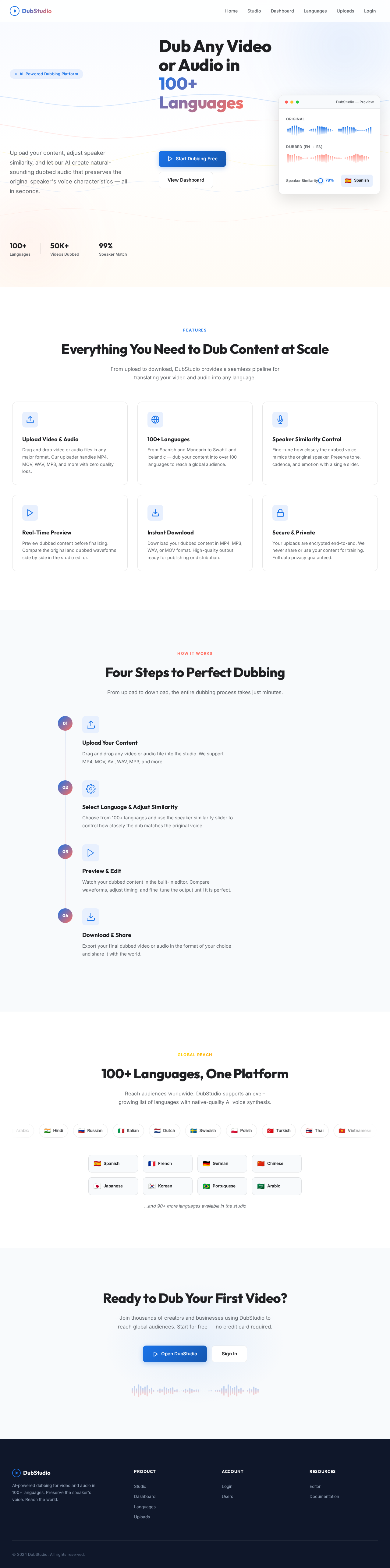
build a Video and Audio dubbing Website with a Speaker similarity Controls how closely the dubbed voice mimics the original speaker. Higher values preserve the source accent; lower values sound more natural in the target language. and 100 Languages. make the uploader actually work for both Video and Audio and dubbing editor Fixed

LandingLoginUsersUploads
Landing

Comments (0)

No comments yet. Be the first!

System Requirements

System Requirement Document

project-010f5886 System Requirements Document

1. Introduction

The purpose of this document is to outline the system requirements for project-010f5886, a Video and Audio Dubbing Website. This platform will enable users to dub video and audio content with controls for speaker similarity and support for 100 languages. The system will ensure that the uploader functions seamlessly for both video and audio files, and that the dubbing editor is fixed and reliable.

2. System Overview

Project-010f5886 is designed to provide a comprehensive solution for dubbing video and audio content. The platform will offer users the ability to control how closely the dubbed voice mimics the original speaker, with options to adjust the speaker similarity. The system will support dubbing in 100 languages, catering to a diverse user base. Additionally, the platform will feature a robust uploader that works efficiently for both video and audio files, alongside a fixed dubbing editor to ensure a smooth user experience.

Page 1 of 5

3. Functional Requirements

  • As a User, I should be able to upload video files for dubbing.
  • As a User, I should be able to upload audio files for dubbing.
  • As a User, I should be able to select from 100 different languages for dubbing.
  • As a User, I should be able to adjust the speaker similarity to control how closely the dubbed voice mimics the original speaker.
  • As a User, I should be able to preview the dubbed content before finalizing.
  • As a User, I should be able to download the dubbed content in the desired format.
  • As an Admin, I should be able to manage the language options available on the platform.
  • As an Admin, I should be able to monitor and manage user uploads and dubbing activities.

4. User Personas

  • User: Individuals or organizations looking to dub video and audio content into different languages.
  • Admin: Platform administrators responsible for managing language options and overseeing user activities.

5. Core User Flows

  • User uploads video/audio -> selects language -> adjusts speaker similarity -> previews dubbed content -> finalizes and downloads.
  • Admin manages language options -> monitors user uploads -> oversees dubbing activities.
Page 2 of 5

6. Visuals Colors and Theme

  • primary: #1A73E8 (a deep blue for brand identity)
  • primary_light: #E8F0FE (a light blue for hover states)
  • secondary: #FF6F61 (a coral hue for emphasis and links)
  • accent: #FFD700 (a vibrant gold for CTAs and active states)
  • highlight: #FFA500 (an orange for hover states and notifications)
  • bg: #FFFFFF (a clean white for the page background)
  • surface: rgba(255, 255, 255, 0.9) (a soft white for card backgrounds)
  • text: #202124 (a dark grey for primary text)
  • text_muted: #5F6368 (a lighter grey for secondary text)
  • border: rgba(0, 0, 0, 0.1) (a subtle grey for borders)

7. Signature Design Concept

The homepage of project-010f5886 will feature an interactive "Dubbing Studio" concept. Users will enter a virtual studio environment where they can drag and drop video or audio files onto a digital mixing board. As they adjust the speaker similarity and language settings, visual equalizers and waveforms will animate in real-time, providing a dynamic and engaging experience. The studio will be designed using @react-three/fiber for 3D elements and framer-motion for smooth transitions and animations. Users can interact with the studio controls to see immediate changes in the dubbing output, making the process intuitive and visually appealing.

Page 3 of 5

8. Interaction Model & Motion Direction

The landing page will utilize a "parallax" interaction model, creating a layered depth effect as users scroll through the page. Decorative elements such as animated waveforms and language icons will move at different speeds, enhancing the storytelling aspect of the platform. Internal pages, such as the dubbing editor and user dashboard, will adopt a "static" interaction model to prioritize clarity and ease of use.

9. Non-Functional Requirements

  • The system must support simultaneous uploads and dubbing processes for multiple users.
  • The platform should maintain high performance and low latency during dubbing operations.
  • The website must be accessible and responsive across various devices and screen sizes.
  • The system should ensure data security and privacy for all user uploads and activities.

10. Tech Stack

  • Frontend: React for Web
  • Backend: Python, FastAPI
  • Database: MySQL or MariaDB, with Alembic for migrations
  • AI Models: Not specified
  • AI Tools: Not specified
  • Local Orchestration: Docker, docker-compose
  • Server-side Orchestration: Kubernetes
Page 4 of 5

11. Assumptions and Constraints

  • The platform will primarily target users in the US, with English as the default language.
  • The system will be designed to handle a high volume of concurrent users and dubbing requests.
  • The dubbing feature will rely on third-party language processing services for accuracy and efficiency.

12. Glossary

  • Dubbing: The process of adding a new audio track to a video or audio file in a different language.
  • Speaker Similarity: A control feature that adjusts how closely the dubbed voice mimics the original speaker's accent and tone.
  • Parallax: An interaction model that creates a sense of depth by moving background and foreground elements at different speeds.
  • Static: An interaction model focused on layout clarity with minimal motion.
Page 5 of 5
Landing design preview
Landing: View Info
Login: Sign In
Dashboard: View Overview
Languages: Manage Options
Languages: Add Language
Uploads: Monitor Activity
Uploads: Review Dubbing
Users: Oversee Activities
Users: Manage Access
Landing design preview
Landing: View Info
Login: Sign In
Dashboard: View Overview
Languages: Manage Options
Languages: Add Language
Uploads: Monitor Activity
Uploads: Review Dubbing
Users: Oversee Activities
Users: Manage Access