Today's price check
Receipt- Flipkart₹54,990
- Amazon₹53,499
- Vijay Sales₹52,990
- Croma₹54,200
 Neel Modi
I want to build something like BOB ride.I put this website link below.you proper analysis this website in detail. and you build this similar for the product. and you used platfrom like flipkart, amazon, vijay sales and croma.


Sign in to leave a comment
product-price-compare is a consumer price-comparison and shopping product for Indian electronics and appliance buyers. It is modeled on the BOB ride website (justbobit.com) as analyzed from the user-supplied link, and it applies the marketplace and e-commerce platform conventions of Flipkart, Amazon, Vijay Sales, and Croma.
The product's intent, derived from the BOB ride reference, is relief from fragmentation: BOB ride's own words are "Skip the app chaos" and "Ride easy," with the tagline "Bob compares all major ride apps to help you instantly find the cheapest or fastest ride, without switching apps or wasting time." The same intent is transposed to shopping: instead of hopping between four store apps and websites to check prices on a phone, laptop, television, or appliance, the shopper sees the four stores' prices side by side in one place, instantly identifies the cheapest or fastest option, and completes the purchase without switching apps or wasting time.
The audience is everyday value-seekers and deal hunters in India who buy electronics and appliances across Flipkart, Amazon, Vijay Sales, and Croma — not enterprise procurement teams. The emotional register is warm, fast, human, and a little bit fun: a friendly co-pilot who did the boring comparison work, not a spreadsheet.
The product is delivered as a first-party web application with application-owned identity, a public anonymous entry surface, a browsable catalog, product detail pages, a cart, a protected checkout, and operational workspaces for catalog management and order fulfillment.
product-price-compare is a web application with three active human roles and a set of first-party pages that carry their accepted work.
Current delivery. A responsive first-party web application. Anonymous visitors land on a public entry surface that explains the product and lets them search and browse. Shoppers browse a catalog of electronics and appliances, open a product detail page that stacks the four stores' prices, add items to a cart, and complete a protected checkout that creates an order. Store/Catalog Managers maintain the product listings that shoppers browse. Order Fulfillment Operators review incoming orders and move them through fulfillment.
Actors. The accepted active-human catalog is exactly three roles: Shopper, Store/Catalog Manager, and Order Fulfillment Operator. The four stores — Flipkart, Amazon, Vijay Sales, and Croma — are external store platforms whose prices and delivery estimates are compared; they are non-persona external actors, not users of this product.
Accepted behavior. Price comparison across the four named stores; catalog browsing with filters; product detail with a stacked four-store price comparison; cart retention; protected checkout that submits cart items as an order; catalog management (listing overview plus a focused add/update editor); order fulfillment review and processing; and shared returning verification through a single Login surface.
Ownership. All accepted human-facing work is owned by first-party pages. The four stores are external price and delivery sources; they are not destinations inside this product.
Narrow exclusions. This document does not add adjacent commerce capabilities that the source did not accept — no wishlist, no reviews or ratings, no coupons or promo codes, no loyalty program, no multi-address address book, no payment-gateway integration detail, no returns/refunds workflow, no shipping-carrier integration, no analytics dashboards, no admin user-management console, no notifications system, and no native mobile app. The BOB ride reference's "Download now" call to action is a fact about the reference site's own conversion flow; it is not carried over as a product capability here, because the accepted delivery shape for this product is a first-party web application with custom UI.
What this product is. A single place where a shopper types what they want to buy and immediately sees what it costs at Flipkart, Amazon, Vijay Sales, and Croma — with the cheapest option called out, the fastest delivery called out, and a clear path to buy. The comparison is the product; the shopping flow exists so that the comparison leads somewhere.
Delivery and access ownership. The product is a first-party web application. Its public entry surface, catalog, and product detail pages are reachable without signing in, so a first-time visitor can evaluate the product and see real prices before committing to anything. The cart is also reachable without signing in, so a shopper can assemble a basket while browsing. Checkout is protected: submitting a cart as an order is a durable commitment bound to a specific shopper, so it requires an established identity. Catalog management and order fulfillment are protected operational workspaces reachable only by provisioned operational users.
Identity. Identity is application-owned. A shopper who has no account establishes one through self-service enrollment at the point where protected checkout requires it; a returning shopper verifies through Login. Operational users (Store/Catalog Manager, Order Fulfillment Operator) do not self-enroll — they are provisioned or invited before they can reach their workspaces. Login is a shared returning-verification surface for all three roles.
Current vs. future. Everything described in this document is current. Section 10 records future ideas that are explicitly not part of the current build and must not appear in current pages or acceptance criteria.
The BOB ride reference (justbobit.com) is an authoritative content_source. The following facts were verified from its primary landing page and are preserved item by item.
Hero statements (verbatim):
Tagline (verbatim):
Calls to action (verbatim):
Domain context from the reference:
Structure reference from the reference:
Feature reference from the reference:
How these facts are used. The reference's structure (a hero that states the value proposition, a one-line explanation of what is being compared, and one clear primary action) and its brand voice (simple, relief from fragmentation, speed, value) are carried into this product's public entry surface. The reference's core feature pattern — compare many providers in one place, surface cheapest and fastest, remove the need to switch apps — is carried into this product's comparison behavior across Flipkart, Amazon, Vijay Sales, and Croma. The reference's literal ride-hailing subject matter and its "Download now" app-acquisition flow are not carried over, because the accepted product subject is electronics and appliance shopping across the four named stores and the accepted delivery shape is a first-party web application.
The page inventory below is the final ordered page contract. Each page appears exactly once.
Each requirement is a distinct story point with its provenance and observable acceptance.
FR-1 — Compare prices across the four stores. As a Shopper, I should see the price of a product at Flipkart, Amazon, Vijay Sales, and Croma side by side in one place, so that I can find the cheapest option without switching apps or wasting time. Provenance: explicit (reference feature: instant comparison across major apps to find the cheapest or fastest option, without switching apps). Lifecycle: initiated by the Shopper entering a query or opening a product; the four stores are the indispensable external participants whose prices are compared; the observable result is a four-row price stack with the cheapest row highlighted; failure is a price source that cannot be read, which is shown as an explicit unavailable row rather than a blank; continuation is opening the product or adding it to the cart. Acceptance: for a product with prices at all four stores, four rows render, each with its store chip, price, and delivery estimate, and the lowest price row is highlighted and stamped "CHEAPEST."
FR-2 — Identify the fastest option. As a Shopper, I should see each store's delivery estimate alongside its price, so that I can choose the fastest option when speed matters more than the lowest price. Provenance: explicit (reference feature: cheapest or fastest). Lifecycle: initiated by the Shopper viewing a product's price stack or a catalog card; the stores supply the estimates; the observable result is a delivery estimate on each store row and on each catalog card; failure is a missing estimate, shown as an explicit unknown rather than a blank; continuation is choosing that store's offer. Acceptance: every store row and every catalog card shows a delivery estimate or an explicit unknown state.
FR-3 — See the saving. As a Shopper, I should see how much I save by choosing the cheapest store, so that the value of comparing is visible at a glance. Provenance: explicit (reference brand voice: value; the product's core promise is finding the cheapest option). Lifecycle: initiated by the Shopper viewing a catalog card or a product's price stack; the observable result is a price-delta badge stating the saving between the cheapest and the highest store price; failure is a single-store availability, in which case no badge is shown rather than a misleading zero; continuation is adding the cheapest offer to the cart. Acceptance: when at least two stores have prices and they differ, a "SAVE ₹…" badge appears; when they do not differ, no badge appears.
FR-4 — Browse the catalog. As a Shopper, I should browse a catalog of electronics and appliances, so that I can discover products without knowing exactly what I want. Provenance: explicit (marketplace conventions of Flipkart, Amazon, Vijay Sales, and Croma). Lifecycle: initiated by the Shopper opening the catalog; the observable result is a grid of product cards each showing image, name, cheapest price, cheapest store chip, and delivery estimate; failure is a catalog that cannot be loaded, shown with a retry; continuation is opening a product. Acceptance: the catalog renders a 3-column grid on desktop and 1 column on mobile, and each card shows the cheapest price and its store chip.
FR-5 — Narrow the catalog. As a Shopper, I should filter and sort the catalog, so that I can reach the products I actually want. Provenance: explicit (marketplace conventions of the four named platforms). Lifecycle: initiated by the Shopper applying a filter or changing the sort order; the observable result is a narrowed, re-sorted grid with a visible result count; failure is a filter combination with no matches, shown as an empty state with a control to clear filters; continuation is opening a product or clearing filters. Acceptance: applying a filter updates the grid and the result count; clearing filters restores the unfiltered grid.
FR-6 — Inspect a product in detail. As a Shopper, I should open a product and see its full information and its four-store price comparison, so that I can decide before buying. Provenance: explicit (marketplace conventions; reference feature of comparing before choosing). Lifecycle: initiated by the Shopper opening a product card; the observable result is a two-column page with a sticky image gallery and a four-store price stack with the cheapest row highlighted; failure is a price stack that cannot be loaded, shown with a retry while the gallery and identity remain visible; continuation is adding to the cart. Acceptance: the page shows the product's name, brand, category, description, image set, and all four store rows with prices and delivery estimates.
FR-7 — Choose which store's offer to buy. As a Shopper, I should choose which store's offer to add to my cart, so that I can act on the comparison rather than being forced into one store. Provenance: explicit (the comparison exists so the shopper can pick the cheapest or fastest). Lifecycle: initiated by the Shopper selecting a store row on the product page; the observable result is that the chosen store and its price are recorded on the cart line; failure is a store whose offer is unavailable, which cannot be selected and is shown as unavailable; continuation is proceeding to the cart. Acceptance: the cart line records the chosen store and that store's price, and the cart shows the store chip for that line.
FR-8 — Retain a selection in the cart. As a Shopper, I should keep selected products in a cart before buying, so that I can assemble a basket while browsing. Provenance: explicit (marketplace conventions of the four named platforms). Lifecycle: initiated by the Shopper adding a product; the observable result is a cart line with image, name, chosen store, price, and quantity, plus a running total; failure is a cart that cannot be loaded, shown with a retry; continuation is proceeding to checkout. Acceptance: added products persist in the cart across navigation within the session, and the running total reflects all lines.
FR-9 — Adjust the cart. As a Shopper, I should change quantities and remove lines, so that the basket matches what I actually want. Provenance: explicit (marketplace conventions). Lifecycle: initiated by the Shopper changing a quantity or removing a line; the observable result is an immediately recomputed running total and total saving; failure is a change that cannot be persisted, which leaves the previous
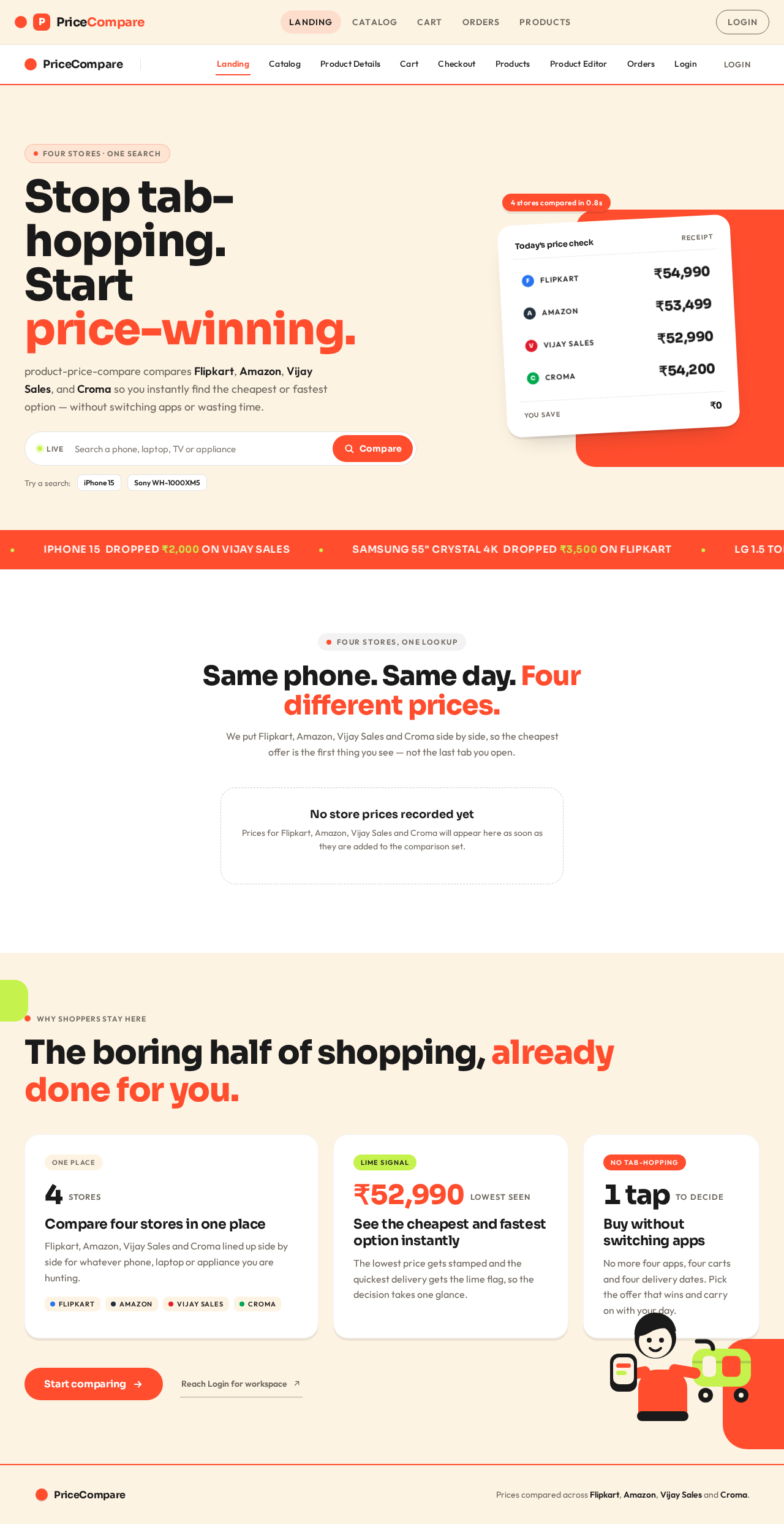
Four stores · one search
product-price-compare compares Flipkart, Amazon, Vijay Sales, and Croma so you instantly find the cheapest or fastest option — without switching apps or wasting time.
Live4 stores compared in 0.8s
We put Flipkart, Amazon, Vijay Sales and Croma side by side, so the cheapest offer is the first thing you see — not the last tab you open.
Prices for Flipkart, Amazon, Vijay Sales and Croma will appear here as soon as they are added to the comparison set.
Why shoppers stay here
4stores
Flipkart, Amazon, Vijay Sales and Croma lined up side by side for whatever phone, laptop or appliance you are hunting.
₹52,990lowest seen
The lowest price gets stamped and the quickest delivery gets the lime flag, so the decision takes one glance.
1 tapto decide
No more four apps, four carts and four delivery dates. Pick the offer that wins and carry on with your day.
Four stores · one search
product-price-compare compares Flipkart, Amazon, Vijay Sales, and Croma so you instantly find the cheapest or fastest option — without switching apps or wasting time.
Live4 stores compared in 0.8s
We put Flipkart, Amazon, Vijay Sales and Croma side by side, so the cheapest offer is the first thing you see — not the last tab you open.
Prices for Flipkart, Amazon, Vijay Sales and Croma will appear here as soon as they are added to the comparison set.
Why shoppers stay here
4stores
Flipkart, Amazon, Vijay Sales and Croma lined up side by side for whatever phone, laptop or appliance you are hunting.
₹52,990lowest seen
The lowest price gets stamped and the quickest delivery gets the lime flag, so the decision takes one glance.
1 tapto decide
No more four apps, four carts and four delivery dates. Pick the offer that wins and carry on with your day.
No comments yet. Be the first!