product-live-status
 SUDARSHAN KAMBLE
I want to build a app which can track and give live status about his product like blinkit and flipkart minutes build the mvp with simulation

Comments (0)
Sign in to leave a comment
System Requirements
System Requirements Document for product-live-status
1. Introduction
product-live-status is a web application that tracks a product and shows its live status, in the style of Blinkit and Flipkart Minutes. The product intent is a nervous, second-by-second "where is it right now" experience: a self-starting product tracker configures the product being tracked, and the app renders a continuously updating simulated status stream — order placed → packed → picked → out for delivery → arriving → delivered — as a legible, always-readable live status view.
The MVP is built with simulation: live status data is generated by the app itself rather than by real product or partner integrations. Blinkit and Flipkart Minutes are referenced only as the style/pattern for live product status tracking; they are not integration targets.
The audience is two accepted human roles: the Product Tracker Owner, who sets up the product being tracked and monitors its live status, and the Live Status Viewer, who opens the app to check the current status of the tracked product and follow it as it changes.
2. System Overview
product-live-status is delivered as a first-party web application with custom UI and application-owned identity. It has six pages: Landing (anonymous public entry), Sign Up and Login (anonymous identity-access surfaces), Products (role-restricted overview of configured product records), Product Setup (role-restricted configuration workspace), and Live Status (role-restricted focused status view for both roles).
Current accepted behavior:
- A Product Tracker Owner self-enrolls, verifies on return, configures the product whose status is tracked, and monitors its simulated live status.
- A Live Status Viewer self-enrolls, verifies on return, and consumes the live status view for the tracked product as simulated status changes occur.
- Simulated status progression drives the live status display; no real product or partner integration exists in the MVP.
Narrow exclusions: no real product/partner integrations, no real courier or logistics feeds, no order placement, payment, or commerce capability, and no adjacent account-management capability beyond self-service enrollment and returning verification.
2a. Product Interpretation and Delivery Boundary
Delivery ownership. All six pages are first-party custom pages owned by the application. There is no provider-owned surface, no external destination, and no headless-only delivery in the current scope. The simulation that produces live status is application-owned backend behavior; the human interaction with that status is owned by the first-party Live Status page.
Access ownership. Identity is application-owned. Landing, Sign Up, and Login are anonymously reachable. Products, Product Setup, and Live Status are protected and require an established, verified identity. Sign Up is the anonymous entry interaction that establishes access; it does not itself require access. Login is the anonymous returning-verification interaction. Role-aware authorization distinguishes Product Tracker Owner configuration control from Live Status Viewer status consumption.
Current vs. future boundary. Current: the simulated MVP described in this document. Future: real product/partner integrations and any capability listed in Section 11 as a future horizon. Future items are excluded from current pages and current acceptance.
2b. Source Content Inventory
Not applicable. The reference directive for Blinkit and Flipkart Minutes declares uses: ["domain_context", "feature_reference"] with authority: inspiration_only and is not a content_source; no verified factual entity, collection, field, value, date, contact, link, or media reference is supplied for preservation.
2c. Page Content and Component Coverage
Landing
- Information/state: Anonymous public entry. Explains the simulated product-tracking app and its live-status experience before identity establishment. Headline "Watch your product move" set flush left in Space Grotesk at
clamp(44px, 9vw, 128px), occupying the left 7 columns of a museum-style asymmetric layout. A full-bleed black canvas (#07080C) with a slowly flowing aqua-violet-coral particle field bleeding off the right and bottom edges. A live-status strip runs along the bottom of the viewport: a monospace ticker of simulated events ("PACKED • 00:42 • PICKED • 01:15 • OUT FOR DELIVERY") that scrolls continuously. - Primary actions: Navigate to Sign Up (single coral CTA rectangle under the headline, never over the field's bright core). Navigate to Login.
- Supporting actions: Read the explanatory copy about simulated live status tracking.
- Domain entities: Simulated status event (stage name, timestamp).
- Component responsibilities: Hero canvas (generative particle field driven by the simulated status event stream); headline block; coral CTA rectangle; monospace event ticker; Login link.
- States: Loading — field initializes on a static gradient frame. Empty — not applicable; the ticker always carries simulated events. Success — field flows, ticker scrolls, CTA and Login are reachable. Error — if the field fails to initialize, the static gradient frame and all text/controls remain fully readable and functional. Recovery — reload re-initializes the field; text and controls never depend on the field.
Sign Up
- Information/state: Anonymous self-service enrollment surface. Collects the minimum identity information needed to establish an application-owned account for a first-time Product Tracker Owner or Live Status Viewer.
- Primary actions: Submit enrollment to establish identity.
- Supporting actions: Navigate to Login for an existing account.
- Domain entities: Account identity (credential and role association).
- Component responsibilities: Enrollment form; submit control; validation messaging; link to Login.
- States: Loading — submit control shows in-progress state. Empty — blank form with field labels. Success — identity established; the actor continues to the protected destination they intended. Error — invalid or incomplete input is reported inline without losing entered values; a duplicate-identity condition is reported with a route to Login. Recovery — correct the reported field and resubmit, or switch to Login.
Login
- Information/state: Anonymous returning-verification surface for continued access to configured product records and their simulated status history.
- Primary actions: Submit credentials to verify identity.
- Supporting actions: Navigate to Sign Up for a first-time account.
- Domain entities: Account identity (credential and role association).
- Component responsibilities: Credential form; submit control; error messaging; link to Sign Up.
- States: Loading — submit control shows in-progress state. Empty — blank form with field labels. Success — identity verified; the actor continues to the protected destination they intended. Error — incorrect credentials are reported without disclosing which field was wrong; entered values other than the credential are preserved. Recovery — retry, or switch to Sign Up.
Products
- Information/state: Role-restricted revisitable overview for the Product Tracker Owner to find and continue monitoring configured product records. Rendered as a dense, quiet list — hairline dividers, no card grid. Each row shows the product name and its current simulated status stage.
- Primary actions: Open a product record to continue monitoring it on Live Status. Start Product Setup for a new product.
- Supporting actions: Scan and locate an existing configured product record.
- Domain entities: Product record (product name, current simulated status stage, last-updated timestamp).
- Component responsibilities: Product list with hairline dividers; per-row product name, current stage, and monospace last-updated timestamp; row action to open Live Status; action to start Product Setup.
- States: Loading — list skeleton with hairline rules. Empty — no configured product records yet, with a direct route to Product Setup. Success — rows render with product name, current stage, and last-updated timestamp. Error — list fails to load; a retry control is offered and the Product Setup route remains available. Recovery — retry reloads the list; a failed row still opens its Live Status view.
Product Setup
- Information/state: Role-restricted focused setup workspace for configuring the product whose status is generated by the MVP simulation. Holds the product identity being tracked and the configuration that seeds the simulated status progression.
- Primary actions: Save the product configuration to create or update the product record.
- Supporting actions: Cancel and return to Products without saving.
- Domain entities: Product record (product name, configuration that seeds simulated status progression).
- Component responsibilities: Product configuration form; save control; cancel control; inline validation messaging.
- States: Loading — form fields load for an existing record. Empty — new-product form with blank fields. Success — configuration saved; the actor continues to the product's Live Status view. Error — invalid or incomplete configuration is reported inline without losing entered values; a save failure preserves the entered configuration. Recovery — correct the reported field and save again, or cancel back to Products.
Live Status
- Information/state: Role-restricted focused status view where the viewer follows the selected product as simulated live status changes occur. Full-bleed generative canvas as the background layer, with a strict 12-column grid on top: left 5 columns hold the readable status stack (product name, current stage in display type, ETA, last-updated); right 5 columns hold the event timeline as ruled rows with monospace timestamps; centre 2 columns are an intentional gutter so the sculpture is never fully covered. The current status word is set as an oversized display headline at
clamp(40px, 7vw, 88px), not a badge or stepper chip. A monospace event ticker is pinned to the bottom edge. - Primary actions: Follow the selected product's simulated live status as it changes.
- Supporting actions: Read the event timeline; read the ETA countdown; return to Products to select a different product record.
- Domain entities: Product record; simulated status event (stage name, timestamp); current stage; ETA; last-updated timestamp.
- Component responsibilities: Generative canvas (colour bands and flow speed driven by the simulated status event stream); status stack (product name, oversized current-stage headline, monospace ETA, monospace last-updated); event timeline as ruled rows with a thin luminous left rule that brightens past-to-present and a monospace timestamp per row; bottom monospace event ticker; return-to-Products control.
- States: Loading — status stack and timeline load against the static gradient frame. Empty — no product selected or no simulated events yet, with a route back to Products. Success — current stage headline, ETA, last-updated, timeline rows, and ticker all render and update as simulated status ticks arrive. Error — the simulated status stream fails; the last known stage, ETA, and timeline remain readable with a stale indicator and a retry control. Recovery — retry reconnects the simulated stream; the timeline resumes from the last known event.
3. Functional Requirements
FR-1 — Track a product and show its live status. (explicit) As a Product Tracker Owner, I should configure the product I want tracked and see its live status, so that I know the current state of my product at any moment.
- Trigger/input: the owner opens Product Setup and saves a product configuration.
- Observable result: a product record exists and its Live Status view shows the current simulated stage, ETA, and last-updated timestamp.
- Access state: protected; requires an established, verified identity.
- Failure/recovery: if the configuration cannot be saved, entered values are preserved and the error is reported inline; the owner corrects and saves again.
- Continuation: the owner continues to the product's Live Status view and to the Products list.
FR-2 — Consume live status as a viewer. (explicit) As a Live Status Viewer, I should open the app and see the current live status of the tracked product, so that I can follow it as it changes.
- Trigger/input: the viewer opens Live Status for a tracked product.
- Observable result: the current stage is displayed as an oversized headline alongside ETA and last-updated, and the event timeline and ticker show the simulated events.
- Access state: protected; requires an established, verified identity.
- Failure/recovery: if the simulated status stream fails, the last known stage, ETA, and timeline remain readable with a stale indicator and a retry control.
- Continuation: the viewer keeps following the product as new simulated status ticks arrive.
FR-3 — Simulated live status progression. (explicit — MVP built with simulation) As a Product Tracker Owner, I should have the tracked product's status progress through simulated stages rather than real integrations, so that the MVP demonstrates live status end to end.
- Trigger/input: a configured product record exists and the simulation advances its status.
- Observable result: the stage advances through the simulated sequence (order placed → packed → picked → out for delivery → arriving → delivered), each transition producing a new timestamped event.
- Access state: application-owned backend behavior; the human interaction with its output is owned by Live Status.
- Failure/recovery: if the simulation stalls, the last known stage remains displayed with a stale indicator and a retry control.
- Continuation: the timeline and ticker continue to accumulate events as the simulation advances.
FR-4 — Self-service enrollment. (required_inference) As a first-time Product Tracker Owner or Live Status Viewer, I should be able to enroll myself, so that I can reach the protected product setup, product records, and live status.
- Trigger/input: an anonymous visitor opens Sign Up and submits enrollment information.
- Observable result: an application-owned identity is established and the actor continues to the protected destination they intended.
- Access state: anonymous entry; no access required to reach Sign Up.
- Failure/recovery: invalid or incomplete input is reported inline without losing entered values; a duplicate-identity condition routes the actor to Login.
- Continuation: the actor proceeds to Products, Product Setup, or Live Status.
FR-5 — Returning verification. (required_inference) As a returning Product Tracker Owner or Live Status Viewer, I should verify my identity before accessing protected product setup, product records, or live status, so that my configured product records and their simulated status history remain mine.
- Trigger/input: a returning actor opens Login and submits credentials.
- Observable result: identity is verified and the actor continues to the protected destination they intended.
- Access state: anonymous entry; no access required to reach Login.
- Failure/recovery: incorrect credentials are reported without disclosing which field was wrong; the actor retries or switches to Sign Up.
- Continuation: the actor proceeds to Products, Product Setup, or Live Status.
FR-6 — Role-aware authorization. (required_inference) As the application, I should distinguish Product Tracker Owner configuration control from Live Status Viewer status consumption, so that configuration and consumption remain correctly separated.
- Trigger/input: an authenticated actor requests Products, Product Setup, or Live Status.
- Observable result: the Product Tracker Owner can reach Products and Product Setup and can configure the tracked product; the Live Status Viewer can reach Live Status and consume status without configuration control.
- Access state: protected; requires an established, verified identity.
- Failure/recovery: an actor without the required role for a destination is not granted configuration control there and is routed to a destination they can use.
- Continuation: the actor continues in the destination matching their role.
FR-7 — Revisit and continue monitoring. (required_inference) As a Product Tracker Owner, I should find and reopen my configured product records, so that I can continue monitoring them across sessions.
- Trigger/input: the owner opens Products.
- Observable result: the list shows each configured product record with its product name, current simulated status stage, and last-updated timestamp.
- Access state: protected; requires an established, verified identity.
- Failure/recovery: if the list fails to load, a retry control is offered and the Product Setup route remains available.
- Continuation: the owner opens a product record's Live Status view or starts Product Setup for a new product.
FR-8 — Follow status changes in place. (required_inference) As a Live Status Viewer, I should see each new simulated status tick reflected in the view I am already watching, so that I do not have to reload to know the current state.
- Trigger/input: the simulation produces a new status event for the product being viewed.
- Observable result: the current-stage headline crossfades to the new stage, the ETA and last-updated numerals update, a new ruled row appears in the event timeline, and the ticker advances.
- Access state: protected; requires an established, verified identity.
- Failure/recovery: if an update fails to arrive, the last known stage remains readable with a stale indicator and a retry control.
- Continuation: the viewer keeps following the product until the simulated sequence completes.
4. User Personas
Product Tracker Owner
- Product context: The requester wants an app that tracks and shows live status about "his product" in the style of Blinkit and Flipkart Minutes. This role sets up the product being tracked and monitors its live status to know the current state of the product at any moment.
- Primary goal: Configure the product being tracked and always know its current live status.
- Distinct accepted responsibilities: Self-enrolls as a first-time user; verifies identity on return; configures the product whose status is generated by the MVP simulation on Product Setup; finds and reopens configured product records on Products; monitors the simulated live status on Live Status.
- Relevant inputs or decisions: The product identity and the configuration that seeds the simulated status progression; which configured product record to continue monitoring; whether to start a new product setup.
- Interactions with other accepted participants: Shares the Live Status view with the Live Status Viewer, who consumes the same simulated status stream. The owner holds configuration control; the viewer does not.
- Observable success: A saved product record appears in Products with its current stage and last-updated timestamp, and its Live Status view shows the current stage, ETA, and event timeline advancing as the simulation progresses.
Live Status Viewer
- Product context: The app's core outcome is giving live status about a product, which implies a viewer who opens the app to check the current status of the tracked product and follow it as it changes. This role consumes the live status view rather than configuring the tracked product.
- Primary goal: See where the tracked product is right now, and follow it as it changes.
- Distinct accepted responsibilities: Self-enrolls as a first-time user; verifies identity on return; opens Live Status for the tracked product; reads the current stage, ETA, last-updated timestamp, event timeline, and ticker; keeps following as new simulated status ticks arrive.
- Relevant inputs or decisions: Which tracked product to follow; how long to keep watching the status view.
- Interactions with other accepted participants: Depends on the Product Tracker Owner having configured the product record; consumes the same simulated status stream the owner monitors, without configuration control.
- Observable success: The current stage is readable as an oversized headline with ETA and last-updated, and each new simulated status tick is reflected in the view without a reload.
5. Core User Flows
Flow A — Product Tracker Owner configures a product and monitors its live status
- The owner arrives at Landing anonymously and reads the explanation of the simulated product-tracking app and its live-status experience, with the particle field flowing and the monospace event ticker scrolling along the bottom.
- The owner selects the coral CTA under the headline and goes to Sign Up.
- On Sign Up, the owner submits enrollment information. The app establishes an application-owned identity and the owner continues to the protected destination they intended.
- The owner lands on Products. Because no product record exists yet, the empty state shows a direct route to Product Setup.
- The owner opens Product Setup and enters the product identity and the configuration that seeds the simulated status progression.
- The owner saves. The product record is created, and the owner continues to the product's Live Status view.
- On Live Status, the owner sees the product name, the current stage as an oversized display headline, the monospace ETA, and the monospace last-updated timestamp in the left status stack, with the event timeline as ruled rows on the right and the ticker pinned to the bottom edge.
- As the simulation advances, each new status tick crossfades the stage headline, updates the ETA and last-updated numerals, adds a ruled row with a monospace timestamp to the timeline, and sends a bright pulse through the field.
- The owner returns to Products, where the record now appears with its product name, current stage, and last-updated timestamp, and reopens it to continue monitoring.
- Failure/recovery: if the simulated status stream fails, the last known stage, ETA, and timeline remain readable with a stale indicator and a retry control; the owner retries and the timeline resumes from the last known event. If a save on Product Setup fails, the entered configuration is preserved and the error is reported inline; the owner corrects and saves again.
- Continuation: the owner keeps the product record in Products and returns to its Live Status view whenever they need the current state.
Flow B — Live Status Viewer follows the tracked product's live status
- The viewer arrives at Landing anonymously and reads the explanation of the simulated live-status experience.
- The viewer selects the coral CTA under the headline and goes to Sign Up.
- On Sign Up, the viewer submits enrollment information. The app establishes an application-owned identity and the viewer continues to the protected destination they intended.
- The viewer opens Live Status for the tracked product.
- The viewer reads the current stage as an oversized display headline, the monospace ETA, and the monospace last-updated timestamp, with the event timeline as ruled rows on the right and the ticker along the bottom edge.
- As the simulation advances, each new status tick crossfades the stage headline, updates the ETA and last-updated numerals, adds a ruled row with a monospace timestamp to the timeline, and sends a bright pulse through the field — the viewer follows the product without reloading.
- The viewer does not receive configuration control; the tracked product's configuration remains with the Product Tracker Owner.
- Failure/recovery: if the simulated status stream fails, the last known stage, ETA, and timeline remain readable with a stale indicator and a retry control; the viewer retries and the timeline resumes from the last known event.
- Continuation: the viewer keeps following the product until the simulated sequence completes, then returns to Products to select a different tracked product record.
Flow C — Returning Product Tracker Owner or Live Status Viewer verifies identity
- The returning actor arrives at Landing anonymously.
- The actor goes to Login.
- On Login, the actor submits credentials. The app verifies identity and the actor continues to the protected destination they intended.
- The Product Tracker Owner continues to Products to find and reopen a configured product record, or to Product Setup to configure a new one.
- The Live Status Viewer continues to Live Status to follow the tracked product.
- Failure/recovery: if the credentials are incorrect, the error is reported without disclosing which field was wrong; the actor retries or switches to Sign Up.
- Continuation: the actor resumes monitoring or following the tracked product with their configured product records and simulated status history intact.
6. Visuals Colors and Theme
Muse: Refik Anadol. Headline direction: Data made physical: a live status sculpture that never sits still. The register is anticipation and pulse — a 10-minute promise creates a nervous, second-by-second emotional state, closer to a live scoreboard or a launch console than to a calm admin dashboard. The product's raw material is literally time-series event data, which is exactly the substance Anadol turns into art.
Colour tokens (dark mode):
| Role | Hex | Use |
|---|---|---|
| Background | #07080C | Deep near-black ground |
| Surface | #101319 | Slightly lifted panels for status cards and data rows |
| Text | #F2F4F8 | Cool near-white body copy, 15.5:1 on the ground |
| Primary | #5FE3C0 | Luminous aqua-mint for progress, active stages, the live pulse |
| Accent | #FF6B4A | Hot coral, used sparingly for the single most urgent signal (delay, "arriving now", the CTA) |
| Muted | #8A93A6 | Metadata and timestamps only — never the primary status label |
| Field violet | #8A6BFF | Generative flow field only |
The generative flow field runs between aqua-mint, violet, and coral — the only place multiple hues coexist; UI chrome stays monochrome. Roughly 70% black/surface, 20% text/muted, 10% luminous colour.
Typography: Headings Space Grotesk at 500–700 weight, tight tracking (-0.02em to -0.03em), sentence case for stage names, uppercase only for micro-labels. Body IBM Plex Sans. Monospace numerals IBM Plex Mono for ETA, countdown, and timestamps so digits never jitter. Scale: 1.25 modular on a 4/8pt rhythm — 56/44/34/26/19/16/14/12. Status display: clamp(40px, 7vw, 88px). Stage labels: 12px uppercase, 0.14em tracking. Body: 16px/1.6.
Shape language: Soft-edged rectangular panels (12–16px radius) that read as glass plates over the black void; thin 1px luminous strokes at low opacity (rgba(95,227,192,0.18)) as panel edges. No pill buttons — controls are flat rectangles with a 1px border that fills with colour on hover. The generative field is the only organic, flowing element; all UI is rectilinear and quiet so the two never compete.
Layout: Full-bleed generative canvas as the background layer of Live Status, with a strict 12-column grid on top: left 5 columns hold the readable status stack, right 5 columns hold the event timeline as ruled rows, centre 2 columns are an intentional gutter so the sculpture is never fully covered. Landing uses a museum-style asymmetric layout: headline in the left 7 columns, the live flow field bleeding off the right and bottom edges. Products is a dense, quiet list — hairline dividers, no card grid.
Imagery: No stock photos, no 3D product renders, no clip art. The imagery is the generative particle/fluid field itself, derived from the simulated status event stream (each stage contributes a colour band and a velocity modifier). Supporting graphics are schematic: a thin topographic route line for the delivery path, and small data-glyph marks for each event node.
Avoid: Blue–indigo primary on white (#2563EB, #4F46E5, #6366F1 and neighbours); Inter, Roboto, Poppins, Open Sans, Lato, Arial or system-ui for headings or body; gradient-blob heroes and grids of identical hover-lift cards; a conventional 4-step stepper widget or progress-bar-with-icons as the primary status display; glassmorphism blur panels as decoration; bright neon-on-black gaming aesthetic or particle chaos that competes with readable text; rotating or moving the status headline itself — only the field moves, text stays still and legible; any element, image, or particle layer covering the status headline, ETA numerals, timestamps, or controls at 375px, 768px or 1280px.
Readable text and controls stay whole at every viewport: headlines, wordmarks, labels, numbers, cards' text and controls stay entirely inside the viewport and their container at 375px, 768px and 1280px, wrapping or scaling (for example font-size: clamp(...) with its mobile size) to fit, and no other element covers any part of them. Imagery, decoration and motion may be cropped, bled off an edge, rotated, overlapped or cut exactly as the direction asks, as long as it covers no readable text or control. Moving and scrollable content (marquees, tickers, carousels, horizontally scrollable rows) may cross the viewport or container edge by design: judge it by whether it actually moves or scrolls and whether every item becomes fully readable as it passes, never by the item cut at the edge in a still frame. With prefers-reduced-motion it stops and shows whole items: they wrap into rows, or sit in a horizontally scrollable row (overflow-x: auto) whose further items are reached by scrolling.
7. Signature Design Concept
"The status is the sculpture." The Landing hero is a full-bleed black canvas (#07080C) with a slowly flowing aqua-violet-coral particle field bleeding off the right and bottom edges — no centred headline, no button in the middle. The headline "Watch your product move" is set in Space Grotesk at clamp(44px, 9vw, 128px), flush left, occupying the left 7 columns and overlapping the field's softest area so the type stays fully legible. A single live-status strip runs along the bottom of the viewport: a monospace ticker showing simulated events ("PACKED • 00:42 • PICKED • 01:15 • OUT FOR DELIVERY") that scrolls continuously and wraps into a static readable row under prefers-reduced-motion. One coral CTA rectangle sits under the headline, never over the field's bright core.
The concept carries through to Live Status, where the same field becomes the background layer of the working view and the current status word is set as an oversized display headline that crossfades on each simulated transition — never a badge or stepper chip. The event timeline is rendered as ruled rows with a thin luminous left rule that brightens past-to-present, each row carrying a monospace timestamp: a data-table treatment, not a card stack. Panel edges are 1px luminous strokes at 18% aqua opacity over pure black, with no drop shadows anywhere — depth comes from the field, not from elevation.
This concept only recomposes accepted content, states, and controls: the field visualizes the simulated status event stream, the headline shows the current stage, the ticker shows timestamped events, and the CTA and Login link are the accepted Landing actions.
8. Interaction Model & Motion Direction
Interaction Model: Animated Motion Tempo: cinematic Hero Dimensionality: webgl
Landing Hero Motion Brief
- Focal subject: A full-bleed generative particle/fluid field on a
#07080Cground, its colour bands and flow speed driven by the simulated status event stream — each stage contributes a colour band and a velocity modifier. The field bleeds off the right and bottom edges; the headline occupies the left 7 columns and overlaps only the field's softest area. - Input → transformation → outcome thesis: The simulated status event stream is the input; each new status tick sends a single bright pulse through the field and shifts its colour band and velocity; the outcome is a continuously morphing data sculpture that visibly changes when a new status tick arrives, while the factual status text stays still and legible beside it.
- Motion vocabulary: Continuous slow generative flow (0.15–0.3 speed, never frantic); scroll-linked morphing between pages; event-driven bursts on each simulated status tick; a 400ms crossfade of the status word; countdown numbers tick with a subtle scale-in.
- Composed first frame: Black canvas with the field already in slow motion, bleeding off the right and bottom edges; "Watch your product move" flush left in Space Grotesk at
clamp(44px, 9vw, 128px); the coral CTA rectangle under the headline; the monospace event ticker scrolling along the bottom edge. - Reduced-motion state: All motion stops, leaving a static gradient frame and instantly-updating text. The ticker becomes a wrapped, fully readable static list of the same timestamped events.
Landing Hero 3D Scene Brief — DIRECTION-DERIVED
One crafted real-time WebGL scene: a compact particle/flow field rendered on a full-bleed canvas, driven by the simulated status event stream. Each simulated stage maps to a colour band (aqua-mint #5FE3C0, violet #8A6BFF, coral #FF6B4A) and a velocity modifier, so the scene's defining state — the current stage of the tracked product — is legible as the field's dominant hue and pace. A new status tick emits a single bright pulse through the field. The scene never covers the headline, CTA, ticker text, or any control; under prefers-reduced-motion it renders a single static gradient frame.
9. Non-Functional Requirements
- NFR-1 — Simulation-only MVP. (explicit) The MVP must be built with simulation rather than real product/partner integrations. Rationale: explicit hard constraint in the authoritative user evidence. Blinkit and Flipkart Minutes are style/pattern references only and are not integration targets.
- NFR-2 — Live status legibility. (explicit — creative direction) The current status word, ETA numerals, timestamps, and controls must remain fully readable and uncovered at 375px, 768px, and 1280px. Rationale: the product's entire value is a legible status stream; the direction forbids any element, image, or particle layer covering them.
- NFR-3 — Reduced-motion support. (explicit — creative direction) All motion must stop under
prefers-reduced-motion, leaving a static gradient frame and instantly-updating text; the ticker must become a wrapped, fully readable static list. Rationale: accessibility of the motion-heavy direction. - NFR-4 — Status update responsiveness. (required_inference) A new simulated status tick must be reflected in the Live Status view without a manual reload. Rationale: the accepted outcome is following live status as it changes.
- NFR-5 — Identity continuity. (required_inference) Configured product records and their simulated status history must remain bound to the correct account across sessions. Rationale: the accepted revisit-and-continue-monitoring journey requires durable actor-specific state.
- NFR-6 — Role separation. (required_inference) Configuration control over the tracked product must remain with the Product Tracker Owner; the Live Status Viewer consumes status without configuration control. Rationale: accepted role-aware authorization.
10. Tech Stack
- Frontend: React (web), with a real-time WebGL/R3F hero and status field as required by the creative direction.
- Backend: Python / FastAPI, owning the simulated status progression and the status event stream.
- Storage: Application-owned storage for account identity, product records, and simulated status event history.
- Containerization: Docker / docker-compose for local and single-host deployment.
Kubernetes is not required by any source-backed or indispensable constraint and is therefore not included.
11. Assumptions and Constraints
Constraints
- The MVP is built with simulation rather than real product/partner integrations. (explicit)
- Blinkit and Flipkart Minutes are referenced as the style/pattern for live product status tracking; they are not integration targets. (explicit)
- Identity is application-owned; Landing, Sign Up, and Login are anonymously reachable, and Products, Product Setup, and Live Status are protected. (required_inference)
- Role-aware authorization distinguishes Product Tracker Owner configuration control from Live Status Viewer status consumption. (required_inference)
Assumptions
- The simulated status sequence is order placed → packed → picked → out for delivery → arriving → delivered, as given by the creative direction's event stream. (required_inference)
- A Live Status Viewer reaches Live Status for a product record configured by a Product Tracker Owner; the viewer does not configure products. (required_inference)
- The MVP runs as a single application instance with application-owned storage; no external service is required for the simulated status stream. (required_inference)
Future horizons (not current scope, not on current pages, not in current acceptance)
- Real product/partner integrations replacing the simulation.
- Real courier or logistics feeds.
- Any commerce capability (order placement, payment).
Presentation, design, and technology defaults — the palette, typography, shape language, layout, motion, and imagery in Sections 6–8 are supplied by the project-wide creative direction and are authoritative for this project. No additional defaults are introduced.
12. Glossary
- Product record — the configured product being tracked, holding its product name, the configuration that seeds the simulated status progression, its current simulated status stage, and its last-updated timestamp.
- Simulated status progression — the application-owned generation of status stages and timestamped events for a product record, used in place of real product or partner integrations.
- Status event — a single timestamped stage transition in the simulated status progression (for example, "PACKED • 00:42").
- Current stage — the stage the tracked product is in right now, displayed as the oversized status headline on Live Status.
- Event timeline — the ruled-row list of status events with monospace timestamps on Live Status, with a thin luminous left rule that brightens past-to-present.
- Event ticker — the monospace marquee of timestamped status events pinned to the bottom edge of the Landing hero and the Live Status page; it scrolls continuously and becomes a wrapped, fully readable static list under
prefers-reduced-motion. - Product Tracker Owner — the accepted human role that configures the product being tracked and monitors its live status.
- Live Status Viewer — the accepted human role that consumes the live status view and follows the tracked product as it changes, without configuration control.
- Generative field — the full-bleed particle/fluid canvas whose colour bands and flow speed are driven by the simulated status event stream.
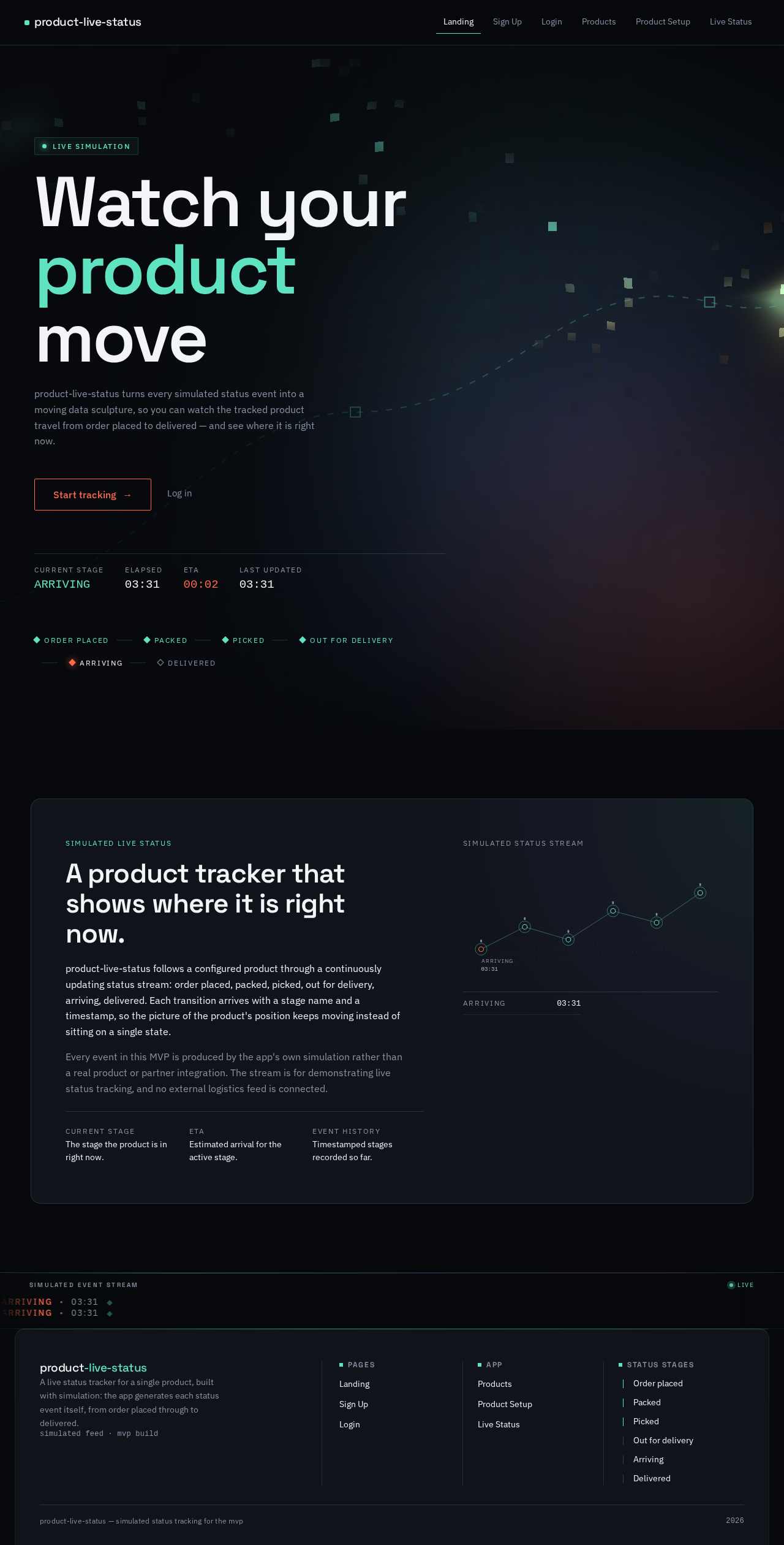
Watch your product move
product-live-status turns every simulated status event into a moving data sculpture, so you can watch the tracked product travel from order placed to delivered — and see where it is right now.
Simulated live status
A product tracker that shows where it is right now.
product-live-status follows a configured product through a continuously updating status stream: order placed, packed, picked, out for delivery, arriving, delivered. Each transition arrives with a stage name and a timestamp, so the picture of the product's position keeps moving instead of sitting on a single state.
Every event in this MVP is produced by the app's own simulation rather than a real product or partner integration. The stream is for demonstrating live status tracking, and no external logistics feed is connected.
- Current stageThe stage the product is in right now.
- ETAEstimated arrival for the active stage.
- Event historyTimestamped stages recorded so far.
Simulated status stream
- ORDER PLACED00:00
Watch your product move
product-live-status turns every simulated status event into a moving data sculpture, so you can watch the tracked product travel from order placed to delivered — and see where it is right now.
Simulated live status
A product tracker that shows where it is right now.
product-live-status follows a configured product through a continuously updating status stream: order placed, packed, picked, out for delivery, arriving, delivered. Each transition arrives with a stage name and a timestamp, so the picture of the product's position keeps moving instead of sitting on a single state.
Every event in this MVP is produced by the app's own simulation rather than a real product or partner integration. The stream is for demonstrating live status tracking, and no external logistics feed is connected.
- Current stageThe stage the product is in right now.
- ETAEstimated arrival for the active stage.
- Event historyTimestamped stages recorded so far.
Simulated status stream
- ORDER PLACED00:00
No comments yet. Be the first!