procurement-estimate-management
 ZIAUL HAQUE_Euroteck
Procurement & Estimate Management Website


Comments (0)
Sign in to leave a comment
System Requirements
System Requirements Document for Procurement & Estimate Management
1. Introduction
Procurement & Estimate Management is a web application for recording procurement requests and preparing the cost estimates that support purchase decisions. The product exists so that a procurement officer, an estimator, and a procurement manager can work from one ordered system of record instead of scattered spreadsheets and messages: requests are recorded, costs are estimated against those requests, and a manager reviews both together before spending is committed and a procurement case is closed.
The audience is a small in-house procurement function. Three distinct roles share the same durable data but do different work on it: the Procurement Officer keeps procurement records current and drives each purchase cycle; the Estimator prepares and submits cost estimates for procurement items; the Procurement Manager reviews records and estimates in one place, approves estimates, controls spending, and closes procurement cases. Each role reaches only the working surface its responsibility requires.
This document is the System Requirements Document for the product named Procurement & Estimate Management. It specifies the current delivery, the three role-scoped working surfaces, the identity entry points, the visual system, and the technical stack.
2. System Overview
2a. Product Interpretation and Delivery Boundary
The product is a first-party, application-owned web application. All working surfaces are custom UI owned by the application, served by a React frontend against a shared FastAPI backend with MariaDB persistence. There is no provider-owned or external-only surface, and no headless delivery.
Access is split into two boundaries:
- Anonymous entry. The Landing page explains the product before any identity check. Login and Sign Up are anonymously reachable and are the only places where identity is established or verified. A protected destination never owns the interaction that grants access to itself.
- Protected work. Procurement Records, Estimates, and Review are role-restricted working surfaces. A visitor who has not verified identity is sent to Login; a verified user whose role does not match the surface is told so and returned to the surface their role owns. Identity continuity is application-owned: the same account resumes the same durable records across sessions.
The three protected surfaces are separated because their working context, authoritative state, lifecycle, and completion outcome differ: the officer authors and advances procurement records; the estimator authors cost estimates bound to procurement items and submits them for decision; the manager reads records and estimates together, approves, and closes cases. Each is an independently resumed responsibility, so each owns its own destination.
Current scope is limited to recording and maintaining procurement records, preparing and submitting cost estimates, and reviewing records with their estimates to approve and close. Nothing beyond that is current.
Removed from scope
- Smart Micro-Grid Dashboard (also: Smart Micro-Grid, EMS, Random Forest, Predictive Load Shedding, ESP32, Relay, Telemetry, SoC, Solar Panel, Environmental Sensor, AI Engine, Load Shedding)
- Dark-mode slate dashboard theme (also: Slate Dark, Slate Container, Dark Mode)
- Power, energy, and IoT device monitoring of any kind
2b. Source Content Inventory
Not applicable. No reference directive in this request declares content_source; the reusable design-system skill is a visual/style reference only and supplies no product facts, and its micro-grid content is explicitly removed above.
2c. Page Content and Component Coverage
Landing
- Information/state: Public, no identity required. Product name "Procurement & Estimate Management"; hero headline "Every purchase, costed and checked."; subline "Record procurement requests and cost estimates in one ordered system."; a short explanation of the three-role workflow (record → estimate → review); a ruled sample purchase record panel showing aligned label/value rows with orange status marks.
- Primary action: "Start now" — leads to Sign Up. Supporting action: a text link to Login for returning users.
- Domain entities shown: a representative procurement record (request reference, item, quantity, requesting officer, status) and a representative estimate line (unit cost, extended cost, total) — illustrative only, not live data.
- Component responsibilities: top bar with wordmark and Login link; hero block (8-column headline, ruled diagram panel at right); small-cap orange section labels above each section heading; a three-step procurement-flow strip with the signal orange bar marking the active step; footer.
- States: static content; no loading, empty, or error states. If the hero diagram is slow to render, the text block remains fully readable. Reduced-motion: the hero diagram appears in its final composed state with no reveal.
Login
- Information/state: Anonymous. Email and password fields; inline validation messages; a general failure message for rejected credentials that does not disclose which field was wrong.
- Primary action: submit credentials to verify identity and continue to the surface the account's role owns. Supporting actions: link to Sign Up; link back to Landing.
- Domain entities: user account (email, password credential, role).
- Component responsibilities: centered ruled form on the warm-grey ground; label/value rows aligned on the grid; single orange submit control; error region above the form.
- States: idle; submitting (control disabled, no spinner flourish); success (redirect to role-owned surface); error — invalid credentials (retry permitted); error — network/server failure (retry permitted, entered email preserved); already-verified visitor is redirected to their role-owned surface.
Sign Up
- Information/state: Anonymous. Fields for name, email, password, and role selection among Procurement Officer, Estimator, and Procurement Manager; inline validation for required fields, email format, and password minimum length.
- Primary action: create the account and establish identity, then continue to the surface the chosen role owns. Supporting action: link to Login.
- Domain entities: user account (name, email, password credential, role).
- Component responsibilities: ruled form on the grid; role selection presented as honest switch-style controls, not a card grid; single orange submit control; error region.
- States: idle; submitting; success (identity established, redirect to role-owned surface); error — email already registered (link to Login offered); error — validation failure (field-level messages, entered values preserved); error — server failure (retry permitted).
Procurement Records
- Information/state: Role-restricted to the Procurement Officer. A ruled table of procurement records with columns for request reference, item description, quantity, unit, requesting officer, date raised, status, and linked estimate indicator. Status values are limited and rendered as small-caps labels with a single orange mark on the active status.
- Primary actions: create a new procurement record; open a record to edit its fields; advance a record's status through its purchase cycle. Supporting actions: filter and sort the table; search by reference or item; open the linked estimate for a record (read-only view of the estimator's submitted figures).
- Domain entities: procurement record (reference, item description, quantity, unit, requesting officer, date raised, status, notes); link to estimate.
- Component responsibilities: page header with small-cap orange label; ruled table with tabular-figure numbers in IBM Plex Mono; record editor as an in-page ruled form (label/value rows, 6px radius fields, hairline rules, no shadow); status control as an honest switch; empty-state panel; pagination or scroll region.
- States: loading (skeleton ruled rows); empty (no records yet — prompt to create the first record); success (record saved, table reflects the change immediately); error — validation failure on save (field messages, values preserved); error — save rejected by server (retry offered, unsaved values preserved); error — record not found on open (return to table with a notice); unauthorized (redirect to Login if unverified, or to the role-owned surface with a notice if the role does not match).
Estimates
- Information/state: Role-restricted to the Estimator. A ruled list of estimates, each bound to a procurement record, with columns for estimate reference, linked procurement record, line count, total cost, status (draft / submitted / approved / returned), and last updated. An estimate editor shows line items with description, quantity, unit cost, and extended cost, plus a tabular-figure total.
- Primary actions: create an estimate for a procurement record; add, edit, and remove line items; submit the estimate for review. Supporting actions: filter by status; open a returned estimate to revise and resubmit; view the linked procurement record read-only.
- Domain entities: estimate (reference, linked procurement record, status, total, timestamps); estimate line (description, quantity, unit cost, extended cost).
- Component responsibilities: page header with small-cap orange label; ruled list; estimate editor with ruled line-item rows and a right-aligned tabular total; submit control in signal orange; status labels in small caps; empty-state panel.
- States: loading; empty (no estimates yet — prompt to create one against an existing procurement record); success (estimate saved as draft, or submitted and status changes to submitted); error — no procurement record selected (inline prompt to choose one); error — validation failure on a line (field messages, values preserved); error — submit rejected (status remains draft, retry offered); error — estimate returned by the manager (status shows returned with the manager's note, editor reopens for revision); unauthorized (redirect as above).
Review
- Information/state: Role-restricted to the Procurement Manager. A read-only combined view: a procurement record beside its linked estimate, with aligned label/value rows for record fields and a ruled table of estimate lines with a tabular total. A decision panel shows the current estimate status and the available decision.
- Primary actions: approve a submitted estimate; return a submitted estimate to the estimator with a note; close a procurement case once its estimate is approved. Supporting actions: filter the queue by status; open any record/estimate pair; search by reference.
- Domain entities: procurement record; estimate; decision (approve / return, note, timestamp, deciding manager); case closure (timestamp, closing manager).
- Component responsibilities: page header with small-cap orange label; queue list on the left, selected pair on the right (stacking to one column on narrow viewports); ruled comparison panel; decision controls as honest switches with one orange confirm action; note field for returns; empty-state panel.
- States: loading; empty (nothing awaiting review — calm empty panel); success (approval recorded, estimate status becomes approved and the record shows it; closure recorded, record status becomes closed); error — decision rejected by server (state unchanged, retry offered); error — estimate already decided by a concurrent action (view refreshes to current state with a notice); unauthorized (redirect as above).
3. Functional Requirements
FR-1 — Public product explanation. As a prospective user I should see a public Landing page that explains what the product does and offers a way to begin, so that I understand the product before any identity check. (explicit; owner: Landing)
- Trigger: anonymous visit to the site root. Observable result: Landing renders with headline, subline, workflow explanation, and "Start now". Failure/recovery: none applicable; content is static. Continuation: "Start now" leads to Sign Up; the Login link leads to Login.
FR-2 — Self-service enrollment. As a new user I should complete self-service enrollment so that I can begin protected procurement work. (required_inference; owner: Sign Up)
- Input: name, email, password, role selection. Observable result: an account is created and identity is established; the user lands on the surface their role owns. Failure/recovery: duplicate email offers Login; validation errors preserve entered values; server failure permits retry. Continuation: the user proceeds to their role-owned surface.
FR-3 — Returning verification. As a returning user I should verify my identity on Login so that I can resume my protected work. (required_inference; owner: Login)
- Input: email and password. Observable result: identity verified; the user lands on the surface their role owns. Failure/recovery: invalid credentials show a non-disclosing error and permit retry; server failure preserves the email and permits retry. Continuation: the user resumes their role-owned surface with prior records intact.
FR-4 — Role-appropriate access. As a verified user I should reach only the protected surface my role requires, so that each role works in its own context. (required_inference; owner: Login, Sign Up, and the three protected pages)
- Trigger: an unverified visitor requests a protected page, or a verified user requests a page their role does not own. Observable result: unverified visitors are sent to Login; mismatched roles are returned to their own surface with a notice. Failure/recovery: the notice explains the redirect and offers the correct destination. Continuation: the user completes the intended work on the correct surface.
FR-5 — Record procurement requests. As a Procurement Officer I should create procurement records so that each purchase request is captured in the system. (explicit; owner: Procurement Records)
- Input: item description, quantity, unit, requesting officer, date raised, notes. Observable result: the record appears in the ruled table with a reference and an initial status. Failure/recovery: validation errors preserve entered values; server rejection permits retry. Continuation: the officer can open the record to edit or advance it.
FR-6 — Keep procurement records current. As a Procurement Officer I should update procurement records and advance their status through the purchase cycle so that each purchase cycle is tracked to completion. (explicit; owner: Procurement Records)
- Input: edited fields or a status change. Observable result: the table and record reflect the new values and status immediately. Failure/recovery: rejected saves preserve unsaved values and offer retry; a record that cannot be found returns the officer to the table with a notice. Continuation: the officer continues with the next record or opens the linked estimate.
FR-7 — Track procurement progress. As a Procurement Officer I should see the status of every procurement record and whether an estimate is linked, so that I know where each purchase stands. (explicit; owner: Procurement Records)
- Trigger: opening the table or filtering it. Observable result: records are listed with status labels and a linked-estimate indicator. Failure/recovery: empty state prompts creating the first record. Continuation: the officer opens a record or its linked estimate.
FR-8 — Prepare cost estimates. As an Estimator I should create cost estimates for procurement items so that purchase decisions are supported by costed figures. (explicit; owner: Estimates)
- Input: a selected procurement record and one or more line items (description, quantity, unit cost). Observable result: an estimate is saved as a draft with a computed total. Failure/recovery: missing record selection prompts a choice; line validation errors preserve values. Continuation: the estimator adds lines or submits.
FR-9 — Submit estimates. As an Estimator I should submit an estimate so that the Procurement Manager can decide on it. (explicit; owner: Estimates)
- Input: a draft estimate with at least one line. Observable result: status becomes submitted and the estimate enters the manager's review queue. Failure/recovery: a rejected submit leaves the estimate in draft and offers retry. Continuation: the estimator awaits the decision and can revise if returned.
FR-10 — Revise returned estimates. As an Estimator I should revise an estimate the manager returned and resubmit it so that the estimate can still support the purchase decision. (required_inference; owner: Estimates)
- Trigger: an estimate whose status is returned, with the manager's note visible. Observable result: edits are saved and resubmission returns the estimate to submitted. Failure/recovery: validation errors preserve values; rejected resubmission leaves it returned with retry offered. Continuation: the manager reviews the revised estimate.
FR-11 — Review records with their estimates. As a Procurement Manager I should view procurement records and their estimates in one place so that I can judge each purchase against its cost. (explicit; owner: Review)
- Trigger: opening Review or selecting a queue item. Observable result: the record's fields and the estimate's lines and total are shown together in aligned ruled rows. Failure/recovery: empty queue shows a calm empty panel. Continuation: the manager approves, returns, or closes.
FR-12 — Approve estimates. As a Procurement Manager I should approve a submitted estimate so that spending is authorized. (explicit; owner: Review)
- Input: a submitted estimate and an approve decision. Observable result: the estimate status becomes approved, the decision is recorded with the deciding manager and timestamp, and the estimator sees the approved status. Failure/recovery: a rejected decision leaves state unchanged and offers retry; a concurrent decision refreshes the view with a notice. Continuation: the manager closes the case.
FR-13 — Return estimates with a note. As a Procurement Manager I should return a submitted estimate to the estimator with a note so that the estimator can correct it. (required_inference; owner: Review)
- Input: a submitted estimate, a return decision, and a note. Observable result: the estimate status becomes returned and the note is visible to the estimator. Failure/recovery: a rejected decision leaves state unchanged and offers retry. Continuation: the estimator revises and resubmits.
FR-14 — Close procurement cases. As a Procurement Manager I should close a procurement case once its estimate is approved so that spending is controlled and the case is finished. (explicit; owner: Review)
- Input: a record whose estimate is approved and a close decision. Observable result: the record status becomes closed with the closing manager and timestamp recorded. Failure/recovery: a rejected closure leaves state unchanged and offers retry. Continuation: the case leaves the active queue.
4. User Personas
Procurement Officer
- Product context: Records purchase requests as they arise and shepherds each one through its purchase cycle. Works primarily in the ruled table of procurement records, where volume and status clarity matter more than narrative.
- Primary goal: Keep every procurement record current and complete each purchase cycle without losing track of where a request stands.
- Distinct responsibilities: Creates procurement records with item description, quantity, unit, requesting officer, and date raised; edits them as circumstances change; advances their status; checks whether an estimate is linked and reads the estimator's submitted figures.
- Inputs and decisions: Decides when a request is ready to be recorded, what quantity and unit are correct, and when a record advances to its next status.
- Interactions with other participants: Hands each recorded item to the Estimator implicitly by making the record available for costing; reads the Estimator's submitted estimate; sees the Procurement Manager's approval and closure reflected in the record's status.
- Observable success: Every request is recorded, its status is accurate, and each purchase cycle reaches closure with its estimate visible.
Estimator
- Product context: Prepares cost estimates for procurement items. Works in the estimate editor, where line-item arithmetic and a trustworthy total are the whole job.
- Primary goal: Submit accurate, complete cost estimates that support purchase decisions.
- Distinct responsibilities: Creates an estimate against a specific procurement record; adds, edits, and removes line items with quantity and unit cost; submits for review; revises and resubmits when returned.
- Inputs and decisions: Chooses which procurement record to cost, decides line-item breakdown and unit costs, and decides when an estimate is complete enough to submit.
- Interactions with other participants: Reads the Procurement Officer's record to know what is being costed; receives the Procurement Manager's return note or approval and responds by revising or stopping.
- Observable success: Each estimate is submitted with a correct total, and returned estimates are revised and resubmitted until approved.
Procurement Manager
- Product context: Reviews procurement records and their estimates together and holds spending authority. Works in the combined Review surface, where the record and its cost sit side by side.
- Primary goal: Control spending by approving only sound estimates and closing each procurement case.
- Distinct responsibilities: Reads records against their estimates; approves a submitted estimate; returns an estimate with a note; closes a case once its estimate is approved.
- Inputs and decisions: Judges whether the estimate's total is justified by the record; decides approve or return, and when a case is finished.
- Interactions with other participants: Consumes the Procurement Officer's records and the Estimator's submitted estimates; sends approvals and return notes back to the Estimator and closure back to the record.
- Observable success: No spending is committed without an approval, every returned estimate comes back revised, and every approved case is closed.
5. Core User Flows
Flow A — A new user enrolls and reaches their working surface
- A visitor opens the site root and lands on Landing, reading the headline, subline, and workflow explanation.
- The visitor selects "Start now" and arrives at Sign Up.
- The visitor enters name, email, and password and selects a role (Procurement Officer, Estimator, or Procurement Manager).
- The visitor submits. On success, identity is established and the application routes them to the surface their role owns: Procurement Records, Estimates, or Review.
- Failure: if the email is already registered, the page offers Login; if a field is invalid, field-level messages appear and entered values are preserved; if the server fails, the visitor retries with values intact.
Flow B — A returning user verifies identity and resumes work
- A returning user opens Login (directly or from the Landing link).
- They enter email and password and submit.
- On success they land on their role-owned surface with their prior records intact.
- Failure: invalid credentials show a non-disclosing error and permit retry; a server failure preserves the email and permits retry.
- If a verified user requests a surface their role does not own, they are returned to their own surface with a notice explaining the redirect.
Flow C — The Procurement Officer records and advances a purchase
- The officer signs in and lands on Procurement Records.
- They select the create action and fill item description, quantity, unit, requesting officer, date raised, and notes in the in-page ruled form.
- They save. The record appears in the ruled table with a reference and an initial status.
- As the purchase progresses, the officer opens the record, edits fields, and moves its status forward with the status switch; the table reflects each change immediately.
- The officer checks the linked-estimate indicator to see whether the Estimator has costed the item, and opens the estimate read-only to read the submitted figures.
- Failure: a rejected save preserves unsaved values and offers retry; a record that cannot be found returns the officer to the table with a notice.
- Continuation: the officer moves to the next record; later, the record's status shows the manager's approval and closure.
Flow D — The Estimator prepares and submits an estimate
- The estimator signs in and lands on Estimates.
- They create an estimate and select the procurement record to cost.
- They add line items — description, quantity, unit cost — and the extended costs and total compute in tabular figures.
- They submit. The estimate's status becomes submitted and it enters the manager's review queue.
- Failure: submitting without a selected record prompts a choice; a line validation error preserves values; a rejected submit leaves the estimate in draft with retry offered.
- Continuation: the estimator awaits the decision.
Flow E — The Estimator revises a returned estimate
- The estimator opens Estimates and finds an estimate whose status is returned, with the manager's note visible.
- They reopen the editor, adjust line items, and resubmit.
- The status returns to submitted and the estimate re-enters the review queue.
- Failure: validation errors preserve values; a rejected resubmission leaves the estimate returned with retry offered.
Flow F — The Procurement Manager reviews, approves, and closes
- The manager signs in and lands on Review, seeing the queue of records with their estimates.
- They select a pair; the record's fields and the estimate's lines and total appear together in aligned ruled rows.
- They decide approve. The estimate status becomes approved, the decision is recorded with the deciding manager and timestamp, and the estimator sees the approved status on Estimates.
- Alternatively they decide return, entering a note; the estimate status becomes returned and the note is visible to the estimator, who revises it in Flow E.
- Once the estimate is approved, the manager closes the case; the record status becomes closed with the closing manager and timestamp, and the case leaves the active queue.
- Failure: a rejected decision leaves state unchanged and offers retry; a concurrent decision by another action refreshes the view to current state with a notice.
6. Visuals Colors and Theme
The visual system follows the supplied creative direction: functional clarity after Dieter Rams — exact, calm, trustworthy, with a strict grid and one signal colour.
Mode: Light mode only.
Colour tokens (exact hex, by role):
| Role | Token | Hex |
|---|---|---|
| Page background (warm grey ground) | --bg | #F2EFE9 |
| Surface (ruled panels, table ground) | --surface | #FBFAF7 |
| Primary text / ink | --text | #1C1C1A |
| Primary (rules, wordmark, dark controls) | --primary | #23231F |
| Accent (one action or one status only) | --accent | #E4611B |
| Muted (secondary text, labels) | --muted | #7A756B |
| Hairline rule | --rule | #D8D3C8 |
| Success / approved | --ok | #2F6B3A |
| Warning / returned | --warn | #B07A12 |
| Critical / rejected | --critical | #A32B22 |
The accent #E4611B is reserved: it marks exactly one action per view (the primary submit or confirm) and the active step in the procurement-flow strip. It is never used for decoration.
Typography:
- Headings: Archivo, Medium weight, tight tracking, flush left.
- Body: IBM Plex Sans.
- Numbers in every table and total: IBM Plex Mono with
font-variant-numeric: tabular-nums. - Labels: small caps at 12px with 0.08em tracking.
- Scale: 1.25 modular — 64 / 48 / 32 / 20 / 16 / 14, with 12px small-cap labels; display
clamp(40px, 6vw, 88px).
Shape language: Rounded rectangles at 6px radius; hairline 1px rules; no shadows. Controls look like honest switches and dials.
Layout: A 12-column modular grid with visible rules. Label and value pairs align in ruled rows. Sections sit on the grid, not in floating cards. At 375px the grid collapses to one column; at 768px to two; at 1280px the full twelve columns apply. All headlines, labels, numbers, and controls wrap or scale with clamp() to stay entirely inside the viewport and their container at 375px, 768px, and 1280px.
Imagery: Diagrammatic line art of parts, crates, and ruled tables. No stock photography and no decorative illustration.
Avoid: gradient blobs and glass panels; blue or indigo primary colours; hover-lift cards in an identical grid; bouncy or decorative animation.
7. Signature Design Concept
The public entry is a left-aligned hero on the warm-grey ground (#F2EFE9). An oversized ink headline — "Every purchase, costed and checked." — set in Archivo Medium at clamp(40px, 6vw, 88px) fills eight of twelve columns, flush left, with the subline "Record procurement requests and cost estimates in one ordered system." beneath it in IBM Plex Sans at 20px and the single orange "Start now" control below that.
At the right, a ruled diagram panel shows a sample purchase record: aligned label/value rows (reference, item, quantity, requesting officer, status) separated by hairline rules on the #FBFAF7 surface, with numbers in IBM Plex Mono tabular figures and small orange status marks on the active row. The panel is drawn as diagrammatic line art — no photograph, no shadow, no glass.
Below the hero, a three-step procurement-flow strip (Record → Estimate → Review) carries the signal orange bar on the active step, and each section heading is preceded by a small-cap orange label. The whole composition is a single strict grid with visible rules; the only colour event on the page is orange.
8. Interaction Model & Motion Direction
Interaction Model: Animated Motion Tempo: restrained Hero Dimensionality: flat
Landing Hero Motion Brief
- Focal subject: the ruled diagram panel of a sample purchase record at the right of the hero, with its orange status marks.
- Input → transformation → outcome thesis: on load, the hero diagram's hairline rules draw in and its label/value rows settle into alignment, ending in the fully composed record panel with orange status marks in place. The transformation reveals the product's defining state — an ordered, costed record — and nothing else moves.
- Motion vocabulary: one slow reveal of the hero diagram on load; instant mechanical feedback at 120ms for every control state change; no flourish, no bounce, no parallax, no scroll-linked depth.
- Composed first frame: warm-grey ground, ink headline occupying eight columns, subline and orange "Start now" beneath, ruled record panel at right already legible in its final alignment.
- Reduced-motion state: the hero diagram appears immediately in its final composed state with no reveal; all controls still give instant 120ms state feedback.
9. Non-Functional Requirements
- NFR-1 — Identity continuity. Accounts and sessions are application-owned so that a user resumes the same durable records across visits. (required_inference; rationale: procurement records, estimates, and decisions are durable and bound to the correct participant.)
- NFR-2 — Role-scoped access. Each protected surface is reachable only by the role that owns it; unverified visitors are routed to Login and mismatched roles to their own surface. (required_inference; rationale: the three roles hold differentiated control over shared procurement state — the officer authors records, the estimator authors estimates, the manager approves and closes.)
- NFR-3 — Durable persistence. Procurement records, estimates, estimate lines, decisions, and closures persist in MariaDB and survive restarts. (explicit via planning scope
durable_state_required.) - NFR-4 — Readable at every viewport. Headlines, wordmarks, labels, numbers, and controls remain entirely inside the viewport and their container at 375px, 768px, and 1280px, wrapping or scaling to fit, with nothing covering them. (explicit design constraint.)
- NFR-5 — Reduced motion. With
prefers-reduced-motion, the hero reveal is suppressed and a usable static arrangement is provided. (explicit design constraint.) - NFR-6 — No shadows, no gradients, no glass. Surfaces are flat with hairline rules and 6px radii. (explicit creative direction.)
- NFR-7 — Credential handling. Passwords are stored only as salted hashes; Login errors do not disclose which field failed. (required_inference; rationale: identity is application-owned.)
10. Tech Stack
- Frontend: React application UI, served as the custom first-party interface for all six pages.
- Backend: a single shared FastAPI process hosting all application APIs and domain modules (identity, procurement records, estimates, review decisions). Feature APIs extend this process rather than adding new services.
- Database: MariaDB for application-owned persistent data (accounts, procurement records, estimates, estimate lines, decisions, closures).
- Infrastructure:
docker-compose.ymlwith three services —frontend,backend,database— with the frontend depending on the backend and the backend depending on the database. - Fonts: Archivo (headings), IBM Plex Sans (body), IBM Plex Mono (tabular figures), loaded as web fonts.
11. Assumptions and Constraints
- A-1: The three personas are a closed active-human set; no additional human roles exist in the current product. (planning scope)
- A-2: The six pages are a closed, ordered page contract: Landing, Login, Sign Up, Procurement Records, Estimates, Review. (planning scope,
page_contract_version=1) - A-3: Self-service enrollment is open to any visitor; no invitation or provisioning flow exists. (planning scope)
- A-4: Role selection occurs at Sign Up; the product does not include role administration or role changes after enrollment. (required_inference, narrow)
- A-5: The micro-grid dashboard content in the reusable design-system skill is a visual reference only and is not product scope; its dark slate palette is not used. (explicit removal)
- A-6: Light mode only; no dark theme is required. (creative direction)
- A-7: The product is English-language. (default — not specified by user)
12. Glossary
- Procurement record: A purchase request captured by the Procurement Officer, with reference, item description, quantity, unit, requesting officer, date raised, status, and notes.
- Estimate: A costed breakdown prepared by the Estimator against a procurement record, composed of estimate lines and a total, with a status of draft, submitted, approved, or returned.
- Estimate line: One row of an estimate — description, quantity, unit cost, and extended cost.
- Decision: The Procurement Manager's approve or return action on a submitted estimate, recorded with a note (for returns), the deciding manager, and a timestamp.
- Case closure: The Procurement Manager's action marking a procurement record closed once its estimate is approved.
- Role-owned surface: The protected page a given role works in — Procurement Records for the Procurement Officer, Estimates for the Estimator, Review for the Procurement Manager.
- Signal orange: The accent
#E4611B, reserved for one action or one status per view.
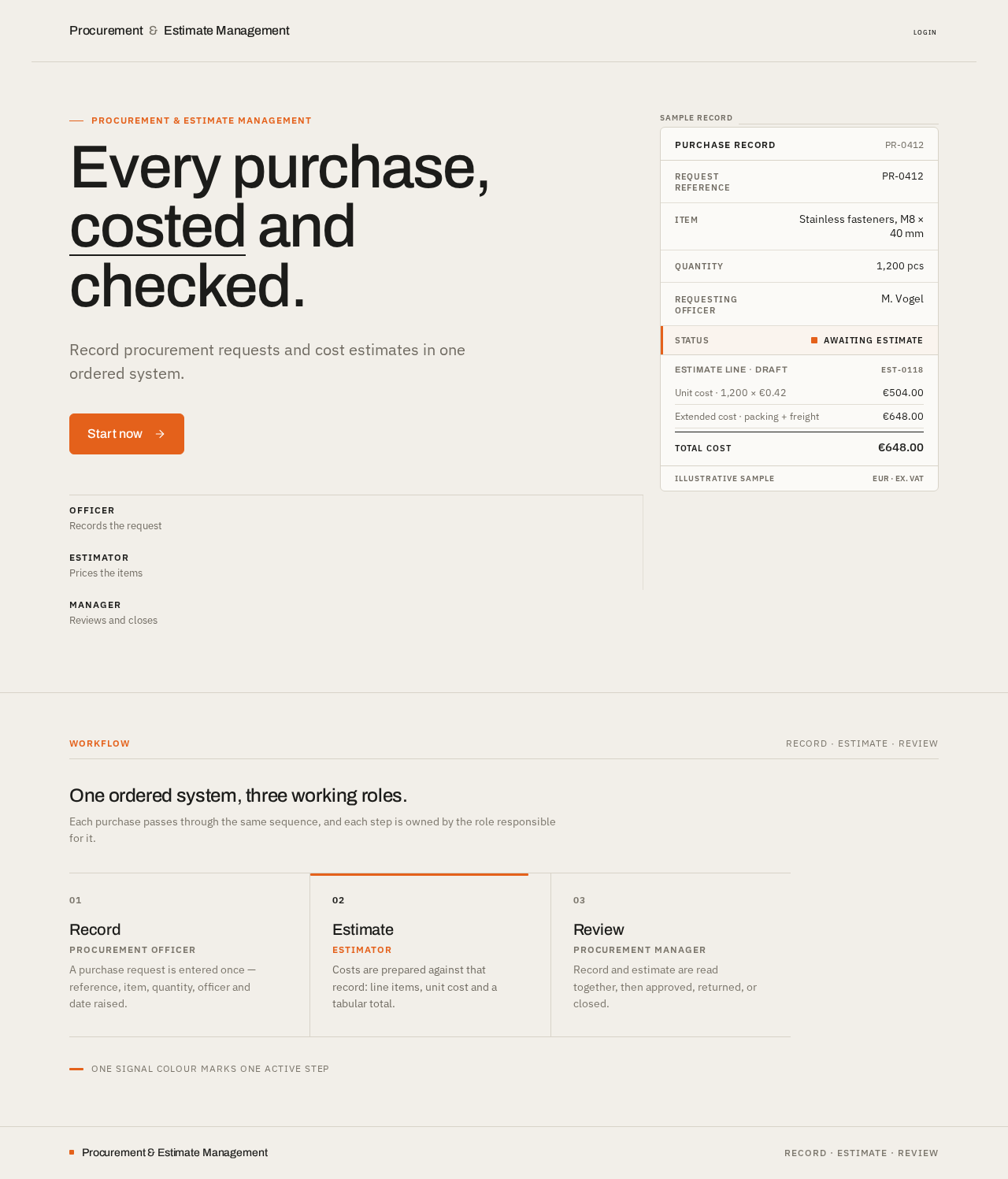
Procurement & Estimate Management
Every purchase, costed and checked.
Record procurement requests and cost estimates in one ordered system.
Purchase record
PR-0412- Request referencePR-0412
- ItemStainless fasteners, M8 × 40 mm
- Quantity1,200 pcs
- Requesting officerM. Vogel
- StatusAwaiting estimate
Estimate line · draft
EST-0118One ordered system, three working roles.
Each purchase passes through the same sequence, and each step is owned by the role responsible for it.
- 01
Record
Procurement OfficerA purchase request is entered once — reference, item, quantity, officer and date raised.
- 02
Estimate
EstimatorCosts are prepared against that record: line items, unit cost and a tabular total.
- 03
Review
Procurement ManagerRecord and estimate are read together, then approved, returned, or closed.
One signal colour marks one active step
Procurement & Estimate Management
Every purchase, costed and checked.
Record procurement requests and cost estimates in one ordered system.
Purchase record
PR-0412- Request referencePR-0412
- ItemStainless fasteners, M8 × 40 mm
- Quantity1,200 pcs
- Requesting officerM. Vogel
- StatusAwaiting estimate
Estimate line · draft
EST-0118One ordered system, three working roles.
Each purchase passes through the same sequence, and each step is owned by the role responsible for it.
- 01
Record
Procurement OfficerA purchase request is entered once — reference, item, quantity, officer and date raised.
- 02
Estimate
EstimatorCosts are prepared against that record: line items, unit cost and a tabular total.
- 03
Review
Procurement ManagerRecord and estimate are read together, then approved, returned, or closed.
One signal colour marks one active step
No comments yet. Be the first!