prism-callcator
 Diya Trivedi
start a project to build a simple single page design of callcator

Comments (0)
Sign in to leave a comment
System Requirements
System Requirements Document for prism-callcator
1. Introduction
prism-callcator is a simple calculator delivered as a single page. The product intent is a fast, no-friction calculation tool: a visitor opens the page, enters numbers and operations, sees the running result, and clears or corrects the entry to start a new calculation. The audience is broad and utility-minded — students, professionals, and anyone reaching for a quick sum — and the experience must feel exact, legible, and quietly confident rather than playful or gimmicky.
The design language is Swiss geometric rigour: a strict modular grid, flush-left type, pure colour used as signal, and a calculator surface that is itself the hero of the page. The single-page constraint is a hard product constraint: entry, computation, and clear interactions are all embedded in one page, with no separate destinations.
2. System Overview
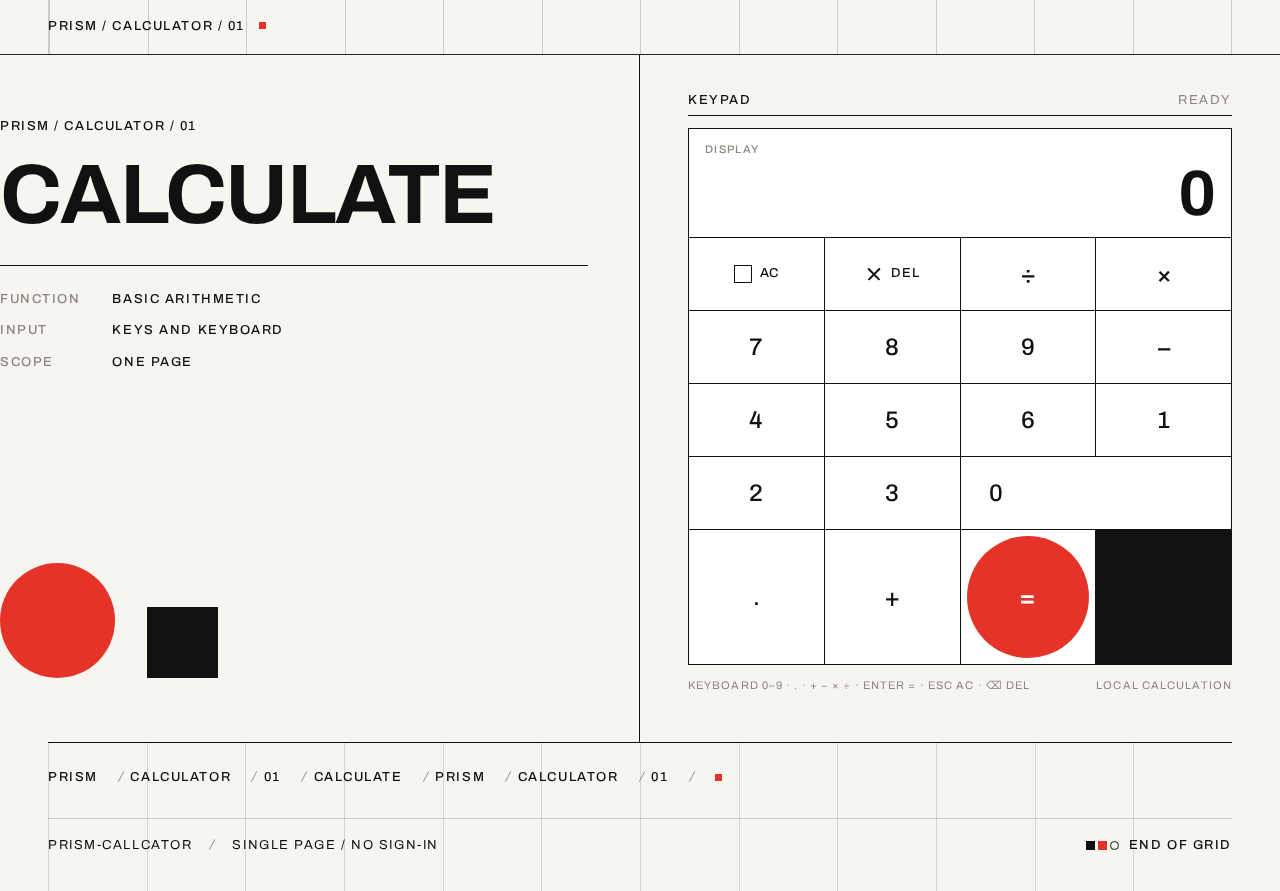
prism-callcator is a single-page web calculator. The page presents an oversized flush-left headline and metadata block alongside a white calculator surface framed by a visible grid. The calculator surface contains a tabular-figure display and a keypad of square keys separated by 1px dividers, with a single red circular equals key breaking the rectangle.
The product has one active human actor, the Calculator User, who enters numbers and operations, observes the running result, and clears or corrects the entry. There is no account, no sign-in, and no persisted user state: the page is anonymous and public, and each visit begins from a fresh display of 0.
Delivery is a React frontend served as the single page, backed by the shared FastAPI backend process and a MariaDB database provisioned in the scaffold. The calculator's arithmetic is performed in the page itself; the backend and database are provisioned infrastructure and do not carry calculator domain state, because the accepted product has no persistence, history, or account requirement.
Removed from scope
- None — no concepts were removed by the user.
2a. Product Interpretation and Delivery Boundary
The user asked for a simple single-page calculator design. That request is the whole current product: one page, one calculator, no surrounding application. The page is the anonymous public entry surface — a visitor lands on it and can immediately calculate, with no identity establishment, no gating, and no navigation to any other destination.
The single-page constraint is treated as exact. Entry, computation, clear, and correction all live inside the one page; there is no separate results page, history page, settings page, or help page. The backend and database exist as provisioned infrastructure but are not required to make the accepted calculator work, and no future capability is implied by their presence.
Everything beyond a working single-page calculator — calculation history, saved calculations, accounts, sharing, scientific functions — is outside the current delivery boundary and is not part of this document's current requirements.
2c. Page Content and Component Coverage
Calculator
Information and state
- Page header: all-caps micro-label metadata line reading
PRISM / CALCULATOR / 01with 0.12em tracking, separated from the body by a 1px black rule. - Hero headline: oversized flush-left
CALCULATEin Archivo 700 atclamp(40px, 8vw, 96px), stacked over a thin black rule and a small all-caps metadata block. - Calculator display: current entry or result rendered in tabular Archivo figures at
clamp(32px, 6vw, 64px), right-aligned within the display cell, initial value0. - Operator indicator: the currently selected operator key is shown in the red accent (
#E63329) while active. - Footer line: hairline rule with a repeating all-caps micro-label metadata motif.
- Visible 12-column grid: hairline vertical rules run from header through the calculator to the footer.
Primary actions
- Digit keys
0–9append digits to the current entry. - Decimal point key begins or extends a fractional entry.
- Operator keys
+,−,×,÷select the pending operation and mark that key active in red. - Equals key (the single red circle) evaluates the pending operation and shows the result.
- Clear key resets the display to
0and discards any pending operation and entry. - Delete key removes the last entered digit from the current entry.
Supporting actions
- Keyboard input mirrors the on-screen keys for digits, operators, decimal point, equals, and clear/delete.
Domain entities
- Current entry (the number being typed).
- Pending operand and pending operator (the stored left-hand value and selected operation).
- Display value (the string shown in the display).
Component responsibilities
- Headline and metadata block: static composition, no interaction.
- Display cell: renders the display value in tabular figures; crossfades on update.
- Keypad grid: renders keys as grid cells separated by 1px dividers; each key reports press to the calculator state.
- Equals key: rendered as the single red circle, visually distinct from the rectangular keys.
- Grid rules: decorative hairline structure, non-interactive.
States
- Loading: not applicable — the page is static and computes locally; the display shows
0on first paint. - Empty: initial state, display shows
0with no pending operation. - Success: after equals, the display shows the computed result; the result becomes the current entry for a subsequent operation.
- Error: division by zero shows an error indication in the display instead of a numeric result; the next digit or clear key returns the calculator to a usable state.
- Recovery: clear resets to
0; delete removes the last digit; entering a new digit after an error starts a fresh entry.
3. Functional Requirements
FR-1 — Open the calculator page As a Calculator User I should open the single calculator page and immediately see a working calculator, so that I can start a calculation without any setup.
- Provenance: explicit (single page design of calculator).
- Lifecycle: trigger — visiting the page; observable result — the page renders with the display showing
0and the full keypad available; access — anonymous, no identity required; failure/recovery — if the page fails to load, reloading the page restores the initial state; continuation — the user begins entering digits. - Acceptance: the page loads with display
0, all digit, operator, decimal, equals, clear, and delete keys present and operable.
FR-2 — Enter digits As a Calculator User I should press digit keys to build a number in the display, so that I can enter the operands of my calculation.
- Provenance: explicit (simple calculator).
- Lifecycle: trigger — pressing a digit key
0–9; observable result — the digit is appended to the current entry and the display updates; failure/recovery — none beyond clear/delete; continuation — the user presses an operator or equals. - Acceptance: pressing
1,2,3shows123; pressing a digit while the display shows0replaces the0with that digit.
FR-3 — Enter a decimal point As a Calculator User I should press the decimal key to enter fractional numbers, so that I can calculate with non-integer values.
- Provenance: explicit (simple calculator).
- Lifecycle: trigger — pressing the decimal key; observable result — a decimal point is added to the current entry, or a leading
0.is started if the entry is empty; failure/recovery — a second decimal point in the same entry is ignored; continuation — further digits extend the fractional part. - Acceptance: pressing
.then5from a fresh state shows0.5; pressing.twice in one entry leaves a single decimal point.
FR-4 — Select an operator As a Calculator User I should press an operator key to choose the pending operation, so that the calculator knows what to do with the next operand.
- Provenance: explicit (simple calculator).
- Lifecycle: trigger — pressing
+,−,×, or÷; observable result — the current entry is stored as the pending operand, the operator is stored as pending, and the pressed operator key is shown in the red accent; failure/recovery — pressing a different operator before entering a second operand replaces the pending operator; continuation — the user enters the second operand. - Acceptance: after entering
8and pressing+, the+key is red and the display still shows8; pressing×instead makes×red and+inactive.
FR-5 — Evaluate with equals As a Calculator User I should press the equals key to see the result of my calculation, so that I get the answer I came for.
- Provenance: explicit (simple calculator).
- Lifecycle: trigger — pressing the red circular equals key; observable result — the pending operation is applied to the pending operand and the current entry, and the display shows the result with a 120ms opacity crossfade; the result becomes the current entry; failure/recovery — if no operation is pending, the display is unchanged; continuation — the user can chain a new operator onto the result or clear.
- Acceptance: entering
7,+,5,=shows12; pressing=again with no new operator leaves12displayed.
FR-6 — Clear the calculation As a Calculator User I should press the clear key to reset the calculator, so that I can start a new calculation from zero.
- Provenance: explicit (simple calculator).
- Lifecycle: trigger — pressing the clear key; observable result — the display returns to
0, the pending operand and operator are discarded, and no operator key is shown active; failure/recovery — clear is always available and always succeeds; continuation — the user begins a new entry. - Acceptance: after any sequence, pressing clear shows
0with no active operator.
FR-7 — Delete the last digit As a Calculator User I should press the delete key to remove the last entered digit, so that I can correct a mistyped entry without starting over.
- Provenance: explicit (simple calculator).
- Lifecycle: trigger — pressing the delete key; observable result — the last digit of the current entry is removed, and if the entry becomes empty the display shows
0; failure/recovery — delete on an empty or0display leaves0; continuation — the user continues typing. - Acceptance: with
123displayed, pressing delete shows12; pressing delete again shows1; pressing delete again shows0.
FR-8 — Handle division by zero As a Calculator User I should be told when I divide by zero rather than shown a misleading number, so that I understand the calculation cannot be completed.
- Provenance: required_inference (indispensable failure state for the accepted division operation).
- Lifecycle: trigger — pressing equals with a pending
÷and a zero divisor; observable result — the display shows an error indication instead of a numeric result; failure/recovery — pressing clear resets to0, and pressing a digit starts a fresh entry; continuation — the user corrects the divisor or starts over. - Acceptance: entering
5,÷,0,=shows an error indication; pressing clear then shows0.
FR-9 — Keyboard input As a Calculator User I should be able to use my keyboard for digits, operators, decimal, equals, and clear/delete, so that I can calculate quickly without reaching for the mouse.
- Provenance: required_inference (indispensable input parity for a keyboard-accessible single-page calculator).
- Lifecycle: trigger — pressing a supported key; observable result — the same state change as the corresponding on-screen key, with the same 80ms key-press flash on the matching key; failure/recovery — unsupported keys are ignored; continuation — the user continues with either input method.
- Acceptance: typing
4+4then Enter shows8; pressing Escape clears to0.
FR-10 — Reduced-motion behaviour As a Calculator User who prefers reduced motion I should see instant state changes with no transitions, so that the calculator remains comfortable and usable.
- Provenance: required_inference (accessibility of the accepted motion design).
- Lifecycle: trigger — the operating system reports
prefers-reduced-motion: reduce; observable result — key-press flashes and the result crossfade become instant; failure/recovery — not applicable; continuation — all calculation behaviour is unchanged. - Acceptance: with reduced motion enabled, pressing keys updates the display immediately with no visible transition.
4. User Personas
Calculator User
Product context. The Calculator User is anyone who needs a quick sum — a student checking homework, a professional totalling figures, or a passer-by working out a split bill. They arrive at the page with a number in mind and no patience for setup, sign-in, or explanation. They judge the tool in the first second: does it look exact, and can they type immediately?
Primary goal. Get a correct arithmetic result as fast as possible, then either continue calculating from that result or clear and start again.
Distinct accepted responsibilities.
- Entering operands digit by digit, including fractional values.
- Choosing the pending operation and seeing which operator is active.
- Committing the calculation with equals and reading the result.
- Correcting mistakes with delete, or abandoning the calculation with clear.
- Recognising and recovering from a division-by-zero error.
Relevant inputs and decisions. Which operator applies; whether the current entry is complete; whether to chain another operation onto the result or clear; whether to correct a digit or start over.
Interactions with other participants. None. The Calculator User is the only active human actor; the calculator computes locally and no other person, provider, or counterparty is affected by the calculation.
Observable success. The display shows the expected result after equals; the active operator is visibly marked in red; clear returns the display to 0; a mistyped digit is removed by delete; division by zero is clearly signalled rather than silently producing a wrong number.
5. Core User Flows
Flow 1 — Perform a basic calculation
- The Calculator User opens the single calculator page. The page renders with the display showing
0and the full keypad available; no sign-in or setup is required. - The user presses digit keys to enter the first operand. Each digit appends to the display, which updates in tabular figures.
- The user presses an operator key (
+,−,×, or÷). The current entry is stored as the pending operand and the pressed key turns red to show it is active. - The user presses digit keys to enter the second operand. The display shows the second operand.
- The user presses the red circular equals key. The pending operation is applied and the display crossfades over 120ms to the result.
- Continuation: the result becomes the current entry, so the user can press another operator to chain a further calculation, or press clear to return to
0.
Flow 2 — Correct a mistyped entry
- The user is mid-entry and notices a wrong digit in the display.
- The user presses the delete key. The last digit is removed and the display updates.
- The user repeats delete as needed; when the entry is emptied the display shows
0. - The user continues typing the corrected number and proceeds with the calculation.
Flow 3 — Start over with clear
- The user has entered a partial calculation — an operand, an operator, or both — and decides to abandon it.
- The user presses the clear key. The display returns to
0, the pending operand and operator are discarded, and no operator key remains red. - The user begins a new calculation from the fresh state.
Flow 4 — Recover from division by zero
- The user enters a dividend, presses
÷, enters0, and presses equals. - The display shows an error indication instead of a numeric result.
- Recovery: the user presses clear to return to
0and starts a corrected calculation, or presses a digit to begin a fresh entry.
Flow 5 — Calculate by keyboard
- The user, with the page open, types digits, operators, and the decimal point directly on the keyboard. Each keystroke produces the same state change as the matching on-screen key, with the 80ms key-press flash on that key.
- The user presses Enter to evaluate. The result appears in the display.
- The user presses Escape to clear, returning the display to
0.
6. Visuals Colors and Theme
The visual language is Swiss geometric rigour after Josef Müller-Brockmann: grid-locked type, flush-left composition, and pure colour used as signal.
Colour tokens (light mode)
- Background:
#F7F5F0— warm off-white ground. - Surface:
#FFFFFF— pure white calculator surface. - Text:
#111111— black for type and grid rules. - Primary:
#111111— black for structure and primary keys. - Accent:
#E63329— saturated red, used only for the equals key, the active operator, and the single geometric mark in the hero. - Muted:
#8A8780— secondary labels and hairline rules.
Colour is functional: red means action, black means structure, white means surface. No other hues are introduced; blue and indigo are forbidden.
Typography
- Headings: Archivo, flush-left, ragged-right, tracking
-0.02em; weight 700 for the oversized headline, 500 for labels, 400 for body. - Body: Archivo.
- Scale: 1.5 modular — 96 / 64 / 40 / 24 / 16 / 13.
- Headline:
clamp(40px, 8vw, 96px). - Display numbers: tabular figures at
clamp(32px, 6vw, 64px). - Body: 16px. Micro-labels: 13px, all caps,
0.12emtracking.
Shape language
- Hard edges, zero border-radius on the calculator surface and keys.
- Thin 1px black rules define the grid; keys are square or rectangular blocks separated by 1px dividers, not gaps.
- One geometric red circle — the equals key — breaks the rectangle as a deliberate signal.
- No shadows, no gradients, no soft corners.
Layout
- Strict asymmetric two-column grid on a 12-column system: left column (7 cols) holds the oversized headline and a small metadata block; right column (5 cols) holds the calculator surface flush to the grid.
- On mobile the grid collapses to a single column: headline above, calculator below, full-width.
- Horizontal rules separate the header, the calculator, and a footer line.
- All numbers are tabular and aligned.
Imagery
- Typography and geometry are the imagery: a single large red circle and a black square appear as abstract geometric marks in the hero, echoing the calculator keys.
- No photography, no illustration, no icons beyond simple geometric pictograms for clear and delete.
- The grid itself is visible as hairline rules.
Readability constraint. Headlines, labels, numbers, and controls stay entirely inside the viewport and their container at 375px, 768px, and 1280px, wrapping or scaling to fit; decoration may bleed or overlap but never covers readable text or a control.
7. Signature Design Concept
The public entry is a full-viewport asymmetric composition on warm off-white. The left seven columns carry an oversized flush-left CALCULATE headline in Archivo 700 at clamp(40px, 8vw, 96px), stacked over a thin black rule and the all-caps metadata line PRISM / CALCULATOR / 01. The right five columns carry the calculator surface — a white rectangle with a 1px black border, flush to the grid — whose display shows 0 in tabular Archivo at 64px. A single large red circle sits at the bottom-right of the calculator as the equals key, breaking the rectangle. Hairline vertical rules run from the header through the calculator to the footer, making the 12-column structure itself the decoration. There is no centred headline, no gradient, and no call-to-action button: the calculator is the hero, framed by the grid.
8. Interaction Model & Motion Direction
Interaction Model: Static Motion Tempo: restrained Hero Dimensionality: flat
Landing Hero Motion Brief
- Focal subject: the calculator surface itself — the white bordered rectangle with its tabular
0display and the single red circular equals key — set against the oversizedCALCULATEheadline and the visible grid. - Input → transformation → outcome thesis: a key press (input) produces an 80ms background flash on the pressed key — black to red for operators — and the display value updates with a 120ms opacity crossfade (transformation), leaving the new number or result legible in tabular figures (outcome). Only accepted calculator behaviour is animated.
- Motion vocabulary: instant state changes, an 80ms key-press flash, a 120ms opacity crossfade on the result, and straight-cut scroll reveals rather than fades. No bounce, no easing theatrics.
- Composed first frame: warm off-white ground;
CALCULATEflush-left across the left seven columns over a hairline rule and thePRISM / CALCULATOR / 01metadata line; the white calculator surface flush to the right five columns with0in the display; the red circle at its bottom-right; hairline vertical grid rules running the full height. - Reduced-motion state: all transitions become instant — the key-press flash and the result crossfade are removed, and the display updates immediately on every input, with the layout unchanged.
9. Non-Functional Requirements
- Single-page constraint. The calculator must be delivered as exactly one page; entry, computation, clear, and correction are embedded in it, with no additional routes or destinations. (explicit)
- Anonymous access. The page requires no account, sign-in, or identity establishment; it is publicly reachable and each visit starts from
0. (explicit — no access requirement stated; required_inference for the anonymous entry) - Local computation. Arithmetic is performed in the page so that results appear without a network round trip; the provisioned backend and database are not required for calculation. (required_inference — supports the "fast, no-friction" intent)
- Legibility. All readable text and controls remain fully inside the viewport and their container at 375px, 768px, and 1280px. (explicit design constraint)
- Accessibility. Keyboard input mirrors the on-screen keys, and
prefers-reduced-motionremoves all transitions. (required_inference) - No persistence. No calculation history, saved values, or user data is stored; the MariaDB database holds no calculator domain state. (explicit — no persistence requested)
10. Tech Stack
- Frontend: React application UI — the single calculator page, with calculator state and arithmetic implemented in the page.
- Backend: shared FastAPI process for application APIs and domain modules (provisioned scaffold; no calculator-specific API is required by the accepted requirements).
- Database: MariaDB for application-owned persistent data (provisioned scaffold; unused by the current calculator, which has no persistence requirement).
- Containerisation: Docker / docker-compose for the frontend, backend, and database services.
- Typography: Archivo, loaded as a web font.
11. Assumptions and Constraints
- Assumption: "callcator" in the user's request means calculator; the product name is
prism-callcator. (labeled assumption) - Assumption: the calculator supports the four basic operations (
+,−,×,÷), digits, a decimal point, equals, clear, and delete — the minimum set implied by "simple calculator". (labeled assumption) - Assumption: the page is publicly accessible with no account, since no identity, persistence, or sharing requirement was stated. (labeled assumption)
- Constraint: exactly one page; no additional routes, pages, or navigation. (explicit)
- Constraint: the visual language follows the supplied Swiss geometric direction — warm off-white ground, black structure, a single red accent, Archivo, hard edges, visible grid. (explicit design constraint)
- Constraint: blue or indigo accents, rounded corners, shadows, gradients, glass/blur, decorative illustration or photography, and bouncy motion are excluded. (explicit design constraint)
- Out of scope (current): calculation history, saved calculations, accounts, sharing, scientific or advanced functions, and any multi-page navigation.
12. Glossary
- Calculator User — the single active human actor who enters numbers and operations and reads results on the calculator page.
- Display — the tabular-figure area of the calculator surface showing the current entry, result, or error indication.
- Pending operand — the stored left-hand value captured when an operator key is pressed.
- Pending operator — the selected operation (
+,−,×,÷) awaiting the second operand, shown in red while active. - Equals key — the single red circular key that evaluates the pending operation.
- Clear — the action that resets the display to
0and discards any pending operand and operator. - Delete — the action that removes the last entered digit from the current entry.
- Micro-label — an all-caps 13px label with 0.12em tracking, used for metadata such as
PRISM / CALCULATOR / 01. - Tabular figures — numerals of equal width, used so the display does not shift as digits change.
PRISM / CALCULATOR / 01
Calculate
PRISM / CALCULATOR / 01
No comments yet. Be the first!