
prime-you

byAmber Kapoor

You are an expert SaaS product team consisting of: - Product Manager - UI/UX Designer - Frontend Engineer - Backend Engineer - Database Architect - DevOps Engineer - QA Engineer Build a production-ready Micro SaaS. Idea: Dental recall recovery Requirements: Create: - Beautiful landing page - Dashboard - User authentication - Google Login - Email Login - Stripe subscriptions - Pricing page - Admin dashboard - Database - REST APIs - Responsive design - Dark mode - User settings - Billing page - Analytics - SEO - Error handling - Loading states Generate: - Frontend - Backend - Database schema - APIs - Authentication - Deployment configuration - Environment variables - README - Sample data Use a modern design similar to Linear, Notion or Vercel. Everything should be production-ready.

LandingAdmin DashboardPricingUsersLogin
Landing

Comments (0)

No comments yet. Be the first!

System Requirements

System Requirement Document
Page 1 of 5

System Requirements Document for Prime-You

1. Introduction

Prime-You is a Micro SaaS project focused on dental recall recovery. The goal is to create a production-ready platform with a modern design, similar to Linear, Notion, or Vercel, that includes a variety of features such as user authentication, subscription management, and analytics.

2. System Overview

Prime-You aims to streamline the dental recall process by providing a comprehensive platform that includes a beautiful landing page, user dashboards, and various administrative tools. The system will support user authentication, including Google and email login, and manage subscriptions through Stripe. It will also offer responsive design with dark mode, user settings, and analytics capabilities.

Page 2 of 5

3. Functional Requirements as Story Points

  • As a User, I should be able to view a beautiful landing page.
  • As a User, I should be able to log in using Google.
  • As a User, I should be able to log in using email.
  • As a User, I should be able to manage my subscription through Stripe.
  • As a User, I should be able to view and interact with a responsive dashboard.
  • As a User, I should be able to switch between light and dark modes.
  • As a User, I should be able to update my user settings.
  • As an Admin, I should be able to access an admin dashboard.
  • As an Admin, I should be able to view analytics.
  • As a User, I should be able to view a pricing page.
  • As a User, I should be able to view a billing page.
  • As a User, I should experience proper error handling and loading states.

4. User Personas

  • User: A dental practice staff member who uses the platform to manage patient recalls and subscriptions.
  • Admin: A dental practice administrator who oversees the platform's usage, accesses analytics, and manages user accounts.

5. Core User Flows

  • User visits the landing page -> logs in with Google/email -> accesses the dashboard -> manages subscriptions -> updates user settings.
  • Admin logs in -> accesses the admin dashboard -> views analytics -> manages user accounts.
Page 3 of 5

6. Visuals Colors and Theme

  • primary: #0070f3 (blue)
  • primary_light: #3291ff (light blue)
  • secondary: #1c1c1e (dark gray)
  • accent: #ff4081 (pink)
  • highlight: #f5a623 (orange)
  • bg: #ffffff (white)
  • surface: #f7f7f7 (light gray)
  • text: #333333 (dark gray)
  • text_muted: #888888 (gray)
  • border: #eaeaea (light gray)

7. Signature Design Concept

Interactive Dental Timeline

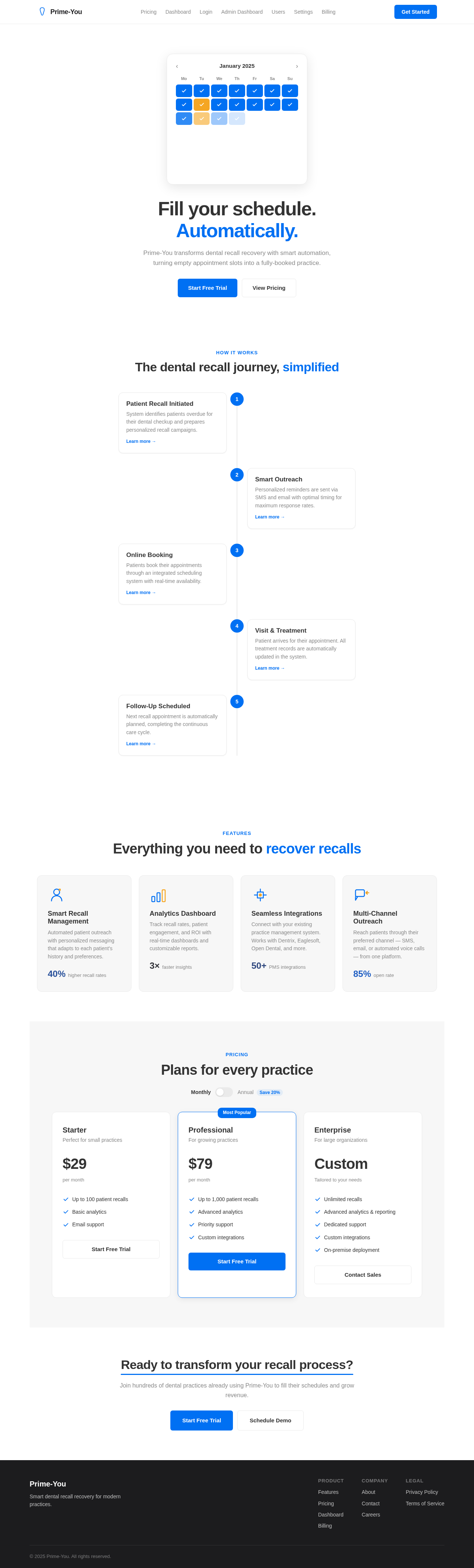
The landing page will feature an interactive dental timeline that users can scroll through to see the journey of a dental recall process. Using motion/react, the timeline will animate as users scroll, showing different stages of the recall process with engaging visuals and micro-interactions. Each stage will have clickable elements that provide more information, creating an educational and engaging experience.

Page 4 of 5

Landing Hero Motion Brief

The hero section will depict a dental appointment transforming into a successful recall outcome. As users scroll, they will see a dental calendar filling up with appointments, animated using motion/react. The animation will loop every 10 seconds, showing the transformation from an empty calendar to a fully booked schedule, emphasizing the platform's effectiveness.

8. Interaction Model & Motion Direction

  • Interaction Model: Parallax
  • The landing page will utilize a parallax effect to create depth, with different layers moving at varying speeds as the user scrolls. This will enhance the storytelling aspect of the dental recall process.
  • Internal pages will have minimal motion to maintain clarity and focus on functionality.

9. Non-Functional Requirements

  • The system must be highly responsive and perform well on various devices and screen sizes.
  • It should ensure data security and privacy, complying with relevant regulations.
  • The platform must be scalable to accommodate growing user numbers.

10. Tech Stack

  • Frontend: React for Web
  • Backend: FastAPI
  • Database: MySQL or MariaDB, using Alembic for migrations
  • Deployment: Docker, Kubernetes
  • AI Tools: None specified
Page 5 of 5

11. Assumptions and Constraints

  • The platform will primarily target dental practices in Canada.
  • The system must integrate seamlessly with existing dental practice management systems.
  • Stripe will be used for handling all subscription payments.

12. Glossary

  • Micro SaaS: A small-scale software as a service product.
  • Dental Recall: The process of reminding patients to schedule their dental appointments.
  • Stripe: A technology company that builds economic infrastructure for the internet, used here for payment processing.
Landing design preview
Landing: View Info
Login: Sign In Google
Login: Sign In Email
Admin Dashboard: View Overview
Admin Dashboard: View Analytics
Admin Dashboard: Manage Users
Users: Edit User
Settings: Update Profile
Billing: View Billing
Billing: Manage Subscription
Dashboard: Toggle Dark Mode
Landing design preview
Landing: View Info
Login: Sign In Google
Login: Sign In Email
Admin Dashboard: View Overview
Admin Dashboard: View Analytics
Admin Dashboard: Manage Users
Users: Edit User
Settings: Update Profile
Billing: View Billing
Billing: Manage Subscription
Dashboard: Toggle Dark Mode