prime-website
 rishi gangurde
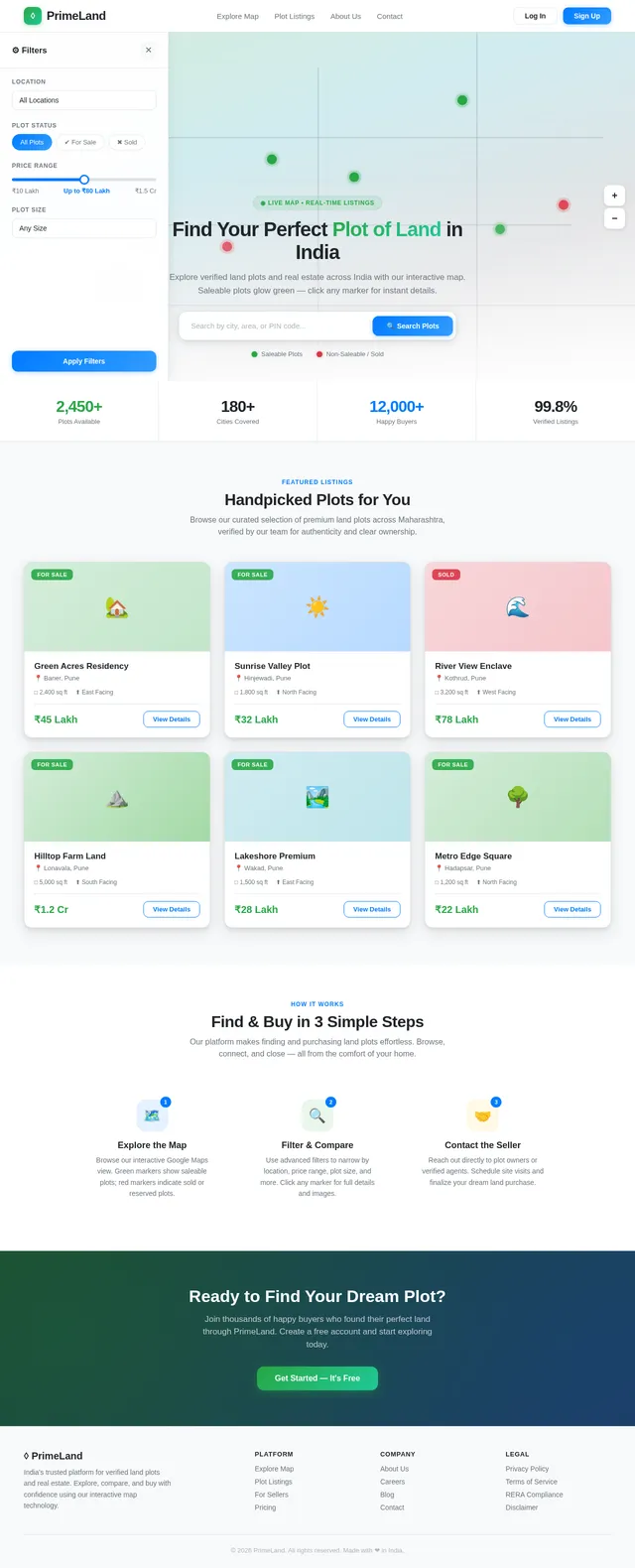
I want to make an website for real estate filed where I can show each land areas and plots for sale with the help of google maps integrated in it. Each person can see land and plots on Google map while zoom in and zoom out. Lands for saleble will in green color and Red is for non saleble.
Comments (0)
Sign in to leave a comment
System Requirements
System Requirements Document (SRD)
Project Name: prime-website
1. Introduction
The prime-website project aims to create a cutting-edge real estate website tailored for the Indian market, specifically for showcasing land areas and plots for sale. The website will leverage Google Maps integration to provide an intuitive and interactive experience for users to explore available plots. Saleable plots will be marked in green, while non-saleable plots will be marked in red, ensuring clarity and ease of navigation.
This document outlines the system requirements for the prime-website project, initiated by Rishi Gangurde, and is designed to meet the needs of users in India, considering locale-specific defaults such as currency (INR), timezone (IST), and regional preferences.
2. System Overview
The prime-website will serve as a platform for real estate businesses and individuals to list and explore land plots for sale. The system will integrate Google Maps to visually display land plots, allowing users to zoom in and out for detailed views. Key features include:
- Interactive map-based navigation for land plots.
- Color-coded markers for saleable (green) and non-saleable (red) plots.
- User-friendly interface optimized for desktop and mobile devices.
- Support for real estate agents, buyers, and sellers to interact seamlessly.
3. Functional Requirements
User Stories:
- As a User, I should be able to view land plots on Google Maps with zoom-in and zoom-out functionality.
- As a User, I should see saleable plots marked in green and non-saleable plots marked in red.
- As a User, I should be able to search for plots based on location, size, and price.
- As a User, I should be able to click on a plot marker to view detailed information about the plot (e.g., price, area, owner details).
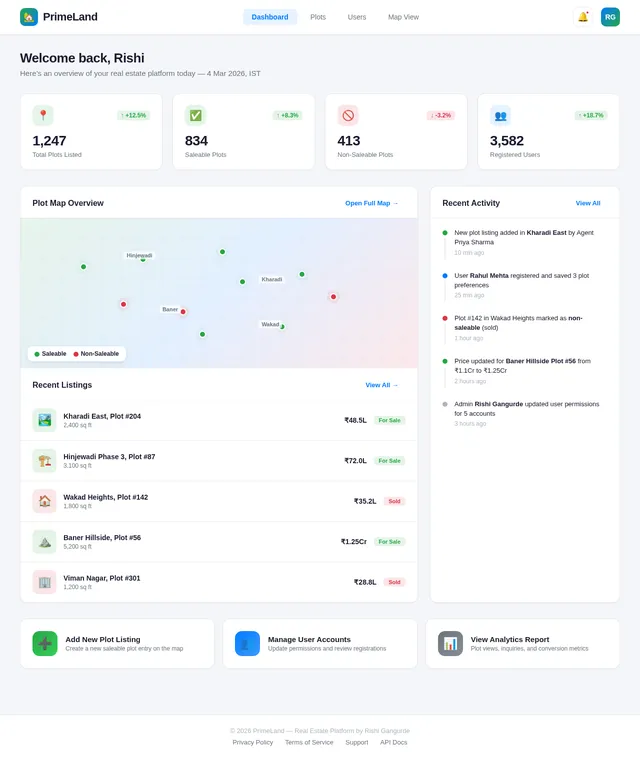
- As an Admin, I should be able to add, edit, and delete plot listings on the map.
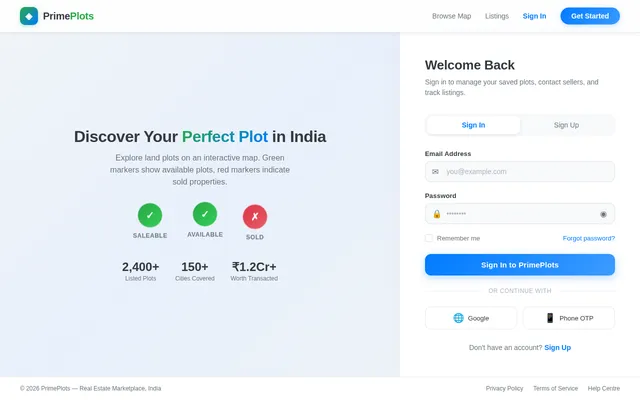
- As an Admin, I should be able to manage user accounts and permissions.
- As a Guest, I should be able to browse the map and view plot details without logging in.
4. User Personas
Admin:
- Responsible for managing plot listings, user accounts, and permissions.
- Ensures data accuracy and oversees website operations.
User:
- Includes buyers and sellers of land plots.
- Can search, view, and interact with plot listings.
- May register to save preferences or contact sellers directly.
Guest:
- Unregistered visitors who can browse the map and view plot details.
- Limited functionality compared to registered users.
5. Visuals Colors and Theme
Color Scheme:
- Primary Colors:
- Green (#28a745) for saleable plots.
- Red (#dc3545) for non-saleable plots.
- Secondary Colors:
- Blue (#007bff) for interactive buttons and links.
- White (#ffffff) for backgrounds and clean aesthetics.
- Gray (#6c757d) for neutral elements like borders and text.
Theme:
- A modern, clean, and professional design with a focus on usability.
- Google Maps integration will be central to the design, ensuring seamless navigation.
- Typography: Use sans-serif fonts like Roboto or Open Sans for readability.
6. Signature Design Concept
Interactive Real Estate Map with Dynamic Plot Animations
The homepage will feature a full-screen Google Maps interface as the centerpiece. Upon loading, users will see a dynamic animation where plot markers "pulse" gently to indicate saleable and non-saleable plots.
Key Features:
- Dynamic Plot Animations: Saleable plots will emit a subtle green glow, while non-saleable plots will have a red halo effect.
- Zoom Transitions: Smooth zoom-in and zoom-out transitions with micro-interactions, such as plot markers enlarging slightly when hovered over.
- Interactive Sidebar: A collapsible sidebar will display filters (e.g., location, price range, plot size) and update the map dynamically based on user selections.
- Plot Details Pop-Up: Clicking a plot marker will open a sleek pop-up card with detailed information, including images, price, and contact details.
- Ambient Background: A faint gradient overlay will shift colors subtly based on the time of day (e.g., warm tones for sunrise, cool tones for evening).
This design will make the website visually striking and memorable, ensuring users are captivated from the moment they land on the homepage.
7. Non-Functional Requirements
- Performance: The website should load within 3 seconds for optimal user experience.
- Scalability: Support up to 10,000 concurrent users.
- Security: Implement SSL encryption for secure data transmission.
- Accessibility: Ensure WCAG 2.1 compliance for accessibility.
- Localization: Default currency is INR, and timezone is IST.
8. Tech Stack
Frontend:
- React for Web
Backend:
- Python
- FastAPI
Database:
- MySQL (preferred for structured data)
- Alembic for database migrations
AI Tools:
- Google Nano Banana for image generation (e.g., plot visuals).
Local Orchestration:
- Docker
- docker-compose
Server-Side Orchestration:
- Kubernetes
9. Assumptions and Constraints
Assumptions:
- Users will primarily access the website via desktop and mobile browsers.
- Google Maps API will provide accurate and up-to-date map data.
- Plot data will be provided by sellers and verified by admins.
Constraints:
- Limited to Google Maps API functionality for map interactions.
- Requires internet connectivity for full functionality.
10. Glossary
- Plot Marker: A visual indicator on the map representing a land plot.
- Saleable Plot: A land plot available for purchase, marked in green.
- Non-Saleable Plot: A land plot not available for purchase, marked in red.
- Google Maps API: A service providing interactive map functionality.
- WCAG 2.1: Web Content Accessibility Guidelines for ensuring accessibility.
This document provides a comprehensive overview of the requirements for the prime-website project. Rishi, feel free to review and suggest any additional features or changes!
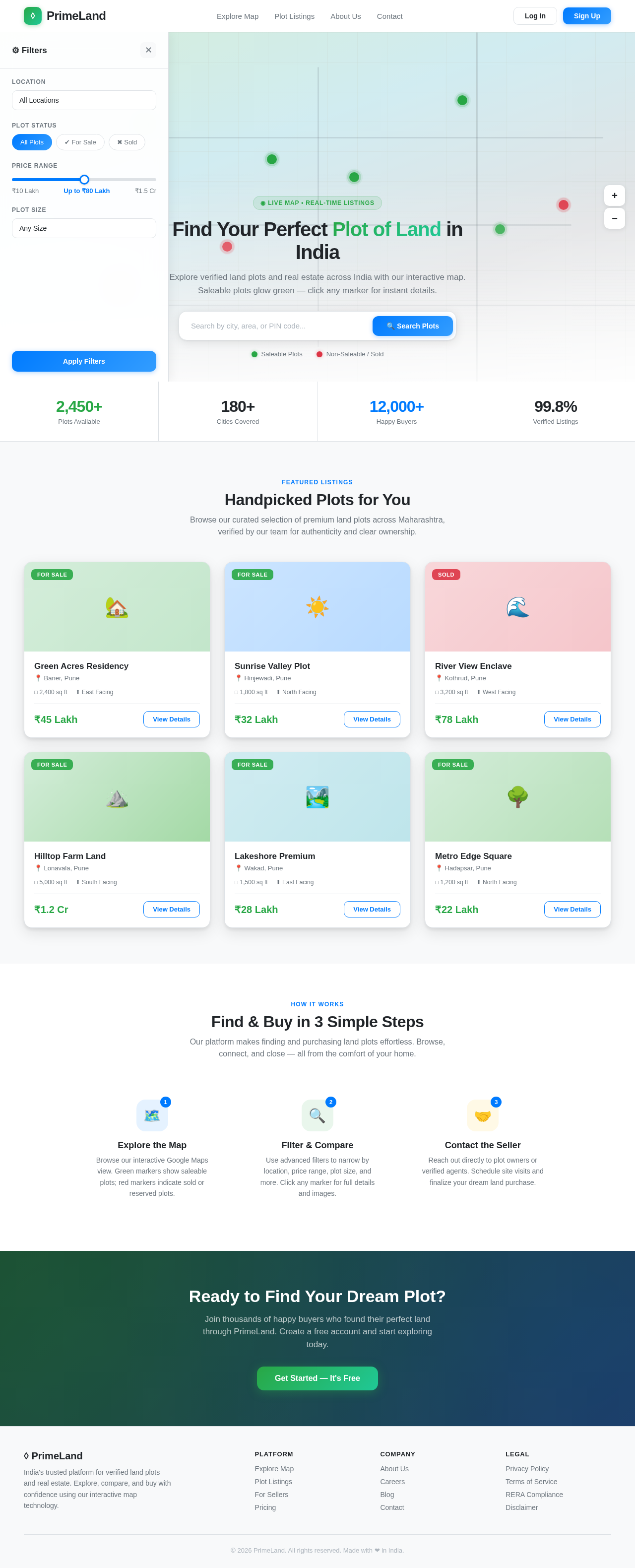
Handpicked Plots for You
Browse our curated selection of premium land plots across Maharashtra, verified by our team for authenticity and clear ownership.
Find & Buy in 3 Simple Steps
Our platform makes finding and purchasing land plots effortless. Browse, connect, and close — all from the comfort of your home.
Ready to Find Your Dream Plot?
Join thousands of happy buyers who found their perfect land through PrimeLand. Create a free account and start exploring today.
No comments yet. Be the first!