prime-weather
 Monin Modi
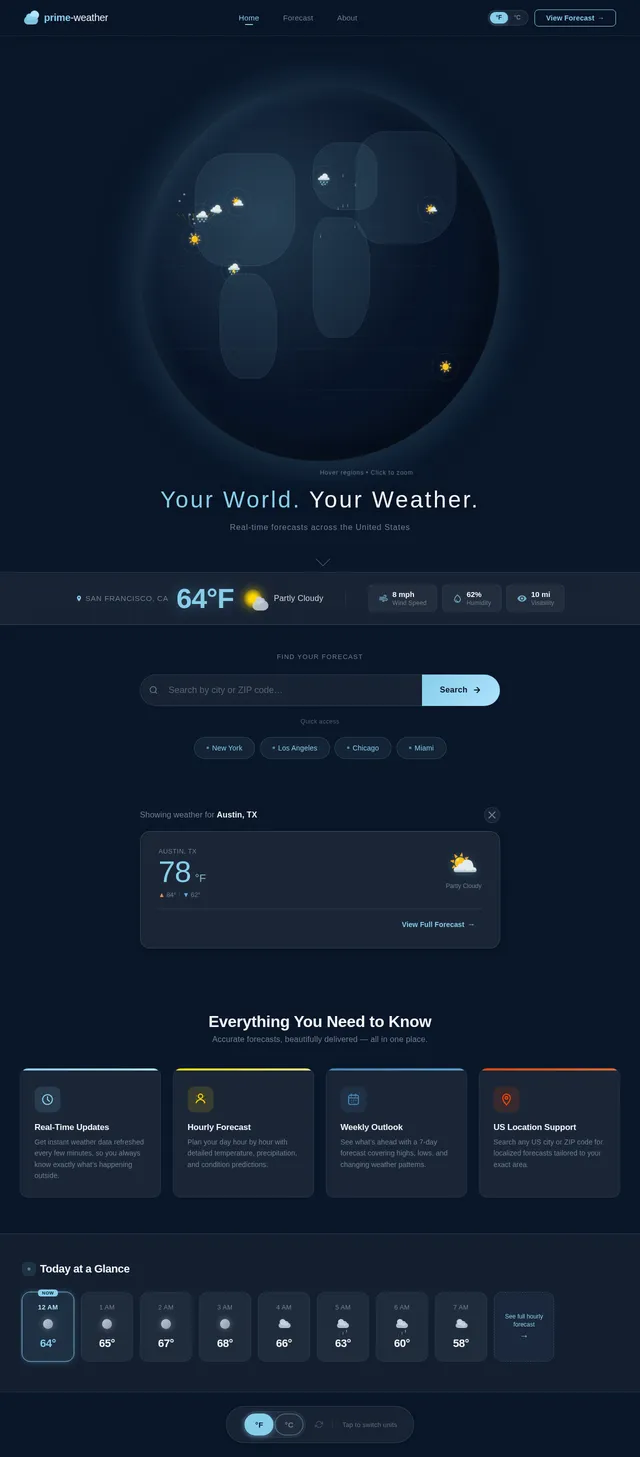
create an weather forecast app with 2 pages

Comments (0)
Sign in to leave a comment
System Requirements
System Requirements Document (SRD) for prime-weather
1. Introduction
Welcome to the System Requirements Document for prime-weather, a weather forecast application designed for users in the United States. This document outlines the functional and non-functional requirements, user personas, design concepts, and technical specifications for the project. The goal of prime-weather is to provide accurate, real-time weather updates and detailed forecasts in a user-friendly and visually appealing format.
2. System Overview
The prime-weather application will consist of two main pages:
- Homepage: Displays current weather conditions for the user's location.
- Details Page: Provides extended forecasts, including hourly and weekly weather predictions.
The system will leverage advanced AI models and APIs to ensure accurate weather data and seamless user interaction. The application will cater to users across the United States, considering locale-specific defaults such as Fahrenheit for temperature, miles per hour for wind speed, and the US timezone system.
3. Functional Requirements
- As a User, I should be able to view the current weather conditions on the homepage.
- As a User, I should be able to access detailed weather forecasts, including hourly and weekly predictions, on the details page.
- As a User, I should be able to search for weather information by city or ZIP code.
- As a User, I should be able to toggle between Fahrenheit and Celsius for temperature display.
- As a User, I should be able to view weather-related visuals, such as icons for sunny, rainy, or snowy conditions.
4. User Personas
1. Regular User
- Description: Individuals looking for quick and accurate weather updates.
- Needs: Easy navigation, real-time weather data, and detailed forecasts.
- Technical Expertise: Basic familiarity with mobile and web applications.
2. Guest User
- Description: Casual visitors who want to check weather conditions without creating an account.
- Needs: Instant access to weather data without login barriers.
- Technical Expertise: Minimal; expects intuitive design.
5. Visuals Colors and Theme
The prime-weather application will feature a clean and modern design inspired by nature and weather elements. The proposed color palette includes:
- Primary Colors: Sky Blue (#87CEEB), Sunshine Yellow (#FFD700)
- Secondary Colors: Cloud White (#F5F5F5), Storm Gray (#708090)
- Accent Colors: Rainy Blue (#4682B4), Sunset Orange (#FF4500)
The theme will incorporate smooth gradients and subtle animations to evoke a sense of calm and connection to the natural world.
6. Signature Design Concept
Interactive Weather Globe
The homepage will feature a 3D interactive weather globe that dynamically updates based on the user's location and current weather conditions. Here's how it works:
- Visuals: A rotating globe with real-time weather icons (e.g., sun, clouds, rain) displayed over the user's region.
- Animations: The globe rotates smoothly, and weather icons animate (e.g., raindrops falling, sun rays glowing).
- Interaction: Users can click on the globe to zoom into specific regions and view detailed weather data for that area.
- Micro-interactions: Hovering over the globe displays temperature and weather summaries for different regions.
- Color Shifts: The globe's background changes based on the time of day (e.g., sunrise hues in the morning, twilight tones in the evening). This bold and unforgettable design will captivate users and make the homepage a standout feature of the application.
7. Non-Functional Requirements
- The system should provide real-time weather updates with minimal latency.
- The application must be responsive and optimized for both web and mobile platforms.
- The system should ensure high availability, with an uptime of at least 99.9%.
- The application must comply with accessibility standards (e.g., WCAG 2.1).
- The system should support localization for US-specific defaults (e.g., Fahrenheit, miles per hour).
8. Tech Stack
Frontend
- React for Web
- React Native for Mobile App
Backend
- Python
- FastAPI
Database
- MySQL or MariaDB (preferred for relational data)
- Alembic for database migrations
AI Models
- GPT 5.2 for user-friendly responses
- Google Nano Banana for image generation
AI Tools
- Litellm for LLM Routing
- Langchain
Local Orchestration
- Docker
- Docker-compose
Server-side Orchestration
- Kubernetes
9. Assumptions and Constraints
Assumptions
- Users will primarily access the application from the US, so locale-specific defaults (e.g., Fahrenheit, US timezones) will be prioritized.
- The application will rely on third-party APIs for weather data.
Constraints
- The system must adhere to data privacy regulations applicable in the US.
- The application should be lightweight and optimized for low-bandwidth environments.
10. Glossary
- Homepage: The main landing page of the application, displaying current weather conditions.
- Details Page: A secondary page providing extended weather forecasts.
- AI Models: Artificial intelligence systems used for generating responses and visuals.
- Docker: A tool for containerizing applications.
- Kubernetes: A system for automating deployment, scaling, and management of containerized applications.
- WCAG: Web Content Accessibility Guidelines, a standard for ensuring web accessibility.
This document outlines the vision for prime-weather and provides a comprehensive guide for its development. Monin, your weather app is set to be both functional and visually stunning — let's make it happen! 🌟
No comments yet. Be the first!