prime-building
create a application for building a todo application with single page design and minimal design

Comments (0)
Sign in to leave a comment
System Requirements
Prime-Building System Requirements Document
Introduction
The "Prime-Building" project is focused on developing a minimalistic, single-page todo application designed for personal use. This document outlines the system requirements for creating a streamlined, user-friendly experience that emphasizes simplicity and efficiency.
System Overview
The Prime-Building application will be a single-page web application that allows users to manage their personal tasks efficiently. The focus will be on delivering a clean, minimal interface that facilitates quick task entry and management without unnecessary complexity. The application will be accessible via web browsers, ensuring cross-platform compatibility.
Functional Requirements
- As a User, I should be able to add new tasks.
- As a User, I should be able to view a list of all tasks.
- As a User, I should be able to mark tasks as completed.
- As a User, I should be able to delete tasks.
User Personas
- User: The primary user of the application, who will manage personal tasks. The user values simplicity and efficiency in task management.
Visuals Colors and Theme
- primary: #2C3E50 (a deep slate blue for a professional look)
- primary_light: #34495E (a lighter tint of the primary for hover states)
- secondary: #E74C3C (a vibrant coral for emphasis and links)
- accent: #F39C12 (a bright orange for call-to-action buttons)
- highlight: #F1C40F (a warm yellow for notifications and active states)
- bg: #ECF0F1 (a light grey for the background to maintain a clean look)
- surface: rgba(255, 255, 255, 0.9) (a soft white for card backgrounds)
- text: #2C3E50 (dark slate blue for primary text)
- text_muted: #95A5A6 (a muted grey for secondary text)
- border: rgba(44, 62, 80, 0.2) (a subtle border color)
Signature Design Concept
The homepage of the Prime-Building application will feature an interactive "Task Canvas" concept. This canvas will allow users to drag and drop tasks into different sections of the page, such as "To Do," "In Progress," and "Completed." The tasks will animate smoothly as they are moved, providing a tactile and engaging experience. The interface will use framer-motion for fluid animations and transitions, ensuring that interactions feel natural and responsive. The design will maintain a minimalist aesthetic, with tasks represented as simple cards that expand slightly when hovered over, revealing additional options like edit or delete.
Interaction Model & Motion Direction
The landing page will employ an "animated" interaction model, with moderate scroll-triggered reveals and hover transitions. This approach will enhance the user experience by providing subtle visual feedback without overwhelming the user. Internal pages will maintain a "static" model to ensure clarity and focus on task management.
Non-Functional Requirements
- The application must load within 2 seconds on a standard broadband connection.
- It should be responsive and accessible on all major web browsers.
- The design should be intuitive, requiring minimal user guidance.
Tech Stack
- Frontend: React for Web
- Backend: Python with FastAPI
- Database: MySQL or MariaDB, using Alembic for migrations
- Local orchestration: Docker and docker-compose
Assumptions and Constraints
- The application is intended for personal use, so scalability is not a primary concern.
- The design will prioritize simplicity over feature richness.
- The application will not include complex interactive elements beyond basic task management.
Glossary
- Task Canvas: The interactive area where users can manage their tasks.
- Minimal Design: A design approach that emphasizes simplicity and the removal of unnecessary elements.
- Single-Page Application (SPA): A web application that interacts with the user by dynamically rewriting the current page, rather than loading entire new pages from the server.
This document provides a comprehensive overview of the requirements and design philosophy for the Prime-Building project, ensuring a focused and efficient development process.
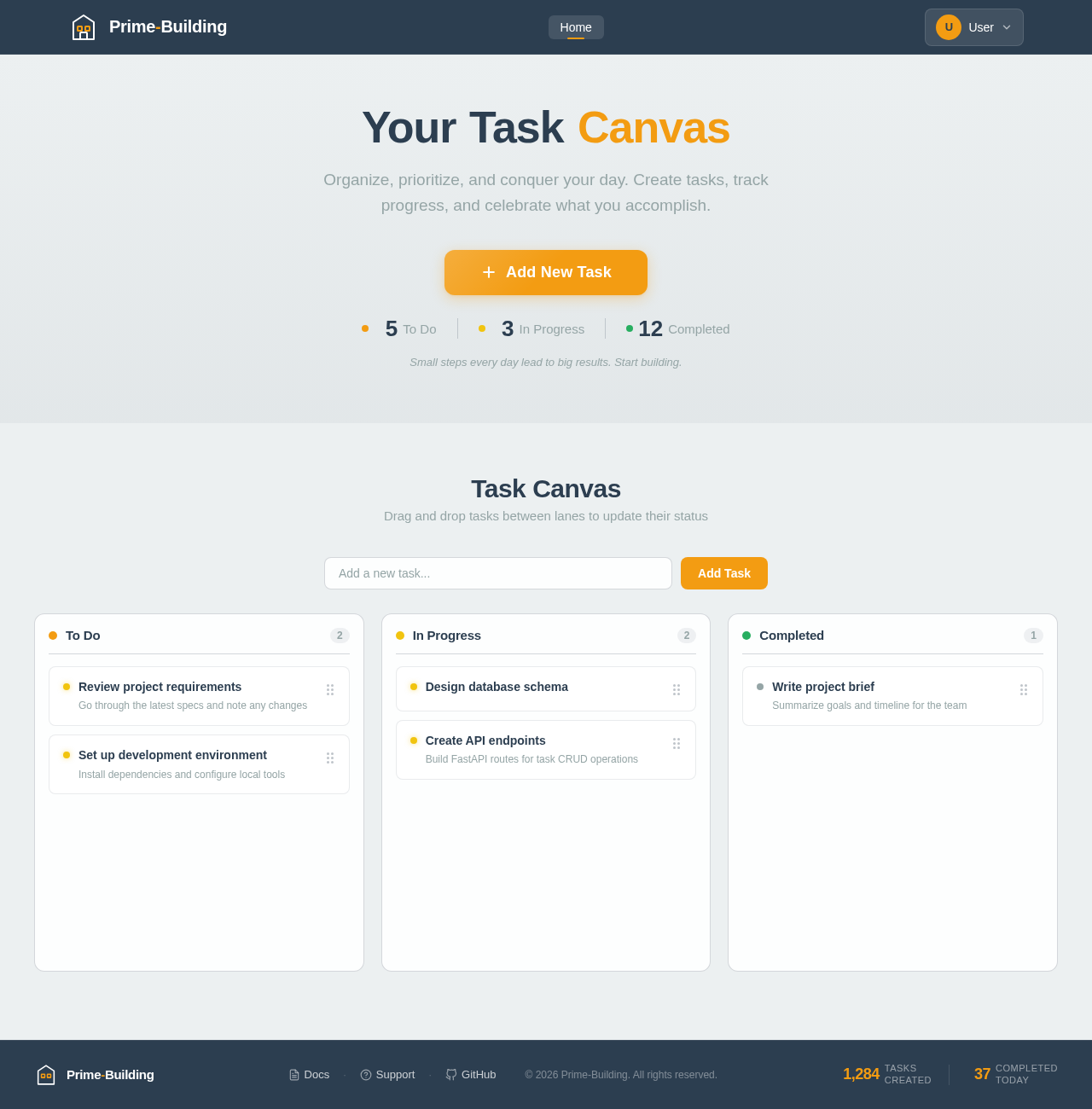
YourTaskCanvas
Organize, prioritize, and conquer your day. Create tasks, track progress, and celebrate what you accomplish.
Small steps every day lead to big results. Start building.
Task Canvas
Drag and drop tasks between lanes to update their status
No comments yet. Be the first!