presupuestodeobra
 José
JoséDeseo crear una aplicación para generar bases de datos de tipos de monedas, regiones, unidades de medida, materiales, mano de obra, maquinaria y equipo. Con estos generar análisis de precios unitarios, presupuestos de obras. con las mismas características que un administrador de archivos (commander one) por ejemplo.

Comments (0)
Sign in to leave a comment
System Requirements
System Requirements Document for presupuestodeobra
1. Introduction
The "presupuestodeobra" application is designed to facilitate the creation and management of databases related to construction project budgeting. It enables users to generate databases of currency types, regions, units of measurement, materials, labor, machinery, and equipment. These databases are used to perform unit price analyses and create construction budgets. The application is intended for construction budget specialists and project managers who require a tool with functionalities similar to a file manager, such as Commander One, to organize and manage their data efficiently.
2. System Overview
The application provides a structured environment for managing construction-related data and generating detailed analyses and budgets. It replicates the features of a file manager to allow users to navigate, organize, and manipulate data efficiently. The system supports self-service account creation and login for secure access to personalized data and analyses.
2a. Product Interpretation and Delivery Boundary
The application is delivered as a custom UI with app-owned identity management, ensuring secure and personalized access to user data. It includes features for creating and maintaining databases, performing unit price analyses, and generating construction budgets. The application must replicate the characteristics of a file manager like Commander One, providing a familiar interface for users. The current scope includes all functionalities necessary for database management and budget analysis, with future expansions possible as user needs evolve.
2b. Source Content Inventory
Not applicable as no content source directive was provided.
2c. Page Content and Component Coverage
Inicio
- Overview: Public entry page explaining the application's purpose, target audience, and functionalities.
- Components:
- Introduction to the application
- Overview of database management and budget analysis features
- Call-to-action for account creation or login
Iniciar sesión
- Overview: Page for returning users to log in and access their personalized data.
- Components:
- Username and password fields
- Login button
- Password recovery option
Crear cuenta
- Overview: Page for new users to create an account and start using the application.
- Components:
- Registration form with fields for personal information
- Submit button to create an account
- Link to login page for existing users
Bases de datos
- Overview: Page for managing databases of currencies, regions, units, materials, labor, machinery, and equipment.
- Components:
- List and search functionality for database entries
- Add, edit, and delete options for database records
- Import/export data functionality
Explorador de archivos
- Overview: File manager interface for organizing and managing data files and records.
- Components:
- Navigation pane for folder and file structure
- File operations: copy, move, delete, rename
- Search and filter options
Análisis de precios unitarios
- Overview: Page for creating and maintaining unit price analyses from database inputs.
- Components:
- Form for inputting analysis parameters
- Calculation and result display
- Save and export analysis options
Presupuestos de obra
- Overview: Page for generating and managing construction budgets based on unit price analyses.
- Components:
- Budget creation form
- Integration with unit price analyses
- Export and report generation options
3. Functional Requirements
- As a construction budget specialist, I should be able to create and manage databases of currency types, regions, units of measurement, materials, labor, machinery, and equipment to ensure accurate data for analyses. (explicit)
- As a construction budget specialist, I should be able to perform unit price analyses using the data from the databases to generate accurate cost estimates. (explicit)
- As a construction budget specialist, I should be able to generate construction budgets from unit price analyses to plan and manage project costs effectively. (explicit)
- As a project manager, I should be able to navigate and manage files using a file manager interface to organize and access data efficiently. (explicit)
- As a user, I should be able to create an account to start using the application and access personalized data. (required_inference)
- As a user, I should be able to log in to access my databases, analyses, and budgets securely. (required_inference)
4. User Personas
Especialista en presupuestos de obra (analista de precios unitarios)
- Context: Responsible for building and maintaining databases of inputs and using them to create unit price analyses and construction budgets.
- Primary Goal: To generate accurate and comprehensive construction budgets.
- Responsibilities: Create, organize, and reuse database records; perform analyses; generate budgets.
- Interactions: Uses the application to manage data and perform analyses; collaborates with project managers for budget planning.
- Success: A well-supported construction budget based on complete and consistent unit price analyses.
Gestor de archivos y proyectos de presupuesto
- Context: Operates the application with file manager logic to organize and manage project data.
- Primary Goal: To maintain an organized and accessible project data structure.
- Responsibilities: Navigate, organize, copy, move, and reuse files and records.
- Interactions: Uses the application to manage data files and collaborate with budget specialists.
- Success: Quickly locating and reusing any existing database, analysis, or budget.
5. Core User Flows
5.1 Creating and Managing Databases
- Start: User logs in and navigates to the "Bases de datos" page.
- Action: User creates a new database entry for a specific category (e.g., materials).
- Result: The new entry is saved and displayed in the database list.
- Continuation: User can edit or delete entries as needed.
5.2 Performing Unit Price Analyses
- Start: User logs in and navigates to the "Análisis de precios unitarios" page.
- Action: User inputs parameters for a new analysis.
- Result: The application calculates and displays the analysis results.
- Continuation: User saves the analysis for future reference.
5.3 Generating Construction Budgets
- Start: User logs in and navigates to the "Presupuestos de obra" page.
- Action: User selects a unit price analysis to base the budget on.
- Result: The application generates a construction budget.
- Continuation: User exports the budget for reporting or further use.
5.4 Managing Files with File Manager Interface
- Start: User logs in and navigates to the "Explorador de archivos" page.
- Action: User organizes files by moving them into folders.
- Result: Files are organized as per user input.
- Continuation: User can search and filter files for quick access.
6. Visuals Colors and Theme
- Muse: Dieter Rams
- Palette:
- Background: #F5F5F5
- Surface: #FFFFFF
- Text: #333333
- Primary: #FF6600
- Accent: #009688
- Muted: #CCCCCC
- Typography:
- Headings: Archivo — Medium weight, all caps, tight tracking
- Body: Roboto Mono
- Scale: 1.25 modular, 48/36/24/18/14
- Shape Language: Rounded-rectangle controls with modular grid alignment
- Layout: Strict grid with aligned labels and values, dense but ordered interface
- Imagery: Diagrammatic line art and product silhouettes; minimalistic and functional
7. Signature Design Concept
The public entry page ("Inicio") features a split-screen hero. On one side, a detailed view of a construction budget layout is presented, while the other side displays a clean diagrammatic illustration of the data flow. The warm grey background with functional orange accents highlights interactive elements and important actions, embodying the principles of functional clarity and honest design.
8. Interaction Model & Motion Direction
- Interaction Model: Static
- Motion Tempo: Restrained
- Hero Dimensionality: Flat
- Landing Hero Motion Brief: The hero section features a composed layout with instant feedback on user interactions. The split-screen design provides a clear view of both the construction budget layout and the data flow diagram, ensuring users can quickly grasp the application's functionality.
9. Non-Functional Requirements
- Performance: The application must provide instant feedback and efficient navigation without unnecessary delays.
- Usability: The interface should be intuitive, with a layout that supports efficient data handling and visualization.
- Reliability: The system must ensure data integrity and consistent performance under typical usage conditions.
10. Tech Stack
- Frontend: React
- Backend: Python/FastAPI
- Database: PostgreSQL
- Containerization: Docker/docker-compose
- Deployment: Kubernetes (if required for scaling)
11. Assumptions and Constraints
- Assumptions:
- Users are familiar with file manager interfaces.
- The application will be used primarily by construction budget specialists and project managers.
- Constraints:
- The application must replicate the features of a file manager like Commander One.
- The design must adhere to the principles of functional clarity and honest design.
12. Glossary
- Unit Price Analysis: A detailed calculation of the cost of a single unit of work or material.
- Construction Budget: A financial plan for a construction project, detailing expected costs and expenses.
- File Manager Interface: A user interface that allows users to manage files and folders, similar to applications like Commander One.
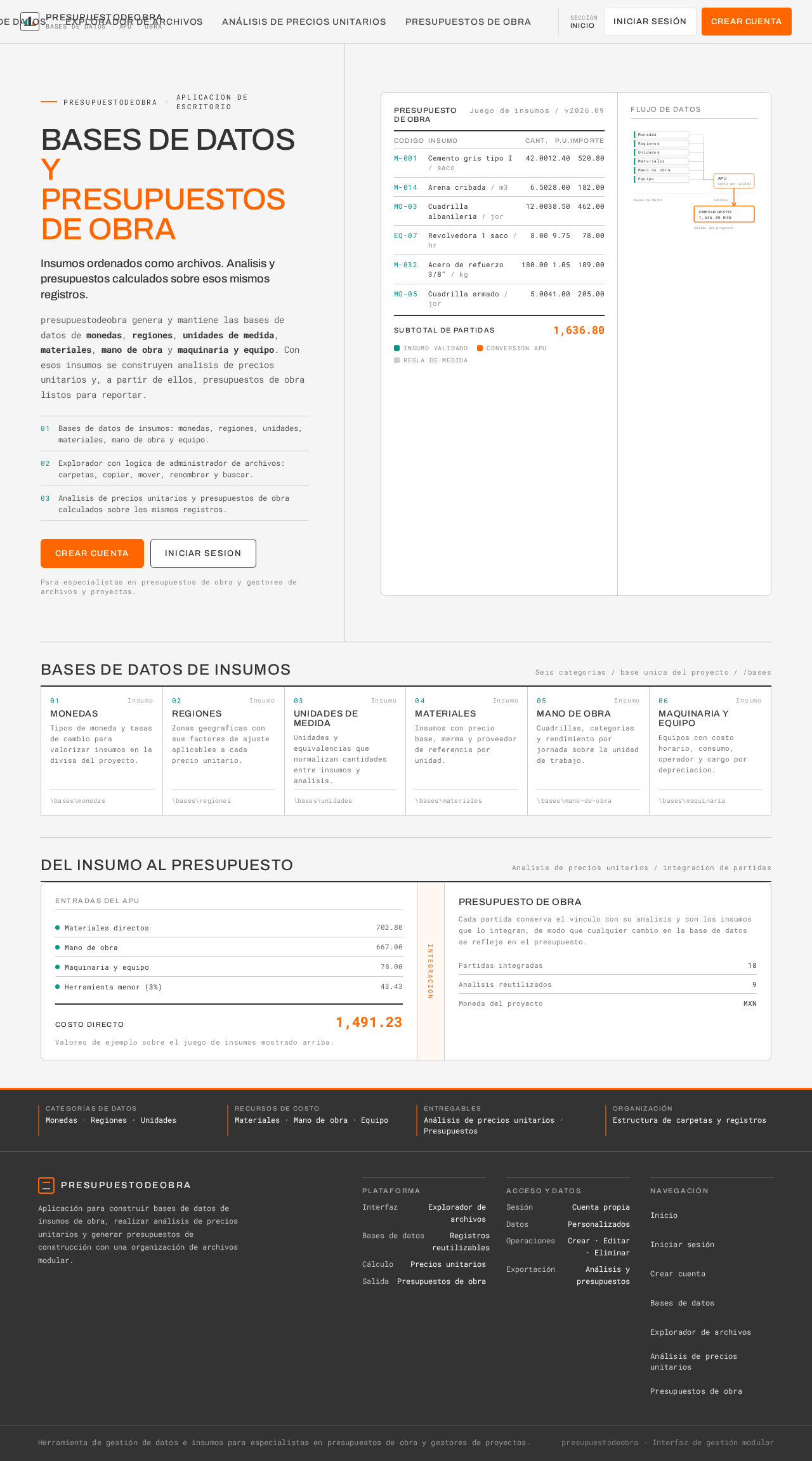
presupuestodeobraAplicacion de escritorio
Bases de datosy presupuestos de obra
Insumos ordenados como archivos. Analisis y presupuestos calculados sobre esos mismos registros.
presupuestodeobra genera y mantiene las bases de datos de monedas, regiones, unidades de medida, materiales, mano de obra y maquinaria y equipo. Con esos insumos se construyen analisis de precios unitarios y, a partir de ellos, presupuestos de obra listos para reportar.
- Bases de datos de insumos: monedas, regiones, unidades, materiales, mano de obra y equipo.
- Explorador con logica de administrador de archivos: carpetas, copiar, mover, renombrar y buscar.
- Analisis de precios unitarios y presupuestos de obra calculados sobre los mismos registros.
Para especialistas en presupuestos de obra y gestores de archivos y proyectos.
Presupuesto de obra
Juego de insumos / v2026.09| Codigo | Insumo | Cant. | P.U. | Importe |
|---|---|---|---|---|
| M-001 | Cemento gris tipo I / saco | 42.00 | 12.40 | 520.80 |
| M-014 | Arena cribada / m3 | 6.50 | 28.00 | 182.00 |
| MO-03 | Cuadrilla albanileria / jor | 12.00 | 38.50 | 462.00 |
| EQ-07 | Revolvedora 1 saco / hr | 8.00 | 9.75 | 78.00 |
| M-032 | Acero de refuerzo 3/8" / kg | 180.00 | 1.05 | 189.00 |
| MO-05 | Cuadrilla armado / jor | 5.00 | 41.00 | 205.00 |
Flujo de datos
Bases de datos de insumos
Seis categorias / base unica del proyecto / /basesMonedas
Tipos de moneda y tasas de cambio para valorizar insumos en la divisa del proyecto.
\bases\monedasRegiones
Zonas geograficas con sus factores de ajuste aplicables a cada precio unitario.
\bases\regionesUnidades de medida
Unidades y equivalencias que normalizan cantidades entre insumos y analisis.
\bases\unidadesMateriales
Insumos con precio base, merma y proveedor de referencia por unidad.
\bases\materialesMano de obra
Cuadrillas, categorias y rendimiento por jornada sobre la unidad de trabajo.
\bases\mano-de-obraMaquinaria y equipo
Equipos con costo horario, consumo, operador y cargo por depreciacion.
\bases\maquinariaDel insumo al presupuesto
Analisis de precios unitarios / integracion de partidasEntradas del APU
- Materiales directos702.80
- Mano de obra667.00
- Maquinaria y equipo78.00
- Herramienta menor (3%)43.43
Valores de ejemplo sobre el juego de insumos mostrado arriba.
Presupuesto de obra
- Partidas integradas18
- Analisis reutilizados9
- Moneda del proyectoMXN
presupuestodeobraAplicacion de escritorio
Bases de datosy presupuestos de obra
Insumos ordenados como archivos. Analisis y presupuestos calculados sobre esos mismos registros.
presupuestodeobra genera y mantiene las bases de datos de monedas, regiones, unidades de medida, materiales, mano de obra y maquinaria y equipo. Con esos insumos se construyen analisis de precios unitarios y, a partir de ellos, presupuestos de obra listos para reportar.
- Bases de datos de insumos: monedas, regiones, unidades, materiales, mano de obra y equipo.
- Explorador con logica de administrador de archivos: carpetas, copiar, mover, renombrar y buscar.
- Analisis de precios unitarios y presupuestos de obra calculados sobre los mismos registros.
Para especialistas en presupuestos de obra y gestores de archivos y proyectos.
Presupuesto de obra
Juego de insumos / v2026.09| Codigo | Insumo | Cant. | P.U. | Importe |
|---|---|---|---|---|
| M-001 | Cemento gris tipo I / saco | 42.00 | 12.40 | 520.80 |
| M-014 | Arena cribada / m3 | 6.50 | 28.00 | 182.00 |
| MO-03 | Cuadrilla albanileria / jor | 12.00 | 38.50 | 462.00 |
| EQ-07 | Revolvedora 1 saco / hr | 8.00 | 9.75 | 78.00 |
| M-032 | Acero de refuerzo 3/8" / kg | 180.00 | 1.05 | 189.00 |
| MO-05 | Cuadrilla armado / jor | 5.00 | 41.00 | 205.00 |
Flujo de datos
Bases de datos de insumos
Seis categorias / base unica del proyecto / /basesMonedas
Tipos de moneda y tasas de cambio para valorizar insumos en la divisa del proyecto.
\bases\monedasRegiones
Zonas geograficas con sus factores de ajuste aplicables a cada precio unitario.
\bases\regionesUnidades de medida
Unidades y equivalencias que normalizan cantidades entre insumos y analisis.
\bases\unidadesMateriales
Insumos con precio base, merma y proveedor de referencia por unidad.
\bases\materialesMano de obra
Cuadrillas, categorias y rendimiento por jornada sobre la unidad de trabajo.
\bases\mano-de-obraMaquinaria y equipo
Equipos con costo horario, consumo, operador y cargo por depreciacion.
\bases\maquinariaDel insumo al presupuesto
Analisis de precios unitarios / integracion de partidasEntradas del APU
- Materiales directos702.80
- Mano de obra667.00
- Maquinaria y equipo78.00
- Herramienta menor (3%)43.43
Valores de ejemplo sobre el juego de insumos mostrado arriba.
Presupuesto de obra
- Partidas integradas18
- Analisis reutilizados9
- Moneda del proyectoMXN
No comments yet. Be the first!