
pr

byram_anshu namdev

Here's a comprehensive prompt you can use with an AI coding agent to build a complete AI-powered video clipping application from scratch. AI Video Clipping Tool - Complete Development Prompt Build a production-quality AI-powered video clipping tool for personal use. The project must continue automatically until completion without asking for approval between stages. If the output becomes too long, continue from the previous point automatically until every feature is implemented. Primary Goal Create a desktop application that automatically finds the most interesting moments from long-form videos and generates high-quality short clips suitable for YouTube Shorts, Instagram Reels, TikTok, Facebook Reels, and X. The application must work entirely on Windows without Docker. --- Core Requirements - Python backend - Modern desktop UI - GPU acceleration whenever available - FFmpeg for video processing - Local AI models where possible - OpenAI API support for advanced analysis - Modular architecture - Clean code - Fully documented - Easy installation - Automatic dependency checking - Automatic model downloading - Resume interrupted jobs - Multi-threaded processing --- User Interface Create a modern dashboard with: - Drag and drop videos - Paste YouTube URL - Paste Twitch URL - Paste Kick URL - Paste Vimeo URL - Paste direct MP4 URL - Local file selection Dashboard should include - Recent jobs - Processing queue - GPU usage - CPU usage - RAM usage - VRAM usage - Progress bars - ETA - Live logs - Preview player - Clip gallery Support Dark Mode. --- AI Configuration Allow selecting - OpenAI - Local LLM - Hybrid mode Support OpenAI API key. Supported models should be configurable. --- Before Processing Ask the user: Video Source Clip Duration Minimum duration Maximum duration Example: Minimum: 20 seconds Maximum: 45 seconds Number of clips to generate Example 5 10 20 Maximum processing time Target platform - TikTok - Shorts - Instagram - Facebook - X - Custom Language Subtitle language Video category Examples Gaming Podcast Interview Education Tutorial Sports Movie Reaction Streaming Comedy Technology Finance Motivation News Cooking Travel Music Other --- AI Analysis Analyze Speech Emotion Excitement Funny moments Loudness Audience reaction Important keywords Facial expressions Scene changes Motion Music intensity Voice emphasis Silence detection Topic changes Objects OCR text Trending moments Story progression Highlight score Virality score Retention score Engagement score Hook quality --- Optional User Rules Allow custom instructions such as: Only clips with jokes. Only motivational moments. Only exciting gameplay. Ignore introductions. Ignore sponsor segments. Skip silent parts. Skip profanity. Include emotional moments. Prefer face camera. Avoid copyrighted music. Focus on educational content. Create viral hooks. Generate clips for beginners. Prioritize audience retention. These rules should influence AI scoring. --- Clip Generation Automatically Find best timestamps. Cut clips. Smooth transitions. Add subtitles. Center subjects. Crop vertically. Add zoom effects. Face tracking. Speaker tracking. Remove silence. Normalize audio. Improve volume. Reduce noise. Sharpen video. Export in multiple qualities. --- Subtitle Features Automatic speech recognition. Speaker detection. Word-level timing. Animated captions. Multiple subtitle styles. Emoji support. Keyword highlighting. Burned subtitles. Separate subtitle file. --- AI Scoring Each candidate clip should receive scores for Virality Engagement Emotion Humor Educational value Entertainment Energy Retention Overall score Allow sorting by score. --- Preview Preview every clip before exporting. Allow Trim Split Merge Rename Delete Reorder Reprocess --- Export Formats MP4 MOV MKV Vertical 9:16 Square 1:1 Landscape 16:9 Custom Export qualities 720p 1080p 2K 4K Batch export. --- Project Structure Arrange everything into a clean folder structure. Example project/ backend/ frontend/ ai/ models/ downloads/ exports/ clips/ temp/ cache/ database/ assets/ config/ logs/ scripts/ tests/ docs/ requirements.txt README.md launcher.py --- Technologies Python FastAPI PySide6 or PyQt6 OpenCV Whisper FFmpeg PyTorch ONNX Runtime CUDA MediaPipe OpenAI API yt-dlp SQLite Polars NumPy Pydantic Uvicorn --- GPU Support Automatically detect NVIDIA CUDA AMD ROCm (where supported) Intel GPU Fallback to CPU. --- Performance Use Async processing Multi-threading GPU inference Memory optimization Model caching Incremental processing --- Error Handling Recover from crashes. Resume interrupted jobs. Detect missing dependencies. Automatically repair configuration. Generate detailed logs. --- Security Encrypt API keys locally. Validate inputs. Prevent file corruption. Prevent duplicate jobs. --- Installer Generate requirements.txt setup script Windows installer Desktop shortcut Automatic FFmpeg detection Automatic Python version check Automatic model download --- Documentation Generate README Installation guide User guide Developer guide API documentation Architecture documentation Troubleshooting guide --- Testing Create automated tests for Video downloading AI analysis Subtitle generation Clip generation Export Database UI Settings --- Final Deliverable The project must be fully functional. Do not leave placeholder code. Implement every feature. If a feature cannot be implemented, replace it with the closest working alternative. Never stop after creating templates. Always continue implementing until every file is completed. Arrange every file in the proper folder. Ensure the application runs locally on Windows without Docker and fully utilizes available GPU resources when supported.You can further customize this prompt for a specific focus, such as viral short-form content, gaming clips, podcast clipping, or educational video clipping, with AI scoring tuned for those use cases.

DashboardProcessingRules
Dashboard

Comments (0)

No comments yet. Be the first!

System Requirements

System Requirement Document
Page 1 of 5

pr System Requirements Document

Introduction

The "pr" project is an AI-powered video clipping tool designed to automatically identify and generate high-quality short clips from long-form videos. This desktop application is tailored for personal use and aims to create content suitable for platforms like YouTube Shorts, Instagram Reels, TikTok, Facebook Reels, and X. The application is optimized for Windows and does not require Docker.

System Overview

The "pr" project leverages advanced AI capabilities to analyze video content and generate clips based on user-defined criteria. It supports GPU acceleration, modular architecture, and integrates various technologies for efficient video processing and AI analysis.

Source Content Inventory

  • Python Backend: Core processing logic.
  • FFmpeg: Video processing.
  • OpenAI API: Advanced video analysis.
  • PySide6 or PyQt6: Modern desktop UI.
  • SQLite: Database management.
  • CUDA, ROCm, Intel GPU: GPU support.
  • Whisper, PyTorch, ONNX Runtime, MediaPipe: AI models and processing.
Page 2 of 5

Functional Requirements as Story Points

  • As a User, I should be able to drag and drop videos for processing.
  • As a User, I should be able to paste URLs from YouTube, Twitch, Kick, Vimeo, and direct MP4 links.
  • As a User, I should be able to select video sources and configure clip duration and number.
  • As a User, I should be able to choose target platforms and languages for subtitles.
  • As a User, I should be able to configure AI models and modes (OpenAI, Local LLM, Hybrid).
  • As a User, I should be able to preview, trim, split, merge, rename, delete, reorder, and reprocess clips.
  • As a User, I should be able to export clips in various formats and qualities.
  • As a Developer, I should be able to generate code automatically using the API.
  • As a User, I should be able to apply custom rules to influence AI scoring.
  • As a User, I should be able to view system resource usage and live logs.
  • As a User, I should be able to view and manage recent jobs and processing queues.
  • As a User, I should be able to configure subtitle features and styles.

User Personas

  • Content Creator: Individuals creating content for social media platforms.
  • Video Editor: Professionals looking to streamline video editing processes.
  • AI Enthusiast: Users interested in leveraging AI for video content creation.

Core User Flows

  • User selects video source -> Configures AI settings -> Processes video -> Previews clips -> Exports clips.
  • User drags and drops video -> Sets clip duration and number -> Applies custom rules -> Generates clips -> Exports in desired format.
  • User pastes URL -> Configures target platform and language -> Processes video -> Previews and edits clips -> Exports clips.
Page 3 of 5

Visuals Colors and Theme

  • primary: #1E90FF (Dodger Blue)
  • primary_light: #63B8FF (Light Dodger Blue)
  • secondary: #FF6347 (Tomato)
  • accent: #FFD700 (Gold)
  • highlight: #FFA500 (Orange)
  • bg: #F5F5F5 (White Smoke)
  • surface: rgba(255, 255, 255, 0.9)
  • text: #333333 (Dark Gray)
  • text_muted: #888888 (Gray)
  • border: rgba(200, 200, 200, 0.5)

Signature Design Concept

The homepage of the "pr" application will feature an interactive video reel carousel. Users can drag and scroll through a 3D carousel of video thumbnails, each representing a different video project. Hovering over a thumbnail will expand it slightly, revealing a brief preview of the video content. Clicking on a thumbnail will open a detailed view with editing options. This dynamic carousel will be built using @react-three/fiber for 3D rendering and framer-motion for smooth animations and transitions.

Interaction Model & Motion Direction

  • Interaction Model: Parallax
  • Landing Page: Features layered depth with scroll-triggered animations and interactive elements.
  • Internal Pages: Static for clarity and ease of use, focusing on functionality and speed.
Page 4 of 5

Non-Functional Requirements

  • The application must run efficiently on Windows without Docker.
  • It should utilize available GPU resources for processing.
  • The system must handle errors gracefully and resume interrupted jobs.
  • The application should be easy to install and configure.

Tech Stack

  • Frontend: PySide6 or PyQt6
  • Backend: Python, FastAPI
  • Database: SQLite
  • AI Models: Whisper, PyTorch, ONNX Runtime
  • Video Processing: FFmpeg, OpenCV
  • API: OpenAI API
  • Other Tools: yt-dlp, Polars, NumPy, Pydantic, Uvicorn

Assumptions and Constraints

  • The application is designed for Windows and does not support Docker.
  • GPU acceleration is preferred but not mandatory.
  • The application should be user-friendly and cater to non-technical users.
Page 5 of 5

Glossary

  • AI: Artificial Intelligence
  • API: Application Programming Interface
  • GPU: Graphics Processing Unit
  • FFmpeg: A multimedia framework for handling video, audio, and other multimedia files.
  • LLM: Large Language Model
  • UI: User Interface
  • URL: Uniform Resource Locator

This document outlines the comprehensive requirements for the "pr" project, ensuring a robust and user-friendly AI-powered video clipping tool.

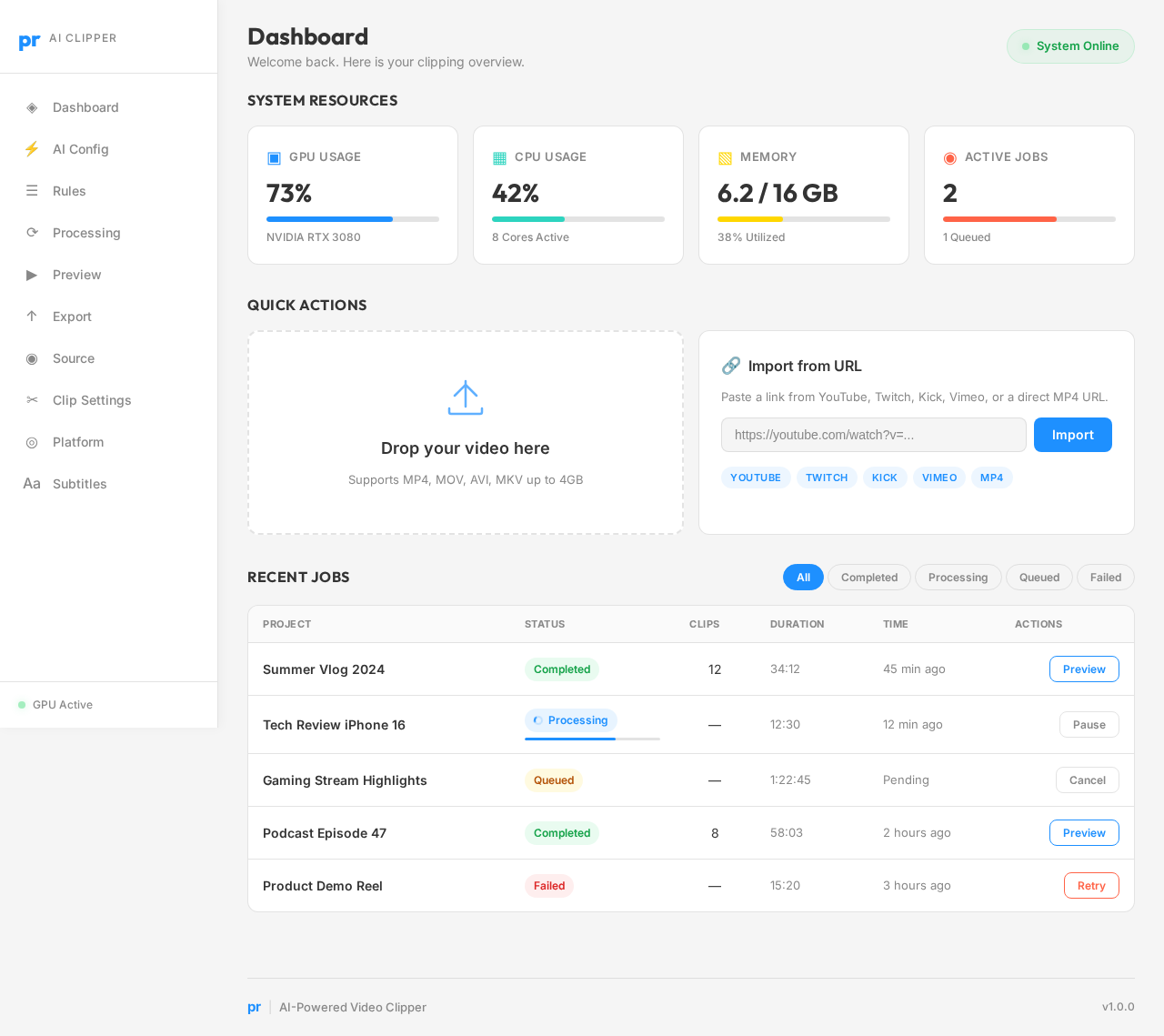
Dashboard design preview
Dashboard: View Resources
AI Config: Select Provider
AI Config: Enter API Key
Rules: Apply Custom Rules
Processing: Start Job
Processing: View Live Logs
Processing: Monitor GPU Usage
Preview: View Scores
Preview: Sort By Score
Preview: Reprocess Clip
Export: Choose Quality