ppt-presentation
 Darshan Reddy
I NEED A PPT FOR PRESENTATION


Comments (0)
Sign in to leave a comment
System Requirements
System Requirements Document for ppt-presentation
1. Introduction
This document specifies ppt-presentation, a browser-based presentation site that delivers a lecture on interaction models in human–computer interaction (HCI) as a click-through slide session rather than a PowerPoint file or slide deck. The presentation is authored to be shown on a projector or opened through a shared link, and it permanently carries the presenter credit: Name: B Aishwarya Sri, Roll no: 23r21a6606.
The product intent is a single, self-contained web presentation: a public landing surface that establishes the topic and the presenter, and a slide session that advances one slide at a time through the interaction-model content. The audience is a classroom or shared-link viewer; the presenter is the person advancing the slides during delivery. The site is anonymous and public — no accounts, no sign-in, no stored session state beyond the current slide position in the browser.
2. System Overview
ppt-presentation is a small web application composed of three provisioned services:
- frontend — a React application that renders the Landing page and the Presentation slide session.
- backend — a shared FastAPI process that serves the presentation content (slide definitions and presenter credit) to the frontend.
- database — MariaDB, provisioned as application-owned persistent storage. It holds the presentation's slide content and presenter attribution so the deck can be served consistently; it does not imply user accounts, authentication, or per-viewer records.
Actors. Two active human personas: the Presenter, who delivers the session and advances slides, and the Audience member, who views the slides on a projector or shared link. There are no system or provider actors beyond the provisioned services.
Accepted behavior. The site presents the topic of interaction models in HCI as a click-through slide session; it displays the presenter credit (B Aishwarya Sri, roll no. 23r21a6606) as presented content; and it is viewable on a projector or via a shared link. The deliverable is a web presentation site, not a PowerPoint file or slide deck.
Exclusions. The product does not produce, export, or accept PowerPoint files or slide-deck files. It does not provide accounts, authentication, editing, or authoring tools for end users. It does not provide speaker notes, audience polling, or live Q&A.
Removed from scope
- PowerPoint file or slide deck (also: PPT, .pptx, slide-deck file)
2a. Product Interpretation and Delivery Boundary
ppt-presentation is delivered entirely as a first-party web application. Both surfaces — Landing and Presentation — are public and anonymously reachable; no identity, login, or session account is required to view or advance the slides. This matches the accepted access contract: both pages have access_requirement: none.
The presentation content (slide text, the interaction-model material, and the presenter credit) is owned by the application and served by the shared backend from MariaDB. The frontend is the sole human-facing surface. There is no provider-owned or external destination in the current scope.
Current scope covers the two pages and the click-through session. Future ideas (such as downloadable export or speaker notes) are explicitly out of current scope and are not represented in any page.
2c. Page Content and Component Coverage
Landing
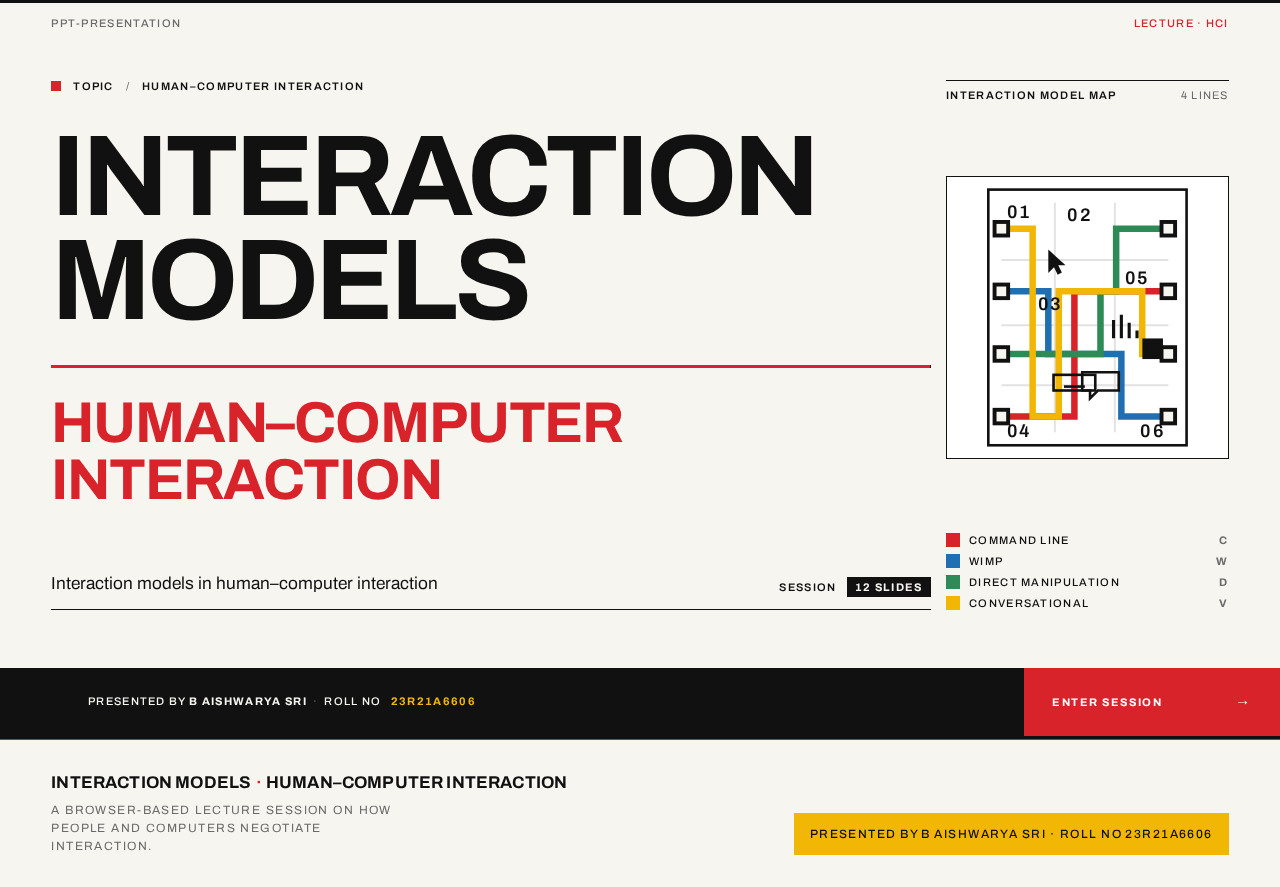
- Information/state. The public entry surface. Displays the presentation title composition ("INTERACTION MODELS" / "HUMAN–COMPUTER INTERACTION"), a schematic interaction-model map, and the presenter credit band ("Presented by B Aishwarya Sri · Roll no 23r21a6606"). Anonymous; no prior state required.
- Primary action. A rectangular red ENTER SESSION → block that navigates to the Presentation page.
- Supporting actions. None beyond entry; the landing is a single-purpose entry surface.
- Domain entities. Presentation (title, topic, presenter name, presenter roll number).
- Component responsibilities.
- Headline block: oversized flush-left title in Archivo 700, second line in red at half size, sitting beneath a full-width 3px black rule.
- Schematic map: four colour-coded lines (red, blue, green, yellow) crossing like a transit diagram, occupying the right columns.
- Presenter band: full-width black band carrying the presenter credit in white uppercase micro-label type, with the red ENTER SESSION block pinned to the far right.
- States.
- Loading: content fetched from the backend; show the paper-white ground with the structural rules in place.
- Empty: not applicable — the presentation always has a title and presenter credit.
- Success: full composition rendered; ENTER SESSION navigates to Presentation.
- Error: if content fails to load, show a plain message on the paper-white ground with a retry control; the structural rules remain.
- Recovery: retry re-requests content from the backend.
Presentation
- Information/state. The click-through slide session covering interaction models in HCI. Each slide is a white surface inside a paper-white frame with a persistent top rule carrying the section number and title, a left column of model-code chips, the slide body in a single wide measure, and a footer strip with the presenter credit. Current slide index is held in the browser.
- Primary actions. Advance to the next slide; return to the previous slide, via the ruled
01 / 12counter with rectangular prev/next blocks at bottom-right. - Supporting actions. Keyboard advance/back (arrow keys) for presenter convenience; return to Landing via the presenter strip or a back control.
- Domain entities. Slide (section number, title, body, model-code chips), Presentation (presenter credit shown in footer).
- Component responsibilities.
- Top rule: 3px black rule with section number and title.
- Model-code chips: left-column rectangular chips colour-coded to the interaction model (command line = red, WIMP = blue, direct manipulation = green, conversational = yellow).
- Slide body: single wide measure of body text and diagrams.
- Slide counter: tabular
NN / 12with red prev block and black next block, flush bottom-right. - Footer strip: small red-ruled strip carrying the presenter credit.
- Background numeral: oversized section number in yellow at 18% opacity behind the title.
- States.
- Loading: slide content fetched from the backend; show the frame and rules.
- Empty: not applicable — the deck always has slides.
- Success: slide rendered; counter reflects position; advancing crossfades (160ms) and draws the red rule left-to-right.
- Error: if slide content fails to load, show a plain message within the frame with a retry control.
- Recovery: retry re-requests slide content; position is preserved.
- Boundary: at the first slide, prev is disabled; at the last slide, next is disabled.
3. Functional Requirements
FR-1 — Browser-based click-through presentation (explicit). As a Presenter, I should deliver the presentation as a browser-based site whose slides I click through one at a time, so that the session runs in a browser instead of a PowerPoint file.
- Trigger/input: Presenter opens the Presentation page and activates next/prev.
- Observable result: the visible slide changes to the adjacent slide; the counter updates.
- Access state: anonymous, public.
- Failure/recovery: if a slide fails to load, a retry control re-requests it; position is preserved.
- Continuation: the Presenter continues advancing until the last slide.
- Provenance: explicit.
FR-2 — Topic content: interaction models in HCI (explicit). As an Audience member, I should see slide content about interaction models in human–computer interaction, so that the session communicates the stated topic.
- Trigger/input: viewing the Presentation page.
- Observable result: slides present the interaction-model material (command line, WIMP, direct manipulation, conversational models) with colour-coded model chips and diagrams.
- Access state: anonymous, public.
- Failure/recovery: content load failure shows a retry control.
- Continuation: content is read slide by slide.
- Provenance: explicit.
FR-3 — Presenter credit displayed (explicit). As an Audience member, I should see the presenter credit — Name: B Aishwarya Sri, Roll no: 23r21a6606 — on the presentation, so that attribution is always visible.
- Trigger/input: viewing the Landing or any slide.
- Observable result: the Landing shows the credit in the black presenter band; each slide shows it in the footer strip.
- Access state: anonymous, public.
- Failure/recovery: credit is part of the served content; if content fails, retry restores it.
- Continuation: credit persists across all slides.
- Provenance: explicit.
FR-4 — Viewable on projector or shared link (explicit). As an Audience member, I should view the presentation on a projector or through a shared link, so that I can follow the session remotely or in the room.
- Trigger/input: opening the shared URL on a projector or another device.
- Observable result: the Landing and Presentation render legibly at projector scale and at shared-link viewport sizes.
- Access state: anonymous, public; no link token or login required.
- Failure/recovery: if the link fails to load, the viewer retries the URL.
- Continuation: the viewer follows the slides as the Presenter advances (shared-link viewers see the same deck from the start).
- Provenance: explicit.
FR-5 — Enter the session from the Landing (required_inference). As an Audience member, I should enter the slide session from the Landing via the ENTER SESSION control, so that I move from the title surface into the slides.
- Trigger/input: activating ENTER SESSION.
- Observable result: navigation to the Presentation page at the first slide.
- Access state: anonymous, public.
- Failure/recovery: if the Presentation fails to load, a retry control is shown.
- Continuation: the viewer reads and follows the slides.
- Provenance: required_inference.
FR-6 — Slide position and navigation boundaries (required_inference). As a Presenter, I should see the current slide position and have prev/next disabled at the deck boundaries, so that I always know where I am and cannot advance past the end.
- Trigger/input: advancing or returning slides.
- Observable result: the
NN / 12counter reflects position; prev is disabled on the first slide and next on the last. - Access state: anonymous, public.
- Failure/recovery: not applicable beyond content retry.
- Continuation: the Presenter ends the session at the last slide.
- Provenance: required_inference.
4. User Personas
Presenter
- Product context. The Presenter delivers a lecture on interaction models in HCI to a classroom or shared-link audience, typically projected. The presenter is credited as B Aishwarya Sri, roll no. 23r21a6606.
- Primary goal. Advance through the slide session in order, keeping the topic content and the presenter credit visible to the audience.
- Distinct responsibilities. Controls slide advancement (next/prev, keyboard), monitors the slide counter, and ensures the session reaches the final slide. The Presenter is the only actor who drives the session forward.
- Inputs/decisions. Decides when to advance or return a slide during delivery.
- Interactions with other participants. The Audience member follows the slides the Presenter advances; the presenter credit is shown to the audience on every slide.
- Observable success. The session runs slide by slide to the end with the credit always visible.
Audience member
- Product context. Views the presentation on a projector in the room or through a shared link on another device.
- Primary goal. Read and follow the interaction-model content and see who is presenting.
- Distinct responsibilities. Reads the slides, notes the presenter attribution, and follows the session as it is presented. The Audience member does not control advancement in the projected setting.
- Inputs/decisions. Decides when to enter the session from the Landing (shared-link case) and reads at their own pace where the link allows.
- Interactions with other participants. Follows the Presenter's advancement; sees the presenter credit.
- Observable success. The content and the credit (B Aishwarya Sri, roll no. 23r21a6606) are legible and complete.
5. Core User Flows
Flow A — Presenter delivers the session.
- Presenter opens the shared URL; the Landing renders the title composition, schematic map, and presenter band.
- Presenter activates ENTER SESSION →; the Presentation opens at slide 01.
- Presenter advances with the next block (or arrow key); the slide crossfades (160ms), the red rule draws left-to-right, and the counter updates to
02 / 12. - Presenter continues advancing through the interaction-model slides; each slide shows its section number, model chips, body, and the presenter credit footer.
- At the last slide, next is disabled; the Presenter ends the session.
- Failure/recovery: if a slide fails to load, a retry control re-requests it and the position is preserved.
Flow B — Audience member follows on a projector.
- Audience member watches the projected Presentation as the Presenter advances.
- Audience member reads each slide's interaction-model content and the presenter credit strip.
- Audience member follows to the final slide.
- Failure/recovery: if the projection drops, the Presenter reloads the URL and the session restarts from slide 01.
Flow C — Audience member opens the shared link.
- Audience member opens the shared URL; the Landing renders.
- Audience member reads the title and presenter credit, then activates ENTER SESSION →.
- Audience member reads the slides from slide 01 onward at their own pace using the prev/next blocks.
- Audience member reaches the last slide; next is disabled.
- Failure/recovery: if content fails to load, a retry control is shown on the Landing or within the slide frame.
6. Visuals Colors and Theme
Authoritative creative direction: Systematic clarity — subway-map rigour for an HCI lecture in the browser (muse: Massimo Vignelli).
- Mode: light.
- Colour tokens (exact hex by role):
- Background (paper-white ground):
#F7F5F0 - Surface (slide white):
#FFFFFF - Text (near-black):
#111111 - Primary (structural red — rules, slide numbers, active model line, CTA):
#D8232A - Accent (coded category chip, presenter credit bar):
#F2B705 - Muted:
#6B6B6B - Model-line codes: command line
#D8232A(red), WIMP#1F6FB2(blue), direct manipulation#2E8B57(green), conversational#F2B705(yellow)
- Background (paper-white ground):
- Contrast: red on paper-white 5.9:1; black on white 19:1. Never more than one saturated colour in a single text block.
- Typography: headings and body Archivo (Helvetica-class grotesque). Headings weight 700 for slide titles, weight 500 for section numbers; uppercase only for micro-labels with 0.12em tracking. No italic, no display serif, no script.
- Type scale (1.25 modular, five sizes only): display 44px mobile → 120px desktop (clamp); slide title 32→64px; section number 96→200px as background numeral; body 17→20px at 1.5 leading; micro-label 11→12px uppercase. Hierarchy comes from weight and the red rule, never from new sizes.
- Shape language: hard edges only — zero border-radius anywhere. Structure drawn with 1px and 3px horizontal rules in
#111111and#D8232A, rectangular colour chips, visible 12-column grid on the Landing. Icons are flat pictograms in solid black or one coded colour, never outlined or shaded. - Spacing rhythm: strict 12-column grid; generous paper-white margins; rules as the primary structural separator.
- Imagery: diagrams only — subway-style interaction-model map, schematic command-line and WIMP diagrams in 1px black lines, colour-coded legend chips, flat pictograms (keyboard, pointer, speech bubble, gesture hand). No photography, no 3D, no decorative illustration.
7. Signature Design Concept
The Landing is a near-full-viewport typographic composition on paper-white, not a centred SaaS hero. The words INTERACTION MODELS are set in Archivo 700 at clamp(44px, 9vw, 120px), stacked in two flush-left lines occupying the left nine columns; the second line HUMAN–COMPUTER INTERACTION is in red #D8232A at half the size, sitting directly beneath a 3px black rule that spans the full 12-column grid. To the right, a small schematic map of four colour-coded lines (red, blue, green, yellow) crosses like a transit diagram. Below the rule, a full-width band in #111111 carries the presenter credit "Presented by B Aishwarya Sri · Roll no 23r21a6606" in white uppercase micro-label type, with a rectangular red ENTER SESSION → block pinned to the far right of that band. No gradient, no blob, no image — the grid itself is the hero. The 3px black rule acts as the page's spine and repeats on every slide as the top rule.
8. Interaction Model & Motion Direction
Interaction Model: Static (direction) Motion Tempo: still Hero Dimensionality: flat
Landing Hero Motion Brief. Focal subject: the oversized typographic title and the schematic interaction-model map. Input→transformation→outcome thesis: on load, the structural rules and headline settle into place; hovering the ENTER SESSION block performs a solid colour swap (no lift); activating it navigates to the Presentation. Motion vocabulary: instant, restrained — a single red rule may draw left-to-right on entry; no parallax, no bounce, no floating elements. Composed first frame: paper-white ground, 3px black rule spanning the grid, flush-left headline in columns 1–9, schematic map in columns 10–12, black presenter band with red ENTER SESSION block. Reduced-motion state: all elements render in their final positions with no rule-draw animation; hover states remain solid colour swaps.
9. Non-Functional Requirements
- NFR-1 — Legibility at distance (explicit, from projector requirement). Slide titles and body must remain legible when projected; the type scale and contrast tokens above are the minimum.
- NFR-2 — Responsive integrity (direction). Readable text and controls stay whole at 375px, 768px, and 1280px, wrapping or scaling via
clamp(...); no element covers readable text or controls. - NFR-3 — Anonymous public access (explicit access contract). Both pages are reachable without identity; no login, no session account, no stored viewer records.
- NFR-4 — Content consistency (required_inference). Slide content and presenter credit are served from the backend/database so every viewer sees the same deck.
- NFR-5 — Reduced motion (direction). With
prefers-reduced-motion, provide a usable static arrangement; slide changes are instant. - NFR-6 — No file deliverable (explicit constraint). The product must not produce or require a PowerPoint file or slide-deck file.
10. Tech Stack
- frontend: React application UI (Landing and Presentation).
- backend: shared FastAPI process serving presentation content APIs.
- database: MariaDB for application-owned slide content and presenter attribution.
- Deployment: docker-compose with the three provisioned services (frontend, backend, database). No Kubernetes required at this scale.
11. Assumptions and Constraints
- A-1. The deck has a fixed set of slides (the counter shows
NN / 12); slide count and content are authored, not user-editable. - A-2. The presenter credit is fixed content: Name B Aishwarya Sri, Roll no 23r21a6606.
- A-3. Shared-link viewers see the deck from slide 01 and navigate independently; there is no live sync between presenter and remote viewers.
- A-4. No accounts, authentication, or per-viewer persistence are required.
- C-1 (explicit). The deliverable is a web presentation site, not a PowerPoint file or slide deck.
- C-2. The generic indigo/blue-on-white SaaS template is forbidden; the Vignelli direction governs all visuals.
12. Glossary
- Interaction model: a framework describing how a human and computer exchange input and feedback (e.g., command line, WIMP, direct manipulation, conversational).
- HCI: human–computer interaction.
- WIMP: Windows, Icons, Menus, Pointer — a graphical interaction model.
- Direct manipulation: an interaction model where users act on visible objects directly.
- Click-through session: a presentation advanced one slide at a time in the browser.
- Presenter credit: the displayed attribution "B Aishwarya Sri · Roll no 23r21a6606".
- Model-code chip: a rectangular colour-coded label identifying an interaction model on a slide.
HUMAN–COMPUTER INTERACTION
Interaction models in human–computer interaction
- Command lineC
- WIMPW
- Direct manipulationD
- ConversationalV
Presented by B Aishwarya SriRoll no 23r21a6606
HUMAN–COMPUTER INTERACTION
Interaction models in human–computer interaction
- Command lineC
- WIMPW
- Direct manipulationD
- ConversationalV
Presented by B Aishwarya SriRoll no 23r21a6606
No comments yet. Be the first!