powersave-chrome-extension
 Mounir Hcini
Google Chrome extension powersave inspired

Comments (0)
Sign in to leave a comment
System Requirements
System Requirements Document for powersave-chrome-extension
1. Introduction
powersave-chrome-extension is a Google Chrome extension, inspired by Powersave, that helps people make their browser draw less battery. It is a small, free, no-sign-in utility: the user installs it in Chrome, opens it, sees whether power-saving is currently on, and flips it on or off. There is no account, no subscription, and no setup ritual — the whole product is a legible power state and a switch.
The audience is pragmatic and slightly battery-anxious: people who want their browser to be gentler on their laptop battery and who value a tool that is instantly readable rather than an enterprise dashboard. The product's emotional register is calm confidence with a wink — friendly, legible, and honest about what it does.
This document is the System Requirements Document for the product. It defines the current delivery (a Chrome extension whose single working surface is the Power Saving popup), the single accepted persona, the functional behavior, the visual and interaction direction, and the technical stack. It also records the hard constraints: the build must stay within free quota limits, and no sign-in is required to use the product.
2. System Overview
powersave-chrome-extension is delivered as a Google Chrome extension with one first-party surface:
- Power Saving — the popup-proportioned working surface where the user views the current power-saving state and turns power-saving on or off.
The surface is reachable without signing in. The extension is installed in Google Chrome and opened directly to the Power Saving page — there is no separate marketing or landing page in the product. The product has exactly one active human persona: the Chrome user managing power-saving.
The system is supported by a shared FastAPI backend process (application APIs and domain modules), a MariaDB database for application-owned persistent data, and a React frontend application UI. The backend and database support the product's durable state (the persisted power-saving on/off state) and do not introduce accounts, authentication, or additional product capabilities.
Removed from scope
- Landing page (also: Landing surface, public entry page, marketing page, landing screen)
2a. Product Interpretation and Delivery Boundary
The product is a Chrome extension, not a web SaaS application. Its only working surface is the extension popup, proportioned like a popup card (max 420px). The user explicitly stated that a landing page was not requested: the product is the Chrome extension itself, modeled on Powersave, and the extension popup is the whole first-party surface owned by the application.
Access is deliberately open. The user explicitly required that the extension be usable without signing in, and the Planning Scope records access_requirement: none for Power Saving. There is no application-owned identity, no account creation, no login, and no session continuity requirement. The power-saving state is a single durable preference owned by the local installation, persisted so that it survives reopening the extension; it is not tied to a person and does not require identity.
The current delivery horizon covers: installing the extension in Google Chrome, opening it to the Power Saving page, viewing the current power-saving state, and turning power-saving on or off. Nothing beyond these is current. There is no future-horizon feature set recorded in the authoritative requirements; the product is intentionally small.
The build must stay within free quota limits. This is a hard constraint on the implementation and deployment, not a product behavior: it means the delivered stack must run on free-tier infrastructure and free tooling, with no paid services required for the accepted behavior.
Reference fidelity (https://powersave.pro/). The user asked to make a copy of the Powersave extension, and the reference is used as a supplemental feature_reference and domain_context source for the Chrome extension's power-saving behavior and popup surface. The reference's own product identity, integrations, pricing tiers, and account model are not copied: powersave-chrome-extension keeps its own name, its single power-saving on/off capability, its free build, and its no-sign-in access model. The reference informs the popup surface shape (a compact extension popup that opens directly to the working control, with the current state legible at a glance and one primary control) and the plain, short, non-marketing copy register. The reference's data-capture features (record creation in Airtable/Notion/Coda/ClickUp, Obsidian markdown notes, webhooks, AI autofill, screenshots, clipping, link match, bulk operations, custom keyboard shortcuts, access-token connection management, Pro pricing) are outside this product's scope and are not implemented.
2c. Page Content and Component Coverage
Power Saving
Information and state
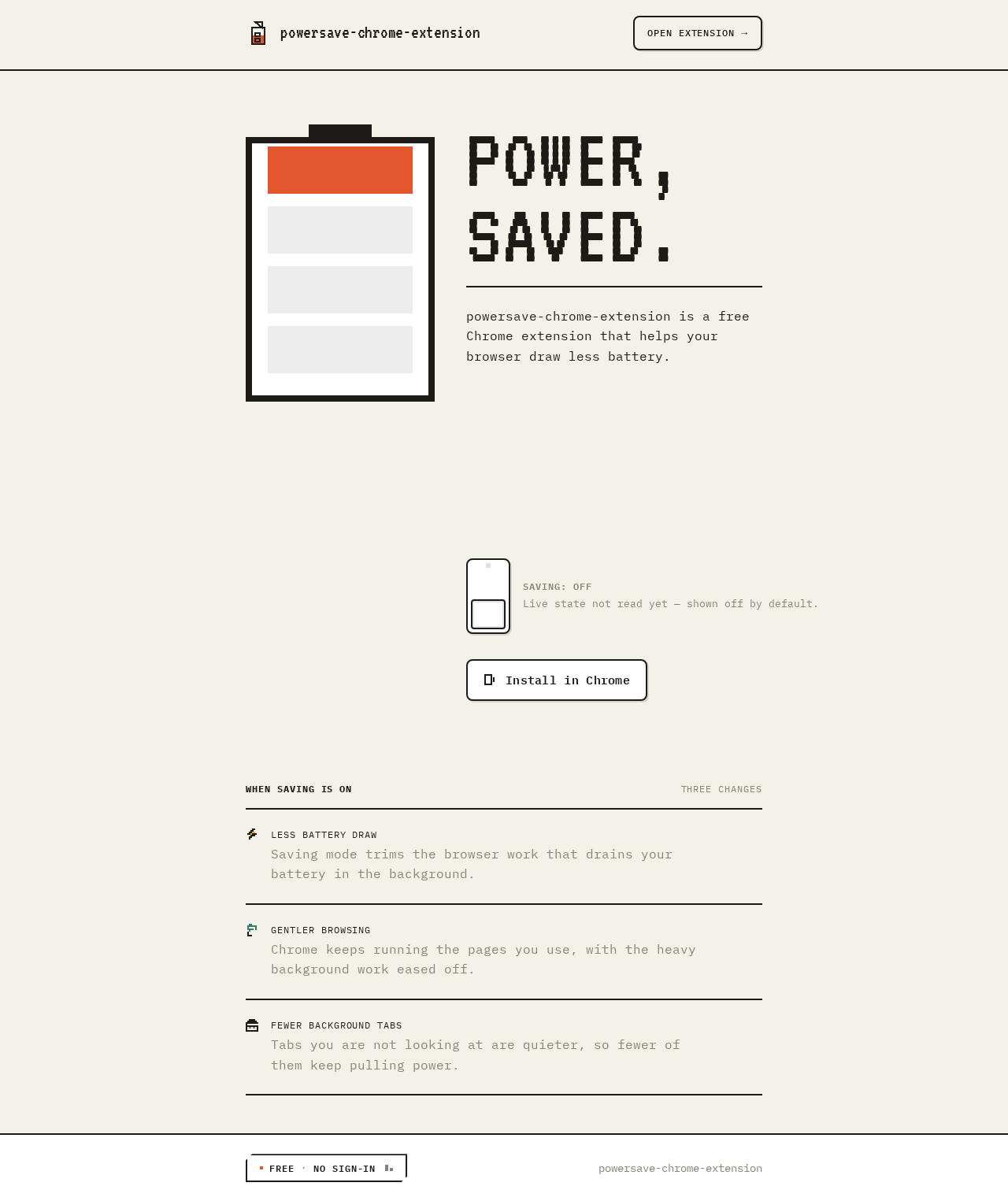
- The pixel battery glyph at 96px at the top of the popup card, draining in four discrete 25% segments to reflect the saving state.
- The big on/off rocker switch (64×120px) beneath the glyph — the only control on the card.
- A live state line stating whether power-saving is currently on or off.
- A small ruled list of what changes when saving is on.
- The current power-saving state, persisted so it survives reopening the extension.
- The product name powersave-chrome-extension and its one-line purpose (a free Chrome extension that helps the browser draw less battery) as the popup card's identity line.
- A stamp-like "FREE · NO SIGN-IN" badge with clipped corners, carrying the access model inside the popup card.
Primary actions
- View the current power-saving state.
- Turn power-saving on.
- Turn power-saving off.
Supporting actions
- Read the ruled list of what changes when saving is on.
- Read the "FREE · NO SIGN-IN" stamp confirming the access model.
Domain entities
- Power-saving preference: a single on/off state owned by the local installation, persisted durably.
Component responsibilities
- Battery glyph: renders the current state in four 25% segments; pulses its inner segments on a 2s step cycle while saving is active (suppressed under reduced motion).
- Rocker switch: physical-looking notched ink track with hard 2px offset shadow; snaps with a 2-frame overshoot on change; the only control on the card.
- State line: swaps with a quick blink (opacity 1→0→1 over 120ms) when the state changes.
- Ruled list: small list of what changes when saving is on.
- Identity line: product name and one-line purpose in IBM Plex Mono, above the battery glyph.
- Access stamp: clipped-corner "FREE · NO SIGN-IN" badge in the card footer.
- Popup shell: the extension popup itself is the page frame — opening the extension lands directly on the working control with no intermediate screen, no navigation, and no marketing content, matching the reference extension's direct-to-control popup behavior.
States
- Loading: while the persisted state is being read on open, the card shows the glyph and switch in a neutral/off presentation until the stored value resolves.
- Empty: not applicable — the state always has a value (on or off).
- Success: the switch reflects the new state, the glyph drains or fills to the matching segment count, and the state line updates.
- Error: if the state cannot be persisted, the switch reverts to the last known persisted state and the state line reflects that last known value; the user can retry the toggle.
- Recovery: retrying the toggle re-attempts persistence; on success the card returns to the normal success state.
3. Functional Requirements
FR-1 — Install the extension in Google Chrome (required_inference) As a Chrome user managing power-saving, I should be able to install powersave-chrome-extension in Google Chrome so that I can use it in my browser.
- Trigger/input: the user installs the extension in Google Chrome.
- Observable result: the extension is available in Chrome and can be opened.
- Access state: no sign-in required.
- Failure/recovery: if installation does not complete, the user can retry installing the extension.
- Continuation: the user opens the extension to reach the Power Saving page.
FR-2 — Open the extension to reach the Power Saving page (required_inference) As a Chrome user managing power-saving, I should be able to open the extension and reach the Power Saving page so that I can see and control my power-saving state.
- Trigger/input: the user opens the installed extension.
- Observable result: the Power Saving page is displayed with the current power-saving state.
- Access state: no sign-in required.
- Failure/recovery: if the page does not open, the user can reopen the extension.
- Continuation: the user views the current state and may toggle power-saving.
FR-3 — View the current power-saving state (explicit) As a Chrome user managing power-saving, I should be able to view the current power-saving state so that I know whether my browser is currently saving power.
- Trigger/input: the user opens the Power Saving page.
- Observable result: the page shows whether power-saving is currently on or off, with the battery glyph and state line reflecting that state.
- Access state: no sign-in required.
- Failure/recovery: if the stored state cannot be read, the page presents the default off state and the user can toggle to set a state.
- Continuation: the user may turn power-saving on or off.
FR-4 — Turn power-saving on (explicit) As a Chrome user managing power-saving, I should be able to turn power-saving on so that my browser draws less battery.
- Trigger/input: the user flips the rocker switch to on.
- Observable result: the switch shows on, the battery glyph fills to the saving state, the state line reads that saving is on, and the on state is persisted.
- Access state: no sign-in required.
- Failure/recovery: if the on state cannot be persisted, the switch reverts to the last known persisted state and the user can retry.
- Continuation: the state remains on across reopening the extension.
FR-5 — Turn power-saving off (explicit) As a Chrome user managing power-saving, I should be able to turn power-saving off so that my browser returns to normal power behavior.
- Trigger/input: the user flips the rocker switch to off.
- Observable result: the switch shows off, the battery glyph drains to the off state, the state line reads that saving is off, and the off state is persisted.
- Access state: no sign-in required.
- Failure/recovery: if the off state cannot be persisted, the switch reverts to the last known persisted state and the user can retry.
- Continuation: the state remains off across reopening the extension.
FR-6 — Use the extension without signing in (explicit) As a Chrome user managing power-saving, I should be able to use the extension without signing in so that I can get value with no account setup.
- Trigger/input: the user installs and opens the extension.
- Observable result: all accepted behavior (viewing state, toggling on/off) is available with no sign-in step.
- Access state: no sign-in required on Power Saving.
- Failure/recovery: not applicable — there is no sign-in step to fail.
- Continuation: the user proceeds directly to the Power Saving page.
FR-7 — Stay within free quota limits (explicit) As the product owner, the build should stay within free quota limits so that the extension can be delivered at no cost.
- Trigger/input: the implementation and deployment of the extension.
- Observable result: the delivered stack runs on free-tier infrastructure and free tooling, with no paid services required for accepted behavior.
- Access state: not applicable.
- Failure/recovery: if a component would exceed free limits, it is replaced with a free-tier alternative that preserves accepted behavior.
- Continuation: the product remains usable within the free limits.
4. User Personas
Chrome user managing power-saving
Product context. This person uses Google Chrome as their daily browser and has noticed that it draws battery. They want a small, free tool that makes the browser gentler on their laptop battery without adding accounts, subscriptions, or configuration work. They install the extension in Chrome and open it when they want to check or change their power-saving state.
Primary goal. A browser session that uses less power, with no extra setup and no sign-in.
Distinct accepted responsibilities.
- Installing the extension in Google Chrome.
- Opening the extension to reach the Power Saving page.
- Viewing the current power-saving state.
- Turning power-saving on.
- Turning power-saving off.
Relevant inputs and decisions. The single recurring decision is whether power-saving should be on or off right now. The user reads the state line and the battery glyph, then flips the rocker switch. There is no other input, no configuration, and no account data.
Interactions with other accepted participants. None. The product has one active human persona; there is no counterparty, recipient, or administrator. The backend and database are supporting system actors, not participants the user interacts with.
Observable success. The user opens the extension, sees the current state, flips the switch, and sees the state change and persist — with no sign-in and no setup. The browser session then uses less power while saving is on.
5. Core User Flows
Flow A — Install and first open
- The Chrome user managing power-saving installs powersave-chrome-extension in Google Chrome.
- The extension becomes available in Chrome.
- The user opens the extension.
- The Power Saving page is displayed with the current power-saving state (default off on first use).
- Failure/recovery: if installation does not complete, the user retries installing the extension. If the page does not open, the user reopens the extension.
- Continuation: the user proceeds to view the state and may toggle power-saving.
Flow B — View the current power-saving state
- The user opens the extension from Chrome.
- The Power Saving page loads and reads the persisted power-saving state.
- The battery glyph, rocker switch, and state line reflect the current state (on or off).
- Failure/recovery: if the stored state cannot be read, the page presents the default off state and the user can toggle to set a state.
- Continuation: the user may turn power-saving on or off.
Flow C — Turn power-saving on
- The user opens the Power Saving page and sees the current state.
- The user flips the rocker switch to on.
- The switch snaps to on, the battery glyph fills to the saving state, and the state line updates to read that saving is on.
- The on state is persisted so it survives reopening the extension.
- Failure/recovery: if the on state cannot be persisted, the switch reverts to the last known persisted state and the user can retry the toggle.
- Continuation: the user closes the extension; on reopening, the state remains on.
Flow D — Turn power-saving off
- The user opens the Power Saving page and sees the current state.
- The user flips the rocker switch to off.
- The switch snaps to off, the battery glyph drains to the off state, and the state line updates to read that saving is off.
- The off state is persisted so it survives reopening the extension.
- Failure/recovery: if the off state cannot be persisted, the switch reverts to the last known persisted state and the user can retry the toggle.
- Continuation: the user closes the extension; on reopening, the state remains off.
6. Visuals Colors and Theme
The creative direction is authoritative for this section: Charming clarity: pixel-perfect power control, muse Susan Kare.
Mode. Light mode only.
Color tokens (exact hex by role).
- Background (warm paper ground, ~60% of surface):
#F4F1E8 - Surface (white cards, ~30%):
#FFFFFF - Text and primary (ink):
#1C1B18 - Accent (burnt pixel orange — live "saving" state, battery-fill glyph, one CTA; never more than ~8% of any screen):
#E4572E - Muted (labels and secondary data):
#8A8578 - Secondary pixel accents used only inside icons: teal
#2E7D6F, mustard#E3B23C
Typography.
- Headings: VT323 — at very large sizes for the numeric power readout and the popup state headline; pixel-terminal voice, all-caps for labels, sentence case for the headline; tight, monospaced grid so glyphs stack like a bitmap.
- Body: IBM Plex Mono regular at 15–16px with 1.6 leading; nothing bolder than 600 anywhere.
- Scale: 1.25 modular on a 4px baseline — display
clamp(48px, 9vw, 112px)in VT323; section heads 32/24px VT323; body 16/15/14px IBM Plex Mono; micro-labels 12px uppercase with 0.08em tracking.
Shape language.
- Chunky 2px ink outlines on every card and control.
- 8px radii that read as "pixel-rounded".
- Hard 2px offset shadows (no blur) in ink at 12% opacity.
- A 4px pixel grid governs icon construction.
- Toggles are physical-looking rocker switches with a notched track; badges are stamp-like rectangles with clipped corners.
- No soft blur, no glass, no gradient.
Layout.
- Power Saving: a popup-proportioned card (max 420px) on the paper ground, with the product identity line at the top, the battery glyph beneath it, the big on/off rocker under the glyph, a live state line, a small ruled list of what changes when saving is on, and a footer strip with the "free · no sign-in" stamp. The card is the entire product surface; there is no separate landing or marketing page.
- Everything sits on the 4px grid.
Imagery. Pixel icons and pictograms only — a 16×16 battery, a lightning bolt, a leaf, a monitor, a tab-stack. Icons are drawn on the 4px grid with 2px strokes, rendered as inline SVG with crisp edges. No photography, no illustrations of people, no 3D. The battery glyph is the product's signature artwork and is drawn at two scales (32px in the card header, 96px as the card's main glyph) from the same grid.
Readability rule. Headlines, wordmarks, labels, numbers, cards' text, and controls stay entirely inside the viewport and their container at 375px, 768px, and 1280px, wrapping or scaling to fit; no other element covers any part of them.
7. Signature Design Concept
The product is the extension popup, and the popup card is the whole composition: a paper-ground card (max 420px) with a chunky ink-outlined pixel battery glyph at the top, drawn with orange fill segments, the VT323 state headline beneath it set flush-left against a 2px ink rule, a live state line, the big ink rocker switch with the orange accent on the live track, a small ruled list of what changes when saving is on, and a clipped-corner "FREE · NO SIGN-IN" stamp in the footer. There is no separate landing or marketing page.
The signature moves that carry the identity:
- A pixel battery glyph drawn on a 4px grid that drains in four discrete 25% segments as the saving state changes — the same glyph at 32px in the card header and 96px as the card's main glyph.
- A VT323 state headline set flush-left against a 2px ink rule directly beneath the battery glyph, so the glyph and the words read as one instrument.
- A physical-looking rocker switch with a notched ink track and hard 2px offset shadow — the only control on the Power Saving card, scaled to 64×120px so it reads as a real object.
- Ruled list rows inside the popup card separated by full-width 2px ink hairlines, each led by a 16×16 pixel icon and a 12px uppercase mono label, with zero card borders or hover-lift.
- A stamp-like "FREE · NO SIGN-IN" badge with clipped corners in the card footer, echoing a system-UI dialog rather than a marketing pill.
8. Interaction Model & Motion Direction
Interaction Model: Animated Motion Tempo: restrained Hero Dimensionality: flat
Popup Motion Brief
- Focal subject: the 96px pixel battery glyph at the top of the popup card, drawn on the 4px grid with 2px ink strokes and orange fill segments, with the VT323 state headline set against the 2px ink rule beneath it.
- Input → transformation → outcome thesis: the persisted saving state read on open, and each rocker-switch flip, drive the glyph's fill segments and the state line; while saving is on, the glyph's inner segments pulse on a 2s step cycle and the rocker shows the orange accent on the live track. The outcome is a card that reads as a working power instrument, not a marketing panel.
- Motion vocabulary: frame-by-frame, not eased — the battery glyph drains in discrete 25% steps with a 90ms stepped transition; the rocker switch snaps with a 2-frame overshoot; the state label swaps with a quick blink (opacity 1→0→1 over 120ms). One purposeful loop only: the battery's inner segments pulse on a 2s step cycle while saving is active.
- Composed first frame: paper ground
#F4F1E8, the popup card (max 420px) with the product identity line, the 96px battery glyph with orange fill segments, the VT323 state headline against a 2px ink rule, the live state line, the ink rocker switch with the orange accent on the live track, the ruled list, and the clipped-corner "FREE · NO SIGN-IN" stamp. - Reduced-motion state: all steps become instant state changes and the pulse stops; the first frame remains fully composed and readable.
9. Non-Functional Requirements
NFR-1 — Free quota limits (explicit) The build must stay within free quota limits. The delivered stack must run on free-tier infrastructure and free tooling, with no paid services required for accepted behavior. Rationale: the user explicitly required a free build.
NFR-2 — No sign-in (explicit) No sign-in is required to use the planned pages. Power Saving is reachable without authentication, and no account creation, login, or session continuity is required. Rationale: the user explicitly required the extension to be usable without signing in.
NFR-3 — Durable local state (required_inference) The power-saving on/off state is persisted so that it survives reopening the extension. On any state change, the state is written to durable storage; on open, the state is read and the card is hydrated. No authentication or cross-device sync is involved. Rationale: the accepted behavior of viewing the current state and toggling it on or off requires the state to persist across reopening.
NFR-4 — Readability at every viewport (explicit, from creative direction) Headlines, wordmarks, labels, numbers, cards' text, and controls stay entirely inside the viewport and their container at 375px, 768px, and 1280px, wrapping or scaling to fit; no other element covers any part of them.
NFR-5 — Reduced motion (explicit, from creative direction)
With prefers-reduced-motion, all stepped transitions become instant state changes and the battery pulse stops, while the static arrangement remains fully usable and readable.
NFR-6 — No forbidden visual patterns (explicit, from creative direction) No blue–indigo accents on white, no blurred drop shadows, no glassmorphism, no gradient blobs, no soft radii above 8px, no photography or 3D renders, no identical hover-lift card grids, no Inter/Roboto/Arial/system-ui for headings or body, and no eased springy motion.
10. Tech Stack
- Frontend: React application UI (the Power Saving popup surface), styled with the VT323 and IBM Plex Mono typefaces and the palette and shape language defined in Section 6.
- Backend: shared FastAPI process for application APIs and domain modules, including the power-saving state read/write endpoints.
- Database: MariaDB for application-owned persistent data — the persisted power-saving on/off state.
- Chrome extension packaging: the extension is packaged for Google Chrome and opened to reach the Power Saving page. The popup opens directly to the Power Saving card, mirroring the reference extension's direct-to-control popup surface.
- Reference: https://powersave.pro/ is a supplemental reference for the popup surface shape and the plain copy register only; its integrations, pricing tiers, and account model are not part of this stack.
- Deployment: free-tier infrastructure and free tooling only, consistent with the free quota constraint.
11. Assumptions and Constraints
Assumptions
- The extension's power-saving state is a single on/off preference owned by the local installation, persisted durably, and not tied to a person. (required_inference)
- The default state on first use is off. (required_inference)
- The Power Saving page is the extension popup-proportioned card (max 420px). (explicit, from creative direction)
- The product has no landing or marketing page; the extension popup is the only first-party surface. (explicit)
Constraints
- The build must stay within free quota limits. (explicit)
- No sign-in is required to use the planned pages. (explicit)
- The product is a Google Chrome extension named powersave-chrome-extension, inspired by Powersave (reference: https://powersave.pro/). (explicit)
- The reference at https://powersave.pro/ is used only as a supplemental reference for the extension popup surface and copy register; its data-capture integrations, AI features, pricing tiers, and account/token model are not copied into this product. (explicit)
- The visual direction is authoritative: warm paper ground, ink type, burnt orange accent, VT323 headings, IBM Plex Mono body, chunky 2px outlines, 8px radii, hard 2px offset shadows, 4px pixel grid, stepped motion. (explicit, from creative direction)
12. Glossary
- powersave-chrome-extension — the product: a free Google Chrome extension that helps the browser draw less battery.
- Power-saving state — the single on/off preference indicating whether power-saving is currently active.
- Rocker switch — the physical-looking on/off control on the Power Saving card, with a notched ink track and hard 2px offset shadow.
- Battery glyph — the pixel battery artwork drawn on a 4px grid, rendered at 32px and 96px, draining in four discrete 25% segments.
- Power Saving — the popup-proportioned working surface where the user views and toggles the power-saving state.
- Free quota limits — the free-tier infrastructure and tooling constraint under which the build must operate.
- No sign-in — the access model in which no account, login, or session continuity is required to use the product.
Power,saved.
powersave-chrome-extension is a free Chrome extension that helps your browser draw less battery.
Live state not read yet — shown off by default.
When saving is on
- LESS BATTERY DRAW
Saving mode trims the browser work that drains your battery in the background.
- GENTLER BROWSING
Chrome keeps running the pages you use, with the heavy background work eased off.
- FEWER BACKGROUND TABS
Tabs you are not looking at are quieter, so fewer of them keep pulling power.
Power,saved.
powersave-chrome-extension is a free Chrome extension that helps your browser draw less battery.
Live state not read yet — shown off by default.
When saving is on
- LESS BATTERY DRAW
Saving mode trims the browser work that drains your battery in the background.
- GENTLER BROWSING
Chrome keeps running the pages you use, with the heavy background work eased off.
- FEWER BACKGROUND TABS
Tabs you are not looking at are quieter, so fewer of them keep pulling power.
No comments yet. Be the first!