pos-frs
 Debashish Mukherjee
I want to build an application for my fashion retail store which can take an IP camera feed. The application should capture the face of any person at my billing counter whose billing amount exceeds a certain value. I want the application to store the details of the transaction with optionally customer name, email, phone number. I also want to be notified the next time the same customer walks into my store. The application should be lightweight to run off a i3 PC without the need for a GPU


Comments (0)
Sign in to leave a comment
System Requirements
System Requirements Document for pos-frs
1. Introduction
The pos-frs application is designed for a fashion retail store to enhance customer interaction and transaction tracking. The application captures the face of customers at the billing counter whose transaction amount exceeds a specified value. It stores transaction details, including optional customer information such as name, email, and phone number. Additionally, it notifies the store owner when a previously recorded customer re-enters the store. The application is optimized to run on an Intel i3 PC without requiring a GPU, ensuring lightweight performance.
2. System Overview
The pos-frs application integrates IP camera feeds to perform facial recognition and transaction tracking. It captures and stores transaction details for customers exceeding a specified billing amount and notifies the store owner upon their return. The application is designed to operate efficiently on an Intel i3 PC without a GPU.
2a. Product Interpretation and Delivery Boundary
The application is a standalone system running on a local PC in the retail store. It processes IP camera feeds for facial recognition and stores transaction data locally. The application does not require internet connectivity for its core functions, ensuring data privacy and security. Future expansions may include cloud integration for data backup and advanced analytics.
2b. Source Content Inventory
Not applicable as no content source directive was provided.
2c. Page Content and Component Coverage
Transaction Capture
- Camera Feed Integration: Connects to an IP camera to monitor the billing counter.
- Facial Recognition: Captures the face of customers whose transactions exceed a specified value.
- Transaction Details: Records transaction amount, date, and time.
- Optional Customer Information: Allows input of customer name, email, and phone number.
Customer Notification
- Recognition Alert: Notifies the store owner when a previously recorded customer re-enters the store.
- Notification Settings: Configure notification preferences and thresholds.
System Configuration
- Threshold Settings: Set the transaction amount threshold for facial capture.
- Camera Setup: Configure IP camera settings and integration.
- Data Management: Manage stored transaction and customer data.
3. Functional Requirements
- As a store owner, I should be able to connect an IP camera to the application to monitor the billing counter. (explicit)
- As a store owner, I should be able to capture the face of any customer whose billing amount exceeds a specified value. (explicit)
- As a store owner, I should be able to store transaction details, including optional customer information such as name, email, and phone number. (explicit)
- As a store owner, I should be notified when a previously recorded customer re-enters the store. (explicit)
- As a store owner, I should be able to configure the application to run efficiently on an Intel i3 PC without a GPU. (explicit)
4. User Personas
- Store Owner: Responsible for configuring the application, monitoring transactions, and receiving notifications about returning customers.
5. Core User Flows
-
Initial Setup
- The store owner installs the application on an Intel i3 PC.
- The store owner configures the IP camera settings and transaction threshold.
-
Transaction Monitoring
- The application continuously monitors the billing counter via the IP camera.
- When a transaction exceeds the specified value, the application captures the customer's face and stores transaction details.
-
Customer Notification
- The application compares incoming faces with stored records.
- The store owner receives a notification if a returning customer is detected.
6. Visuals Colors and Theme
- Muse: Jessica Walsh
- Palette:
- Background: #FFE4E1
- Surface: #FFB6C1
- Text: #333333
- Primary: #FF69B4
- Accent: #FF4500
- Muted: #E0E0E0
- Typography:
- Headings: Archivo Black
- Body: Unbounded
- Scale: 1.5 modular
- Shape Language: Bold color fields, overlapping shapes, sticker-like elements
- Layout: Asymmetric with overlapping sections and bold color blocks
- Motion: Bouncy scale-ins, marquee text, color flips on hover
7. Signature Design Concept
The entry screen features an oversized headline in Archivo Black with expressive sizing. The hero section is built from bold color fields with surreal 3D props, creating an engaging and playful atmosphere. Interactive sticker-like elements with color flips on hover enhance user engagement.
8. Interaction Model & Motion Direction
- Interaction Model: Animated
- Motion Tempo: Expressive
- Hero Dimensionality: Layered_2d
- Landing Hero Motion Brief: The hero section features a bold color block with playful type and surreal imagery. On user interaction, elements bounce into place with expressive animations, creating a dynamic and engaging experience.
9. Non-Functional Requirements
- The application must run efficiently on an Intel i3 PC without a GPU. (explicit)
- The application should ensure data privacy by storing transaction details locally. (required_inference)
10. Tech Stack
- Frontend: React
- Backend: Python/FastAPI
- Database: SQLite (local storage)
- Facial Recognition: OpenCV
- Deployment: Local installation on Windows
11. Assumptions and Constraints
- The application will operate in a local environment without internet connectivity.
- The IP camera is compatible with the application and provides a clear feed of the billing counter.
12. Glossary
- IP Camera: A type of digital video camera that receives control data and sends image data via the Internet.
- Facial Recognition: A technology capable of identifying or verifying a person from a digital image or a video frame.
- Transaction Threshold: The specified billing amount that triggers facial capture and data storage.
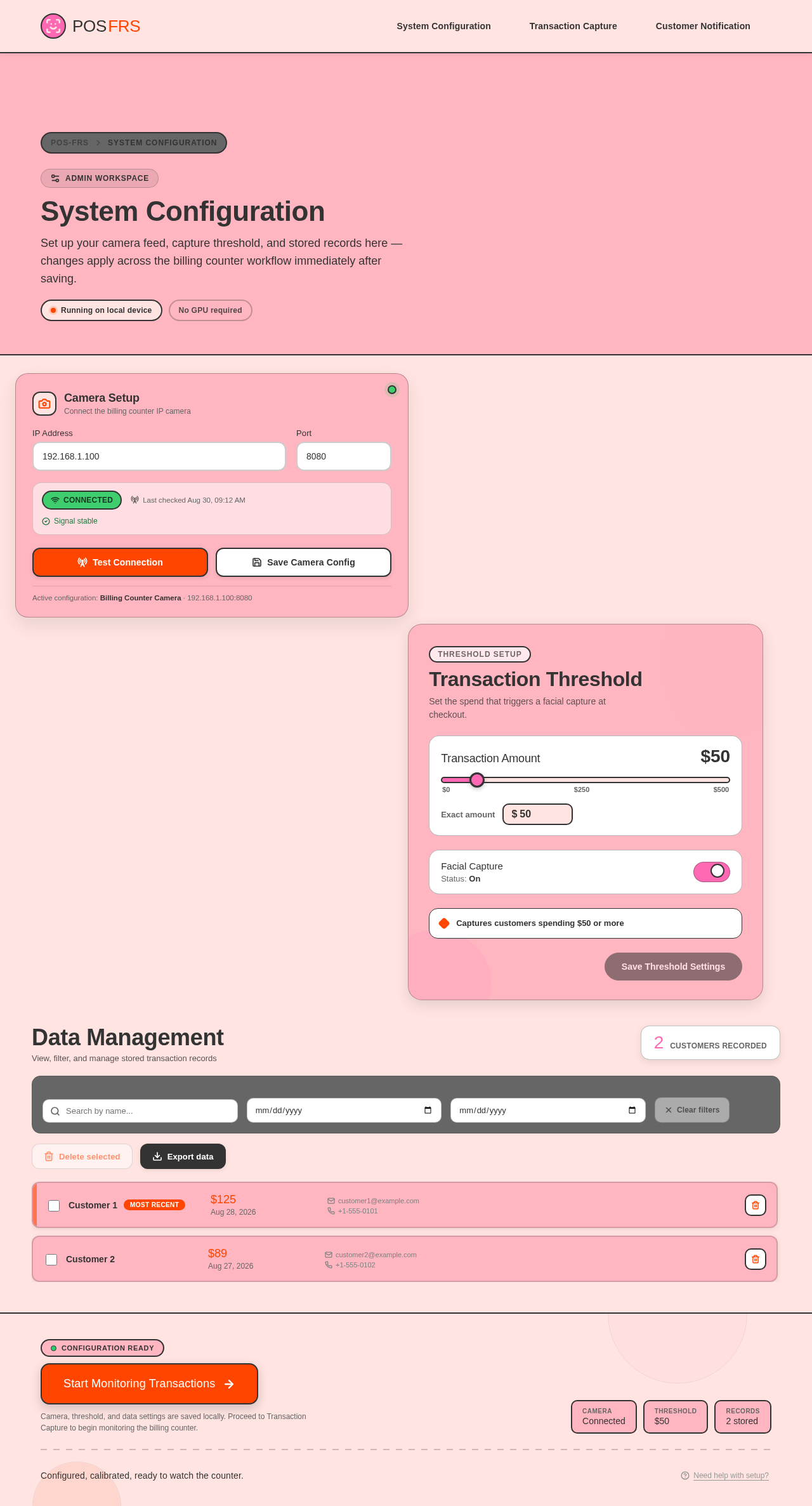
System Configuration
Set up your camera feed, capture threshold, and stored records here — changes apply across the billing counter workflow immediately after saving.
Camera Setup
Connect the billing counter IP camera
Active configuration: Billing Counter Camera · 192.168.1.100:8080
Transaction Threshold
Set the spend that triggers a facial capture at checkout.
Captures customers spending $50 or more
Data Management
View, filter, and manage stored transaction records
- Customer 1Most recent$125Aug 28, 2026customer1@example.com+1-555-0101
- Customer 2$89Aug 27, 2026customer2@example.com+1-555-0102
System Configuration
Set up your camera feed, capture threshold, and stored records here — changes apply across the billing counter workflow immediately after saving.
Camera Setup
Connect the billing counter IP camera
Active configuration: Billing Counter Camera · 192.168.1.100:8080
Transaction Threshold
Set the spend that triggers a facial capture at checkout.
Captures customers spending $50 or more
Data Management
View, filter, and manage stored transaction records
- Customer 1Most recent$125Aug 28, 2026customer1@example.com+1-555-0101
- Customer 2$89Aug 27, 2026customer2@example.com+1-555-0102
No comments yet. Be the first!