portfolio
 Afiq Rohaizal
Build me the most interactive portfolio, with 3D effects, hovering effects, clicking effects and more


Comments (0)
Sign in to leave a comment
System Requirements
Portfolio System Requirements Document
1. Introduction
The purpose of this document is to outline the system requirements for the "Portfolio" project. This project aims to create an interactive and visually engaging portfolio website for Afiq Rohaizal, incorporating advanced 3D effects, hover interactions, and clickable elements to provide a dynamic user experience.
2. System Overview
The Portfolio project is designed to showcase Afiq Rohaizal's work and achievements through an interactive web platform. The system will leverage modern web technologies to create a visually appealing and engaging experience for visitors. The portfolio will include various interactive elements such as 3D effects, hover animations, and clickable interactions to enhance user engagement.
3. Functional Requirements
- As a Visitor, I should be able to view a 3D interactive homepage that showcases Afiq's work.
- As a Visitor, I should be able to experience hover effects on portfolio items to reveal additional information.
- As a Visitor, I should be able to click on portfolio items to view detailed project descriptions.
- As a Visitor, I should be able to navigate through different sections of the portfolio using an interactive menu.
- As a Visitor, I should be able to experience smooth transitions between sections of the portfolio.
- As a Visitor, I should be able to interact with dynamic elements that respond to my actions (e.g., mouse movements, clicks).
4. User Personas
- Visitor: Individuals interested in viewing Afiq Rohaizal's portfolio, including potential clients, employers, and collaborators.
5. Core User Flows
- Visitor lands on the homepage -> Interacts with 3D elements -> Navigates to portfolio section -> Hovers over items for more info -> Clicks on an item for detailed view -> Returns to homepage or explores other sections.
6. Visuals Colors and Theme
- primary: #1E3A8A (Deep Blue)
- primary_light: #3B82F6 (Light Blue)
- secondary: #F97316 (Vibrant Orange)
- accent: #10B981 (Emerald Green)
- highlight: #F59E0B (Amber)
- bg: #F3F4F6 (Light Gray)
- surface: rgba(255, 255, 255, 0.8) (White with transparency)
- text: #111827 (Dark Gray)
- text_muted: #6B7280 (Muted Gray)
- border: rgba(209, 213, 219, 0.2) (Light Gray)
7. Signature Design Concept
The homepage will feature an interactive 3D landscape using @react-three/fiber and @react-three/drei. Visitors will navigate through a virtual gallery where each portfolio piece is a 3D model that can be rotated and examined. Hovering over a model will trigger animations and reveal project details. Clicking a model will expand it into a full-screen view with detailed descriptions and media. The entire experience will be enhanced with subtle animations using framer-motion for smooth transitions and interactions.
8. Interaction Model & Motion Direction
The landing page will utilize a "parallax" interaction model, creating a layered depth effect as users scroll through the site. Decorative elements will move at different speeds to create a sense of depth, while content remains in the natural flow. Internal pages will maintain a "static" interaction model to ensure clarity and ease of reading, with minimal motion to enhance usability.
9. Non-Functional Requirements
- The system should be responsive and accessible across all modern web browsers and devices.
- The portfolio should load quickly and efficiently, optimizing for performance without compromising visual quality.
- The system should be secure, protecting user data and interactions.
10. Tech Stack
- Frontend: React for Web
- Backend: Not specified (assumed static content)
- Database: Not applicable (assumed static content)
- 3D and Animation Libraries:
@react-three/fiber,@react-three/drei,framer-motion
11. Assumptions and Constraints
- The portfolio will primarily target web users and may not include a mobile app version.
- The system will not require user authentication or personalized data storage.
12. Glossary
- 3D Effects: Visual elements that provide a three-dimensional appearance, enhancing the depth and interactivity of the website.
- Hover Effects: Visual changes that occur when a user moves the cursor over an element.
- Parallax: A design technique where background images move slower than foreground images, creating an illusion of depth.
- Framer-motion: A library for creating animations and transitions in React applications.
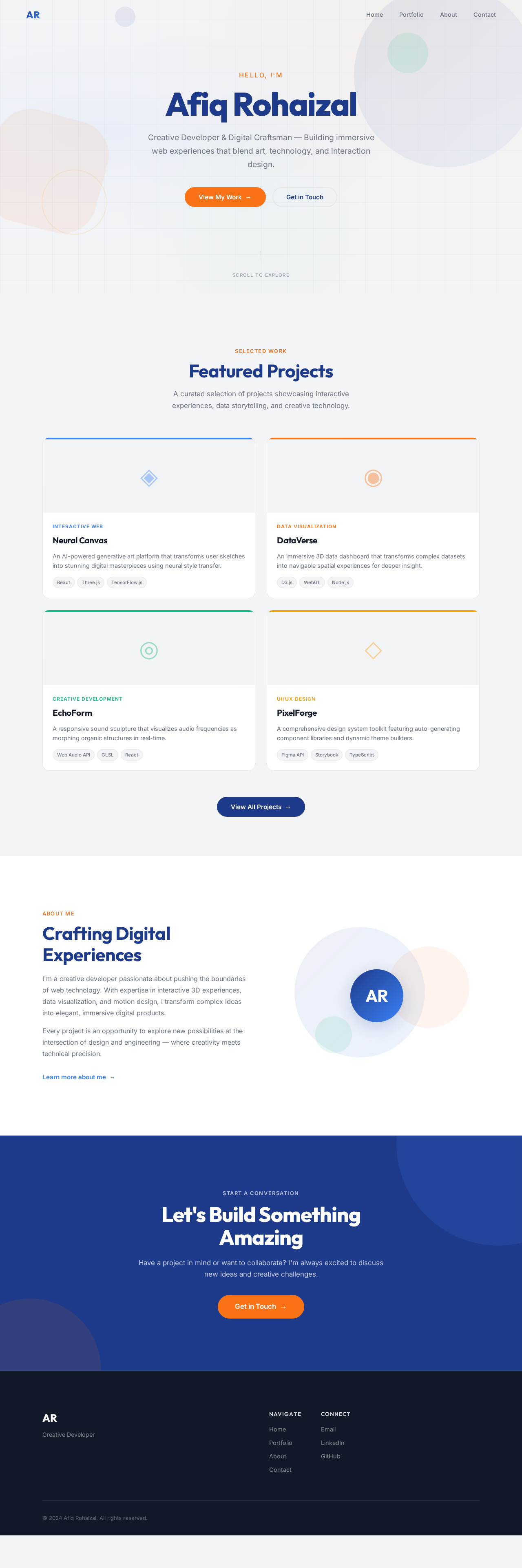
Hello, I'm
Afiq Rohaizal
Creative Developer & Digital Craftsman — Building immersive web experiences that blend art, technology, and interaction design.
Featured Projects
A curated selection of projects showcasing interactive experiences, data storytelling, and creative technology.
Neural Canvas
An AI-powered generative art platform that transforms user sketches into stunning digital masterpieces using neural style transfer.
DataVerse
An immersive 3D data dashboard that transforms complex datasets into navigable spatial experiences for deeper insight.
EchoForm
A responsive sound sculpture that visualizes audio frequencies as morphing organic structures in real-time.
PixelForge
A comprehensive design system toolkit featuring auto-generating component libraries and dynamic theme builders.
Crafting Digital Experiences
I'm a creative developer passionate about pushing the boundaries of web technology. With expertise in interactive 3D experiences, data visualization, and motion design, I transform complex ideas into elegant, immersive digital products.
Every project is an opportunity to explore new possibilities at the intersection of design and engineering — where creativity meets technical precision.
Learn more about me →Let's Build Something Amazing
Have a project in mind or want to collaborate? I'm always excited to discuss new ideas and creative challenges.
Get in Touch→
No comments yet. Be the first!