Daily progress
Open the Dashboard to see today’s plan as one calm ring, filled by the habits you have completed.
Build Daylight, a simple personal habit tracker. Include a dashboard with daily progress, a habits page to add and complete habits, and a weekly insights page. Use a clean, friendly design with teal accents. Keep the first version focused on these three pages.


Sign in to leave a comment
Daylight is a simple personal habit tracker for one daily user. The product helps a person record the habits they want to keep, mark them complete each day, see how much of today's plan is done, and review how the week went. The intent is calm encouragement rather than clinical measurement: the interface should feel clean, friendly, and warm, with teal accents marking progress and controls.
The audience is a single habit tracker user who wants a lightweight, private record of daily habits and a weekly view of their consistency. The first version is deliberately focused on three working pages — a Dashboard with daily progress, a Habits page to add and complete habits, and a Weekly Insights page — reached through a public Landing page and self-service Sign Up and Login.
Daylight is delivered as a first-party web application. A React frontend presents the public Landing page, the Sign Up and Login access surfaces, and the three working pages (Dashboard, Habits, Weekly Insights). A shared FastAPI backend owns the application APIs and domain logic for habits and daily completions, and a MariaDB database holds application-owned persistent data. Because habit records are private and must persist across visits, the application owns identity: a new user enrolls through Sign Up, and a returning user verifies identity through Login before reaching the Dashboard, Habits, or Weekly Insights pages.
The single active human actor is the Habit tracker user. The backend and database are supporting system actors, not personas. The current version covers exactly the six pages in the page contract: Landing, Sign Up, Login, Dashboard, Habits, and Weekly Insights. No other destinations, modules, or capabilities are in scope for this version.
Removed from scope
Daylight is a private, single-user habit tracker. All habit data belongs to the signed-in user and is only reachable after identity is established. The public Landing page explains the product and offers the entry action; Sign Up creates a new private habit record; Login verifies a returning user. The Dashboard, Habits, and Weekly Insights pages are protected and require login.
The first version is intentionally bounded to these six pages. There is no social, sharing, notification, reminder, goal-setting, or account-management surface beyond enrollment and login. Habit data persists in the application database so that daily progress and weekly insights remain available across sessions.
FR-1 — Public entry and product explanation (explicit; owner: Landing) As a Habit tracker user, I should see a public Landing page that explains Daylight and its habit tracking purpose, with the headline "Small habits, steady daylight", the subline "Track your habits each day. See your progress and your weekly insights.", and a "Start today" call to action, so that I understand the product before signing in.
FR-2 — Self-service enrollment (required_inference; owner: Sign Up) As a Habit tracker user, I should be able to enroll through a Sign Up page so that I can begin a private habit record.
FR-3 — Returning-user verification (required_inference; owner: Login) As a Habit tracker user, I should be able to verify my identity through a Login page so that I can reach my private habit records.
FR-4 — Dashboard daily progress (explicit; owner: Dashboard) As a Habit tracker user, I should see my daily progress on the Dashboard so that I know how much of today's plan is done.
FR-5 — Add habits (explicit; owner: Habits) As a Habit tracker user, I should be able to add habits on the Habits page so that I can track the habits I care about.
FR-6 — Complete habits (explicit; owner: Habits) As a Habit tracker user, I should be able to complete habits on the Habits page so that I can record today's progress.
FR-7 — Weekly insights (explicit; owner: Weekly Insights) As a Habit tracker user, I should see weekly insights on the Weekly Insights page so that I can review how my week went.
FR-8 — Clean, friendly design with teal accents (explicit; cross-cutting) As a Habit tracker user, I should experience a clean, friendly design with teal accents across all pages so that the tool feels calm and encouraging.
FR-9 — Focused first version (explicit; cross-cutting) As a Habit tracker user, I should encounter only the three working pages plus the public entry and access surfaces so that the product stays simple.
The creative direction (Humane technology after Yves Béhar) is authoritative for this section.
#F4EFE6#FFFDF8#1F3A38#0E7C74#E8734A#6E7F7CThe public entry (Landing) is composed as a warm oat ground filling the screen. A large teal progress ring sits left at 40 percent width, with a soft inner shadow. The headline stacks right in ink at 48px to 72px, reading "Small habits, steady daylight", with the subline beneath it and the "Start today" CTA as a solid teal pill under the headline. Section openers use a small terracotta dot and a short label above the heading. Habit rows elsewhere use a soft oat card with a thin warm rule and a round check button. The Weekly Insights page shows a seven-day bar row in teal with one terracotta bar for the best day. The concept recomposes only accepted content and controls.
Interaction Model: Animated Motion Tempo: restrained Hero Dimensionality: layered_2d
Landing Hero Motion Brief
prefers-reduced-motion, a usable static arrangement is provided.#F4EFE6 used across pages.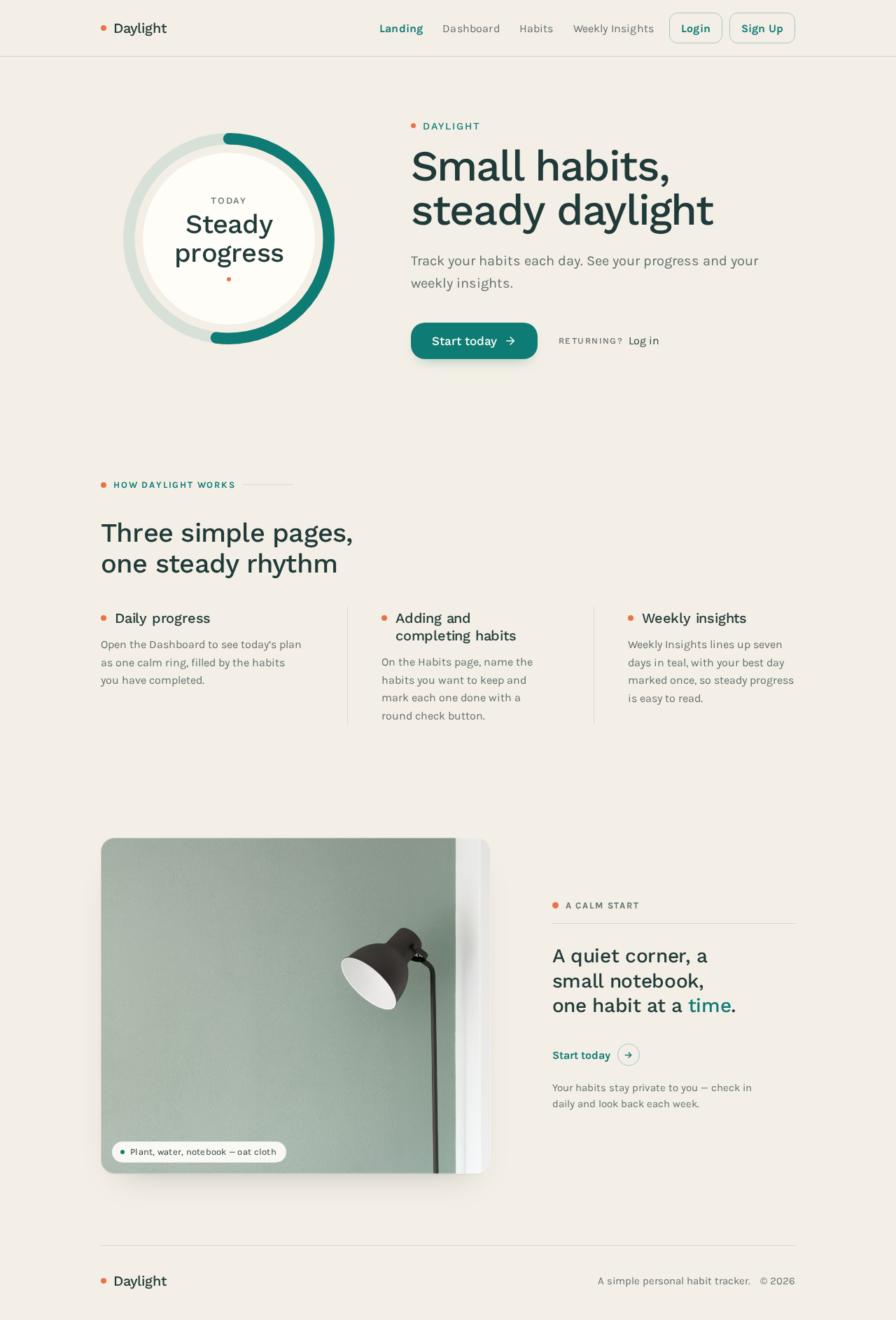
Daylight
Track your habits each day. See your progress and your weekly insights.
Daily progress
Open the Dashboard to see today’s plan as one calm ring, filled by the habits you have completed.
Adding and completing habits
On the Habits page, name the habits you want to keep and mark each one done with a round check button.
Weekly insights
Weekly Insights lines up seven days in teal, with your best day marked once, so steady progress is easy to read.

A calm start
Your habits stay private to you — check in daily and look back each week.
No comments yet. Be the first!