polar-dashboard
 Usama Tahir
bro i want you to build me a 3d website with scroll animation for my project ExamProctoring System i have explained the project below and procide suchcode that i can connect my database to it afterwards buddy first let me explain teachers dashboard the teahcers dashboard will have an option of create paper he willhave a single foem in which both there will be options for mcqs and subjective paper and the mcqs will have default 4 options teaher will also have to mark the correct answer so that the mcqs can automatically be checked by the system and teacher will not have to check them and also mcqs can have ultiple answer this feature can be abled and disabled by teacher if techer selects more then 1 option then the mcqs will have more then one answers and for subjective the teacher will check it themselves and there will be a single form with options to add both subjective questions and mcqs and if teacher obnly adds questions and no mcqs then in the final paper which will be shown to user there will be no mvqs option and vice versa and the subjective questions will have a box for teacher to add question and when student is giving exam he will see a question and a dynamic textAarea for writing answes and teacher has a options to limit max words for every subjective question and the teaxtarea will have word features and when teacher checks subjective questions she will also have abox for feedback for every question and teacher when checking papers will onbly check the subjective questions and mcqs will be chexked automatocally by the answes stored in the backend and teacher will also have the feature to mark each question individually and can give ncqs marks only once and all the other mcqs will be assigned numbers automatically and when student submits a paper the teacher will have 4 different pages first page will have options to create paper the second page will have all the papers created by teachet that are to be given to students and each paper will have the name on left end and a start exam button on right end when teache rclicks on the start exam button a page will open adn students will be shown the exam that the teacher has started amd teachxer will be takedn toi a page where she will accwept studfents requests to start paper and monitor anyone she wants and the third page will have all the papers that are submitted by students and in this page the the teacher will see all the paper tabs that are submitted by students and when she clicks on the paper tab then the tab opens the papers of all the students that have specifically submitted that exam and teacher can click on every studnt paper to view adn mark his paper and when a teacher has marked all the submitted papers of students in a single paper tab then at the end a button of announce result will appear now its upto teacher whenever they wish they cna announce the result to students by clicking on the button and fourth tab will have all the papers tabs which are marked by the teacher when teacher clicks onteh tab it will open list of all the students that gave specifically attemted this paper along with their ids and exam marks and the strudent dashboard first will havea registration page in wehich all the inecessery info will be takena dn also caera willopen to take a pictuire that pivture eill be stored in the backend adn when studnet tries to login again the camera will be opened and he will have to take a picture adn the picture will be comaprd to the picture stored in the memory and then he will be logged in and the student dashboard will have 3 pages one page will have all the paper that are created by teacher and every paper will have a apply now button which will work only when teacher has stated an exam when students clicks on apply now then a ;ogin box will appear the student will have to logins and request will be send to teacher when teacher accepts the request the student will have the paper opened for them and the second page will have all the papers that are submitted by student and have their results pending for the specific student and the third page will have all the papers that have their results announced for the specific student
Comments (0)
Sign in to leave a comment
System Requirements
System Requirements Document (SRD)
Project Name: Exam Eye
1. Introduction
Welcome to the System Requirements Document (SRD) for Exam Eye, a tech-focused, modern frontend solution for the Exam Proctoring System envisioned by Usama Tahir from Pakistan. This document outlines the functional and non-functional requirements, user personas, design elements, and technical specifications for the project. The goal is to create a cutting-edge, responsive, and modular frontend that integrates seamlessly with backend systems for database connectivity and AI functionalities.
The Exam Eye will feature dynamic scroll animations, 3D elements, and a professional aesthetic tailored to the needs of teachers and students, ensuring a user-friendly and visually engaging experience.
2. System Overview
The Exam Eye is designed to facilitate the Exam Proctoring System, focusing on the following key functionalities:
- Teacher Dashboard: Enables teachers to create dynamic exams, monitor students during exams, grade subjective questions, and manage results.
- Student Dashboard: Allows students to register, log in using facial recognition, request access to exams, submit papers, and view results.
- AI Integration: Provides summaries for subjective answers to assist teachers during grading.
The frontend will be built using React, ensuring modularity and scalability, with scroll animations and 3D elements to enhance user engagement. The design will avoid generic AI aesthetics, focusing instead on a tech-centric, modern vibe.
3. Functional Requirements
Teacher Dashboard
- As a Teacher, I should be able to create dynamic papers with both MCQs and subjective questions.
- As a Teacher, I should be able to mark correct answers for MCQs and enable/disable multiple answers.
- As a Teacher, I should be able to limit the maximum word count for subjective questions.
- As a Teacher, I should be able to monitor students during exams via live camera feeds.
- As a Teacher, I should be able to accept student requests to start exams.
- As a Teacher, I should be able to grade subjective questions manually and provide feedback for each question.
- As a Teacher, I should be able to announce results to students once grading is complete.
- As a Teacher, I should be able to view all submitted papers and mark them individually.
Student Dashboard
- As a Student, I should be able to register by providing necessary information and capturing a photo for facial recognition.
- As a Student, I should be able to log in using facial recognition.
- As a Student, I should be able to request access to exams created by teachers.
- As a Student, I should be able to view pending and announced results for my submitted papers.
- As a Student, I should be able to submit my exam papers seamlessly.
4. User Personas
Teacher
- Role: Educator responsible for creating, monitoring, and grading exams.
- Needs: Efficient tools for exam creation, automated grading for MCQs, manual grading for subjective questions, and real-time student monitoring.
Student
- Role: Exam taker who registers, logs in, and interacts with the system to complete exams.
- Needs: Secure login, seamless exam access, and clear result visibility.
5. Visuals Colors and Theme
Color Palette
The color palette for Exam Eye is designed to evoke trust, professionalism, and modernity:
- Background:
#F5F9FC(Light Blue-Gray) - Surface:
#E8EEF3(Soft Gray) - Text:
#000000(Black for better readability) - Accent:
#1ABC9C(Emerald Green) - Muted Tones:
#BDC3C7(Muted Silver)
6. Signature Design Concept
Concept: Interactive 3D Dashboard with Scroll Animations
The Exam Eye homepage will feature a 3D interactive dashboard that evolves as the user scrolls. The design will include:
- Dynamic Scroll Animations: Sections will transition smoothly with parallax effects, creating depth and immersion.
- 3D Elements: Floating cards representing key features (e.g., "Create Paper," "Monitor Students") will rotate and shift as users interact.
- Glassmorphism: Transparent panels with subtle gradients and shadows will give the interface a futuristic feel.
- Interactive Landing Page: The homepage will feature a rotating globe or network visualization, symbolizing connectivity and innovation. Clicking on nodes will navigate users to specific sections (e.g., Teacher Dashboard, Student Dashboard).
- Micro-Interactions: Hover effects, button animations, and subtle transitions will enhance user engagement.
- Floating Menu: The top menu will remain visible as users scroll, ensuring easy navigation throughout the platform.
This design ensures the platform is visually striking while remaining functional and intuitive.
7. Non-Functional Requirements
- Performance: The frontend must load within 3 seconds on standard broadband connections.
- Responsiveness: The design must adapt seamlessly to various screen sizes, including desktops, tablets, and smartphones.
- Accessibility: Ensure WCAG 2.1 compliance for users with disabilities.
- Scalability: The frontend should support future integrations with backend systems and AI models.
- Security: Implement secure coding practices to prevent vulnerabilities in the frontend.
8. Tech Stack
Frontend
- React: For building a modular and scalable UI.
- React Hooks: For state management and component lifecycle.
- CSS-in-JS: Styled-components or Emotion for dynamic styling.
Tools
- Webpack: For bundling and optimizing assets.
- Babel: For JavaScript transpilation.
- Three.js: For 3D elements and animations.
9. Assumptions and Constraints
Assumptions
- The backend will handle database connectivity, AI integration, and facial recognition logic.
- Teachers and students will access the platform via modern browsers (Chrome, Firefox, Edge).
Constraints
- The frontend must avoid purple tones and generic AI aesthetics.
- The design must prioritize modularity for easy backend integration.
10. Glossary
- MCQs: Multiple Choice Questions.
- Subjective Questions: Open-ended questions requiring manual grading.
- Facial Recognition: Technology used to authenticate users based on facial features.
- AI Summaries: Automated summaries generated for subjective answers.
- Glassmorphism: A design trend featuring transparent elements with frosted-glass effects.
- Floating Menu: A navigation bar that remains visible at the top of the page during scrolling.
End of Document
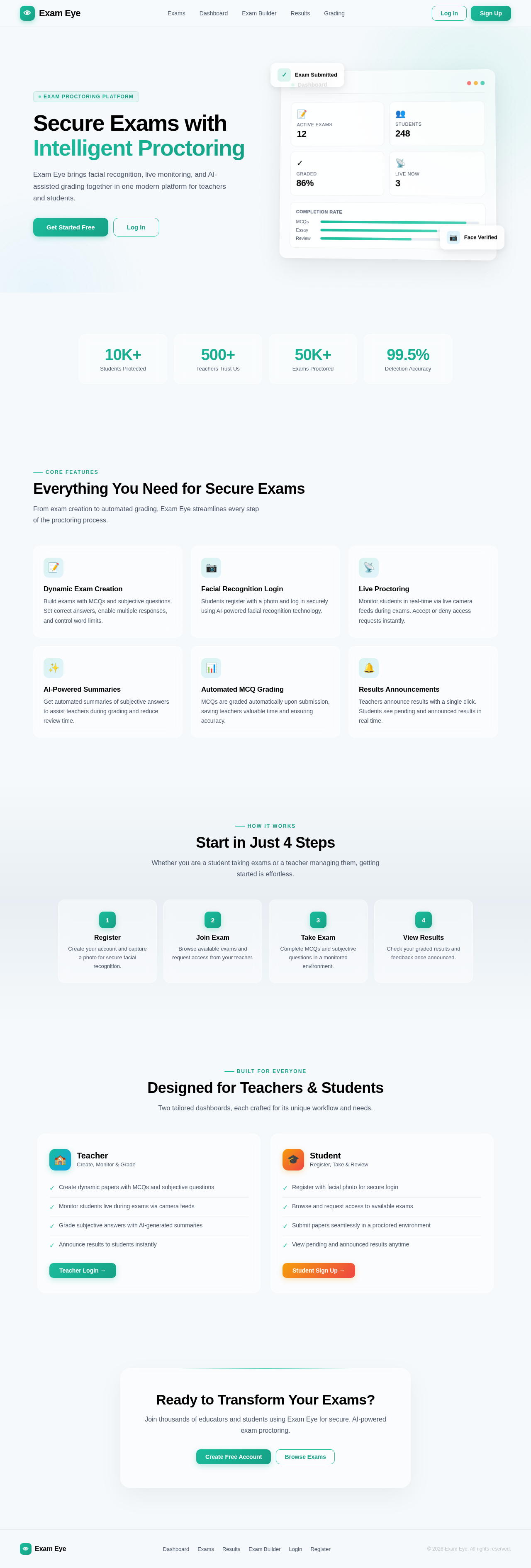
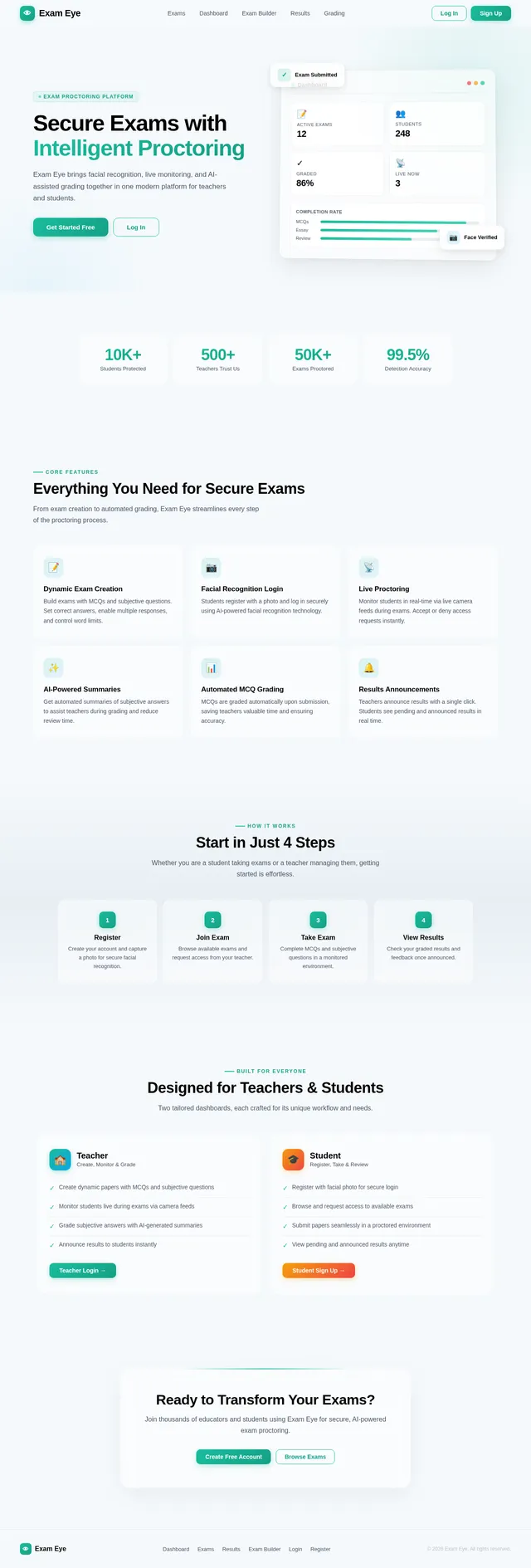
Secure Exams with Intelligent Proctoring
Exam Eye brings facial recognition, live monitoring, and AI-assisted grading together in one modern platform for teachers and students.
Everything You Need for Secure Exams
From exam creation to automated grading, Exam Eye streamlines every step of the proctoring process.
Dynamic Exam Creation
Build exams with MCQs and subjective questions. Set correct answers, enable multiple responses, and control word limits.
Facial Recognition Login
Students register with a photo and log in securely using AI-powered facial recognition technology.
Live Proctoring
Monitor students in real-time via live camera feeds during exams. Accept or deny access requests instantly.
AI-Powered Summaries
Get automated summaries of subjective answers to assist teachers during grading and reduce review time.
Automated MCQ Grading
MCQs are graded automatically upon submission, saving teachers valuable time and ensuring accuracy.
Results Announcements
Teachers announce results with a single click. Students see pending and announced results in real time.
Start in Just 4 Steps
Whether you are a student taking exams or a teacher managing them, getting started is effortless.
Register
Create your account and capture a photo for secure facial recognition.
Join Exam
Browse available exams and request access from your teacher.
Take Exam
Complete MCQs and subjective questions in a monitored environment.
View Results
Check your graded results and feedback once announced.
Designed for Teachers & Students
Two tailored dashboards, each crafted for its unique workflow and needs.
Teacher
Create, Monitor & Grade- ✓Create dynamic papers with MCQs and subjective questions
- ✓Monitor students live during exams via camera feeds
- ✓Grade subjective answers with AI-generated summaries
- ✓Announce results to students instantly
Student
Register, Take & Review- ✓Register with facial photo for secure login
- ✓Browse and request access to available exams
- ✓Submit papers seamlessly in a proctored environment
- ✓View pending and announced results anytime
Ready to Transform Your Exams?
Join thousands of educators and students using Exam Eye for secure, AI-powered exam proctoring.
No comments yet. Be the first!