plasma-system
 Ahzam Maqsood
Create a premium hybrid 3D luxury perfume ecommerce website, not a basic template. Use modern 2026 web design trends: - 3D animated perfume bottle in hero section - Cinematic dark luxury theme - Scroll-based animations - Fragrance mist / smoke particle effect - Glassmorphism product cards - Premium editorial layout - Large bold typography - Smooth micro-interactions - Mobile-first ecommerce conversion design Important: Do not make the full website overly heavy 3D. Use 3D mainly in the hero section and key storytelling sections, while keeping shop, product page, cart, and checkout fast, clean, and conversion-focused. Hero concept: A luxury perfume bottle floating in the center with slow 3D rotation, golden rim light, soft fragrance mist moving behind it, and text revealing smoothly. Sections: Hero, featured perfumes, scent categories, best sellers, scent notes storytelling, brand story, reviews, Instagram gallery, newsletter, footer. Make the website look like a premium 2026 luxury fragrance brand with high-end animations, but optimized for fast loading and sales.


Comments (0)
Sign in to leave a comment
Project Tasks37
Implement ShopHero for Shop
As a frontend developer, implement the ShopHero section for the Shop page. The section renders a full-width `<section className="sho-hero">` with four decorative mist/blob divs (`sho-hero__mist--1` through `--4`) inside `sho-hero__mist-layer`, a `sho-hero__gradient-top` overlay, a `sho-hero__accent-line` golden decorative line, and an inner content block containing: eyebrow text 'Revaya Scent', an `<h1>` with a `sho-hero__title-accent` span highlighting 'Collection', a decorative divider, a subtitle paragraph about luxury fragrances, and a CTA anchor linking to `#shop-filters` with a `sho-hero__cta-arrow` arrow span. All styles live in `ShopHero.css` (6532 chars) and must render animated mist blobs, gradient overlays, and the gold accent line as defined in the CSS.
Database Models and Migrations
As a Backend Developer, define all MySQL/MariaDB database models and migrations for the Revaya Scent platform. Create tables: products (id, name, description, price, bottle_gradient_key, created_at), product_variants (id, product_id, size_ml, price, label, available), scent_notes (id, product_id, tier [top/heart/base], name, description, tags, timestamp_label), product_images (id, product_id, url, badge_label, sort_order), scent_families (id, name), product_families (product_id, family_id), reviews (id, product_id, rating, text, author, date, verified), cart_sessions (id, session_token, created_at), cart_items (id, session_id, product_id, variant_id, quantity), orders (id, session_id, status, subtotal, discount, shipping, tax, total, created_at), order_items (id, order_id, product_id, variant_id, quantity, price), newsletter_subscribers (id, email, subscribed_at, is_active). Include Alembic migrations and seed data for the 9 products (Midnight Oud, Golden Iris, Velvet Rose, Amber Elixir, Ocean Aura, Cedar Noir, Jasmine Muse, Santal Supreme, Citrus Royale) with their variants, scent notes, and sample reviews.
Global Cart State Management
As a Frontend Developer, implement global state management for the shopping cart and UI state across the Revaya Scent SPA. Use React Context API with useReducer (or Zustand) to manage: cartItems (array), cartCount (derived), appliedPromo (nullable), wishlistIds (array), and activeNavLink (string). Expose actions: ADD_TO_CART, REMOVE_FROM_CART, UPDATE_QUANTITY, SET_PROMO, REMOVE_PROMO, TOGGLE_WISHLIST. Persist cart state to localStorage with hydration on mount. Provide CartContext/CartProvider wrapping the app root. The hardcoded cartCount=3 badge in TopNav should read from this context. This context is consumed by TopNav (cartCount badge), CartItems, CartSummary, CartActions, CartRecommended, CheckoutSummary, and ProductVariants (add-to-cart action).
Design System and Theme Setup
As a Frontend Developer, set up the global design system and theme for Revaya Scent. Create a global CSS file (variables.css or theme.js) exporting all design tokens: --color-primary: #1A1A1D, --color-primary-light: #333337, --color-secondary: #FFD700, --color-accent: #FF4500, --color-highlight: #FFA500, --color-bg: #0D0D0D, --color-surface: rgba(26,26,29,0.8), --color-text: #FFFFFF, --color-text-muted: #B0B0B0, --color-border: rgba(255,215,0,0.2). Define typography scale using large bold editorial fonts. Set up global resets, box-sizing, and font imports. Provide shared utility classes for glassmorphism (.glass-card), golden glow (.glow-gold), mist effect (.mist-layer), and editorial layout (.editorial-container). This is consumed by all page components and section CSS files.
Implement ShopFilters for Shop
As a frontend developer, implement the ShopFilters section for the Shop page. The component uses `useState` for `search`, `selectedFamilies` (array), `priceRange` ([50,500]), `sortBy`, and `panelOpen`, plus `useMemo` to compute `activeFilterCount` (counts active family toggles, price range deviations, and non-empty search). Render a `sh-f__top` row containing: a search input with SVG magnifier icon and a conditional clear `×` button (`clearSearch`); a sort `<select>` or button group for `SORT_OPTIONS` (Newest, Popularity, Price asc/desc); and a mobile toggle button showing `activeFilterCount` badge. A collapsible `sh-f__panel` (controlled by `panelOpen`) contains: scent family toggle chips for `SCENT_FAMILIES` (Floral, Oriental, Fresh, Woody) using `toggleFamily`; a dual-handle price range slider using two `<input type="range">` elements with `handleMinChange`/`handleMaxChange` updating `priceRange`, with CSS custom fill computed via `fillLeft`/`fillRight` percentages; and a 'Clear All' button calling `clearAll()`. Styles live in `ShopFilters.css` (8736 chars).
Implement TopNav for Product
As a frontend developer, implement the TopNav section for the Product page. This component (TopNav.jsx) renders a sticky header with the Revaya Scent brand mark, a desktop nav using NAV_LINKS array (Landing, Shop, Product, Cart, Checkout), a search input with lucide-react Search icon, a ShoppingBag cart icon with a hardcoded cartCount=3 badge, and a hamburger/X toggle button. Uses useState(false) for menuOpen state. A tn-mobile drawer slides open on toggle, containing a mobile search input and stacked nav links each with ChevronRight icons. Note: this component likely already exists from the Landing/Shop pages — reuse or reconcile with the existing TopNav component.
Products API Endpoints
As a Backend Developer, implement the Products REST API using FastAPI. Create endpoints: GET /api/products (list with filtering by family, price range, sort, pagination), GET /api/products/{id} (product detail with variants, notes, reviews). Define Pydantic schemas for Product, Variant, ScentNote, Review. Implement query parameter handling for search, selectedFamilies, priceRange, sortBy, page, rowsPerPage. This API supports ShopGrid, ShopFilters, ShopPagination, ProductHero, ProductInfo, ProductNotes, ProductVariants, ProductGallery, ProductReviews sections.
Cart API Endpoints
As a Backend Developer, implement the Cart REST API using FastAPI. Create endpoints: GET /api/cart (retrieve cart items), POST /api/cart/items (add item), PUT /api/cart/items/{id} (update quantity), DELETE /api/cart/items/{id} (remove item), POST /api/cart/promo (validate and apply promo code against VALID_PROMOS: WELCOME10 10%, LUXURY20 20%, REVAYA15 15%, REVAYA10 10%), DELETE /api/cart/promo (remove applied promo). Use session or user-based cart storage. This API supports CartItems, CartSummary, CartPromo, CartActions sections.
Newsletter Subscription API
As a Backend Developer, implement the Newsletter subscription API using FastAPI. Create endpoint: POST /api/newsletter/subscribe (accept email, validate format, store subscriber, return success/duplicate response). Implement GET /api/newsletter/subscribers (admin list endpoint). Store subscribers in database with email, subscribed_at, is_active fields. This API supports the Newsletter section on the Landing page.
Reviews API Endpoints
As a Backend Developer, implement the Reviews REST API using FastAPI. Create endpoints: GET /api/products/{id}/reviews (list reviews with filter: Most Helpful, Newest, Highest Rated; paginated with REVIEWS_PER_PAGE=4), POST /api/products/{id}/reviews (submit a new review with rating, text, author). Return review objects with id, rating, text, author, date, verified fields and aggregate rating distribution (5★ 62%, 4★ 28%, 3★ 7%, 2★ 3%, 1★ 0%) from computed data. This API supports ProductReviews section.
React Router and Page Setup
As a Frontend Developer, set up React Router v6 for the Revaya Scent SPA. Configure routes: / (Landing), /Shop, /Product/:id, /Cart, /Checkout, /Privacy. Create page-level wrapper components (LandingPage, ShopPage, ProductPage, CartPage, CheckoutPage) that compose their section components. Integrate CartProvider (global state context) at the app root. Configure code-splitting with React.lazy and Suspense for each page. Set up a shared Layout component containing TopNav and Footer. Ensure navigation links in TopNav, Footer, CartActions, and CheckoutHeader all resolve correctly via React Router Link components instead of plain anchors where applicable.
Implement ShopGrid for Shop
As a frontend developer, implement the ShopGrid section for the Shop page. The component defines a `products` array of 9 fragrance objects (Midnight Oud, Golden Iris, Velvet Rose, Amber Elixir, Ocean Aura, Cedar Noir, Jasmine Muse, Santal Supreme, Citrus Royale), each with `id`, `name`, `tags`, `topNotes`, `price`, and `bottleGradient` keys. A `bottleGradients` map defines per-product color tokens (`top`, `mid`, `bottom`, `accent`). A `BottleSVG` sub-component renders an inline `<svg className="sg-card__bottle">` using unique gradient IDs (`sg-bg-{key}`, `sg-accent-{key}`, `sg-cap-{key}`) derived from the gradient key for each product. The grid uses `useState` for hover/active card state. Each card renders the `BottleSVG`, product name, tag chips, top notes, and price. Styles live in `ShopGrid.css` (7844 chars) and must handle glassmorphism card effects and per-product gradient bottle rendering.
Implement ProductHero for Product
As a frontend developer, implement the ProductHero section for the Product page. This component renders a full 3D perfume bottle scene using @react-three/fiber Canvas with @react-three/drei Float, Environment, and OrbitControls. The PerfumeBottleModel sub-component constructs the bottle geometry procedurally using CylinderGeometry parts (body, liquid, shoulder taper, neck, cap base, cap body, cap top) with four custom THREE.MeshPhysicalMaterial/MeshStandardMaterial instances: glassMaterial (transparent amber, clearcoat), goldMaterial (metallic FFD700), darkCapMaterial (dark metallic), and liquidMaterial (translucent golden with emissive glow). The Float wrapper provides gentle idle animation at speed=1.8. The surrounding UI includes star ratings, a Heart wishlist button, ShoppingBag CTA, and trust badges using Check, Truck, ShieldCheck icons from lucide-react.
Implement ProductGallery for Product
As a frontend developer, implement the ProductGallery section for the Product page. This component (ProductGallery.jsx) manages a 6-image gallery with useState for activeIndex and zoomed state and a thumbnailsRef. The galleryImages array contains Unsplash product images with badge labels (Front View, Packaging, Detail, Lifestyle, Atmosphere, Side View). Navigation is via goPrev/goNext handlers with wrap-around using modulo. ZoomIn/ZoomOut lucide icons toggle the zoomed state on the main image. Thumbnail click calls handleThumbClick which either zooms (if already active) or navigates. Decorative pg-glow and pg-mist CSS elements create ambient atmospheric effects. Below the main viewer, detailCards render three feature highlights (Hand-Crafted Bottle, Gold-Foil Packaging, Lifestyle Moments) with emoji icons.
Implement ProductInfo for Product
As a frontend developer, implement the ProductInfo section for the Product page. This component renders a Three.js golden particle field background via a @react-three/fiber Canvas. The ParticleField sub-component creates 160 particles using BufferGeometry and useFrame for per-frame physics: mouse-attraction force (force = min(3.0/dist², 2.5)), velocity damping at 0.94, and boundary bounce. Mouse position is tracked via a mouseRef passed down to the Canvas. A pointsMaterial renders particles as gold (#FFD700) additive-blended dots. The main component uses useState for revealed and concentrationWidth (animated to 28 on scroll entry via IntersectionObserver at 0.1 threshold) and sectionRef. The UI displays product description text, concentration/longevity detail bars, and ingredient highlights that animate in on viewport entry.
Implement ProductVariants for Product
As a frontend developer, implement the ProductVariants section for the Product page. This component renders variant selection UI backed by SIZE_VARIANTS (50ml/$185, 100ml/$295, 200ml/$495 with availability labels) and INTENSITY_VARIANTS (Original/Intense/Lumière with concentration levels). State includes selectedSize (index), selectedIntensity (key), and a quantity counter managed with Minus/Plus lucide icons. A @react-three/fiber Canvas renders GoldenParticles: 60 points with vertexColors interpolated between gold shades, additive blending, and useEffect-based requestAnimationFrame rotation loop (rotation.y += 0.0012, rotation.x += 0.0006). The add-to-cart button shows a ShoppingBag icon and uses a Check confirmation state. useCallback is used on selection handlers for performance.
Implement ProductNotes for Product
As a frontend developer, implement the ProductNotes section for the Product page. This component visualizes the scent pyramid via SCENT_TIERS array (Top Notes/Heart Notes/Base Notes with time stamps, descriptions, and tag arrays). A ParticleMolecule sub-component creates a raw Three.js scene (no react-three/fiber) on a canvas ref: 72 particles distributed spherically at radius=14 with random velocities, rendered as Points with #FFD700 additive PointsMaterial. The renderer uses WebGLRenderer with alpha=true and an animRef requestAnimationFrame loop that updates particle positions each frame with boundary clamping. useState tracks the active tier for the accordion/tab interaction. Wind, Heart, and Gem lucide icons differentiate the three tier cards. useEffect handles canvas resize and cleanup of the Three.js renderer on unmount.
Implement ProductReviews for Product
As a frontend developer, implement the ProductReviews section for the Product page. This component renders 29 total reviews with a 4.7 average rating. REVIEWS_DATA contains 6 sample review objects with id, rating (4-5 stars), text, author, date, and verified boolean. RATING_DISTRIBUTION array drives a histogram bar chart (5★ 62%, 4★ 28%, 3★ 7%, 2★ 3%, 1★ 0%). FILTER_OPTIONS (Most Helpful, Newest, Highest Rated) drive a filter selector stored in useState. Pagination with REVIEWS_PER_PAGE=4 and page state navigated via ChevronLeft/ChevronRight buttons. A renderStars helper renders filled/empty star spans with prr-star-empty class. CheckCircle icon marks verified purchases. Edit3 icon appears on a write-review CTA. getSortedReviews returns a sorted copy of REVIEWS_DATA based on active filter.
Implement Footer for Product
As a frontend developer, implement the Footer section for the Product page. This component (Footer.jsx) renders a rvf-footer with a two-column top layout: a brand block (Revaya Scent heading with rvf-brand-dot, tagline paragraph, and social icon links for Instagram, Facebook, Twitter, Youtube from lucide-react at size=18 strokeWidth=1.5) and a rvf-cols grid of three link columns defined in linkColumns array (Shop, Discover, Help — each with 4 anchor links to /Shop, /Product, /Cart, /Checkout routes). A horizontal rvf-divider separates the top from the bottom row containing a dynamic year copyright via new Date().getFullYear() and a legal nav. Note: this component may already exist from the Landing or Shop pages — reuse or reconcile with the existing Footer component.
Implement CartHero for Cart
As a frontend developer, implement the CartHero section for the Cart page. This section renders a Three.js WebGL canvas (via canvasRef and useEffect) with 38 golden particles (color 0xffd700, AdditiveBlending, opacity 0.65, size 0.04) that bounce within bounded velocity fields. The camera is positioned at z=14 with a 60° FOV. Includes a ResizeObserver for responsive canvas sizing, full cleanup on unmount (cancelAnimationFrame, renderer.dispose, geometry.dispose, material.dispose). Also renders a PROGRESS_STEPS breadcrumb array ['Cart', 'Checkout', 'Confirmation'] with the first step marked active. Styles from CartHero.css. Note: CartHero depends on the TopNav task from the Product page to establish page-level chaining.
Checkout API Endpoints
As a Backend Developer, implement the Checkout REST API using FastAPI. Create endpoints: POST /api/orders (submit order with contact info, shipping address, billing/payment method), GET /api/orders/{id} (order confirmation detail), POST /api/orders/validate (validate form fields server-side). Define Pydantic schemas for Order, ShippingAddress, BillingInfo, PaymentMethod. Compute server-side: subtotal, shipping ($12.00 flat rate via SHIPPING_RATE), tax (8% via TAX_RATE), discount (validate DISCOUNT_CODE='REVAYA10' for 10% off). This API supports CheckoutForm, CheckoutSummary, CheckoutHeader sections.
Implement ShopPagination for Shop
As a frontend developer, implement the ShopPagination section for the Shop page. The component uses `useState` for `currentPage` (default 1) and `rowsPerPage` (default 24). A `getVisiblePages(current, total)` helper computes the visible page array with ellipsis (`'...'`) insertion: always includes page 1 and `TOTAL_PAGES` (8), inserts `'...'` when gap exists around the current page window (current±1). Renders a `sp-root` section with: a `sp-divider` line; a `sp-rows` block with three `sp-rows__btn` buttons for `ROWS_OPTIONS` ([12,24,36]) applying `sp-rows__btn--active` on the selected count and calling `handleRowsChange` (which resets to page 1); a `<nav className="sp-pages">` with Prev/Next nav buttons (disabled at boundaries, with `sp-pages__arrow` spans and `sp-pages__nav-label` text), numeric page buttons with `sp-pages__btn--active` on `currentPage`, and `sp-pages__ellipsis` spans for `'...'` entries using unique `ellipsis-{i}` keys. Styles live in `ShopPagination.css` (4120 chars).
Implement ProductCTA for Product
As a frontend developer, implement the ProductCTA section for the Product page. This component renders a final conversion section with a @react-three/fiber Canvas featuring two sub-components: BottleMesh and MistParticles. BottleMesh uses useFrame with clock.getElapsedTime() for sinusoidal group rotation (sin(t*0.35)*0.25) and vertical float (sin(t*0.6)*0.15), plus continuous cap rotation (+=0.003). The bottle geometry includes cap (cylinder+sphere in FFD700 gold), neck, body with meshPhysicalMaterial (clearcoat 0.6, transmission 0.15), inner liquid with MeshDistortMaterial (distort=0.08, speed=1.2), and a torus label glow ring with emissive FFD700. MistParticles renders count=60 mist points using useMemo for positions/randoms Float32Arrays. UI includes ShoppingBag, Zap, Heart primary CTAs and Truck, ShieldCheck, RefreshCw, Lock, Clock trust/urgency badges from lucide-react. Float and PerspectiveCamera from drei are used for the camera setup.
Implement CartItems for Cart
As a frontend developer, implement the CartItems section for the Cart page. Uses useState to manage an array of 3 cart items (Midnight Oud $185, Golden Iris $165×2, Velvet Rose $195) each with id, name, variant, size, price, quantity, and imageId fields. Implements updateQuantity (delta-based, clamped 1–10) and removeItem (filter) handlers. Renders a dynamic ci-header__count with Intl.NumberFormat currency formatting. Includes a full empty-state UI with an SVG shopping cart icon, 'Your Cart is Empty' heading, descriptive text, and an 'Explore Collection' CTA link to /Shop. Populated state renders a ci-list of item cards with quantity controls and remove buttons. Styles from CartItems.css.
Implement CartSummary for Cart
As a frontend developer, implement the CartSummary section for the Cart page. Includes a GoldenParticles sub-component rendered via @react-three/fiber Canvas (camera at [0,0,5], fov 45) with 28 particles using BufferGeometry, pointsMaterial (color #FFD700, size 0.06, AdditiveBlending, opacity 0.55), animated with per-frame sinusoidal drift and slow Y-axis rotation. The CartSummary component uses useState for appliedCoupon ('LUXE15'). Order data is derived: subtotal $435, discount $65.25 (when coupon applied), shipping $0, tax computed at 8% on discounted subtotal. Displays cs-summary__lines for each order line and a formatted total. Uses formatCurrency helper. Styles from CartSummary.css.
Implement CartPromo for Cart
As a frontend developer, implement the CartPromo section for the Cart page. Uses useState for code input, status ('idle'/'loading'/'success'/'error'), appliedPromo object, and message string. Validates against VALID_PROMOS dictionary with keys WELCOME10 (10% off), LUXURY20 (20% off), REVAYA15 (15% off). Contains a full Three.js scene (via canvasRef and useEffect) featuring a 3D perfume bottle group composed of CylinderGeometry body (color 0x2a2a35, MeshPhysicalMaterial with clearcoat 0.6, opacity 0.7), shoulder (color 0x1e1e28, clearcoat 0.7), and neck (color 0x555555, MeshStandardMaterial, metalness 0.9). Scene lighting includes AmbientLight (0xffd700), rimLight PointLight (0xffd700, 2.5), fillLight (0xff8c00, 1.2), and backRim (0xffa500, 1.5). Uses ResizeObserver on canvas parent for responsive sizing and SRGBColorSpace output. Styles from CartPromo.css.
Implement CartRecommended for Cart
As a frontend developer, implement the CartRecommended section for the Cart page. Uses useState for addedIds (string array) and toastMessage (string|null). handleQuickAdd appends product.id to addedIds (deduped) and sets a toast message that auto-clears after 2600ms via setTimeout. Renders a cr-__grid of 4 product cards (Midnight Oud $185, Golden Iris $165, Velvet Rose $195, Amber Elixir $175), each with an inline SVG perfume bottle illustration using unique per-product linearGradient IDs (cr-cap-{id}, cr-body-{id}) and radialGradient (cr-rim-{id}) defined in SVG defs. Each card has a Quick Add button that switches to an 'Added' state (isAdded check). Section header includes cr-__eyebrow 'Complete Your Collection', h2 title 'You Might Also Like', and descriptive subtitle. Styles from CartRecommended.css.
Implement CheckoutHeader for Checkout
As a frontend developer, implement the CheckoutHeader section for the Checkout page. Build the `CheckoutHeader` component using `useState` to track `activeStep` (initialized to 1). Render a breadcrumb nav with links to `/Landing` and `/Cart` and a current 'Checkout' span. Render a header row with `.chh-title-group` (eyebrow 'Secure Checkout' + h1 'Complete Your Order') and a back-link SVG arrow pointing to `/Cart`. Implement the 4-step progress bar (Cart, Shipping, Billing, Review) using `STEPS` array and `getStepClass()` helper that assigns `.chh-step--completed`, `.chh-step--active`, or `.chh-step--pending` classes. Render a `.chh-progress-fill` div with inline `width` style driven by `progressPercent = (activeStep / (STEPS.length - 1)) * 100`. Completed steps show a checkmark SVG; pending/active steps show the numeric index+1. Add `role='progressbar'` with aria attributes for accessibility. Apply `CheckoutHeader.css` styles.
API Client and HTTP Layer
As a Frontend Developer, implement the shared API client and HTTP layer for communicating with the FastAPI backend. Create an apiClient module (using fetch or axios) with base URL from environment variable (REACT_APP_API_URL). Implement typed helper functions: getProducts(params), getProduct(id), getProductReviews(id, filter, page), addCartItem(productId, variantId, qty), updateCartItem(id, delta), removeCartItem(id), applyPromoCode(code), removePromoCode(), createOrder(orderData), subscribeNewsletter(email). Include request/response interceptors for error handling and loading states. Export custom hooks: useProducts, useProduct, useCart, useCheckout for consumption by section components.
Implement CartActions for Cart
As a frontend developer, implement the CartActions section for the Cart page. Uses useState for savedForLater (boolean) and saveAnimating (boolean). handleSaveForLater toggles savedForLater and triggers a 450ms CSS animation class (ca-actions__save--animating) via setTimeout. Renders a ca-actions__cta-row with: a 'Proceed to Checkout' anchor linking to /Checkout (with truck SVG icon and arrow SVG), and a 'Continue Shopping' anchor linking to /Shop (with back-arrow SVG). Below renders a ca-actions__secondary-row with the Save for Later button that dynamically swaps its SVG icon (bookmark path vs. checkmark polyline) and label based on savedForLater state, using fill color #FFD700 when saved. Also renders a ca-actions__trust row with trust badge items. Styles from CartActions.css.
Implement CheckoutForm for Checkout
As a frontend developer, implement the CheckoutForm section for the Checkout page. Build a large multi-section form component using `useState` for all field values and validation state. Render inline SVG icon components: `IconEnvelope`, `IconMap`, `IconCard`, `IconLock`, `IconCheck`, `IconWarn`, `IconInfo`, `IconCreditCard`, `IconPayPal`, `IconApple`. Implement three payment method tabs (Credit Card with `IconCreditCard`, PayPal with `IconPayPal`, Apple Pay with `IconApple`) with conditional panel rendering. Build contact info section (email field with `IconEnvelope`), shipping address section (address fields with `IconMap`), and billing/payment section (card fields with `IconCard` and `IconLock`). Implement per-field validation UI using `IconCheck` for valid, `IconWarn` for error, and `IconInfo` for hints. Apply `CheckoutForm.css` for all layout, field, icon, and tab styles.
Implement CheckoutSummary for Checkout
As a frontend developer, implement the CheckoutSummary section for the Checkout page. Build the `CheckoutSummary` aside component with `useState` for `items` (initialized with `initialItems`: Midnight Oud $185, Golden Iris $165, Velvet Rose $195), `discountCode` string, and `appliedDiscount` nullable state. Implement `handleQuantityChange(id, delta)` that maps items and filters out quantities below 1. Implement `handleRemove(id)` to filter items. Derive computed values: `subtotal` (sum of price × quantity), `shipping` ($12.00 constant via `SHIPPING_RATE` if items exist), `taxEstimate` (subtotal × 0.08 via `TAX_RATE`), `discountAmount` (10% of subtotal if `appliedDiscount` is set), and `total`. Render `BottleIcon` SVG placeholder for item thumbnails. Implement promo code input with `handleApplyDiscount` that validates against `DISCOUNT_CODE = 'REVAYA10'` and `handleRemoveDiscount`. Render empty cart state with cart SVG when items array is empty. Format all prices via `formatPrice()`. Apply `CheckoutSummary.css`.
Implement CheckoutSecurity for Checkout
As a frontend developer, implement the CheckoutSecurity section for the Checkout page. Build the static `CheckoutSecurity` component (no state) rendering a `.chs-inner` container with two subsections. In `.chs-badges`, render three trust badge items separated by `.chs-divider` elements: (1) SSL badge with shield+checkmark SVG and label '256-bit SSL Encryption / Your data is securely encrypted', (2) Returns badge with refresh-arrow SVG and label '30-Day Returns / Free returns on all orders', (3) Payment badge with credit-card SVG and label 'Secure Checkout / PCI-DSS compliant payments'. In `.chs-actions`, render a mailto support link `support@revayascent.com` with question-circle SVG (`IconHelp` inline) and `.chs-support__email` span, plus a `/Privacy` anchor with right-arrow SVG as `.chs-privacy`. Apply `CheckoutSecurity.css` for badge layout, dividers, and action link styling.
Integrate Shop Page
As a Tech Lead, verify the end-to-end integration between the Shop page frontend (ShopGrid, ShopFilters, ShopPagination) and the Products backend API. Ensure filter parameters (family, priceRange, sortBy, search, page, rowsPerPage) are correctly passed to GET /api/products and that the response product list, pagination metadata, and per-product data render correctly in the ShopGrid and ShopPagination components. Confirm the ShopFilters component drives live API queries and ShopGrid displays real product data including names, tags, top notes, prices, and bottle gradients. Note: ShopHero section is static and does not require API integration.
Integrate Product Page
As a Tech Lead, verify the end-to-end integration between the Product page frontend (ProductHero, ProductGallery, ProductVariants, ProductInfo, ProductNotes, ProductReviews, ProductCTA) and the backend APIs (GET /api/products/{id}, GET /api/products/{id}/reviews, POST /api/cart/items). Ensure product details, variants (size/intensity), scent notes pyramid, gallery images, and reviews all populate from real API data. Confirm variant selection updates pricing correctly and the Add-to-Cart action dispatches to the Cart API and updates the global CartContext (cartCount badge in TopNav). Verify review pagination and filter (Most Helpful, Newest, Highest Rated) work against the reviews endpoint.
Integrate Cart Page
As a Tech Lead, verify the end-to-end integration between the Cart page frontend (CartHero, CartItems, CartSummary, CartPromo, CartRecommended, CartActions) and the Cart backend API (GET /api/cart, PUT /api/cart/items/{id}, DELETE /api/cart/items/{id}, POST /api/cart/promo, DELETE /api/cart/promo). Ensure CartItems renders real persisted cart data, quantity updates and removals sync to the API, CartPromo validates promo codes against the backend VALID_PROMOS dictionary (not just client-side), CartSummary computes totals from API response, and CartRecommended quick-add calls POST /api/cart/items. Confirm CartActions 'Proceed to Checkout' link passes cart state correctly. Verify CartSummary totals match backend calculation (subtotal, discount, shipping, tax).
Integrate Checkout Page
As a Tech Lead, verify the end-to-end integration between the Checkout page frontend (CheckoutHeader, CheckoutForm, CheckoutSummary, CheckoutSecurity) and the Checkout backend API (POST /api/orders, POST /api/orders/validate). Ensure CheckoutSummary populates from the cart API (not hardcoded initial items), promo code REVAYA10 validation runs server-side, CheckoutForm field validation errors are reconciled with backend validation responses, order submission via POST /api/orders returns an order ID and triggers a success/confirmation state in CheckoutHeader (step 4 completed). Confirm pricing totals (subtotal, shipping $12, tax 8%, discount 10%) match backend calculation exactly.
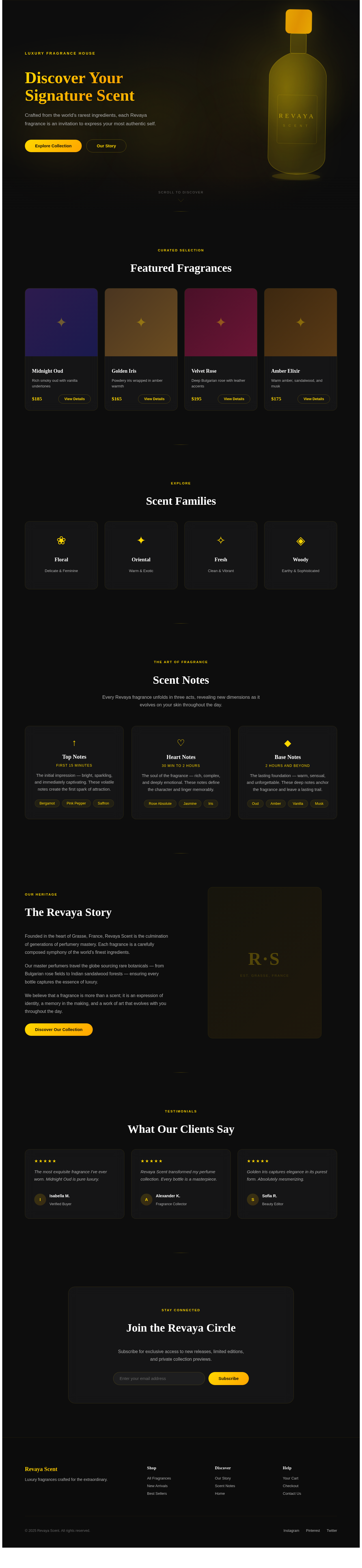
Luxury Fragrance House
Discover Your Signature Scent
Crafted from the world's rarest ingredients, each Revaya fragrance is an invitation to express your most authentic self.
Curated Selection
Featured Fragrances
Midnight Oud
Rich smoky oud with vanilla undertones
Golden Iris
Powdery iris wrapped in amber warmth
Velvet Rose
Deep Bulgarian rose with leather accents
Amber Elixir
Warm amber, sandalwood, and musk
The Art of Fragrance
Scent Notes
Every Revaya fragrance unfolds in three acts, revealing new dimensions as it evolves on your skin throughout the day.
Top Notes
First 15 minutes
The initial impression — bright, sparkling, and immediately captivating. These volatile notes create the first spark of attraction.
Heart Notes
30 min to 2 hours
The soul of the fragrance — rich, complex, and deeply emotional. These notes define the character and linger memorably.
Base Notes
2 hours and beyond
The lasting foundation — warm, sensual, and unforgettable. These deep notes anchor the fragrance and leave a lasting trail.
Our Heritage
The Revaya Story
Founded in the heart of Grasse, France, Revaya Scent is the culmination of generations of perfumery mastery. Each fragrance is a carefully composed symphony of the world's finest ingredients.
Our master perfumers travel the globe sourcing rare botanicals — from Bulgarian rose fields to Indian sandalwood forests — ensuring every bottle captures the essence of luxury.
We believe that a fragrance is more than a scent; it is an expression of identity, a memory in the making, and a work of art that evolves with you throughout the day.
Discover Our CollectionTestimonials
What Our Clients Say
The most exquisite fragrance I've ever worn. Midnight Oud is pure luxury.
Revaya Scent transformed my perfume collection. Every bottle is a masterpiece.
Golden Iris captures elegance in its purest form. Absolutely mesmerizing.
No comments yet. Be the first!