pharma-siddharth-pujara
 Siddharth Pujara
Make one Pharma company website, named Siddharth Pujara Pharma

Comments (0)
Sign in to leave a comment
System Requirements
System Requirements Document for pharma-siddharth-pujara
1. Introduction
Siddharth Pujara Pharma is a single pharmaceutical company website for an Indian manufacturer and distributor. The site exists to serve two audiences with one coherent information system: pharmacists, stockists, and doctors who need fast, unambiguous product facts (composition, strength, pack, therapeutic category), and the general public who need to trust the maker. The website presents the company, its product range, and its contact information publicly, and gives a designated content administrator a working control room for keeping company, product, and contact content accurate and current.
The product intent is a regulated-industry information surface: serious, competent, humane, information-dense, and legible. It is not a marketing brochure and not a generic SaaS template.
2. System Overview
The current delivery is a single first-party web application with a public, account-free reading surface and a small authenticated administrative surface.
Actors
- Pharma Company Website Visitor — an anonymous member of the public, a pharmacist, stockist, or doctor who browses company information, product details, and contact information without an account.
- Pharma Company Content Administrator — the person responsible for keeping the website's company, product, and contact content accurate and current.
Accepted behavior
- Public visitors read the Landing, Products, and Contact destinations without an account.
- The administrator is provisioned or invited before first administrative use, completes returning verification at Login, and then works in Content Library and Content Editor to add and update company, product, and contact content.
- Administrative content changes are executed and persisted by the backend before the public website reflects them.
Ownership
- Landing, Products, Contact, Login, Content Library, and Content Editor are all first-party application pages.
- Backend execution and persistence of administrative content changes is a system process supporting the administrator's first-party interaction; it is not a human-facing surface.
Narrow exclusions
- No public visitor account, registration, or login is offered; the public surface is account-free.
- No e-commerce, ordering, cart, payment, prescription handling, or patient-record capability is in scope.
- No capability beyond the six named pages is in scope for the current horizon.
2a. Product Interpretation and Delivery Boundary
Siddharth Pujara Pharma is delivered as one first-party website. The public half is open: anyone may read the company's story, browse its products, and find its contact details without creating an account or signing in. Nothing on the public surface is gated.
The administrative half is deliberately small and closed. A single administrative role — the Pharma Company Content Administrator — owns the durable content that the public reads. That person is provisioned or invited before first use rather than self-registering, and must complete returning verification at Login before Content Library or Content Editor becomes available. Login is the anonymous entry boundary for that verification; the protected administrative state itself remains unavailable until identity is established.
Content changes made by the administrator are executed and persisted by the backend before the public website reflects them. This is the only place where a system process sits between a human action and its outcome, and it exists so that the public site never shows a half-written change.
Everything described above is current. No future-horizon capabilities are accepted at this time.
2b. Source Content Inventory
Not applicable — no reference directive in this project declares content_source authority.
2c. Page Content and Component Coverage
Landing
- Information and state: The company identity "Siddharth Pujara Pharma", its standing as an established manufacturer and distributor, a headline statement of what the company makes, and an at-a-glance summary of the therapeutic categories it covers with a count per category. No account state is required or shown.
- Primary actions: Navigate to Products; navigate to Contact; select a therapeutic category chip to move into the Products view for that category.
- Supporting actions: Read the company introduction; read the numbered breadcrumb strip; follow the category chips as the primary navigation row.
- Domain entities: Company profile, therapeutic category, product count per category.
- Component responsibilities: Full-viewport information panel with an asymmetric split — a stacked condensed display headline against a solid signal-colour block holding a single flat-on product photograph with a numbered circle; a full-width heavy rule beneath the headline; a small-caps label strip above the headline carrying the company name and its manufacturer/distributor standing; a horizontal row of category chips, each with its colour dot and tabular count, functioning as the navigation rather than a collapsed menu; a numbered breadcrumb strip at the top of the page.
- States:
- Loading: Category chips and counts resolve from the company's published content; the headline and identity strip render immediately as static content.
- Empty: If no categories are published yet, the chip row is omitted and the headline, rule, and photograph block remain; the page still routes to Products and Contact.
- Success: Headline, rule, photograph block, and category chips with counts are all present and each chip navigates to the corresponding Products view.
- Error: If category data cannot be retrieved, the chip row is replaced by a plain inline notice that product categories are temporarily unavailable, with a link to Products; the rest of the page remains readable.
- Recovery: Reloading the page re-attempts the category fetch; the visitor can always continue to Products or Contact regardless of chip availability.
Login
- Information and state: The verification surface for the Pharma Company Content Administrator. It is anonymously reachable and holds no protected content. It states that access is for the site's content administrator and that access is by invitation or provisioning.
- Primary actions: Submit credentials to complete returning verification; continue to Content Library on success.
- Supporting actions: Read the invitation/provisioning notice; return to the public site.
- Domain entities: Administrator identity, invitation or provisioning record, verification session.
- Component responsibilities: A single narrow form column on the warm ground with label/value field pairs set flush-left on a shared baseline; a primary submit control; an inline notice explaining that administrative access is provisioned or invited rather than self-registered; a numbered breadcrumb strip at the top.
- States:
- Loading: Submit control enters a pending state while verification is checked; fields remain visible.
- Empty: Fields render empty with labels; no protected content is present or previewed.
- Success: Verification succeeds and the administrator is taken to Content Library.
- Error: Invalid credentials produce an inline error message adjacent to the form, the fields retain the entered identifier, and the password field is cleared; no protected content is revealed.
- Recovery: The administrator can retry immediately; if the account has not yet been provisioned or invited, the notice directs them to obtain an invitation rather than offering self-registration.
Products
- Information and state: The company's pharmaceutical product information, presented as a real table-like grid with sticky column headers: Product, Composition, Strength, Form, Pack, and a therapeutic-category dot. Filterable by therapeutic category using the colour code. Faint column rules remain visible so the data reads as a system.
- Primary actions: Browse the product grid; filter by therapeutic category; open a product row to expand its detail panel.
- Supporting actions: Read the numbered breadcrumb strip; clear an active category filter; navigate to Contact.
- Domain entities: Product, composition, strength, dosage form, pack size, therapeutic category, category colour code.
- Component responsibilities: Sticky-header data table on desktop with a category dot plus small-caps label in each row; a category filter control using the same colour code as the chips and the admin editor; an expandable detail panel per row; a stacked label/value layout for the same content on mobile; a numbered breadcrumb strip at the top showing the active category segment.
- States:
- Loading: Column headers render immediately; rows show a pending state until product data resolves.
- Empty: If no products match the active filter, an inline message states that no products match and offers a clear-filter action; if no products are published at all, the grid is replaced by a plain statement that the product list is being prepared.
- Success: Rows render with all six columns populated and the category dot and label matching the site-wide colour code.
- Error: If product data cannot be retrieved, an inline error replaces the rows with a retry action; headers and the filter remain visible.
- Recovery: Retry re-attempts the fetch; clearing the filter always returns the visitor to the full list when data is available.
Contact
- Information and state: The company's contact information, set as flush-left label/value pairs on a shared baseline with hairline rules between rows, like a transit information panel. The phone number is set in tabular numerals at display size.
- Primary actions: Read the contact details; use the phone number or other published contact channels.
- Supporting actions: Read the numbered breadcrumb strip; navigate to Products or Landing.
- Domain entities: Company contact record — address, phone, email, and any other published contact channel.
- Component responsibilities: Two-column label/value panel aligned flush-left on a shared baseline; hairline rules between rows; the phone number rendered in tabular numerals at 28px; a numbered breadcrumb strip at the top.
- States:
- Loading: Label column renders immediately; values resolve from published contact content.
- Empty: If a contact field is not published, its row is omitted rather than shown blank; if no contact content is published at all, a plain statement directs the visitor to check back.
- Success: All published contact rows render with correct label/value alignment and hairline rules.
- Error: If contact content cannot be retrieved, an inline notice states that contact details are temporarily unavailable; the page remains navigable.
- Recovery: Reloading re-attempts the fetch; the visitor can always return to Landing or Products.
Content Library
- Information and state: The authenticated administrator's overview of the company's company, product, and contact content. Presented as a dense three-row-per-item list with tabular numerals, inline status chips, and keyboard-first interaction. Protected — unavailable until returning verification is complete.
- Primary actions: Review existing company, product, and contact content items; open an item in Content Editor; create a new content item.
- Supporting actions: Filter or scan the list by content type and status; read the numbered breadcrumb strip; sign out.
- Domain entities: Content item, content type (company / product / contact), publication status, last-updated timestamp, administrator identity.
- Component responsibilities: Dense list rows with tabular numerals for counts and dates; inline status chips using the site's state colours; keyboard-first focus order and activation; a create-new-item control; a numbered breadcrumb strip at the top.
- States:
- Loading: List frame and column labels render immediately; rows show a pending state until content resolves.
- Empty: If no content items exist yet, an inline message states that no content has been created and offers the create-new-item action.
- Success: All content items render with type, status, and last-updated information; each row opens in Content Editor.
- Error: If the content list cannot be retrieved, an inline error with a retry action replaces the rows; the create action remains available.
- Recovery: Retry re-attempts the fetch; if the session has lapsed, the administrator is returned to Login and, after verification, back to Content Library.
Content Editor
- Information and state: The authenticated administrator's workspace for adding and updating company, product, and contact content. Protected — unavailable until returning verification is complete. The therapeutic-category select uses the same colour dot plus small-caps label as the public category chips and product rows.
- Primary actions: Create a new company, product, or contact content item; update an existing item; save and publish the change.
- Supporting actions: Select a therapeutic category for a product item; review the item's current published state before saving; return to Content Library; sign out.
- Domain entities: Content item, content type, product fields (name, composition, strength, dosage form, pack size, therapeutic category), company fields, contact fields, publication status.
- Component responsibilities: Field groups per content type with label/value pairs set flush-left; a therapeutic-category select carrying the site-wide colour dot and small-caps label; a save/publish control; an inline confirmation of the persisted result; a numbered breadcrumb strip at the top.
- States:
- Loading: Field groups render with their labels; existing values resolve for an item being updated.
- Empty: A new item opens with empty fields and labels only; no placeholder product facts are invented.
- Success: On save, the backend executes and persists the change, an inline confirmation states that the change is published, and the public website reflects the new content.
- Error: If validation fails, the offending field is marked inline with a plain message and the entered values are retained; if persistence fails, an inline error states that the change was not saved and the entered values are retained.
- Recovery: The administrator can correct and resubmit without re-entering the whole item; a failed save leaves the previously published content untouched on the public site.
3. Functional Requirements
FR-1 — Public, account-free access to the website As a Pharma Company Website Visitor, I should reach and read the Siddharth Pujara Pharma website without creating an account or signing in, so that I can learn about the company on my own terms.
- Provenance: explicit
- Lifecycle: Trigger — the visitor opens the site. Input — a public URL. Observable result — Landing renders with company identity and navigation. Access state — anonymous, no account required. Failure/recovery — if a public page's content cannot be retrieved, an inline notice appears and the rest of the page remains readable and navigable. Continuation — the visitor moves to Products or Contact.
FR-2 — Company introduction on Landing As a Pharma Company Website Visitor, I should see who Siddharth Pujara Pharma is and what it makes as soon as the site opens, so that I can judge whether this is the maker I am looking for.
- Provenance: required_inference
- Lifecycle: Trigger — Landing loads. Input — published company profile content. Observable result — the company name, its manufacturer-and-distributor standing, and a headline statement of what it makes are visible in the first screen. Access state — anonymous. Failure/recovery — if company content is unavailable, the identity strip and headline still render and the visitor can continue to Products or Contact. Continuation — the visitor selects a therapeutic category or moves to Products.
FR-3 — Therapeutic-category navigation from Landing As a Pharma Company Website Visitor, I should see the therapeutic categories the company covers, each with its colour code and a count, and be able to select one, so that I can go straight to the products I care about.
- Provenance: required_inference
- Lifecycle: Trigger — Landing loads with published category data. Input — the visitor's selection of a category chip. Observable result — the visitor arrives at the Products view filtered to that category, and the breadcrumb strip shows the active category segment. Access state — anonymous. Failure/recovery — if category data cannot be retrieved, the chip row is replaced by an inline notice and a link to Products. Continuation — the visitor browses the filtered product list.
FR-4 — Browsing the product range As a Pharma Company Website Visitor, I should browse the company's products in a table-like grid showing product, composition, strength, form, pack, and therapeutic category, so that I can read the facts I need without hunting.
- Provenance: required_inference
- Lifecycle: Trigger — the visitor opens Products. Input — published product content. Observable result — rows render with all six columns populated and a category dot plus small-caps label per row. Access state — anonymous. Failure/recovery — if product data cannot be retrieved, an inline error with a retry action replaces the rows while headers and filter remain. Continuation — the visitor filters, opens a row, or moves to Contact.
FR-5 — Filtering products by therapeutic category As a Pharma Company Website Visitor, I should filter the product grid by therapeutic category using the same colour code used everywhere else on the site, so that I can narrow a long list quickly and trust that the coding means the same thing throughout.
- Provenance: required_inference
- Lifecycle: Trigger — the visitor selects a category filter on Products. Input — the selected category. Observable result — the grid shows only matching products and the breadcrumb strip reflects the active category. Access state — anonymous. Failure/recovery — if no products match, an inline message states this and offers a clear-filter action. Continuation — the visitor clears the filter or opens a matching row.
FR-6 — Opening a product's detail panel As a Pharma Company Website Visitor, I should expand a product row to see its full detail, so that I can confirm composition, strength, form, and pack before acting on it.
- Provenance: required_inference
- Lifecycle: Trigger — the visitor activates a product row. Input — the selected product. Observable result — the row's detail panel expands in place with the product's full published detail. Access state — anonymous. Failure/recovery — if the detail cannot be retrieved, an inline message appears within the row and the row remains in the list. Continuation — the visitor collapses the panel or continues browsing.
FR-7 — Reading contact information As a Pharma Company Website Visitor, I should find the company's contact details set out clearly as label/value pairs, so that I can reach the right person or channel without guessing.
- Provenance: required_inference
- Lifecycle: Trigger — the visitor opens Contact. Input — published contact content. Observable result — contact rows render flush-left on a shared baseline with hairline rules, and the phone number is set in tabular numerals at display size. Access state — anonymous. Failure/recovery — if contact content cannot be retrieved, an inline notice states the details are temporarily unavailable and the page remains navigable. Continuation — the visitor uses a published channel or returns to Products.
FR-8 — Administrator provisioning or invitation before first use As a Pharma Company Content Administrator, I should be provisioned or invited before my first administrative use, so that administrative access is bound to a known person rather than open to anyone.
- Provenance: required_inference
- Lifecycle: Trigger — the company decides who administers the site. Input — the administrator's identity. Observable result — the administrator holds an invitation or provisioning record that Login will accept. Access state — anonymous until verification. Failure/recovery — if the administrator has not yet been provisioned or invited, Login's notice directs them to obtain an invitation rather than offering self-registration. Continuation — the administrator completes returning verification at Login.
FR-9 — Returning verification at Login As a Pharma Company Content Administrator, I should complete returning verification at Login before reaching Content Library or Content Editor, so that the durable content the public reads stays under my control.
- Provenance: required_inference
- Lifecycle: Trigger — the administrator opens Login. Input — their credentials. Observable result — on success the administrator arrives at Content Library; on failure an inline error appears and no protected content is revealed. Access state — Login is anonymously reachable and holds no protected content; Content Library and Content Editor remain unavailable until verification succeeds. Failure/recovery — the administrator can retry immediately; the entered identifier is retained and the password field is cleared. Continuation — the administrator works in Content Library.
FR-10 — Reviewing existing content in Content Library As a Pharma Company Content Administrator, I should see all of the site's company, product, and contact content in one dense, keyboard-first list with type, status, and last-updated information, so that I can find what needs attention quickly.
- Provenance: required_inference
- Lifecycle: Trigger — the administrator arrives at Content Library after verification. Input — the published and draft content set. Observable result — rows render with tabular numerals, inline status chips, and a working keyboard focus order. Access state — protected; requires completed verification. Failure/recovery — if the list cannot be retrieved, an inline error with a retry action replaces the rows while the create action remains available; a lapsed session returns the administrator to Login and, after verification, back to Content Library. Continuation — the administrator opens an item or creates a new one.
FR-11 — Creating new company, product, or contact content As a Pharma Company Content Administrator, I should create a new company, product, or contact content item in Content Editor, so that the public site can carry information it does not yet have.
- Provenance: required_inference
- Lifecycle: Trigger — the administrator selects create-new-item from Content Library. Input — the content type and its field values. Observable result — the item is saved and persisted, and the public website reflects it. Access state — protected; requires completed verification. Failure/recovery — validation failures mark the offending field inline and retain entered values; a persistence failure states that the change was not saved and retains entered values, leaving previously published content untouched. Continuation — the administrator returns to Content Library and sees the new item.
FR-12 — Updating existing content As a Pharma Company Content Administrator, I should update an existing company, product, or contact item in Content Editor, so that the public website stays accurate and current.
- Provenance: required_inference
- Lifecycle: Trigger — the administrator opens an item from Content Library. Input — the revised field values. Observable result — the change is saved and persisted, an inline confirmation states that it is published, and the public website reflects the new content. Access state — protected; requires completed verification. Failure/recovery — validation failures mark the offending field inline and retain entered values; a persistence failure states that the change was not saved and retains entered values, leaving the previously published content untouched. Continuation — the administrator returns to Content Library.
FR-13 — Assigning a therapeutic category to a product As a Pharma Company Content Administrator, I should assign a therapeutic category to a product using the same colour dot and small-caps label used on the public category chips and product rows, so that the coding system stays consistent between what I edit and what visitors read.
- Provenance: required_inference
- Lifecycle: Trigger — the administrator edits a product item. Input — the selected therapeutic category. Observable result — the product carries that category, and the public product row and detail header show the matching dot and label. Access state — protected; requires completed verification. Failure/recovery — if the category is not set, the product's category cell renders without a dot rather than showing a wrong one. Continuation — the administrator saves and publishes the item.
FR-14 — Backend execution and persistence before public reflection As a Pharma Company Content Administrator, I should have my content changes executed and persisted by the backend before the public website reflects them, so that visitors never see a half-written change.
- Provenance: required_inference
- Lifecycle: Trigger — the administrator saves a content item. Input — the submitted field values. Observable result — the change is persisted and only then appears on the public site. Access state — protected; requires completed verification. Failure/recovery — if persistence fails, the public site continues to show the previously published content and the administrator is told the change was not saved. Continuation — the administrator corrects and resubmits, or returns to Content Library.
4. User Personas
Pharma Company Website Visitor
Product context. This person arrives at Siddharth Pujara Pharma from outside the company — a pharmacist, stockist, or doctor checking a product fact, or a member of the general public deciding whether to trust the maker. They have no account, no relationship with the site, and no patience for a marketing funnel. They may arrive from a search result, a printed pack, or a colleague's reference, and they may leave within seconds if the facts are not immediately legible.
Primary goal. Find the specific information they came for — a product's composition, strength, form, pack, or therapeutic category, the company's identity and standing, or a way to get in touch — without an account and without hunting.
Distinct accepted responsibilities. Reading the company introduction on Landing; selecting a therapeutic category from the chip row; browsing the product grid; filtering by therapeutic category; expanding a product row for full detail; reading contact information set as label/value pairs.
Relevant inputs and decisions. Which therapeutic category to select; whether to filter or scan the full list; which product row to expand; which contact channel to use. The visitor decides continuously whether the page has answered their question or whether they should leave.
Interactions with other accepted participants. The visitor does not interact with the administrator directly, but every fact they read is content the administrator has published. The visitor's experience is the observable outcome of the administrator's work: a stale or missing product fact is the visitor's problem first.
Observable success. The visitor finds the needed information on the first or second page they open, reads it in a layout that distinguishes similar-looking products by coded information, and either acts on a contact channel or leaves satisfied — all without ever encountering a sign-in prompt.
Pharma Company Content Administrator
Product context. This person is accountable for the accuracy of everything the public reads on Siddharth Pujara Pharma. They work in a control room, not a marketing page: dense lists, tabular numerals, inline status, keyboard-first movement, and short feedback loops. They are provisioned or invited rather than self-registering, because administrative access is bound to a known person.
Primary goal. Keep the company, product, and contact content on the public website accurate and current, and be confident that what they saved is what visitors now see.
Distinct accepted responsibilities. Completing returning verification at Login; reviewing all company, product, and contact content in Content Library; creating new content items; updating existing items; assigning therapeutic categories to products using the site-wide colour code; saving and publishing changes that the backend persists before the public site reflects them.
Relevant inputs and decisions. Which content item needs attention; what the correct composition, strength, form, pack, or category is; whether a change is ready to publish; how to correct a validation or persistence failure without losing entered work.
Interactions with other accepted participants. The administrator is the sole author of what the Pharma Company Website Visitor reads. Their publishing decision is the moment a visitor's experience changes. They do not interact with visitors directly and receive no visitor-facing messages through this product.
Observable success. The public website shows current, correctly categorised content; the administrator can find and update any item quickly from Content Library; and a failed save never leaves the public site in a half-written state.
5. Core User Flows
Flow A — A visitor learns who Siddharth Pujara Pharma is
- The Pharma Company Website Visitor opens the Siddharth Pujara Pharma site at the Landing page. No account is requested and none is needed.
- Landing renders the full-viewport information panel: the small-caps identity strip reading the company name and its manufacturer-and-distributor standing, the stacked condensed headline, and the heavy rule beneath it.
- The visitor reads the headline and the identity strip, and forms a first judgement about the maker.
- Below the rule, the visitor sees the horizontal row of therapeutic-category chips, each with its colour dot and a tabular count.
- Decision: the visitor either selects a category chip to go straight to those products, or moves to Products to see the full range, or moves to Contact.
- Observable result: the visitor has the company's identity and its category coverage
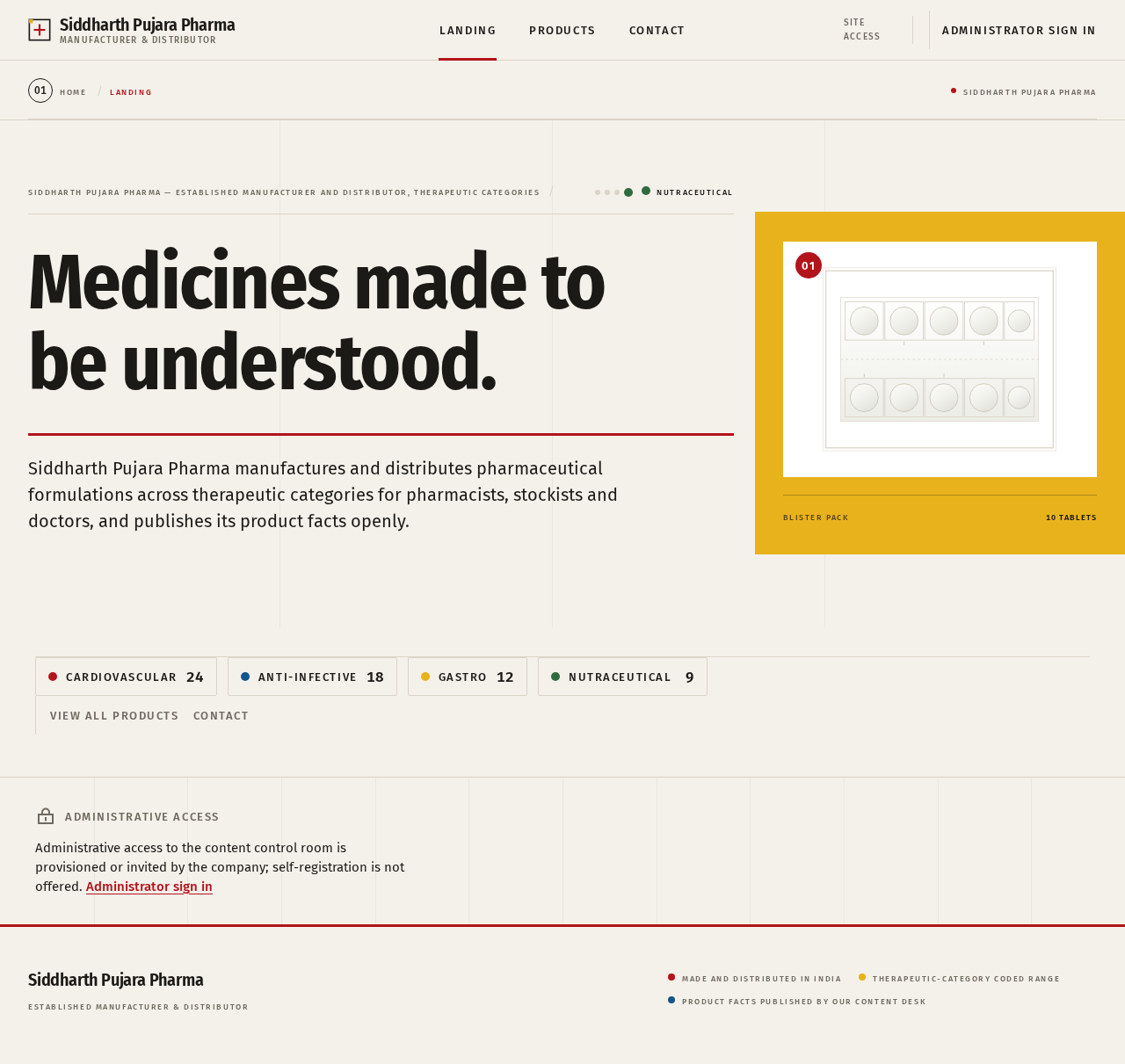
Medicines made tobe understood.
Siddharth Pujara Pharma manufactures and distributes pharmaceutical formulations across therapeutic categories for pharmacists, stockists and doctors, and publishes its product facts openly.
Administrative access
Administrative access to the content control room is provisioned or invited by the company; self-registration is not offered. Administrator sign in
Medicines made tobe understood.
Siddharth Pujara Pharma manufactures and distributes pharmaceutical formulations across therapeutic categories for pharmacists, stockists and doctors, and publishes its product facts openly.
Administrative access
Administrative access to the content control room is provisioned or invited by the company; self-registration is not offered. Administrator sign in
No comments yet. Be the first!