personal-ai
 Balaji Bala
Work on my existing Dodo Personal AI Assistant Phase 1 project only. Do not start Phase 2 and do not rebuild the project from scratch. Inspect the existing code first and fix the current implementation while preserving the existing UI, navigation, Midnight Orb design, Expo React Native + TypeScript architecture, and Supabase backend. The app must work on both Android and iOS. First fix the current crash: "Cannot find native module 'ExponentAV'". The project is using Expo SDK 57, so remove the old expo-av usage that causes the ExponentAV crash and migrate the required audio/voice code to the correct modern expo-audio implementation compatible with the installed Expo version. Update SpeechToTextService, VoiceService, permissions, imports, package dependencies and related files as required. Do not leave any expo-av import that causes the crash. If a voice capability is not supported in Expo Go, handle it gracefully without crashing the app. Also fix the current "TypeError: undefined is not a function" unhandled promise errors by finding the actual undefined function and fixing its source instead of hiding the error. Audit all service imports, exports, Supabase methods, Zustand stores, navigation, permissions, audio and voice functions. The most important requirement is that all Phase 1 editable features must actually save, update, load and persist. Currently screens open but changing assistant name, language, avatar and contacts shows "Something went wrong" or "Could not save". Fix the complete persistence flow. Supabase must be the source of truth for authenticated user data. Every user must have isolated data using auth.uid() and proper RLS policies. Verify profiles, conversations, messages, memories, tasks, reminders and contacts have correct user-based CRUD policies. Never expose service-role keys in the mobile app. Make sure profile data is created correctly after registration/login and loaded when the app starts. Do not overwrite saved values with defaults after navigation or app restart. Make assistant name fully functional. Default assistant name is Dodo. User must be able to change it to any name such as Friday. After saving, the new name must immediately appear on Home, Assistant, greetings and all relevant screens. The value must persist after app restart and logout/login and must belong only to that user. Make the user profile fully functional. Store user id, display name, email, assistant name, assistant avatar, preferred language and preferred addressing style. Load these values from Supabase when the authenticated session starts. Do not reset them to default values unexpectedly. Make language selection fully functional with English, Thanglish and Auto Detect. English mode must respond in English. Thanglish mode must respond naturally in Tamil written using English letters. Auto Detect must reply in English when the user speaks/types English and Thanglish when the user speaks/types Thanglish. If the user says "Thanglish la sollu", reply in Thanglish. If the user says "English la sollu", reply in English. Persist the selected language per user. Greetings must depend on the current time: morning, afternoon, evening or night. In Thanglish mode the greeting can be like "Hi bro 👋 Good afternoon, Balaji! Naan Dodo. Unakku enna help pannanum?" and in English mode it can be like "Hi Balaji! Good afternoon. How may I help you?" For addressing style, default to "bro". If the user naturally calls the assistant "bro", "mama" or "macha", follow that word in subsequent responses. For example, if the user says "Hi mama", respond naturally using mama. Do not randomly mix bro, mama and macha. Save the preferred style where appropriate. Make assistant avatar selection functional. Keep the existing bundled avatars such as AI Orb, Friendly AI, Futuristic, Minimal and Robot. When the user selects an avatar, immediately update the UI and save the selection to Supabase. The selection must persist after restart and login. Each user's avatar must be independent. Make Contacts fully functional. The user must be able to add, edit, delete and list contacts. Store contact name, phone number, optional email and important-contact status. Example: Amma, phone number, Important ON. On Save, validate the fields, save to Supabase, show success, refresh the list and persist the contact after restart. Editing, deleting and Important ON/OFF must also work. Fix the current contact save error. Do not use fake local-only contact data as the final source of truth. Make Tasks fully functional in Phase 1. User must be able to create, edit, complete and delete tasks. Persist all task data in Supabase and isolate it by authenticated user. Show loading, empty and error states correctly. Make Reminders functional in Phase 1 where supported. User must be able to create, edit, delete and complete reminders. Persist reminders in Supabase. If local notification permission is available, use it safely. If permission is denied, do not crash and still save the reminder data. Make Memory functional. User must be able to save and remove simple personal preferences such as "Call me bro", "My assistant name is Dodo" and "I prefer Thanglish". Persist memories in Supabase and make sure one user can never see another user's memories. Make Assistant Chat reliable. The existing deterministic/mock responder may remain for Phase 1 if no live AI API is connected. User messages and assistant responses must display correctly. Conversation history must persist to Supabase and remain after app restart. Avoid duplicate messages, handle loading/error states and apply the user's language and addressing style. Do not claim that live AI, web search or WhatsApp integration exists in Phase 1 if it has not been implemented. Make all Settings screens functional. Assistant name, language, avatar, profile information and addressing style must save correctly. When Save is pressed, validate the input, update Supabase, update the local Zustand/store state, show success and navigate back only after successful saving. If Supabase fails, keep the user on the current screen and show a useful error instead of silently losing the change. Keep Email/Password login, registration, forgot password and Google login flow. Profile creation must work safely after authentication. Google provider can remain disabled until real Google OAuth credentials are configured, but the application must not crash when Google provider is unavailable. Fix the permission layer for microphone and notifications. Handle allowed, denied, temporary/limited and permanently denied states according to the actual Android/iOS APIs. Do not promise permission options that the operating system does not provide. Permission errors must never crash the application. Keep the current Midnight Orb UI and make it responsive for small Android phones, large Android phones, small iPhones and large iPhones. Fix safe-area issues, keyboard overlap, bottom-tab overlap, text overflow, fixed-width problems and content clipping. Use responsive layouts and safe-area insets correctly. Fix every unhandled promise rejection. Every async operation must have proper try/catch handling and useful developer logging. Do not hide errors with a generic catch. User-facing errors should be clear and actionable. Make local Zustand state and Supabase state consistent using this flow: UI action → service → Supabase → successful response → update local store → update UI. Do not use fake local state and pretend that data was saved. If the network fails, show the error and do not report false success. Keep Phase 2 features as placeholders only. Do not implement advanced automation workflows, WhatsApp reading/sending, device control, advanced background wake-word service, driving mode, live web search, live ChatGPT/Google intelligence or automatic external messaging in this task. However, keep clean service interfaces so Phase 2 can be added later without rewriting the Phase 1 architecture. The Automations screen may show that it belongs to Phase 2, but it must open without crashing. After all fixes, run npx tsc --noEmit and make sure there are zero TypeScript errors. Search the entire project for expo-av and ExponentAV and remove obsolete usage causing the crash. Verify the expo-audio implementation and package compatibility. Test registration, login, logout, login again, assistant name change, language change, avatar change, add/edit/delete contact, Important contact toggle, create/complete/delete task, create/edit/delete reminder, save/remove memory, send chat message, app restart and persistence. Verify Supabase RLS and user isolation. Verify there are no unhandled promise rejections. Verify Android and iOS compatible code paths. Do not modify unrelated parts of the project. Do not start Phase 2. This task is to make the existing Phase 1 genuinely functional and stable, not just visually complete. At the end, provide a concise report containing the files changed, bugs fixed, Supabase changes, audio changes, tests performed and any remaining genuine Phase 1 limitations.


Comments (0)
Sign in to leave a comment
System Requirements
System Requirements Document for personal-ai
1. Introduction
personal-ai is the existing Dodo Personal AI Assistant — Phase 1 project: an Expo React Native + TypeScript mobile application backed by Supabase, presented through the existing Midnight Orb visual design. This document specifies the work required to make that existing Phase 1 application genuinely functional and stable — not to rebuild it and not to extend it into Phase 2.
The product intent is a personal AI assistant that a single authenticated user can shape to themselves: they name the assistant (default Dodo), choose its avatar, choose the language it answers in (English, Thanglish, or Auto Detect), and choose how it addresses them (default bro). They keep durable personal records — contacts, tasks, reminders, memories — and hold a persistent conversation with the assistant. Every one of those editable features must actually save, load, and persist in Supabase, isolated per user, and must survive navigation, app restart, and logout/login.
The audience is the existing Phase 1 user of the Dodo Personal AI Assistant on Android and iOS, and the developer maintaining that codebase. The immediate engineering audience is the person fixing the current crash (Cannot find native module 'ExponentAV'), the current TypeError: undefined is not a function unhandled promise rejections, and the current "Something went wrong" / "Could not save" persistence failures.
This document is scoped strictly to the existing Phase 1 project. It preserves the existing UI, navigation, Midnight Orb design, Expo React Native + TypeScript architecture, and Supabase backend, and it does not modify unrelated parts of the project.
2. System Overview
The system is a single Expo React Native + TypeScript mobile application (Android and iOS) with a Supabase backend. Supabase is the source of truth for all authenticated user data. The application is delivered as a first-party custom UI with application-owned identity: users self-enroll with email/password (or Google when real OAuth credentials are configured), verify themselves on return, and then work inside protected destinations.
Actors. The only active human actor is the Authenticated App User. Supabase Auth is the identity provider; Supabase Postgres with Row Level Security is the durable data owner; the operating system (Android/iOS) owns microphone and notification permission state; Expo Go / the native runtime owns audio and voice module availability. The deterministic/mock responder is an in-app system process, not a persona.
Accepted current behavior. The user can register, log in, recover a forgotten password, and log out. After authentication, a profile row is created or upserted and loaded at session start. The user can change the assistant name, the assistant avatar, the preferred language, the preferred addressing style, and profile information; each save validates input, writes to Supabase, updates local Zustand state only after a successful response, shows success, and navigates back only after success. The user can add, edit, delete, and list contacts (name, phone, optional email, important-contact status) and toggle Important ON/OFF. The user can create, edit, complete, and delete tasks. The user can create, edit, delete, and complete reminders, with local notification permission used safely when available. The user can save and remove simple personal memories. The user can chat with the assistant, with user and assistant messages displayed correctly, conversation history persisted to Supabase, no duplicate messages, and the user's language and addressing style applied. The Automations screen opens and states that it belongs to Phase 2.
Ownership and exclusions. Audio/voice is migrated from the obsolete expo-av usage to the modern expo-audio implementation compatible with the installed Expo SDK 57; no expo-av import that causes the ExponentAV crash remains. Voice capabilities unsupported in Expo Go degrade gracefully without crashing. Service-role keys are never exposed in the mobile app. Phase 2 capabilities — advanced automation workflows, WhatsApp reading/sending, device control, advanced background wake-word service, driving mode, live web search, live ChatGPT/Google intelligence, and automatic external messaging — are explicitly not implemented in this task; only clean service interfaces are kept so Phase 2 can be added later without rewriting the Phase 1 architecture. The application must not claim that live AI, web search, or WhatsApp integration exists in Phase 1 when it has not been implemented.
2a. Product Interpretation and Delivery Boundary
Delivery. The product is delivered as the existing first-party Expo React Native application on Android and iOS. There is no separate web product, no provider-hosted assistant surface, and no headless delivery in Phase 1. The Midnight Orb design and the existing navigation structure are preserved; this work fixes behavior, persistence, crash sources, and responsiveness rather than redesigning the product.
Access ownership. Identity is application-owned through Supabase Auth. Anonymous visitors reach Landing, Login, Sign Up, and Account Recovery without an account. Everything else — Home, Assistant, Contacts, Tasks, Reminders, Memory, Settings, Automations — requires login. The anonymous entry interaction (Landing → Login / Sign Up / Account Recovery) is a distinct access boundary from the protected destinations, and a protected destination never owns the interaction that establishes access to itself. Google sign-in remains available as a flow but may stay disabled until real Google OAuth credentials are configured; when the Google provider is unavailable the application must not crash.
Current vs. future boundary. Current: profile and assistant preferences, contacts, tasks, reminders, memory, chat with the deterministic/mock responder, permission handling, persistence, and stability. Future (Phase 2, placeholders only): automation workflows, WhatsApp reading/sending, device control, background wake-word service, driving mode, live web search, live ChatGPT/Google intelligence, and automatic external messaging. The Automations screen exists now only as a Phase 2 placeholder that must open without crashing.
Data boundary. Supabase is the source of truth. Local Zustand state is a mirror updated only after a successful Supabase response, following: UI action → service → Supabase → successful response → update local store → update UI. If the network fails, the user sees the error and no false success is reported. Saved values are never overwritten with defaults after navigation or app restart.
2b. Source Content Inventory
The reference directive for the existing Dodo Personal AI Assistant Phase 1 codebase declares content_source, structure_reference, and feature_reference with authoritative authority. The verified factual entities requested by that directive are the existing project's own artifacts, preserved as follows:
- Existing architecture: Expo React Native + TypeScript application; Supabase backend; Zustand stores; navigation layer; service layer.
- Existing design: Midnight Orb UI.
- Existing named services and modules:
SpeechToTextService,VoiceService, permission layer, audio/voice functions, Supabase methods, Zustand stores, navigation. - Existing bundled assistant avatars: AI Orb, Friendly AI, Futuristic, Minimal, Robot.
- Existing data entities: profiles, conversations, messages, memories, tasks, reminders, contacts.
- Existing authentication flows: Email/Password login, registration, forgot password, Google login.
- Existing screens referenced by the source: Home, Assistant, Contacts, Tasks, Reminders, Memory, Settings, Automations.
- Existing default values: assistant name Dodo; addressing style bro; languages English, Thanglish, Auto Detect.
- Existing crash and error artifacts to be removed:
expo-avusage,ExponentAVnative module reference,TypeError: undefined is not a functionunhandled promise rejections, "Something went wrong" and "Could not save" persistence failures.
No additional factual entities, dates, contacts, links, or media references are asserted by the source beyond these existing project artifacts.
2c. Page Content and Component Coverage
Landing
- Information/state: Anonymous first impression of the Dodo Personal AI Assistant; product name; a short statement of what the assistant does in Phase 1 (personal assistant with name, avatar, language, addressing style, contacts, tasks, reminders, memory, and chat); clear entry points to access.
- Primary actions: Navigate to Login; navigate to Sign Up.
- Supporting actions: Navigate to Account Recovery.
- Domain entities: None persisted; presentation only.
- Component responsibilities: Hero/brand block presenting the Midnight Orb identity; primary and secondary access buttons; safe-area-aware layout that does not clip on small Android phones, large Android phones, small iPhones, or large iPhones.
- States: Loading (static content, no data fetch); empty (not applicable); success (renders and routes correctly); error (routing failure surfaces a clear, actionable message rather than a crash); recovery (user can retry navigation).
Login
- Information/state: Email and password inputs; Google sign-in entry point; link to Sign Up; link to Account Recovery; inline validation and error region.
- Primary actions: Submit email/password credentials to Supabase Auth; on success, load the authenticated session and route to Home.
- Supporting actions: Navigate to Sign Up; navigate to Account Recovery; attempt Google sign-in.
- Domain entities: Supabase Auth session; profile row (created or upserted after successful authentication).
- Component responsibilities: Credential form with validation; Google provider control that degrades gracefully when the provider is unavailable; error display that is clear and actionable; keyboard-avoiding, safe-area-aware layout.
- States: Loading (submission in progress, controls disabled); empty (no credentials entered); success (session established, profile loaded, routed to Home); error (invalid credentials, network failure, or unavailable Google provider shown without crashing); recovery (user can correct input and resubmit).
Sign Up
- Information/state: Registration inputs (email, password, and the profile fields the existing project collects); inline validation and error region.
- Primary actions: Create the account through Supabase Auth; on success, create or upsert the profile row and route into the authenticated experience.
- Supporting actions: Navigate to Login.
- Domain entities: Supabase Auth user; profile row keyed to the authenticated user.
- Component responsibilities: Registration form with validation; safe profile creation after authentication; error display; keyboard-avoiding, safe-area-aware layout.
- States: Loading (submission in progress); empty (no input); success (account created, profile created safely, routed onward); error (duplicate account, weak password, network failure shown clearly); recovery (user can correct input and resubmit).
Account Recovery
- Information/state: Email input for password recovery; confirmation and error regions.
- Primary actions: Request a password reset through Supabase Auth.
- Supporting actions: Navigate back to Login.
- Domain entities: Supabase Auth recovery request.
- Component responsibilities: Recovery form with validation; confirmation messaging; error display; keyboard-avoiding, safe-area-aware layout.
- States: Loading (request in progress); empty (no email entered); success (recovery request accepted, confirmation shown); error (unknown email or network failure shown clearly); recovery (user can retry).
Home
- Information/state: Time-based greeting (morning, afternoon, evening, night) composed from the persisted display name, the persisted assistant name, and the persisted language and addressing style; the persisted assistant avatar; entry points to the assistant and to the Phase 1 feature destinations.
- Primary actions: Open Assistant to chat; navigate to Contacts, Tasks, Reminders, Memory, Settings, Automations.
- Supporting actions: Reflect the current persisted assistant name, avatar, language, and addressing style immediately after they are changed in Settings.
- Domain entities: Profile (user id, display name, email, assistant name, assistant avatar, preferred language, preferred addressing style).
- Component responsibilities: Greeting composer that selects the correct time bucket and language template; avatar renderer using the bundled avatar set; navigation entry points; safe-area-aware, responsive layout that avoids bottom-tab overlap and text overflow.
- States: Loading (profile being loaded at session start); empty (profile not yet available — show a neutral state without overwriting saved values); success (greeting and avatar render from persisted values); error (profile load failure shown clearly, with retry); recovery (retry reloads from Supabase rather than substituting defaults).
Assistant
- Information/state: Conversation thread of user messages and assistant responses; current conversation identity; input composer; loading and error regions.
- Primary actions: Send a user message; receive and display the assistant response from the deterministic/mock responder.
- Supporting actions: Load persisted conversation history on open; apply the persisted language mode and addressing style to responses.
- Domain entities: Conversations; messages; profile language and addressing style.
- Component responsibilities: Message list with stable keys to avoid duplicate messages; composer with send control; responder invocation; persistence of both user and assistant messages to Supabase; language and addressing-style application; keyboard-avoiding layout with safe-area insets.
- States: Loading (history being fetched); empty (no conversation yet — show an empty state with a prompt to start); success (messages displayed and persisted, history remains after app restart); error (send or load failure shown clearly, no false success, no duplicate insertion); recovery (retry send or reload history).
Contacts
- Information/state: List of the authenticated user's contacts with name, phone number, optional email, and important-contact status; add/edit form; success and error regions.
- Primary actions: Add a contact; edit a contact; delete a contact; toggle Important ON/OFF.
- Supporting actions: Validate fields on Save; refresh the list after a successful write.
- Domain entities: Contacts (name, phone number, optional email, important-contact status), isolated per authenticated user.
- Component responsibilities: List rendering with loading, empty, and error states; validated add/edit form; delete confirmation; Important toggle; Supabase CRUD through the service layer; no fake local-only contact data as the final source of truth.
- States: Loading (list fetch in progress); empty (no contacts yet — show an empty state); success (contact saved, success shown, list refreshed, contact persists after restart); error (the current contact save error is fixed; validation and network errors shown clearly); recovery (user stays on the form with input preserved and can retry).
Tasks
- Information/state: List of the authenticated user's tasks with completion state; create/edit form; loading, empty, and error regions.
- Primary actions: Create a task; edit a task; complete a task; delete a task.
- Supporting actions: Refresh the list after a successful write.
- Domain entities: Tasks, isolated per authenticated user.
- Component responsibilities: List rendering with correct loading, empty, and error states; create/edit form; complete and delete controls; Supabase CRUD through the service layer.
- States: Loading (list fetch in progress); empty (no tasks yet — show an empty state); success (task created, edited, completed, or deleted and persisted); error (network or validation failure shown clearly); recovery (retry without losing input).
Reminders
- Information/state: List of the authenticated user's reminders with completion state; create/edit form; notification-permission status; loading, empty, and error regions.
- Primary actions: Create a reminder; edit a reminder; delete a reminder; complete a reminder.
- Supporting actions: Request local notification permission when available; schedule a local notification safely when permission is granted.
- Domain entities: Reminders, isolated per authenticated user.
- Component responsibilities: List rendering with loading, empty, and error states; create/edit form; complete and delete controls; Supabase CRUD through the service layer; permission handling that never crashes and never promises options the OS does not provide.
- States: Loading (list fetch in progress); empty (no reminders yet — show an empty state); success (reminder persisted; notification scheduled when permission allows); error (permission denied or network failure shown clearly, with the reminder data still saved); recovery (retry, or continue without notifications).
Memory
- Information/state: List of the authenticated user's saved personal preferences (for example "Call me bro", "My assistant name is Dodo", "I prefer Thanglish"); add and remove controls; loading, empty, and error regions.
- Primary actions: Save a memory; remove a memory.
- Supporting actions: Refresh the list after a successful write.
- Domain entities: Memories, isolated per authenticated user so one user can never see another user's memories.
- Component responsibilities: List rendering with loading, empty, and error states; add control; remove control; Supabase CRUD through the service layer.
- States: Loading (list fetch in progress); empty (no memories yet — show an empty state); success (memory saved or removed and persisted); error (network failure shown clearly); recovery (retry).
Settings
- Information/state: Profile information (user id, display name, email); assistant name (default Dodo); assistant avatar selection from the bundled set (AI Orb, Friendly AI, Futuristic, Minimal, Robot); preferred language (English, Thanglish, Auto Detect); preferred addressing style (default bro); save, success, and error regions.
- Primary actions: Save assistant name; save language; save avatar; save profile information; save addressing style.
- Supporting actions: Validate input on Save; update Supabase; update local Zustand state; show success; navigate back only after successful saving.
- Domain entities: Profile (user id, display name, email, assistant name, assistant avatar, preferred language, preferred addressing style).
- Component responsibilities: Settings forms with validation; avatar picker that immediately updates the UI and saves the selection; language selector; addressing-style selector; save orchestration that keeps the user on the current screen and shows a useful error when Supabase fails; safe-area-aware, responsive layout.
- States: Loading (profile being loaded); empty (no unsaved changes); success (value saved, local store updated, success shown, navigation back performed only after success); error (Supabase failure keeps the user on the screen with a useful error and no silent loss of the change); recovery (retry the save with input preserved).
Automations
- Information/state: A clear statement that automations belong to Phase 2 and are not implemented in Phase 1.
- Primary actions: Open the screen without crashing.
- Supporting actions: None in Phase 1.
- Domain entities: None in Phase 1.
- Component responsibilities: Placeholder presentation consistent with the Midnight Orb design; no Phase 2 capability is implemented.
- States: Loading (static content); empty (not applicable); success (screen opens without crashing); error (any failure surfaces a clear message rather than a crash); recovery (user can navigate away and return).
3. Functional Requirements
Each requirement below is a distinct story point with provenance, lifecycle facts, and observable acceptance. Provenance is explicit for source-stated behavior, basic_default for accepted defaults, and required_inference for indispensable inferred mechanics.
FR-1 — Work only on the existing Phase 1 project. As an Authenticated App User, I should have the existing Dodo Personal AI Assistant Phase 1 project fixed in place, so that my app becomes functional without being rebuilt. Provenance: explicit. Trigger: developer begins the task. Observable result: the existing UI, navigation, Midnight Orb design, Expo React Native + TypeScript architecture, and Supabase backend are preserved; unrelated parts of the project are not modified; Phase 2 is not started. Failure/recovery: if a change would require rebuilding or touching unrelated areas, it is not made. Continuation: the remaining fixes proceed within the existing structure.
FR-2 — Android and iOS support. As an Authenticated App User, I should be able to use the app on both Android and iOS, so that my platform does not determine whether the app works. Provenance: explicit. Trigger: app launch on either platform. Observable result: code paths are compatible with both Android and iOS. Failure/recovery: platform-specific failures are surfaced clearly rather than crashing. Continuation: the user continues using the app on their platform.
FR-3 — Remove the ExponentAV crash. As an Authenticated App User, I should no longer see Cannot find native module 'ExponentAV', so that the app starts and runs. Provenance: explicit. Trigger: app launch or any code path that previously loaded expo-av. Observable result: no expo-av import remains that causes the crash; the entire project is searched for expo-av and ExponentAV and obsolete usage is removed. Failure/recovery: any remaining reference is found and removed. Continuation: audio/voice code runs through the migrated implementation.
FR-4 — Migrate audio/voice to expo-audio for Expo SDK 57. As an Authenticated App User, I should have the required audio/voice code running on the modern expo-audio implementation compatible with the installed Expo SDK 57, so that voice features work on the supported stack. Provenance: explicit. Trigger: any audio or voice operation. Observable result: SpeechToTextService, VoiceService, permissions, imports, package dependencies, and related files are updated as required; the expo-audio implementation and package compatibility are verified. Failure/recovery: incompatible usage is corrected rather than suppressed. Continuation: voice operations proceed through the migrated services.
FR-5 — Graceful Expo Go voice fallback. As an Authenticated App User, I should have voice capabilities that are unsupported in Expo Go handled gracefully, so that the app never crashes because of an unsupported voice capability. Provenance: explicit. Trigger: a voice capability is requested in an environment that does not support it. Observable result: the app reports the limitation clearly and continues running. Failure/recovery: the unsupported path is detected and handled without a crash. Continuation: the user continues with the remaining app functionality.
FR-6 — Fix TypeError: undefined is not a function. As an Authenticated App User, I should no longer encounter TypeError: undefined is not a function unhandled promise errors, so that the app behaves predictably. Provenance: explicit. Trigger: the code path that previously produced the error. Observable result: the actual undefined function is found and its source is fixed rather than the error being hidden. Failure/recovery: the root cause is corrected at its source. Continuation: the affected operation completes normally.
FR-7 — Audit service imports, exports, Supabase methods, Zustand stores, navigation, permissions, audio and voice functions. As an Authenticated App User, I should have all service imports, exports, Supabase methods, Zustand stores, navigation, permissions, audio and voice functions audited, so that broken wiring no longer causes failures. Provenance: explicit. Trigger: audit performed as part of the fix. Observable result: broken imports, exports, and method references are identified and corrected. Failure/recovery: each broken reference is fixed at its source. Continuation: the audited layers operate consistently.
FR-8 — All Phase 1 editable features actually save, update, load and persist. As an Authenticated App User, I should have every Phase 1 editable feature actually save, update, load and persist, so that "Something went wrong" and "Could not save" no longer appear for valid edits. Provenance: explicit. Trigger: any edit to a Phase 1 feature. Observable result: the complete persistence flow works end to end. Failure/recovery: failures are surfaced with clear, actionable errors. Continuation: the saved value is visible and remains after navigation and restart.
FR-9 — Supabase as source of truth with per-user isolation. As an Authenticated App User, I should have Supabase be the source of truth for my authenticated data, isolated to me using auth.uid() and proper RLS policies, so that my data is durable and private. Provenance: explicit. Trigger: any read or write of user data. Observable result: data is read from and written to Supabase under the authenticated user's identity. Failure/recovery: unauthorized or failed access is rejected and surfaced clearly. Continuation: the user's own data remains correct and isolated.
FR-10 — Correct user-based CRUD policies. As an Authenticated App User, I should have profiles, conversations, messages, memories, tasks, reminders and contacts covered by correct user-based CRUD policies, so that each table enforces my ownership. Provenance: explicit. Trigger: any CRUD operation on those tables. Observable result: policies are verified for each table. Failure/recovery: incorrect policies are corrected. Continuation: CRUD operations succeed only for the owning user.
FR-11 — Never expose service-role keys in the mobile app. As an Authenticated App User, I should have the mobile app never expose service-role keys, so that my data cannot be accessed through a leaked privileged key. Provenance: explicit. Trigger: app build and runtime. Observable result: no service-role key is present in the mobile app. Failure/recovery: any exposed key is removed. Continuation: the app operates with the appropriate non-privileged credentials.
FR-12 — Profile created after registration/login and loaded at session start. As an Authenticated App User, I should have my profile data created correctly after registration/login and loaded when the app starts, so that my saved values are available immediately. Provenance: explicit. Trigger: successful registration or login; app start with an authenticated session. Observable result: the profile row exists and is loaded. Failure/recovery: profile creation or load failure is surfaced clearly and retried. Continuation: the loaded profile drives the app's displayed values.
FR-13 — Do not overwrite saved values with defaults. As an Authenticated App User, I should have my saved values preserved rather than reset to defaults after navigation or app restart, so that my configuration is stable. Provenance: explicit. Trigger: navigation or app restart. Observable result: saved values remain in place. Failure/recovery: any accidental default substitution is corrected. Continuation: the user sees their saved configuration.
FR-14 — Assistant name fully functional. As an Authenticated App User, I should be able to change the assistant name from the default Dodo to any name such as Friday, so that the assistant is named the way I want. Provenance: explicit. Trigger: the user edits the assistant name and saves. Observable result: after saving, the new name immediately appears on Home, Assistant, greetings and all relevant screens; the value persists after app restart and logout/login; the value belongs only to that user. Failure/recovery: a failed save keeps the user on the screen with a useful error. Continuation: the new name is used everywhere the assistant is referenced.
FR-15 — User profile stores the required fields. As an Authenticated App User, I should have my profile store user id, display name, email, assistant name, assistant avatar, preferred language and preferred addressing style, so that all personalization is durable. Provenance: explicit. Trigger: profile creation and profile load at session start. Observable result: all listed fields are stored and loaded from Supabase when the authenticated session starts. Failure/recovery: missing or failed fields are surfaced and retried. Continuation: the loaded values drive the app.
FR-16 — Language selection fully functional. As an Authenticated App User, I should be able to select English, Thanglish, or Auto Detect, so that the assistant answers in the language I want. Provenance: explicit. Trigger: the user selects a language. Observable result: English mode responds in English; Thanglish mode responds naturally in Tamil written using English letters; Auto Detect replies in English when the user speaks/types English and Thanglish when the user speaks/types Thanglish; the selected language persists per user. Failure/recovery: a failed save keeps the user on the screen with a useful error. Continuation: subsequent responses follow the selected mode.
FR-17 — Explicit language override phrases. As an Authenticated App User, I should have "Thanglish la sollu" trigger a Thanglish reply and "English la sollu" trigger an English reply, so that I can switch language mid-conversation. Provenance: explicit. Trigger: the user says or types either phrase. Observable result: the assistant replies in the requested language. Failure/recovery: an unrecognized phrase leaves the current mode unchanged. Continuation: the conversation continues in the requested language.
FR-18 — Time-based greetings. As an Authenticated App User, I should receive greetings that depend on the current time — morning, afternoon, evening, or night — so that the assistant greets me appropriately. Provenance: explicit. Trigger: Home or greeting rendering. Observable result: the correct time bucket is selected; in Thanglish mode the greeting can be like "Hi bro\x20\xf0\x9f\x91\x8b Good afternoon, Balaji! Naan Dodo. Unakku enna help pannanum?" and in English mode it can be like "Hi Balaji! Good afternoon. How may I help you?". Failure/recovery: an unavailable time source falls back to a neutral greeting without crashing. Continuation: the greeting renders with the persisted name, assistant name, language, and addressing style.
FR-19 — Addressing style defaults to "bro". As an Authenticated App User, I should have the assistant default to addressing me as bro, so that the default tone is familiar. Provenance: basic_default. Trigger: first use without a saved addressing style. Observable result: the assistant uses "bro". Failure/recovery: a failed load does not silently change the saved style. Continuation: the default applies until the user changes it.
FR-20 — Follow the user's natural addressing word. As an Authenticated App User, I should have the assistant follow the word I naturally use — "bro", "mama", or "macha" — in subsequent responses, so that the assistant matches how I speak. Provenance: explicit. Trigger: the user calls the assistant "bro", "mama", or "macha" (for example "Hi mama"). Observable result: the assistant responds naturally using that word and does not randomly mix bro, mama and macha; the preferred style is saved where appropriate. Failure/recovery: an unrecognized word leaves the current style unchanged. Continuation: subsequent responses use the followed word.
FR-21 — Assistant avatar selection functional. As an Authenticated App User, I should be able to select an assistant avatar from the existing bundled avatars — AI Orb, Friendly AI, Futuristic, Minimal, Robot — so that the assistant looks the way I want. Provenance: explicit. Trigger: the user selects an avatar. Observable result: the UI updates immediately and the selection is saved to Supabase; the selection persists after restart and login; each user's avatar is independent. Failure/recovery: a failed save keeps the user on the screen with a useful error. Continuation: the selected avatar renders on Home and all relevant screens.
FR-22 — Contacts fully functional. As an Authenticated App User, I should be able to add, edit, delete and list contacts storing contact name, phone number, optional email and important-contact status (for example Amma, phone number, Important ON), so that my contacts are durable. Provenance: explicit. Trigger: the user adds, edits, deletes, lists, or toggles Important on a contact. Observable result: on Save the fields are validated, the contact is saved to Supabase, success is shown, the list refreshes, and the contact persists after restart; editing, deleting and Important ON/OFF also work; the current contact save error is fixed; fake local-only contact data is not used as the final source of truth. Failure/recovery: validation and network errors are shown clearly and the user stays on the form with input preserved. Continuation: the refreshed list shows the persisted contact.
FR-23 — Tasks fully functional in Phase 1. As an Authenticated App User, I should be able to create, edit, complete and delete tasks, so that my tasks are durable. Provenance: explicit. Trigger: the user creates, edits, completes, or deletes a task. Observable result: all task data is persisted in Supabase and isolated by authenticated user; loading, empty and error states are shown correctly. Failure/recovery: failures are shown clearly without false success. Continuation: the list reflects the persisted state.
FR-24 — Reminders functional in Phase 1 where supported. As an Authenticated App User, I should be able to create, edit, delete and complete reminders, so that my reminders are durable. Provenance: explicit. Trigger: the user creates, edits, deletes, or completes a reminder. Observable result: reminders are persisted in Supabase; if local notification permission is available it is used safely; if permission is denied the app does not crash and the reminder data is still saved. Failure/recovery: denied permission or network failure is shown clearly with the reminder data preserved. Continuation: the reminder remains in the list.
FR-25 — Memory functional. As an Authenticated App User, I should be able to save and remove simple personal preferences such as "Call me bro", "My assistant name is Dodo" and "I prefer Thanglish", so that the assistant remembers my preferences. Provenance: explicit. Trigger: the user saves or removes a memory. Observable result: memories are persisted in Supabase and one user can never see another user's memories. Failure/recovery: failures are shown clearly. Continuation: the memory list reflects the persisted state.
FR-26 — Assistant Chat reliable. As an Authenticated App User, I should have a reliable chat with the assistant, so that my conversation is usable and durable. Provenance: explicit. Trigger: the user sends a message. Observable result: the existing deterministic/mock responder may remain for Phase 1 if no live AI API is connected; user messages and assistant responses display correctly; conversation history persists to Supabase and remains after app restart; duplicate messages are avoided; loading and error states are handled; the user's language and addressing style are applied. Failure/recovery: send or load failures are shown clearly with no false success and no duplicate insertion. Continuation: the conversation continues from the persisted history.
FR-27 — No false Phase 1 capability claims. As an Authenticated App User, I should not be told that live AI, web search or WhatsApp integration exists in Phase 1 when it has not been implemented, so that I am not misled. Provenance: explicit. Trigger: any in-app statement about capabilities. Observable result: no such claim is made. Failure/recovery: incorrect claims are removed. Continuation: the app describes only what it does.
FR-28 — All Settings screens functional. As an Authenticated App User, I should have assistant name, language, avatar, profile information and addressing style save correctly from Settings, so that my preferences are durable. Provenance: explicit. Trigger: the user presses Save on a Settings screen. Observable result: input is validated, Supabase is updated, local Zustand/store state is updated, success is shown, and navigation back occurs only after successful saving. Failure/recovery: if Supabase fails, the user stays on the current screen and sees a useful error instead of silently losing the change. Continuation: the saved value is reflected across the app.
FR-29 — Keep Email/Password login, registration, forgot password and Google login flow. As an Authenticated App User, I should keep email/password login, registration, forgot password and the Google login flow, so that I can access my account the way I already do. Provenance: explicit. Trigger: the user uses any of these flows. Observable result: the flows remain available; profile creation works safely after authentication; the Google provider may remain disabled until real Google OAuth credentials are configured, but the application must not crash when the Google provider is unavailable. Failure/recovery: an unavailable Google provider is reported clearly without a crash. Continuation: the user can still use email/password access.
FR-30 — Permission layer for microphone and notifications. As an Authenticated App User, I should have microphone and notification permissions handled according to the actual Android/iOS APIs, so that permission states are truthful and never crash the app. Provenance: explicit. Trigger: a microphone or notification permission check or request. Observable result: allowed, denied, temporary/limited and permanently denied states are handled according to the actual OS APIs; no permission option the OS does not provide is promised; permission errors never crash the application. Failure/recovery: denied or permanently denied states are explained with actionable guidance. Continuation: the user can continue using the app without the denied capability.
FR-31 — Midnight Orb UI responsive across device sizes. As an Authenticated App User, I should have the current Midnight Orb UI responsive on small Android phones, large Android phones, small iPhones and large iPhones, so that the app is usable on my device. Provenance: explicit. Trigger: rendering on any supported device size. Observable result: safe-area issues, keyboard overlap, bottom-tab overlap, text overflow, fixed-width problems and content clipping are fixed using responsive layouts and safe-area insets correctly. Failure/recovery: layout defects are corrected rather than worked around. Continuation: the user navigates and edits without obstruction.
FR-32 — Fix every unhandled promise rejection. As an Authenticated App User, I should have every async operation wrapped with proper try/catch handling and useful developer logging, so that failures are handled rather than crashing. Provenance: explicit. Trigger: any async operation. Observable result: errors are caught with useful developer logging; errors are not hidden with a generic catch; user-facing errors are clear and actionable. Failure/recovery: the specific failure is identified and handled. Continuation: the user can retry or continue.
FR-33 — Zustand and Supabase consistency flow. As an Authenticated App User, I should have local Zustand state and Supabase state kept consistent using the flow UI action → service → Supabase → successful response → update local store → update UI, so that what I see reflects what is saved. Provenance: explicit. Trigger: any state-changing action. Observable result: local state is updated only after a successful Supabase response; fake local state is not used to pretend data was saved; if the network fails, the error is shown and no false success is reported. Failure/recovery: the error is surfaced and the local state is not falsely advanced. Continuation: the user can retry the action.
FR-34 — Phase 2 features remain placeholders only. As an Authenticated App User, I should have Phase 2 features remain placeholders, so that Phase 1 stays stable and scoped. Provenance: explicit. Trigger: any Phase 2 capability area. Observable result: advanced automation workflows, WhatsApp reading/sending, device control, advanced background wake-word service, driving mode, live web search, live ChatGPT/Google intelligence and automatic external messaging are not implemented in this task; clean service interfaces are kept so Phase 2 can be added later without rewriting the Phase 1 architecture; the Automations screen may show that it belongs to Phase 2 but must open without crashing. Failure/recovery: any attempt to implement Phase 2 behavior is not made. Continuation: Phase 1 remains the delivered scope.
FR-35 — Zero TypeScript errors and verified audio compatibility. As an Authenticated App User, I should have the project pass npx tsc --noEmit with zero TypeScript errors and verified expo-audio compatibility, so that the codebase is sound. Provenance: explicit. Trigger: running npx tsc --noEmit and the project-wide search for expo-av and ExponentAV. Observable result: zero TypeScript errors; no obsolete expo-av/ExponentAV usage remains; the expo-audio implementation and package compatibility are verified. Failure/recovery: each reported error is fixed at its source. Continuation: the verified build proceeds.
FR-36 — Verification of the full Phase 1 test matrix. As an Authenticated App User, I should have the full Phase 1 test matrix verified, so that the fixes are proven. Provenance: explicit. Trigger: running the verification pass. Observable result: registration, login, logout, login again, assistant name change, language change, avatar change, add/edit/delete contact, Important contact toggle, create/complete/delete task, create/edit/delete reminder, save/remove memory, send chat message, app restart and persistence are tested; Supabase RLS and user isolation are verified; no unhandled promise rejections are present; Android and iOS compatible code paths are verified. Failure/recovery: any failing item is fixed and retested. Continuation: the verified Phase 1 build is delivered.
FR-37 — Concise final report. As an Authenticated App User, I should receive a concise report at the end, so that I know what changed. Provenance: explicit. Trigger: completion of the fixes. Observable result: the report contains files changed, bugs fixed, Supabase changes, audio changes, tests performed and any remaining genuine Phase 1 limitations. Failure/recovery: missing items are added. Continuation: the report closes the task.
FR-38 — Self-service enrollment and returning verification. As an Authenticated App User, I should be able to enroll myself and verify myself on return before reaching protected destinations, so that my private durable records are bound to me. Provenance: required_inference. Trigger: first use without an account; later use with an existing account. Observable result: the anonymous entry interaction (Landing → Login / Sign Up / Account Recovery) establishes access, and protected destinations remain unavailable until identity is established. Failure/recovery: failed enrollment or verification is shown clearly with retry. Continuation: the user reaches the protected experience.
FR-39 — Profile creation or upsert after authentication and profile loading at session start. As an Authenticated App User, I should have my profile created or upserted after authentication and loaded at session start, so that my personalization is available from the first screen. Provenance: required_inference. Trigger: successful authentication; app start with an existing session. Observable result: the profile row exists and is loaded before personalized content renders. Failure/recovery: failure is surfaced and retried. Continuation: the loaded profile drives Home, Assistant, and Settings.
FR-40 — Supabase auth.uid()-based RLS for all user tables. As an Authenticated App User, I should have auth.uid()-based RLS on profiles, conversations, messages, memories, tasks, reminders and contacts, so that my rows are only reachable by me. Provenance: required_inference. Trigger: any query against those tables. Observable result: rows are scoped to the authenticated user. Failure/recovery: unauthorized access is rejected. Continuation: the user's own data operations succeed.
FR-41 — Backend persistence confirmation before local state update or success reporting. As an Authenticated App User, I should have local Zustand state updated and success reported only after backend persistence is confirmed, so that I am never shown a false success. Provenance: required_inference. Trigger: any save action. Observable result: the local store and UI advance only after Supabase confirms. Failure/recovery: on failure the user stays put with a useful error. Continuation: the user can retry.
FR-42 — Microphone and notification permission checks with safe denied and unsupported handling. As an Authenticated App User, I should have microphone and notification permission checks that handle denied and unsupported states safely, so that the app never crashes on permission outcomes. Provenance: required_inference. Trigger: a permission check or request. Observable result: denied and unsupported outcomes are handled without a crash and without promising unavailable options. Failure/recovery: the user is told what is unavailable and can continue. Continuation: the remaining functionality stays usable.
FR-43 — Voice/audio capability detection compatible with Expo SDK 57 and graceful Expo Go fallback. As an Authenticated App User, I should have voice/audio capability detection compatible with Expo SDK 57 and a graceful Expo Go fallback, so that voice features degrade instead of crashing. Provenance: required_inference. Trigger: a voice/audio capability is requested. Observable result: capability is detected and the fallback path is used when unsupported. Failure/recovery: the unsupported path is reported clearly. Continuation: the user continues without the unsupported capability.
4. User Personas
Authenticated App User
Product context. The Authenticated App User is the single active human role in this Phase 1 personal AI assistant. They use the existing Dodo Personal AI Assistant on Android or iOS, presented through the Midnight Orb design. They arrive either as a new user creating an account or as a returning user verifying themselves, and they work inside protected destinations where their own durable records live.
Primary goal. To have a personal assistant that is genuinely theirs — named the way they want, speaking the language they want, addressing them the way they speak — and to have every editable Phase 1 feature actually save, load, and persist across navigation, app restart, and logout/login, with their data isolated to their own account.
Distinct accepted responsibilities. This role is not a generic "user of an app." Their work is specifically the recurring act of editing and saving Phase 1 features and confirming persistence. They:
- Register or log in with email/password (or Google when configured), recover a forgotten password, and log out.
- Change the assistant name from the default Dodo to any name such as Friday, and expect the new name to appear immediately on Home, Assistant, greetings, and all relevant screens.
- Select an assistant avatar from the bundled set — AI Orb, Friendly AI, Futuristic, Minimal, Robot — and expect the UI to update immediately and the selection to persist.
- Select a language — English, Thanglish, or Auto Detect — and expect English responses in English mode, natural Tamil written in English letters in Thanglish mode, and input-matched responses in Auto Detect mode, including the explicit overrides "Thanglish la sollu" and "English la sollu".
- Set and have followed an addressing style that defaults to bro and follows "bro", "mama", or "macha" when they naturally use one of those words, without random mixing.
- Maintain contacts (name, phone number, optional email, important-contact status) with add, edit, delete, list, and Important ON/OFF.
- Maintain tasks with create, edit, complete, and delete.
- Maintain reminders with create, edit, delete, and complete, accepting that notifications depend on permission.
- Save and remove simple personal memories such as "Call me bro", "My assistant name is Dodo", and "I prefer Thanglish".
- Chat with the assistant and expect the conversation history to persist and remain after app restart.
- Read the Automations screen as a Phase 2 placeholder that opens without crashing.
Relevant inputs or decisions. Their inputs are the profile fields (display name, email, assistant name, assistant avatar, preferred language, preferred addressing style), contact fields, task fields, reminder fields, memory text, and chat messages. Their decisions are which name, avatar, language, and addressing style to use; which contacts are important; which tasks and reminders are complete; which memories to keep; and whether to grant microphone and notification permissions.
Interactions with other accepted participants. The role interacts with Supabase Auth for enrollment and returning verification, with Supabase Postgres for durable storage of their own rows, with the deterministic/mock responder for chat replies, and with the Android/iOS permission system for microphone and notification access. The role never interacts with another user's data, and no other human participant is affected by their work.
Observable success. Every Phase 1 editable feature saves, loads, and persists correctly; the app no longer crashes on audio/voice or unhandled promise errors; saved values are not overwritten with defaults after navigation or app restart; the Midnight Orb UI works responsively on small and large Android phones and small and large iPhones; and the user's data remains isolated to their own account.
Source-backed constraints. The role works only within the existing Phase 1 project; Phase 2 capabilities are not available to them in this task; the Google provider may be unavailable until real OAuth credentials are configured; voice capabilities unsupported in Expo Go are unavailable but must not crash the app; and notification-dependent reminder behavior depends on the OS permission outcome.
5. Core User Flows
Flow 1 — First-time enrollment and first protected use
- The Authenticated App User opens the app for the first time and lands on Landing without an account.
- On Landing, they read the product statement and choose Sign Up.
- On Sign Up, they enter their registration details and submit. The app validates the input and creates the account through Supabase Auth.
- On success, the app creates or upserts the profile row bound to the authenticated user, then routes the user into the authenticated experience.
- On Home, the app loads the profile from Supabase at session start and renders the time-based greeting using the persisted display name, the default assistant name Dodo, the default addressing style bro, and the default language.
- Failure/recovery: if registration fails (duplicate account, weak password, network failure), the user stays on Sign Up with a clear, actionable error and can correct the input and resubmit. If profile creation fails after authentication, the failure is surfaced and retried rather than silently leaving the user without a profile.
- Continuation: the user proceeds to personalize the assistant in Settings or start chatting in Assistant.
Flow 2 — Returning login and session start
- The Authenticated App User opens the app and reaches Login.
- They enter their email and password and submit. The app validates the input and authenticates through Supabase Auth.
- On success, the app loads the profile from Supabase when the authenticated session starts and routes to Home.
- On Home, the greeting renders from the persisted values — the saved assistant name, saved avatar, saved language, and saved addressing style — and no saved value is replaced by a default.
- Failure/recovery: if credentials are invalid or the network fails, the user stays on Login with a clear, actionable error and can retry. If the profile load fails, Home shows a clear error with retry rather than substituting defaults.
- Continuation: the user continues into Assistant, Contacts, Tasks, Reminders, Memory, or Settings.
Flow 3 — Google sign-in when the provider is unavailable
- On Login, the Authenticated App User chooses the Google sign-in entry point.
- The app attempts the Google flow. If real Google OAuth credentials are not configured and the provider is unavailable, the app reports the unavailability clearly.
- Failure/recovery: the app does not crash; the user remains on Login and can use email/password instead.
- Continuation: the user authenticates with email/password and proceeds to Home.
Flow 4 — Forgot password recovery
- On Login, the Authenticated App User chooses Account Recovery.
- On Account Recovery, they enter their email and submit the recovery request through Supabase Auth.
- The app shows a confirmation that the recovery request was accepted.
- Failure/recovery: if the email is unknown or the network fails, the user sees a clear, actionable error and can retry.
- Continuation: the user returns to Login and signs in with the recovered credentials.
Flow 5 — Changing the assistant name
- From Home, the Authenticated App User opens Settings.
- In the assistant name field, they replace the default Dodo with a name such as Friday and press Save.
- The app validates the input, updates Supabase, and — only after the successful response — updates the local Zustand store and shows success.
- The app navigates back only after successful saving. The new name immediately appears on Home, Assistant, greetings, and all relevant screens.
- Failure/recovery: if Supabase fails, the user stays on the Settings screen with a useful error and their input preserved, and no false success is reported.
- Continuation: after app restart and after logout/login, the assistant name remains Friday and belongs only to that user.
Flow 6 — Changing the assistant avatar
- In Settings, the Authenticated App User opens the avatar selection and sees the bundled avatars AI Orb, Friendly AI, Futuristic, Minimal, and Robot.
- They select an avatar. The UI updates immediately, and the selection is saved to Supabase.
- Failure/recovery: if the save fails, the user stays on the screen with a useful error and the change is not silently lost.
- Continuation: after restart and login, the selected avatar persists and is independent per user.
Flow 7 — Changing the language
- In Settings, the Authenticated App User selects English, Thanglish, or Auto Detect and presses Save.
- The app validates the input, updates Supabase, updates the local store after the successful response, shows success, and navigates back only after success.
- In Assistant, the assistant responds according to the selected mode: English mode responds in English; Thanglish mode responds naturally in Tamil written using English letters; Auto Detect replies in English for English input and Thanglish for Thanglish input.
- Failure/recovery: if the save fails, the user stays on the screen with a useful error.
- Continuation: the selected language persists per user across restart and logout/login.
Flow 8 — Explicit language override during chat
- In Assistant, the Authenticated App User types or says "Thanglish la sollu".
- The assistant replies in Thanglish.
- Later, the user types or says "English la sollu".
- The assistant replies in English.
- Failure/recovery: if the phrase is not recognized, the current mode is unchanged and the conversation continues.
- Continuation: subsequent responses follow the most recently requested language.
Flow 9 — Setting and following the addressing style
- In Settings, the Authenticated App User sets the preferred addressing style, which defaults to bro, and saves it.
- In Assistant, the user writes "Hi mama".
- The assistant responds naturally using "mama" and does not randomly mix bro, mama and macha.
- The preferred style is saved where appropriate.
- Failure/recovery: if the save fails, the user stays on the screen with a useful error; if the word is not recognized, the current style is unchanged.
- Continuation: subsequent responses use the followed word.
Flow 10 — Adding a contact
- From Home, the Authenticated App User opens Contacts.
- The list loads from Supabase with a loading state, then shows the user's contacts or an empty state.
- The user adds a contact — for example Amma, a phone number, and Important ON — and presses Save.
- The app validates the fields, saves the contact to Supabase, shows success, and refreshes the list.
- Failure/recovery: if validation fails or the network fails, the user stays on the form with a clear, actionable error and their input preserved; the current contact save error is fixed so valid saves succeed.
- Continuation: after app restart, the contact persists and is visible only to that user.
Flow 11 — Editing, deleting, and toggling Important on a contact
- In Contacts, the Authenticated App User selects an existing contact.
- They edit the fields and save, or delete the contact, or toggle Important ON/OFF.
- The app writes the change to Supabase, shows success, and refreshes the list.
- Failure/recovery: a failed write keeps the user on the current view with a clear error and no false success.
- Continuation: the refreshed list reflects the persisted change after restart.
Flow 12 — Creating, completing, and deleting a task
- From Home, the Authenticated App User opens Tasks.
- The list loads from Supabase with a loading state, then shows the user's tasks or an empty state.
- The user creates a task and saves it; the task is persisted in Supabase and isolated by authenticated user.
- The user completes the task, and the completion state is persisted.
- The user deletes the task, and the deletion is persisted.
- Failure/recovery: loading, empty, and error states are shown correctly; a failed write shows a clear error without false success.
- Continuation: the list reflects the persisted state after restart.
Flow 13 — Creating, editing, deleting, and completing a reminder
- From Home, the Authenticated App User opens Reminders.
- The list loads from Supabase with a loading state, then shows the user's reminders or an empty state.
- The user creates a reminder and saves it; the reminder is persisted in Supabase.
- If local notification permission is available, the app uses it safely to schedule the notification.
- If permission is denied, the app does not crash and the reminder data is still saved.
- The user edits, completes, or deletes the reminder, and each change is persisted.
- Failure/recovery: denied permission or a network failure is shown clearly with the reminder data preserved.
- Continuation: the reminder remains in the list after restart.
Flow 14 — Saving and removing a memory
- From Home, the Authenticated App User opens Memory.
- The list loads from Supabase with a loading state, then shows the user's memories or an empty state.
- The user saves a simple personal preference such as "Call me bro", "My assistant name is Dodo", or "I prefer Thanglish".
- The memory is persisted in Supabase and appears in the list.
- The user removes a memory, and the removal is persisted.
- Failure/recovery: a failed write shows a clear error without false success.
- Continuation: the memory list reflects the persisted state, and no other user can see these memories.
Flow 15 — Sending a chat message and persisting history
- From Home, the Authenticated App User opens Assistant.
- The app loads the persisted conversation history from Supabase with a loading state, then shows the messages or an empty state.
- The user types a message and sends it. The user message displays correctly and is persisted to Supabase.
- The deterministic/mock responder produces the assistant response, applying the user's language and addressing style. The assistant response displays correctly and is persisted to Supabase.
- Duplicate messages are avoided, and loading and error states are handled.
- Failure/recovery: if sending or loading fails, the user sees a clear, actionable error with no false success and no duplicate insertion, and can retry.
- Continuation: after app restart, the conversation history remains.
Flow 16 — Handling microphone permission for voice
- In Assistant, the Authenticated App User initiates a voice input.
- The app checks microphone permission according to the actual Android/iOS APIs and handles the allowed, denied, temporary/limited, or permanently denied state truthfully, without promising options the OS does not provide.
- If the voice capability is not supported in Expo Go, the app handles it gracefully without crashing.
- Failure/recovery: a permission error never crashes the application; the user is told what is unavailable and can continue.
- Continuation: the user can continue chatting by typing.
Flow 17 — Handling notification permission for reminders
- In Reminders, the Authenticated App User creates a reminder.
- The app checks notification permission according to the actual Android/iOS APIs.
- If permission is granted, the app schedules the local notification safely.
- If permission is denied or permanently denied, the app does not crash and still saves the reminder data.
- Failure/recovery: the permission outcome is explained with actionable guidance.
- Continuation: the reminder remains in the list and the user can continue managing reminders.
Flow 18 — Logging out and logging back in
- The Authenticated App User logs out from the authenticated experience.
- The app ends the session and returns the user to the anonymous access boundary.
- The user logs back in with email/password.
- The app loads the profile from Supabase at session start and restores the saved assistant name, avatar, language, and addressing style.
- Failure/recovery: a failed login shows a clear error and the user can retry.
- Continuation: the user's saved values and records are intact and belong only to that user.
Flow 19 — Opening the Phase 2 placeholder
- From Home, the Authenticated App User opens Automations.
- The screen opens without crashing and states that automations belong to Phase 2.
- No Phase 2 capability is implemented or offered.
- Failure/recovery: any failure surfaces a clear message rather than a crash.
- Continuation: the user navigates back to the Phase 1 experience.
Flow 20 — Using the app on a small or large device
- The Authenticated App User opens the app on a small Android phone, a large Android phone, a small iPhone, or a large iPhone.
- The Midnight Orb UI renders responsively, with safe-area insets applied correctly and no keyboard overlap, bottom-tab overlap, text overflow, fixed-width problems, or content clipping.
- Failure/recovery: any layout defect is corrected rather than worked around.
- Continuation: the user navigates and edits without obstruction.
6. Visuals Colors and Theme
The user has not supplied a new palette, font, or brand specification for this task; the binding visual constraint is to preserve the existing Midnight Orb design. The tokens below are the coherent, accessible defaults that express that preserved direction. They are labeled as defaults and do not introduce new product behavior.
Theme name: Midnight Orb (preserved).
Mode: Dark-first, with the Midnight Orb as the single luminous focal element against a deep night field.
Color tokens (exact hex by role):
| Role | Token | Hex |
|---|---|---|
| App background (deep night) | bg.base | #070B18 |
| Elevated surface | bg.surface | #0E1428 |
| Raised surface / card | bg.raised | #151C36 |
| Hairline border | border.subtle | #232C4D |
| Primary text | text.primary | #F2F5FF |
| Secondary text | text.secondary | #A9B4D6 |
| Muted text | text.muted | #6E7AA3 |
| Orb core (primary accent) | accent.orb | #7C5CFF |
| Orb glow (secondary accent) | accent.glow | #3FD0FF |
| Success | state.success | #3DDC97 |
| Error | state.error | #FF6B81 |
| Warning | state.warning | #FFC46B |
| Important contact marker | state.important | #FFB020 |
Typography. Heading family: Inter (or the platform system sans as fallback). Body family: Inter. Type scale: display 32/38, title 24/30, heading 20/26, body 16/24, label 14/20, caption 12/16. Weights: 700 for display and title, 600 for heading and label, 400 for body and caption.
Radius and shape language. Orb: fully circular. Cards and sheets: 20px radius. Inputs and buttons: 14px radius. Chips and toggles: pill (999px). The shape language stays soft and rounded to match the orb motif.
Spacing rhythm. 4px base unit; scale 4, 8, 12, 16, 24, 32, 48. Screen horizontal padding 16px on small devices and 24px on large devices. Vertical rhythm between sections 24px.
Imagery style. The Midnight Orb is the signature image: a luminous sphere with a soft outer glow, rendered against the deep night field, with the bundled assistant avatars (AI Orb, Friendly AI, Futuristic, Minimal, Robot) presented as circular variants of the same motif. No stock photography, no generic gradient hero, and no indigo-on-white template look.
Accessibility. Primary text on bg.base and bg.surface meets contrast requirements; error and success colors are paired with text labels, not color alone.
7. Signature Design Concept
Concept: "The Orb Answers."
The public entry (Landing) is composed around the Midnight Orb as the single focal subject. The orb sits centered in the deep night field, rendered in accent.orb with an accent.glow halo, and it is the visual anchor that the rest of the composition orbits.
Around the orb, the accepted Phase 1 identity of the product is stated plainly: the assistant can be named (default Dodo), given an avatar, taught a language (English, Thanglish, Auto Detect), and taught how to address the user (default bro). Below the orb, two access controls sit in the thumb-reachable lower third: a primary Sign Up control and a secondary Login control, with Account Recovery as a quiet tertiary link.
The signature move is that the orb is the same object the user will see again on Home and Assistant — the entry does not invent a separate mascot. The bundled avatars (AI Orb, Friendly AI, Futuristic, Minimal, Robot) are previewed as small circular satellites of the main orb, communicating that the assistant's appearance is the user's choice without adding any new capability.
This concept only recomposes accepted content, states, and controls. It introduces no new behavior, page, or destination.
8. Interaction Model & Motion Direction
No CREATIVE DIRECTION block was supplied for this task, and the binding instruction is to preserve the existing Midnight Orb design. The tempo below is chosen for the product's audience — a personal assistant used in short, frequent, low-friction sessions on a phone — and is stated with its rationale.
Interaction Model: Animated Motion Tempo: restrained Hero Dimensionality: layered_2d
Rationale for tempo. The audience opens this app many times a day for quick edits and short chats. A restrained tempo keeps the Midnight Orb feeling alive without adding latency or distraction to save-and-confirm interactions, which are the core of this task.
Landing Hero Motion Brief
- Focal subject: the Midnight Orb, rendered in
accent.orbwith anaccent.glowhalo againstbg.base. - Input → transformation → outcome thesis: on entry, the orb settles from a slightly larger, softer state into its resting size and glow (input: screen entry; transformation: a short scale-and-glow settle; outcome: the orb rests as the stable focal point while the access controls fade in beneath it). On press of an access control, the orb brightens briefly to acknowledge the input before navigation (input: press; transformation: a brief glow lift; outcome: navigation to Login, Sign Up, or Account Recovery).
- Motion vocabulary: slow radial glow breathing (6–8s cycle), a 240ms ease-out settle on entry, a 120ms glow lift on press, and 200ms fade-and-rise for the access controls. No parallax, no scroll-linked depth, no particle systems.
- Composed first frame: the orb centered slightly above the vertical midpoint, at rest size with its halo fully formed; the product statement directly beneath it; the Sign Up and Login controls in the lower third within thumb reach; Account Recovery as a quiet tertiary link below them.
- Reduced-motion state: when the OS reduced-motion setting is enabled, the orb renders static at its resting size and glow, the access controls appear without fade-and-rise, and the press acknowledgment is replaced by an immediate state change with no glow animation.
9. Non-Functional Requirements
NFR-1 — Platform compatibility. The app must work on both Android and iOS, with code paths verified for each. Provenance: explicit. Rationale: the source requires both platforms.
NFR-2 — Device responsiveness. The Midnight Orb UI must be responsive for small Android phones, large Android phones, small iPhones and large iPhones, with safe-area insets applied correctly and no keyboard overlap, bottom-tab overlap, text overflow, fixed-width problems, or content clipping. Provenance: explicit. Rationale: the source requires responsive layouts and correct safe-area insets.
NFR-3 — Type safety. npx tsc --noEmit must report zero TypeScript errors. Provenance: explicit. Rationale: the source requires a clean type check after all fixes.
NFR-4 — Crash elimination. The Cannot find native module 'ExponentAV' crash must be eliminated by removing obsolete expo-av usage, and the TypeError: undefined is not a function unhandled promise errors must be fixed at their source. Provenance: explicit. Rationale: the source names both as current defects.
NFR-5 — Audio stack compatibility. Audio/voice code must use the modern expo-audio implementation compatible with the installed Expo SDK 57, with package compatibility verified. Provenance: explicit. Rationale: the source specifies Expo SDK 57 and expo-audio.
NFR-6 — Graceful degradation. Voice capabilities unsupported in Expo Go, and notification permission denial, must degrade gracefully without crashing the app. Provenance: explicit. Rationale: the source requires graceful handling in both cases.
NFR-7 — Data isolation and security. Supabase must be the source of truth for authenticated user data, with per-user isolation using auth.uid() and proper RLS policies on profiles, conversations, messages, memories, tasks, reminders and contacts; service-role keys must never be exposed in the mobile app. Provenance: explicit. Rationale: the source requires user isolation and key safety.
NFR-8 — Error handling discipline. Every async operation must have proper try/catch handling and useful developer logging; errors must not be hidden with a generic catch; user-facing errors must be clear and actionable; no unhandled promise rejections may remain. Provenance: explicit. Rationale: the source requires this discipline explicitly.
NFR-9 — State consistency. Local Zustand state and Supabase state must remain consistent using the flow UI action → service → Supabase → successful response → update local store → update UI; fake local state must not be used to pretend data was saved; network failure must show an error and must not report false success. Provenance: explicit. Rationale: the source specifies this flow as a requirement.
NFR-10 — Permission truthfulness. Microphone and notification permission handling must reflect the actual Android/iOS APIs, including allowed, denied, temporary/limited and permanently denied states, and must not promise options the OS does not provide. Provenance: explicit. Rationale: the source requires truthful permission handling.
NFR-11 — Scope discipline. Only the existing Phase 1 project may be modified; unrelated parts of the project must not be modified; Phase 2 must not be started. Provenance: explicit. Rationale: the source states this as a hard constraint.
NFR-12 — Phase 2 extensibility. Clean service interfaces must be kept so Phase 2 can be added later without rewriting the Phase 1 architecture. Provenance: explicit. Rationale: the source requires forward-compatible interfaces without implementing Phase 2.
NFR-13 — Honest capability reporting. The app must not claim that live AI, web search, or WhatsApp integration exists in Phase 1 when it has not been implemented. Provenance: explicit. Rationale: the source prohibits false capability claims.
10. Tech Stack
Source-specified choices are preserved exactly; no substitutions are made.
- Mobile framework: Expo React Native with TypeScript (existing architecture, preserved). Provenance: explicit.
- Expo SDK: SDK 57 (installed version; the audio migration must be compatible with it). Provenance: explicit.
- Audio/voice:
expo-audio(modern implementation), replacing obsoleteexpo-avusage. Provenance: explicit. - Backend and data: Supabase (Auth, Postgres with Row Level Security) as the source of truth for authenticated user data. Provenance: explicit.
- Client state: Zustand stores, updated only after a successful Supabase response. Provenance: explicit.
- Navigation: the existing navigation layer, preserved. Provenance: explicit.
- Design system: the existing Midnight Orb UI, preserved. Provenance: explicit.
- Platforms: Android and iOS. Provenance: explicit.
- Type checking:
npx tsc --noEmitmust report zero errors. Provenance: explicit.
No additional frameworks, state libraries, or backend services are introduced by this document.
11. Assumptions and Constraints
Assumptions
- A-1. The existing project already contains the Phase 1 screens, services, Zustand stores, navigation, and Supabase schema referenced by the source; this work fixes them in place rather than creating them. Label: source-backed assumption.
- A-2. The Supabase project is reachable and the authenticated user's session can be established with the existing credentials configuration. Label: source-backed assumption.
- A-3. The bundled avatars AI Orb, Friendly AI, Futuristic, Minimal, and Robot already exist as assets in the project. Label: source-backed assumption.
- A-4. The deterministic/mock responder already exists and may remain for Phase 1 because no live AI API is connected. Label: source-backed assumption.
- A-5. Google OAuth credentials are not yet configured, so the Google provider may remain disabled. Label: source-backed assumption.
- A-6. The exact hex values, font family, type scale, radius, and spacing in Section 6 are coherent defaults expressing the preserved Midnight Orb direction, not user-specified values. Label:
[Default — not specified by user].
Constraints
- C-1. Work only on the existing Dodo Personal AI Assistant Phase 1 project; do not start Phase 2 and do not rebuild the project from scratch. Provenance: explicit.
- C-2. Preserve the existing UI, navigation, Midnight Orb design, Expo React Native + TypeScript architecture, and Supabase backend. Provenance: explicit.
- C-3. Do not modify unrelated parts of the project. Provenance: explicit.
- C-4. Do not leave any
expo-avimport that causes theExponentAVcrash; migrate required audio/voice code toexpo-audiocompatible with Expo SDK 57. Provenance: explicit. - C-5. Never expose service-role keys in the mobile app. Provenance: explicit.
- C-6. Supabase must be the source of truth for authenticated user data; every user's data must be isolated using
auth.uid()and proper RLS policies. Provenance: explicit. - C-7. Do not use fake local-only contact data as the final source of truth. Provenance: explicit.
- C-8. Do not use fake local state and pretend that data was saved; if the network fails, show the error and do not report false success. Provenance: explicit.
- C-9. Do not overwrite saved values with defaults after navigation or app restart. Provenance: explicit.
- C-10. Do not hide errors with a generic catch; user-facing errors must be clear and actionable. Provenance: explicit.
- C-11. Do not promise permission options that the operating system does not provide. Provenance: explicit.
- C-12. Do not claim that live AI, web search or WhatsApp integration exists in Phase 1 if it has not been implemented. Provenance: explicit.
- C-13. Do not implement Phase 2 features in this task: advanced automation workflows, WhatsApp reading/sending, device control, advanced background wake-word service, driving mode, live web search, live ChatGPT/Google intelligence, or automatic external messaging; keep clean service interfaces so Phase 2 can be added later without rewriting the Phase 1 architecture. Provenance: explicit.
- C-14. The Google provider may remain disabled until real Google OAuth credentials are configured, but the application must not crash when the Google provider is unavailable. Provenance: explicit.
- C-15. If a voice capability is not supported in Expo Go, handle it gracefully without crashing the app. Provenance: explicit.
- C-16. If local notification permission is denied, do not crash and still save the reminder data. Provenance: explicit.
- C-17. After all fixes,
npx tsc --noEmitmust report zero TypeScript errors. Provenance: explicit. - C-18. The app must work on both Android and iOS, responsive for small Android phones, large Android phones, small iPhones and large iPhones. Provenance: explicit.
Future (Phase 2 — not implemented in this task)
- Advanced automation workflows.
- WhatsApp reading/sending.
- Device control.
- Advanced background wake-word service.
- Driving mode.
- Live web search.
- Live ChatGPT/Google intelligence.
- Automatic external messaging.
These remain out of current scope and out of current page behavior. Only clean service interfaces are kept so they can be added later without rewriting the Phase 1 architecture.
12. Glossary
- Phase 1 — The current, in-scope version of the Dodo Personal AI Assistant: profile and assistant preferences, contacts, tasks, reminders, memory, chat with the deterministic/mock responder, permissions, persistence, and stability.
- Phase 2 — The explicitly out-of-scope future version covering advanced automation workflows, WhatsApp reading/sending, device control, advanced background wake-word service, driving mode, live web search, live ChatGPT/Google intelligence, and automatic external messaging.
- Midnight Orb — The existing visual design of the application, preserved by this work.
- Dodo — The default assistant name.
- Thanglish — Tamil written using English letters; the assistant responds naturally in this form when Thanglish mode is active.
- Auto Detect — The language mode that replies in English for English input and Thanglish for Thanglish input.
- Addressing style — The word the assistant uses to address the user; defaults to bro and follows "bro", "mama", or "macha" when the user naturally uses one of those words.
- Important contact — A contact marked with the important-contact status, toggled ON/OFF by the user.
- Memory — A saved simple personal preference, such as "Call me bro", "My assistant name is Dodo", or "I prefer Thanglish".
- Deterministic/mock responder — The existing Phase 1 chat responder used when no live AI API is connected.
- RLS — Supabase Row Level Security, used to isolate each user's rows by
auth.uid(). auth.uid()— The Supabase Auth function returning the authenticated user's identifier, used as the ownership key for per-user data isolation.- Service-role key — The privileged Supabase key that must never be exposed in the mobile app.
expo-av— The obsolete audio package whose usage causes theExponentAVnative module crash and must be removed.expo-audio— The modern audio implementation compatible with Expo SDK 57, to which the required audio/voice code is migrated.- Expo Go — The Expo runtime environment in which some voice capabilities may be unsupported and must degrade gracefully.
- Zustand — The client state library whose stores are updated only after a successful Supabase response.
- Safe-area insets — The device-specific insets applied so content is not obscured by notches, home indicators, or system bars.
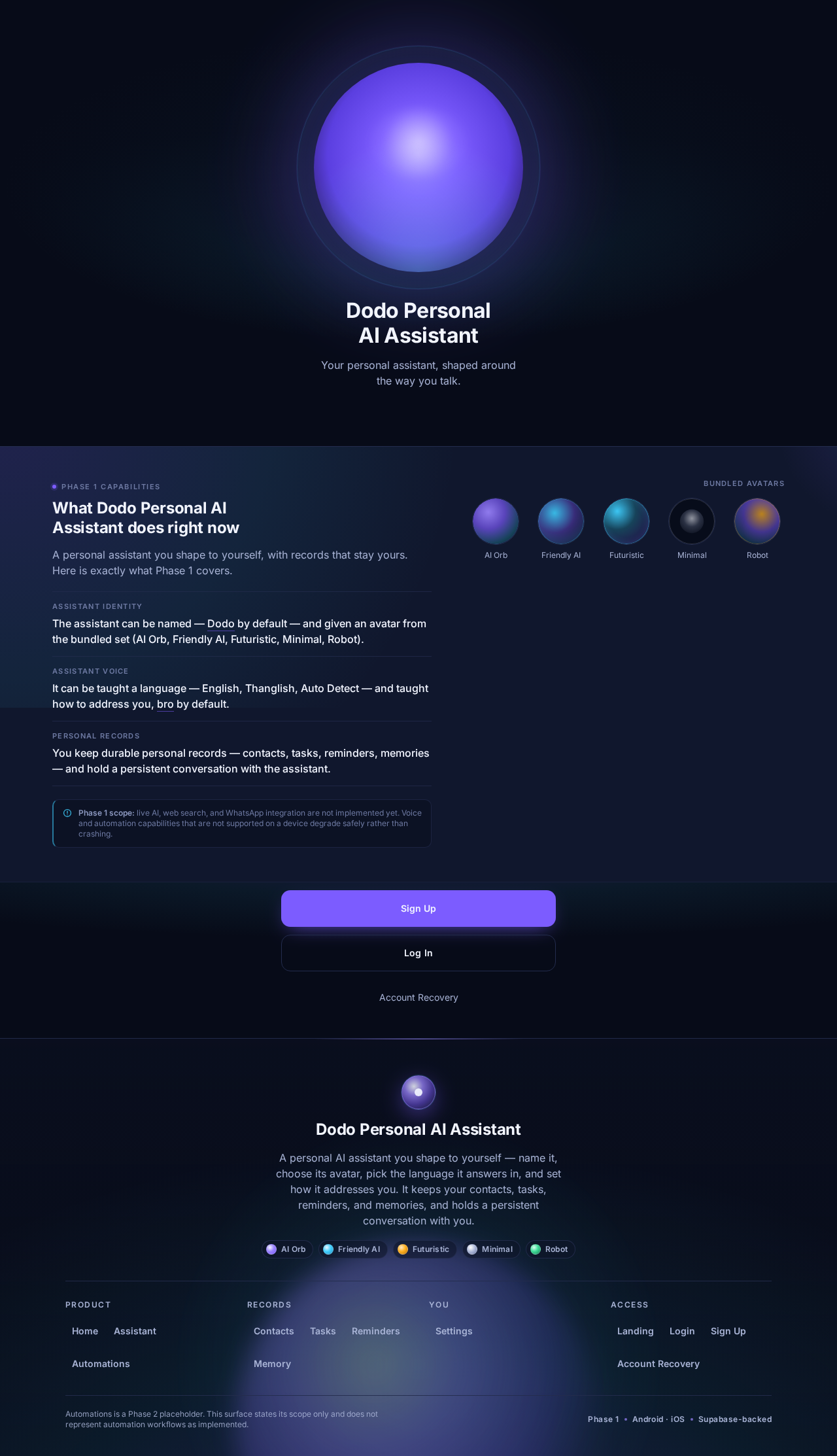
Dodo Personal AI Assistant
Your personal assistant, shaped around the way you talk.
What Dodo Personal AI Assistant does right now
A personal assistant you shape to yourself, with records that stay yours. Here is exactly what Phase 1 covers.
- Assistant identity
The assistant can be named — Dodo by default — and given an avatar from the bundled set (AI Orb, Friendly AI, Futuristic, Minimal, Robot).
- Assistant voice
It can be taught a language — English, Thanglish, Auto Detect — and taught how to address you, bro by default.
- Personal records
You keep durable personal records — contacts, tasks, reminders, memories — and hold a persistent conversation with the assistant.
Phase 1 scope: live AI, web search, and WhatsApp integration are not implemented yet. Voice and automation capabilities that are not supported on a device degrade safely rather than crashing.
Dodo Personal AI Assistant
Your personal assistant, shaped around the way you talk.
What Dodo Personal AI Assistant does right now
A personal assistant you shape to yourself, with records that stay yours. Here is exactly what Phase 1 covers.
- Assistant identity
The assistant can be named — Dodo by default — and given an avatar from the bundled set (AI Orb, Friendly AI, Futuristic, Minimal, Robot).
- Assistant voice
It can be taught a language — English, Thanglish, Auto Detect — and taught how to address you, bro by default.
- Personal records
You keep durable personal records — contacts, tasks, reminders, memories — and hold a persistent conversation with the assistant.
Phase 1 scope: live AI, web search, and WhatsApp integration are not implemented yet. Voice and automation capabilities that are not supported on a device degrade safely rather than crashing.
No comments yet. Be the first!