perfume-luxury
 Tejveer Singh
Make a perfume selling website looks like premium and luxury website like nike puma make this type of permufe selling website with 3d Animation and premium ho and ix interface

Comments (0)
Sign in to leave a comment
System Requirements
System Requirements Document for Perfume
1. Introduction
Perfume is a premium, luxury perfume-selling website. The product intent, derived from the authoritative requirement thread, is to sell perfume online through a storefront whose visual style and interaction quality match the premium, campaign-driven feel of Nike and Puma sites, and whose experience is carried by 3D animation and a high-quality interface.
The audience is two-fold: Shoppers who browse and buy perfume through a dramatic, animated storefront, and the Store owner who keeps the perfume catalog current and fulfills customer orders. The site is delivered as a first-party React application backed by a shared FastAPI service and a MariaDB database, with application-owned identity for the Store owner.
The requester (Tejveer Singh) asked for this document as the System Requirements for the project named Perfume (project name chosen as perfume-luxury).
2. System Overview
Perfume is a full-stack web application with three runnable services:
- frontend — a React application delivering the public storefront (Landing, Shop, Product Details, Cart, Checkout) and the Store owner's protected management surfaces (Admin Products, Admin Orders), plus the identity surfaces (Login, Sign Up).
- backend — a shared FastAPI process hosting all application APIs and domain modules: catalog, cart/checkout, orders, and identity.
- database — MariaDB holding application-owned persistent data: perfume products, orders, and Store owner accounts.
Current accepted behavior: a Shopper browses a premium, 3D-animated perfume catalog, views a perfume's details, adds it to a cart, and completes a purchase with confirmation. A Store owner enrolls and verifies identity, then creates and edits perfume products and reviews and fulfills customer orders. The visual and interaction constraints — premium/luxury look like Nike and Puma, 3D animation, premium high-quality interface — are hard constraints on the delivered experience.
Narrow exclusions: no stock photography of people; no blue/indigo-on-white SaaS template look; no grid of identical hover-lift cards; no flat product photos without the 3D bottle. The reusable "mobile-shop-landing-page" skill is not adopted — it is a mobile-shop template unrelated to perfume and conflicts with the required premium perfume aesthetic.
Removed from scope
- Mobile-shop landing page template (also: mobile-shop-landing-page skill, vibrant three-section mobile shop page)
2a. Product Interpretation and Delivery Boundary
The storefront is publicly reachable: Landing, Shop, Product Details, Cart, and Checkout require no identity, so a Shopper can browse and buy without an account. The Store owner's management work is protected: Admin Products and Admin Orders are role-restricted and require the Store owner to be verified through Login, with new Store owners enrolling through Sign Up. Identity is application-owned; the Login and Sign Up surfaces are anonymously reachable entry points, and protected admin state remains unavailable until identity is established.
All product behavior is delivered first-party by the application. There are no provider-owned or external destinations in the current scope. The 3D animation and premium interface are delivered within the first-party frontend. Future ideas are not part of current acceptance.
2c. Page Content and Component Coverage
Landing
- Information/state: anonymous public entry; full-viewport plum void hero with one glossy pink 3D perfume bottle centered and large; headline "Perfume, Poured In Gloss" stacked left in two lines; subline "A luxury perfume shop with a 3D bottle you can turn in your hand."; lime capsule CTA "Enter the Shop"; a pink price tag floating over the bottle base; a marquee of perfume names in Unbounded caps across a pink band.
- Primary action: "Enter the Shop" navigates to Shop.
- Supporting actions: scroll turns the 3D bottle (camera orbit); marquee scrolls perfume names.
- Domain entities: perfume (name, price for the floating tag), hero bottle render.
- Component responsibilities: WebGL/R3F hero scene (bottle, liquid morph, highlight sweep), hero copy block, lime capsule CTA, pink price tag, perfume-name marquee band.
- States: loading (hero scene initializing — static bottle poster fallback), empty (no featured perfume — hero still renders with generic bottle), success (hero interactive), error (WebGL unavailable — static bottle image with same copy and CTA), recovery (reduced-motion — static arrangement, marquee wraps or scrolls so every name is fully readable).
Shop
- Information/state: public catalog of perfume products; asymmetric product wall where each product sits in a curved colour panel with a blob mask, not an equal card grid; each panel shows perfume name, price (lime), and stock state (lime).
- Primary action: select a perfume panel to open Product Details.
- Supporting actions: scroll through the product wall; soft bounce on hover.
- Domain entities: perfume (name, price, stock, panel colour, bottle render).
- Component responsibilities: product wall layout, curved colour panels with blob masks, per-product bottle render, price/stock tags.
- States: loading (skeleton panels), empty (no products — message that the catalog is being prepared), success (panels render), error (catalog fetch failed — retry control), recovery (retry reloads catalog).
Product Details
- Information/state: one perfume with its glossy 3D bottle, name, price (lime), stock state, and description.
- Primary action: add the perfume to the cart.
- Supporting actions: scroll turns the bottle; quantity selection.
- Domain entities: perfume, cart line.
- Component responsibilities: 3D bottle viewer, product info block, add-to-cart control, quantity control.
- States: loading (bottle and details loading), empty (perfume not found — return to Shop), success (added to cart — confirmation and cart count update), error (add failed or out of stock — message with recovery), recovery (retry add; out-of-stock disables add).
Cart
- Information/state: the Shopper's selected perfumes with quantities, line prices, and order total.
- Primary action: proceed to Checkout.
- Supporting actions: change quantity; remove a line.
- Domain entities: cart, cart line, perfume.
- Component responsibilities: line list, quantity controls, remove controls, total summary, checkout CTA.
- States: loading (cart loading), empty (no items — prompt to browse Shop), success (lines and total shown), error (cart update failed — message and retry), recovery (retry restores last known cart).
Checkout
- Information/state: order summary of cart lines and total; purchase confirmation on success.
- Primary action: place the order.
- Supporting actions: review summary; return to Cart to edit.
- Domain entities: order, order line, cart.
- Component responsibilities: order summary, place-order control, confirmation panel.
- States: loading (placing order), empty (cart empty — redirect prompt to Shop), success (confirmation with order reference), error (payment/order failure — message with retry), recovery (retry place order; cart preserved on failure).
Admin Products
- Information/state: role-restricted; list of perfume products with name, price, stock.
- Primary action: create a perfume product.
- Supporting actions: edit an existing product.
- Domain entities: perfume.
- Component responsibilities: product list, create form, edit form, save controls.
- States: loading (list loading), empty (no products — prompt to create first), success (saved product appears in list and in Shop), error (save failed — validation message and retry), recovery (retry save; unsaved input preserved).
Admin Orders
- Information/state: role-restricted; list of customer orders with status.
- Primary action: review an order and mark it fulfilled.
- Supporting actions: open an order's detail.
- Domain entities: order, order line.
- Component responsibilities: order list, order detail, fulfill control.
- States: loading (orders loading), empty (no orders yet), success (order marked fulfilled — status updates), error (update failed — message and retry), recovery (retry update).
Login
- Information/state: anonymous identity surface for the Store owner; email and password fields.
- Primary action: verify identity and enter protected admin work.
- Supporting actions: link to Sign Up.
- Domain entities: store owner account.
- Component responsibilities: credential form, submit control, error messaging.
- States: loading (verifying), empty (n/a), success (redirect to Admin Products), error (invalid credentials — message and retry), recovery (retry; link to Sign Up).
Sign Up
- Information/state: anonymous enrollment surface for a new Store owner; enrollment fields.
- Primary action: create the Store owner account.
- Supporting actions: link to Login.
- Domain entities: store owner account.
- Component responsibilities: enrollment form, submit control, validation messaging.
- States: loading (creating account), empty (n/a), success (account created — proceed to Login or verified entry), error (validation or duplicate — message and retry), recovery (correct fields and resubmit).
3. Functional Requirements
FR-1 — Sell perfume on a website (explicit) As a Shopper I should browse a catalog of perfumes and purchase one, so that I can buy perfume online.
- Trigger: Shopper opens Shop. Input: catalog selection. Result: perfume panels with name, price, stock. Access: public. Failure/recovery: catalog fetch failure shows retry. Continuation: select a perfume to open Product Details.
FR-2 — Premium and luxury visual style like Nike and Puma (explicit) As a Shopper I should experience a premium, luxury storefront styled like Nike and Puma campaign sites, so that the shop feels high-end.
- Applies across Landing, Shop, Product Details, Cart, Checkout. Result: dark plum ground, hot pink and lime accents, Unbounded/Quicksand type, capsule buttons, blob-masked panels. Access: public. Failure/recovery: n/a (presentation constraint). Continuation: consistent across all pages.
FR-3 — 3D animation (explicit) As a Shopper I should see and interact with 3D animation, so that the storefront feels dramatic and premium.
- Trigger: Landing load and scroll; Product Details scroll. Result: glossy pink 3D bottle turns with scroll; liquid morph and highlight sweep. Access: public. Failure/recovery: WebGL unavailable shows static bottle with same copy and controls. Continuation: scroll continues to turn the bottle.
FR-4 — Premium high-quality interface (explicit) As a Shopper I should use a polished, high-quality interface, so that every interaction feels premium.
- Applies across all pages. Result: readable text and controls stay whole at 375px, 768px, 1280px; soft bounce on hover; capsule controls. Access: public and protected. Failure/recovery: reduced-motion provides usable static arrangement. Continuation: consistent interaction quality.
FR-5 — Store owner enrollment and verification before admin work (required_inference) As a Store owner I should enroll or verify my identity before doing admin work, so that only I manage products and orders.
- Trigger: Store owner opens Admin Products or Admin Orders without a verified session. Input: Sign Up enrollment or Login credentials. Result: verified session grants access to Admin Products and Admin Orders. Access: Login and Sign Up anonymous; admin pages role-restricted. Failure/recovery: invalid credentials show message and retry; enrollment validation errors allow correction. Continuation: verified Store owner lands on Admin Products.
FR-6 — Add perfume to cart before checkout (required_inference) As a Shopper I should add a perfume to the cart before checkout, so that my selection is reviewed and purchased.
- Trigger: Shopper selects add-to-cart on Product Details. Input: perfume and quantity. Result: cart line created; cart count updates. Access: public. Failure/recovery: out-of-stock disables add; add failure shows retry. Continuation: proceed to Cart, then Checkout.
FR-7 — Store owner creates and edits perfume products (required_inference) As a Store owner I should create and edit perfume products, so that the catalog stays current.
- Trigger: Store owner opens Admin Products. Input: product fields (name, price, stock, description). Result: saved product appears in Admin Products and in Shop. Access: role-restricted. Failure/recovery: validation or save failure shows message and preserves input. Continuation: return to list; product visible to Shoppers.
FR-8 — Store owner reviews and fulfills orders (required_inference) As a Store owner I should review and fulfill customer orders, so that purchases are completed.
- Trigger: Store owner opens Admin Orders. Input: order selection. Result: order detail shown; marking fulfilled updates status. Access: role-restricted. Failure/recovery: update failure shows message and retry. Continuation: order status reflects fulfillment.
FR-9 — Shopper completes purchase and receives confirmation (required_inference) As a Shopper I should complete checkout and receive confirmation, so that I know my order succeeded.
- Trigger: Shopper places order on Checkout. Input: cart lines and total. Result: order created; confirmation with order reference shown. Access: public. Failure/recovery: order failure shows message, cart preserved, retry available. Continuation: confirmation displayed; order appears in Admin Orders for the Store owner.
4. User Personas
Shopper
- Product context: arrives at the public storefront seeking a premium perfume purchase experience with drama and 3D animation.
- Primary goal: discover a perfume, view it in detail, add it to the cart, and complete a purchase with confirmation.
- Distinct responsibilities: browses the Shop product wall, selects a perfume, views its 3D bottle on Product Details, adds to cart, reviews the Cart, and places the order on Checkout.
- Inputs/decisions: which perfume to select, quantity, whether to proceed to checkout.
- Interactions: receives confirmation on Checkout; their order becomes visible to the Store owner in Admin Orders.
- Observable success: confirmation with order reference after placing the order; cart count updates on add.
Store owner
- Product context: responsible for the shop's catalog and order fulfillment; enters through application-owned identity.
- Primary goal: keep the perfume catalog current and fulfill customer purchases.
- Distinct responsibilities: enrolls via Sign Up or verifies via Login, creates and edits perfume products in Admin Products, and reviews and fulfills orders in Admin Orders.
- Inputs/decisions: product fields (name, price, stock, description), which orders to fulfill.
- Interactions: products created appear to Shoppers in Shop; orders from Shoppers appear in Admin Orders.
- Observable success: saved products visible in Shop; orders marked fulfilled with updated status.
5. Core User Flows
Flow A — Shopper browses and buys a perfume
- Shopper opens Landing (public). The full-viewport plum hero shows the glossy pink 3D bottle; headline "Perfume, Poured In Gloss" and subline render; scroll turns the bottle.
- Shopper selects the lime capsule CTA "Enter the Shop" → Shop.
- Shopper scrolls the asymmetric product wall; each perfume sits in a curved colour panel with name, lime price, and stock.
- Shopper selects a perfume → Product Details. The 3D bottle renders; scroll turns it.
- Shopper selects quantity and adds to cart. Result: cart count updates; confirmation shown. Failure: out-of-stock disables add; add failure shows retry.
- Shopper opens Cart. Lines, quantities, and total shown. Shopper adjusts quantity or removes a line. Empty cart prompts browsing Shop.
- Shopper proceeds to Checkout. Order summary shown.
- Shopper places the order. Result: confirmation with order reference. Failure: message shown, cart preserved, retry available.
- Continuation: the order appears in the Store owner's Admin Orders.
Flow B — Store owner enrolls and verifies
- New Store owner opens Sign Up (anonymous). Enters enrollment fields.
- Submits. Result: account created. Failure: validation or duplicate shows message; fields corrected and resubmitted.
- Continuation: Store owner proceeds to Login (or verified entry) and reaches Admin Products.
Flow C — Store owner verifies and manages products
- Store owner opens Login (anonymous). Enters email and password.
- Submits. Result: verified session; redirect to Admin Products. Failure: invalid credentials show message and retry; link to Sign Up available.
- On Admin Products (role-restricted), Store owner creates a perfume product with name, price, stock, description.
- Saves. Result: product appears in the list and in Shop for Shoppers. Failure: validation message; input preserved; retry.
- Store owner edits an existing product; saves; updated values reflect in Shop.
Flow D — Store owner reviews and fulfills orders
- Store owner opens Admin Orders (role-restricted).
- Reviews the order list; opens an order's detail.
- Marks the order fulfilled. Result: status updates. Failure: message and retry.
- Continuation: order status reflects fulfillment.
6. Visuals Colors and Theme
Muse: Karim Rashid. Headline register: sensual pop luxury — bold, glossy, confident.
Colour tokens (dark mode):
- Background:
#120A14(deep plum ground, ~70% of page) - Surface:
#1F1224 - Text:
#FCE9F3(light pink body text) - Primary:
#FF4FA3(hot pink, main accent) - Accent:
#C6FF3D(lime — price and stock only) - Muted:
#B79BC4
Typography:
- Headings: Unbounded, 700 weight, tight tracking, uppercase for section labels.
- Body: Quicksand.
- Scale: 1.333 modular; hero
clamp(44px, 9vw, 128px); steps 48/32/22/17/15.
Shape language: capsule buttons, blob masks, glossy rounded bottles; section edges curve with a large radius.
Layout: full-bleed 3D hero, then an asymmetric product wall; each product in a curved colour panel, not a card grid.
Imagery: one glossy 3D perfume bottle on a plum void, plus macro renders of glass and liquid. No stock people.
Forbidden: blue/indigo accents on white; gradient-blob hero behind a centred headline; grid of identical hover-lift cards; Inter, Roboto, or system-ui fonts; flat product photos without the 3D bottle.
7. Signature Design Concept
The public entry (Landing) is a full-viewport plum void holding one glossy pink 3D perfume bottle, centered and large. The headline "Perfume, Poured In Gloss" sits left in two stacked lines at clamp(44px, 9vw, 128px); the subline "A luxury perfume shop with a 3D bottle you can turn in your hand." sits beneath; a lime capsule CTA "Enter the Shop" sits under it; a pink price tag floats over the bottle base. Scroll turns the bottle (camera orbit). A marquee of perfume names runs in Unbounded caps across a pink band. Product panels use curved blob masks, not equal hover-lift cards. Readable text and controls stay whole at 375px, 768px, and 1280px.
8. Interaction Model & Motion Direction
Interaction Model: Animated Motion Tempo: expressive Hero Dimensionality: webgl
Landing Hero Motion Brief
- Focal subject: one glossy pink 3D perfume bottle on a plum void.
- Input→transformation→outcome thesis: scroll input turns the bottle (camera orbit) and drives a slow liquid morph and glossy highlight sweep; outcome is a dramatic, premium first impression that leads to the lime capsule CTA.
- Motion vocabulary: slow liquid morph, glossy highlight sweep, soft bounce on hover, scroll-driven camera orbit.
- Composed first frame: centered large bottle, headline stacked left, subline beneath, lime capsule CTA under it, pink price tag over the bottle base.
- Reduced-motion state: static bottle arrangement; marquee wraps or scrolls so every name is fully readable; all text and controls whole.
Landing Hero 3D Scene Brief — DIRECTION-DERIVED A real-time WebGL/R3F scene with one crafted glossy pink perfume bottle on a plum void; the bottle's defining state is its liquid morph and highlight sweep, turned by scroll. This is the product's defining hero state.
9. Non-Functional Requirements
- Premium/luxury look like Nike and Puma (explicit) — the delivered visual style must read as premium and luxury campaign design.
- 3D animation (explicit) — the storefront must include real-time 3D animation (WebGL/R3F hero).
- Premium high-quality interface (explicit) — polished interaction quality across all pages.
- Readable text and controls (explicit) — headlines, wordmarks, labels, numbers, cards' text and controls stay entirely inside the viewport and their container at 375px, 768px, and 1280px; imagery and motion may crop/bleed but never cover readable text or controls.
- Reduced motion (explicit) — with
prefers-reduced-motion, provide a usable static arrangement; marquees wrap or scroll so each item is fully readable. - Access control (required_inference) — Admin Products and Admin Orders are role-restricted; Login and Sign Up are anonymously reachable.
- Persistence (required_inference) — products, orders, and Store owner accounts persist in MariaDB.
10. Tech Stack
- frontend: React application UI (WebGL/R3F for the 3D hero).
- backend: shared FastAPI process for application APIs and domain modules (catalog, cart/checkout, orders, identity).
- database: MariaDB for application-owned persistent data.
- deployment: docker-compose with the three services (frontend, backend, database).
11. Assumptions and Constraints
- The project name is
perfume-luxury; the product is named Perfume. - Identity is application-owned; Login and Sign Up are anonymously reachable; admin pages are role-restricted to the Store owner.
- The reusable "mobile-shop-landing-page" skill is not adopted (unrelated mobile-shop template; conflicts with the premium perfume aesthetic).
- Nike and Puma are visual inspiration only; no product names, copy, or facts are taken from them.
- No stock photography of people; no blue/indigo-on-white SaaS template look.
12. Glossary
- Shopper: public visitor who browses and buys perfume.
- Store owner: verified account holder who manages products and orders.
- Blob mask: curved organic shape used for product panels.
- Capsule button: pill-shaped control.
- R3F: React Three Fiber, used for the WebGL 3D hero.
- Role-restricted: accessible only to a verified Store owner.
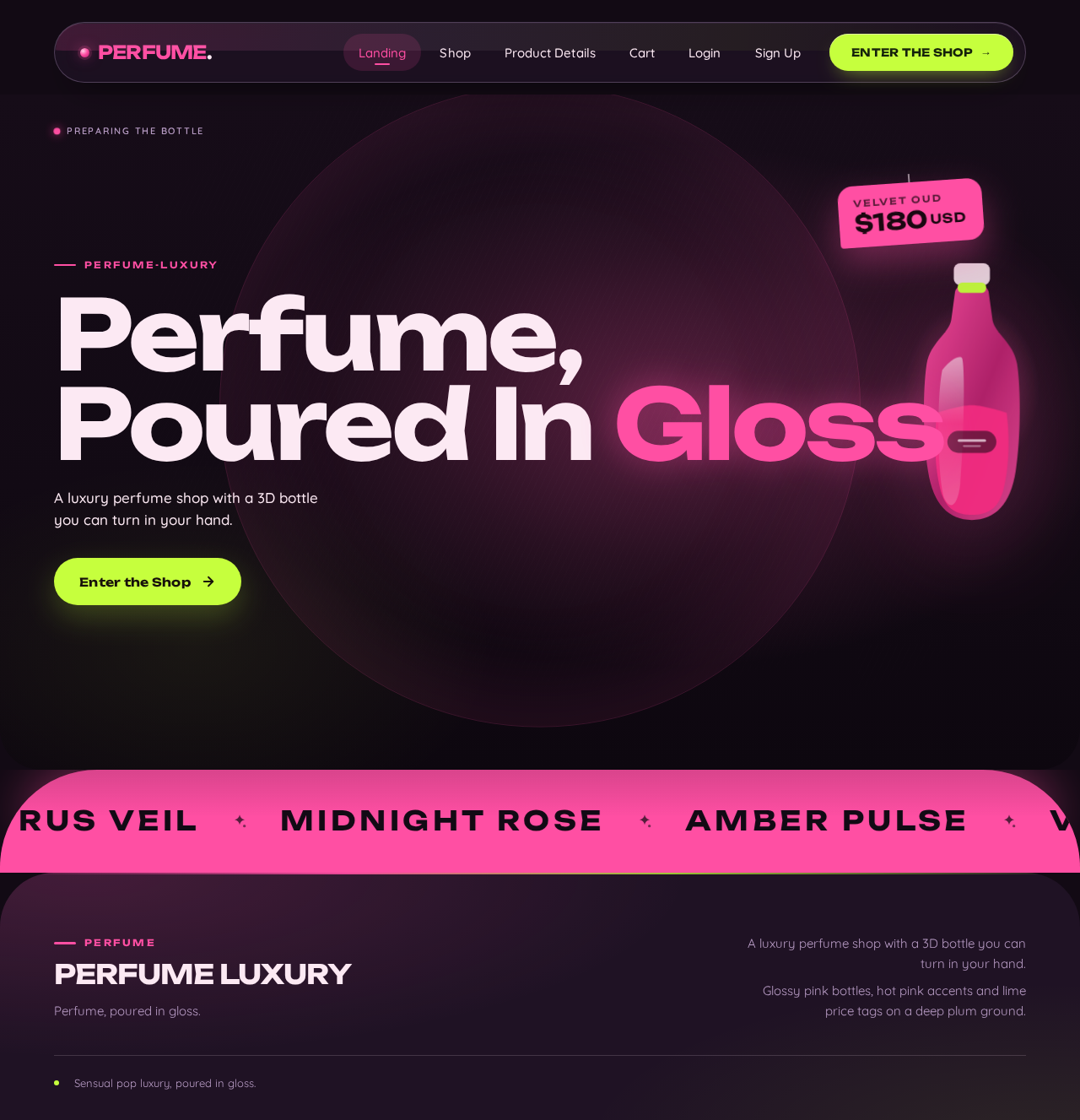
Perfume,Poured In Gloss
A luxury perfume shop with a 3D bottle you can turn in your hand.
Perfume,Poured In Gloss
A luxury perfume shop with a 3D bottle you can turn in your hand.
No comments yet. Be the first!