pearl-single
 Diya Trivedi
start a project to build a simple single page design of calculaor

Comments (0)
Sign in to leave a comment
System Requirements
System Requirements Document for pearl-single
1. Introduction
pearl-single is a simple calculator delivered as a single page. The product intent is narrow and complete: a person opens one page, enters numbers and arithmetic operators to form a calculation, sees the result, and can clear the calculation to start a new one. The design must be simple, and the entire product must live on one page.
The audience is a general consumer — anyone who needs a quick, accurate everyday sum on a phone or laptop — who wants the answer and nothing else. The page is the anonymous public entry to the product: it explains itself through its own composition and hosts the full calculation lifecycle. There is no account, no dashboard, no navigation, and no second destination.
The visual register is calm and trustworthy: numbers on quiet paper, with the interface receding so the digits are the only content.
2. System Overview
pearl-single is a single-page web calculator. The page presents a running expression, a live result, and a keypad of digits and arithmetic operators, plus a clear control. All calculation behavior is performed in the browser on the single page; the page is publicly reachable with no identity requirement.
Current delivery comprises three provisioned services:
- frontend — a React application that renders the single Calculator page and hosts all calculation interaction.
- backend — a shared FastAPI process for application APIs and domain modules. It is provisioned infrastructure; the accepted calculator behavior requires no server-side domain operation, so the backend carries no calculator-specific product requirement.
- database — MariaDB for application-owned persistent data. It is provisioned infrastructure; the accepted calculator behavior creates no durable application-owned records, so no domain entities, authentication, or persistence requirements are derived from it.
Actors: one active human persona, Calculator User, who performs all accepted work on the Calculator page. No other human participant is materially affected by a calculation, and no system, provider, or external service owns any accepted human-facing step.
Accepted behavior: forming a calculation from entered numbers and operators, seeing the result, and clearing the calculation to start a new one — all on one page.
Narrow exclusions: there is no second page, no navigation, no account or sign-in, no history of past calculations, no saved calculations, and no scientific or programmer function set beyond the arithmetic operators the page presents.
Removed from scope
- Additional pages beyond the single Calculator page (also: multi-page, navigation, routes)
- User accounts, sign-in, and identity establishment (also: authentication, login)
- Calculation history or saved calculations (also: memory, recall, persistence of past results)
2a. Product Interpretation and Delivery Boundary
pearl-single is delivered as one first-party page, the Calculator, which is also the anonymous public entry to the product. A visitor arrives at the page with no identity step and immediately has the full calculator available: the running expression, the live result, the keypad, and the clear control. Nothing on the page is gated, and no protected state exists to protect.
The calculation lifecycle is entirely contained in that page and in the visitor's own session in the browser. Because no accepted behavior creates a durable relationship, obligation, entitlement, value transfer, or commitment that must remain bound to a returning person, the product establishes no application-owned identity and no session continuity requirement. There is no anonymous pre-identity lifecycle separate from the calculator itself, so no additional destination exists.
The provisioned backend and database are part of the delivery infrastructure but are not surfaced as product behavior: the accepted calculator work does not require a server round trip or stored records. Future ideas — such as history or accounts — are explicitly out of the current boundary and are not represented in the page.
2c. Page Content and Component Coverage
Calculator
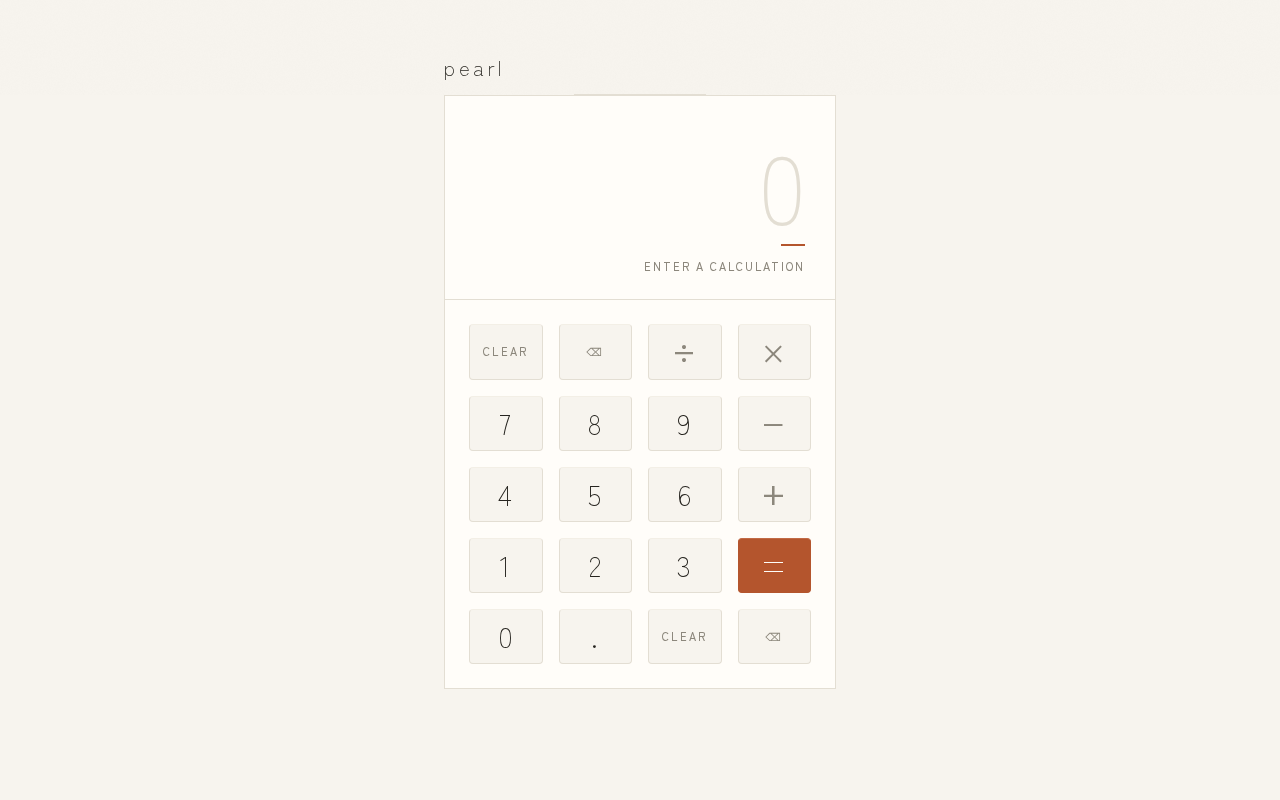
The single page of the product and its anonymous public entry. It is a centred single column on a paper field: a small tracked lowercase wordmark at the top, a hairline rule spanning the column, then a vertical stack of running expression, live result with a terracotta underline, and a strict four-column keypad.
Information and state
- Running expression — the sequence of entered numbers and arithmetic operators, right-aligned, set in muted stone grey at 18px. Empty at first use.
- Live result — the current result of the calculation, right-aligned, oversized light-weight tabular numerals, sitting above a 24px terracotta underline. Shows a resting placeholder state before any calculation is formed.
- Keypad — digits, arithmetic operators, and the equals key in a strict four-column grid with 16px gutters; equals is the only terracotta-filled key.
- Clear control — resets the running expression and the live result to their starting state.
- Wordmark — "pearl" in tracked lowercase at 20px, offset into the left margin at 1280px.
Primary actions
- Enter a digit or an arithmetic operator to extend the running expression.
- Press equals to see the result of the formed calculation.
- Press clear to start a new calculation.
Supporting actions
- Continue a calculation after a result by entering further numbers or operators.
Domain entities
- Calculation — the in-page expression being formed, held only for the current visit; it is not stored, listed, or revisited.
- Result — the numeric outcome of the formed calculation, displayed live on the page.
Component responsibilities
- Display region — owns the running expression and live result, keeps them right-aligned and fully inside the column at every viewport, and applies the slow opacity fade when the result updates.
- Keypad grid — owns digit, operator, equals, and clear keys; each key carries a 1px lighter top edge for depth and a 200ms ink-fill on press; keys are 4:3 with 4px radius, becoming square in the 4×5 arrangement at 375px.
- Page frame — owns the paper ground, the hairline rules, the wordmark placement, and the generous margins that make the composition read as a printed object.
States
- Loading — none required; the page renders its resting state immediately.
- Empty — first use: running expression empty, live result in its resting placeholder, keypad fully available.
- Success — a formed calculation shows its result in the live result position with the terracotta underline, and the running expression remains visible above it.
- Error — an incomplete or malformed expression (for example, an operator entered without a preceding number, or equals pressed before a calculation is formed) does not produce a result; the page keeps the current expression visible and available for correction by entering the missing number or clearing.
- Recovery — the clear control returns the page to its empty state at any point; entering a missing number resolves an incomplete expression without clearing.
3. Functional Requirements
FR-1 — Single-page calculator As a Calculator User, I should get the whole calculator on one page, so that I can do a quick sum without navigating anywhere.
- Provenance: explicit.
- Lifecycle: the Calculator page is the anonymous public entry; opening it presents the complete calculator immediately. Observable acceptance: the running expression, live result, keypad, and clear control are all present on the one page, and no other page or navigation exists.
- Failure/recovery: none applicable; the page has no dependency that can leave it partially available.
- Continuation: the user proceeds directly to entering a calculation.
FR-2 — Enter numbers and arithmetic operators As a Calculator User, I should enter numbers and arithmetic operators to form a calculation, so that I can express the sum I want.
- Provenance: explicit.
- Lifecycle: the user presses digit and operator keys on the keypad; each entry extends the running expression, which is shown right-aligned in muted stone grey. Observable acceptance: the running expression reflects exactly the digits and operators entered, in order.
- Failure/recovery: an operator entered without a preceding number leaves the expression incomplete and produces no result; the user enters the missing number or clears.
- Continuation: the user presses equals, or continues entering to extend the expression.
FR-3 — See the result of the calculation As a Calculator User, I should see the result of the calculation, so that I get the answer I came for.
- Provenance: explicit.
- Lifecycle: the user presses equals on a formed calculation; the live result updates in the oversized light-weight tabular numerals above the terracotta underline, with a slow opacity fade. Observable acceptance: the displayed result is the correct outcome of the entered expression.
- Failure/recovery: pressing equals on an incomplete or malformed expression produces no result; the expression stays visible and the user corrects it by entering the missing number or clearing.
- Continuation: the user can enter further numbers or operators to continue from the result, or clear to start over.
FR-4 — Clear the calculation As a Calculator User, I should clear the calculation to start a new one, so that I can move on to a fresh sum without reloading.
- Provenance: explicit.
- Lifecycle: the user presses the clear control; the running expression empties and the live result returns to its resting placeholder. Observable acceptance: after clearing, the page is in its empty state and ready for a new calculation.
- Failure/recovery: none applicable; clearing is always available.
- Continuation: the user begins a new calculation on the same page.
FR-5 — Simple, quiet presentation As a Calculator User, I should see a simple, uncluttered page, so that the numbers are the only thing demanding my attention.
- Provenance: explicit (the design must be simple) with the creative direction supplying the concrete treatment.
- Lifecycle: on every visit the page presents the paper ground, hairline rules, tracked lowercase wordmark, muted running expression, oversized live result with the single terracotta underline, and a keypad with exactly one terracotta-filled key. Observable acceptance: no drop shadows, gradients, pill shapes, illustration, icons, or competing accent colours appear; readable text and controls stay whole inside the viewport and their container at 375px, 768px, and 1280px.
- Failure/recovery: at narrow widths the column goes full-width with 20px side padding and the keypad becomes a 4×5 grid of square keys, keeping every glyph and label fully visible.
- Continuation: the user proceeds with the calculation.
4. User Personas
Calculator User
Product context. A general consumer who opens pearl-single on a phone or laptop to work out a quick, everyday sum. They arrive at the single Calculator page anonymously, with no account and no prior state, and they expect the tool to be immediately usable.
Primary goal. Get an accurate answer to a simple arithmetic calculation with as little friction as possible, and be able to start a fresh calculation afterwards.
Distinct accepted responsibilities.
- Entering numbers and arithmetic operators to form a calculation on the keypad.
- Reading the running expression to confirm what has been entered.
- Pressing equals to see the result.
- Correcting an incomplete expression by entering the missing number or clearing.
- Clearing the calculation to start a new one.
Relevant inputs and decisions. Which digits and operators to enter and in what order; when the expression is complete enough to evaluate; whether to continue from a result or clear and start over.
Interactions with other accepted participants. None. A calculation affects no other human participant, and no system, provider, or external service owns a step the user must wait on or respond to. The user is the sole participant in the lifecycle.
Observable success. The live result shows the correct outcome of the entered expression, set large and legible above the terracotta underline, and the user can clear to a clean empty state and begin again — all without leaving the one page.
What makes this role distinct. The role's work is a single, self-contained, anonymous arithmetic session on one page: there is no counterparty, no stored record, no permission, and no return visit to resume. Its success is measured purely by the correctness and legibility of the number on screen.
5. Core User Flows
Flow 1 — Perform a calculation
- The Calculator User opens pearl-single and lands on the Calculator page — the anonymous public entry. The page shows the wordmark, the hairline rule, an empty running expression, the live result in its resting placeholder, and the full keypad.
- The user presses digit keys to enter the first number. The digits appear in the running expression, right-aligned in muted stone grey.
- The user presses an arithmetic operator key. The operator is appended to the running expression.
- The user presses digit keys for the second number. The running expression now shows the complete expression.
- The user presses the terracotta equals key. The live result updates to the correct outcome of the expression, set in oversized light-weight tabular numerals above the terracotta underline, with a slow opacity fade (instant under reduced motion).
- Continuation: the user either enters further numbers or operators to continue from the result, or presses clear to start a new calculation (Flow 3).
Flow 2 — Correct an incomplete expression
- On the Calculator page, the user has entered an operator without a preceding number, or presses equals before a calculation is formed.
- No result is produced; the running expression remains visible exactly as entered.
- Recovery: the user enters the missing number, completing the expression, and presses equals to see the result — or presses clear to return to the empty state (Flow 3).
- The user continues with Flow 1 from the corrected expression.
Flow 3 — Clear and start a new calculation
- On the Calculator page, with an expression or result currently shown, the user presses the clear control.
- The running expression empties and the live result returns to its resting placeholder. The page is in its empty state.
- The user begins a new calculation by following Flow 1 from step 2.
6. Visuals Colors and Theme
The muse is Kenya Hara, and the headline idea is "Emptiness as content — a calculator that breathes." The page reads as a printed object: paper ground, charcoal ink, one warm gesture.
Colour tokens (light mode)
- Background (paper field):
#F7F4EE - Surface (keypad block):
#FFFDF9 - Text / primary ink:
#26241F - Accent (equals key and live-result underline only):
#B4552D - Muted (labels, operator glyphs, running expression):
#8C877C - Hairline rule:
#E3DED3 - Key top edge (depth): one 1px lighter edge per key, no shadow.
Proportion: roughly 85% paper, 12% ink, 3% terracotta. No other hue enters the page.
Typography
- Family: Zen Kaku Gothic New for both headings and body.
- Wordmark: 20px, Light 300, lowercase, letter-spacing 0.18em.
- Section labels and operator glyphs: 11px, weight 500, uppercase, letter-spacing 0.22em.
- Running expression: 18px.
- Live result:
clamp(56px, 9vw, 96px), Light 300, tabular numerals, line-height 1.0. - Keypad glyphs:
clamp(22px, 3vw, 28px). - Helper copy: 14px / 1.8.
- Scale: 1.25 modular, with a deliberate whisper-to-number contrast.
Shape language
- Square and near-square throughout. The calculator body is a 1:1.35 portrait block.
- Keys are 4:3 with a 4px radius — a hint of softness, never pills.
- Hairline 1px rules at
#E3DED3divide the display from the keypad. - Nothing glossy, nothing floating on a shadow; depth comes only from the single 1px lighter top edge on each key.
Layout and spacing rhythm
- Centred single column on the paper field with at least 12vw margins each side at 1280px.
- Top: tracked lowercase wordmark at left, a hairline rule spanning the column, then the vertical stack — running expression (muted, right-aligned), live result (oversized, right-aligned, tabular), a terracotta 24px underline beneath the result, then the strict four-column keypad with 16px gutters.
- Equals spans one cell and is the only terracotta-filled key.
- At 375px: full-width column with 20px side padding; keypad becomes a 4×5 grid of square keys.
- At 768px: the block sits centred at 420px wide with the wordmark and rule above it.
- At 1280px: the block is 440px with the wordmark offset into the left margin, making the composition asymmetric and editorial rather than a floating card.
Imagery style
- No photography, no illustration, no icons. The only texture is the paper ground itself — a faint 2% noise/grain — and the hairline rules. The numerals are the imagery.
Avoid
- Blue or indigo accents and any SaaS-blue button; drop shadows, glassmorphism, floating card stacks; pill buttons or large corner radii; gradient backgrounds or blob shapes; bouncy or springy key animations; illustration, icons, or decorative imagery; multiple accent colours competing with the terracotta; a centred marketing headline above the calculator.
7. Signature Design Concept
"The printed sum." The first screen is a single portrait block of paper on a paper field, distinguishable only by its brighter surface (#FFFDF9) and a hairline border — no card shadow, no gradient, no coloured button. The dominant element is the oversized light-weight live result, clamp(56px, 9vw, 96px), right-aligned in charcoal with tabular numerals, sitting above a short 24px terracotta rule that is the only warm mark on the page. The wordmark "pearl" whispers at top-left in 20px tracked lowercase; at 1280px it is offset into the left margin so the composition is asymmetric and editorial. Below, the keypad is a quiet grid of ink glyphs on near-white keys, with exactly one terracotta key — equals — anchoring the composition. Vast empty margins do the dramatic work: the page reads as a printed object, not a SaaS hero.
The concept recomposes only accepted content and controls: the running expression, the live result, the digit and operator keys, equals, and clear. It introduces no new behavior, page, or destination.
8. Interaction Model & Motion Direction
Interaction Model: Static (direction) Motion Tempo: still Hero Dimensionality: flat
Landing Hero Motion Brief
- Focal subject. The oversized light-weight live result, right-aligned in charcoal tabular numerals above the 24px terracotta underline, inside the hairline-bordered paper block floating in empty paper.
- Input → transformation → outcome thesis. A key press inks its glyph (200ms ink-fill) and extends the running expression; pressing equals fades the live result into its new value (400ms opacity fade) above the terracotta rule. The page never moves, scales, or bounces — the only change is ink appearing and the number resolving.
- Motion vocabulary. Slow 400ms opacity fades on result updates; 200ms ink-fill on key press. No bounce, no scale, no particles, no scroll-linked depth.
- Composed first frame. Paper field
#F7F4EE; tracked lowercase "pearl" at top-left; a hairline rule spanning the column; the running expression empty and muted; the live result in its resting placeholder at full display size; the terracotta underline beneath it; the four-column keypad below with a single terracotta equals key. - Reduced-motion state. With
prefers-reduced-motion, the fades resolve instantly; the ink-fill on key press is immediate. The static arrangement is fully usable and identical in layout.
9. Non-Functional Requirements
- Single page (explicit). The product is exactly one page, the Calculator. No additional routes, navigation, or destinations exist.
- Simplicity (explicit). The interface presents only the running expression, live result, keypad, clear control, and wordmark; no dashboards, card grids, or decorative modules.
- Readable text and controls at every viewport (explicit). Headlines, the wordmark, labels, numbers, and controls stay entirely inside the viewport and their container at 375px, 768px, and 1280px, wrapping or scaling (for example
clamp(...)with its mobile size) to fit; no other element covers any part of them. Decoration and texture may bleed, but never over readable text or controls. - Reduced motion (explicit). Under
prefers-reduced-motion, fades and ink-fill resolve instantly and the page remains fully usable. - Anonymous public access (required_inference). The Calculator page is reachable without identity; no authentication, account, or session continuity is required because no accepted behavior creates durable actor-bound state.
- No persistence of calculations (required_inference). The calculation and its result exist only for the current visit on the page; nothing is stored, listed, or revisited. The provisioned database is not used for calculator records.
- Accessible contrast and legibility (required_inference). Charcoal
#26241Fon paper#FFFDF9/#F7F4EEand the terracotta equals key with legible glyph contrast keep all numbers and labels readable; the live result uses tabular numerals so digits align as they change.
10. Tech Stack
- frontend — React application rendering the single Calculator page; all calculation interaction and arithmetic evaluation happen in the browser on that page.
- backend — shared FastAPI process for application APIs and domain modules; provisioned and available for reuse, with no calculator-specific endpoint required by the accepted behavior.
- database — MariaDB for application-owned persistent data; provisioned, with no calculator domain entities derived from the accepted behavior.
- Containerization — Docker with docker-compose as the inventory of runnable services (frontend, backend, database).
- Typography — Zen Kaku Gothic New, loaded for the frontend.
11. Assumptions and Constraints
- Assumption (narrow): The arithmetic operators presented on the keypad are the four basic operations — addition, subtraction, multiplication, and division — together with decimal entry, since the source asks for a simple calculator and names no other function set. No scientific, memory, or programmer functions are included.
- Assumption (narrow): Calculation evaluation happens on the single page in the browser; the provisioned backend and database are infrastructure that the accepted behavior does not exercise.
- Constraint (explicit): The design must be a single page.
- Constraint (explicit): The design must be simple.
- Constraint (explicit): The page is the anonymous public entry; no identity step precedes it.
- Constraint (explicit, from the creative direction): The palette, fonts, surfaces, tone, and layout described in Sections 6–8 are binding; the generic indigo/blue-on-white SaaS template is forbidden.
- Out of scope: additional pages, accounts and sign-in, calculation history or saved calculations, and any function set beyond the arithmetic operators the page presents.
12. Glossary
- Calculator page — the single page of pearl-single and its anonymous public entry; hosts the entire calculation lifecycle.
- Running expression — the sequence of entered numbers and arithmetic operators shown right-aligned in muted stone grey above the result.
- Live result — the current outcome of the calculation, displayed in oversized light-weight tabular numerals above the terracotta underline.
- Keypad — the strict four-column grid of digit, operator, equals, and clear keys.
- Equals key — the single terracotta-filled key that evaluates the formed calculation.
- Clear control — the control that empties the running expression and returns the live result to its resting placeholder.
- Calculator User — the sole active human persona; an anonymous visitor performing an everyday arithmetic calculation on the page.
- Paper field — the
#F7F4EEbackground on which the hairline-bordered calculator block sits.
pearl
Calculator
enter a calculation
pearl
Calculator
enter a calculation
No comments yet. Be the first!