pearl-simple
 Lilly Benjamin
a simple game idea, inspiration from haak and it should be fun HAAK is a Metroidvania-Platformer where you traverse the land with a hook, dash, and charged slash — full game, way too big to clone. But the fun core mechanic — swinging around with a grappling hook — makes a great simple arcade game on its own. Steam Idea: Hook Swing — a physics-based swinging game. You launch a grappling hook, swing through the air building momentum, and try to reach a goal (or just rack up distance/height) while avoiding obstacles. combat, exploration, and a final boss for like 15 levels


Comments (0)
Sign in to leave a comment
System Requirements
System Requirements Document for pearl-simple
1. Introduction
The project "pearl-simple" is a simple, fun arcade game inspired by the Metroidvania mechanics of HAAK, focusing on a physics-based swinging mechanic using a grappling hook. The game is designed to be engaging and exploratory, with a playful 3D-driven adventure style. The target audience is casual gamers who enjoy physics-based challenges and exploration.
2. System Overview
The game, titled "The Last Hook," is a physics-based swinging game where players use a grappling hook to swing through levels, building momentum to reach goals or achieve distance/height while avoiding obstacles. The game includes combat, exploration, and a final boss across approximately 15 levels. The core mechanic is inspired by HAAK but focuses solely on the grappling-hook swinging aspect.
2a. Product Interpretation and Delivery Boundary
The game will be delivered as a mobile app, with a focus on simplicity and fun. It will not attempt to clone the full scope of HAAK but will use its grappling-hook mechanic as inspiration. The game will feature three main pages: Landing, Play, and Level Select. The Player persona is the sole active human participant, responsible for navigating levels, engaging in combat, and progressing through the game.
2b. Source Content Inventory
Not applicable as no content source directive was provided.
2c. Page Content and Component Coverage
Landing
- Introduction: Brief overview of "The Last Hook" and its core mechanics.
- Start Game: Option to begin a new game session.
- Resume Game: Option to continue from the last saved progress.
- Instructions: Basic controls and gameplay mechanics.
Play
- Gameplay Area: Interactive 3D environment for swinging, combat, and exploration.
- HUD Elements: Minimal interface showing current score, level, and health.
- Obstacles and Enemies: Dynamic elements that players must avoid or defeat.
- Boss Encounter: Special section for final boss battles.
Level Select
- Level Overview: Display of available levels and progression status.
- Level Selection: Option to choose a level to play or replay.
- Progress Indicators: Visual cues showing completed levels and unlocked content.
3. Functional Requirements
- As a Player, I should be able to start a new game from the Landing page. (Provenance: required_inference)
- As a Player, I should be able to resume my last game session from the Landing page. (Provenance: required_inference)
- As a Player, I should be able to swing using a grappling hook to navigate levels. (Provenance: explicit)
- As a Player, I should be able to engage in combat with enemies. (Provenance: explicit)
- As a Player, I should be able to explore levels to find hidden paths or items. (Provenance: explicit)
- As a Player, I should be able to progress through approximately 15 levels, culminating in a final boss battle. (Provenance: explicit)
- As a Player, I should be able to select and replay levels from the Level Select page. (Provenance: required_inference)
4. User Personas
- Player: The primary user who interacts with the game. Responsibilities include controlling the grappling-hook movement, navigating levels, avoiding obstacles, engaging in combat, exploring, and progressing toward the final boss.
5. Core User Flows
-
Starting a New Game
- Player accesses the Landing page.
- Player selects "Start Game."
- Game transitions to the Play page, beginning at level 1.
-
Resuming a Game
- Player accesses the Landing page.
- Player selects "Resume Game."
- Game resumes from the last saved point on the Play page.
-
Playing a Level
- Player navigates the level using the grappling hook.
- Player avoids obstacles and engages in combat.
- Player explores the level for hidden paths or items.
- Upon completion, Player returns to the Level Select page.
-
Selecting a Level
- Player accesses the Level Select page.
- Player chooses a level to play or replay.
- Game transitions to the Play page for the selected level.
-
Final Boss Battle
- Player progresses to the final level.
- Player engages in a boss battle.
- Upon victory, Player completes the game.
6. Visuals Colors and Theme
- Muse: Bruno Simon
- Palette (light mode):
- Background: #F5F5F5
- Surface: #FFFFFF
- Text: #333333
- Primary: #FF6F61
- Accent: #FFB400
- Muted: #B3B3B3
- Typography:
- Headings: Fredoka — Bold, uppercase, large scale, playful
- Body: Nunito; scale 1.5 modular, 48/32/24/18/14
- Shape language: Rounded, low-poly forms
- Imagery: Low-poly 3D objects and environments
7. Signature Design Concept
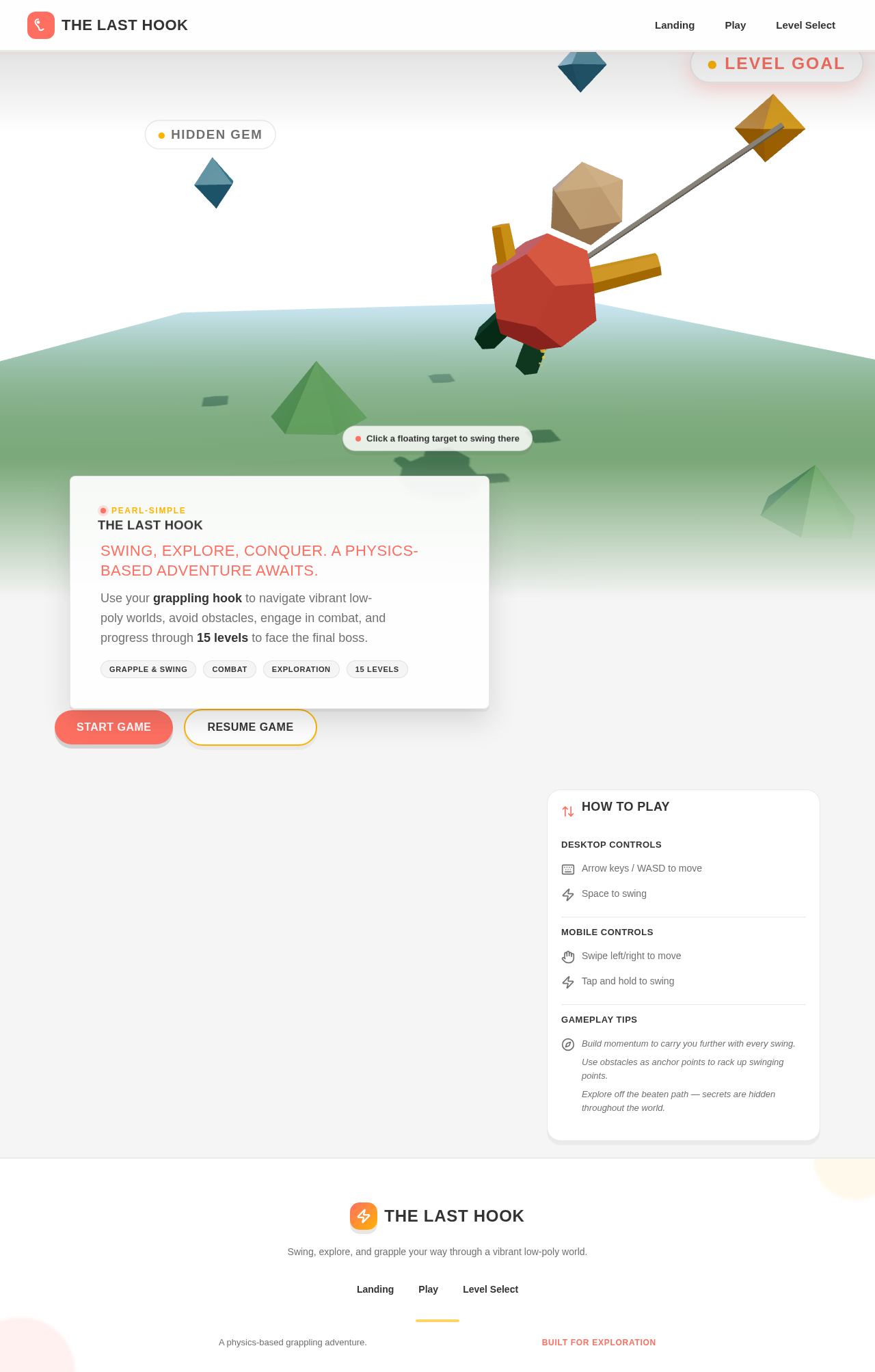
The Landing page will feature a dynamic 3D scene of the player character swinging through a vibrant low-poly world. This scene will serve as the hero, emphasizing the core mechanic of the game. Floating labels will indicate goals and points of interest, enhancing the sense of exploration.
8. Interaction Model & Motion Direction
- Interaction Model: Animated
- Motion Tempo: Cinematic
- Hero Dimensionality: WebGL
- Landing Hero Motion Brief: The player character swings through a colorful 3D environment, with bouncy, physics-driven interactions. The scene transforms as the player navigates, showcasing the game's playful mechanics. In reduced-motion mode, the scene transitions smoothly without abrupt movements.
9. Non-Functional Requirements
- The game must maintain a consistent frame rate to ensure smooth gameplay. (Provenance: required_inference)
- The game should load quickly to keep players engaged. (Provenance: required_inference)
- The game must be compatible with a range of mobile devices. (Provenance: required_inference)
10. Tech Stack
- Frontend: React Native for mobile app development
- Backend: Node.js for any server-side logic
- Physics Engine: Matter.js for physics-based interactions
- 3D Graphics: Three.js for WebGL rendering
11. Assumptions and Constraints
- The game will not include complex, realistic textures to maintain a playful aesthetic.
- The game will not feature overly serious or dark themes.
- The game will not clone the full scope of HAAK but will focus on the grappling-hook mechanic.
12. Glossary
- Grappling Hook: A tool used by the player to swing through levels.
- HUD: Heads-Up Display, the interface showing game information.
- Low-Poly: A style of 3D modeling using a small number of polygons, creating a simple and stylized look.
The Last Hook
Swing, Explore, Conquer. A physics-based adventure awaits.
Use your grappling hook to navigate vibrant low-poly worlds, avoid obstacles, engage in combat, and progress through 15 levels to face the final boss.
Desktop Controls
Mobile Controls
Gameplay Tips
- Build momentum to carry you further with every swing.
- Use obstacles as anchor points to rack up swinging points.
- Explore off the beaten path — secrets are hidden throughout the world.
The Last Hook
Swing, Explore, Conquer. A physics-based adventure awaits.
Use your grappling hook to navigate vibrant low-poly worlds, avoid obstacles, engage in combat, and progress through 15 levels to face the final boss.
Desktop Controls
Mobile Controls
Gameplay Tips
- Build momentum to carry you further with every swing.
- Use obstacles as anchor points to rack up swinging points.
- Explore off the beaten path — secrets are hidden throughout the world.
No comments yet. Be the first!