pearl-page
 Diya Trivedi
start a project to build a simple single page design of calcultor

Comments (0)
Sign in to leave a comment
System Requirements
System Requirements Document for pearl-page
1. Introduction
pearl-page is a simple calculator delivered as a single-page design. The product intent is narrow and explicit: one page on which a person can perform everyday arithmetic — entering numbers and operators, seeing the running expression and the result, and clearing the calculation to start over — without leaving the page.
The audience is anyone who needs quick arithmetic in a browser: a single anonymous visitor who opens the page, calculates, and is done. There is no account, no saved history, and no second destination. The design treats this familiar object with a deliberate industrial, labeled aesthetic (see Sections 6–8), but the product behavior itself remains a plain calculator.
The requester is Diya Trivedi (IN). The project name is pearl-page.
2. System Overview
pearl-page is a single-page web calculator. The entire product surface is one page, Calculator, which is the anonymous public entry and owns number and operator entry, the running expression and result display, and clearing the calculation.
Current delivery consists of:
- Calculator — the one and only page. Anonymous, no sign-in, no navigation to any other destination. It presents a display strip (running expression line plus large result line) and a 4-column keypad, and it performs arithmetic locally in the browser.
- A shared FastAPI backend process that serves application APIs and domain modules. For the current accepted scope, the calculator's arithmetic is performed in the page itself; the backend exists as the shared application process and is available for application APIs, but no accepted requirement depends on a server round-trip for calculation.
- A MariaDB database provisioned as application-owned persistent storage. The accepted scope defines no durable calculator state (no saved history, no accounts, no stored expressions), so no domain entities are required by the current requirements.
- A React frontend that renders the Calculator page.
Actors: the single active human persona, Calculator User. There are no other human personas, no provider-owned surfaces, and no external destinations in the accepted scope.
Removed from scope
- None. No concept was explicitly removed by the user; the scope was narrowed from the outset to a simple single-page calculator.
2a. Product Interpretation and Delivery Boundary
pearl-page is delivered as a first-party, single-page web application. The Calculator page is publicly reachable and anonymous: a visitor opens it and can immediately calculate. No identity establishment, sign-in, session continuity, or account management is part of the product, because nothing in the accepted scope requires a visitor to privately own or resume durable state — each calculation is ephemeral and lives only in the page.
All accepted behavior — digit entry, operator selection, evaluation, clearing, and the display of the running expression and result — is owned by the Calculator page. Arithmetic is computed in the browser; the shared backend and database are provisioned infrastructure that the current requirements do not exercise for calculation or persistence. There is no future-horizon requirement in the accepted thread; the product is complete at one page.
The design language (industrial labeled-object aesthetic, quoted micro-labels, hazard-tape stripes, oversized wordmark) is presentation only and adds no behavior, page, or destination.
2c. Page Content and Component Coverage
Calculator
The single page of the product. Anonymous public entry; no navigation, no other destinations.
Information and state
- Current running expression (the sequence of entered numbers and operators), shown on a small expression line.
- Current result / current entry, shown in large tabular numerals on the result line.
- Whether a calculation is in progress, freshly started, or just evaluated (so that the next digit begins a new entry after an equals, while an operator continues from the result).
- No persisted state: refreshing the page returns to the initial empty/zero state.
Primary actions
- Enter digits 0–9 (and a decimal point) to build the current number.
- Select an operator (+, −, ×, ÷) to commit the current number and begin the next operand.
- Press equals to evaluate the expression and show the result.
- Press clear (C) to clear the current entry; press all-clear (AC) to reset the whole calculation to its initial state.
Supporting actions
- Read the running expression line to confirm what has been entered.
- Read the result line to see the current value or final result.
Domain entities
- Expression — the ordered sequence of operands and operators currently being built (in-page state only).
- Operand — the number currently being typed or the last committed number.
- Result — the evaluated value shown on the result line.
Component responsibilities
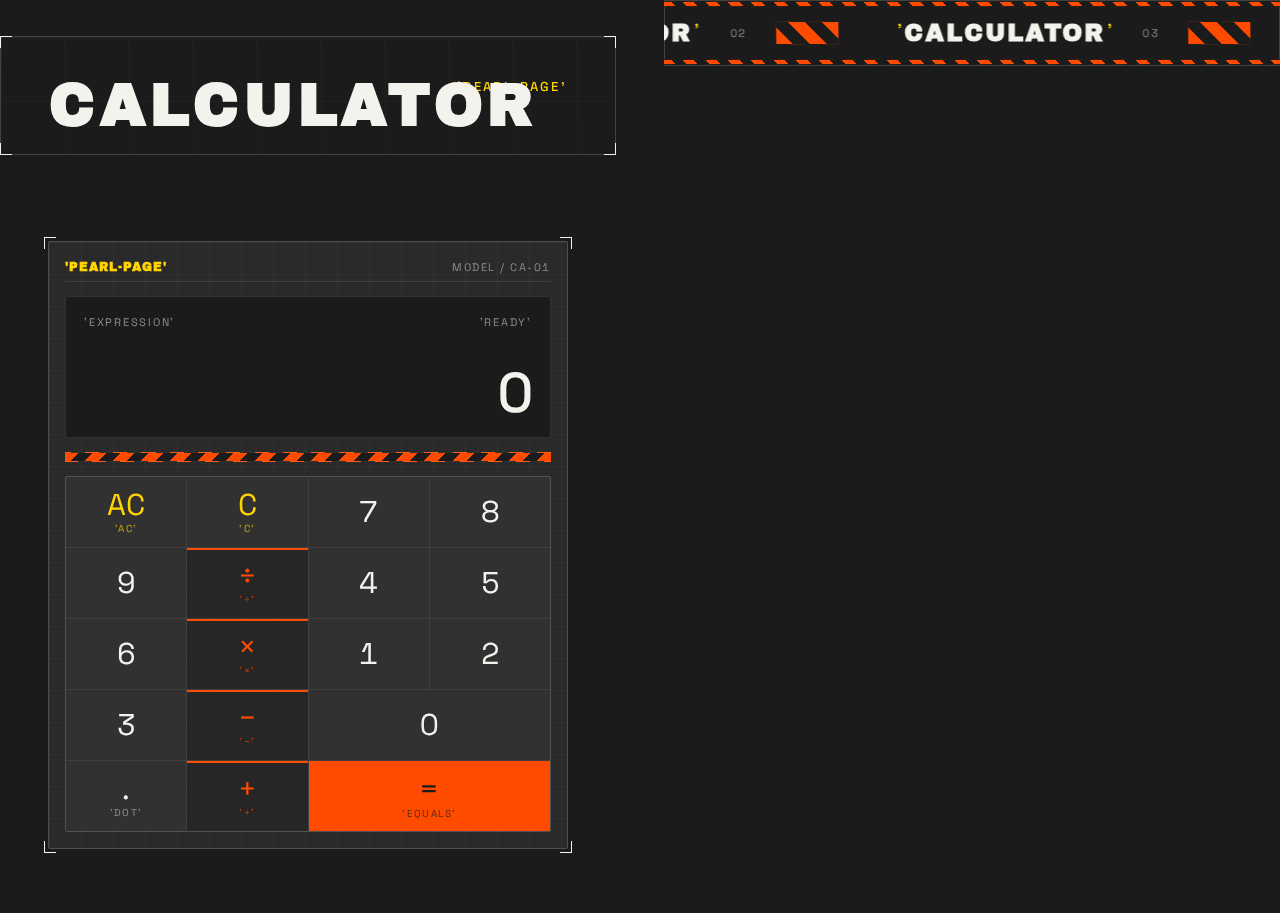
- Wordmark and brand tag — oversized flush-left "CALCULATOR" wordmark and a small quoted 'PEARL-PAGE' tag; presentation only.
- Ticker tape — a hazard-striped strip beneath the wordmark; presentation only, scrolling continuously (static wrapped row under reduced motion).
- Calculator plate — the framed container with hairline border and corner registration marks holding the display and keypad.
- Display strip — split into a small running-expression line and a large tabular-numeral result line; the result line performs a quick vertical slide when a new digit or result appears.
- Keypad — a 4-column grid of flat rectangular keys (digits, decimal point, operators, clear/all-clear, equals); the equals key is the solid safety-orange block; operator and clear captions are wrapped in literal quotation marks.
- Hazard-tape divider — diagonal orange/black stripes separating the wordmark area from the keypad area; presentation only.
States
- Loading — none required; the page renders immediately with no data fetch.
- Empty / initial — result line shows 0, expression line empty; AC available.
- In progress — expression line shows the entered sequence; result line shows the current entry.
- Success — equals produces the evaluated result on the result line; the expression line reflects the completed calculation.
- Error / recovery — invalid operations (for example division by zero, or a malformed expression) do not crash the page; the display shows an error indication and the user recovers by pressing AC to reset and continue. A new digit after an error begins a fresh entry.
3. Functional Requirements
FR-1 — Single-page calculator delivery (explicit) As a Calculator User, I should reach the entire calculator on one page, so that I can do arithmetic without navigating anywhere.
- Trigger/input: opening the page.
- Observable result: the Calculator page renders with a display strip and keypad; there is no other page or navigation.
- Access: anonymous, no sign-in.
- Failure/recovery: if the page fails to load, reloading the page restores the initial calculator state.
- Continuation: the user proceeds to enter numbers.
FR-2 — Number entry (explicit) As a Calculator User, I should enter digits (0–9) and a decimal point, so that I can build the number I want to calculate with.
- Trigger/input: pressing digit keys and the decimal-point key.
- Observable result: the result line shows the number being built; each new digit updates the display with a quick vertical slide.
- Access: anonymous.
- Failure/recovery: pressing the decimal point when one is already present in the current number does not add a second decimal point; the display remains valid.
- Continuation: the user selects an operator or presses equals.
FR-3 — Operator selection (explicit) As a Calculator User, I should select an operator (+, −, ×, ÷), so that I can combine numbers in an expression.
- Trigger/input: pressing an operator key after entering a number.
- Observable result: the current number is committed and the expression line shows the number followed by the chosen operator; the result line is ready for the next operand.
- Access: anonymous.
- Failure/recovery: pressing an operator with no current entry does not corrupt the expression; the most recent valid state is retained.
- Continuation: the user enters the next number.
FR-4 — Evaluation (explicit) As a Calculator User, I should press equals to evaluate my expression, so that I get the correct result.
- Trigger/input: pressing the equals key with a complete expression.
- Observable result: the result line shows the evaluated result in large tabular numerals; the expression line reflects the completed calculation.
- Access: anonymous.
- Failure/recovery: an incomplete expression (for example a trailing operator) is handled without crashing; the display shows a valid state or error indication and the user can continue or clear.
- Continuation: the user can start a new number (beginning a fresh entry) or continue from the result with an operator.
FR-5 — Clear current entry (explicit) As a Calculator User, I should press clear (C) to clear the current entry, so that I can correct a mistyped number without losing the rest of the calculation.
- Trigger/input: pressing the clear key.
- Observable result: the current entry is cleared while the committed part of the expression is retained.
- Access: anonymous.
- Failure/recovery: pressing clear on an empty entry leaves the display in a valid state.
- Continuation: the user re-enters the number.
FR-6 — All-clear reset (explicit) As a Calculator User, I should press all-clear (AC) to reset the whole calculation, so that I can start over from a clean state.
- Trigger/input: pressing the all-clear key.
- Observable result: the expression line is emptied and the result line returns to 0; the calculator is in its initial state.
- Access: anonymous.
- Failure/recovery: pressing all-clear after an error clears the error and restores a usable calculator.
- Continuation: the user begins a new calculation.
FR-7 — Running expression and result display (explicit) As a Calculator User, I should see both the running expression and the current result, so that I can confirm what I have entered and what it evaluates to.
- Trigger/input: any entry, operator, or evaluation action.
- Observable result: the expression line shows the entered sequence in small type; the result line shows the current value in large tabular numerals.
- Access: anonymous.
- Failure/recovery: an error condition is shown on the display rather than leaving stale or misleading values.
- Continuation: the user continues entering or clears.
4. User Personas
Calculator User
Product context. A visitor who opens pearl-page to do quick, everyday arithmetic in a browser. They arrive with no account and no prior state; the page is the whole product.
Primary goal. Get a correct arithmetic result quickly on a single page, without leaving it or signing in.
Distinct accepted responsibilities.
- Enter numbers (digits and a decimal point) to build operands.
- Select operators (+, −, ×, ÷) to compose an expression.
- Press equals to evaluate and read the result.
- Read the running expression line and the result line to confirm their work.
- Correct mistakes with clear (C) for the current entry and all-clear (AC) to reset the whole calculation.
Relevant inputs and decisions. Which digits to type, which operator to apply, when to evaluate, and whether to correct (C) or restart (AC). The user decides when a calculation is finished.
Interactions with other participants. None. The Calculator User is the only active human persona; there is no counterparty, recipient, or approver in the accepted scope. Arithmetic is computed in the page.
Observable success. The result line shows the correct evaluated value for the entered expression, the expression line reflects what was entered, and the user can clear and start a new calculation at any time — all without leaving the page.
5. Core User Flows
Flow A — Perform a calculation
- Start. The Calculator User opens the Calculator page (anonymous; no sign-in). The page renders with the result line showing 0 and an empty expression line.
- Enter the first number. The user presses digit keys (and a decimal point if needed). The result line shows the number being built, updating with a quick vertical slide on each digit.
- Select an operator. The user presses an operator key (+, −, ×, ÷). The current number is committed and the expression line shows the number followed by the operator; the result line is ready for the next operand.
- Enter the next number. The user presses digit keys to build the second operand; the result line shows it.
- Evaluate. The user presses equals. The page computes the expression and the result line shows the evaluated result in large tabular numerals; the expression line reflects the completed calculation.
- Continue or finish. The user may continue from the result by selecting another operator, or begin a fresh entry by pressing a digit. The calculation is complete when the user has the result they need.
Failure/recovery. If the user enters an incomplete expression (for example a trailing operator) and presses equals, the page does not crash; the display shows a valid state or error indication, and the user continues by entering a number or pressing AC to reset.
Flow B — Correct a mistake with clear
- Start. The user is mid-calculation on the Calculator page with a committed expression and a current entry.
- Clear the current entry. The user presses clear (C). The current entry is cleared while the committed part of the expression is retained.
- Re-enter. The user types the corrected number and continues the calculation (operator or equals).
Failure/recovery. Pressing clear on an empty entry leaves the display in a valid state; the user simply continues.
Flow C — Reset the whole calculation
- Start. The user is on the Calculator page, possibly after an error or with a calculation they want to abandon.
- All-clear. The user presses all-clear (AC). The expression line is emptied and the result line returns to 0; any error indication is cleared.
- Begin again. The user starts a new calculation from the clean initial state.
Failure/recovery. If the display showed an error (for example division by zero), AC restores a usable calculator and the user proceeds.
6. Visuals Colors and Theme
The creative direction is authoritative for this section: Remixed familiarity for a calculator that feels like a labeled object, muse Virgil Abloh — a utilitarian tool treated as an industrial, labeled object rather than a generic rounded-keypad app.
Mode: dark.
Colour tokens (exact hex by role)
- Background:
#1B1B1B(charcoal ground) - Surface:
#2A2A2A(raised keypad surface / calculator plate) - Text:
#F4F2ED(ink-white for digits and labels) - Primary:
#FF4B00(safety orange — the single hot accent, reserved for the equals key, operator row, and the tape stripe) - Accent:
#FFD400(hazard yellow — only in quoted micro-labels and the ticker) - Muted:
#8C8C8C(secondary metadata)
Orange and yellow together occupy under 10% of the frame; the page is mostly dark industrial grey so the accents read as warning-tape signals.
Typography
- Headings: Archivo Black, all-caps, wide
0.08emtracking, used for the oversized quoted wordmark and section labels. - Body and numerals: Space Grotesk Regular/Medium — tabular numerals, tight leading, small uppercase micro-labels wrapped in literal quotation marks.
- Scale: 1.25 modular — 40/32/24/18/15/13. Display wordmark
clamp(48px, 12vw, 144px); keypad numeralsclamp(22px, 4vw, 32px); micro-labels 12px uppercase.
Shape language. Industrial hard edges with 2px corners. Keys are flat rectangular plates with 1px hairline borders and no shadow; the equals key is a solid orange block. Hazard-tape stripes (diagonal orange/black) frame the keypad. Exposed grid lines and a thin bounding frame around the whole calculator make it read as a labeled, manufactured object.
Layout. Single page, centred vertical stack on dark ground. Top-left is a small quoted brand tag 'PEARL-PAGE'. The hero is an oversized two-line wordmark 'CALCULATOR' set flush-left, with a ticker tape beneath it. The calculator itself is a wide plate on the right of the desktop grid (stacked below on mobile), with a full-width display strip showing the running expression on top and the result in large numerals below, then a 4-column keypad. Everything sits inside a visible 1px frame with corner registration marks.
Imagery. No photography. The visuals are the type itself, hazard-tape stripes, exposed grid lines, registration marks, and quoted labels — an industrial packaging aesthetic. The calculator plate is the hero object, treated like a product on concrete.
Avoid. Rounded pill buttons and soft drop shadows; blue or indigo accents on a white ground; gradient blobs or glassmorphism panels; Inter, Roboto, Poppins, or system-ui; bouncy spring animations; photographic hero imagery; identical hover-lift cards in a grid; decorative illustration or clip art. The generic indigo/blue-on-white SaaS template is forbidden.
Readability constraint. Headlines, wordmarks, labels, numbers, and controls stay entirely inside the viewport and their container at 375px, 768px, and 1280px, wrapping or scaling (for example clamp(...) with its mobile size) to fit; no other element covers any part of them. Decoration and motion may be cropped or bled off an edge, but never over readable text or controls.
7. Signature Design Concept
The public entry is a dark industrial first screen built around the calculator as a labeled object.
- An oversized Archivo Black 'CALCULATOR' wordmark in ink-white (
#F4F2ED) spans the viewport width flush-left, with the word repeated as a hazard-striped ticker tape running edge-to-edge directly beneath it. - To the right (below on mobile) sits the calculator plate — a charcoal (
#2A2A2A) rectangle with a 1px hairline frame, corner registration marks, and a small quoted 'PEARL-PAGE' tag top-left. - The plate's display strip is split into a small running-expression line in Space Grotesk and a large tabular-numeral result line, with a quick vertical slide on each new digit.
- Below it, a 4×5 keypad of flat grey plates with 1px hairline borders and no shadow; the solid safety-orange (
#FF4B00) equals key anchors the bottom-right as the only hot block. - Hazard-tape diagonal stripes divide the wordmark area from the keypad area and form the ticker content.
- Every micro-label and operator/clear caption is wrapped in literal quotation marks (
'+','C','AC') as a quoted-label motif.
No centred headline, no gradient, no blue button. The concept recomposes only accepted content and controls — the display, the keypad, and the labels — and introduces no new behavior or destination.
8. Interaction Model & Motion Direction
Interaction Model: Animated Motion Tempo: expressive Hero Dimensionality: flat
Landing Hero Motion Brief
- Focal subject: the calculator plate as a labeled industrial object, framed by the oversized 'CALCULATOR' wordmark and the hazard-striped ticker tape.
- Input → transformation → outcome thesis: a key press (input) depresses the key 1px with a 90ms ease-out and swaps the display numerals with a quick vertical slide (transformation), so the running expression and result update visibly (outcome) — using only the accepted entry, operator, evaluation, and clear behavior.
- Motion vocabulary: snappy and mechanical — keys depress 1px on press with a 90ms ease-out; display numerals swap with a quick vertical slide; the ticker tape scrolls continuously at a slow constant speed; hazard stripes hold still. No bounces, no fades longer than 150ms.
- Composed first frame: dark charcoal ground; flush-left oversized 'CALCULATOR' wordmark; hazard-striped ticker tape running edge-to-edge beneath it; the calculator plate on the right (stacked below on mobile) with its display strip showing 0 and the 4-column keypad with the orange equals key at bottom-right; quoted 'PEARL-PAGE' tag top-left.
- Reduced-motion state: with
prefers-reduced-motion, the ticker becomes a static wrapped row and key presses only change colour (no 1px depression, no vertical slide), keeping every item fully readable.
9. Non-Functional Requirements
- Single-page constraint (explicit): the design must be a single page. The product has exactly one page, Calculator; no additional routes, navigation, or destinations are permitted in the current scope.
- Simplicity (explicit): the product is a simple calculator; behavior is limited to number entry, operator selection, evaluation, clearing, and display. No adjacent capabilities (history, memory, scientific functions, accounts) are included.
- Anonymous access (required_inference): the Calculator page is publicly reachable with no sign-in, because no accepted requirement needs durable actor-specific state or identity continuity.
- Responsive legibility (explicit, from design direction): readable text and controls stay whole and inside the viewport and their container at 375px, 768px, and 1280px.
- Accessibility — reduced motion (explicit, from design direction): honor
prefers-reduced-motionwith a usable static arrangement (ticker as a static wrapped row; key presses change colour only). - Robustness (required_inference): invalid operations (division by zero, malformed or incomplete expressions) must not crash the page; the display shows an error indication and AC restores a usable state.
- No persistence (required_inference): calculations are ephemeral in-page state; refreshing returns to the initial state. The provisioned database is not required by current behavior.
10. Tech Stack
- Frontend: React application rendering the single Calculator page; arithmetic computed in the browser.
- Backend: shared FastAPI process for application APIs and domain modules (provisioned; not required for calculation in the current scope).
- Database: MariaDB, provisioned as application-owned persistent storage (no domain entities required by current requirements).
- Containerization: Docker / docker-compose with the provisioned services —
backend(FastAPI),database(MariaDB),frontend(React). - Typography: Archivo Black (headings) and Space Grotesk (body/numerals), per the creative direction.
11. Assumptions and Constraints
- Assumption (narrow): arithmetic is performed client-side in the Calculator page; the shared backend and MariaDB are provisioned infrastructure that the current requirements do not exercise for calculation or persistence.
- Assumption (narrow): the calculator supports the four basic operations (+, −, ×, ÷), digits 0–9, a decimal point, equals, clear (C), and all-clear (AC), consistent with "a simple calculator."
- Constraint (explicit): the design must be a single page; the product has exactly one page, Calculator.
- Constraint (explicit): the product is a simple calculator; no adjacent capabilities are added.
- Constraint (explicit, design): the industrial labeled-object aesthetic, palette, fonts, and layout in Sections 6–8 are authoritative; the generic indigo/blue-on-white SaaS template is forbidden.
- Constraint (explicit, design): readable text and controls stay whole at 375px, 768px, and 1280px; reduced-motion provides a usable static arrangement.
12. Glossary
- Calculator page — the single page of pearl-page; the anonymous public entry that owns all calculator behavior.
- Expression — the ordered sequence of operands and operators currently being built, shown on the expression line.
- Operand — a number being typed or the last committed number in the expression.
- Result — the evaluated value shown on the result line.
- Expression line — the small line on the display strip showing the running expression.
- Result line — the large tabular-numeral line on the display strip showing the current value or final result.
- C (clear) — clears the current entry while retaining the committed part of the expression.
- AC (all-clear) — resets the whole calculation to its initial state (expression empty, result 0).
- Calculator plate — the framed container holding the display strip and keypad, styled as a labeled industrial object.
- Ticker tape — the hazard-striped strip beneath the wordmark; presentation only.
CALCULATOR
'Pearl-Page'
No comments yet. Be the first!