pearl-calculator
 Diya Trivedi
build simple single page design of calculator

Comments (0)
Sign in to leave a comment
System Requirements
System Requirements Document for pearl-calculator
1. Introduction
pearl-calculator is a simple calculator delivered as a single-page design. The product intent is narrow and complete: one quiet surface where a person can perform everyday arithmetic — entering numbers and operators, seeing the running expression and the result, and clearing or correcting input to start a new calculation.
The audience is anyone who needs quick, everyday arithmetic in a browser. There is no account, no saved history, no scientific function set, and no second page. The calculator is the product, and the page is the calculator.
The visual and emotional register is drawn from Kenya Hara's aesthetics of white and emptiness: a paper-white field, one softly lit object, whispering type, and restraint in place of decoration. The tool should feel like an object on a desk rather than a dashboard.
2. System Overview
2a. Product Interpretation and Delivery Boundary
pearl-calculator is a first-party, browser-delivered single-page calculator. The one accepted page, Calculator, is the anonymous public entry and the entire product surface. A visitor arrives, the calculator is already present and usable, and every calculator interaction — expression entry, expression and result display, clearing and correcting input — happens on that page.
There is no application-owned identity, no sign-in, no session continuity requirement, and no protected destination. Nothing about the calculator requires a person to be recognized across visits, because no calculation state is persisted or resumed. Access is open and anonymous by design.
All arithmetic evaluation and display state live in the browser on the single page. The provisioned backend and database exist as shared application infrastructure and are not required by any accepted calculator behavior; no calculator capability depends on a server round trip, and no calculation data is stored. The delivery boundary is therefore: one page, client-side arithmetic, no persistence, no accounts.
Nothing in this document describes a future release. The accepted scope is the current and complete product.
2b. Source Content Inventory
Not applicable — no reference directive supplies a content_source.
2c. Page Content and Component Coverage
Calculator
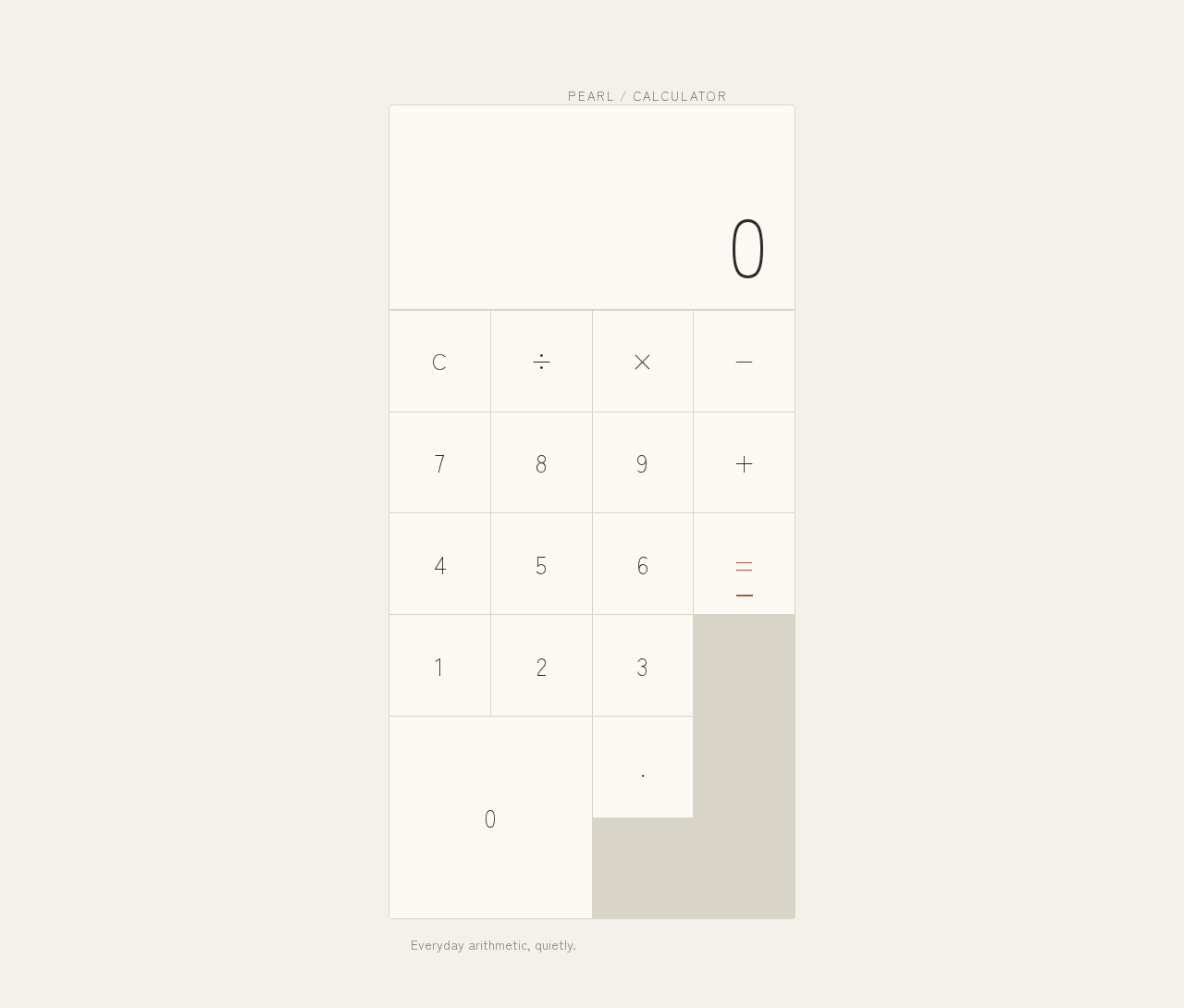
The single page of the product, and the anonymous public entry. It presents the calculator as one object in emptiness on a paper-white ground.
Information and state
- Current expression line: the sequence of entered numerals and operators, right-aligned, set small and muted above the result.
- Current result display: the oversized result numeral, right-aligned, dominant inside the display area.
- Active operator state: the most recently chosen pending operator is marked by a terracotta underline and terracotta numeral.
- Idle/initial state: expression line empty or showing a zero result, awaiting first input.
- Error state: an invalid expression (for example a division by zero or a malformed operator sequence) surfaces a plain, readable message in the display area in place of a result, with the expression retained so the person can correct it.
- No loading state is required: arithmetic is evaluated locally and instantly.
Primary actions
- Enter digits 0–9 to build the current operand.
- Enter a decimal point to begin a fractional operand.
- Choose an operator (÷ × − +) to commit the current operand and set the pending operation; the chosen operator becomes the active operator.
- Press equals (=) to evaluate the expression and show the result.
- Clear (C) to reset the expression and result to the idle state.
- Correct input by clearing and re-entering, or by continuing to append to the current expression.
Supporting actions and content
- Wordmark "PEARL / CALCULATOR" set as 13px uppercase tracked caps above the calculator block.
- One line of muted helper copy beneath the block: "Everyday arithmetic, quietly."
- Typographic operators only (÷ × − + =); no icon set.
Domain entities
- Expression: an ordered sequence of operands and operators currently entered.
- Operand: a numeric value being typed or already committed.
- Pending operator: the operator awaiting its right-hand operand.
- Result: the evaluated numeric outcome of the expression.
Component responsibilities
- Display region: renders the expression line and the result numeral; cross-fades the result over 160ms with a 2px upward slide when it changes; renders error messages in place of a result.
- Divider rule: a 1px full-width rule separating display from keypad.
- Keypad: a strict 4×5 grid of flat, hairline-ruled square keys with even gutters; each key reports its press with a 90ms opacity dip to 0.6 and back.
- Equals key and active operator: the only elements carrying the terracotta accent, expressed as an underline and terracotta numeral rather than a filled button.
- Page frame: paper-white ground, the calculator block offset to roughly 60/40 of the viewport with generous margins, and the wordmark and helper copy positioned above and below the block.
States
- Empty/idle: display shows a zero result and an empty expression line; all keys available.
- Success: after equals, the result numeral updates with the cross-fade and the expression line shows the evaluated expression.
- Error: invalid expression shows a readable message; the person clears or corrects and continues.
- Recovery: clear returns the page to the idle state at any time.
3. Functional Requirements
FR-1 — Single-page calculator delivery (explicit) As a Calculator user, I should get the whole calculator on one page, so that I can do arithmetic without navigating anywhere.
- Trigger: the page loads.
- Observable result: the calculator — display, expression line, and full keypad — is present and usable on the single page; no other page or route is part of the product.
- Failure/recovery: if the page fails to render, reloading restores the same single surface.
- Continuation: the person begins entering digits immediately.
FR-2 — Digit entry (explicit) As a Calculator user, I should press digit keys 0–9 to build a number, so that I can enter the operands of my calculation.
- Trigger: pressing a digit key.
- Observable result: the digit appends to the current operand and the display updates to show it.
- Access state: anonymous; no identity required.
- Failure/recovery: an unexpected key press leaves the expression unchanged.
- Continuation: the person continues typing digits or chooses an operator.
FR-3 — Decimal entry (required_inference) As a Calculator user, I should enter a decimal point to build a fractional operand, so that everyday arithmetic with decimals is possible.
- Trigger: pressing the decimal key while entering an operand.
- Observable result: a decimal point is placed in the current operand and the display reflects it.
- Failure/recovery: a second decimal point in the same operand is ignored rather than producing a malformed number.
- Continuation: the person continues the operand or chooses an operator.
FR-4 — Operator selection and active-operator indication (explicit) As a Calculator user, I should choose an operator (÷ × − +) and see which one is active, so that I know what operation is pending.
- Trigger: pressing an operator key.
- Observable result: the current operand is committed, the operator becomes pending, and that operator is marked with a terracotta underline and terracotta numeral.
- Failure/recovery: choosing a different operator before entering the next operand replaces the pending operator and moves the active marking to it.
- Continuation: the person enters the next operand.
FR-5 — Expression display (explicit) As a Calculator user, I should see the running expression above the result, so that I can confirm what I have entered before evaluating it.
- Trigger: any entry that changes the expression.
- Observable result: the expression line, set small and muted and right-aligned, shows the current sequence of operands and operators.
- Failure/recovery: clearing resets the expression line to empty.
- Continuation: the person evaluates or corrects the expression.
FR-6 — Result display (explicit) As a Calculator user, I should see the result as the dominant numeral on the page, so that the answer is immediately readable.
- Trigger: pressing equals, or any change to the evaluated result.
- Observable result: the oversized result numeral updates, cross-fading over 160ms with a 2px upward slide; with reduced motion the change is instant.
- Failure/recovery: an invalid expression shows a readable message in place of a result.
- Continuation: the person starts a new calculation or continues from the result.
FR-7 — Evaluation with equals (explicit) As a Calculator user, I should press equals to evaluate my expression, so that I get the answer.
- Trigger: pressing the equals key.
- Observable result: the expression is evaluated and the result numeral shows the outcome; the equals key is the terracotta-accented action.
- Failure/recovery: division by zero or a malformed expression produces a plain, readable error message in the display area, with the expression retained for correction.
- Continuation: the person clears to start again, or continues entering from the result.
FR-8 — Clear and correct input (explicit) As a Calculator user, I should clear the calculator to reset it, so that I can start a new calculation or recover from a mistake.
- Trigger: pressing the clear key.
- Observable result: the expression line empties and the result returns to the idle state; all keys remain available.
- Failure/recovery: clearing from an error state also removes the error message.
- Continuation: the person begins a new calculation.
FR-9 — Key press feedback (explicit) As a Calculator user, I should feel a quiet acknowledgement when I press a key, so that the object feels tactile without being bouncy.
- Trigger: pressing any key.
- Observable result: the key dips to 0.6 opacity over 90ms and returns; no scale or bounce. With reduced motion, feedback is instant.
- Continuation: the person continues entering.
FR-10 — Anonymous open access (required_inference) As a Calculator user, I should use the calculator immediately without signing in, so that quick arithmetic is never gated.
- Trigger: arriving at the page.
- Observable result: the calculator is fully usable with no identity step, because no calculation state is persisted or resumed.
- Failure/recovery: none required; there is no protected state to recover.
- Continuation: the person calculates and leaves.
4. User Personas
Calculator user
Product context. A person who needs quick, everyday arithmetic — a sum, a difference, a product, a division — and wants it without ceremony. They arrive at pearl-calculator on a browser, likely for a single short task, and expect the tool to be ready the moment the page appears.
Primary goal. Get a correct answer to a simple arithmetic expression with as little friction as possible, and be able to correct or restart without thinking about it.
Distinct accepted responsibilities.
- Entering operands with digit and decimal keys.
- Choosing operators and reading which operator is active.
- Reading the running expression to confirm what has been entered.
- Pressing equals to evaluate and reading the dominant result numeral.
- Clearing to reset or recover from a mistake or an error.
Relevant inputs and decisions. Which numbers and operators to enter; whether the expression as displayed matches their intent; whether to evaluate, continue, or clear.
Interactions with other accepted participants. None. The calculator is a single-person, single-page tool with no counterparty, recipient, or shared state; the only other actor is the browser evaluating arithmetic locally.
Observable success. The result numeral shows the correct answer, the expression line confirms what was evaluated, and the person can clear and start again in one press.
What makes this role distinct. The work is entirely local, ephemeral, and anonymous: there is no account, no history to manage, and no collaboration. The persona's whole responsibility is entry, confirmation, evaluation, and reset on one surface.
5. Core User Flows
Flow 1 — Perform a simple calculation
- The Calculator user opens pearl-calculator. The Calculator page loads as the anonymous public entry; the calculator fades in once over 600ms (instant with reduced motion).
- The display shows the idle state: an empty expression line and a zero result.
- The user presses digit keys to build the first operand. Each digit appends and the display updates; each key dips to 0.6 opacity over 90ms.
- The user presses an operator key (for example ×). The operand is committed, the operator becomes pending, and it is marked with a terracotta underline and terracotta numeral.
- The user presses digit keys to build the second operand; the expression line shows the full running expression, right-aligned and muted.
- The user presses equals. The expression is evaluated locally and the result numeral updates with a 160ms cross-fade and 2px upward slide (instant with reduced motion).
- The user reads the result — the dominant numeral on the page — and either continues entering from it or presses clear to reset.
Failure and recovery. If the user mistypes an operand, they press clear and re-enter, or continue appending to correct the current operand. If they choose the wrong operator before entering the next operand, choosing another operator replaces the pending one and moves the active marking.
Flow 2 — Recover from an invalid expression
- The user has entered an expression that cannot be evaluated, such as a division by zero.
- The user presses equals. The display shows a plain, readable error message in place of a result, and the expression line is retained.
- The user reads the message, presses clear, and the expression line empties and the result returns to the idle state.
- The user re-enters a valid expression and presses equals to obtain the result.
Flow 3 — Enter a decimal calculation
- The user presses digit keys, then the decimal key, then further digits to build a fractional operand; a second decimal point in the same operand is ignored.
- The user chooses an operator, enters the second operand, and presses equals.
- The result numeral shows the decimal outcome; the user clears to start a new calculation.
6. Visuals Colors and Theme
The creative direction is authoritative for this section. Muse: Kenya Hara — "Emptiness as the interface." Headline idea: a pearl-white calculator after Hara, where the drama is the amount of white around one precise object.
Mode. Light only.
Colour tokens (exact hex, by role)
- Background / paper-white ground:
#F4F1EA— covers roughly 70% of the viewport. - Surface / calculator block:
#FBF9F4— one object, slightly lighter than the ground. - Hairline edge and rules:
#D9D4C8— 1px borders and the display/keypad divider. - Text / ink:
#2B2A27— all numerals and labels; also the primary colour. - Accent:
#B4552F— unbleached terracotta, reserved only for the equals key and the active operator (underline and numeral). - Muted:
#8C877C— the expression line and secondary labels.
Typography
- Family: Zen Kaku Gothic New for both headings and body.
- Wordmark and section labels: Light 300, 13px, uppercase Latin sub-labels, tracking
0.18em. - Expression line: 18px, muted.
- Result display:
clamp(44px, 9vw, 88px), Light 300, tabular figures, tracking-0.02em, right-aligned. - Key numerals: 22–28px.
- Helper copy: 14px / 1.7.
- Scale: 1.25 modular; only three sizes visible at once.
Shape language. Square proportions and thin rules. The calculator is a tall rounded-square block with radius 4px only — almost sharp — with a 1px hairline border. Keys are flat squares with 1px rules, no shadows, no pills. One thin horizontal rule separates display from keypad. Nothing decorative that is not a boundary.
Spacing rhythm. Centered single column on a vast paper ground; at least 15vw of untouched margin on desktop; the block offset to roughly 60/40 of the viewport rather than centered. Keypad is a strict 4×5 grid with even gutters. At 375px the block fills the width minus 24px margins; at 768px the block is 420px wide; at 1280px the block is 440px wide, floating in white space.
Imagery style. No photography, no illustration, no icons beyond typographic operators (÷ × − + =). Texture comes only from the paper-white ground and hairline rules; a single faint unbleached paper grain may be applied at 3% opacity to the background. The calculator is the only object in the frame.
Avoided. Gradient blobs, glassmorphism or frosted panels; rounded pill buttons and drop shadows on keys; blue or indigo accents of any kind; Inter, Roboto, Arial, Helvetica or system-ui; decorative illustration, icons or stock photography; a centred marketing headline with subtext and a CTA button above the calculator; bouncy or springy key animations; dense dashboard chrome, history panels or scientific-function clutter.
7. Signature Design Concept
The first screen is not a marketing hero: it is the calculator as a single object in emptiness.
A paper-white field (#F4F1EA) fills the viewport. The calculator block (#FBF9F4, 1px #D9D4C8 hairline, 4px radius) sits slightly right of optical center at roughly 60/40 of the viewport, about 440px wide at desktop, surrounded by at least 15vw of untouched paper-white. Inside the block, the oversized result numeral — up to 88px, Light 300, ink #2B2A27, tabular figures, right-aligned — is the dominant element, with the running expression set small and muted directly above it. A thin 1px rule runs the full width of the block between display and keypad, echoing MUJI dividers. A tiny tracked wordmark "PEARL / CALCULATOR" sits above the block at 13px uppercase with 0.18em tracking, and one line of muted helper copy — "Everyday arithmetic, quietly." — sits below.
The terracotta accent (#B4552F) appears only as the equals key and the active operator's underline and numeral — colour as a quiet signal, not a filled button. There is no gradient, no button stack, no illustration. The drama is the amount of white around one precise object, and the number is the hero of the page.
8. Interaction Model & Motion Direction
Interaction Model: Static (direction) Motion Tempo: still Hero Dimensionality: flat
Landing Hero Motion Brief
- Focal subject. The oversized Light-300 result numeral inside the calculator block — the single object in the paper-white field.
- Input → transformation → outcome thesis. A key press (input) dips that key to 0.6 opacity over 90ms and back (transformation), and the result line cross-fades over 160ms with numerals sliding 2px upward when it changes (outcome). Nothing else moves.
- Motion vocabulary. A single 600ms slow-ease fade-in of the calculator on load; a 90ms opacity dip on key press with no scale and no bounce; a 160ms cross-fade with a 2px upward slide on the result line. No parallax, no scroll-linked depth, no spring.
- Composed first frame. Paper-white ground filling the viewport; the calculator block offset to 60/40, hairline-edged, with the wordmark above and helper copy below; the display showing the idle zero result at full size; the equals key and no operator yet carrying terracotta.
- Reduced-motion state. With
prefers-reduced-motion, all transitions become instant and the load fade is removed; the composed first frame is identical and fully usable.
9. Non-Functional Requirements
- Single-page constraint (explicit): the product is exactly one page; no additional routes, panels, or destinations are introduced.
- Simplicity constraint (explicit): the calculator is simple — no scientific functions, no history panel, no memory keys, no unit conversion.
- Local evaluation (required_inference): arithmetic is evaluated in the browser so results appear instantly with no network dependency and no loading state.
- No persistence (required_inference): no calculation state is stored server-side or resumed across visits; the provisioned database holds no calculator data.
- Anonymous access (required_inference): the page is reachable and fully usable without identity; no authentication gate exists.
- Readability at every viewport (explicit, from the creative direction): wordmark, labels, expression line, result numeral, and all keys stay entirely inside the viewport and their container at 375px, 768px, and 1280px, wrapping or scaling with
clamp()as needed; no element covers any readable text or control. - Reduced motion (explicit):
prefers-reduced-motionremoves the load fade and makes all transitions instant while preserving a fully usable static arrangement. - Accessible contrast (required_inference): ink
#2B2A27on#FBF9F4and muted#8C877Con#FBF9F4are used for readable text; the terracotta accent is never the sole carrier of meaning beyond the active-operator underline, which is paired with the operator glyph itself. - Keyboard operability (required_inference): every key is a real focusable control so the calculator can be operated without a pointer.
10. Tech Stack
- Frontend: React application UI — the single Calculator page, client-side arithmetic, and the visual system described above.
- Backend: shared FastAPI process for application APIs and domain modules. It is provisioned infrastructure; no accepted calculator behavior requires it, and no calculator endpoint is specified.
- Database: MariaDB for application-owned persistent data. It is provisioned infrastructure; no calculator domain entity is persisted.
- Containerization: Docker / docker-compose with the three services above (
frontend,backend,database).
No additional services, queues, or workers are needed for the accepted scope.
11. Assumptions and Constraints
- A-1 (explicit): The product is a simple calculator and nothing more; scope is limited to basic arithmetic entry, display, evaluation, and clearing.
- A-2 (explicit): The design is a single page; the page-count constraint is exact at one.
- A-3 (required_inference): The calculator supports the four basic operations (÷ × − +), decimal operands, equals, and clear, matching the 4×5 keypad grid in the creative direction.
- A-4 (required_inference): No calculation history, memory, or persistence is offered, so no identity or session continuity is required.
- A-5 (required_inference): The provisioned backend and database remain available as shared infrastructure but carry no calculator-specific requirement.
- A-6 (explicit, from the creative direction): The visual system — palette, Zen Kaku Gothic New, square hairline keys, 60/40 offset, still motion — is binding for the page.
- A-7 (explicit): The generic indigo/blue-on-white SaaS template is forbidden for this project.
12. Glossary
- Calculator page: the single page of pearl-calculator and the anonymous public entry; it contains the display, expression line, and keypad.
- Expression: the ordered sequence of operands and operators currently entered, shown small and muted above the result.
- Operand: a numeric value being typed or already committed in the expression.
- Pending operator: the operator awaiting its right-hand operand; marked as the active operator.
- Active operator: the most recently chosen operator, indicated by a terracotta underline and terracotta numeral.
- Result: the evaluated numeric outcome, shown as the oversized dominant numeral.
- Idle state: the initial or cleared state with an empty expression line and a zero result.
- Paper-white ground: the
#F4F1EAbackground field that fills most of the viewport. - Hairline rule: a 1px
#D9D4C8boundary used for the block edge, key rules, and the display/keypad divider.
PearlCalculator
Everyday arithmetic, quietly.
PearlCalculator
Everyday arithmetic, quietly.
No comments yet. Be the first!