pearl-8080ai
 Diya Trivedi
start a projet to build a simple single page design of 8080ai

Comments (0)
Sign in to leave a comment
System Requirements
System Requirements Document for pearl-8080ai
1. Introduction
pearl-8080ai is a project to build a simple single-page design for 8080ai, a deep-tech / AI product. The product intent is narrow and explicit: present 8080ai to visitors through one cohesive, anonymous public page that communicates computational rigor, reliability, and engineered infrastructure. The audience is developer- and research-facing — people who expect precision rather than marketing fluff — and the page must feel like a well-designed technical manual or a transit system that simply works.
The design language is systematic clarity in the spirit of Massimo Vignelli: black type on white, primary red as the signal accent, visible grids, tabular alignment, and no decorative gradients. The page is a vertical sequence of clearly delineated bands, each numbered like a technical document.
2. System Overview
pearl-8080ai delivers a single, statically renderable public page named 8080ai. There is no account system, no authentication, no persistence, and no server-side workflow required by the accepted requirements. The page is the anonymous public entry surface for the product; a Site Visitor opens it and reads its content.
Actors
- Site Visitor (human, anonymous) — the only accepted active human persona. Opens the page and reads the 8080ai presentation.
- No provider, external, or system actors perform product-visible work in the current scope.
Accepted behavior
- A single page presents 8080ai with a hero band, numbered content bands, and a top navigation bar.
- The page is simple: one page, one reading journey, no multi-step flows.
Narrow exclusions
- No additional pages, routes, or destinations beyond the single 8080ai page.
- No user accounts, sign-in, or identity establishment.
- No data collection, forms, checkout, or transactional flows.
- No backend services, databases, or queues are required by the accepted requirements.
2a. Product Interpretation and Delivery Boundary
The accepted requirement is a simple single-page design of 8080ai. This is a presentation surface, not an application. Delivery is a single anonymous public page that any visitor can open directly; there is no protected state, no continuity requirement, and therefore no application-owned identity. The page is fully readable without interaction beyond scrolling and hovering.
Everything the page shows is current. There is no future horizon established by the source beyond the single-page design itself; anything resembling additional pages, accounts, or interactive product features is out of scope and must not be introduced.
2b. Source Content Inventory
Not applicable — no reference directive declares a content_source.
2c. Page Content and Component Coverage
8080ai
The single public page. Anonymous, no access requirement. A vertical sequence of full-width bands separated by 1px black rules, laid out on a visible 12-column grid with 24px gutters.
Information and state
- Product identity: the wordmark "8080AI" and a one-sentence product description.
- Numbered section labels (01, 02, 03, …) in the top-left corner of each band, set in 12px uppercase Archivo with wide tracking.
- Content bands presenting 8080ai's product context (what it is, what it does, why it matters) as ruled rows and tabular feature/data lists.
- No dynamic data, no user-specific state, no persisted state.
Primary actions
- Explore the system — the single red hero button; scrolls the visitor to the first content band.
- Get started — the single top-bar button, right-aligned, separated from the wordmark by a rule.
Supporting actions
- Hover on any interactive element: instant background inversion to black with white text (no easing).
- Scroll: a red progress line grows left-to-right along the full-width rule that separates bands.
Domain entities
- None persisted. The page is a static presentation of product content.
Component responsibilities
- Top navigation bar — wordmark left-aligned, single "Get started" button right-aligned, separated by a 1px black rule.
- Hero band — 7-column left block with oversized "8080AI" headline (Archivo Black, clamp 64px–128px, flush-left), 24px Archivo Regular subhead, and the red "Explore the system" button with sharp corners; 5-column right block as a solid #E30613 rectangle containing a white line-art 8080 microprocessor schematic with #FFD100 accent data paths. Thin black rule below.
- Numbered content bands — each with a numbered label, a section heading (30px mobile to 48px desktop), body copy at 16–18px with 1.6 line-height, and where applicable a ruled data table or feature list with alternating white and #F5F5F5 rows, labels in small caps, values right-aligned in monospace.
- Scroll progress rule — full-width horizontal rule doubling as a progress indicator.
- Footer band — closing rule and minimal product attribution consistent with the technical-manual tone.
States
- Loading — static content; no loading state required. Fonts may swap; layout must not shift readable text or controls.
- Empty — not applicable; content is fixed.
- Success — the page renders fully and every band is readable at 375px, 768px, and 1280px.
- Error — no data fetch; the only failure mode is a failed asset load. Recovery: text content remains readable with system font fallbacks; the schematic degrades to a flat red block without breaking layout.
- Recovery — reloading the page restores full presentation.
3. Functional Requirements
FR-1 — Single-page presentation of 8080ai (explicit) As a Site Visitor, I should open a single page that presents 8080ai, so that I can understand what the product is from one cohesive surface.
- Trigger: visitor navigates to the page URL.
- Observable result: one page renders with the 8080ai wordmark, hero, and numbered content bands.
- Access: anonymous, no requirement.
- Failure/recovery: if assets fail, text content remains readable; reload restores full presentation.
- Continuation: visitor scrolls through the bands.
FR-2 — Hero band with wordmark, subhead, and primary button (explicit) As a Site Visitor, I should see an oversized "8080AI" headline, a one-sentence subhead, and a red "Explore the system" button in the hero, so that I immediately grasp the product identity and have a clear next action.
- Trigger: page load.
- Observable result: 7-column left block with headline (Archivo Black, clamp 64px–128px), 24px subhead, red sharp-cornered button; 5-column right block as a solid #E30613 rectangle with white line-art 8080 microprocessor schematic and #FFD100 accent data paths.
- Access: anonymous.
- Failure/recovery: headline types in letter-by-letter on load; with
prefers-reduced-motionthe headline appears fully formed. - Continuation: clicking "Explore the system" scrolls to the first content band.
FR-3 — Numbered content bands (explicit) As a Site Visitor, I should read 8080ai's product content in clearly delineated, numbered bands, so that I can follow the presentation like a technical document.
- Trigger: scrolling.
- Observable result: each band carries a numbered label (01, 02, 03, …) in the top-left, a section heading, and body copy; bands separated by full-width 1px black rules.
- Access: anonymous.
- Failure/recovery: content fades in at 200ms ease-out on viewport entry; with reduced motion, content is immediately visible.
- Continuation: visitor continues to the next band.
FR-4 — Top navigation bar with wordmark and Get started button (explicit) As a Site Visitor, I should see a simple top bar with the wordmark left-aligned and a single "Get started" button right-aligned, so that navigation stays minimal and consistent.
- Trigger: page load.
- Observable result: top bar with wordmark left, "Get started" button right, separated by a 1px black rule.
- Access: anonymous.
- Failure/recovery: bar remains legible at all viewports; button text stays whole.
- Continuation: visitor may click "Get started" or continue scrolling.
FR-5 — Ruled data tables and feature lists (explicit) As a Site Visitor, I should read feature and data content as ruled rows with alternating white and #F5F5F5 backgrounds, labels in small caps and values right-aligned in monospace, so that technical information is scannable and precise.
- Trigger: scrolling to a band containing tabular content.
- Observable result: ruled rows, alternating backgrounds, small-caps labels, right-aligned monospace values.
- Access: anonymous.
- Failure/recovery: at narrow viewports rows wrap so labels and values remain fully readable.
- Continuation: visitor continues reading.
FR-6 — Scroll progress rule (explicit) As a Site Visitor, I should see a red line grow left-to-right along the full-width rule as I scroll, so that I can gauge my position in the document.
- Trigger: scrolling.
- Observable result: red progress line grows along the rule in proportion to scroll position.
- Access: anonymous.
- Failure/recovery: with reduced motion, the progress line updates without animation.
- Continuation: visitor continues scrolling.
FR-7 — Instant hover inversion on interactive elements (explicit) As a Site Visitor, I should see interactive elements invert to black background with white text instantly on hover, so that affordances are unambiguous.
- Trigger: pointer hover over a button or link.
- Observable result: instant background inversion to black, text to white, no easing.
- Access: anonymous.
- Failure/recovery: on touch devices, no hover state is required; the element remains legible.
- Continuation: visitor may click the element.
FR-8 — Readable text and controls at every viewport (explicit) As a Site Visitor, I should be able to read every headline, wordmark, label, number, and control fully at 375px, 768px, and 1280px, so that nothing is cropped or covered.
- Trigger: viewing at any supported viewport.
- Observable result: all readable text and controls stay entirely inside the viewport and their container, wrapping or scaling via
clamp(...)as needed; imagery and decoration may bleed but never cover readable text or controls. - Access: anonymous.
- Failure/recovery: with
prefers-reduced-motion, any moving or scrollable content provides a usable static arrangement. - Continuation: visitor reads the full page.
4. User Personas
Site Visitor
Product context. A developer, researcher, or technically minded reader who has arrived at the 8080ai page — likely from a link, a search, or a shared reference — to find out what 8080ai is. They are anonymous and have no account; they expect precision and are put off by marketing fluff.
Primary goal. Understand 8080ai from a single, well-organized page and know what the next action is.
Distinct accepted responsibilities.
- Open the single 8080ai page.
- Read the hero: wordmark, one-sentence subhead, and the "Explore the system" button.
- Scroll through the numbered content bands, reading headings, body copy, and ruled data/feature tables.
- Use the top-bar "Get started" button or the hero button as their chosen next action.
- Track position via the scroll progress rule.
Relevant inputs or decisions.
- Deciding whether to click "Explore the system" (scroll into content) or "Get started" (top-bar action).
- Deciding when they have read enough to understand the product.
Interactions with other accepted participants. None — the Site Visitor is the only accepted human persona, and no other participant is materially affected by their reading.
Observable success. The visitor can read every band fully at their viewport, the hero communicates the product in one sentence, and the next action is obvious.
Constraints carried from source. The page must be simple and single-page; the visitor is anonymous with no access requirement.
5. Core User Flows
Flow A — Site Visitor reads the 8080ai page
- Start. The Site Visitor opens the 8080ai page URL in a browser. No sign-in or identity step occurs; the page is anonymous.
- Hero. The page loads. The oversized "8080AI" headline types in letter-by-letter (or appears fully formed under
prefers-reduced-motion). The visitor reads the 24px subhead explaining the product in one sentence and sees the red "Explore the system" button and the red schematic block on the right. - Decision. The visitor chooses to click "Explore the system" or to scroll manually.
- Content bands. The visitor scrolls. Each band carries a numbered label (01, 02, 03, …), a section heading, and body copy; bands are separated by full-width black rules. Content fades in at 200ms ease-out on entry (immediately under reduced motion).
- Data reading. Where a band contains a ruled table or feature list, the visitor reads labels in small caps and values right-aligned in monospace, with alternating white and #F5F5F5 rows.
- Progress. As the visitor scrolls, the red progress line grows left-to-right along the full-width rule, showing position in the document.
- Hover. Hovering any interactive element inverts it instantly to black background with white text.
- Completion. The visitor reaches the closing band and footer, having read the full 8080ai presentation.
- Failure/recovery. If a font or image asset fails to load, text remains readable with system fallbacks and the schematic degrades to a flat red block without breaking layout; reloading restores full presentation.
- Continuation. The visitor may click the top-bar "Get started" button as their next action, or leave the page.
Flow B — Site Visitor on a narrow viewport
- Start. The Site Visitor opens the 8080ai page on a 375px-wide device.
- Layout adaptation. The hero headline scales down via
clamp(...)to its mobile size; the 7/5-column split stacks so the headline, subhead, and button remain fully inside the viewport, and the red schematic block sits below without covering any readable text or control. - Reading. The visitor scrolls through the numbered bands; tabular rows wrap so labels and values remain fully readable.
- Reduced motion. If the device requests reduced motion, the headline appears fully formed, section content is immediately visible, and the progress line updates without animation.
- Completion. The visitor reads the full page; every headline, label, number, and control stays whole.
6. Visuals Colors and Theme
Muse and headline. Massimo Vignelli — Systematic clarity for the 8080 AI machine. The page reads as infrastructure for intelligence: a technical manual or a transit system that just works.
Mode. Light mode only.
Color tokens (exact hex by role)
- Background:
#FFFFFF(dominant, ~90% of surface) - Surface:
#F5F5F5(alternating table rows, secondary blocks) - Text:
#000000(all reading) - Primary:
#E30613(interactive elements, key data points, the single hero accent block) - Accent:
#FFD100(secondary signal — small labels, hover states, one hero schematic detail) - Muted:
#6B6B6B(secondary text and rules)
No gradients, no shadows, no translucency. No colors outside this palette — especially no blues or purples.
Typography
- Headings: Archivo, weights 500–700, tracking
-0.02em, flush-left ragged-right. Section labels in all-caps. - Body: Archivo, regular weight, 16–18px, line-height 1.6.
- Monospace companion: IBM Plex Mono for code snippets, data values, and technical labels, set in small caps or uppercase.
- Modular scale (1.25): 12 / 15 / 18 / 24 / 30 / 48 / 64 / 96.
- Display sizes via
clamp: hero headline 48px mobile → 96px desktop (up to 128px for the wordmark per hero direction); section headings 30px mobile → 48px desktop.
Shape language. Hard edges, 0px radius, strict rectangular blocks. 1px solid black rules define sections. No rounded corners, blobs, or soft shadows. Color blocks are flat and full-bleed within their grid columns.
Layout. Visible 12-column grid, 24px gutters. Asymmetric compositions with text offset left or right and color blocks filling remaining columns. Full-width horizontal rules mark section transitions. Each band carries a numbered label (01, 02, 03) top-left. Top bar: wordmark left, single "Get started" button right, separated by a rule.
Imagery. Diagrammatic line art and schematic illustrations — circuit-like patterns, grid overlays, data-flow diagrams, isometric technical drawings. Photography only if informational (high-contrast monochrome server rack or chip macro, cropped to grid). No stock people, no 3D renders, no abstract gradients.
7. Signature Design Concept
The public entry is a technical document rendered as a civic poster. The hero is a full-width white band split on the visible 12-column grid: a 7-column left block holds the oversized "8080AI" wordmark in Archivo Black at clamp(64px, 12vw, 128px), flush-left, with a 24px Archivo Regular subhead and a single sharp-cornered red "Explore the system" button. The remaining 5 columns are a solid #E30613 rectangle containing a white line-art schematic of a simplified 8080 microprocessor, with #FFD100 accent lines tracing the data paths. A thin black rule closes the band.
Below, the page unfolds as numbered bands — 01, 02, 03 — each labeled top-left in 12px uppercase Archivo with wide tracking, each separated by a full-width rule that doubles as a scroll progress indicator, the red line growing left-to-right as the visitor descends. Data and feature content appears as ruled rows alternating white and #F5F5F5, labels in small caps, values right-aligned in IBM Plex Mono. Every interactive element inverts instantly to black-on-white on hover. The composition recomposes only accepted content and controls; it introduces no new behavior.
8. Interaction Model & Motion Direction
Interaction Model: Static Motion Tempo: still Hero Dimensionality: flat
Landing Hero Motion Brief
- Focal subject. The oversized "8080AI" wordmark on the left and the red schematic block on the right.
- Input → transformation → outcome thesis. On load, the wordmark types in letter-by-letter, resolving into the full "8080AI" identity; the schematic block holds steady as the visual anchor. The outcome is a fully formed, readable hero — no further motion is required to understand it.
- Motion vocabulary. Letter-by-letter typing on the headline; instant (no-easing) hover inversion on interactive elements; a 200ms ease-out fade-in for section content as it enters the viewport; a red progress line growing along the full-width rule on scroll. No parallax, no scroll-triggered animation beyond the fade-in, no bouncy or playful motion.
- Composed first frame. White ground; 7-column left block with the wordmark mid-typing, subhead and red button already visible; 5-column red block with the white schematic and yellow data paths; thin black rule below.
- Reduced-motion state. With
prefers-reduced-motion, the wordmark appears fully formed, section content is immediately visible without fade, and the progress line updates without animation. All content remains fully readable.
9. Non-Functional Requirements
- NFR-1 — Single page. The design must be a single page; no additional routes or destinations. (explicit)
- NFR-2 — Simplicity. The design must be simple: one reading journey, no multi-step flows, no accounts. (explicit)
- NFR-3 — Responsive readability. All readable text and controls stay entirely inside the viewport and their container at 375px, 768px, and 1280px, wrapping or scaling via
clamp(...); no element covers readable text or controls. (explicit) - NFR-4 — Reduced motion. A usable static arrangement is provided under
prefers-reduced-motion. (explicit) - NFR-5 — Palette discipline. Only the defined palette is used; no blues, purples, gradients, glassmorphism, or soft shadows. (explicit)
- NFR-6 — Typography discipline. Only Archivo and a monospace companion (IBM Plex Mono) are used. (explicit)
- NFR-7 — Anonymous access. The page is publicly reachable with no authentication or identity establishment. (required_inference — the only accepted persona is an anonymous Site Visitor with no access requirement.)
10. Tech Stack
- Frontend: React with a static single-page build; no backend required by the accepted requirements.
- Styling: CSS with the defined design tokens (palette, Archivo and IBM Plex Mono via web fonts, 12-column grid, 0px radius, 1px rules).
- Motion: CSS transitions and a lightweight typing effect for the hero headline, gated by
prefers-reduced-motion. - Deployment: Static hosting of the built page. No database, queue, or container orchestration is required for the current scope.
11. Assumptions and Constraints
- A-1. The page is anonymous and public; no identity, session, or persistence is needed. (required_inference)
- A-2. All 8080ai product content shown on the page is presentation copy; no dynamic data source is specified, so content is authored statically. (required_inference)
- A-3. "Get started" is a single top-bar control whose destination is not specified by the source; it is presented as the page's next-action affordance without inventing a new destination. (required_inference)
- A-4. The 8080 microprocessor schematic is decorative line art within the hero's red block and carries no interactive behavior. (required_inference)
- C-1. The design must be a single page. (explicit)
- C-2. The design must be simple. (explicit)
- C-3. No colors outside the defined palette; no rounded corners, gradients, glassmorphism, soft shadows, stock people, or 3D renders. (explicit)
- C-4. No additional pages, accounts, or transactional flows are in scope. (explicit)
12. Glossary
- 8080ai — The deep-tech / AI product this page presents.
- Band — A full-width horizontal section of the page, separated by 1px black rules and labeled with a number (01, 02, 03).
- Wordmark — The oversized "8080AI" headline in the hero.
- Progress rule — The full-width horizontal rule that doubles as a scroll progress indicator, with a red line growing left-to-right.
- Hover inversion — The instant (no-easing) state change where an interactive element's background becomes black and its text white.
- Site Visitor — The anonymous human persona who opens and reads the 8080ai page.
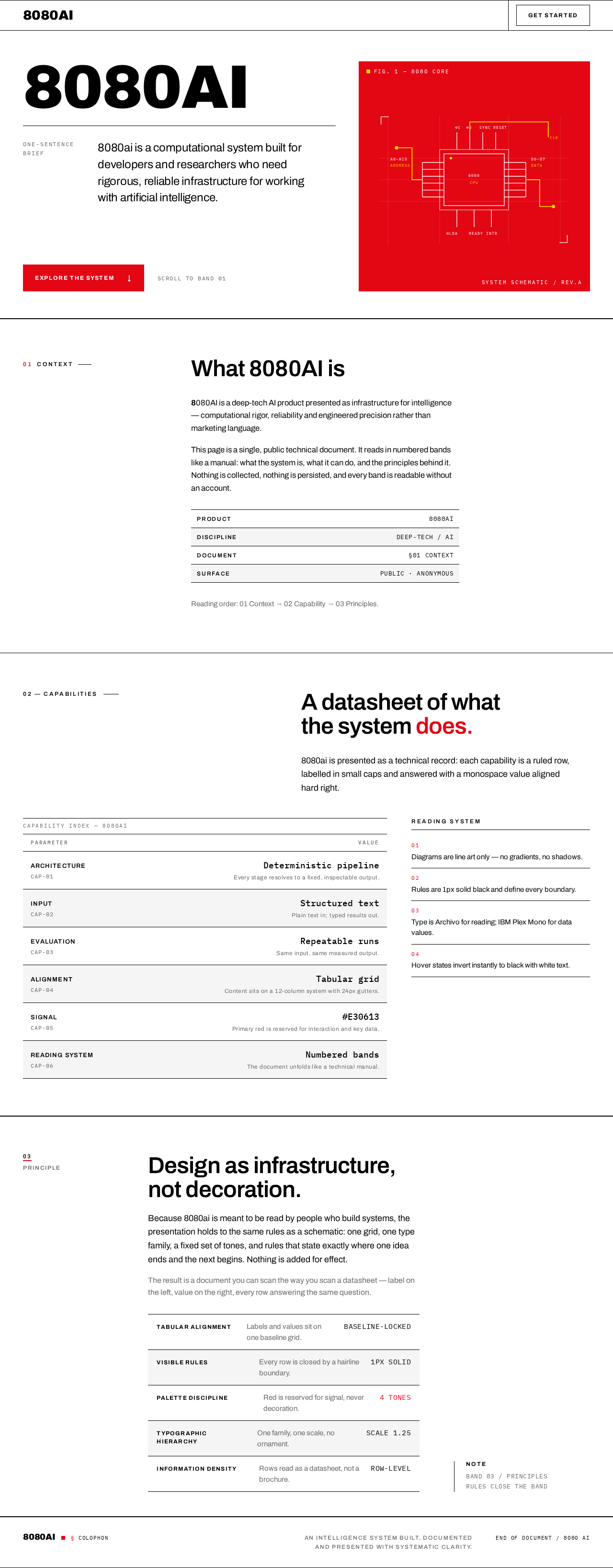
8080ai is a computational system built for developers and researchers who need rigorous, reliable infrastructure for working with artificial intelligence.
01Context
What 8080AI is
8080AI is a deep-tech AI product presented as infrastructure for intelligence — computational rigor, reliability and engineered precision rather than marketing language.
This page is a single, public technical document. It reads in numbered bands like a manual: what the system is, what it can do, and the principles behind it. Nothing is collected, nothing is persisted, and every band is readable without an account.
- Product
- 8080AI
- Discipline
- DEEP-TECH / AI
- Document
- §01 CONTEXT
- Surface
- PUBLIC · ANONYMOUS
Reading order: 01 Context → 02 Capability → 03 Principles.
A datasheet of what the system does.
8080ai is presented as a technical record: each capability is a ruled row, labelled in small caps and answered with a monospace value aligned hard right.
| Parameter | Value |
|---|---|
| ArchitectureCAP-01 | Deterministic pipelineEvery stage resolves to a fixed, inspectable output. |
| InputCAP-02 | Structured textPlain text in; typed results out. |
| EvaluationCAP-03 | Repeatable runsSame input, same measured output. |
| AlignmentCAP-04 | Tabular gridContent sits on a 12-column system with 24px gutters. |
| SignalCAP-05 | #E30613Primary red is reserved for interaction and key data. |
| Reading systemCAP-06 | Numbered bandsThe document unfolds like a technical manual. |
Design as infrastructure, not decoration.
Because 8080ai is meant to be read by people who build systems, the presentation holds to the same rules as a schematic: one grid, one type family, a fixed set of tones, and rules that state exactly where one idea ends and the next begins. Nothing is added for effect.
The result is a document you can scan the way you scan a datasheet — label on the left, value on the right, every row answering the same question.
- Tabular alignmentLabels and values sit on one baseline grid.Baseline-locked
- Visible rulesEvery row is closed by a hairline boundary.1px solid
- Palette disciplineRed is reserved for signal, never decoration.4 tones
- Typographic hierarchyOne family, one scale, no ornament.Scale 1.25
- Information densityRows read as a datasheet, not a brochure.Row-level
8080ai is a computational system built for developers and researchers who need rigorous, reliable infrastructure for working with artificial intelligence.
01Context
What 8080AI is
8080AI is a deep-tech AI product presented as infrastructure for intelligence — computational rigor, reliability and engineered precision rather than marketing language.
This page is a single, public technical document. It reads in numbered bands like a manual: what the system is, what it can do, and the principles behind it. Nothing is collected, nothing is persisted, and every band is readable without an account.
- Product
- 8080AI
- Discipline
- DEEP-TECH / AI
- Document
- §01 CONTEXT
- Surface
- PUBLIC · ANONYMOUS
Reading order: 01 Context → 02 Capability → 03 Principles.
A datasheet of what the system does.
8080ai is presented as a technical record: each capability is a ruled row, labelled in small caps and answered with a monospace value aligned hard right.
| Parameter | Value |
|---|---|
| ArchitectureCAP-01 | Deterministic pipelineEvery stage resolves to a fixed, inspectable output. |
| InputCAP-02 | Structured textPlain text in; typed results out. |
| EvaluationCAP-03 | Repeatable runsSame input, same measured output. |
| AlignmentCAP-04 | Tabular gridContent sits on a 12-column system with 24px gutters. |
| SignalCAP-05 | #E30613Primary red is reserved for interaction and key data. |
| Reading systemCAP-06 | Numbered bandsThe document unfolds like a technical manual. |
Design as infrastructure, not decoration.
Because 8080ai is meant to be read by people who build systems, the presentation holds to the same rules as a schematic: one grid, one type family, a fixed set of tones, and rules that state exactly where one idea ends and the next begins. Nothing is added for effect.
The result is a document you can scan the way you scan a datasheet — label on the left, value on the right, every row answering the same question.
- Tabular alignmentLabels and values sit on one baseline grid.Baseline-locked
- Visible rulesEvery row is closed by a hairline boundary.1px solid
- Palette disciplineRed is reserved for signal, never decoration.4 tones
- Typographic hierarchyOne family, one scale, no ornament.Scale 1.25
- Information densityRows read as a datasheet, not a brochure.Row-level
No comments yet. Be the first!