pdf-generator
 wish way
You are a senior SaaS product strategist, B2B workflow architect, and startup operator. Your task is to design a niche PDF generation API product that is differentiated, revenue-focused, and suitable for a solo founder or small team. Product goal Build a PDF generation API for a narrow niche where demand already exists and users already pay for document automation. The product must not be a generic “PDF generator.” It must solve an end-to-end workflow for a specific industry. Target direction Focus on one of these niches: Accountants. HR teams. Legal operations. Insurance brokers. Shopify app developers. Choose the niche with the best combination of: Repetitive document creation. Compliance or audit needs. High willingness to pay. Clear templates and workflow automation. Low need for heavy enterprise sales at MVP stage. Core positioning Position the product as a compliance-aware document automation API, not just a rendering tool. The product should help users: Generate PDFs from structured data. Validate fields before rendering. Apply conditional logic inside templates. Keep an audit trail. Manage template versions. Support batch generation. Integrate with existing systems through API, webhooks, and automation. Differentiation strategy Do not copy generic PDF API features only. Add features that make the product feel meaningfully different. Include features such as: Rule-based document generation. Conditional blocks based on business logic. Field validation before PDF creation. Audit logs for every generated file. Template versioning and rollback. Approval workflow for sensitive documents. Batch personalization from CSV or JSON. Webhook-based job status updates. Retry and failure inbox for failed jobs. AI-assisted field mapping, but with human confirmation. Industry-specific starter templates. Compliance clause insertion based on rules or jurisdiction. Product principles The product must: Solve a real pain that already costs time or money. Be narrow enough to win a niche. Be simple enough for a solo founder to build. Be sticky enough that users keep paying monthly. Reduce errors, manual work, and compliance risk. MVP scope Design an MVP with only the highest-leverage features: API for PDF generation from JSON or CSV. 10 niche-specific templates. Conditional sections. Validation rules. Asynchronous job handling. Webhooks. Template version history. Basic dashboard for jobs and templates. Avoid building unnecessary features like: Full drag-and-drop design studio. Generic marketplace. Broad multi-industry support at launch. Overly complex enterprise admin features. Required output format Return the answer in this structure: 1. Best niche choice Pick one niche and explain why it is the best starting point. 2. Pain points List the real problems this niche faces in document workflows. 3. Unique features List the features that would make the product stand out. 4. MVP plan Explain what to build first and what to avoid. 5. Pricing idea Suggest a simple pricing model that fits this niche. 6. Go-to-market Explain how to get first customers with low-cost acquisition. 7. Why this wins Explain why this product can compete even in a crowded market. Important constraints Keep the product narrow. Focus on revenue potential. Prefer boring, repeatable, high-value workflows. Avoid generic startup advice. Avoid vague feature lists. Every feature should tie to a clear user pain. Think like a founder building for profit, not vanity. Now produce a practical product strategy, not theory. build end-to-end product


Comments (0)
Sign in to leave a comment
System Requirements
System Requirements Document for pdf-generator
1. Introduction
The pdf-generator is a niche PDF generation API product designed specifically for accountants. It aims to provide a compliance-aware document automation solution that addresses the repetitive document creation needs of accounting firms and teams. The product is focused on reducing errors, manual work, and compliance risks while ensuring high usability and revenue potential for a solo founder or small team.
2. System Overview
The pdf-generator is a B2B SaaS product that offers a specialized API for generating PDFs from structured data, with a focus on compliance and audit needs. It is designed to integrate seamlessly with existing systems through APIs, webhooks, and automation, providing a comprehensive solution for accounting workflows. The product includes features such as rule-based document generation, field validation, audit logs, template versioning, and batch processing, all tailored to the specific needs of accountants.
2a. Product Interpretation and Delivery Boundary
The product is delivered as a compliance-aware document automation API, specifically targeting accountants. It is not a generic PDF generator but a specialized tool that solves end-to-end workflows for the accounting industry. The product is designed to be narrow in scope, focusing on high-value, repeatable workflows with compliance and audit value. It is suitable for a solo founder or small team, with a focus on revenue potential and low-cost customer acquisition.
2b. Source Content Inventory
Not applicable as no explicit content_source directive was provided.
2c. Page Content and Component Coverage
Landing
- Purpose: Introduce the product as a compliance-aware PDF automation tool for accountants.
- Components:
- Overview of key features and benefits.
- Call-to-action for sign-up or login.
- Contact information for inquiries.
Sign Up
- Purpose: Allow accounting operators and integration developers to enroll in the service.
- Components:
- Registration form for new users.
- Confirmation and welcome message.
Login
- Purpose: Provide access for returning users to resume their work.
- Components:
- Login form with email and password fields.
- Password recovery option.
Accept Invitation
- Purpose: Enable document approvers to accept invitations for sensitive document reviews.
- Components:
- Invitation acceptance form.
- Confirmation message upon successful acceptance.
Dashboard
- Purpose: Central hub for managing jobs, templates, and operational work.
- Components:
- Overview of recent activities and pending tasks.
- Navigation to other pages like Job Builder, Templates, and Audit Log.
Job Builder
- Purpose: Submit individual or batch jobs from JSON or CSV inputs.
- Components:
- Job submission form.
- Options for batch processing and personalization.
Validation
- Purpose: Validate fields before document creation.
- Components:
- Field validation interface.
- Error messages for invalid inputs.
Rules
- Purpose: Configure business logic and conditional template behavior.
- Components:
- Rule creation and management tools.
- Conditional logic editor.
Generation
- Purpose: Handle PDF production as asynchronous jobs.
- Components:
- Job status updates.
- Options for retrying failed jobs.
Jobs
- Purpose: Track and manage job statuses and failures.
- Components:
- Job overview list.
- Failure inbox for retrying jobs.
Integrations
- Purpose: Configure and verify API and webhook-based status automation.
- Components:
- Integration setup tools.
- Webhook configuration options.
Templates
- Purpose: Manage accounting templates, including versioning and rollback.
- Components:
- Template creation and editing tools.
- Version history and rollback options.
Compliance
- Purpose: Manage compliance clause behavior and application.
- Components:
- Compliance rule editor.
- Jurisdiction-based clause management.
Audit Log
- Purpose: Review history of generated files and document actions.
- Components:
- Timeline of document events.
- Search and filter options for audit records.
Approvals
- Purpose: Manage sensitive document review and release decisions.
- Components:
- Approval workflow interface.
- Document review tools.
Field Mapping
- Purpose: Review and confirm AI-assisted field mappings.
- Components:
- Mapping review interface.
- Confirmation and adjustment tools.
3. Functional Requirements
- As an accounting workflow operator, I should be able to generate PDFs from structured JSON or CSV data to automate document creation. (explicit)
- As an accounting workflow operator, I should be able to validate fields before rendering to ensure data accuracy. (explicit)
- As an accounting workflow operator, I should be able to apply conditional logic inside templates to customize document content. (explicit)
- As an accounting workflow operator, I should be able to maintain an audit trail for every generated file to meet compliance requirements. (explicit)
- As an accounting workflow operator, I should be able to manage template versions, including version history and rollback to maintain document consistency. (explicit)
- As an accounting workflow operator, I should be able to support batch generation and batch personalization from CSV or JSON to handle large volumes of documents efficiently. (explicit)
- As an integration developer, I should be able to integrate with existing systems through API, webhooks, and automation to streamline workflows. (explicit)
- As an accounting workflow operator, I should be able to receive webhook-based job status updates to monitor document generation progress. (explicit)
- As an accounting workflow operator, I should be able to access a retry and failure inbox for failed jobs to ensure successful document generation. (explicit)
- As an accounting workflow operator, I should be able to use AI-assisted field mapping with human confirmation to improve data accuracy. (explicit)
- As an accounting workflow operator, I should be able to use industry-specific starter templates, with 10 accountant-focused templates in the MVP to speed up document creation. (explicit)
- As an accounting workflow operator, I should be able to insert compliance clauses based on rules or jurisdiction to meet legal requirements. (explicit)
- As a document approver, I should be able to use an approval workflow for sensitive documents to ensure compliance and accuracy. (explicit)
- As an accounting workflow operator, I should be able to access a basic dashboard for jobs and templates to manage document workflows. (explicit)
4. User Personas
Accounting Workflow Operator
- Context: Works within accounting firms and teams to generate recurring client PDFs.
- Primary Goal: Automate document workflows to reduce errors and compliance risks.
- Responsibilities: Configure templates, apply validation rules, manage batch processing, and review audit logs.
- Interactions: Collaborates with integration developers and document approvers to ensure seamless document generation and approval processes.
- Success: Achieves efficient, error-free document workflows that meet compliance standards.
Integration Developer
- Context: Connects accounting systems to the PDF generation API.
- Primary Goal: Integrate document automation into existing workflows.
- Responsibilities: Set up API and webhook integrations, monitor job statuses, and troubleshoot integration issues.
- Interactions: Works with accounting workflow operators to ensure data accuracy and seamless integration.
- Success: Successfully integrates the API into accounting systems, enabling automated document workflows.
Document Approver
- Context: Designated reviewer for sensitive documents within accounting teams.
- Primary Goal: Ensure compliance and accuracy of generated documents before release.
- Responsibilities: Review and approve documents using the approval workflow and audit trail.
- Interactions: Collaborates with accounting workflow operators to confirm document compliance and accuracy.
- Success: Approves documents that meet internal and compliance requirements, ensuring accurate and compliant document releases.
5. Core User Flows
5.1 Accounting Workflow Operator: Generate PDF
- Start: Operator logs into the Dashboard.
- Action: Navigates to the Job Builder page.
- Input: Submits JSON or CSV data for PDF generation.
- Validation: System validates fields and applies conditional logic.
- Result: PDF is generated and stored in the system.
- Continuation: Operator reviews the audit log for compliance verification.
5.2 Integration Developer: Set Up API Integration
- Start: Developer logs into the Dashboard.
- Action: Navigates to the Integrations page.
- Input: Configures API and webhook settings for automation.
- Result: Integration is successfully set up.
- Continuation: Developer monitors job status updates via webhooks.
5.3 Document Approver: Approve Sensitive Document
- Start: Approver receives an invitation and logs into the system.
- Action: Navigates to the Approvals page.
- Review: Reviews the document and audit trail.
- Decision: Approves or rejects the document based on compliance.
- Result: Document status is updated, and the operator is notified.
6. Visuals Colors and Theme
- Muse: Dieter Rams
- Palette:
- Background: #F7F7F7
- Surface: #FFFFFF
- Text: #000000
- Primary: #FF6600
- Accent: #008000
- Muted: #CCCCCC
- Typography:
- Headings: Saira, Medium weight, all caps, tight tracking
- Body: Source Sans Pro
- Scale: 1.25 modular, 48/32/24/18/16
- Shape Language: Rounded-rectangle controls and aligned label/value pairs.
- Layout: Modular grid with clear sections for audit logs, template management, and batch processing.
- Motion: Instant, mechanical feedback with restrained tempo.
7. Signature Design Concept
The Landing page will feature a structured grid layout showcasing top document templates and key API features. The design will use a crisp white background with orange callouts to highlight interactive elements. Rounded-rectangle buttons with small caps labels will be used for primary actions, and a vertical timeline will visualize the audit trail section. Functional iconography will clarify template versioning and compliance status.
8. Interaction Model & Motion Direction
- Interaction Model: Static
- Motion Tempo: Restrained
- Hero Dimensionality: Flat
- Landing Hero Motion Brief: The hero layout will feature a large, structured grid showcasing top document templates and key API features. The design will emphasize clarity and functionality, with orange callouts highlighting interactive elements. In reduced-motion mode, the layout will remain static, ensuring accessibility.
9. Non-Functional Requirements
- Performance: The system must handle batch processing efficiently to support high-volume document generation.
- Scalability: The API should be able to scale to accommodate increasing numbers of users and document generation requests.
- Security: Ensure data security and compliance with industry standards for sensitive document handling.
- Reliability: The system must provide reliable job status updates and handle retries for failed jobs.
10. Tech Stack
- Frontend: React
- Backend: Python/FastAPI
- Storage: Appropriate storage solutions for document management
- Deployment: Docker/docker-compose, Kubernetes (if required for deployment)
11. Assumptions and Constraints
- Assumption: The initial niche is accountants, and the product will not broaden to multi-industry support at launch.
- Constraint: The product must remain narrow, revenue-focused, and suitable for a solo founder or small team.
- Assumption: Users have a high willingness to pay for compliance-aware document automation solutions.
12. Glossary
- PDF Generation API: An application programming interface that allows users to generate PDF documents from structured data.
- Compliance-Aware: Ensuring that generated documents meet legal and regulatory requirements.
- Audit Trail: A chronological record of document generation and actions for compliance verification.
- Webhook: A method for augmenting or altering the behavior of a web page or web application with custom callbacks.
- Batch Processing: The execution of a series of jobs in a program on a computer without manual intervention.
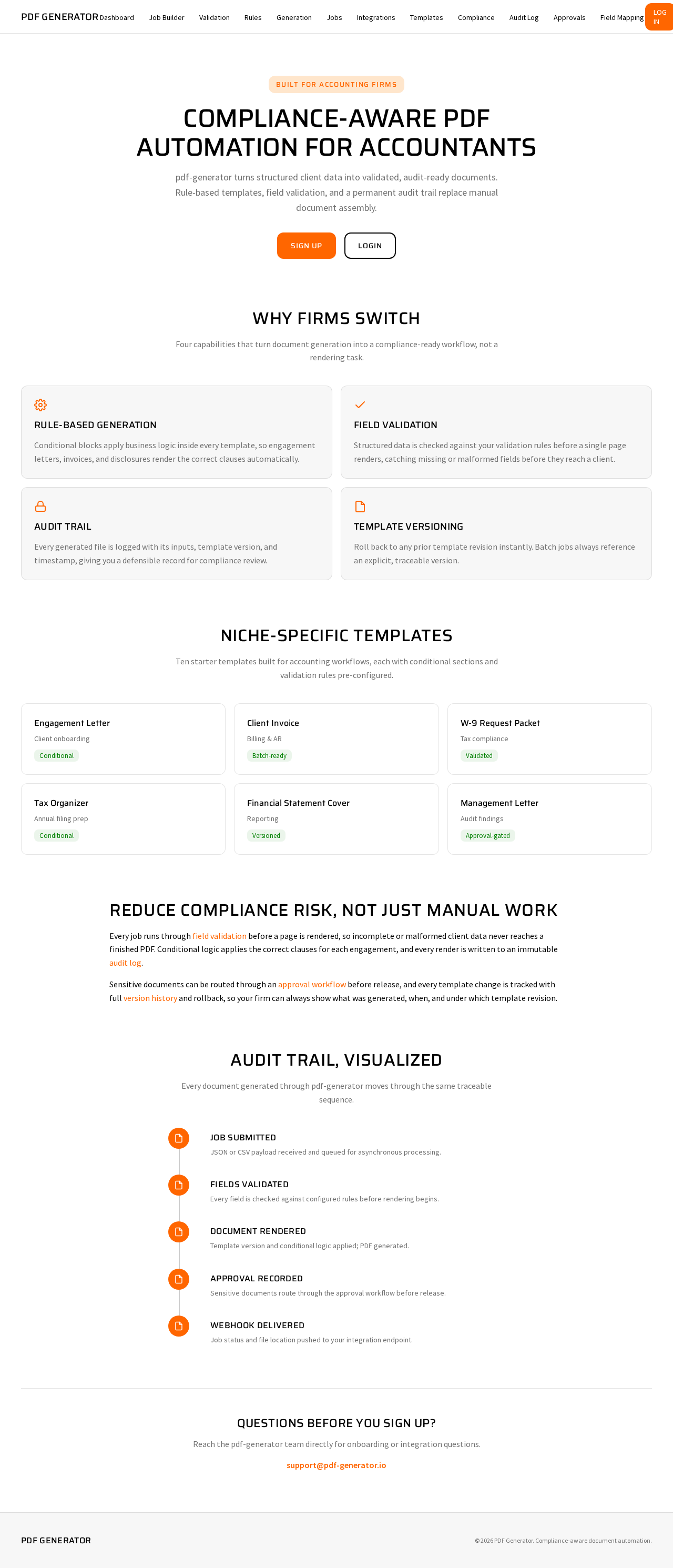
Compliance-aware PDF automation for accountants
pdf-generator turns structured client data into validated, audit-ready documents. Rule-based templates, field validation, and a permanent audit trail replace manual document assembly.
Why Firms Switch
Four capabilities that turn document generation into a compliance-ready workflow, not a rendering task.
Rule-Based Generation
Conditional blocks apply business logic inside every template, so engagement letters, invoices, and disclosures render the correct clauses automatically.
Field Validation
Structured data is checked against your validation rules before a single page renders, catching missing or malformed fields before they reach a client.
Audit Trail
Every generated file is logged with its inputs, template version, and timestamp, giving you a defensible record for compliance review.
Template Versioning
Roll back to any prior template revision instantly. Batch jobs always reference an explicit, traceable version.
Niche-Specific Templates
Ten starter templates built for accounting workflows, each with conditional sections and validation rules pre-configured.
Reduce Compliance Risk, Not Just Manual Work
Every job runs through field validation before a page is rendered, so incomplete or malformed client data never reaches a finished PDF. Conditional logic applies the correct clauses for each engagement, and every render is written to an immutable audit log.
Sensitive documents can be routed through an approval workflow before release, and every template change is tracked with full version history and rollback, so your firm can always show what was generated, when, and under which template revision.
Audit Trail, Visualized
Every document generated through pdf-generator moves through the same traceable sequence.
Job Submitted
JSON or CSV payload received and queued for asynchronous processing.
Fields Validated
Every field is checked against configured rules before rendering begins.
Document Rendered
Template version and conditional logic applied; PDF generated.
Approval Recorded
Sensitive documents route through the approval workflow before release.
Webhook Delivered
Job status and file location pushed to your integration endpoint.
Questions Before You Sign Up?
Reach the pdf-generator team directly for onboarding or integration questions.
support@pdf-generator.ioCompliance-aware PDF automation for accountants
pdf-generator turns structured client data into validated, audit-ready documents. Rule-based templates, field validation, and a permanent audit trail replace manual document assembly.
Why Firms Switch
Four capabilities that turn document generation into a compliance-ready workflow, not a rendering task.
Rule-Based Generation
Conditional blocks apply business logic inside every template, so engagement letters, invoices, and disclosures render the correct clauses automatically.
Field Validation
Structured data is checked against your validation rules before a single page renders, catching missing or malformed fields before they reach a client.
Audit Trail
Every generated file is logged with its inputs, template version, and timestamp, giving you a defensible record for compliance review.
Template Versioning
Roll back to any prior template revision instantly. Batch jobs always reference an explicit, traceable version.
Niche-Specific Templates
Ten starter templates built for accounting workflows, each with conditional sections and validation rules pre-configured.
Reduce Compliance Risk, Not Just Manual Work
Every job runs through field validation before a page is rendered, so incomplete or malformed client data never reaches a finished PDF. Conditional logic applies the correct clauses for each engagement, and every render is written to an immutable audit log.
Sensitive documents can be routed through an approval workflow before release, and every template change is tracked with full version history and rollback, so your firm can always show what was generated, when, and under which template revision.
Audit Trail, Visualized
Every document generated through pdf-generator moves through the same traceable sequence.
Job Submitted
JSON or CSV payload received and queued for asynchronous processing.
Fields Validated
Every field is checked against configured rules before rendering begins.
Document Rendered
Template version and conditional logic applied; PDF generated.
Approval Recorded
Sensitive documents route through the approval workflow before release.
Webhook Delivered
Job status and file location pushed to your integration endpoint.
Questions Before You Sign Up?
Reach the pdf-generator team directly for onboarding or integration questions.
support@pdf-generator.io
No comments yet. Be the first!