Page 1 of 25
System Requirements Document for pasha
1. Introduction
PaashaClips Studio is a fully local, zero-API-key YouTube content-production pipeline for an independent creator operating on one machine. It generates a long-form video and, when enabled and supported locally, automatically derives captioned vertical Shorts from that video.
The system replaces cloud-dependent generation services with a local stack:
- Ollama for content strategy and script generation.
- Sharp for templated thumbnail generation.
- Piper for text-to-speech.
- FFmpeg for media production and clipping.
- faster-whisper for local transcription and word-level caption timing.
- Electron with electron-builder for packaging the local dashboard as a Windows desktop application.
The product must remain useful without any cloud account, API key, credit card, paid tier, credit task, reward claim, or YouTube connection. The agent and its core pipeline are entirely free. YouTube publishing is an optional final action using one optional free Google Cloud OAuth client.
Creative Direction
PaashaClips Studio SHALL feel like a dependable local video workshop with pixel-perfect nerve: a capable desktop studio application for the owner of one machine, not an anonymous cloud dashboard. The interface itself is the imagery, making generation, Shorts extraction, approval, local capability status, and optional publishing tangible and inspectable.
Page 2 of 25
Visuals, Colors, Typography, and Layout
- Persistent application background: warm paper beige
#F2E8D5; work surfaces: cream #FFF9EC; structural ink and text: #1A1A1A.
- Tomato red
#E4572E is reserved for the primary Generate Video Now control, the active pipeline stage, and failure states.
- Green
#168A63 marks local-ready, approved, and completed states; limited sunflower #F2B134 marks warnings; muted supporting text uses #8C826F.
- Blue and indigo status colors are forbidden.
- Headings use Space Mono at weight 700, compact all-caps utility labels, slight positive tracking, and deliberately short labels. Stage names and numerical status use tabular figures.
- Body copy uses DM Sans. Use DM Sans weights 500–700 for controls and 400–500 for explanatory copy, an operational
1.2 rhythm, type scale 64/40/28/20/16/13, 12px Space Mono uppercase labels, and a 16px minimum body size.
- Panels are hard-edged cream surfaces framed by 2px ink rules. Controls may use 8px radii only where pressability needs to be obvious. Shadows are single-direction 4px ink offsets; soft floating elevation is forbidden.
- Use custom one-colour, hand-drawn-feeling pixel icons on a strict 16px grid, including a play triangle, film strip, waveform, scissors, caption tile, folder, and upload arrow.
- Do not use stock creator photography, generic device mockups, gradients, abstract AI blobs, glassmorphism, translucent frosted panels, identical rounded card grids, hover-lift shadows, or generic centered SaaS-hero compositions.
- The Dashboard is a compact desktop studio board: a persistent fixed left rail holds the seven-step pipeline as numbered 32px pixel icons; the broad main canvas contains one dominant run panel followed by a horizontally scrollable production contact sheet for the long-form video, thumbnail, and Shorts. Use ruled rows, visible grid divisions, and label/value pairings rather than uniform cards.
- The selected pipeline stage opens its run log as a ruled in-page drawer; it does not navigate to a separate dashboard.
- Capability checks are presented as a machine-status cassette label with four stacked rows for Ollama, Piper, FFmpeg, and faster-whisper. Each row shows its pixel icon, local service or binary name, version when available, and a plain-English repair instruction only when unavailable.
- Generated assets are presented as a horizontal contact sheet: one wide long-form video frame followed by smaller vertical 9:16 Short frames. Each asset carries a chunky pixel stamp reading
PENDING, APPROVED, or REJECTED.
- Approval controls are opposing stamps: green APPROVE and black-outline REJECT. A selected decision leaves a brief stepped, frame-by-frame imprint over the asset preview.
Page 3 of 25
Landing Hero Motion Brief
- Motion Tempo: restrained.
- Thesis: local inputs become inspectable, creator-owned outputs: an idea moves through a visible production pipeline and resolves into a long-form video plus captioned Shorts ready for review on the local machine.
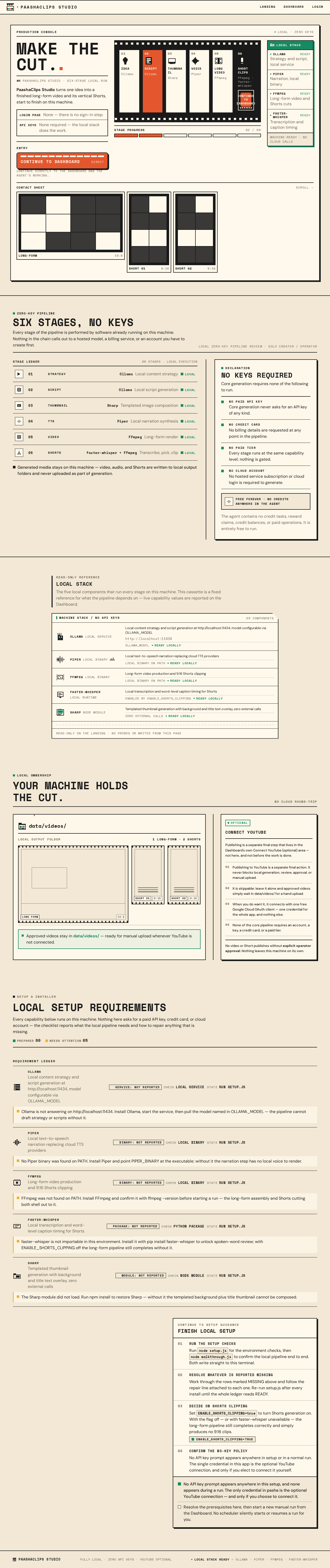
- Focal subject: a full-width cream production console headed by the Space Mono title MAKE THE CUT. beside an oversized black pixel filmstrip spanning approximately 60% of the viewport.
- Composed first frame: the filmstrip contains six sequential frames—idea, script, thumbnail, voice, long video, and short clips—with the current stage filled tomato red. A large tomato-red, 2px-ink-bordered GENERATE VIDEO NOW control is physically inset into the final film frame. A narrow green Local Stack status rail at right lists Ollama, Piper, FFmpeg, and faster-whisper with their machine-ready state.
- Visible layers: warm paper application ground; cream console panel; black pixel-filmstrip with sprocket holes; sequential stage icons and labels; tomato active-stage fill; Local Stack cassette rail; a ruled contact-sheet edge with video, thumbnail, and vertical Short previews.
- Opening and loop: on entry, the six film frames stamp in one cell at a time from idea through short clips, then the active stage advances through one contained loop at restrained tempo. Completed stages stamp into place and a segmented film-strip progress meter fills discretely; the loop returns to the composed first frame without implying an automatic generation run.
- Interaction: activating GENERATE VIDEO NOW begins the actual manual run; its sprocket perforations fill one by one and the control becomes a live elapsed-time display. Selecting a pipeline icon opens the corresponding ruled run-log drawer.
- Implementation: use a product-specific 2D DOM/SVG/CSS composition with Motion for React (
motion/react) or GSAP. Animations MUST be short, discrete, purposeful, and cancellable; no Canvas, WebGL, R3F, Drei, gradients, or decorative motion is required.
- Responsive behavior: preserve the filmstrip sequence, generate control, and Local Stack status as readable ruled regions on narrow screens; the contact sheet scrolls horizontally rather than shrinking vertical Short previews into illegibility.
- Reduced-motion fallback: show the completed composed first frame and apply pipeline, stamp, progress, and approval-state changes instantly.
- Desktop shell: the same composition renders inside the Electron application window; the native window chrome is treated as part of the studio board frame, and the restrained motion tempo, flat hero dimensionality, and reduced-motion fallback are unchanged.
Page 4 of 25
2. System Overview
PaashaClips Studio is delivered as a local Express dashboard on port 3456, backed by a SQLite3 Database class and a local filesystem workspace including data/videos/. It retains the established agent-oriented pipeline architecture while replacing core cloud dependencies with local execution.
PaashaClips Studio is also delivered as a Windows desktop application: an Electron shell wraps the existing Express dashboard and is bundled with electron-builder to produce a Windows .exe (installer plus portable build). The dashboard opens in a native window on launch, so the operator does not need Node, npm, or a browser to run the app. The local stack checks for Ollama, Piper, FFmpeg, and faster-whisper still run at startup with the same plain-English repair instructions, and YouTube publishing remains optional and skippable.
The intended current pipeline is:
- Content strategy generation.
- Script generation.
- Thumbnail generation.
- Local text-to-speech generation.
- Long-form video production.
- Optional Shorts transcription, selection, clipping, and captioning.
- Persistence of production records and asset metadata.
- Manual creator approval or rejection.
- Optional YouTube OAuth connection and publishing only after explicit approval.
The existing codebase architecture must be inspected before implementation. The inspection must verify or report any mismatch with the described architecture:
- Seven original agents:
ContentStrategyAgentScriptWriterAgentThumbnailDesignerAgentSEOOptimizerAgentProductionManagementAgentPublishingSchedulingAgentAnalyticsOptimizationAgent
- SQLite3-backed
Database class.
CredentialManager.- Express dashboard on port
3456.
- Existing
DailyAutomation scheduler.
- Duplicate OAuth flows in
modern-auth.js and oauth-server.js.
- Existing Express dashboard entry point suitable for wrapping in an Electron main process.
The current delivery is intentionally constrained to one creator-operated channel and one manual generation trigger. Automated scheduling and multi-channel support are not current product capabilities.
Page 5 of 25
2a. Product Interpretation and Delivery Boundary
PaashaClips Studio is a local-first creator-production utility, not a cloud SaaS service. The Solo Creator / Operator can generate, inspect, approve, reject, and manually upload locally produced assets without ever connecting to Google or supplying an API key.
The system owns the local dashboard, locally stored generated media, review statuses, production metadata, setup checks, and local pipeline execution. The application does not present a login page and does not require any sign-in, enrollment, or verification step: the operator opens the dashboard and works directly. Generated media and review state are available immediately on the local machine. This boundary exists only to preserve ownership and continuity of locally durable creator work; it does not imply account-management, multi-user collaboration, invitations, role-based permissions, or cloud identity features.
The desktop packaging boundary is local-only: the Electron shell and electron-builder packaging run on the operator's machine, produce a Windows .exe (installer plus portable build), and launch the existing Express dashboard in a native window. Packaging does not introduce a cloud service, an account, an API key, a paid tier, or a required YouTube connection, and it does not change the optional and skippable status of YouTube publishing.
YouTube is externally owned. The operator may choose to connect YouTube using one free Google Cloud OAuth client. This connection is separate from generation and review, is optional, and must never block local generation, asset review, approval, or manual upload from data/videos/.
Current delivery excludes:
- A login page, sign-in step, or any authentication gate before the agent and its working are reachable.
- Required API keys in the core pipeline.
- Credit-card, paid-tier, or paid-provider dependency in the core pipeline.
- Credit tasks, reward claims, credit balances, or paid operations in the agent or core pipeline.
- Cloud LLM, cloud image generation, and cloud TTS services in the core pipeline.
- Required YouTube OAuth connection.
- Automatic publishing without explicit approval.
- A separate review queue page.
- Elaborate review-state workflows beyond pending review, approved, and rejected.
- Automation scheduling in the current product workflow.
- Multi-channel support.
- Any API-key prompt during setup unless the operator elects to connect YouTube.
- A required Node/npm installation or a required browser to launch the application.
Page 6 of 25
2b. Source Content Inventory
The authoritative existing-artifact source must be read before implementation and used for factual verification, architecture alignment, and implementation patterns.
Verified source-content targets to inspect and preserve where applicable:
index.js
- Application startup flow.
- Express dashboard configuration.
- Existing dashboard behavior.
generateContent() orchestration.logCapabilitySummary().- Console startup banner.
- Existing scheduler startup behavior.
agents/
- Existing agent constructor and initialization patterns.
- Existing content, script, thumbnail, SEO, production, publishing/scheduling, and analytics agent responsibilities.
database/db.js
- SQLite3
Database class.
- Existing persistence methods.
saveProductionData.
utils/credential-manager.js
- Existing credential ownership and access behavior.
utils/ffmpeg.js
- Existing
checkFFmpeg() capability-check style and failure messaging.
modern-auth.js
- OAuth implementation and auto-browser-open user experience to retain.
oauth-server.js
- Duplicate OAuth flow to consolidate and remove.
test.js
- Existing
SystemTest style.
- Existing 12 system tests.
- Simulation-fallback behavior expectations.
setup.js and walkthrough.js
- Existing setup flow and capability-check tone.
README and CONTRIBUTING.md
- Existing user-facing documentation references and setup instructions.
package.json
- Existing scripts, dependencies, user-facing description, and internal package name behavior.
- Electron and
electron-builder packaging configuration
- Electron main-process entry that wraps the existing Express dashboard.
electron-builder target configuration for the Windows .exe installer and portable build.- Packaging scripts added to
package.json without renaming the internal package name field.
No unverified product facts, populated source collections, contacts, dates, links, or media assets are introduced by this document.
Page 7 of 25
2c. Page Content and Component Coverage
Page 8 of 25
Landing
- Purpose and access
- Public application entry surface.
- Available without login to the Solo Creator / Operator and Setup / Installer.
- Explains that PaashaClips Studio is a fully local, zero-API-key YouTube production pipeline that can create long-form videos and Shorts.
- Information and state
- Local-first product explanation.
- Clear statement that core generation requires no paid API key, credit card, paid tier, or cloud account.
- Clear statement that YouTube connection is optional.
- Entry-state indication that the agent and its working are reachable directly, with no login page and no sign-in step.
- Clear statement that PaashaClips Studio is available as a Windows desktop application (
.exe) that launches the dashboard in a native window without a Node/npm setup or a browser.
- Primary actions
- Continue directly to the Dashboard and the agent's working.
- Continue to local setup guidance when the visitor is preparing the machine.
- Supporting content
- Local stack overview: Ollama, Piper, FFmpeg, faster-whisper, and Sharp.
- Plain-language explanation that approved videos remain in
data/videos/ for manual upload when YouTube is not connected.
- Plain-language explanation that the Windows
.exe installer and portable build are produced locally with Electron and electron-builder.
- Loading, empty, success, error, and recovery states
- Loading: entry information may render while local availability information is being prepared.
- Success: visitor proceeds directly to the Dashboard or to setup.
- Error/recovery: where local setup has not been completed, the page directs the Setup / Installer to setup guidance rather than requesting API keys.
Page 9 of 25
Dashboard
- Purpose and access
- Main workspace for the Solo Creator / Operator.
- Reachable directly with no login page, no sign-in step, and no authentication gate.
- Owns the current manual generation, pipeline progress, review, local capability visibility, and optional YouTube connection interactions.
- Renders inside the Electron native window when the desktop application is launched, and inside a browser when the Express dashboard is opened directly.
- Production console
- Prominent single Generate Video Now control.
- The action triggers
/generate.
- Only one manual generation trigger is provided.
- The current product supports one channel only.
- The dashboard does not provide an automated scheduler workflow.
- Live pipeline progress
- Shows live progress for the required stages in this order:
- Strategy
- Script
- Thumbnail
- TTS
- Video
- Shorts
- Displays the active, completed, skipped, degraded, or failed state for applicable stages.
- Provides a run log drawer or equivalent in-page operational detail for a selected pipeline stage.
- Generated asset review section
- Displays generated long-form video, thumbnail, and generated Shorts in one minimal dashboard section.
- Shows local asset previews and asset paths where applicable.
- Shows review status for each reviewable asset:
pending_reviewapprovedrejected
- Provides exactly one Approve control and one Reject control per generated video, thumbnail, and Short.
- Does not introduce a separate queue page or additional review workflow states.
- Approval behavior
- After production and optional Shorts clipping complete, generated outputs are placed into
pending_review.
- No item may publish without explicit operator approval.
- Rejection is a visible final review decision within the supported simple review model.
- Approved local videos remain in
data/videos/ for manual upload unless the operator separately chooses optional YouTube connection and publishing.
- Optional YouTube connection section
- Separate dashboard section titled exactly Connect YouTube (optional).
- Starts the consolidated OAuth flow only when selected by the operator.
- Retains the auto-browser-open experience from
modern-auth.js.
- Shows connection success or failure without affecting local-generation usefulness.
- OAuth success messages, browser HTML, and console output use the PaashaClips Studio name.
- Local capability status
- Displays availability of Ollama, Piper, FFmpeg, and faster-whisper.
- Shows local binary or service name, availability, and version when available.
- Shows plain-English repair instructions only when a capability is unavailable.
- Runs the same Ollama, Piper, FFmpeg, and faster-whisper checks at desktop-application startup, with the same plain-English repair instructions.
- Clearly distinguishes:
- Required local production prerequisites.
- Missing faster-whisper behavior when Shorts clipping is enabled.
- Optional Shorts behavior when
ENABLE_SHORTS_CLIPPING is disabled.
- Data entities
- Content record.
- Production record.
- Long-form video.
- Thumbnail.
- Short.
- Local capability status.
- Optional YouTube OAuth connection state.
- Desktop packaging target (Windows
.exe installer and portable build).
- Loading, empty, success, error, and recovery states
- Empty: no generated media exists; the Generate Video Now control remains available.
- Generating: live stage progress and elapsed execution state are shown.
- Success: the completed video, thumbnail, and available Shorts appear for review.
- Degraded success: generation completes without Shorts when Shorts clipping is disabled or faster-whisper is unavailable.
- Error: failed local capability or failed pipeline stage is clearly identified with plain-English repair or retry guidance.
- Recovery: after resolving a local dependency issue, the operator can start a new manual generation run; no scheduler silently starts or resumes.
- Desktop launch: the Electron window opens the dashboard directly; if the local Express server cannot start, the window reports the failure with plain-English guidance instead of failing silently.
Page 10 of 25
3. Functional Requirements
FR-01 — Local-first pipeline
As a Solo Creator / Operator, I should be able to use the core content pipeline entirely on my local machine without an API key, paid tier, credit card, or cloud account, so that I retain control of production and can work without mandatory external services.
- Provenance: explicit.
- Trigger/input: The operator runs setup and uses the local dashboard.
- Access: No login page and no authentication gate; the operator opens the dashboard and works directly.
- Behavior and observable result:
- Core generation executes locally.
- The system does not require cloud LLM, cloud image generation, cloud TTS, paid services, or API keys for core production.
- Generated media remains locally available, including in
data/videos/.
- The system does not present credit tasks, reward claims, credit balances, or paid operations; the agent remains entirely free.
- The application is packaged as a Windows
.exe (installer plus portable build) using Electron and electron-builder, and launches the dashboard in a native window without requiring Node, npm, or a browser.
- Failure/recovery: Missing local dependencies must be reported clearly with install instructions rather than failing silently.
- Continuation: The operator can resolve prerequisites and continue using the local pipeline.
Page 11 of 25
FR-02 — Architecture verification before implementation
As a Setup / Installer, I should have the existing codebase architecture verified before changes are made, so that implementation follows the actual repository rather than assumptions.
- Provenance: explicit.
- Trigger/input: Work begins on the rebrand and pipeline changes.
- Behavior and observable result:
- The implementation process reads
index.js, agents/, database/db.js, utils/credential-manager.js, and utils/ffmpeg.js.
- It verifies the described seven-agent architecture, SQLite3 database, CredentialManager, Express dashboard on port
3456, DailyAutomation scheduler, and duplicate OAuth modules.
- It verifies the existing Express dashboard entry point is suitable for wrapping in an Electron main process before packaging work begins.
- Any mismatch is reported before proceeding.
- Failure/recovery: A discovered mismatch must be surfaced and reconciled before the affected implementation work continues.
- Continuation: Confirmed repository patterns guide subsequent changes.
Page 12 of 25
FR-03 — Ordered implementation and quality gates
As a Setup / Installer, I should have implementation performed in the requested phase order with test and lint checks after each phase, so that the system changes remain controlled and regressions are visible.
- Provenance: explicit.
- Trigger/input: Completion of each implementation phase.
- Behavior and observable result:
- Work proceeds through Phases 1 through 7 in order.
- After each phase,
npm test and npm run lint are run.
- A summary of changes is shown.
- Work pauses until the user says
continue before the next phase begins.
- One clear commit is created after each phase, with one concern per commit.
- Failure/recovery: Test or lint failures must be addressed before the next phase proceeds.
- Continuation: The next phase begins only after user continuation approval.
Page 13 of 25
FR-04 — Regression and simulation protection
As a Setup / Installer, I should have regression coverage for each new behavior while preserving the existing 12 system tests and simulation fallback, so that the pipeline remains testable even with zero dependencies installed.
- Provenance: explicit.
- Trigger/input: Each new behavior added in Phases 1 through 7.
- Behavior and observable result:
- A regression test is added in
test.js for each new behavior using the existing SystemTest pattern.
- The existing 12 system tests remain functional.
- The pipeline remains able to run in simulation-fallback mode with zero dependencies installed for testing.
- Failure/recovery: Missing dependencies in test environments must not cause silent crashes or invalidate the simulation fallback.
- Continuation: The installer can run the test suite and validate behavior without accounts.
Page 14 of 25
FR-05 — Consolidated optional OAuth module
As a Solo Creator / Operator, I should be able to initiate one optional YouTube OAuth connection flow with the existing auto-browser-open experience, so that optional publishing setup is not duplicated or confusing.
- Provenance: explicit.
- Trigger/input: The operator selects Connect YouTube (optional) from Dashboard.
- Access: No login required for Dashboard; Google OAuth is optional.
- Behavior and observable result:
modern-auth.js and oauth-server.js are consolidated into one OAuth module.- The retained OAuth flow keeps
modern-auth.js auto-browser-open UX.
- The duplicate OAuth flow is removed.
- Related package scripts and README references are updated.
- OAuth success HTML and console logs display “PaashaClips Studio.”
- Failure/recovery: OAuth connection failures are shown clearly and do not block local generation, review, approval, or manual upload.
- Continuation: The operator may retry optional connection later or continue fully locally.
Page 15 of 25
FR-06 — Production API key startup warning
As a Setup / Installer, I should receive a loud startup warning when NODE_ENV=production and API_KEY is unset, so that the condition is visible rather than hidden in logger output.
- Provenance: explicit.
- Trigger/input: Application startup in production mode.
- Behavior and observable result:
- When
NODE_ENV=production and API_KEY is unset, the application emits a loud startup warning in addition to, or instead of, logger-only warning behavior.
- Failure/recovery: The warning is clearly visible to the operator at startup.
- Continuation: The system preserves the zero-key core-pipeline boundary; the warning does not redefine a core pipeline API key as required.
FR-07 — FFmpeg scheduler safety
As a Setup / Installer, I should have any scheduler startup refused loudly when FFmpeg is unavailable, so that automated execution cannot proceed silently without required video tooling.
- Provenance: explicit.
- Trigger/input: Startup of any retained or transitional scheduler behavior.
- Behavior and observable result:
- FFmpeg availability is checked at startup.
- If FFmpeg is unavailable, the scheduler does not start and the failure is loud.
- Failure/recovery: Plain-English FFmpeg installation or repair guidance is provided.
- Continuation: The installer resolves FFmpeg availability before any scheduler can start.
- Current boundary: The current product workflow does not expose or run an automation scheduler; this requirement preserves safe handling of the existing scheduler during architecture transition.
Page 16 of 25
FR-08 — Local Ollama content strategy and scripting
As a Solo Creator / Operator, I should have content strategy and scripts generated through local Ollama, so that the core ideation and writing stages require no cloud LLM API key.
- Provenance: explicit.
- Trigger/input: The operator starts Generate Video Now.
- Access: No login required.
- Behavior and observable result:
ContentStrategyAgent uses a local Ollama instance at http://localhost:11434.ScriptWriterAgent uses a local Ollama instance at http://localhost:11434.- The Ollama model is configurable through
.env variable OLLAMA_MODEL.
- Example supported model configuration includes
llama3.1:8b.
- Cloud LLM calls in these agents are replaced.
- Failure/recovery: If Ollama is unavailable, the system provides clear plain-English instructions rather than silently crashing. Simulation fallback remains available for testing.
- Continuation: Once Ollama is available, the pipeline continues from strategy to script.
Page 17 of 25
FR-09 — Local templated thumbnail generation
As a Solo Creator / Operator, I should receive a templated thumbnail made locally with Sharp, so that thumbnail creation makes zero external calls.
- Provenance: explicit.
- Trigger/input: The pipeline reaches the thumbnail stage after strategy and script generation.
- Access: No login required.
- Behavior and observable result:
ThumbnailDesignerAgent replaces AI image generation with a Sharp-generated template.- The template includes a background and title text overlay.
- Thumbnail generation makes zero external calls.
- The generated thumbnail appears with the associated video in the Dashboard review section.
- Failure/recovery: A generation error is shown as a thumbnail-stage failure and allows a subsequent manual run after the local issue is corrected.
- Continuation: A successful thumbnail proceeds to TTS and video production.
Page 18 of 25
FR-10 — Local Piper text-to-speech
As a Solo Creator / Operator, I should have script narration generated through local Piper TTS, so that voice production does not use a cloud TTS provider.
- Provenance: explicit.
- Trigger/input: The pipeline reaches the TTS stage.
- Access: No login required.
- Behavior and observable result:
ProductionManagementAgent uses a local Piper TTS call.- Cloud TTS providers are not used for this step.
- The generated narration supports local long-form video production.
- Failure/recovery: If Piper is missing or unavailable, the system presents plain-English installation or repair instructions and does not silently crash.
- Continuation: Once Piper succeeds, the pipeline advances to video generation.
Page 19 of 25
FR-11 — Local capability checks and summary
As a Setup / Installer, I should receive clear local capability checks for Ollama, Piper, FFmpeg, and faster-whisper, so that I can prepare or repair the machine without cloud credential prompts.
- Provenance: explicit and required_inference.
- Trigger/input: Application startup and execution of
setup.js or walkthrough.js.
- Behavior and observable result:
- Ollama availability is checked as a local service availability condition.
- Piper availability is checked as a local binary availability condition.
- FFmpeg availability is checked using the existing
checkFFmpeg() style.
- faster-whisper availability is checked for Shorts functionality.
logCapabilitySummary() reports the local stack rather than legacy OpenAI, Gemini, ElevenLabs, or Azure checks.setup.js and walkthrough.js report missing capabilities in the established FFmpeg-check tone and provide install instructions.- No API key prompt is presented unless the operator chooses optional YouTube connection.
- The same Ollama, Piper, FFmpeg, and faster-whisper checks run at desktop-application startup, with the same plain-English repair instructions.
- Failure/recovery: Missing capabilities yield clear, actionable install guidance; failures are never silent.
- Continuation: The installer resolves needed components, or the system uses supported graceful degradation and simulation behavior.
Page 20 of 25
FR-12 — Shorts clipping agent
As a Solo Creator / Operator, I should have the system generate two or three high-hook-potential Shorts from a completed long-form video when Shorts clipping is enabled and locally supported, so that every produced video can also yield vertical short-form clips.
- Provenance: explicit.
- Trigger/input:
ProductionManagementAgent completes the long-form .mp4 and ENABLE_SHORTS_CLIPPING=true.
- Access: No login required.
- Behavior and observable result:
- A new
agents/shorts-clipping-agent.js follows the repository’s existing agent pattern.
- Its constructor accepts
db and credentials.
- It provides
initialize().
- It is invoked by
generateContent() after production and before the database-save step.
- It transcribes the long-form video locally using faster-whisper through a Python subprocess or an appropriate Node binding.
- It sends the local transcript to Ollama to identify two or three highest-hook-potential segments.
- It cuts selected segments using FFmpeg into 9:16 vertical clips.
- It burns word-by-word captions into clips using faster-whisper word-level timestamps.
- Failure/recovery: If faster-whisper is not installed, Shorts clipping degrades gracefully in the same spirit as the FFmpeg check pattern. The long-form pipeline remains usable.
- Continuation: Available Shorts are saved and shown for individual review; unavailable Shorts do not prevent long-form review.
Page 21 of 25
FR-13 — Shorts persistence
As a Solo Creator / Operator, I should have each generated Short persisted with its required metadata and review status, so that I can inspect and approve or reject it independently.
- Provenance: explicit.
- Trigger/input: A Short is successfully created by the Shorts clipping agent.
- Access: No login required to view records.
- Behavior and observable result:
database/db.js defines a shorts table.- Each Short row includes:
contentId as a foreign key.path.title.durationSec.status.
- Supported status values are:
pending_reviewapprovedrejected
saveProductionData inserts generated Short rows.
- Failure/recovery: Failed Short persistence is reported as a production persistence failure and must not be represented as an available reviewable asset.
- Continuation: Persisted Shorts appear in the Dashboard review section.
Page 22 of 25
FR-14 — Feature-flagged graceful Shorts behavior
As a Solo Creator / Operator, I should be able to run the pipeline correctly with Shorts clipping disabled or with faster-whisper unavailable, so that optional clip generation does not make long-form production unusable.
- Provenance: explicit.
- Trigger/input:
.env value ENABLE_SHORTS_CLIPPING is not true, or faster-whisper is unavailable.
- Access: No login required for dashboard runs.
- Behavior and observable result:
- Shorts clipping is enabled only when
ENABLE_SHORTS_CLIPPING=true.
- With the flag off, the long-form pipeline completes without Shorts processing.
- With faster-whisper unavailable, the pipeline degrades gracefully rather than silently crashing.
- Dashboard progress communicates the skipped, unavailable, or degraded Shorts result.
- Failure/recovery: The operator receives faster-whisper installation guidance when relevant.
- Continuation: The completed long-form video and thumbnail proceed to pending review.
Page 23 of 25
FR-15 — Pending-review approval gate
As a Solo Creator / Operator, I should have generated production outputs placed in pending_review before any publishing action, so that nothing publishes without my explicit approval.
- Provenance: explicit.
- Trigger/input: Production and optional Shorts clipping complete.
- Access: No login required.
- Behavior and observable result:
- Generated outputs are assigned
pending_review after production and Shorts processing and before any scheduleContent() behavior.
- No video or Short may publish without explicit operator approval.
- The approved/rejected decision is controlled by the operator from Dashboard.
- Failure/recovery: A pending item remains unpublished when no decision has been made.
- Continuation: The operator approves for optional publishing or manual upload readiness, or rejects the item.
Page 24 of 25
FR-16 — Minimal per-asset review controls
As a Solo Creator / Operator, I should be able to approve or reject each generated video, thumbnail, and Short from one Dashboard review section, so that review remains direct and lightweight.
- Provenance: explicit.
- Trigger/input: Generated production assets are displayed on Dashboard.
- Access: No login required.
- Behavior and observable result:
- Each generated video, thumbnail, and Short has one Approve action and one Reject action.
- The resulting status is visibly updated to
approved or rejected.
- The interface does not add a separate review queue page.
- The interface does not add elaborate intermediate review states.
- Failure/recovery: If a status update fails, the existing status remains visible and the operator receives an actionable error.
- Continuation: Approved videos remain local for manual upload or optional YouTube publishing; rejected assets remain visibly rejected.
Page 25 of 25
FR-17 — One-click manual generation and live progress
As a Solo Creator / Operator, I should be able to start one video-generation run from a single Generate Video Now button and observe live progress through every stage, so that the local pipeline is understandable and controllable.
- Provenance: explicit.
- Trigger/input: The operator selects Generate Video Now on Dashboard.
- Access: No login required.
- Behavior and observable result:
- The control triggers
/generate.
- The dashboard displays live progress in this exact sequence:
- Strategy
- Script
- Thumbnail
- TTS
- Video
- Shorts
- The run produces a long-form video and
- Desktop packaging: the same control and live progress render inside the Electron native window when the desktop application is launched, and inside a browser when the Express dashboard is opened directly.



No comments yet. Be the first!