organization-email-management
 Chintan Radadiya
Analyze attached word document and create implementation approach , SOW and timeline.


Comments (0)
Sign in to leave a comment
System Requirements
System Requirements Document
1. Introduction
This document outlines the system requirements for an AI-Powered Executive Office & Reporting System. The system is designed to facilitate secure internal web application functionalities, including AI-powered email management, task routing, and executive office management. It is intended for use by the client and office assistants, providing responsive access across various devices such as desktops, laptops, tablets, and mobile devices.
2. System Overview
The system will integrate with the client's email environment to automate email processing, task management, and executive reporting. It will leverage AI to analyze emails and attachments, route tasks, and draft responses in both English and Arabic. The system will also provide a comprehensive executive dashboard for workload management.
3. Functional Requirements
3.1 Authentication & User Management
- As a user, I want to securely log in and log out of the system.
- As a user, I want to manage my password and reset it if necessary.
- As a primary user, I want to add office assistants/members to the system.
- As a user, I want initial members to have equivalent or duplicate access.
3.2 Email Integration
- As a user, I want to connect to the client email environment using official provider APIs.
- As a user, I want to securely authenticate and maintain the email connection.
- As a user, I want email synchronization and processing to run in the background.
3.3 Automatic Email Reading
- As a user, I want the system to detect new incoming emails.
- As a user, I want the system to automatically retrieve message content and relevant attachments.
- As a user, I want the system to process emails and attachments without keeping the email application open.
- As a user, I want the system to analyze email content and redirect it to the related department.
- As a user, I want insights of email and attachments provided as a summary.
- As a user, I want the system to draft responses in Arabic and English.
- As a user, I want to track unanswered and overdue emails.
- As a user, I want a daily/weekly executive inbox summary.
3.4 AI Email & Attachment Analysis
- As a user, I want the system to understand the purpose and request contained in the email.
- As a user, I want the system to analyze supporting attachments.
- As a user, I want the system to identify the subject/category and requested action.
- As a user, I want the system to extract relevant contextual information.
- As a user, I want the system to identify potential sensitivity and escalation needs.
3.5 Intelligent Routing
- As a user, I want the system to determine the appropriate department for email routing.
- As a user, I want the system to determine the responsible person where rules permit.
- As a user, I want to use configurable routing logic supplied by the client.
- As a user, I want the system to create an internal task/work item associated with the originating email.
3.6 Sensitivity, Escalation & Approval
- As a user, I want the system to classify requests according to configurable sensitivity/escalation rules.
- As a user, I want normal requests to be routed according to business rules.
- As a user, I want sensitive requests to be sent into a human approval path where required.
- As a user, I want the system to record approval/rejection outcomes and workflow history.
3.7 Task Management
- As a user, I want to create tasks from incoming requests.
- As a user, I want to associate tasks with source emails and attachments.
- As a user, I want to track task status from intake through completion.
- As a user, I want visibility of pending, in-progress, delayed, and completed work.
3.8 AI Response Drafting
- As a user, I want the system to generate a draft response based on the incoming email, attachments, and context with English and Arabic support.
- As a user, I want to edit the AI-generated draft.
3.9 Human Review & Send
- As a user, I want AI-generated email drafts to be presented for human review.
- As a user, I want explicit human approval to be required before sending emails.
3.10 Email/Task Review Workspace
- As a user, I want to display AI summary/classification.
- As a user, I want to see routing and approval status.
- As a user, I want to see task state and history.
3.11 Executive Dashboard
- As a user, I want to see the overall workload and number of memos/requests.
- As a user, I want to see items under review, in progress, delayed, and completed.
- As a user, I want an executive view of the current office workload.
3.12 Responsive Web Access
- As a user, I want browser-based access.
- As a user, I want a responsive experience for desktop, laptop, iPad/tablet, and mobile.
4. User Personas
- Primary User: The client who manages office assistants and oversees the executive office operations.
- Office Assistant: Assists the primary user in managing emails, tasks, and executive reporting.
5. Core User Flows
- Email Processing Flow:
- Email arrives.
- System retrieves email and attachments.
- AI analyzes request.
- Classification/sensitivity assessment.
- Routing decision.
- Task creation.
- Escalation/approval where required.
- Response drafting where applicable.
- Human review.
- Human approval.
- Email send/route.
- Status tracking.
- Executive dashboard update.
6. Visuals Colors and Theme
- Default to a professional and clean theme suitable for executive environments, with a focus on usability and clarity.
7. Signature Design Concept
- A minimalist design that emphasizes functionality and ease of use, with intuitive navigation and clear visual hierarchy.
8. Interaction Model & Motion Direction
- Smooth transitions and animations to enhance user experience without distracting from core functionalities.
9. Non-Functional Requirements
- The system must ensure data security and privacy.
- The system should be highly available and responsive.
- The system should support scalability to accommodate growing user needs.
10. Tech Stack
- The tech stack will be determined based on the client's existing infrastructure and integration requirements with email providers.
11. Assumptions and Constraints
- The system will integrate with existing email providers using their official APIs.
- The system must comply with relevant data protection regulations.
12. Glossary
- AI: Artificial Intelligence
- API: Application Programming Interface
- Executive Dashboard: A visual representation of key metrics and workload for executive management.
- Routing Logic: Rules that determine how emails and tasks are directed within the system.
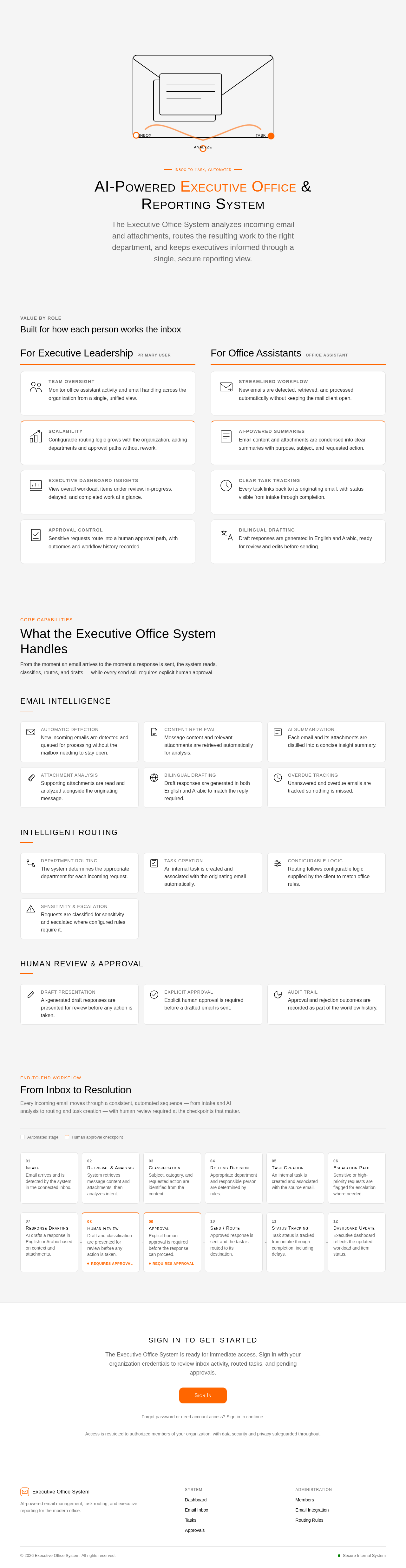
AI-Powered Executive Office & Reporting System
The Executive Office System analyzes incoming email and attachments, routes the resulting work to the right department, and keeps executives informed through a single, secure reporting view.
Built for how each person works the inbox
For Executive Leadership
Primary UserTeam Oversight
Monitor office assistant activity and email handling across the organization from a single, unified view.
Scalability
Configurable routing logic grows with the organization, adding departments and approval paths without rework.
Executive Dashboard Insights
View overall workload, items under review, in-progress, delayed, and completed work at a glance.
Approval Control
Sensitive requests route into a human approval path, with outcomes and workflow history recorded.
For Office Assistants
Office AssistantStreamlined Workflow
New emails are detected, retrieved, and processed automatically without keeping the mail client open.
AI-Powered Summaries
Email content and attachments are condensed into clear summaries with purpose, subject, and requested action.
Clear Task Tracking
Every task links back to its originating email, with status visible from intake through completion.
Bilingual Drafting
Draft responses are generated in English and Arabic, ready for review and edits before sending.
What the Executive Office System Handles
From the moment an email arrives to the moment a response is sent, the system reads, classifies, routes, and drafts — while every send still requires explicit human approval.
Email Intelligence
Automatic Detection
New incoming emails are detected and queued for processing without the mailbox needing to stay open.
Content Retrieval
Message content and relevant attachments are retrieved automatically for analysis.
AI Summarization
Each email and its attachments are distilled into a concise insight summary.
Attachment Analysis
Supporting attachments are read and analyzed alongside the originating message.
Bilingual Drafting
Draft responses are generated in both English and Arabic to match the reply required.
Overdue Tracking
Unanswered and overdue emails are tracked so nothing is missed.
Intelligent Routing
Department Routing
The system determines the appropriate department for each incoming request.
Task Creation
An internal task is created and associated with the originating email automatically.
Configurable Logic
Routing follows configurable logic supplied by the client to match office rules.
Sensitivity & Escalation
Requests are classified for sensitivity and escalated where configured rules require it.
Human Review & Approval
Draft Presentation
AI-generated draft responses are presented for review before any action is taken.
Explicit Approval
Explicit human approval is required before a drafted email is sent.
Audit Trail
Approval and rejection outcomes are recorded as part of the workflow history.
From Inbox to Resolution
Every incoming email moves through a consistent, automated sequence — from intake and AI analysis to routing and task creation — with human review required at the checkpoints that matter.
Intake
Email arrives and is detected by the system in the connected inbox.
Retrieval & Analysis
System retrieves message content and attachments, then analyzes intent.
Classification
Subject, category, and requested action are identified from the content.
Routing Decision
Appropriate department and responsible person are determined by rules.
Task Creation
An internal task is created and associated with the source email.
Escalation Path
Sensitive or high-priority requests are flagged for escalation where needed.
Response Drafting
AI drafts a response in English or Arabic based on context and attachments.
Human Review
Draft and classification are presented for review before any action is taken.
Requires approvalApproval
Explicit human approval is required before the response can proceed.
Requires approvalSend / Route
Approved response is sent and the task is routed to its destination.
Status Tracking
Task status is tracked from intake through completion, including delays.
Dashboard Update
Executive dashboard reflects the updated workload and item status.
Sign In To Get Started
The Executive Office System is ready for immediate access. Sign in with your organization credentials to review inbox activity, routed tasks, and pending approvals.
Access is restricted to authorized members of your organization, with data security and privacy safeguarded throughout.
AI-Powered Executive Office & Reporting System
The Executive Office System analyzes incoming email and attachments, routes the resulting work to the right department, and keeps executives informed through a single, secure reporting view.
Built for how each person works the inbox
For Executive Leadership
Primary UserTeam Oversight
Monitor office assistant activity and email handling across the organization from a single, unified view.
Scalability
Configurable routing logic grows with the organization, adding departments and approval paths without rework.
Executive Dashboard Insights
View overall workload, items under review, in-progress, delayed, and completed work at a glance.
Approval Control
Sensitive requests route into a human approval path, with outcomes and workflow history recorded.
For Office Assistants
Office AssistantStreamlined Workflow
New emails are detected, retrieved, and processed automatically without keeping the mail client open.
AI-Powered Summaries
Email content and attachments are condensed into clear summaries with purpose, subject, and requested action.
Clear Task Tracking
Every task links back to its originating email, with status visible from intake through completion.
Bilingual Drafting
Draft responses are generated in English and Arabic, ready for review and edits before sending.
What the Executive Office System Handles
From the moment an email arrives to the moment a response is sent, the system reads, classifies, routes, and drafts — while every send still requires explicit human approval.
Email Intelligence
Automatic Detection
New incoming emails are detected and queued for processing without the mailbox needing to stay open.
Content Retrieval
Message content and relevant attachments are retrieved automatically for analysis.
AI Summarization
Each email and its attachments are distilled into a concise insight summary.
Attachment Analysis
Supporting attachments are read and analyzed alongside the originating message.
Bilingual Drafting
Draft responses are generated in both English and Arabic to match the reply required.
Overdue Tracking
Unanswered and overdue emails are tracked so nothing is missed.
Intelligent Routing
Department Routing
The system determines the appropriate department for each incoming request.
Task Creation
An internal task is created and associated with the originating email automatically.
Configurable Logic
Routing follows configurable logic supplied by the client to match office rules.
Sensitivity & Escalation
Requests are classified for sensitivity and escalated where configured rules require it.
Human Review & Approval
Draft Presentation
AI-generated draft responses are presented for review before any action is taken.
Explicit Approval
Explicit human approval is required before a drafted email is sent.
Audit Trail
Approval and rejection outcomes are recorded as part of the workflow history.
From Inbox to Resolution
Every incoming email moves through a consistent, automated sequence — from intake and AI analysis to routing and task creation — with human review required at the checkpoints that matter.
Intake
Email arrives and is detected by the system in the connected inbox.
Retrieval & Analysis
System retrieves message content and attachments, then analyzes intent.
Classification
Subject, category, and requested action are identified from the content.
Routing Decision
Appropriate department and responsible person are determined by rules.
Task Creation
An internal task is created and associated with the source email.
Escalation Path
Sensitive or high-priority requests are flagged for escalation where needed.
Response Drafting
AI drafts a response in English or Arabic based on context and attachments.
Human Review
Draft and classification are presented for review before any action is taken.
Requires approvalApproval
Explicit human approval is required before the response can proceed.
Requires approvalSend / Route
Approved response is sent and the task is routed to its destination.
Status Tracking
Task status is tracked from intake through completion, including delays.
Dashboard Update
Executive dashboard reflects the updated workload and item status.
Sign In To Get Started
The Executive Office System is ready for immediate access. Sign in with your organization credentials to review inbox activity, routed tasks, and pending approvals.
Access is restricted to authorized members of your organization, with data security and privacy safeguarded throughout.
No comments yet. Be the first!