orbit-show
 Emmanuel Somuyiwa
Create a App that show all my detail and the name Cisco and for writing codes

Comments (0)
Sign in to leave a comment
System Requirements
System Requirements Document for orbit-show
Introduction
The "orbit-show" application is designed to display user details and the name "Cisco," while also providing functionality for writing code. This application targets developers and tech enthusiasts who appreciate a clean and precise interface that showcases both personal information and coding capabilities.
System Overview
The application will be a split-screen interface, with one side dedicated to displaying user details and the name "Cisco," and the other side for writing and showcasing code. The design will follow a duality theme inspired by Adham Dannaway, emphasizing a clear separation between personal information and code. The application will be delivered as a web-based platform accessible to users without requiring specific identity management.
Product Interpretation and Delivery Boundary
The application will be delivered as a web-based platform, accessible to users without requiring login or identity management. The focus is on providing a seamless experience for displaying personal details and writing code. The application will not include additional features such as account management or external integrations beyond the stated requirements.
Page Content and Component Coverage
Home
-
User Details Section
- Display user's personal details.
- Show the name "Cisco" prominently.
- Use a clean and organized layout with rounded corners and precise spacing.
- Loading State: Display a loading animation while fetching user details.
- Error State: Show an error message if user details cannot be loaded.
-
Code Writing Section
- Provide an interface for writing and showcasing code.
- Include syntax highlighting and basic code editing features.
- Loading State: Display a loading animation while initializing the code editor.
- Error State: Show an error message if the code editor fails to load.
-
Split-Screen Layout
- Implement a two-column grid with a clear divide.
- Ensure responsive design for various screen sizes.
- Hover Effects: Reveal additional code details or personal insights on hover.
Functional Requirements
-
As a user, I should be able to view my personal details and the name "Cisco" on the application.
- Provenance: User requirement.
- Lifecycle Facts: Display on application load.
- Observable Acceptance: User details and "Cisco" are visible on the screen.
-
As a user, I should be able to write and showcase code within the application.
- Provenance: User requirement.
- Lifecycle Facts: Code editor available on application load.
- Observable Acceptance: User can input and edit code with syntax highlighting.
User Personas
- User: A developer or tech enthusiast who wants to display personal details and write code in a clean and organized interface.
Core User Flows
-
Viewing Personal Details and "Cisco"
- Step 1: User opens the application.
- Step 2: Application loads and displays user details and the name "Cisco" on the left side of the split-screen.
- Step 3: User can view the information without any additional interaction.
-
Writing and Showcasing Code
- Step 1: User opens the application.
- Step 2: Application loads and initializes the code editor on the right side of the split-screen.
- Step 3: User writes or edits code using the provided editor.
- Step 4: User can view changes in real-time with syntax highlighting.
Visuals Colors and Theme
- Muse: Adham Dannaway
- Palette:
- Background: #FFFFFF
- Surface: #F2F2F2
- Text: #333333
- Primary: #004080
- Accent: #FF4500
- Muted: #B0B0B0
- Typography:
- Headings: Manrope — Bold, large size, tight tracking, uppercase
- Body: Fira Code
- Scale: 1.25 modular, 60/48/36/24/18
- Shape Language: Split-screen with mirrored halves, rounded corners, and precise spacing.
- Layout: Two-column grid with a clear divide; one side for personal details, the other for code showcases.
Signature Design Concept
The entry page will feature a split-screen hero with a portrait on one side and a code visualization on the other. The design will use deep ink and accent colors for contrast, with hover effects revealing additional details. The interface will maintain precise 8-pt spacing and subtle cursor-following highlights on interactive components.
Interaction Model & Motion Direction
- Interaction Model: Animated
- Motion Tempo: Restrained
- Hero Dimensionality: Layered_2d
- Landing Hero Motion Brief:
- Focal Subject: Split-screen hero with portrait and code visualization.
- Input→Transformation→Outcome: Hovering over elements reveals additional details; subtle parallax between halves.
- Motion Vocabulary: Subtle hover effects and parallax.
- Composed First Frame: Split-screen with clear divide and visible elements.
- Reduced-Motion State: Static display without hover effects.
Non-Functional Requirements
- Performance: The application should load user details and initialize the code editor within 2 seconds.
- Accessibility: Ensure all text is readable with sufficient contrast and the interface is navigable via keyboard.
Tech Stack
- Frontend: React
- Code Editor: Monaco Editor
- Styling: CSS with styled-components
- Deployment: Docker, hosted on a cloud platform
Assumptions and Constraints
- The application will not require user authentication or account management.
- The application will be accessed via modern web browsers.
Glossary
- Split-Screen: A layout design where the screen is divided into two distinct sections.
- Syntax Highlighting: A feature in code editors that displays source code in different colors and fonts according to the category of terms.
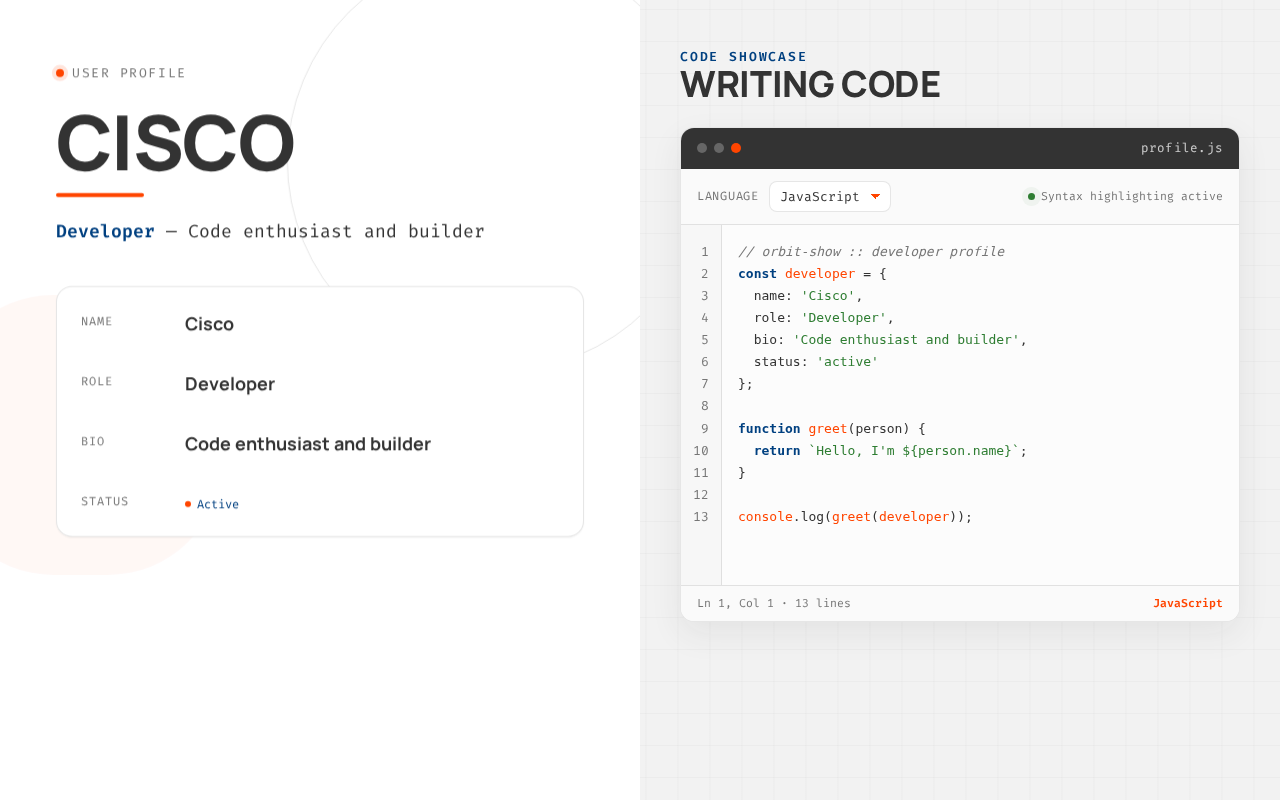
Cisco
Developer — Code enthusiast and builder
Code showcase
Writing Code
Cisco
Developer — Code enthusiast and builder
Code showcase
No comments yet. Be the first!