orbit-oracool
 Daniel Onakoya
Build "ORACOOL AI" using React + Vite + Tailwind CSS + Supabase. Name: Oracool AI Tagline: "Intelligence That Anticipates" Colors: Deep black (#0a0a0f), Ice cyan (#00f0ff), Electric purple (#8b5cf6) Style: Dark mode, glassmorphism, glowing orbs, premium feel CREATOR SYSTEM: - Creator: Daniel Onakoya (danielonakoya19@gmail.com, born June 19 2009) - Second Admin: Think Global (thinkglobal1000@gmail.com) - Gold "CREATOR" badge for Daniel, Gold "ADMIN" badge for Think Global - AI sings Happy Birthday to Daniel on June 19 - AI knows Daniel is the creator ADMIN SYSTEM: - Both admins get full access, no payment, no limits - Admin dashboard at /admin with users, revenue, stats - Admin notifications for new signups and payments MULTI-AI SYSTEM: - GPT-4o (OpenAI), Claude 3.5 (Anthropic), Gemini 2.0 (Google), Grok 3 (xAI) - Tavily for internet search - Built-in AI as fallback - Auto-routing to best AI API KEYS PAGE (/config): - Input fields for: PAYSTACK_PUBLIC_KEY, PAYSTACK_SECRET_KEY, SUPABASE_URL, SUPABASE_ANON_KEY, TAVILY_API_KEY - Optional: OPENAI_API_KEY, ANTHROPIC_API_KEY, GOOGLE_AI_API_KEY, GROK_API_KEY - Save button, test connections, show status SUBSCRIPTION (PAYSTACK ONLY - No Stripe): FREE TRIAL: 10 chat queries, 3 premium queries per feature PRO $19.99/month: Unlimited everything ENTERPRISE $99/month: Team workspace, API access Build: 1. Landing page with hero, features, pricing, testimonials, FAQ 2. Signup/Login pages with Supabase auth 3. Dashboard with glowing orb 4. Voice interaction (Web Speech API + SpeechSynthesis) 5. AI chat with text input 6. /config page for API keys 7. /admin page for admins 8. PWA setup 9. Responsive design (mobile-first)


Comments (0)
Sign in to leave a comment
System Requirements
System Requirements Document for orbit-oracool
1. Introduction
Oracool AI is a cutting-edge AI application designed to integrate advanced AI capabilities with smart technology, providing users with a premium, futuristic experience. The product is built using React, Vite, Tailwind CSS, and Supabase, and it leverages multiple AI systems to deliver intelligent, anticipatory interactions. The target audience includes tech-savvy users who are interested in AI-driven smart home integration, voice interaction, and personalized AI experiences.
2. System Overview
Oracool AI offers a comprehensive suite of features, including voice interaction, AI calling, smart home integration, and advanced security measures. The system supports multiple AI models and provides a seamless user experience through a responsive, mobile-first design. The application is designed to be intuitive and accessible, with a focus on user privacy and security.
2a. Product Interpretation and Delivery Boundary
Oracool AI is delivered as a web application with a dark mode, glassmorphism aesthetic. The application is accessible via a landing page, with additional pages for user authentication, dashboard interaction, and administrative functions. The system is designed to be responsive and mobile-first, ensuring accessibility across devices. The application exclusively uses Paystack for payment processing, with no integration of Stripe.
2b. Source Content Inventory
Not applicable as no explicit content_source directive was provided.
2c. Page Content and Component Coverage
Landing Page
- Hero Section: Central glowing orb, tagline "Intelligence That Anticipates", call-to-action buttons.
- Features: Overview of AI capabilities, smart home integration, and security features.
- Pricing: Details of subscription plans (Free Trial, Pro, Enterprise).
- Testimonials: User reviews and feedback.
- FAQ: Common questions and answers.
Signup/Login Pages
- Authentication: Supabase authentication for user signup and login.
- Facial Verification: Optional face login with liveness detection and anti-spoofing.
Dashboard
- Top Bar: Logo, persona selector, avatar, tier badge.
- Left Sidebar: Navigation for Chat, Calls, History, Smart Home, Cameras, Car, Emergency, Religious, Security, Gallery, Insights, Settings.
- Main Area: Glowing orb for voice interaction, real-time transcript, and voice responses.
- Bottom Navigation: Mobile navigation with trial banner showing remaining queries.
Admin Page (/admin)
- User Management: View and manage users, revenue, and statistics.
- Notifications: Alerts for new signups and payments.
- Security Dashboard: Overview of security logs and settings.
API Keys Page (/config)
- Input Fields: PAYSTACK_PUBLIC_KEY, PAYSTACK_SECRET_KEY, SUPABASE_URL, SUPABASE_ANON_KEY, TAVILY_API_KEY, optional AI API keys.
- Actions: Save button, test connections, show status.
3. Functional Requirements
- As a user, I should be able to interact with Oracool AI using voice commands, with real-time transcription and voice responses. (explicit)
- As an admin, I should have full access to the admin dashboard to manage users, view statistics, and receive notifications. (explicit)
- As a user, I should be able to integrate and control smart home devices using voice commands and the dashboard interface. (explicit)
- As a user, I should be able to initiate AI calls, including emergency calls, with confirmation and conversation summaries. (explicit)
- As a user, I should have access to multi-language support and real-time translation for over 100 languages. (explicit)
- As a user, I should be able to generate images and videos using AI, with options to download and share. (explicit)
- As a user, I should be able to register my face for login and benefit from enhanced security features like MFA and encryption. (explicit)
- As a user, I should experience proactive intelligence with personalized reminders and conversation initiation by the AI. (explicit)
- As a user, I should be able to customize my AI persona to suit different interaction styles. (explicit)
4. User Personas
- Daniel Onakoya: Creator with full access and special privileges, including a birthday greeting from the AI.
- Think Global: Second admin with full access and management capabilities.
- General User: Access to AI features, smart home integration, and subscription management.
- Enterprise User: Access to team workspace, API access, and enhanced security features.
5. Core User Flows
User Signup and Login
- User accesses the landing page and selects signup/login.
- User completes the Supabase authentication process.
- Optional: User registers face for facial verification.
- User is directed to the dashboard.
Voice Interaction
- User clicks the glowing orb to activate the microphone.
- User speaks a command; real-time transcription appears.
- AI provides a voice response and executes the command.
Smart Home Integration
- User navigates to the Smart Home section on the dashboard.
- User issues voice commands to control devices.
- AI confirms the action and provides status updates.
AI Calling
- User initiates a call command via voice.
- AI confirms the contact and call details.
- User confirms, and AI conducts the call.
- AI provides a summary of the conversation.
Subscription Management
- User accesses the pricing section on the landing page.
- User selects a subscription plan and completes payment via Paystack.
- User receives confirmation and access to subscription features.
6. Visuals Colors and Theme
- Muse: Gleb Kuznetsov
- Palette:
- Background: #0a0a0f
- Surface: #131316
- Text: #ffffff
- Primary: #00f0ff
- Accent: #8b5cf6
- Muted: #666a6d
- Typography:
- Headings: Space Grotesk — Bold, uppercase
- Body: Orbitron
- Scale: 1.414 modular
- Shape Language: Full-bleed 3D scene, floating glass panels
- Layout: Radial with floating panels, central orb focus
- Motion: Continuous slow orbit, parallax, light sweeps
7. Signature Design Concept
The landing page features a large rotating glowing orb as the hero element, set against a deep black background. Floating glass panels with thin luminous strokes display feature highlights, creating an immersive and futuristic experience. The use of cyan and purple glowing elements signals interaction points, aligning with the cinematic future tech theme.
8. Interaction Model & Motion Direction
- Interaction Model: Animated
- Motion Tempo: Cinematic
- Hero Dimensionality: WebGL
- Landing Hero Motion Brief: The focal subject is a rotating, glowing orb. Upon user interaction, the orb transforms, revealing feature highlights on floating glass panels. The motion vocabulary includes slow orbits and subtle camera movements, creating an immersive experience. A reduced-motion state is available for accessibility.
9. Non-Functional Requirements
- Security: AES-256 encryption, TLS 1.3, MFA, rate limiting, security logging.
- Performance: Responsive design, mobile-first approach, optimized for fast loading.
- Scalability: Support for large user base and multiple AI integrations.
- Reliability: High availability and fault tolerance.
10. Tech Stack
- Frontend: React, Vite, Tailwind CSS
- Backend: Supabase
- AI Integration: GPT-4o, Claude 3.5, Gemini 2.0, Grok 3, Tavily
- Payment Processing: Paystack
- Voice Interaction: Web Speech API, SpeechSynthesis
11. Assumptions and Constraints
- The application will exclusively use Paystack for payment processing.
- The system will support over 100 languages for translation and interaction.
- The application will maintain a premium, futuristic aesthetic as per the creative direction.
12. Glossary
- AI: Artificial Intelligence
- PWA: Progressive Web App
- MFA: Multi-Factor Authentication
- API: Application Programming Interface
- RTSP: Real-Time Streaming Protocol
- ONVIF: Open Network Video Interface Forum
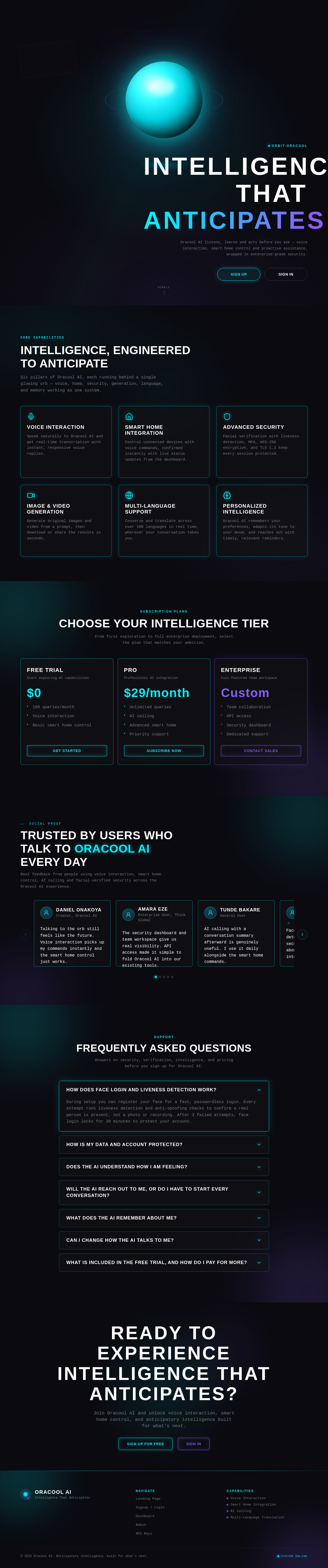
Intelligence, Engineered To Anticipate
Six pillars of Oracool AI, each running behind a single glowing orb — voice, home, security, generation, language, and memory working as one system.
Voice Interaction
Speak naturally to Oracool AI and get real-time transcription with instant, responsive voice replies.
Smart Home Integration
Control connected devices with voice commands, confirmed instantly with live status updates from the dashboard.
Advanced Security
Facial verification with liveness detection, MFA, AES-256 encryption, and TLS 1.3 keep every session protected.
Image & Video Generation
Generate original images and video from a prompt, then download or share the results in seconds.
Multi-Language Support
Converse and translate across over 100 languages in real time, wherever your conversation takes you.
Personalized Intelligence
Oracool AI remembers your preferences, adapts its tone to your mood, and reaches out with timely, relevant reminders.
Choose Your Intelligence Tier
From first exploration to full enterprise deployment, select the plan that matches your ambition.
Free Trial
Start exploring AI capabilities
- 100 queries/month
- Voice interaction
- Basic smart home control
Pro
Professional AI integration
- Unlimited queries
- AI calling
- Advanced smart home
- Priority support
Enterprise
Full-featured team workspace
- Team collaboration
- API access
- Security dashboard
- Dedicated support
Trusted by users who talk to Oracool AI every day
Real feedback from people using voice interaction, smart home control, AI calling and facial-verified security across the Oracool AI experience.
Daniel Onakoya
Creator, Oracool AI
Talking to the orb still feels like the future. Voice interaction picks up my commands instantly and the smart home control just works.
Amara Eze
Enterprise User, Think Global
The security dashboard and team workspace give us real visibility. API access made it simple to fold Oracool AI into our existing tools.
Tunde Bakare
General User
AI calling with a conversation summary afterward is genuinely useful. I use it daily alongside the smart home commands.
Chiamaka Obi
Pro Subscriber
Face login with liveness detection feels fast and secure. I never worry about someone else getting into my account.
Ifeanyi Uche
General User
The AI remembers my preferences and adjusts its tone to how I am feeling. It genuinely feels anticipatory, not just reactive.
Frequently Asked Questions
Answers on security, verification, intelligence, and pricing before you sign up for Oracool AI.
During setup you can register your face for a fast, passwordless login. Every attempt runs liveness detection and anti-spoofing checks to confirm a real person is present, not a photo or recording. After 3 failed attempts, face login locks for 30 minutes to protect your account.
Oracool AI uses AES-256 encryption and TLS 1.3 for data in transit and at rest, with optional multi-factor authentication (MFA) on your account. Rate limiting and continuous security logging guard against abuse, and Enterprise plans include a dedicated security dashboard for visibility into activity.
Oracool AI includes mood detection so responses can adapt in tone, offering empathetic replies that match the emotion behind your message rather than a single flat tone for every conversation.
Oracool AI can initiate conversation proactively, with time-of-day greetings and gentle nudges based on patterns it learns, like reminding you of something you usually check around this time. Reminders you set are also delivered right when you need them.
Oracool AI remembers your preferences to personalize responses over time. You stay in control: every saved memory is visible and editable, so you can update or remove anything it has stored.
Yes. Choose from custom personas including Professional, Friendly, Mentor, Creative, and Analyst, and switch between them anytime to match the moment.
The Free Trial includes 100 queries a month, voice interaction, and basic smart home control, shown as a remaining-queries banner in your dashboard. Upgrading to Pro or Enterprise is handled exclusively through Paystack for secure payment processing.
Ready to Experience Intelligence That Anticipates?
Join Oracool AI and unlock voice interaction, smart home control, and anticipatory intelligence built for what's next.
Intelligence, Engineered To Anticipate
Six pillars of Oracool AI, each running behind a single glowing orb — voice, home, security, generation, language, and memory working as one system.
Voice Interaction
Speak naturally to Oracool AI and get real-time transcription with instant, responsive voice replies.
Smart Home Integration
Control connected devices with voice commands, confirmed instantly with live status updates from the dashboard.
Advanced Security
Facial verification with liveness detection, MFA, AES-256 encryption, and TLS 1.3 keep every session protected.
Image & Video Generation
Generate original images and video from a prompt, then download or share the results in seconds.
Multi-Language Support
Converse and translate across over 100 languages in real time, wherever your conversation takes you.
Personalized Intelligence
Oracool AI remembers your preferences, adapts its tone to your mood, and reaches out with timely, relevant reminders.
Choose Your Intelligence Tier
From first exploration to full enterprise deployment, select the plan that matches your ambition.
Free Trial
Start exploring AI capabilities
- 100 queries/month
- Voice interaction
- Basic smart home control
Pro
Professional AI integration
- Unlimited queries
- AI calling
- Advanced smart home
- Priority support
Enterprise
Full-featured team workspace
- Team collaboration
- API access
- Security dashboard
- Dedicated support
Trusted by users who talk to Oracool AI every day
Real feedback from people using voice interaction, smart home control, AI calling and facial-verified security across the Oracool AI experience.
Daniel Onakoya
Creator, Oracool AI
Talking to the orb still feels like the future. Voice interaction picks up my commands instantly and the smart home control just works.
Amara Eze
Enterprise User, Think Global
The security dashboard and team workspace give us real visibility. API access made it simple to fold Oracool AI into our existing tools.
Tunde Bakare
General User
AI calling with a conversation summary afterward is genuinely useful. I use it daily alongside the smart home commands.
Chiamaka Obi
Pro Subscriber
Face login with liveness detection feels fast and secure. I never worry about someone else getting into my account.
Ifeanyi Uche
General User
The AI remembers my preferences and adjusts its tone to how I am feeling. It genuinely feels anticipatory, not just reactive.
Frequently Asked Questions
Answers on security, verification, intelligence, and pricing before you sign up for Oracool AI.
During setup you can register your face for a fast, passwordless login. Every attempt runs liveness detection and anti-spoofing checks to confirm a real person is present, not a photo or recording. After 3 failed attempts, face login locks for 30 minutes to protect your account.
Oracool AI uses AES-256 encryption and TLS 1.3 for data in transit and at rest, with optional multi-factor authentication (MFA) on your account. Rate limiting and continuous security logging guard against abuse, and Enterprise plans include a dedicated security dashboard for visibility into activity.
Oracool AI includes mood detection so responses can adapt in tone, offering empathetic replies that match the emotion behind your message rather than a single flat tone for every conversation.
Oracool AI can initiate conversation proactively, with time-of-day greetings and gentle nudges based on patterns it learns, like reminding you of something you usually check around this time. Reminders you set are also delivered right when you need them.
Oracool AI remembers your preferences to personalize responses over time. You stay in control: every saved memory is visible and editable, so you can update or remove anything it has stored.
Yes. Choose from custom personas including Professional, Friendly, Mentor, Creative, and Analyst, and switch between them anytime to match the moment.
The Free Trial includes 100 queries a month, voice interaction, and basic smart home control, shown as a remaining-queries banner in your dashboard. Upgrading to Pro or Enterprise is handled exclusively through Paystack for secure payment processing.
Ready to Experience Intelligence That Anticipates?
Join Oracool AI and unlock voice interaction, smart home control, and anticipatory intelligence built for what's next.
No comments yet. Be the first!