orbit-marketing
 Aditya Sable
Marketing automation for dentists

Comments (0)
Sign in to leave a comment
System Requirements
orbit-marketing System Requirements Document
1. Introduction
The orbit-marketing project is designed to provide a comprehensive marketing automation solution tailored specifically for individual dental clinics. This document outlines the system requirements necessary to support the unique needs of dental professionals, enabling them to effectively manage and enhance their marketing efforts.
2. System Overview
The orbit-marketing system aims to streamline marketing processes for individual dental clinics by offering automated tools and features that cater to their specific requirements. The system will facilitate efficient communication, patient engagement, and marketing campaign management, ultimately contributing to the growth and success of dental practices.
3. Functional Requirements as Story Points
- As a Dental Clinic Owner, I should be able to automate appointment reminders to reduce no-shows.
- As a Dental Clinic Owner, I should be able to send personalized follow-up emails to patients after their visits.
- As a Dental Clinic Owner, I should be able to manage and track marketing campaigns to evaluate their effectiveness.
- As a Dental Clinic Owner, I should be able to segment patients based on treatment history for targeted marketing.
- As a Dental Clinic Owner, I should be able to generate reports on patient engagement and marketing performance.
- As a Dental Clinic Owner, I should be able to integrate with existing dental practice management software for seamless operations.
4. User Personas
- Dental Clinic Owner: The primary user responsible for managing the clinic's operations and marketing strategies.
- Dental Staff: Assist in executing marketing campaigns and managing patient communications.
- Patients: Recipients of marketing communications and engagement efforts.
5. Core User Flows
- Dental Clinic Owner sets up automated appointment reminders -> Patients receive reminders -> Patients confirm or reschedule appointments.
- Dental Clinic Owner creates a marketing campaign -> Dental Staff executes the campaign -> Patients receive targeted communications -> Engagement metrics are tracked and reported.
- Dental Clinic Owner segments patient list -> Sends personalized follow-up emails -> Patients receive emails -> Engagement is monitored and analyzed.
6. Visuals Colors and Theme
- primary: #2A9D8F (Teal)
- primary_light: #E9F5F4 (Light Teal)
- secondary: #264653 (Dark Blue)
- accent: #E76F51 (Coral)
- highlight: #F4A261 (Orange)
- bg: #F1FAEE (Off White)
- surface: #FFFFFF (White)
- text: #1D3557 (Navy Blue)
- text_muted: #A8DADC (Light Blue)
- border: #D3D3D3 (Light Gray)
7. Signature Design Concept
Interactive Dental Journey
The homepage will feature an interactive dental journey map where users can explore various aspects of dental care and marketing strategies. As users hover over different sections of the map, they will see animations illustrating the transformation of a dental practice through effective marketing. This concept will be implemented using motion/react for smooth animations and transitions.
LANDING HERO MOTION BRIEF
The landing hero will depict a dental clinic's transformation through marketing automation. The animation will start with a static image of a dental clinic, which then transforms as marketing strategies are applied, showing increased patient engagement and clinic growth. The animation will loop every 10 seconds, with interactive elements allowing users to click and learn more about each marketing strategy.
8. Interaction Model & Motion Direction
- Intended Interaction Model: Animated
- The landing page will feature moderate scroll-triggered reveals and hover transitions to engage users and highlight key features of the marketing automation system.
- Each section of the landing page will have a distinctive core mechanic, such as morphing SVGs or kinetic typography, to maintain user interest and convey the brand's innovative approach.
9. Non-Functional Requirements
- The system must ensure data security and patient privacy in compliance with relevant regulations.
- The system should be scalable to accommodate the growth of dental clinics.
- The system should provide high availability and reliability to support continuous operations.
10. Tech Stack
- Frontend: React for Web
- Backend: Python, FastAPI
- Database: MySQL or MariaDB, using Alembic for migrations
- AI Models: GPT 5.4 for user-friendly response
- AI Tools: Litellm for LLM Routing, Langchain
- Local Orchestration: Docker, docker-compose
- Server-side Orchestration: Kubernetes
11. Assumptions and Constraints
- The system assumes that dental clinics have access to the internet and basic IT infrastructure.
- The system is constrained by the need to integrate with existing dental practice management software.
- The system must comply with healthcare regulations regarding patient data handling.
12. Glossary
- Marketing Automation: The use of software to automate marketing processes such as customer segmentation, customer data integration, and campaign management.
- Patient Engagement: Strategies and tools used to involve patients in their healthcare, improving communication and outcomes.
- Dental Clinic Owner: The individual responsible for the overall management and success of a dental practice.
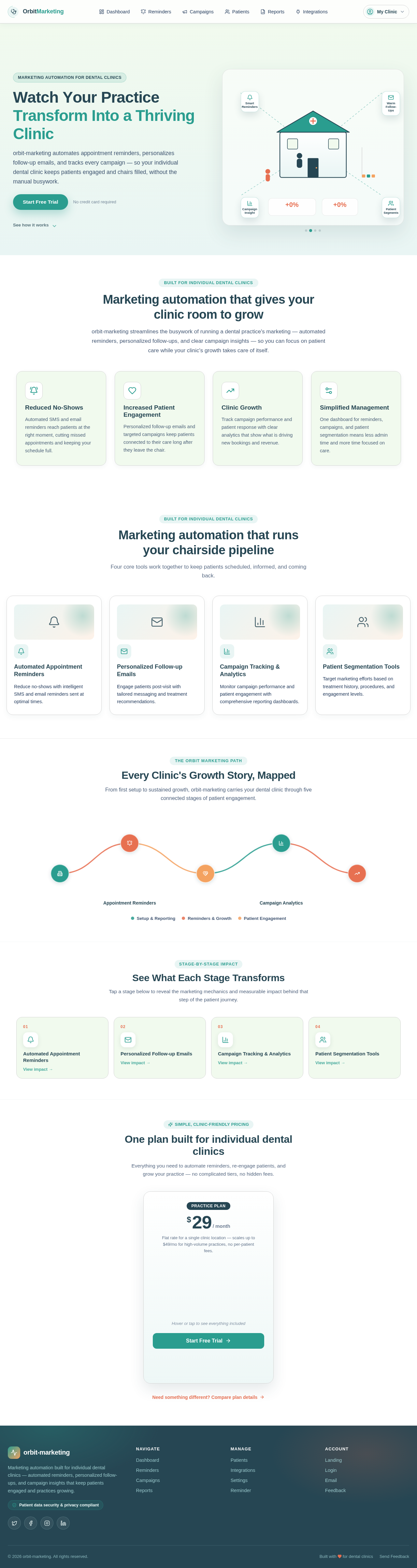
Watch Your Practice
Transform Into a Thriving Clinic
orbit-marketing automates appointment reminders, personalizes follow-up emails, and tracks every campaign — so your individual dental clinic keeps patients engaged and chairs filled, without the manual busywork.
Marketing automation that gives your clinic room to grow
orbit-marketing streamlines the busywork of running a dental practice's marketing — automated reminders, personalized follow-ups, and clear campaign insights — so you can focus on patient care while your clinic's growth takes care of itself.
Reduced No-Shows
Automated SMS and email reminders reach patients at the right moment, cutting missed appointments and keeping your schedule full.
Increased Patient Engagement
Personalized follow-up emails and targeted campaigns keep patients connected to their care long after they leave the chair.
Clinic Growth
Track campaign performance and patient response with clear analytics that show what is driving new bookings and revenue.
Simplified Management
One dashboard for reminders, campaigns, and patient segmentation means less admin time and more time focused on care.
Marketing automation that runs your chairside pipeline
Four core tools work together to keep patients scheduled, informed, and coming back.
Automated Appointment Reminders
Reduce no-shows with intelligent SMS and email reminders sent at optimal times.
Personalized Follow-up Emails
Engage patients post-visit with tailored messaging and treatment recommendations.
Campaign Tracking & Analytics
Monitor campaign performance and patient engagement with comprehensive reporting dashboards.
Patient Segmentation Tools
Target marketing efforts based on treatment history, procedures, and engagement levels.
Every Clinic's Growth Story, Mapped
From first setup to sustained growth, orbit-marketing carries your dental clinic through five connected stages of patient engagement.
One plan built for individual dental clinics
Everything you need to automate reminders, re-engage patients, and grow your practice — no complicated tiers, no hidden fees.
Flat rate for a single clinic location — scales up to $49/mo for high-volume practices, no per-patient fees.
- Automated appointment reminders (SMS + email)
- Personalized post-visit follow-up emails
- Campaign tracking & analytics dashboard
- Patient segmentation by treatment history
- Integration with your practice management software
Hover or tap to see everything included
Watch Your Practice
Transform Into a Thriving Clinic
orbit-marketing automates appointment reminders, personalizes follow-up emails, and tracks every campaign — so your individual dental clinic keeps patients engaged and chairs filled, without the manual busywork.
Marketing automation that gives your clinic room to grow
orbit-marketing streamlines the busywork of running a dental practice's marketing — automated reminders, personalized follow-ups, and clear campaign insights — so you can focus on patient care while your clinic's growth takes care of itself.
Reduced No-Shows
Automated SMS and email reminders reach patients at the right moment, cutting missed appointments and keeping your schedule full.
Increased Patient Engagement
Personalized follow-up emails and targeted campaigns keep patients connected to their care long after they leave the chair.
Clinic Growth
Track campaign performance and patient response with clear analytics that show what is driving new bookings and revenue.
Simplified Management
One dashboard for reminders, campaigns, and patient segmentation means less admin time and more time focused on care.
Marketing automation that runs your chairside pipeline
Four core tools work together to keep patients scheduled, informed, and coming back.
Automated Appointment Reminders
Reduce no-shows with intelligent SMS and email reminders sent at optimal times.
Personalized Follow-up Emails
Engage patients post-visit with tailored messaging and treatment recommendations.
Campaign Tracking & Analytics
Monitor campaign performance and patient engagement with comprehensive reporting dashboards.
Patient Segmentation Tools
Target marketing efforts based on treatment history, procedures, and engagement levels.
Every Clinic's Growth Story, Mapped
From first setup to sustained growth, orbit-marketing carries your dental clinic through five connected stages of patient engagement.
One plan built for individual dental clinics
Everything you need to automate reminders, re-engage patients, and grow your practice — no complicated tiers, no hidden fees.
Flat rate for a single clinic location — scales up to $49/mo for high-volume practices, no per-patient fees.
- Automated appointment reminders (SMS + email)
- Personalized post-visit follow-up emails
- Campaign tracking & analytics dashboard
- Patient segmentation by treatment history
- Integration with your practice management software
Hover or tap to see everything included
No comments yet. Be the first!