opal-zomato
 Shubham Patel
We need to make a website like zomato


Comments (0)
Sign in to leave a comment
System Requirements
System Requirements Document for opal-zomato
1. Introduction
opal-zomato is a food delivery marketplace website in the spirit of Zomato: diners discover restaurants by location and cuisine, browse menus with prices and ratings, build a cart, pay online, and track their order from confirmation to delivery, then rate and review the restaurant. Restaurant owners list their restaurant and menu items with prices, receive incoming orders, and update order status. Delivery partners accept available orders, pick up food, and mark delivery complete.
The product serves three active human roles — Diner, Restaurant owner, and Delivery partner — each with its own working context and its own access boundary. The site is a first-party web application with application-owned accounts: a new participant enrolls through Sign Up, a returning participant verifies through Login, and each role then works in the destinations that belong to its responsibilities.
The reference to Zomato is inspiration only for restaurant discovery and food-ordering feature shape and structure; it supplies no copy, brand, data, or capability beyond the accepted requirements below.
2. System Overview
opal-zomato is delivered as a React web frontend talking to a shared FastAPI backend that owns all application APIs and domain modules, backed by MariaDB for application-owned persistent data. The backend holds restaurant listings, menu items and prices, carts, orders, payments records, order status history, ratings and reviews, and account records. The frontend renders the public discovery surfaces (Landing, Restaurants, Restaurant Details) anonymously, and the role-restricted working surfaces (Checkout, Order Tracking, Orders, Restaurant Listing, Incoming Orders, Deliveries) only for the signed-in participant who owns that work.
Actors: Diner, Restaurant owner, Delivery partner (active human personas); the application backend and database act as system processes supporting them. Online payment is handled through an online payment step at Checkout; the payment provider is an external service invoked from that step.
Current accepted behavior: restaurant search and browsing by location and cuisine; restaurant pages with menu items, prices and ratings; cart and order placement; online payment before tracking; live order status from confirmation to delivery; post-delivery rating and review; past order history; owner listing and menu management; owner order receipt and status updates; partner order acceptance, pickup, and delivery completion; self-service enrollment and returning verification for all three roles.
Narrow exclusions: no capabilities beyond those listed are current — no loyalty programs, no table reservations, no advertising, no chat, no multi-restaurant split carts, no admin back office.
Removed from scope
- None — no concept was explicitly removed by the user.
2a. Product Interpretation and Delivery Boundary
opal-zomato is a first-party web product. Discovery is public and anonymous: anyone can open Landing, search on Restaurants, and read a Restaurant Details page with its menu, prices and ratings without an account. Everything that creates a durable commitment — a cart tied to a person, an order, a payment, an order status history, a review, a restaurant listing, an accepted delivery — belongs to a signed-in participant and is only reachable after that participant establishes or verifies identity.
Identity is application-owned and self-service. Sign Up is the anonymous entry where a new Diner, Restaurant owner, or Delivery partner creates an account and chooses their role; Login is the anonymous entry where a returning participant verifies. A protected destination never establishes access to itself: a diner who tries to check out while signed out is sent to Sign Up or Login and returns to Checkout afterward. Role-restricted destinations (Checkout, Order Tracking, Orders for the Diner; Restaurant Listing and Incoming Orders for the Restaurant owner; Deliveries for the Delivery partner) are visible only to the signed-in participant whose role owns that work.
Online payment is an external provider responsibility invoked from Checkout; opal-zomato records the payment outcome and does not itself process card data. Order tracking begins only after payment succeeds. Everything described here is current; no future-horizon features are committed.
2c. Page Content and Component Coverage
Landing
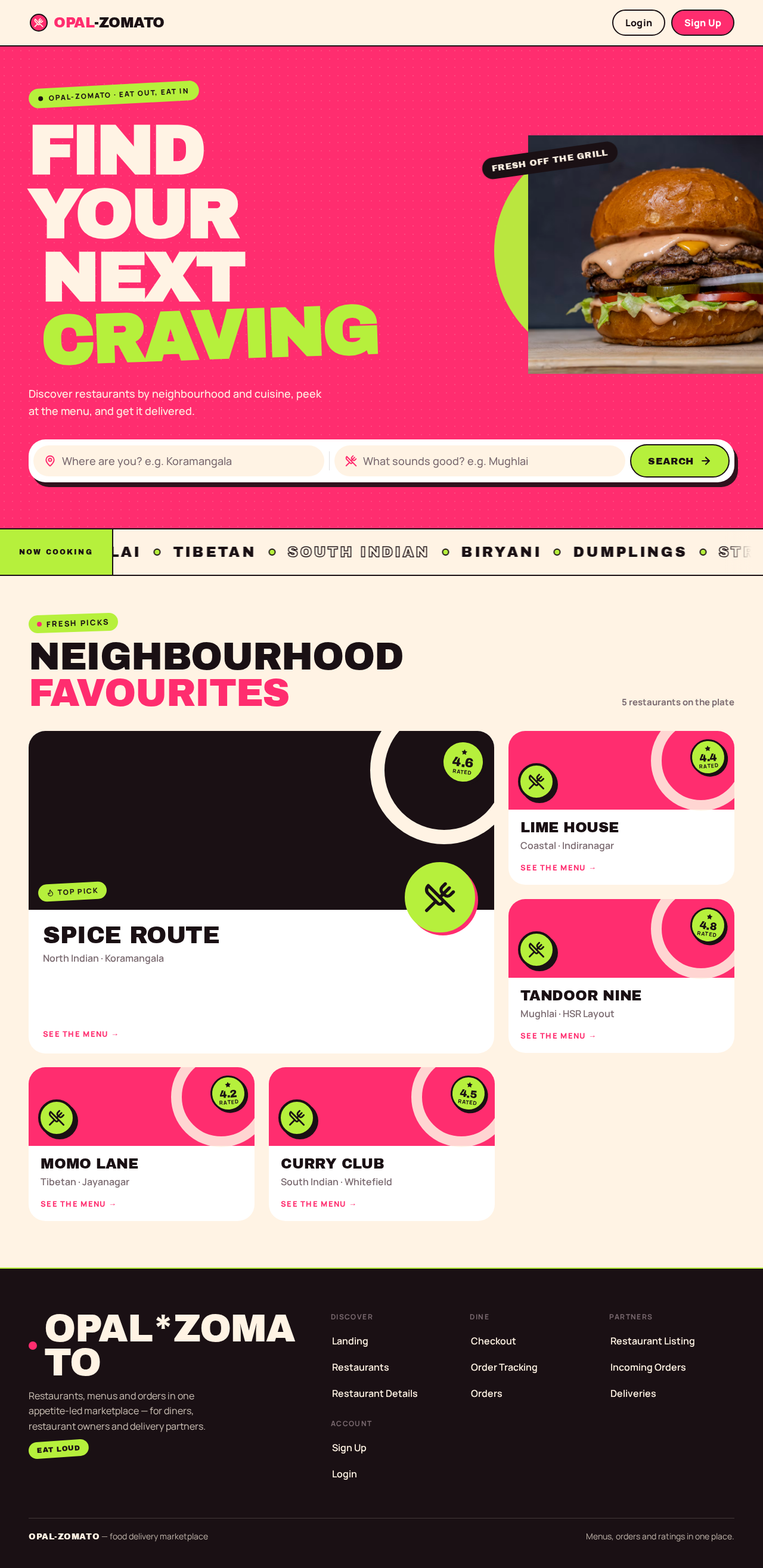
- Information/state: anonymous public entry. Full-bleed hot pink hero band with oversized Archivo Black headline in cream, a cut-out dish photo bleeding off the right edge, and a white capsule search bar with a lime Search button beneath the headline. A cream marquee ticker of cuisine words. Below the band, a staggered restaurant preview grid (2-up then 3-up with one oversized feature card) drawn from listed restaurants, each card with a rotated sticker rating badge. Signed-out state shows Sign Up / Login in the header; signed-in state shows the participant's role destination links.
- Primary actions: type a location and/or cuisine into the capsule search bar and press the lime Search button → Restaurants with those filters applied. Open a preview restaurant card → Restaurant Details.
- Supporting actions: Sign Up, Login; jump to the participant's own working destination when signed in.
- Domain entities: Restaurant (name, cuisine, location, rating), Cuisine tag.
- Component responsibilities: hero band, headline, capsule search bar, marquee ticker, restaurant preview grid, sticker rating badge, header identity controls.
- States: loading — skeleton cards in the preview grid; empty — no restaurants listed yet, hero and search remain usable with a short "no restaurants yet" note in the grid area; success — preview grid populated; error — preview fetch fails, grid area shows a retry control while hero and search stay usable; recovery — retry reloads the preview.
Restaurants
- Information/state: anonymous browse and search. Location input and cuisine filter controls, result count, and a staggered restaurant card grid (2-up then 3-up with one oversized feature card) with 28px radii and rotated sticker rating badges.
- Primary actions: enter or change location; select a cuisine; submit search → results update. Open a restaurant card → Restaurant Details.
- Supporting actions: clear filters; adjust filters without losing the current result set until the new search resolves.
- Domain entities: Restaurant, Cuisine, Location, Rating.
- Component responsibilities: search/filter bar, result count, restaurant card grid, sticker badge, empty-state panel.
- States: loading — skeleton cards while results resolve; empty — no restaurants match the location and cuisine, with a clear-filters action; success — matching cards shown; error — search request fails, an inline error with retry preserves the entered filters; recovery — retry re-runs the same search.
Restaurant Details
- Information/state: anonymous restaurant page. Restaurant name, cuisine, location, aggregate rating, and the full menu grouped as listed, each item with name, price and description; a cart panel showing current items, quantities, line totals and cart total; an "add to cart" control per item. Reviews left by diners after delivery are shown with their rating.
- Primary actions: add a menu item to the cart; adjust quantity or remove an item in the cart panel; proceed to Checkout.
- Supporting actions: return to Restaurants; open Sign Up or Login when proceeding to Checkout while signed out.
- Domain entities: Restaurant, MenuItem (name, price, description), Cart, CartLine, Review, Rating.
- Component responsibilities: restaurant header, menu list, per-item add control, cart panel with quantity controls and total, review list, proceed-to-checkout control.
- States: loading — menu skeleton; empty — restaurant has no menu items yet, page states this and disables checkout; success — menu and cart render, add-to-cart confirms visibly; error — menu fetch fails with retry; recovery — retry reloads the menu, cart contents preserved. If the diner is signed out when proceeding, they are routed to Sign Up or Login and returned to Checkout with the cart intact.
Checkout
- Information/state: role-restricted to the signed-in Diner. Order summary of the cart (restaurant, items, quantities, line totals, order total), delivery details for the order, and an online payment step. Shows payment state: awaiting payment, processing, paid, or failed.
- Primary actions: confirm the order and pay online; on payment success the order is created and the diner is taken to Order Tracking.
- Supporting actions: edit the cart (return to Restaurant Details); retry payment after a failure.
- Domain entities: Order, OrderLine, Payment, Cart, DeliveryDetails.
- Component responsibilities: order summary, delivery details form, pay control, payment state indicator, failure panel with retry.
- States: loading — summary resolving; empty — cart is empty, page explains and links back to Restaurants; success — payment confirmed, order created, redirect to Order Tracking; error — payment declined or provider unreachable, order is not created, cart is preserved, retry offered; recovery — retry re-attempts payment for the same cart.
Order Tracking
- Information/state: role-restricted to the signed-in Diner who placed the order. Live order status from confirmation through acceptance, preparation, pickup, and delivery, with the current status highlighted and the status history shown; order contents and total; after delivery, a rating and review form for the restaurant.
- Primary actions: watch status update; after delivery, submit a rating and review.
- Supporting actions: open Orders to see other past orders; return to Restaurants.
- Domain entities: Order, OrderStatusEvent, Review, Rating, Restaurant.
- Component responsibilities: status timeline, current-status highlight, order summary, rating control, review text field, submit control.
- States: loading — status timeline skeleton; empty — not applicable (an order always has at least a confirmation status); success — status advances visibly, review submission confirms and the review appears on Restaurant Details; error — status refresh fails, last known status stays visible with a retry; recovery — retry refreshes status; review submit failure keeps the entered rating and text for retry.
Orders
- Information/state: role-restricted to the signed-in Diner. List of the diner's past orders, newest first, each with restaurant, date, items, total, final status, and whether a review was left.
- Primary actions: open an order → Order Tracking for that order.
- Supporting actions: return to Restaurants to order again.
- Domain entities: Order, Restaurant, Review.
- Component responsibilities: order list, per-order summary row, review-left indicator, open control.
- States: loading — list skeleton; empty — no past orders yet, with a link to Restaurants; success — orders listed; error — list fetch fails with retry; recovery — retry reloads the list.
Restaurant Listing
- Information/state: role-restricted to the signed-in Restaurant owner. The owner's restaurant listing (name, cuisine, location, description) and its menu items with name, price and description; create and edit forms for both.
- Primary actions: create or edit the restaurant listing; add, edit, or remove a menu item with its price.
- Supporting actions: open Incoming Orders.
- Domain entities: Restaurant, MenuItem.
- Component responsibilities: listing form, menu item list, menu item form, save controls, validation messages.
- States: loading — listing and menu skeleton; empty — no listing yet, create form shown; success — saved changes confirm and appear on Restaurant Details; error — validation or save failure keeps entered values with a clear message; recovery — correct and resubmit.
Incoming Orders
- Information/state: role-restricted to the signed-in Restaurant owner. Incoming orders for the owner's restaurant with items, quantities, diner delivery details, total, and current status; status update controls for each order.
- Primary actions: open an incoming order; update its status (accept, preparing, ready for pickup, and onward as the order progresses).
- Supporting actions: refresh the incoming list.
- Domain entities: Order, OrderLine, OrderStatusEvent, DeliveryDetails.
- Component responsibilities: incoming order list, order detail panel, status control, status history.
- States: loading — list skeleton; empty — no incoming orders, with a note that new orders appear here; success — status change confirms and is reflected on the diner's Order Tracking; error — status update fails, previous status stays shown with retry; recovery — retry the status change.
Deliveries
- Information/state: role-restricted to the signed-in Delivery partner. Available orders ready for pickup, and the partner's accepted deliveries with pickup location, drop-off details, and current status.
- Primary actions: accept an available order; mark pickup complete; mark delivery complete.
- Supporting actions: refresh available and accepted lists.
- Domain entities: Order, DeliveryAssignment, DeliveryDetails, OrderStatusEvent.
- Component responsibilities: available orders list, accept control, accepted deliveries list, pickup and delivery-complete controls, status display.
- States: loading — both lists skeleton; empty — no available orders and no accepted deliveries, each with a short note; success — acceptance and completion confirm and update the diner's Order Tracking and the owner's Incoming Orders; error — accept or status update fails (for example the order was taken by another partner), the list refreshes with a clear message; recovery — pick another available order or retry.
Sign Up
- Information/state: anonymous entry. Account creation form with the participant's details, a role choice among Diner, Restaurant owner, and Delivery partner, and credentials.
- Primary actions: submit to create the account; on success the participant is signed in and taken to the destination for the chosen role (Diner → Restaurants, Restaurant owner → Restaurant Listing, Delivery partner → Deliveries).
- Supporting actions: go to Login if already enrolled.
- Domain entities: Account (identity, role).
- Component responsibilities: account form, role selector, validation messages, submit control.
- States: loading — submit in progress with the control disabled; empty — blank form; success — account created and signed in; error — validation failure or an already-registered identity, entered values preserved with a clear message; recovery — correct and resubmit, or switch to Login.
Login
- Information/state: anonymous entry. Returning verification form for an enrolled participant.
- Primary actions: submit credentials; on success the participant is signed in and taken to the destination for their role (Diner → Restaurants or the order they were returning to, Restaurant owner → Incoming Orders, Delivery partner → Deliveries).
- Supporting actions: go to Sign Up if not yet enrolled.
- Domain entities: Account (identity, role).
- Component responsibilities: verification form, validation messages, submit control.
- States: loading — submit in progress with the control disabled; empty — blank form; success — signed in and routed by role or back to the interrupted destination; error — incorrect credentials, entered identity preserved with a clear message; recovery — retry, or switch to Sign Up.
3. Functional Requirements
FR-1 — Search restaurants by location and cuisine (explicit) As a Diner I should search restaurants by location and cuisine so that I can find somewhere to order from.
- Trigger/input: location text and/or cuisine selection on Restaurants (or the Landing capsule search bar).
- Observable result: the result grid shows only restaurants matching the entered location and cuisine, with a result count.
- Access: anonymous.
- Failure/recovery: a failed search shows an inline error with retry that preserves the entered filters.
- Continuation: open a result to Restaurant Details.
FR-2 — View restaurant pages with menu items, prices and ratings (explicit) As a Diner I should view a restaurant page with its menu items, prices and ratings so that I can decide what to order.
- Trigger/input: opening a restaurant from Restaurants, Landing, or Orders.
- Observable result: Restaurant Details shows the restaurant's name, cuisine, location, aggregate rating, and each menu item with name, price and description, plus diner reviews.
- Access: anonymous.
- Failure/recovery: menu fetch failure shows retry; the page reloads the menu on retry.
- Continuation: add items to the cart.
FR-3 — Add menu items to a cart and place a food order (explicit) As a Diner I should add menu items to a cart and place a food order so that I can get food delivered.
- Trigger/input: add-to-cart on a menu item, quantity adjustments in the cart panel, then proceed to Checkout and confirm the order.
- Observable result: the cart shows items, quantities, line totals and total; confirming creates an order bound to the signed-in diner and the restaurant.
- Access: browsing and cart building are anonymous; placing the order requires a signed-in Diner. A signed-out diner proceeding to Checkout is routed to Sign Up or Login and returned to Checkout with the cart intact.
- Failure/recovery: an empty cart blocks checkout with a link back to Restaurants; a failed order creation keeps the cart and offers retry.
- Continuation: pay online at Checkout.
FR-4 — Pay for the order online (explicit) As a Diner I should pay for my order online so that the restaurant can start preparing it.
- Trigger/input: the pay control on Checkout with the order summary and delivery details confirmed.
- Observable result: the online payment step returns a paid or failed outcome; on paid, the order is created and the diner is taken to Order Tracking.
- Access: signed-in Diner only.
- Failure/recovery: a declined or unreachable payment provider leaves the order uncreated, preserves the cart, and offers retry for the same cart.
- Continuation: Order Tracking.
FR-5 — Track the order status from confirmation to delivery (explicit) As a Diner I should track my order status from confirmation to delivery so that I know when my food arrives.
- Trigger/input: opening Order Tracking for a placed order; status changes made by the Restaurant owner and Delivery partner.
- Observable result: the current status is highlighted and the status history shows confirmation, acceptance, preparation, pickup, and delivery as they occur.
- Access: signed-in Diner who placed the order.
- Failure/recovery: a failed status refresh keeps the last known status visible with retry.
- Continuation: after delivery, rate and review.
FR-6 — Rate and review restaurants after the order (explicit) As a Diner I should rate and review a restaurant after my order so that other diners can judge it.
- Trigger/input: the rating and review form on Order Tracking once the order is delivered.
- Observable result: the submitted rating and review appear on the restaurant's Restaurant Details page and contribute to its aggregate rating; Orders marks the order as reviewed.
- Access: signed-in Diner who placed the delivered order.
- Failure/recovery: a failed submission keeps the entered rating and text for retry.
- Continuation: return to Orders or Restaurants.
FR-7 — View past orders (explicit) As a Diner I should view my past orders so that I can reorder or check what I had.
- Trigger/input: opening Orders.
- Observable result: the diner's orders are listed newest first with restaurant, date, items, total, final status, and review-left indicator.
- Access: signed-in Diner.
- Failure/recovery: a failed list fetch shows retry.
- Continuation: open an order in Order Tracking, or return to Restaurants.
FR-8 — List restaurant and menu items with prices (explicit) As a Restaurant owner I should list my restaurant and menu items with prices so that diners can find and order from me.
- Trigger/input: create or edit the listing and menu items on Restaurant Listing.
- Observable result: the listing and menu items with prices are saved and appear on the public Restaurant Details page and in search results.
- Access: signed-in Restaurant owner.
- Failure/recovery: validation or save failure keeps entered values with a clear message; correct and resubmit.
- Continuation: open Incoming Orders.
FR-9 — Receive orders and update order status (explicit) As a Restaurant owner I should receive orders and update their status so that diners know their food's progress.
- Trigger/input: opening Incoming Orders and changing an order's status (accept, preparing, ready for pickup, onward).
- Observable result: the order's status changes and is reflected in the diner's Order Tracking status history.
- Access: signed-in Restaurant owner for their own restaurant's orders.
- Failure/recovery: a failed status update keeps the previous status shown with retry.
- Continuation: continue updating as the order progresses.
FR-10 — Accept orders, pick up food and mark delivery complete (explicit) As a Delivery partner I should accept orders, pick up food and mark delivery complete so that diners receive their orders.
- Trigger/input: accept an available order on Deliveries, then mark pickup complete, then mark delivery complete.
- Observable result: the order is assigned to the partner, and each step updates the order status visible to the diner and the owner.
- Access: signed-in Delivery partner.
- Failure/recovery: if an order was already taken, acceptance fails with a clear message and the available list refreshes; a failed status update offers retry.
- Continuation: pick another available order.
FR-11 — Self-service enrollment (required_inference) As a Diner, Restaurant owner, or Delivery partner I should complete self-service enrollment so that I can start using my role's work.
- Trigger/input: submitting the Sign Up form with details, a role choice, and credentials.
- Observable result: an account is created, the participant is signed in, and they land on their role's destination (Diner → Restaurants, Restaurant owner → Restaurant Listing, Delivery partner → Deliveries).
- Access: anonymous.
- Failure/recovery: validation failure or an already-registered identity preserves entered values with a clear message; the participant can correct and resubmit or switch to Login.
- Continuation: the role's working destination.
FR-12 — Returning verification (required_inference) As a Diner, Restaurant owner, or Delivery partner I should verify my returning account so that I can resume my work.
- Trigger/input: submitting credentials on Login.
- Observable result: the participant is signed in and routed by role, or back to the destination they were interrupted at (for example Checkout).
- Access: anonymous.
- Failure/recovery: incorrect credentials preserve the entered identity with a clear message; retry or switch to Sign Up.
- Continuation: the role's destination or the interrupted destination.
FR-13 — Pay online before order tracking starts (required_inference) As a Diner I should complete online payment before tracking starts so that the order lifecycle has a definite start.
- Trigger/input: the payment step on Checkout.
- Observable result: Order Tracking is only reachable for an order whose payment succeeded; an unpaid order does not enter tracking.
- Access: signed-in Diner.
- Failure/recovery: an unpaid or failed payment returns the diner to Checkout with the cart preserved and retry available.
- Continuation: Order Tracking after success.
4. User Personas
Diner
- Product context: a hungry person in India looking for food from local restaurants, arriving anonymously to browse and only creating an account when ready to commit to an order.
- Primary goal: find a restaurant by location and cuisine, order food, pay, and know when it arrives.
- Distinct accepted responsibilities: searches and filters restaurants; reads menus, prices and ratings; builds a cart; places and pays for an order; tracks status; rates and reviews after delivery; reviews past orders.
- Inputs/decisions: location, cuisine, menu item choices and quantities, delivery details, payment confirmation, rating and review text.
- Interactions with other participants: the Diner's order is received and status-updated by the Restaurant owner, and accepted, picked up and delivered by the Delivery partner; the Diner's review becomes visible to other diners on Restaurant Details.
- Observable success: a paid order whose status advances to delivered, followed by a submitted review that appears on the restaurant page and a past order listed in Orders.
Restaurant owner
- Product context: a restaurant operator who needs a public listing and a way to receive and progress orders.
- Primary goal: be discoverable with an accurate menu and prices, and move each incoming order through preparation to pickup.
- Distinct accepted responsibilities: creates and edits the restaurant listing and menu items with prices; receives incoming orders; updates order status.
- Inputs/decisions: listing details, menu item names, prices and descriptions; accept/preparing/ready status decisions per order.
- Interactions with other participants: the owner's listing and menu are what the Diner browses; the owner's status updates appear in the Diner's Order Tracking; the owner's ready-for-pickup status is what the Delivery partner acts on.
- Observable success: a saved listing visible on Restaurant Details, and incoming orders whose status changes are reflected for the diner and partner.
Delivery partner
- Product context: a courier who takes available orders and carries them from restaurant to diner.
- Primary goal: accept an available order, pick up the food, and complete delivery.
- Distinct accepted responsibilities: accepts available orders; marks pickup complete; marks delivery complete.
- Inputs/decisions: which available order to accept; when pickup and delivery are complete.
- Interactions with other participants: the partner acts on orders the Restaurant owner has progressed to ready; the partner's pickup and delivery-complete actions update the Diner's Order Tracking.
- Observable success: an accepted order whose pickup and delivery-complete steps are recorded and visible to the diner and owner.
5. Core User Flows
Flow A — Diner discovers a restaurant and orders (Diner)
- The Diner opens Landing anonymously and sees the hot pink hero band, the capsule search bar, and a preview grid of restaurants.
- The Diner types a location and/or cuisine into the capsule search bar and presses the lime Search button; Restaurants opens with those filters applied and shows matching cards with sticker rating badges.
- The Diner opens a restaurant card; Restaurant Details shows the menu with prices, the aggregate rating, and diner reviews.
- The Diner adds menu items to the cart and adjusts quantities; the cart panel shows line totals and the total.
- The Diner proceeds to Checkout. If signed out, they are routed to Sign Up (Flow D) or Login (Flow E) and returned to Checkout with the cart intact.
- On Checkout the Diner reviews the order summary, enters delivery details, and pays online. On success the order is created and Order Tracking opens; on failure the cart is preserved and the Diner retries payment.
- The Diner watches Order Tracking as the Restaurant owner accepts and prepares the order and the Delivery partner picks up and delivers it; the current status is highlighted and the history grows.
- After delivery, the Diner submits a rating and review; it appears on Restaurant Details and Orders marks the order reviewed.
- The Diner opens Orders to see the order listed among past orders, or returns to Restaurants to order again.
Flow B — Diner reviews past orders (Diner)
- The signed-in Diner opens Orders and sees past orders newest first with restaurant, date, items, total, final status, and review-left indicator.
- The Diner opens an order to see its status history in Order Tracking, or returns to Restaurants to order again.
- If the list fails to load, the Diner retries from the error state.
Flow C — Restaurant owner lists and fulfils orders (Restaurant owner)
- The Restaurant owner signs in (Flow E) and lands on Restaurant Listing.
- The owner creates or edits the restaurant listing and adds menu items with names, prices and descriptions; saved changes appear on the public Restaurant Details page.
- When a diner's paid order arrives, the owner opens Incoming Orders and sees it with items, quantities, delivery details, total and status.
- The owner updates the status to accept, then preparing, then ready for pickup; each change is reflected in the diner's Order Tracking.
- If a status update fails, the previous status stays shown and the owner retries.
- The owner continues to the next incoming order.
Flow D — New participant enrolls (Diner, Restaurant owner, or Delivery partner)
- The participant opens Sign Up anonymously from Landing or from a protected destination they were routed away from.
- They enter their details, choose their role (Diner, Restaurant owner, or Delivery partner), and submit.
- On success they are signed in and land on their role's destination: Restaurants for a Diner, Restaurant Listing for a Restaurant owner, Deliveries for a Delivery partner.
- If validation fails or the identity is already registered, entered values are preserved with a clear message; they correct and resubmit or switch to Login.
Flow E — Returning participant verifies (Diner, Restaurant owner, or Delivery partner)
- The participant opens Login anonymously.
- They submit their credentials.
- On success they are signed in and routed by role, or back to the destination they were interrupted at (for example Checkout with the cart intact).
- If credentials are incorrect, the entered identity is preserved with a clear message; they retry or switch to Sign Up.
Flow F — Delivery partner accepts and completes a delivery (Delivery partner)
- The Delivery partner signs in (Flow E) and lands on Deliveries.
- The partner sees available orders ready for pickup and accepts one; the order is assigned to them and appears in their accepted deliveries.
- If the order was already taken, acceptance fails with a clear message and the available list refreshes; the partner picks another.
- The partner marks pickup complete; the diner's Order Tracking reflects pickup.
- The partner marks delivery complete; the diner's Order Tracking reflects delivery and the owner's Incoming Orders shows the final status.
- The partner returns to the available list for the next order.
6. Visuals Colors and Theme
The muse is Jessica Walsh; the headline is "Playful maximalism for a food delivery marketplace." The feeling is appetite, energy and fun, not corporate calm.
Colour tokens (light mode)
- Background:
#FFF3E4(cream ground, ~55% of surface area) - Surface:
#FFFFFF(white cards on cream) - Text:
#1A1014(ink, ~10%) - Primary:
#FF2D6F(hot pink, ~25% — primary actions and full-bleed bands) - Accent:
#B6F03C(lime, ~10% — tags, rates, Search button) - Muted:
#7A6A70
Typography
- Headings: Archivo Black — chunky uppercase display, tight tracking, sizes that fill the column.
- Body: Manrope medium with roomy line-height.
- Scale: 1.333 modular — 128 / 96 / 64 / 40 / 24 / 18 / 16. Hero headline
clamp(48px, 11vw, 128px).
Shape language
- Big capsule buttons; 28px rounded cards; sticker badges rotated 4–8 degrees; hard colour blocks with straight edges.
Layout
- Asymmetric poster grid. A full-bleed colour band holds the search bar. Restaurant cards stagger in a 2-up then 3-up grid with one oversized feature card.
Imagery
- Surreal staged food photography on flat colour grounds: a burger with a pink backdrop, a lime splash, cut-out dishes with hard shadows. No stock people.
Readability rule
- Headlines, wordmarks, labels, numbers, card text and controls stay entirely inside the viewport and their container at 375px, 768px and 1280px, wrapping or scaling to fit; imagery and decoration may crop, bleed, rotate or overlap but never cover readable text or controls.
Avoid
- Blue or indigo primary colours on white; Inter, Roboto or system-ui fonts; glassmorphism or gradient blobs; a grid of identical hover-lift cards with soft shadows; centred headline/subtext/one-button heroes; neutral grey dashboards for the owner and partner pages.
7. Signature Design Concept
The public entry is a full-bleed hot pink #FF2D6F band across the top of Landing. An oversized Archivo Black headline in cream fills the left seven columns at clamp(48px, 11vw, 128px), wrapping within its column at every viewport. A cut-out dish photograph bleeds off the right edge of the band, cropped by the viewport edge but never covering the headline. Directly under the headline sits a white capsule search bar with a lime #B6F03C Search button, sized to stay whole at 375px. Below the band, a cream marquee ticker of cuisine words scrolls at a slow constant speed, and the restaurant preview grid staggers 2-up then 3-up with one oversized feature card, each card carrying a rotated sticker badge with its rating. The concept recomposes only accepted content — the search input, cuisine words, restaurant cards and ratings — into a poster-like first frame.
8. Interaction Model & Motion Direction
Interaction Model: Animated Motion Tempo: expressive Hero Dimensionality: layered_2d
Landing Hero Motion Brief
- Focal subject: the cut-out dish photograph bleeding off the right edge of the hot pink band, layered over the cream headline column.
- Thesis: the diner types a location or cuisine into the capsule search bar → the lime Search button springs on press and the band's content transitions → Restaurants opens with those filters applied. Only accepted search behavior is used.
- Motion vocabulary: springy scale-ins on restaurant cards at 220ms, a slow constant-speed cream marquee ticker of cuisine words, and a colour flip on hover for cards and the Search button.
- Composed first frame: hot pink band, cream Archivo Black headline filling the left seven columns, cut-out dish bleeding off the right edge, white capsule search bar with lime button beneath, marquee ticker beginning its scroll, and the first staggered cards settling in.
- Reduced-motion state: all motion stops under
prefers-reduced-motion; the marquee becomes a static wrapped row of cuisine words, cards appear without scale-in, and hover colour flips become instant state changes. Every item remains fully readable.
9. Non-Functional Requirements
- Identity and access (required_inference, from Planning Scope): application-owned accounts with self-service Sign Up and returning Login; role-restricted destinations are reachable only by the signed-in participant whose role owns that work; anonymous discovery surfaces remain public.
- Durable state (from Planning Scope): carts, orders, payments, status history, reviews, listings and menu items persist in MariaDB so a participant can resume after signing in or returning later.
- Payment boundary (explicit): online payment is performed through an external payment provider invoked at Checkout; opal-zomato records the outcome and does not store card data.
- Readability at every viewport (from creative direction): readable text and controls stay whole at 375px, 768px and 1280px.
- Reduced motion (from creative direction): a usable static arrangement is provided under
prefers-reduced-motion. - Responsive discovery (basic_default): search, menu, cart and status views remain usable on mobile widths, since food ordering is commonly mobile.
10. Tech Stack
- Frontend: React application UI.
- Backend: shared FastAPI process hosting all application APIs and domain modules (restaurants, menus, carts, orders, payments records, status history, reviews, accounts).
- Database: MariaDB for application-owned persistent data.
- Deployment: Docker with docker-compose for the frontend, backend and database services.
- Payment: external online payment provider invoked from the Checkout step.
11. Assumptions and Constraints
- Assumption: the Zomato reference is inspiration only for discovery and ordering feature shape; no Zomato brand, copy, data or capability is imported.
- Assumption: a single cart holds items from one restaurant at a time; a new restaurant's items replace or prompt before mixing, since no multi-restaurant cart was accepted.
- Assumption: delivery details are captured at Checkout as part of placing the order.
- Constraint: role-restricted destinations are limited to the signed-in participant whose role owns that work; anonymous discovery stays public.
- Constraint: order tracking begins only after online payment succeeds.
- Constraint: the visual direction (palette, Archivo Black / Manrope, capsule and sticker shapes, poster grid, expressive motion) is binding; the indigo/blue-on-white SaaS template is forbidden.
- Constraint: no capabilities beyond the accepted requirements are current — no loyalty, reservations, advertising, chat, split carts, or admin back office.
12. Glossary
- Diner: the active human persona who discovers restaurants, orders, pays, tracks, and reviews.
- Restaurant owner: the active human persona who lists a restaurant and menu and progresses incoming orders.
- Delivery partner: the active human persona who accepts available orders, picks up food, and marks delivery complete.
- Restaurant: a listed food business with cuisine, location, rating, and menu items.
- MenuItem: a dish on a restaurant's menu with name, price and description.
- Cart: the diner's current selection of menu items and quantities before ordering.
- Order: a placed, paid commitment for menu items from one restaurant to one diner.
- Order status: the progression from confirmation through acceptance, preparation, pickup, and delivery.
- Review / Rating: the diner's post-delivery text and score for a restaurant.
- Sticker badge: the rotated rating badge on restaurant cards.
- Capsule search bar: the white pill-shaped search input with the lime Search button on Landing.
Find yournext craving
Discover restaurants by neighbourhood and cuisine, peek at the menu, and get it delivered.

- North Indian
- Coastal
- Mughlai
- Tibetan
- South Indian
- Biryani
- Dumplings
- Street Food
- Kebabs
- Desserts
- Chaat
- Thali
Neighbourhood favourites
5 restaurants on the plate
Find yournext craving
Discover restaurants by neighbourhood and cuisine, peek at the menu, and get it delivered.
- North Indian
- Coastal
- Mughlai
- Tibetan
- South Indian
- Biryani
- Dumplings
- Street Food
- Kebabs
- Desserts
- Chaat
- Thali
Neighbourhood favourites
5 restaurants on the plate
No comments yet. Be the first!