opal-system
 Dilema
You are an expert full-stack developer specializing in Next.js (React/TypeScript, App Router), Tailwind CSS, Supabase, and OpenAI/Gemini API integration. I need you to build a lightweight, fast-loading B2B Micro-SaaS called "LogZap" that acts as an AI-powered error triage dashboard for developers. ### 1. Database Schema (Supabase) Generate a PostgreSQL migration script creating the following tables: - `projects`: id (uuid), user_id, project_name, api_key (secure unique token string), notification_webhook_url. - `ingested_logs`: id, project_id, timestamp, raw_payload (jsonb), severity (info/warn/error), is_noise (boolean), ai_analysis (text), status (unread, resolved). ### 2. The Ingestion API Endpoint (Backend Route) Create an optimized Next.js API route at `/api/v1/zap`: - It must accept a POST request containing an `api_key` in the headers and a standard error payload (stack trace, message, and context) in the body. - If the log is classified as an error, pass the raw text to an LLM script utilizing a highly restricted, JSON-returning system prompt: "Analyze this raw server/frontend log. Classify if it is common internet noise (e.g., bot scanning, harmless favicon 404s, standard network timeouts) or a genuine application bug. If it's a bug, provide a 1-sentence plain-English root cause and a 1-sentence recommended fix." - Write the parsed JSON result to `ingested_logs`. If `is_noise` is false, trigger an immediate notification dispatch if a webhook is configured. ### 3. Frontend Dashboard Interface (Next.js / Tailwind) Build a razor-sharp, dark-theme dashboard: - **Project Selection Sidebar**: Easily switch between monitored apps. - **The Main Stream View**: - A real-time log list displaying incoming traffic. - A prominent toggle switch: "Hide Noise" (which filters out records where `is_noise === true`). - Clicking on an active, non-noise bug opens a slide-out panel showing the raw log, the AI-generated plain English summary, and a code block containing the recommended code patch. - **Integration Panel**: Generates a quick copy-paste TypeScript snippet showing developers how to catch global errors in their own Next.js/React applications and push them to our `/api/v1/zap` endpoint using `fetch`. Ensure all code blocks are completely modular, written in TypeScript with precise interfaces, and use Tailwind CSS for a scannable, clean layout.

Comments (0)
Sign in to leave a comment
System Requirements
Opal-System
Introduction
The Opal-System is a project aimed at developing a comprehensive solution for managing and tracking expenses for the Powerhouse Restobar. This document outlines the system requirements for the Opal-System, ensuring that all functionalities are clearly defined and aligned with the project's objectives.
System Overview
The Opal-System will serve as an expense tracking system specifically designed for the Powerhouse Restobar. It will enable users to efficiently manage and monitor financial transactions, generate reports, and ensure accurate financial record-keeping. The system will be tailored to meet the unique needs of the restobar, providing a user-friendly interface and robust functionality.
Functional Requirements
- As a Manager, I should be able to input and categorize expenses to track spending accurately.
- As a Manager, I should be able to generate financial reports to analyze expense trends.
- As a Manager, I should be able to set budget limits and receive alerts when nearing them.
- As a Staff Member, I should be able to submit expense receipts for approval.
- As an Accountant, I should be able to review and approve submitted expenses.
- As an Accountant, I should be able to reconcile expenses with bank statements.
- As a Manager, I should be able to access historical expense data for audits.
User Personas
- Manager: Responsible for overseeing the financial operations and ensuring budget adherence.
- Staff Member: Submits expenses incurred during operations for approval.
- Accountant: Manages financial records, approves expenses, and ensures accuracy in reporting.
Core User Flows
- Manager logs into the system -> Inputs and categorizes expenses -> Sets budget limits -> Generates financial reports.
- Staff Member logs into the system -> Submits expense receipts -> Waits for approval.
- Accountant logs into the system -> Reviews submitted expenses -> Approves or rejects expenses -> Reconciles with bank statements.
Visuals Colors and Theme
- primary: #2A9D8F (Teal)
- primary_light: #A8DADC (Light Teal)
- secondary: #E76F51 (Coral)
- accent: #F4A261 (Orange)
- highlight: #E9C46A (Gold)
- bg: #F1FAEE (Off White)
- surface: rgba(42, 157, 143, 0.8)
- text: #264653 (Dark Slate)
- text_muted: #8D99AE (Gray)
- border: rgba(233, 108, 51, 0.2)
Signature Design Concept
The Opal-System will feature an interactive "Expense Journey" map on the homepage. This map will visually represent the flow of expenses through the restobar's financial system. Users can click on different stages of the journey (e.g., submission, approval, reconciliation) to view detailed information and statistics. The map will be animated using framer-motion to provide smooth transitions and interactions, making the financial process engaging and intuitive.
Interaction Model & Motion Direction
The landing page will utilize a "parallax" interaction model, creating a layered depth effect as users scroll through the page. This will enhance the storytelling aspect of the expense journey, making it visually appealing and engaging. Internal pages will adopt a "static" model to prioritize clarity and ease of use for data-heavy tasks.
Non-Functional Requirements
- The system must ensure data security and privacy, complying with relevant regulations.
- The system should be scalable to accommodate future growth and additional features.
- The system must provide high availability and reliability to support continuous operations.
Tech Stack
- Frontend: React for Web
- Backend: Python, FastAPI
- Database: MySQL or MariaDB, using Alembic for migrations
- AI Models: Not applicable
- AI Tools: Not applicable
- Local Orchestration: Docker, docker-compose
- Server-side Orchestration: Kubernetes
Assumptions and Constraints
- The system will be used primarily by the Powerhouse Restobar's management and staff.
- The system must integrate with existing financial software used by the restobar.
- The system should support multiple currencies, considering the locale-specific needs of Iraq (IQ).
Glossary
- Expense Tracking: The process of recording and managing financial transactions.
- Budget Limit: A predefined spending cap set to control expenses.
- Reconciliation: The process of ensuring that financial records match bank statements.
- Parallax: A visual effect where background images move slower than foreground images, creating a sense of depth.
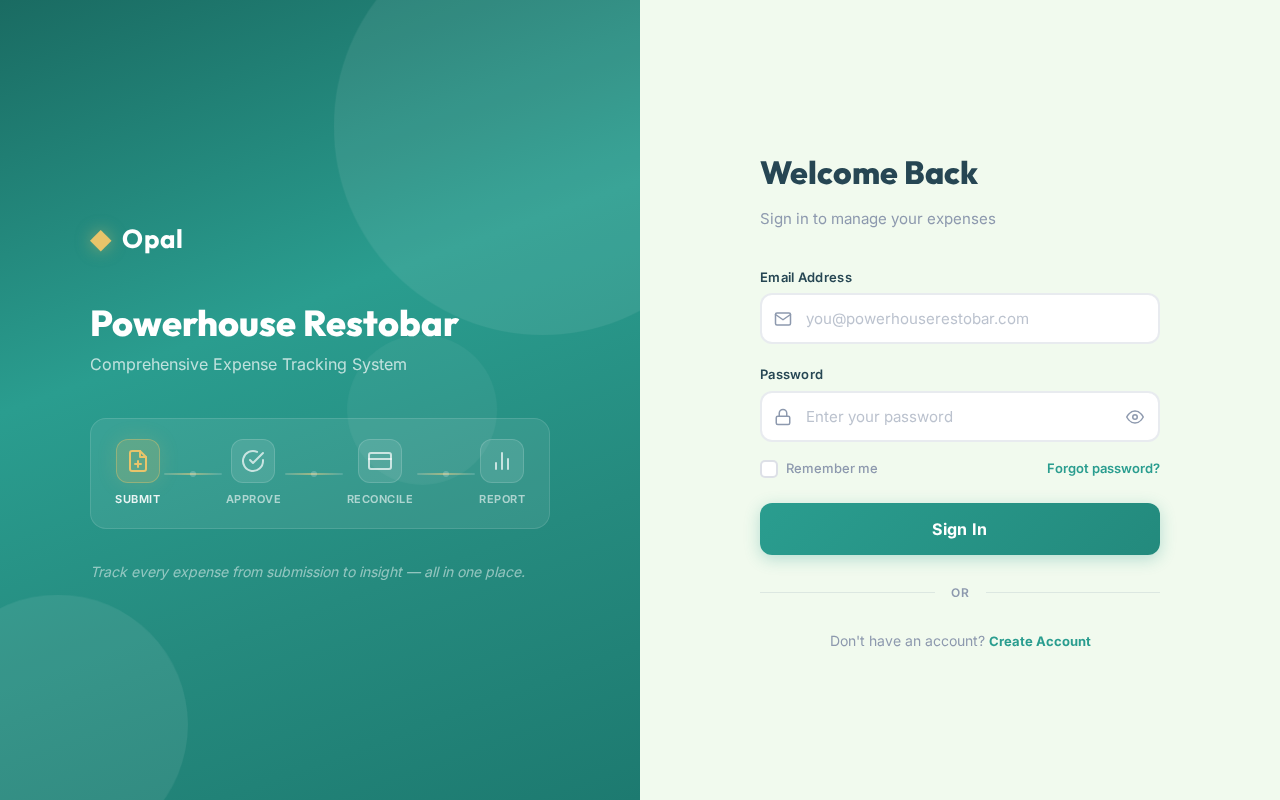
Powerhouse Restobar
Comprehensive Expense Tracking System
Track every expense from submission to insight — all in one place.
Welcome Back
Sign in to manage your expenses
No comments yet. Be the first!